Showing posts with label AEM Java API. Show all posts

October 13, 2020
Estimated Post Reading Time ~

AEM Integration with Algolia Java API


As we have already seen so many integration with search servers like Solr and Elastic. Now we have something new as part of enhancing search capability in AEM.
Algolia is really easy to manage and it’s really simple to set it up. It provides different API for the connection to the Algolia server.

Below are the list of some API that Algolia supports:
https://www.algolia.com/doc/api-client/getting-started/install/java/?language=java
Algolia’s APIs

Lets start with creating our own Algolia account. It provides a 17 days trial period. So yeah this the enough time to explore all it’s features and integrations.

Creating Account:
1. Create you trial account on alogolia.com.
2. After logging in you can create you own index here and start indexing the data using that index name. I have take dev_initial as my index name.

Dashboard for the indexed data

I am going to use the JAVA Api provided by Algolia.
To use this API we need to add the following dependencies in POM.xml

<!-- Algolia library with Apache HTTP requester (compatible with Java 8 and above) -->
<dependency>
<groupId>com.algolia</groupId>
<artifactId>algoliasearch-core</artifactId>
<version>3.10.0</version>
</dependency>
<dependency>
<groupId>com.algolia</groupId>
<artifactId>algoliasearch-apache</artifactId>
<version>3.10.0</version>
</dependency>

<!-- Algolia library with JDK 11 native HTTP client (compatible with Java 11 and above) -->
<dependency>
<groupId>com.algolia</groupId>
<artifactId>algoliasearch-core</artifactId>
<version>3.10.0</version>
</dependency>
<dependency>
<groupId>com.algolia</groupId>
<artifactId>algoliasearch-java-net</artifactId>
<version>3.10.0</version>
</dependency>

<!-- Algolia library with Apache HTTP requester bundled as a single uber JAR (compatible with Java 8 and above) -->
<dependency>
<groupId>com.algolia</groupId>
<artifactId>algoliasearch-apache-uber</artifactId>
<version>3.10.0</version>
</dependency>
After updating the POM.xml file we need to run the mvn compile command to download the dependencies.
Now we have all the dependencies available to integrate AEM with Algolia.

I have used a test servlet to index some random data.

You should have ApplicationID and Admin API Key to connect in AEM , which you can get it on your Algolia account https://www.algolia.com/api-keys
Which will be used in below code snippet:

SearchClient client = DefaultSearchClient.create("YourApplicationID", "YourAdminAPIKey");


Servlet to index data
class Contact {

private String firstname;
private String lastname;
private int followers;
private String company;
private String objectID;

// Getters/setters ommitted
}

Note: Before deploying the code deploy the algoliasearch-apache-uber.jar (3.10.0) on the AEM felix console from https://repo1.maven.org/maven2/com/algolia/algoliasearch-apache-uber/3.10.0/

After indexing the data we can see the data is stored at Algolia server for search implementation. It’s really easy to manage using the dashboard availability and easy to manage the data on the Algolia server.


Data got stored on the Server

In case of any query, you can post your queries on https://discourse.algolia.com/t/com-algolia-search-cannot-be-resolved/10222/12 and get it resolved. Algolia Team gets back to you very quickly. As they are still enhancing and building this API for AEM OSGI bundles so we might face some bundle issues in the AEM console.


By aem4beginner

Content Fragment as Java APIs

In this article we will go through different APIs of content fragment which we can use while exposing or customizing the behavior of CF.

To start with lets understand how we get the related content fragment of a specific model using a query builder.

First we start with adding the specific properties to the map and running a query:

Map<String, String> map = new HashMap<>();

map.put("type", "dam:Asset");
map.put("path", "/content/dam");
map.put("First_property", "jcr:content/contentFragment");
map.put("First_property.value", "true");
map.put("Second_property", "jcr:content/data/cq:model");
map.put("Second_property.value", "conf/fragmentexamples/settings/dam/cfm/models/<your-model-name>");
map.put("property.and", "true");
map.put("p.limit", "-1");


Once we are done creating the map we will create our query variable using the request:
QueryBuilder queryBuilder = request.getResourceResolver().adaptTo(QueryBuilder.class);

Now we will get the results using query and the map using Predicategroup:
Query query = queryBuilder.createQuery(PredicateGroup.create(map),
request.getResourceResolver().adaptTo(Session.class));
final SearchResult result = query.getResult();


This result variable will hold all the Content fragments used by the specified content model at location /content/dam(we defined while creating the map).
Now we can iterate on the results and get the specified resource and adapt it to the ContentFragment interface which holds all the content fragment related APIs.

for (Hit hit : result.getHits()) {​​​​​​​
            ContentFragment cf = hit.getResource().adaptTo(ContentFragment.class);  
String contentFragmentName = cf.getName();
              Iterator<ContentElement> contentElement = cf.getElements();  
           while (contentElement.hasNext()) {​​​​​​​  
               ContentElement contentElementObject = contentElement.next();
               String tagElement = contentElementObject.getName().toString();
String elementContent = contentElementObject.getContent();                        
    }​​​​​​​        
}​​

In above code we have used following content fragment APIs:
1. Adapting a resource to Content Fragment.
2. Once we adapt to Content Fragment we get the object of CF which give the content fragment name i.e contentFragmentName.
3. Once we get the content fragment object, we can get all the properties associated with that content fragment (master node) by creating an iterator on CF object of type ContentElement.
4. We can iterate on the contentElement and get the property name in tagElement and it’s content in elementContent in above created variables.

The above code snippet provides details only related to the master of the content fragment. To get the details of the variations we can use the below API and the elements and other details:

Iterator<VariationDef> variationIterator = cf.listAllVariations();
while (variationIterator.hasNext()) {
    String variationName = variationIterator.next().getName();
}


Reference: https://helpx.adobe.com/experience-manager/6-4/sites/developing/using/reference-materials/javadoc/com/adobe/cq/dam/cfm/ContentFragment.html


By aem4beginner

April 27, 2020
Estimated Post Reading Time ~

How to monitor the Replication Queues through Java

This post will explain the approach to monitor the Replication Queues of Adobe Experience Manager(AEM) through java

Enable the Remote JMX in the AEM server:
Add the following configurations as part of CQ_JVM_OPTS in AEM startup file (start.sh or start.bat)

-Dcom.sun.management.jmxremote -Dcom.sun.management.jmxremote.authenticate=false -Dcom.sun.management.jmxremote.ssl=false -Dcom.sun.management.jmxremote.port=50055

e.g.

CQ_JVM_OPTS='-server -Xmx6144m -XX:MaxPermSize=512M -Djava.awt.headless=true -Dcom.sun.management.jmxremote -Dcom.sun.management.jmxremote.authenticate=false -Dcom.sun.management.jmxremote.ssl=false -Dcom.sun.management.jmxremote.port=50055'

Restart the server.

Configuration.txt:
ServerHost=xxxxxxxxxxx
ServerPort=50055
QueueNames=publish,publish_Dev
Environment=Development
EmailHost=xxxxxx
Email_To=xxxxxx
Email_From=xxxxxxx
QueueThreshold=15

GetReplicationQueueStatus.java
import java.io.*;
import java.util.*;
import javax.management.*;
import javax.management.remote.*;
import javax.mail.*;
import javax.mail.internet.*;

public class GetReplicationQueueStatus {
static JMXConnector m_connector=null;
public static void main(String[] args) {
FileInputStream in=null;
try
{
Properties configuration = new Properties();
in= new FileInputStream("Configuration.txt");
configuration.load(in);
String serverHost=configuration.getProperty("ServerHost");

String serverUrl = "service:jmx:rmi:///jndi/rmi://"+serverHost+":"+configuration.getProperty("ServerPort")+"/jmxrmi";

JMXServiceURL serviceURL = new JMXServiceURL(serverUrl);
m_connector =JMXConnectorFactory.newJMXConnector(serviceURL,null);
m_connector.connect();
MBeanServerConnection m_connection = m_connector.getMBeanServerConnection();
Set<ObjectName> queryResult =m_connection.queryNames(new ObjectName("com.adobe.granite.replication:type=agent,*"),null);
String queueNames=configuration.getProperty("QueueNames");
List<String> queueNameList = Arrays.asList(queueNames.split(","));
for(ObjectName objectName : queryResult) {
if(queueNameList.contains(objectName.getKeyProperty("id").replaceAll("\"", "")))
{
String attrNames[] =
{ "Enabled",
"QueueNumEntries",
"QueueBlocked",
"QueuePaused"
};

AttributeList attrList = m_connection.getAttributes(objectName, attrNames);
String isEnabled= ((Object) attrList.get(0)).toString().split("=")[1];
String queueNumEntries= ((Object) attrList.get(1)).toString().split("=")[1];
String isQueueBlocked= ((Object) attrList.get(2)).toString().split("=")[1];
String isQueuePaused= ((Object) attrList.get(3)).toString().split("=")[1];
System.out.println( "Values: " +isEnabled+" "+ queueNumEntries+" "+isQueueBlocked+" "+ isQueuePaused);
String to=configuration.getProperty("Email_To");
String from=configuration.getProperty("Email_From");
String emailHost=configuration.getProperty("EmailHost");
String queueThreshold=configuration.getProperty("QueueThreshold");
String environment=configuration.getProperty("Environment");
if(!isEnabled.trim().equals("true"))
{
String subject=environment+": Replication Queue "+"\""+objectName.getKeyProperty("id").replaceAll("\"", "")+"\""+" is Disabled";
sendEmail(to,from, subject,subject+"\n"+"Server: "+serverHost, emailHost);
}else if(isQueueBlocked.trim().equals("true"))
{
String subject=environment+": Replication Queue "+"\""+objectName.getKeyProperty("id").replaceAll("\"", "")+"\""+" is Blocked";
sendEmail(to,from, subject,subject+"\n"+"Server: "+serverHost, emailHost);
}else if(isQueuePaused.trim().equals("true"))
{
String subject=environment+": Replication Queue "+"\""+objectName.getKeyProperty("id").replaceAll("\"", "")+"\""+" is Paused";
sendEmail(to,from, subject,subject+"\n"+"Server: "+serverHost, emailHost);
}else if(Integer.parseInt(queueNumEntries.trim())>Integer.parseInt(queueThreshold.trim()))
{
String subject=environment+": Replication Queue "+"\""+objectName.getKeyProperty("id").replaceAll("\"", "")+"\""+" is Queued with "+queueNumEntries+" Requests";
sendEmail(to,from, subject,subject+"\n"+"Server: "+serverHost, emailHost);
}

}

}
}catch(Exception e)
{
e.printStackTrace();
}finally {
try {
if(m_connector!=null)
{
m_connector.close();
}
if(in!=null)
{
in.close();
}
}catch(Exception e)
{

}
}

}

static void sendEmail(String to,String from,String subject,String body,String host)
{
Properties properties = System.getProperties();
properties.setProperty("mail.smtp.host", host);
Session session = Session.getDefaultInstance(properties);

try {
MimeMessage message = new MimeMessage(session);
message.setFrom(new InternetAddress(from));
message.addRecipient(Message.RecipientType.TO, new InternetAddress(to));
message.setSubject(subject);
message.setText("Hi Team\n\n"+body+"\n\n"+"Regards\nAdmin");
Transport.send(message);
System.out.println("Email send successfully...");

}catch (MessagingException mex) {
mex.printStackTrace();
}
}

}

Configure the data in Configuration.txt file accordingly.
An email will be triggered whenever the configured Queue is disabled, blocked, paused or the pending request is more than the configured threshold.

The executable jar file can be generated for the java class and scheduled for continuous monitoring.


By aem4beginner

Configuration Services for Multiple Sites through configurationFactory

Sometimes, we have to define configuration services that will differ only with configuration values. For e.g, we will have different sites that will use the same configuration service but with different configuration values specific to sites.

In this scenario, we have to create a site-specific configuration service for all the sites (multiple services) but OSGI provides the concept of ServiceFactories, the service factory can be used to create configuration services with the same set of properties and different values.

As an example let’s assume, we have two different sites that will use the same configuration service but require site-specific configuration values. The configurationFactory can be used to create a configuration service for different sites.

configurationFactory to create site-specific configurations and to retrieve the site-specific configuration properties.

import java.util.Dictionary;
import java.util.HashMap;
import java.util.Map;

import javax.servlet.http.HttpServletRequest;

import org.apache.commons.lang.StringUtils;
import org.apache.felix.scr.annotations.Component;
import org.apache.felix.scr.annotations.ConfigurationPolicy;
import org.apache.felix.scr.annotations.Properties;
import org.apache.felix.scr.annotations.Property;
import org.apache.felix.scr.annotations.Reference;
import org.apache.felix.scr.annotations.Service;
import org.apache.sling.api.resource.Resource;
import org.apache.sling.api.resource.ResourceResolver;
import org.apache.sling.api.resource.ResourceResolverFactory;
import org.osgi.framework.BundleContext;
import org.osgi.framework.Constants;
import org.osgi.service.cm.Configuration;
import org.osgi.service.cm.ConfigurationAdmin;
import org.osgi.service.component.ComponentContext;
import org.slf4j.Logger;
import org.slf4j.LoggerFactory;

@Component(configurationFactory = true, policy = ConfigurationPolicy.REQUIRE, immediate = true, label = "Config Factory Service", description = "Global configuration Factory Service", metatype = true)
@Properties({ @Property(name = Constants.SERVICE_DESCRIPTION, value = "Common Configuration Factory Service") })
@Service(value = ConfigFactoryServiceImpl.class)
public class ConfigFactoryServiceImpl{

 private static final Logger LOG = LoggerFactory.getLogger(ConfigFactoryServiceImpl.class);

 private static ResourceResolverFactory resourceResolverFactory;
 private static BundleContext bundleContext;

 @Reference
 private ResourceResolverFactory resourceResolverFactoryInit;

 private static final String SERVICE_PID = "service.pid";

 private static final String DEFAULT_CONFIG = "DEFAULT";

 private static Map<String, String> svcPIDMap = new HashMap<String, String>();

 @Property(label = "Site Root Path", value = "DEFAULT", description = "Root path for site (e.g. - /content/sample).")
 public static final String SITE_ROOT_PATH = "siteRootPath";

 @Property(label = "Property1", value = "Property1: ", description = "Property1.")
 public static final String PROPERTY1 = "PROPERTY1";

 @Property(label = "Property2", value = "Property2: ", description = "Property2.")
 public static final String PROPERTY2 = "PROPERTY2";

 @Property(label = "Property3", value = "Property3: ", description = "Property3.")
 public static final String PROPERTY3 = "PROPERTY3";

 protected String getSiteRootPath() {
 return SITE_ROOT_PATH;
 }

 protected void activate(ComponentContext context) {
 try {
 bundleContext = context.getBundleContext();
 resourceResolverFactory = resourceResolverFactoryInit;
 // Get the current config
 Dictionary<?, ?> props = context.getProperties();
 // Save the service.pid to static map
 String servicePID = (String) props.get(SERVICE_PID);
 setServicePID(props, servicePID);
 } catch (Exception e) {

 }
 }

 private void setServicePID(Dictionary<?, ?> props, String servicePID) {
 String siteRootPath = (String) props.get(getSiteRootPath());
 if(!siteRootPath.equals("DEFAULT") && !siteRootPath.startsWith("/"))
 {
 siteRootPath="/"+siteRootPath;
 }
 if (!StringUtils.isEmpty(siteRootPath)) {
 svcPIDMap.put(siteRootPath, servicePID);

 }
 }

 public static String getConfig(HttpServletRequest request, String key) {
 return getConfig(request, null, key);
 }

 public static String getConfig(HttpServletRequest request, String uri,String key) {
 String property = null;
 Object configObj = null;
 try {
 configObj = getConfigObj(request, uri, key);
 } catch (Exception e) {

 }
 if (null != configObj) {
 property = configObj.toString();
 }
 return property;
 }

 public static Object getConfigObj(HttpServletRequest request,String pagePath, String key) {
 Configuration conf;
 String resourcePath = null;
 try {
 if (!("DEFAULT").equals(pagePath)) {
 resourcePath = getResourcePath(request, pagePath);
 conf = locateConfiguration(resourcePath);
 } else {
 conf = locateConfiguration(DEFAULT_CONFIG);
 }

 if (null != conf && null != conf.getProperties()) {
 Object obj = conf.getProperties().get(key);
 return obj;
 } else {
 throw new Exception("Could not find matching configuration");
 }
 } catch (Exception e) {

 }
 return null;
 }

 private static Configuration locateConfiguration(String resourcePath) {
 Configuration locatedConfig = null;
 try {
 String siteRootPath = getSiteRootPath(resourcePath);
 String svcPID = svcPIDMap.get(siteRootPath);
 ConfigurationAdmin bundleConfigAdmin = (ConfigurationAdmin) bundleContext.
 getService(bundleContext.getServiceReference(ConfigurationAdmin.class.getName()));
 locatedConfig = bundleConfigAdmin.getConfiguration(svcPID);
 } catch (Exception e) {

 }
 return locatedConfig;
 }

 protected static String getResourcePath(HttpServletRequest request,String pagePath) {
 String resourcePath = null;
 String uri = request.getRequestURI();
 ResourceResolver resourceResolver = null;
 try {
 resourceResolver = resourceResolverFactory.getResourceResolver(null);
 Resource resolvedResource;
 if (null == pagePath) {
 resolvedResource = resourceResolver.resolve(request, uri);
 } else {
 resolvedResource = resourceResolver.resolve(request, pagePath);
 }
 resourcePath = resolvedResource.getPath();
 } catch (Exception e) {

 } finally {
 if (null != resourceResolver) {
 resourceResolver.close();
 }
 }

 return resourcePath;
 }

 protected static String getSiteRootPath(String resourcePath) {
 if (StringUtils.isEmpty(resourcePath)) {
 return null;
 }

 if (resourcePath.equalsIgnoreCase(DEFAULT_CONFIG)) {
 return resourcePath;
 }

 String siteRootPath = null;
 String[] path = resourcePath.split("/");
 if (path.length > 2) {
 siteRootPath = "/" + path[1] + "/" + path[2];
 LOG.error("siteRootPath= "+siteRootPath);
 }

 return siteRootPath;
 }
}

After deploying the factory service, create the configuration for different sites e.g. /content/Sample1 and /content/Sample2) and also one for DEFAULT configuration by specifying the value for siteRootPath


Retrieving the properties:
String property1 = ConfigFactoryServiceImpl.getConfig(request, ConfigFactoryServiceImpl.PROPERTY1);

If we are using this in the Sample1 site, the property1 specific to the Sample1 site will be return.


If we are using this in the Sample2 site, the property1 specific to the Sample2 site will be returned.


Retrieving the properties by specifying the path:

For e.g to retrieve the properties from DEFAULT configuration

String property1 = ConfigFactoryServiceImpl.getConfig(request,”DEFAULT”, ConfigFactoryServiceImpl.PROPERTY1);


Retrieve site-specific properties.

String property1 = ConfigFactoryServiceImpl.getConfig(request,”/content/Sample1”, ConfigFactoryServiceImpl.PROPERTY1);


By aem4beginner

How to Delete/Disable the users through Java API in AEM

This post will explain how to Delete/Disable the users through Java API in Adobe Experience Manager(AEM).

 @Reference
 ResourceResolverFactory resolverFactory;

 ResourceResolver adminResolver = null;
 Session adminSession=null;

 try {  
 adminResolver = resolverFactory.getAdministrativeResourceResolver(null);
        adminSession = adminResolver.adaptTo(Session.class);
        final UserManager userManager= adminResolver.adaptTo(UserManager.class);
             
      Authorizable authorizable = userManager.getAuthorizable("userName");
      if (authorizable instanceof User) {
         User user = (User)authorizable;
         user.remove(); //Remove the user

        user.disable() // Disable the user.
    }
                       
 } catch (Exception e) {
 e.printStackTrace();
 } finally {
        if (adminResolver != null) adminResolver.close();              
 }


By aem4beginner

How to craete/manage the groups and users through Java API in AEM/Adobe CQ5?

This post will explain how to create/manage the groups and users through Java API.

import java.io.IOException;
import java.security.Principal;

import javax.jcr.PropertyType;
import javax.jcr.Session;
import javax.jcr.Value;
import javax.servlet.Servlet;

import org.apache.commons.lang.StringUtils;
import org.apache.felix.scr.annotations.Component;
import org.apache.felix.scr.annotations.Properties;
import org.apache.felix.scr.annotations.Property;
import org.apache.felix.scr.annotations.Reference;
import org.apache.felix.scr.annotations.Service;
import org.apache.jackrabbit.api.security.user.Group;
import org.apache.jackrabbit.api.security.user.User;
import org.apache.jackrabbit.api.security.user.UserManager;
import org.apache.sling.api.SlingHttpServletRequest;
import org.apache.sling.api.SlingHttpServletResponse;
import org.apache.sling.api.resource.ResourceResolver;
import org.apache.sling.api.resource.ResourceResolverFactory;
import org.apache.sling.api.servlets.SlingAllMethodsServlet;
import org.slf4j.Logger;
import org.slf4j.LoggerFactory;

@Service(value = Servlet.class)
@Component(immediate = true, metatype = true)
@Properties({
 @Property(name = "sling.servlet.paths", value = "/services/manageGroupsAndUsers"),
 @Property(name = "service.description", value = "ManageGroupsAndUsers"),
 @Property(name = "label", value = "ManageGroupsAndUsers") })

public class ManageGroupsAndUsers extends SlingAllMethodsServlet{

 /**
  *
  */
 private static final long serialVersionUID = 1L;

 @Reference
 ResourceResolverFactory resolverFactory;

 private static Logger logger = LoggerFactory.getLogger(ModifyCartServlet.class);

 protected final void doPost(final SlingHttpServletRequest request,
 final SlingHttpServletResponse response) throws IOException {

 String groupName="sampleGroup";
 String userName="sampleUser";
 String password="sampleUser";

 ResourceResolver adminResolver = null;
 Session adminSession=null;
 try {
        adminResolver = resolverFactory.getAdministrativeResourceResolver(null);
        adminSession = adminResolver.adaptTo(Session.class);
        final UserManager userManager= adminResolver.adaptTo(UserManager.class);
            
       if(null==userManager.getAuthorizable(groupName)){
      
        Group group=userManager.createGroup(groupName,new SimplePrincipal(groupName),"/home/groups/test");
      
        Value value=adminSession.getValueFactory().createValue("Sample Group", PropertyType.STRING);
       group.setProperty("./profile/givenName", value);
      
       value=adminSession.getValueFactory().createValue("Test Group", PropertyType.STRING);
       group.setProperty("./profile/aboutMe", value);
      
       value=adminSession.getValueFactory().createValue("albin@gmail.com", PropertyType.STRING);
       group.setProperty("./profile/email", value);      
             
        }else{
        response.getWriter().write("Group already exist..");
        }

     
       if(userManager.getAuthorizable(userName)==null){
        User user=userManager.createUser(userName, password,new SimplePrincipal(userName),"/home/users/test");
        Value value=adminSession.getValueFactory().createValue("Issac", PropertyType.STRING);
        user.setProperty("./profile/familyName", value);
      
        value=adminSession.getValueFactory().createValue("Albin", PropertyType.STRING);
        user.setProperty("./profile/givenName", value);
      
        value=adminSession.getValueFactory().createValue("Test User", PropertyType.STRING);
        user.setProperty("./profile/aboutMe", value);
      
        value=adminSession.getValueFactory().createValue("albin@gmail.com", PropertyType.STRING);
        user.setProperty("./profile/email", value);      
      
        }else
        {
         response.getWriter().write("User already exist..");
        }
     
     
       Group group = (Group)(userManager.getAuthorizable(groupName));
       group.addMember(userManager.getAuthorizable(userName));
                       
 } catch (Exception e) {
 e.printStackTrace();
 response.getWriter().write("Not able to perform User Management.."+resolverFactory);
 } finally {
        if (adminResolver != null) adminResolver.close();
             
 }

 }

 protected final void doGet(final SlingHttpServletRequest request,
 final SlingHttpServletResponse response) throws IOException {
 doPost(request, response);
 }


 private static class SimplePrincipal implements Principal {
        protected final String name;

        public SimplePrincipal(String name) {
            if (StringUtils.isBlank(name)) {
                throw new IllegalArgumentException("Principal name cannot be blank.");
            }
            this.name = name;
        }

        public String getName() {
            return name;
        }

        @Override
        public int hashCode() {
            return name.hashCode();
        }

        @Override
        public boolean equals(Object obj) {
            if (obj instanceof Principal) {
                return name.equals(((Principal) obj).getName());
            }
            return false;
        }
    }

}


By aem4beginner

How to get the UserInfo through Java API in AEM/Adobe CQ5

The below Java API helps to get the UserInfo details in AEM

@Reference
ResourceResolverFactory resolverFactory;

ResourceResolver adminResolver = null;
try {
       adminResolver = resolverFactory.getAdministrativeResourceResolver(null);
       final Session adminSession = adminResolver.adaptTo(Session.class);
       final UserManager userManager = adminResolver.adaptTo(UserManager.class);
       final User user = (User) userManager.getAuthorizable(adminSession.getUserID());
         
       logger.info("user.getID().."+user.getID());
       logger.info("user.isAdmin().."+user.isAdmin());
       logger.info("user.getPrincipal().getName().."+user.getPrincipal().getName());

       String lastName=user.getProperty("./profile/familyName")!=null?user.getProperty("./profile/familyName")[0].getString():null;
      String firstName=user.getProperty("./profile/givenName")!=null?user.getProperty("./profile/givenName")[0].getString():null;
      String aboutMe=user.getProperty("./profile/aboutMe")!=null?user.getProperty("./profile/aboutMe")[0].getString():null;
      String email=user.getProperty("./profile/email")!=null?user.getProperty("./profile/email")[0].getString():null;

     
      logger.info("lastName.."+lastName);
      logger.info("firstName.."+firstName);
      logger.info("aboutMe.."+aboutMe);
      logger.info("email.."+email);
         
       Iterator<Group> itr=user.memberOf();
       while(itr.hasNext())
       {
          Group group=(Group)itr.next();
           logger.info("group.getID().."+group.getID());
           logger.info("group.getPrincipal().getName().."+group.getPrincipal().getName());
        }        
                             
} catch (Exception e) {
        e.printStackTrace();
} finally {
       if (adminResolver != null) adminResolver.close();
}


By aem4beginner

How to get the child Pages of a root Page through Java API -AEM/ Adobe CQ5

This post will explain how to get the child Pages of a root Page through Java API in AEM

public static PageFilter getPageFilter() {
 PageFilter pf = new PageFilter(); 
 return pf;
}

public static Iterator<Page> getPageIterator(Page page){
 Iterator<Page> children = page. listChildren(getPageFilter());
 return children;
}

The filter can be changed to restrict child pages e.g Get the child pages created only with the template "/apps/sample/templates/samplePage"

 public static PageFilter getPageFilter() {
 PageFilter pf = new PageFilter() {
 public boolean includes(Page p) {

 ValueMap props = p.getProperties();
 String templatePath = props.get("cq:template",String.class);
 if("/apps/sample/templates/samplePage".equals(templatePath))
 { 
 return true;
 } else
 {
 return false;
 }
 }
 }; 
 return pf;
 }


By aem4beginner

How to find a Page has child Pages thorough Java API - AEM/Adobe CQ5

This post will explain how to find a Page has child Pages thorough Java API in AEM

public static boolean hasPageChildren(Page rootPage) {
          boolean isTrue = false;
          if (rootPage != null&& rootPage.listChildren(getPageFilter()).hasNext()) {
        isTrue = true;
          }
        return isTrue;
}

public static PageFilter getPageFilter() {
 PageFilter pf = new PageFilter();
 return pf; 
}


By aem4beginner

How to get the published date of a page through Java API - AEM

This post will explain how to get the published date of a page through Java API in AEM

public static Date getPublishDate(Page page) {
 Date newDate = null;
 SimpleDateFormat sdf = new SimpleDateFormat("yyyy-mm-dd", Locale.getDefault());
 if (page != null) {
 String publishedDate =  page.getProperties().get("publisheddate", "");
 if(!"".equals(publishedDate)){
 try {
 newDate = sdf.parse(publishedDate);
 } catch (ParseException e) {

 }
 }
 }
 return newDate;
 }


By aem4beginner

How to check the replication status through java API in AEM/Adobe CQ5

This post will explain how to check the replication status through java API in AEM

Maven dependency:
Add the following dependency to the pom.xml

<dependency>
 <groupId>com.adobe.granite</groupId>
 <artifactId>com.adobe.granite.replication.core</artifactId>
 <version>5.12.2</version>
 <scope>provided</scope>
</dependency>

API's:

@Reference
Replicator replicator;

@Reference
SlingRepository repository;

Session  session = repository.loginAdministrative(null);
ReplicationStatus status=replicator.getReplicationStatus(session, “nodepath”);

status.isDelivered(); //Checks if the content is delivered

Other methods to get different status

isActivated()
isDeactivated
isPending()


By aem4beginner

How to Modify the Node permissions through Java - AEM

This post will explain how to Modify the Node permissions through Java in Adobe Experience Manager(AEM)

Java API:
import java.util.NoSuchElementException;

import javax.jcr.RepositoryException;
import javax.jcr.Session;
import javax.jcr.security.AccessControlEntry;
import javax.jcr.security.AccessControlManager;
import javax.jcr.security.AccessControlPolicyIterator;
import javax.jcr.security.Privilege;

import org.apache.felix.scr.annotations.Component;
import org.apache.felix.scr.annotations.Properties;
import org.apache.felix.scr.annotations.Property;
import org.apache.felix.scr.annotations.Reference;
import org.apache.felix.scr.annotations.Service;
import org.apache.jackrabbit.api.security.JackrabbitAccessControlList;
import org.apache.jackrabbit.api.security.user.Authorizable;
import org.apache.jackrabbit.api.security.user.UserManager;
import org.apache.sling.jcr.api.SlingRepository;
import org.osgi.framework.Constants;
import org.slf4j.Logger;
import org.slf4j.LoggerFactory;

@Component(label = "ModifyNodePermissions", metatype = false, immediate = true)
@Properties({
@Property(name = Constants.SERVICE_DESCRIPTION, value = "ModifyNodePermissions") })
@Service(value = ModifyNodePermissions.class)
public class ModifyNodePermissions {

private static final Logger log = LoggerFactory.getLogger(ModifyNodePermissions.class);
@Reference
private SlingRepository repository;

public void modifyNodePermissions(String nodePath,String groupName)
{
Session session = null;
try {

session = repository.loginAdministrative(null);

UserManager userMgr = ((org.apache.jackrabbit.api.JackrabbitSession) session).getUserManager();
AccessControlManager accessControlManager = session.getAccessControlManager();
Authorizable authorizable = userMgr.getAuthorizable(groupName);
AccessControlPolicyIterator policyIterator = accessControlManager.getApplicablePolicies(nodePath);

org.apache.jackrabbit.api.security.JackrabbitAccessControlList acl = null;

try {
acl = (JackrabbitAccessControlList) policyIterator.nextAccessControlPolicy();

} catch (NoSuchElementException nse) {
acl = (JackrabbitAccessControlList) accessControlManager.getPolicies(nodePath)[0];
}

//Remove the Access Control Entry
/*for (AccessControlEntry e : acl.getAccessControlEntries()) {

if (e.getPrincipal().equals(authorizable.getPrincipal()))
{
acl.removeAccessControlEntry(e);
}
}*/

//Allow
/*Privilege[] allowPrivileges = {accessControlManager.privilegeFromName(Privilege.JCR_REMOVE_NODE),
accessControlManager.privilegeFromName(Privilege.JCR_REMOVE_CHILD_NODES) };

acl.addEntry(authorizable.getPrincipal(), allowPrivileges, true);
*/
//Deny
Privilege[] denyPrivileges = {accessControlManager.privilegeFromName(Privilege.JCR_REMOVE_NODE),
accessControlManager.privilegeFromName(Privilege.JCR_REMOVE_CHILD_NODES) };

acl.addEntry(authorizable.getPrincipal(), denyPrivileges, false);

//Add Policy
accessControlManager.setPolicy(nodePath, acl);
//Remove Policy
//accessControlManager.removePolicy(nodePath, acl);
session.save();

} catch (RepositoryException e) {
e.printStackTrace();
} catch (Exception e) {
e.printStackTrace();
} finally {
if (session != null)
session.logout();
}
}
}


By aem4beginner

How to Retrieve/Update the configuration details through Configuration Admin Service - AEM

This post will explain how to Retrieve/Update the configuration details through Configuration Admin Service in AEM

Java API

//Add the reference
@Reference
org.osgi.service.cm.ConfigurationAdmin configAdmin;

//Reterive/Update the configration

org.osgi.service.cm.Configuration config = configAdmin.getConfiguration("com.day.cq.mailer.DefaultMailService");
Dictionary d = config.getProperties();
String fromAddress=(String)d.get("from.address");
d.put("from.address", "albin.issac1@gmail.com");
config.update(d);


By aem4beginner

Sending mail through Java API with Gmail server in AEM

This post will explain the steps required to send mail in Adobe Experience Manager(AEM) through Java API with the Gmail server.

Configure mail service: Go to the Felix Console - http://localhost:4502/system/console/configMgr
Search for Day CQ Mail Service
Enter the Gmail server details as shown below and save the data.

SMTP Server Host - smtp.gmail.com
SMTP Server Port - 465
SMTP User - your gmail username
SMTP Password - your password
From Address - your email
SMTP Use SSL - true
 
You may need to enable the access for less secure apps in google account - https://www.google.com/settings/security/lesssecureapps

Email Template: Create the email template as text file and store it in the repository - /etc/email/template/emailTemplate.txt (change the path accordingly)


Create the Email servlet: Create a servlet to send the email with the provides details.

import java.io.BufferedInputStream;
import java.io.ByteArrayOutputStream;
import java.io.IOException;
import java.io.InputStream;
import java.util.ArrayList;

import javax.jcr.Node;
import javax.jcr.Session;
import javax.mail.internet.InternetAddress;
import javax.servlet.Servlet;
import javax.servlet.ServletException;

import org.apache.commons.mail.HtmlEmail;
import org.apache.felix.scr.annotations.Component;
import org.apache.felix.scr.annotations.Reference;
import org.apache.felix.scr.annotations.Service;
import org.apache.felix.scr.annotations.sling.SlingServlet;
import org.apache.sling.api.SlingHttpServletRequest;
import org.apache.sling.api.SlingHttpServletResponse;
import org.apache.sling.api.servlets.SlingAllMethodsServlet;
import org.apache.sling.jcr.api.SlingRepository;
import org.slf4j.Logger;
import org.slf4j.LoggerFactory;

import com.day.cq.mailer.MessageGateway;
import com.day.cq.mailer.MessageGatewayService;

@SuppressWarnings({ "serial" })
@Component(metatype = false)
@SlingServlet(name = "EmailServlet", description = "EmailServlet", methods = "POST", generateComponent =false, paths = "/services/EmailServlet")
@Service(Servlet.class)
public class EmailServlet extends SlingAllMethodsServlet {

private static final Logger LOG = LoggerFactory.getLogger(EmailServlet.class);

@Reference
private MessageGatewayService messageGatewayService;
@Reference
public SlingRepository repository;

@Override
protected void doGet(SlingHttpServletRequest request,
SlingHttpServletResponse response) throws ServletException,
IOException {
doPost(request, response);
}

@Override
protected void doPost(SlingHttpServletRequest request,
SlingHttpServletResponse response) throws ServletException,
IOException {
String results = sendEmail(request);
if (results != null && results.equalsIgnoreCase("success")) {
response.getWriter().write("success");
} else {
response.getWriter().write("fail");
}
}

public String sendEmail(SlingHttpServletRequest request) {

ArrayList<InternetAddress> emailRecipients = new ArrayList<InternetAddress>();
Session session = null;
String results = "Success";

String fromAddress=request.getParameter("fromAddress");
String toAddress=request.getParameter("toAddress");

String firstName=request.getParameter("firstName");
String lastName=request.getParameter("lastName");

String templateLink=request.getParameter("templateLink");

try {
session = repository.loginAdministrative(null);
String templateReference = templateLink.substring(1)+ "/jcr:content";

Node root = session.getRootNode();
Node jcrContent = root.getNode(templateReference);
InputStream is = jcrContent.getProperty("jcr:data").getBinary().getStream();

BufferedInputStream bis = new BufferedInputStream(is);
ByteArrayOutputStream buf = new ByteArrayOutputStream();
int resultNumber = bis.read();
while (resultNumber != -1) {
byte b = (byte) resultNumber;
buf.write(b);
resultNumber = bis.read();
}

String bufString = buf.toString();
LOG.info("template.."+bufString);
bufString = bufString.replace("${firstName}", firstName);
bufString = bufString.replace("${lastName}", lastName);
LOG.info("mesage.."+bufString);
HtmlEmail email = new HtmlEmail();

emailRecipients.add(new InternetAddress(toAddress));
email.setCharset("UTF-8");
email.setFrom(fromAddress);
email.setTo(emailRecipients);
email.setSubject("This is the test mail");
email.setHtmlMsg(bufString);
MessageGateway<HtmlEmail> messageGateway = this.messageGatewayService.getGateway(HtmlEmail.class);
messageGateway.send(email);
emailRecipients.clear();

} catch (Exception e) {
results = "fail";
LOG.info("e.getMessage"+e.getMessage());
e.printStackTrace();
} finally {
if(session != null) {
session.logout();
}
}
return results;
}
}

The email can be sent now by invoking the servlet with the required details.

fromAddress=admin@albinsblog.com
toAddress=testmail@gmail.com
firstName=Albin
lastName=Issac
templateLink=/etc/email/template/emailTemplate.txt


By aem4beginner

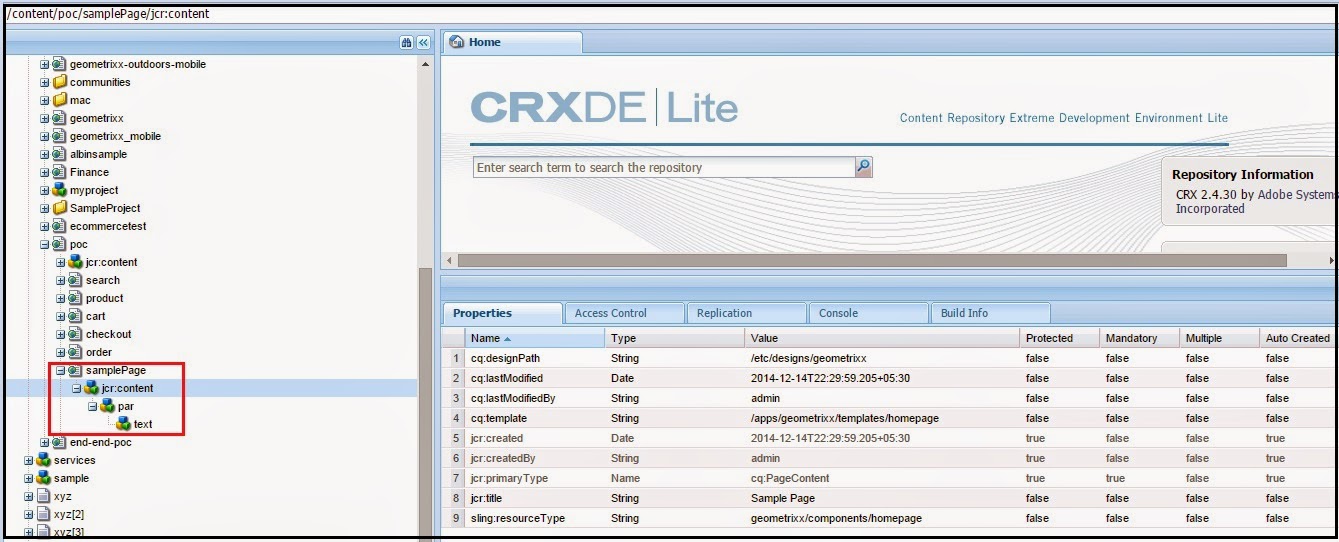
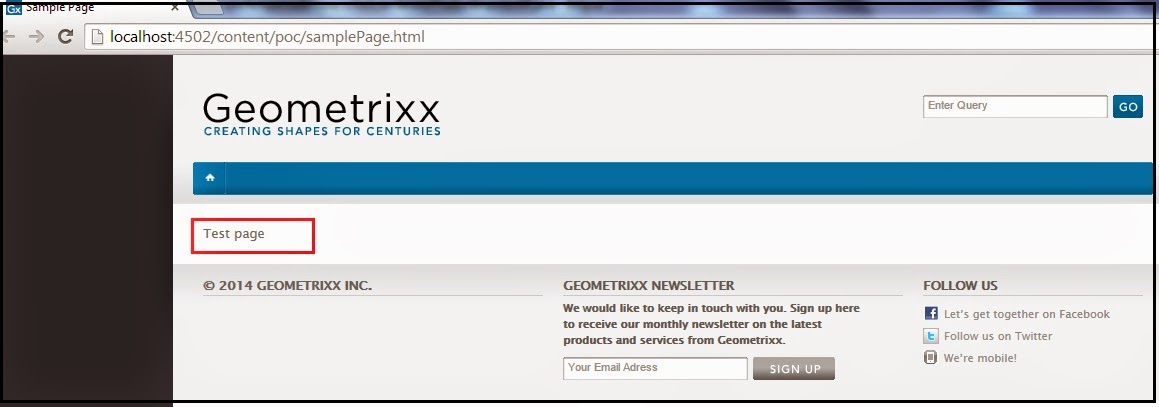
How to create the page through Java API in AEM

This post will explain how to create a page through Java API in Adobe Experience Manager(AEM)

Create the API service
This service create a sample page in Adobe Experience Manager(AEM).

import javax.jcr.Node;
import javax.jcr.Session;

import org.apache.felix.scr.annotations.Component;
import org.apache.felix.scr.annotations.Reference;
import org.apache.felix.scr.annotations.Service;
import org.apache.sling.api.resource.ResourceResolver;
import org.apache.sling.api.resource.ResourceResolverFactory;
import org.osgi.service.component.ComponentContext;

import com.day.cq.wcm.api.Page;
import com.day.cq.wcm.api.PageManager;

@Component(immediate = true, label = "Create Page Service", description = "Create Sample Page", metatype = true)
@Service(value = CreateSamplePage.class )
public class CreateSamplePage {

@Reference
private ResourceResolverFactory resolverFactory;
private ResourceResolver resourceResolver;

private void createPage() throws Exception {
String path="/content/poc";
String pageName="samplePage";
String pageTitle="Sample Page";
String template="/apps/geometrixx/templates/homepage";
String renderer="geometrixx/components/homepage";

this.resourceResolver = this.resolverFactory.getAdministrativeResourceResolver(null);
Page prodPage = null;
Session session = this.resourceResolver.adaptTo(Session.class);
try {
if (session != null) {

// Create Page
PageManager pageManager = this.resourceResolver.adaptTo(PageManager.class);
prodPage = pageManager.create(path, pageName, template, pageTitle);
Node pageNode = prodPage.adaptTo(Node.class);

Node jcrNode = null;
if (prodPage.hasContent()) {

jcrNode = prodPage.getContentResource().adaptTo(Node.class);
} else {
jcrNode = pageNode.addNode("jcr:content", "cq:PageContent");
}
jcrNode.setProperty("sling:resourceType", renderer);


Node parNode = jcrNode.addNode("par");
parNode.setProperty("sling:resourceType", "foundation/components/parsys");

Node textNode = parNode.addNode("text");
textNode.setProperty("sling:resourceType", "foundation/components/text");
textNode.setProperty("textIsRich", "true");
textNode.setProperty("text", "Test page");

session.save();
session.refresh(true);
}

} catch (Exception e) {
throw e;
}
}
}


By aem4beginner

How to create Repository Nodes thorough Java API in AEM

We can create the repository nodes inAdobe Experience Manager(AEM) through Java API, the below code snippet will help us to create the nodes in Adobe Experience Manager(AEM).

private static final String BASE_PATH = "/etc/commerce/products"; // the folder under which the nodes should be created

//Get the Resource resolver from request - Creating the node through Servlet
ResourceResolver resolver = request.getResourceResolver();

//Get the Resource resolver through resolver factory - Creating the node through Service
@Reference
private ResourceResolverFactory resolverFactory;//Get the resolverFactory reference in the service

ResourceResolver resolver = resolverFactory.getAdministrativeResourceResolver(null);//Get the resolver

//Get the session
Session session = resolver.adaptTo(Session.class);

//Create the Node
Node node = JcrUtil.createPath(BASE_PATH+<<Node Name>>, JcrConstants.NT_UNSTRUCTURED, session);

//Set the required properties
node.setProperty("name", "sample");
node.setProperty("description", "sample");

//Save the session
session.save();

While creating the NT_UNSTRUCTURED node make sure the parent folder is sling:folder, the node will not be created if the parent node is of type nt:folder.


By aem4beginner

April 14, 2020
Estimated Post Reading Time ~

Creating an AEM HTL component that uses JavaScript

You can create an Adobe Experience Manager (AEM) HTL component that uses JavaScript. By using JavaScript with your HTLcomponents, you can create more dynamic HTL components that respond to web-based events. For example, you can change the background color of an AEM web page, as shown in the following illustration.


This article walks you to building an AEM HTL component that uses JavaScript. 

To read this development article, click https://helpx.adobe.com/experience-manager/using/htl_js.html.


By aem4beginner

April 13, 2020
Estimated Post Reading Time ~

Invoking Adobe Experience Manager Workflows using the AEM Java API

You can create a workflow for Adobe Experience Manager. A workflow automates Experience Manager activities and is a series of steps that are executed in a specific order. Each step performs a distinct activity such as activating a page or sending an email message. Workflows can interact with assets in the repository, user accounts, and Experience Manager services. Therefore, workflows can coordinate complicated activities that involve any aspect of Experience Manager.


The AEM workflow user interface
For more information about workflows, see http://dev.day.com/docs/en/cq/current/workflows/wf-overview.html#par_reference.

This article creates a simple workflow and then discusses how to invoke the workflow using the AEM Java API. To read this article, click http://helpx.adobe.com/experience-manager/using/invoking-experience-manager-workflows-using.html.

NOTE: You can create custom workflow steps for AEM. See 
https://aem4beginner.blogspot.com/2020/04/developing-cq-custom-workflow-steps.html


By aem4beginner