Showing posts with label WCMUse. Show all posts

January 2, 2021
Estimated Post Reading Time ~

How To Switch From WCMUsePojo To Sling Models in AEM Part One – Component

Looking back at Adobe Experience Manager’s (AEM) component development path (especially if you started from 6.0 or earlier), you likely have used a variety of ways to provide back-end logic to components. Beginning with JSP (or even scriptlets), to abstract component Java class with page context or binding objects, to Adobe’s WCMUse or your custom implementation of Use class, and most recently, WCMUsePojo class if you are working on AEM 6.1 or 6.2. With the release of AEM 6.3 and AEM Core WCM Components, we see that using Sling Models has been advocated by Adobe as the best practice. Now let’s take a look at how you can switch from WCMUsePojo to Sling Models.

Note: this was tested on AEM 6.2, 6.3.
You probably created your project from Adobe Maven Archetype 10 or later. Great, because the archetype should’ve automatically generated some of the settings for you (i.e. Sling Models API, Sling-Model-Packages in maven-bundle-plugin) in order to use Sling Models, and also created a sample Sling Model class (core.models.HelloWorldModel) in your project. While that is great, you likely still need to do a bit more to use the latest Sling Models API and features.

For AEM 6.2
Because AEM 6.2 is built with Sling Models API and Implementation version 1.2, you will need to:
Download the latest Sling Models API and Implementation bundles from Sling and then manually upload them to AEM bundles console (http://localhost:4502/system/console/bundles)
Download AEM 6.2 Communities/Livefyre – FP2 and install the package
Check your project’s POM files and make sure the version numbers for Sling Models API and Implementation are updated based on the ones installed in your AEM server. (Notice that a too high or too low version number in your POM file may cause the ‘imported package cannot be resolved issue’ for your project’s core bundle)
In your core module POM file, check for maven-bundle-plugin, and make sure you have all packages that contain the model classes or interfaces in header Sling-Model-Packages, so that your models can be picked up

For AEM 6.3
Because AEM 6.3 is built on top of Sling Models API and Implementation version 1.3, and the latest version for those are also 1.3, you don’t need to manually import the updated bundles to AEM in order to use the 1.3 features (for example, Exporter Framework and Associating a Model Class with a Resource Type).


You will just need to check #3 and 4 from above to make sure your project is set up properly for Sling Models.

If Sling has a new major release that you want to use, you can still manually import them into your 6.3 servers and check-in Adobe’s documentation for the additional package to be installed in order to support the code at that time.

Here are some sample of dependencies you may need for your project to use Sling Models.
<dependency>
<groupId>org.apache.sling</groupId>
<artifactId>org.apache.sling.models.api</artifactId>
<version>1.3.0</version>
<scope>provided</scope>
</dependency>
<dependency>
<groupId>org.apache.sling</groupId>
<artifactId>org.apache.sling.models.jacksonexporter</artifactId>
<version>1.0.4</version>
<scope>provided</scope>
</dependency>


For a complete reference, I have created a blog project that’s available on Github. I will start using it to put source codes for the demonstration of all my blogs.

Notice that this project was created from Adobe Archetype 10 and set up for AEM 6.3. If you deploy the code to AEM 6.2 or lower, you may find some imported packaged cannot be resolved. To fix that, you can either lower the version number for related packages in the POM files or manually upload the latest version of related bundles in AEM bundles (http://localhost:4502/system/console/bundles).


Since Sling Models are annotation-driven Plain Old Java Objects (POJOs), annotations are used a lot. They allow you to map resource properties, assign default values, inject OSGi services, and much more.

For example, in my blog project, I have a title component at /apps/blog/components/content/title. And I created two classes related to it, one with WCMUsePojo API, org.myorg.blog.core.use.TitleUse, the other with Sling Models, org.myorg.blog.core.models.TitleModel.

In the TitleModel class, the @Model is required to register the Java class as a Sling Model. You can specify adaptable, resourceType, injection strategy, and validation in this annotation. In that class, I was adapting a SlingHttpServletRequest object, and associating the class with the title resource type, so it can be used in the Sling Model exporter later on. Usage of Model annotation can be found in the Sling API documentation.

The @Exporter is for Jackson exporter, which basically scans through all the getters that follow the naming convention in the class and serialized them into JSON format. You will need to add a resourceType element in the @Model, and point it to your component’s resourceType. You can request the Sling Models JSON for the title component with a “model” selector and “JSON” extension.


I then used couple injector-specific annotations to get the sling binding object and map component properties.

The @PostConstruct is usually for initModel()or other methods to call after model option is created. It’s similar to the activate() method in WCMUsePojo that it holds the main logic for processing the data.

You can find reference of all available annotations here.

Lastly in TitleModel class, you will find the getters for the class to return the value for HTL to consume.

After completing my experiment of creating two Java classes for a title component, I’ve found the major differences between implementing with WCMUsePojo and Sling Models are:
WCMUsePojo will need to be extended from that class, whereas Sling Models can be a standalone class with @Model annotation and no keyword
With Sling Models, it’s simpler and cleaner to retrieve common objects or property values, instead of writing more line of code to use API
You may use Felix annotation @Reference to reference to an available OSGI service, whereas in Sling Models, you will use @Inject or @OSGiService
With Sling Models API 1.3, you can serialize the model and export it as a JSON file with Jackson exporter, so your front-end application can leverage the same model. It’s not available for WCMUsePojo.
For WCMUsePojo, you will need to overwrite the activate() method, whereas in Sling Models, your init method will be called in the @PostConstruct annotation

It’s also possible to create your own custom injectors and annotations. For custom injectors, you will create an OSGi service that implements the org.apache.sling.models.spi.Injector interface. And for custom annotations, you will create an OSGi service that implements the org.apache.sling.models.spi.injectorspecific.StaticInjectAnnotationProcessorFactor interface. Also, you can use servicing ranking to change priority of the injectors. They are invoked from lowest number to highest. Available injectors ranking and information can be found here.

And if you are planning to develop a custom injector and annotation, you can reference the source code of OOTB injectors and the ACS AEM Commons project.

In terms of the presentation layer, which is HTML Template Language (HTL) in AEM, I find both WCMUsePojo and Sling Models are being used the same way, with data-sly-use block statement and calling the getter from Java class.

Overall, I think Sling Models are pure POJOs that separate logic and presentation. They are clean and annotation-driven, but also extensible with custom injectors and annotations. Are you ready to make the change and let WCMUsePojo.adaptTo(Sling Models.class)? If you are looking for information on how to make the switch in terms of the JUnit test, check out part two of this blog post


By aem4beginner

How To Switch From WCMUsePojo To Sling Models in AEM Part Two – JUnit Test

As you may know, unit testing and test-driven development (TDD) are important for making sure your code complies with the design, is scalable among your team, and provides automated regression. Often times, the JUnit test and component back-end Java code come hand in hand. An AEM developer who writes the component logic is also responsible to write the JUnit test code for the class. Here in part two, I am going to discuss how you can make the switch in terms of the JUnit test.

I have seen two approaches to writing the JUnit test class for a component class that extends the WCMUsePojo class. One is using Mockito and mocking each AEM/Sling object (i.e. bindings, resource, page, properties, SlingHttpServletRequest, SlingHttpServletResponse…) you will need for your test class, wiring those mocks with each other using Mockito’s when().thenReturn(), or PowerMockito.doReturn().when(), and activating the ComponentUse class with the properties and bindings passed in from each test case. The second approach is using AemContext class from wcm.io and setting it as your JUnit test rule, and then using a test content json file in your Test Resources Root folder to provide test page/resource content for your test cases.

If you haven’t heard of wcm.io, it’s an open-source project that is hosted on GitHub and provides handy libraries and extensions for AEM developers. We will be focusing on the AEM Mocks feature in wcm.io specifically, as it can be used and helpful for both WCMUsePojo and Sling Models test classes.

One of the reasons I like using AEM Mocks here is that it’s very robust and provides access to all mocked environments in the Sling project (Sling Mocks, OSGI Mocks, and JCR Mocks) and also all the context objects (i.e. SlingBindings, resource, page, properties, SlingHttpServletRequest…), so you don’t need to create and wire mocked objects individually and you can then write cleaner test codes. Secondly, it fully supports Sling Models.

Here, I am taking the title component I developed from my previous blog as an example. I have written two sample JUnit test classes, one is for TitleUse.java, which extends WCMUsePojo, the other is for TitleModel.java, which is a Sling Models class. You can find all the source code in my GitHub project.

Note: this was tested on AEM 6.2, 6.3
When you use the AemContext object in your test class, and your project skeleton was generated by Adobe Maven Archetype 10, like mine, you may find several issues when you run the test code. Those can be fixed by modifying the Maven dependencies in your POM file. Issues:

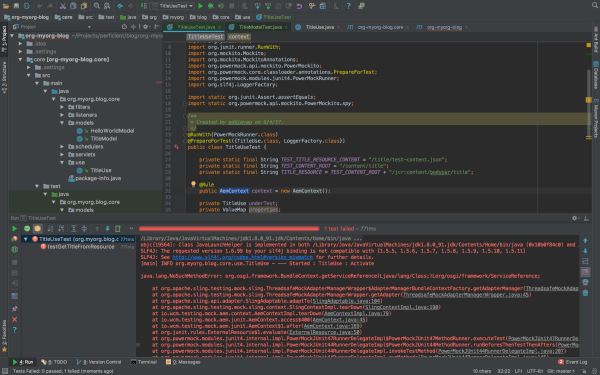
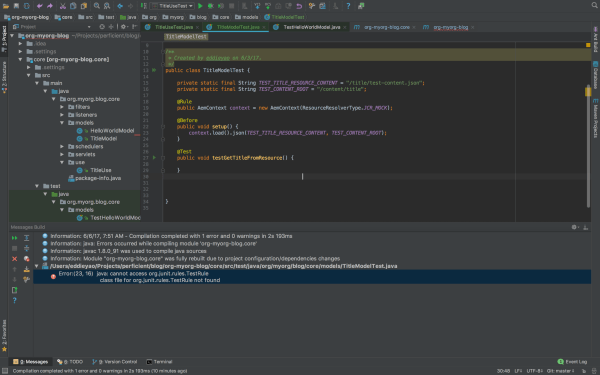
1. java.lang.NoClassDefFoundError: org/junit/rules/TestRule
java.lang.ClassNotFoundException: org.junit.rules.TestRule


Resolved by: validating the maven dependencies of test scope, here’s a working copy in my parent POM:
<dependency>
<groupId>junit</groupId>
<artifactId>junit</artifactId>
<version>4.12</version>
<scope>test</scope>
</dependency>
<dependency>
<groupId>org.slf4j</groupId>
<artifactId>slf4j-simple</artifactId>
<version>1.7.6</version>
<scope>test</scope>
</dependency>
<dependency>
<groupId>org.mockito</groupId>
<artifactId>mockito-core</artifactId>
<version>1.10.19</version>
<scope>test</scope>
</dependency>
<dependency>
<groupId>org.powermock</groupId>
<artifactId>powermock-api-mockito</artifactId>
<version>1.6.4</version>
<scope>test</scope>
</dependency>
<dependency>
<groupId>org.powermock</groupId>
<artifactId>powermock-module-junit4</artifactId>
<version>1.6.4</version>
<scope>test</scope>
</dependency>
<dependency>
<groupId>org.apache.commons</groupId>
<artifactId>commons-imaging</artifactId>
<version>1.0-R1534292</version>
<scope>test</scope>
</dependency>
<dependency>
<groupId>io.wcm</groupId>
<artifactId>io.wcm.testing.aem-mock</artifactId>
<version>2.1.0</version>
<scope>test</scope>
<exclusions>
<exclusion>
<groupId>org.apache.commons</groupId>
<artifactId>commons-imaging</artifactId>
</exclusion>
</exclusions>
</dependency>
<!-- for testing we need the new ResourceTypeBasedResourcePicker -->
<dependency>
<groupId>org.apache.sling</groupId>
<artifactId>org.apache.sling.models.impl</artifactId>
<version>1.3.0</version>
<scope>test</scope>
</dependency>

lang.NoSuchMethodError:
org.osgi.framework.BundleContext.getServiceReference(Ljava/lang/Class;)Lorg/osgi/framework/ServiceReference;

Resolved by: validating the version of the osgi-core library, here’s a working copy in my parent POM:
<dependency>
<groupId>org.osgi</groupId>
<artifactId>osgi.core</artifactId>
<version>6.0.0</version>
<scope>provided</scope>
</dependency>
<dependency>
<groupId>org.osgi</groupId>
<artifactId>osgi.cmpn</artifactId>
<version>6.0.0</version>
<scope>provided</scope>
</dependency>


lang.NoSuchMethodError: org.slf4j.helpers.MessageFormatter.arrayFormat(Ljava/lang/String;[Ljava/lang/Object;]Lorg/slf4j/helpers/FormattingTuple;

Resolved by: validating the version of the slf4j library, here’s a working copy in my parent POM:
<dependency>
<groupId>org.slf4j</groupId>
<artifactId>slf4j-api</artifactId>
<version>1.7.6</version>
<scope>provided</scope>
</dependency>
<dependency>
<groupId>org.slf4j</groupId>
<artifactId>slf4j-simple</artifactId>
<version>1.7.6</version>
<scope>test</scope>
</dependency>


The package version numbers above are based on AEM 6.3, since I am using Sling Models API 1.3 features like associating a model class with a resource type and exporter framework. If you are on AEM 6.2 or lower, you may find some imported packages cannot be resolved in your bundle, you can either manually install the Sling Models 1.3 bundle, or adjust your package version number. Simply check the unresolved bundle in Package Dependencies (http://localhost:4502/system/console/depfinder) and locate the maven dependency in your POM file. Also, be aware of the version number of uber-jar or other bundles to provide AEM APIs and match those with your AEM version.

The Adobe Maven Archetype (10 or 11) didn’t generate a test resource structure, so if you want to use test resources for your test classes, you will need to set up the structure in your project.

Basically, you will create a folder under /core/src/test/resources, and put your component test resources in there. In IntelliJ, after you create the directory, you can mark it as Test Resource Root. The resource files you put in the resources folder can be loaded from your test class.

Now that you have everything set up for you to write JUnit test cases for your component class, here’re the steps:

1. Create the test class in the same package path under /core/src/test/java.
2. Know the JUnit annotations that you are going to use.
a. If you are using wcm.io’s AEM mock context object, you will need the @Rule annotation. The rule will run any Before methods, then the Test method, and finally any After methods, throwing an exception if any of these fail, so you don’t need to define the object repeatedly in those scenarios.
b. @Before annotation is used for set up methods (like assigning common mocked values, loading test content and binding it to Sling request variables) to be called before the actual test cases run.
c. @Test annotation holds statements for each test case to be run for the test class.

3. For Sling Models specifically:
a. If you are using wcm.io’s AEM mock context object, you will need to register models from package by context.addModelsForPackage("org.myorg.blog.core.models");
b. If you are using resourceType feature in Sling Models API 1.3, you may register ResourceTypeBasedResourcePicker service in mocked OSGI environment, by context.registerService(ImplementationPicker.class, new ResourceTypeBasedResourcePicker());
c. If you are using @ScriptVariable in your Sling Models class to provide script objects (i.e. currentPage, properties…), you may use SlingBindings class in your test class to add those objects by

slingBindings = (SlingBindings) context.request().getAttribute(SlingBindings.class.getName());

slingBindings.put(WCMBindings.CURRENT_PAGE, page);

d. Call the Sling Models class by underTest = context.request().adaptTo(TitleModel.class);

4. Write different test cases based on your code design and logic
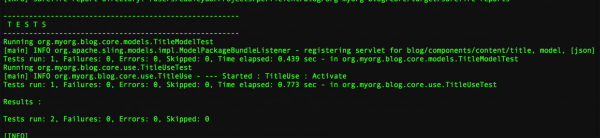
5. Run your unit test class

Differences between writing test class for WCMUsePojo (ComponentUseTest.java) and for Sling Models (ComponentModelTest.java):

1. In ComponentUseTest you mock/spy an instance of your use class, whereas in ComponentModelTest you call the Sling Models class directly;

2. In ComponentUseTest you heavily rely on Mockito/PowerMockito to mock the objects returned from WCMUsePojo APIs, whereas in ComponentModelTest you can just set up the context objects and Sling Models will be able to inject the properties/script variables from those context objects;

3. In ComponentUseTest you initialize the use class by calling activate() the method, whereas in ComponentModelTest you initialize the Sling Models class by calling adaptTo() method.

I hope after this article, you get more knowledge about writing JUnit test class for your component Java code and know the difference between writing test class for WCMUsePojo and for Sling Models.

If you want to know more about unit testing and AEM mocks, I found these two decks online that are helpful, one is an AEM GEMS resource, the other is an adaptTo() presentation. And if you missed my first post on switching from WCMUsePojo API to Sling Models in Adobe Experience Manager, you can read it here.


By aem4beginner

December 31, 2020
Estimated Post Reading Time ~

Unit Testing Hands on - For WCMUsePojo

This post illustrates the unit test for WCMUsePojo, Java class for backend logic as part of AEM Component development.

Quick Recap about WCMUsePojo:
  • WCMUsePojo initializes the objects associated with Bindings (Eg: WCMBindings/SlingBindings) via its init(Bindings) method which in turn calls the activate() method for post initialization tasks.
  • This init(Bindings bindings) method gets called if the POJO is instantiated in HTL via data-sly-use attribute.
  • Bindings(javax.script.Bindings) extends Map(java.util.Map) and hence it is basically a map object where key (type String)is the global variable and value is the respective object.
  • Once when the bindings are initialized, we are able to make use of the global variables which is available to us via methods like getCurrentPage(), getProperties(), etc.
Example:
When we call getCurrentPage() to get page object, below happens behind the scene (considering the above flow)
  • getCurrentPage() -> bindings.get(WCMBindings.CURRENT_PAGE) where WCMBindings.CURRENT_PAGE or WCMBindingsConstants.NAME_CURRENT_PAGE is a scripting variable/reference variable(currentPage) pointing to Page object.
Given the background on WCMUsePojo, writing a unit test case for the same involves the following
  • Mocking Bindings API (javax.script.Bindings)
  • Dummy implementation for bindings.get() call
  • Create an instance of WCMUsePojo class
  • Call init(mockedBindings) method of WCMUsePojo
  • Call method (under test) of WCMUsePojo
Mocking Bindings API:
Use either @Mock annotation or mock() method from org.mockito.* API
    @Mock
    private Bindings mockBindings;
    or
    Bindings mockBindings = mock(Bindings.class)

Dummy implementation for bindings.get() call
  • Use when and thenReturn methods from org.mockito.* API
  • when(mockBindings.get(WCMBindingsConstants.NAME_CURRENT_PAGE)).thenReturn(pageObj);
  • Where pageObj can be created using mocked page resource definition.
    • Load page resource JSON to dummy content path (aemContext.load() - Content Loader option)
    • Set the aemContext to respective resource/path and hence acquire Page object from it.
Example:
private final String PAGE_CONTENT_PATH = "/content/learnings/en/sample";
private final String PAGE_MOCK_JSON= "/learnings/core/models/SampleWCMUsePojoPageCnt.json";
aemContext.load().json(PAGE_MOCK_JSON, PAGE_CONTENT_PATH);
Resource currentPageResc = aemContext.currentResource(PAGE_CONTENT_PATH);
Page pageObj = aemContext.pageManager().getPage(currentPageResc.getPath());
when(mockBindings.get(WCMBindingsConstants.NAME_CURRENT_PAGE)).thenReturn(pageObj);
                    or
Resource resource = aemContext.resourceResolver().getResource(PAGE_CONTENT_PATH );
Page pageObj = resource.adaptTo(Page.class);
when(mockBindings.get(WCMBindingsConstants.NAME_CURRENT_PAGE)).thenReturn(pageObj);
                    or
Page pageObj = aemContext.create().page(PAGE_CONTENT_PATH );
when(mockBindings.get(WCMBindingsConstants.NAME_CURRENT_PAGE)).thenReturn(pageObj);

Create an instance of WCMUsePojo Class
Let say WCMUsePojo class to be tested is SampleWCMUsePojo.class and the Test Java class for the same is SampleWCMUsePojoTest.class
    SampleWCMUsePojo pojoObj = new SampleWCMUsePojo();

Call init(Bindings bindings)
In actual code, this method gets called automatically when the POJO is instantiated via a data-sly-use call in HTL.
For Test class, we are calling this method explicitly after instantiating the POJO per the previous step
    pojoObj.init(mockBindings);

Call method under Test:
Given that we have instantiated the POJO under test and set dummy implementation for bindings per the above steps, now is the time to call the method under test.
    String actualTitle = pojoObj.getPageTitle();
    String expectedTitle = "Sample Title";
    assertEquals(expectedTitle, actualTitle);

Code Example :
Very Simple Use case :

If title and path are not authored in dialog, it has to return the currentPage title and path respectively. If it is authored, it has to return the same.
We need to consider/write tests for two possibilities within this
  • Getting title and path from dialog/component content resource node (component node under content where the component is authored)
    • Create mock resource JSON from component node under the content path. (type -> nt:unstructured)
    • Example: /content/learnings/en/wcmusepojo-unit-test-demo/jcr:content/root/responsivegrid/samplewcmusepojo.tidy.-1.json where samplewcmusepojo is the component name.
  • Getting title and path from the currentPage object.
    • Create mock page resource JSON from page node (type -> cq:Page)
    • Example: /content/learnings/en/wcmusepojo-unit-test-demo.tidy.-1.json
Full code of Simple WCMUsePojo Java class, Test class, and mock resource JSON is available on GitHub
In a similar fashion, we can extend the dummy implementation for binding of desired global objects and hence write test statements per the actual code logic.


By aem4beginner

May 15, 2020
Estimated Post Reading Time ~

How To Switch From WCMUsePojo to Sling Models in AEM Part Three – Custom Injectors

When you are writing Sling Models code, you are constantly invoking injectors for the objects you use in your Sling Models class. There are eight standard injectors Sling provides out of the box currently (based on version 1.3.9.r1784960 of org.apache.sling.models.impl installed in AEM 6.3). But sometimes you may find the eight injectors don’t meet a specific project requirement, or when you switch from WCMUsePojo to Sling Models, you find certain pieces of logic can be encapsulated into Sling Models injector.

I am going to take a specific example I have in my project and discuss the reasons, the steps, the gotchas, and the benefits to writing custom injectors for your Sling Models classes and hopefully help the transition from WCMUsePojo to Sling Models.

Note: this was tested on Adobe Experience Manager (AEM) 6.3.

In many cases, you may want to get an inherited property value from parent page. For example, you have a page structure set up with a root level page, and there are child/grandchild pages created programmatically under that. These can be products, person or facilities pages that are created automatically from a template.


You want content authors to do the authoring in the root page, and your child/grandchild pages’ components can inherit the value. And of course, content authors can choose to overwrite the individual child page components. There are many ways to achieve this. In a component Java class that extends WCMUsePojo, you can write your own implementation of the readPropertyValue(propertyName, currentResource) method, and you can also use com.day.cq.commons.inherit.InheritanceValueMap to get the inherited property value. Below is a sample code snippet:
Resource resource = getResource();
InheritanceValueMap iProperties = new HierarchyNodeInheritanceValueMap(resource);
iProperties.getInherited(PROPERTY_NAME, String.class);

Note: That was using HierarchyNodeInheritanceValueMap implementation. ComponentInheritanceValueMap implementation is provided in the same package.

In Sling Models, you can still use InheritanceValueMap in the @PostConstruct init() method and it will work. But if your inheritance logic deviates from the normal parent flow, or you are using this method in many Sling Models classes, you can create a custom injector and put your inheritance logic there.

There are several reasons/benefits I find for creating a custom Sling Models injector:
Ability to inject the object/value directly into the model class, write less code;
Custom logic for the injector is encapsulated into the injector implementation class;
Ability to be used in multiple model classes easily;
Ability to leverage the Sling mechanism, annotation driven.

I am using the helloworld component as an example to show you how to create a custom injector. You can refer to all the source codes in my GitHub project.

Here are the steps to create a custom injector:
1. Create the structure for the injector.
I am using the models directory came with Adobe archetype, and created the path /core/src/main/java/org/myorg/blog/core/models/injectors.

2. Create injector class.
2.1 Register the injector class with OSGI (org.osgi.service.component.annotations) or Felix annotations.

2.2 Add property for service ranking.
Service ranking is important because Sling Models injectors are invoked in order of their service ranking, from lowest to highest. The first injector that returns a non-null value will be used and the value will be injected to the class.

You can see all the installed Sling Models injectors here: http://localhost:4502/system/console/status-slingmodels

If all installed Sling Models injectors return a null value, and your field/method is not optional, you may get a org.apache.sling.scripting.sightly.SightlyException, Caused by: org.apache.sling.models.factory.MissingElementsException: Could not inject all required fields into class and further Caused by: org.apache.sling.models.factory.ModelClassException: No injector returned a non-null value!

2.3 Implement org.apache.sling.models.spi.Injector interface.
3. Implement your custom injector class.
3.1 Implement getName() method.
This will return the name of your custom Sling Models injector. This name can be specified in the @Source when you invoking the injector, and if there may be more than one injector that will respond to the injection, Sling will pick the injector from @Source annotation.

3.2 Implement getValue() method.
There are several parameters in this method. The adaptable is the object being adapted, i.e. the helloworld resource. Name is the name of field/method passed to the injector (either name in @Named annotation or variable name), i.e. text. DeclaredType is the object type you want injector to return, i.e. String. Element is the field/method. CallbackRegistry is the call back in the injector when adapted model is garbage collected.

Inside this method, based on your adaptable object, you can implement your custom logic accordingly.

In my sample InheritedPropertyInjector.java, I am just using the InheritanceValueMap interface directly, but if you need a custom inheritance implementation, you can take a look at the com.day.cq.commons.inherit.HierarchyNodeInheritanceValueMap or com.day.cq.commons.inherit.ComponentInheritanceValueMap class.

4. Use your custom injector class.
Invoke custom injector with @Inject annotation, and optionally use @Source annotation to explicitly call the custom injector. Test if custom injector class works as expected and exceptions are caught properly.


So what are the use cases for custom injectors? I think there are several. It can act as a central place to provide all available AEM/Sling objects, instead of using different injectors or annotations. It can inject objects that the standard injectors don’t provide as of today. It can also be a tool to meet the specific requirements of your project.

Let me know what you are interested to know more about around WCMUsePojo and Sling Models. Happy coding.


By aem4beginner

May 5, 2020
Estimated Post Reading Time ~

How to get OSGi Service object in POJO?

Overview
In AEM, OSGI Container supports dependency injection which means one OSGi service can be injected into another service using @Reference annotation. Dependency injection design is a well-known design pattern. In this post, would like to explain what are the ways to get a reference of OSGi Service?

Problems/Scenarios
As you know, In some case you are not able to get the object using @Reference annotation. Basically, the OSGi container does not allow you to inject NON-OSGi classes (POJO) into another class.

This happens when you have a class which is not registered as OSGI Component & Service. In such cases, You are left with the following option. Get the service object through a parameter to our class or get the service object through Sling request object. In Sightly model, referencing of services are possible now.

Solutions
Here is the example how to get service object through Sling request object.

// Fetching service reference from request object.
public class Example{
 public ServiceObject YouServiceReference(SlingHttpRequest request){
      final SlingBindings bindings = (SlingBindings) request.getAttribute(SlingBindings.class.getName());
      SlingScriptHelper slingScriptHelper = bindings.getSling();
     YouServiceReference service = slingScriptHelper.getService(YouServiceReference.class);
        return service
   }
}
#Wiht Sightly POJO
public class Example extends WCMUsePojo{
 public ServiceObject YouServiceReference(SlingHttpRequest request){
      return getSlingScriptHelper.getService(YouServiceReference.class);
   }
}


By aem4beginner

May 1, 2020
Estimated Post Reading Time ~

Retrieve Composite Multifield child values in AEM through Java (WCMUsePojo)

In this post, we'll use the Java WCMUsePojo API to retrieve the multifield child values in our sightly code.

Since the multifield values stored in the page is stored as child nodes as shown below:


First, we'll create the MultiList bean having the same properties as in our dialog with getters and setters as shown below:

package com.foo.community.core;

public class MultiList {

private String multitext;
private String multinum;
private String multicheck;

public String getMultitext() {
return multitext;
}

public void setMultitext(String multitext) {
this.multitext = multitext;
}

public String getMultinum() {
return multinum;
}

public void setMultinum(String multinum) {
this.multinum = multinum;
}

public String getMulticheck() {
return multicheck;
}

public void setMulticheck(String multicheck) {
this.multicheck = multicheck;
}
}

And then, we'll create a class extending WCMUsePojo where we'll get the current node and then get the products node (where child values of multifield are stored) and iterate over that and set the retrieved property values in List of MultiList bean created above. Below is the implementation of this process:

package com.foo.community.core;

import java.util.ArrayList;
import java.util.List;
import com.adobe.cq.sightly.WCMUsePojo;
import javax.jcr.Node;
import javax.jcr.NodeIterator;

public class MultiListComponent extends WCMUsePojo{

private List multiItems = new ArrayList();

@Override
public void activate() throws Exception {

Node currentNode = getResource().adaptTo(Node.class);
if(currentNode.hasNode("products")){
Node productsNode = currentNode.getNode("products");
NodeIterator ni = productsNode.getNodes();

String multitext;
String multinum;
String multicheck;

while (ni.hasNext()) {

MultiList multiItem = new MultiList();
Node child = (Node)ni.nextNode();

multitext= child.hasProperty("multitext") ?
child.getProperty("multitext").getString(): "";
multinum = child.hasProperty("multinum") ?
child.getProperty("multinum").getString(): "";
multicheck = child.hasProperty("multicheck") ?
child.getProperty("multicheck").getString(): "";

multiItem.setMultitext(multitext);
multiItem.setMultinum(multinum);
multiItem.setMulticheck(multicheck);
multiItems.add(multiItem);
}
}
}

public List getMultiItems() {
return multiItems;
}
}

And use below sightly code (blog.html) to render values in the html:
<div data-sly-use.blog="com.foo.community.core.MultiListComponent">
<h4>Composite Multifield</h4>
<ol data-sly-list.product="${blog.multiItems}">
<li>
${product.multitext} has ${product.multinum} with boolean
${product.multicheck}
</li>
</ol>
</div>


By aem4beginner

April 14, 2020
Estimated Post Reading Time ~

Using a WCMUsePojo class to populate an Experience Manager Touch UI Select Field

You can create an Adobe Experience Manager (AEM) 6.3 Touch UI component that contains a drop-down control that can be used within the AEM Touch UI view. The data type of the drop-down field is /libs/granite/ui/components/foundation/form/select.

An AEM author selects drop-down values during design time. For example, an author can select a country from the drop-down field, as shown in this illustration.

You can populate a drop-down field by using a com.adobe.granite.ui.components.ds.DataSource object. For information, see DataSource.

Furthermore, you can create this object in a Java WCMUsePojo class and use HTL to invoke it. That is, get the values defined in the DataSource object. Finally, you can bind the resource type of the HTL code to the dialog node that represents the drop-down field.

This development article steps you through how to use a DataSource object, a Java Map collection object, and HTL to populate a drop-down field in an AEM 6.3 component.

To read this development article, click https://helpx.adobe.com/experience-manager/using/aem63_datasource.html


By aem4beginner

Creating an AEM HTML Template Language component that uses the WCMUsePojo class

You can create an Adobe Experience Manager (AEM) 6 Touch UI component that can be used within the AEM Touch UI view. Furthermore, you can use the AEM HTML Template Langauge (HTL - formally known as Sightly) to develop the AEM component. HTL is the AEM template language that can be used to replace use of JSP when developing an AEM component. HTL helps you to separate your design from your application logic. For more information, see Introduction to the HTML Template Language.

An AEM author can access a HTL dialog to enter component values. For example, you can enter text that is displayed by the component, as shown in the following illustration.


After you enter the component's values (for example, text values), you click the checkmark icon and the values are entered onto the AEM page.


This development article steps you through how to build an AEM HTL component by using an AEM Maven Archetype 10 project. This HTL uses a Java class that extends com.adobe.cq.sightly.WCMUsePojo.

AEM 6.1
To read this development article for AEM 6.1, click https://helpx.adobe.com/experience-manager/using/htl_61.html.

AEM 6.2
To read this development article for AEM 6.2, click https://helpx.adobe.com/experience-manager/using/first_htl_WCMUsePojo.html.

AEM 6.3
To read this development article for AEM 6.3, click https://helpx.adobe.com/experience-manager/using/aem63_htl.html.

AEM 6.4

To read this development article for AEM 6.4, click https://helpx.adobe.com/experience-manager/using/aem64_htl.html


By aem4beginner

April 7, 2020
Estimated Post Reading Time ~

Access OSGI ser­vice from the WCMUse-class in Sightly


OSGI service are very helpful once its comes to the development of a module. A Service can be used to perform small task like string operations to big like processing shopping cart. For developers who are shifting to Sightly for better development practices and taking advantage of AEM 6.x features, it might be a troublesome that how a OSGI Service can be accessed in Sightly module.

Zoom out a bit and you will be able to see things more clear. Here’s all that needs to be done,
You have to create a OSGI service as usual by creating a interface and implementing it.
Create a class extending WCMUse and get the instance of your OSGI service.
Class created in step #2, use this in Sightly component to get the values / output

Let’s get started,

1. Create an interface name SightlyServiceInterface.java that will be implemented by our service

package com.adobeaemclub.adobeaemclub.core.services;

public interface SightlySerivceInterface {
String getDeveloperName();
String getDeveloperProfile();
String getDeveloperSkills();
String getDeveloperData(); 
}

2. Create a service class name SightlyService.java, define the method’s implementations 

package com.adobeaemclub.adobeaemclub.core.services;

import org.slf4j.Logger;
import org.slf4j.LoggerFactory;
import org.apache.felix.scr.annotations.Component;
import org.apache.felix.scr.annotations.Service;

@Component
@Service
public class SightlySerivce implements SightlySerivceInterface {

Logger logger = LoggerFactory.getLogger(SightlySerivce.class);

@Override
public String getDeveloperName() {
return "John";
}

@Override
public String getDeveloperProfile() {
return "AEM Developer";
}

@Override
public String getDeveloperSkills() {
return "JAVA, OSGI, HTML, JS";
}
        @Override
public String getDeveloperData() {
String name = this.getDeveloperName();
String profile = this.getDeveloperProfile();
String skills = this.getDeveloperSkills();
return name + " is a " + profile + ", He is expert in skills like " + skills;
}

}

3. Write a class which extends WCMUse name Developer.java
package com.adobeaemclub.adobeaemclub.core.services;

import org.slf4j.Logger;
import org.slf4j.LoggerFactory;

import com.adobe.cq.sightly.WCMUse;

public class Developer extends WCMUse {
Logger logger = LoggerFactory.getLogger(Developer.class);
protected String detail;

@Override
  public void activate() {   

    SightlySerivceInterface service = getSlingScriptHelper().getService(SightlySerivceInterface.class);
    detail = service.getDeveloperData();
  }

  public String getDetails() {
    return this.detail;
  }
}

Line 15 :- Getting our service instance

4. Access values in Sightly componentOur service value:- 
<div data-sly-use.info="com.adobeaemclub.adobeaemclub.core.services.Developer"> ${info.details} 
</div>

5. Once the component is used, the output can be seen


By aem4beginner

March 22, 2020
Estimated Post Reading Time ~

Sling Models vs WCM USE POJO

AEM component back-end logic was shifted over the years from JSP’s to WCMUse class to WCMUsePOJOs and then to Sling Models.

AEM 6.1 or 6.2 were supporting WCMUsePojo class; AEM 6.2 and 6.3 started to support the Sling Models approach.

Both WCMUsePOJOs and Sling Models are used with HTL using <data-sly-use> block.

Before we jump into the difference, let us understand the concepts.

What is a POJO(Plain Old Java Objects)?
POJO's are simple Java classes that don't depend on other libraries, interfaces or annotations. This increases the chance that this can be reused in multiple project types. POJO provides Getter and Setter methods, which allow you to change the underlying data type without breaking the public interface of your class which makes it more robust and resilient to changes.

What if there are no getters and setters?
Say we haven't created setter and getter methods, then anyone can directly call the variable and it surely will affect the code, which may lead to security issues. Here POJO class is forcing another coder to call on the methods rather than directly calling the Instance variables.

What is Sling Models?
Sling Models are annotation-driven POJOs. They allow us to map resource properties, assign default values, inject OSGI services and much more.

Sling Models are pure POJOs that give wonderful separation between logic and presentation which also extensible with custom injectors and annotations. Sling Models let you map Java objects to Sling resources.

Use API Vs Sling Model
Use API
HTL(Formerly known as Sightly) uses two ways of implementing support for business logic objects:
1) Java Use-API, through POJOs,
2) JavaScript Use-API,

Regular POJOs that extend WCMUsePojo implement the User interface and are initialized with the scripting bindings, providing convenience methods for accessing commonly used objects like request, resource, properties, page, etc.

HTL implementation from Sling provides the basic POJO support through the org.apache.sling.scripting.sightly.pojo.Use interface and the JavaUseProvider, whereas the use function is implemented by the org.apache.sling.scripting.sightly.js.provider bundle.
The Sling implementation provides a few extensions to the Use-API.

Sling Model API:
Sling Models are more flexible which can also be used outside HTL, thus makes the business-logic more reusable. They are managed by Sling and can be injected with references to other objects using annotations and reflection.


Conversion from WCMUsePojo to SlingModel

Just by adopting the above-said methods (Remove 'Extends WCMUse', Add sling model annotation on top of the class, then add inject methods to invoke the references.) a developer can easily convert WCMUsePojo to SlingModel.

Conclusion:
For the versions AEM 6.3, AEM 6.4 and AEM Core WCM Components, Adobe recommends using Sling Models as the best practice.

More Details Here
Picking-the-best-use-provider-for-a-project


By aem4beginner

WCMUse POJO class & Alternatives in AEM?


AEM’s component development needs a back end logic to retrieve values from the back end. Sightly is a templating language which together with WCMPojo helps to create components.

This approach(Sightly + WCMUseClass) provided better decoupling of the presentation layer vs business logic, this code will be more maintainable and also easier to debug. AEM 6.1 or 6.2 uses WCMUsePojo class (or even Sling Models) for back end logic. Adobe recommends Sling Models as the best way of implementing AEM WCM Components with version AEM 6.3.

So in Brief,
We can use simple Pojo (without extending Adobe's class) with java-use-api. Cases where resources/services are not easily available, we can extend WCMUsePojo to get the ability to use resources/services. In an advanced way, we can go with Sling Models which will give more flexibility and ease, because it uses annotations.

Important Sling Annotation Reference is given below.
@Model: declares a model class or interface
@Inject: marks a field or method as injectable
@Named: declare a name for the injection (otherwise, defaults based on field or method name).
@Optional: marks a field or method injection as optional
@Source: explicitly tie an injected field or method to a particular injector (by name). It can also be on other annotations.
@Filter: an OSGi service filter
@PostConstruct: methods to call upon model option creation (only for model classes)
@Via: change the adaptable as the source of the injection
@Default: set default values for a field or method
@Path: only used together with the resource-path injector to specify the path of a resource
@Exporters/@Exporter/@ExporterOptions/@ExporterOption : for Exporter Framework

WCMUsePojo Vs Sling Models
  • Mixed POJOs - Pure POJOs
  • Extends from WCMUsePojo - Standalone class with '@Model' annotation and having no keyword
  • More code required to retrieve common objects or property values - Easier methods to retrieve common objects or property values
  • Uses Felix annotation '@Reference' to refer to an available OSGI service - Uses '@Inject' or '@OSGiService'
  • In the case of WCMUsePojo, we have to overwrite the activate() method - init() method will be called in the @PostConstruct annotation
  • Not annotation-driven - Annotation is driven


By aem4beginner

March 21, 2020
Estimated Post Reading Time ~

Sample WCMUse Java File for AEM

The VehicleService.Java WCMUse class below, build and deploy it using maven to your AEM.

package com.aem;

import org.apache.sling.api.SlingHttpServletRequest;
import com.day.cq.wcm.api.Page;
import java.util.HashMap;
import java.util.Map;
import com.adobe.cq.sightly.WCMUse;

public class VehicleService extends WCMUse {
private Map<String, String> map;

@Override
public void activate() throws Exception {
SlingHttpServletRequest request = getRequest();
Page currentPage = getCurrentPage();
createVehicleDetails(request, currentPage);
}
/**
* This will Create vehicle map
*
* @return
*/
private void createVehicleDetails(SlingHttpServletRequest request, Page currentPage) {
map = new HashMap<String, String>();
map.put("name", "NewVehicle");
map.put("price", "1000");
}

/**
* This will return vehicle
*
* @return vehicle map
*/

Map<String,String> getVehicleDetails() {
return map;
}
}


By aem4beginner