Showing posts with label URLs Mapping. Show all posts

January 5, 2021
Estimated Post Reading Time ~

Vanity URLs In AEM – Part 2

In our previous blog, we have seen how to create Vanity URLs in AEM. But, just by creating vanity URLs, end-users will not be able to access the page using the vanity URL as a request from the end-user first hits dispatcher. And the dispatcher doesn’t have the list of vanity URLs. So, the dispatcher has to work continuously with AEM to get the list of vanity URLs from AEM. In this blog, we would see how to make the dispatcher work continuously with AEM to get the list of Vanity URLs.

Configuring dispatcher to get the list of Vanity URLs:
In the given example below, for the demonstration purpose, we had set up an AEM instance and dispatcher in a local machine (PC). The same procedure can be applied in real-time applications as well.

Before making changes to the dispatcher configuration file, follow the below steps:

1. Download Vanity URLs Component and install it on publish instance.
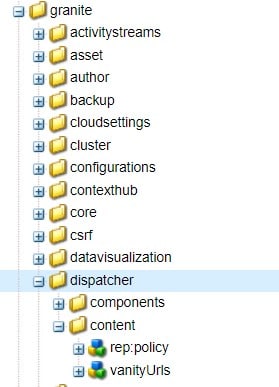
2. In order to verify that the installation is done correctly, go to /libs/granite and look for the dispatcher folder. If you have the dispatcher folder created, then you have successfully installed the package.


3. Now, give ‘Read’ permissions to Everyone group to /libs/granite/dispatcher/content/vanityUrls.

Now, let’s make changes to the dispatcher configuration file to get the list of Vanity URLs.

1. Open dispatcher.any file and add /000X { /type “allow” /url “/libs/granite/dispatcher/content/vanityUrls.html” } to the /filter section (X can be replaced with any number).


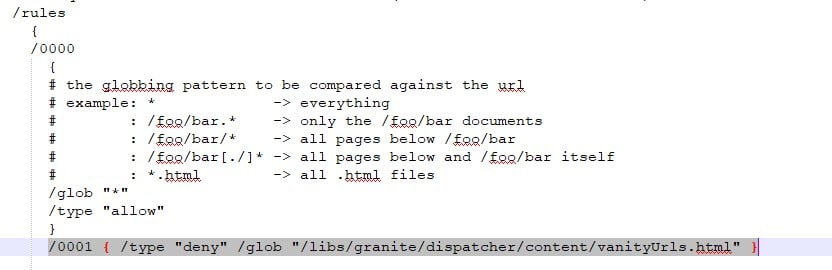
2. Now, add a caching rule to prevent caching of this URL. In order to do this, add /000X { /type “deny” /glob “/libs/granite/dispatcher/content/vanityUrls.html” } to the /rules section (X can be replaced with any number).


3. Now, it’s time to add the vanity_urls configuration. In order to do this, add the following to /farms section.

/vanity_urls

{/url “/libs/granite/dispatcher/content/vanityUrls.html”

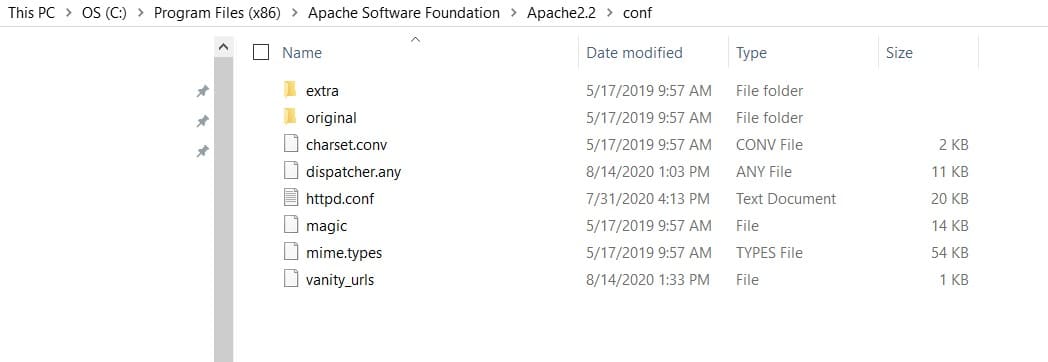
/file “C:/Program Files (x86)/Apache Software Foundation/Apache2.2/conf/vanity_urls”

/delay 300}

URL: it is the path of the Vanity URL service that runs on the publish instance.

file: It’s the path of the file that stores the list of Vanity URLs.

delay: it’s the time interval in seconds to call the Vanity URL service to get the list of updated Vanity URLs. In the above example, it calls the service for every 5 minutes.

4. Save the file and restart the server.

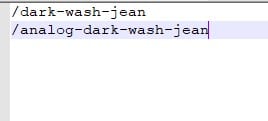
5. Navigate to the file path mentioned above C:/Program Files (x86)/Apache Software Foundation/Apache2.2/conf/vanity_urls and you would see the vanity_urls file is created with the list of vanity URLs.


6. Now, you would be able to access the page using vanity URL using dispatcher which in fact would take you to the original URL.

Example: localhost:8080/analog-dark-wash-jean

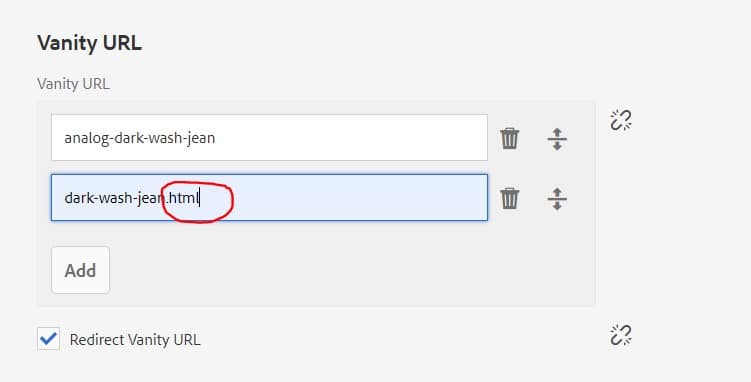
Note: If you are not able to access the page using Vanity, make sure you have not added .html while creating a vanity URL. If you have added .html to the end of the vanity URL, then remove it.


Above dispatcher configuration is a one-time setup and restart of the server is not required every time we add a new vanity URL on AEM pages. It automatically updates the vanity URLs list with the given time interval.


By aem4beginner

October 13, 2020
Estimated Post Reading Time ~

Shortening of URL using etc/map

As most of the time in our project implementation, we somehow end up shortening the URL, So that the whole link or the path is not publicly available and also shorten URL looks pretty decent.

Let's start with the step-by-step setup of our shorten URL internal redirect URLs.

First of all, we get only the http folder inside /etc/map. So if we make any changes will only work in our local instances as most of the time our higher environments are https.

So, just verify your higher environments and make the changes.

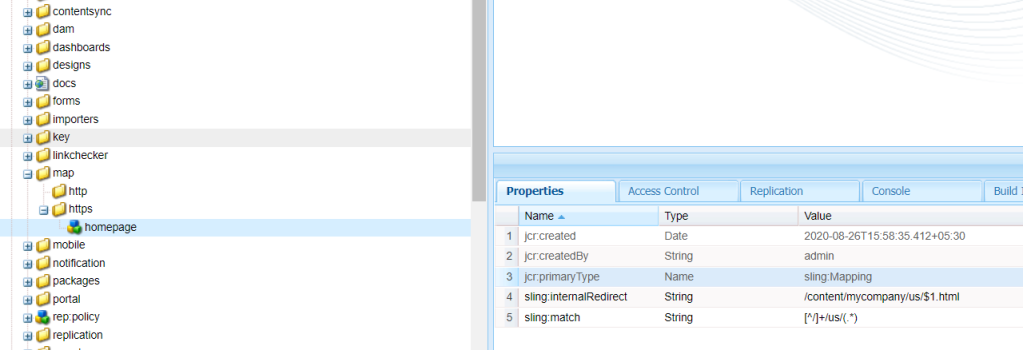
1. Create an https (sling:Folder) under /etc/map, just parallel to the http.
2. Now create a node(sling:Mapping) under /etc/map/https.
3. We need to play around two properties now i.e. sling:Match and sling:InternalRedirect

sling:match: This is the string pattern that we will match the requested URI.
sling:internalRedirect: This is the string pattern where we want to target or redirect the requested URI.

Below is an example where I am loading a page without .html and removing /content/mycompany

Once you publish this configuration then we can see the changes getting reflecting in the publish instance.

Try using https. publish if you are setting up this etc mapping for the publish URLs.

Removing .html and Shortening


By aem4beginner

October 2, 2020
Estimated Post Reading Time ~

Demystifying shortened and extension-less URLs in AEM

Your company has decided to migrate their web presence to Adobe Experience Manager and you’re getting to the tail end of the project. This is usually the point when you realize your URLs need to be shortened, because, let’s be frank: who wants to see “/content” in their URL? And, whilst we’re at it, you should probably get rid of that “html” extension as well.

So the problem we’re trying to solve is how to turn a URL like http://acme.com/content/acme/en/about.html into http://acme.com/about. There are various ways of going about it and naturally, there are trade-offs with each approach. In this post, I’m going to summarise each approach and its tradeoffs. 

Web Server Rewrite Rules
One approach is to use a rewrite module in your web server (i.e. mod_rewrite). This will rewrite all incoming URLs to a path that can be resolved to a resource in AEM, before handing it over to the Dispatcher. This is fairly easy to do by using VirtualHost and rewriting the links accordingly depending on the domain. There are many resources available on how to achieve this, so I won’t go into the details.


Request processing flow when web server rewrites incoming URLs (source) 

Benefits
The advantage of this approach is that the Dispatcher cache path mirrors the content path, so you will not have any issues invalidating content on activation. Moreover, rewrite rules are quite powerful, so you can do some pretty fancy things. 

Drawbacks
However, this also means that your AEM instances are not aware of the link rewriting logic, so you will most likely have to create a custom Link Transformer to rewrite links within your pages before serving them up to the end-users.

Alternatively, you can create a Tag Library to rewrite links, but that will not work for URLs contained in authored content. This is not much fun because it requires more work on your part and is duplicating the link rewriting logic. 

Sling Resource Resolution
The next approach leverages the Sling resource resolution mechanism that comes with AEM. With this approach, the resource resolution engine associates a path with a content resource. The benefit here is that not only can AEM resolve incoming requests to content paths, but it can also rewrite links to their shortened versions automagically.


Request processing flow when AEM rewrites incoming URLs (source)

The most straight forward way to achieve this setup is to configure the “JCR Resource Resolver Factory” service by defining the mappings using the “URL Mappings” (a.k.a resource.resolver.mapping) property.

Using the we.retail sample site as an example, once you apply the configuration below you can now browse to the equipment page using the following URL: http://localhost:4502/equipment.html 

<?xml version="1.0" encoding="UTF-8"?>
<jcr:root xmlns:sling="http://sling.apache.org/jcr/sling/1.0" xmlns:jcr="http://www.jcp.org/jcr/1.0"
jcr:primaryType="sling:OsgiConfig"
resource.resolver.searchpath="[/apps,/libs,/apps/foundation/components/primary,/libs/foundation/components/primary]"
resource.resolver.manglenamespaces="{Boolean}true"
resource.resolver.allowDirect="{Boolean}true"
resource.resolver.required.providers="[org.apache.sling.jcr.resource.internal.helper.jcr.JcrResourceProviderFactory]"
resource.resolver.virtual="[/:/]"
resource.resolver.mapping="[/-/,/content/we-retail/us/en/-/]"
resource.resolver.map.location="/etc/map"
resource.resolver.default.vanity.redirect.status="302"/>


It’s also important to note that a “reverse” mapping is created from this entry, meaning that the built-in “Day CQ Link Checker Transformer” can shorten links within our HTML pages automatically (provided link rewriting is enabled). You may also combine this with the “Strip HTML Extension” property of the built-in transformer in order to remove the “.html” extension from your links (note: you will need a webserver to append the “.html” extension to your incoming requests so that they can be processed). 

<?xml version="1.0" encoding="UTF-8"?>
<jcr:root xmlns:sling="http://sling.apache.org/jcr/sling/1.0" xmlns:jcr="http://www.jcp.org/jcr/1.0"
jcr:primaryType="sling:OsgiConfig"
linkcheckertransformer.strictExtensionCheck="{Boolean}false"
linkcheckertransformer.rewriteElements="[a:href,area:href,form:action]"
linkcheckertransformer.disableRewriting="{Boolean}false"
linkcheckertransformer.disableChecking="{Boolean}false"
linkcheckertransformer.stripHtmltExtension="{Boolean}true"
linkcheckertransformer.mapCacheSize="{Long}5000"/>


The resulting HTML markup for we.retail navigation will look like the snippet below:
<ul class="nav navbar-nav navbar-center">
<li class="visible-xs">
<a href="/">we.<strong class="text-primary">Retail</strong></a>
</li>
<li>
<a href="/experience">Experience</a>
</li>
<li>
<a href="/men">Men</a>
</li>
<li>
<a href="/women">Women</a>
</li>
<li>
<a href="/equipment">Equipment</a>
</li>
</ul>


Benefits

This method works great for sites that have simple URL handling requirements and do not need to support multi-tenancy. It’s very easy to configure (only 2 configuration files) and doesn’t require AEM to be aware of the various domains it’s serving content to. 

Drawbacks
Whilst this approach is easy to configure, this simplicity comes at a cost:
It will not work for websites where the URLs do not nicely match up with the JCR content because it doesn’t support regular expressions.
It doesn’t support cross-site links because this rewriting method is not domain-aware.

If a path is duplicated across multiple sites, it will resolve to the first match. For example, given Geometrixx Outdoors and Geometrixx, when requesting http://localhost:4502/company.html, the resource resolution will either resolve to /content/geometrixx-outdoors/en/company or /content/geometrixx/en/company, depending on which mapping was defined first.
When relying on the LinkCheckerTransformer to provide you with extension-less URLs, your calls to ResourceResolver#map on the backend will still contain the “html” extension. This may not be desired when rendering links to be contained in emails. 

Pulling out the big guns
Another approach is to define Sling Mappings under /etc/map. Sling Mappings are made up of a series of nodes that dictate how the mapping should function for each configured domain. They take more time to set up but are a great compromise because they are almost as powerful as rewrite rules and also make your AEM application aware of the link processing logic.

Here’s what our Sling mappings would look like for we.retail site:
{

"jcr:primaryType": "sling:Folder",
"weretail.com": {
"jcr:primaryType": "sling:Mapping",
"sling:internalRedirect": [
"/content/we-retail/us/en"
],
"weretail_com_content": {
"jcr:primaryType": "sling:Mapping",
"sling:match": "(.+)$",
"sling:internalRedirect": [
"/content/we-retail/us/en/$1",
"/$1"
]
},
"reverse_mapping_content": {
"jcr:primaryType": "sling:Mapping",
"sling:match": "$1",
"sling:internalRedirect": [
"/content/we-retail/us/en/(.*).html"
]
},
"reverse_mapping_content_nohtml": {
"jcr:primaryType": "sling:Mapping",
"sling:match": "$1",
"sling:internalRedirect": [
"/content/we-retail/us/en/(.*)"
]
},
"reverse_mapping_root": {
"jcr:primaryType": "sling:Mapping",
"sling:match": "$",
"sling:internalRedirect": [
"/content/we-retail/us/en(.html)?"
]
}
},
"weretail_com_root": {
"jcr:primaryType": "sling:Mapping",
"sling:match": "weretail.com$",
"sling:internalRedirect": [
"/content/we-retail/us/en.html"
]
}
}

This set of Sling Mappings has more entries than strictly necessary but provides the following:
They handle the rewriting of links created by selecting a resource using the pathfield widget where no “html” extension is provided
Requests to ResourceResolver#map will return the same URL as the one shown to the end user because it isn’t dependent on any transformer to rewrite links

The resulting HTML markup for the we.retail navigation will look like the snippet below:
<ul class="nav navbar-nav navbar-center">
<li class="visible-xs">
<a href="http://weretail.com/">we.<strong class="text-primary">Retail</strong></a>
</li>
<li>
<a href="http://weretail.com/experience">Experience</a>
</li>
<li>
<a href="http://weretail.com/men">Men</a>
</li>
<li>
<a href="http://weretail.com/women">Women</a>
</li>
<li>
<a href="http://weretail.com/equipment">Equipment</a>
</li>
</ul>

Note: The links shown above are absolute links because no web server was set up with the “weretail.com” domain to serve this content. If a web server was set up, the LinkCheckerTransformer would generate internal links like “/equipment” instead of “http://weretail.com/equipment”. 

Benefits
Leverages Sling resource resolution so the rules that are defined in /etc/map will be used by the LinkCheckerTransformer to shorten URLs within web pages.
You can leverage capturing groups to perform sophisticated resource resolution/mapping rules.
With this method, the LinkCheckerTransformer will be able to generate cross-site links. This means that all links will be internal unless the content path points to another website, in which case an absolute link will be rendered. 

Drawbacks
It can be a bit tricky to understand the various properties that can be applied to Sling Mappings
The domain-awareness can make it difficult to maintain the mappings in an environment where AEM instances are provisioned on the fly (may need to use a script to generate the mappings dynamically when an instance is allocated a domain name) 

General Sling Processing Gotchas
As you can see the Sling Resource Resolution is a powerful tool to perform URL handling; However there are a few points to watch out for:
When rewriting a link, if the path provided cannot be resolved to a resource, the link will not be rewritten at all. You will most likely run into this problem if you are using a mix of Sling Filters and request forwards to render your content. A way around this is to write a custom Transformer to force the resource mapping to occur.
The Dispatcher cache path will not match the content path. More specifically, the content will be cached using the shortened path but when a cache invalidation request is sent, the full path will be provided. A way around this is to write rewrite rules on the webserver to correct the path to be invalidated or to use the Dispatcher Flush Rules provided by ACS Commons (as of version 1.5.0, regular expressions are supported for more complex invalidation logic).
Whilst Sling does a lot for you, you will still need to set up some rewrite rules to append the “.html” extension in order for your content to be cached by the Dispatcher.
The LinkCheckerTransformer works just like any other transformer in the rewriting pipeline, it responds to SAX events from the HTML parser. This means that it may not rewrite all links within your HTML page unless it is configured to generate an event. For example, tags may be used to hold open redirects – these will not be rewritten unless the INPUT tag is added to the HTML parser and input:value is added to the list of rewrite elements.
The HTML markup must be valid or else link rewriting will cease to work when it comes across invalid markup. 

Conclusion
Hopefully, this provided you with some insight into URL handling in AEM. It is a tricky topic and it gets even more complex when vanity URLs are thrown in the mix. Avoid them if possible – they get unruly very quick! If you’re going to take away anything from this post, it should be that the Sling Resource Resolution mechanism can do the heavy lifting for you, so I highly recommend you consider it when implementing your URL handling processes.


By aem4beginner

May 27, 2020
Estimated Post Reading Time ~

Best way to use suffix in AEM/Adobe CQ5 URLs

It is better to use the suffix with selectors only that will help the dispatcher when flush cache.

Ex:
<resource path>/results.html
<resource path>/results.html/suffix(Not recommended )
<resource path>/results.html/suffix.suffix1 (Not recommended )
<resource path>/results.slelector.html/suffix(Recommended)
<resource path>/results.slelector.html/suffix.suffix1(Recommended)


By aem4beginner

May 22, 2020
Estimated Post Reading Time ~

Setting regular expression to validate URL format in Adobe CQ5

I want to validate a URL inside a textfield using Adobe CQ5, so I set up the properties regex and regexText as usual, but for some reason is not working:

<facebook
jcr:primaryType="cq:Widget"
emptyText="http://www.facebook.com/account-name"
fieldDescription="Set the Facebook URL"
fieldLabel="Facebook"
name="./facebookUrl"
regex="/^(http://www.|https://www.|http://|https://)[a-z0-9]+([-.]{1}[a-z0-9]+)*.[a-z]{2,5}(:[0-9]{1,5})?(/.*)?$/"
regexText="Invalid URL format"
xtype="textfield"/> 

So when I type inside the component I can see an error message at the console:
Uncaught TypeError: this.regex.test is not a function
To be more accurate the error comes from this line:

if (this.regex && !this.regex.test(value)) {
I tried several regular expressions and none of them worked. I guess the problem is the regular expression itself, because in the other hand I have this other regex to evaluate email address, and it works perfectly fine:

/^[A-za-z0-9]+[\\._]*[A-za-z0-9]*@[A-za-z.-]+[\\.]+[A-Za-z]{2,4}$/
Any suggestions? Thanks in advance.

Best How To:
The syntax of your regex seems to treat the forward slashes (/) as special characters. Since you want to parse a URL containing slashes, my guess is you should escape them twice like this: '\\/' instead of '/'. The result would be:

/^(http:\\/\\/www.|https:\\/\\/www.|http:\\/\\/|https:\\/\\/)[a-z0-9]+([-.]{1}[a-z0-9]+)‌​*.[a-z]{2,5}(:[0-9]{1,5})?(\\/.*)?$/
You need to escape them twice because the string to be compiled as a regex must contain '\/' to escape the slashes, but to introduce a backslash in a string you have to escape the backslash itself too.


By aem4beginner

May 3, 2020
Estimated Post Reading Time ~

URL Mapping in AEM for multilingual sites

A multilingual website is any website that offers content in more than one language.

We were adding multilingual sites for our website (project). The main requirement from the client was to include language code and country code (jp-ja, es-es, fr-fr, etc) in the urls of multi-language sites except for the English site.

Before that, let's see how the normal url redirection will happen in AEM.

Configuring an Internal Redirect from http://localhost:4503/content/myproject/abc.html to http://localhost:4503/abc.html:
Go to CRXDE and navigate to /etc/map/http

2. Create a new node of, type sling:Mapping and name localhost.4503

3. Click Save All

4. Add the following properties to the newly created node.
>Name sling:internalRedirect
>Type String[]
>Value /content/myproject

5. Click Save All

6. Then Navigate to /etc/map/http/localhost.4503

7. Create a new node of, type sling:Mapping and name redirect

8. Add the following properties to the node ‘redirect’.
>Name sling:internalRedirect
>Type String[]
>Value /$1, /content/myproject/$1.html
>Name sling:match
>Type String
>Value (.+)$

9. Then click Save All.

By this, requests such as http://localhost:4503/content/myproject/abc.html and

redirects to http://localhost:4503/abc.html.

*Note: Use ‘ . ‘ instead of ‘: ‘ while giving value. (eg.: localhost.4503).

Now, let's discuss our scenario.

Configuring an Internal Redirect from http://localhost:4503/content/myproject/en/home/abc.html to http://localhost:4503/abc.html and http://localhost:4503/content/myproject/fr-fr/home/abc.html to http://localhost:4503/fr-fr/abc.html.

In this case, the redirect url should show the country_code and language_code eg. (fr-fr) in the multilingual sites except for the English site.
  1. Go to CRXDE and navigate to /etc/map/http
  2. Create a new node of, type sling:Mapping and name localhost.4503
  3. Click Save All
  4. Add the following properties to the newly created node.
first property,

>Name sling:internalRedirect
>Type String[]
>Value /content/myproject/en/home/(.*)() , /content/myproject/([^/]+)/home(/.*)

second property,

>Name sling:match
>Type String
>Value localhost.4503/$1/$2

5. Click Save All

6. Then Navigate to /etc/map/http

7. Create a new node of, type sling:Mapping and name redirect_en

8. Add the following properties to the node ‘redirect_en’.

first property,

>Name sling:internalRedirect
>Type String[]
>Value /$1, /content/myproject/en/home/$1.html

second property,

>Name sling:match
>Type String
>Value localhost.4503/([^.]+)$

9. Create another node under /etc/map/http with,type sling:Mapping and name redirect_fr .

10. Add the following properties to ‘redirect_fr’

first property,

>Name sling:internalRedirect
>Type String[]
>Value /$1, /content/myproject/fr-fr/home/$1.html

second property

>Name sling:match
>Type String
>Value localhost.4503/fr-fr/([^.]+)$

11. Then click Save All.

Now, it will work!


By aem4beginner

May 1, 2020
Estimated Post Reading Time ~

URL Mapping and Removing .html extension from pages in AEM

There's an OSGI configuration provided by AEM - Apache Sling Resource Resolver Factory for Resource mapping in AEM.
Resource mapping is used to define redirects, vanity URLs and virtual hosts for AEM.

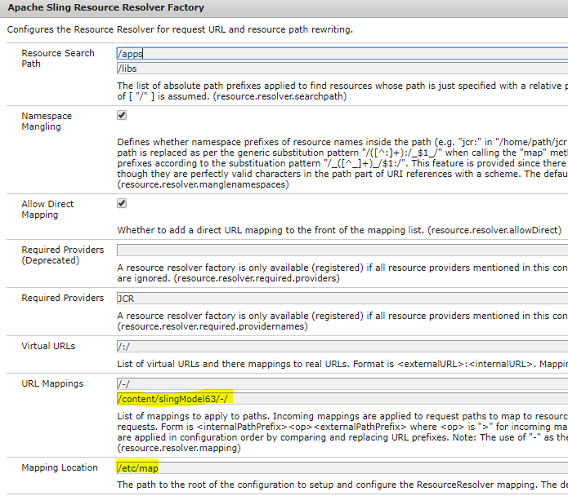
Like when you want to shorten the url (don't want to expose the entire path starting with /content), you can write your entries in URL Mapping property of the above configuration (http://localhost:4502/system/console/configMgr).

For ex. I have my page at http://localhost:4502/content/slingModels63/en.html and I want to slice the middle path of the url, I can have the below mapping and I will be able to access the page by hitting
http://localhost:4502/en.html


The URL Mapping also accepts the regex pattern which you can enter for your resource mapping.
But there's a separate mapping location in crxde where you can define mappings for the HTTP protocol - it's /etc/map/http folder as highlighted above in the config.

Here you can create a node of type sling:Mapping and provide your mappings and avoid doing the changes in the OSGI Configuration through Web console.

Use-Case:
If you want to open your pages in aem without .html extension, then create a node of type sling:Mapping and add the two properties with url pattern values to that node - sling:internalRedirect and sling:match as shown below:


Below is the xml snippet of the above node with properties:
<?xml version="1.0" encoding="UTF-8"?> <jcr:root xmlns:sling="http://sling.apache.org/jcr/sling/1.0" xmlns:jcr="http://www.jcp.org/jcr/1.0" jcr:primaryType="sling:Mapping" sling:internalRedirect="/content/$1.html" sling:match="localhost.4502/content/(.*)$"/>
The above mapping will allow you to access all pages inside content folder to open without .html extension in author instance.

If you want to achieve the same in publish mode, then create /etc/map.publish folder to hold the configurations for the publish environment. These must then be replicated, and the new location (/etc/map.publish) should be configured for the Mapping Location of the Apache Sling Resource Resolver Factory of the publish environment.

Thus, you can define your own regex pattern and mappings upon your requirement, and also you can view all your mappings under the JCR ResourceResolver option of the Felix console at http://localhost:4502/system/console/jcrresolver.


By aem4beginner

April 27, 2020
Estimated Post Reading Time ~

How to implement extension-less URL's in AEM

As per the SEO best practices, it is better to define extensionless URL's to boost the ranking, AEM requires the extension to understand and serve the incoming request.

This post explains the approach to achieve the extensionless URL in Adobe Experience Manager(AEM)

There are two steps
- Rule Configuration Dispatcher
Remove .html extension from incoming URL with /
Append the .html while invoking the publisher for the URL's ending with /

- AEM etc/map configuration
Reverse mapping to rewrite the html URL in the pages to extensionless
Forward mapping to map the incoming request to the resource

This is tested in AEM 6.2 version

Apache configurations:
#Handle the landing page
RewriteRule ^/$ /en/ [R=301,L]
#Mask the /content/geometrixx-outdoors path
RewriteRule ^/content/geometrixx-outdoors/(.*)(\.html)?$ /$1 [NE,L,R=301]

#Replace the .html with /
RewriteCond %{REQUEST_URI} \.html$
RewriteRule ^/(.*).html$ /$1/ [R=301,L,QSA]

#Append the .html for those URL's ending with / before sending to publisher
RewriteCond %{REQUEST_URI} !^/$
RewriteRule ^/(.*)/$ /$1.html [PT,L,QSA]

Publisher etc/map configurations:
Create a node localhost.8080(replace with required DNS and port) of type sling:Mapping under /etc/map/http or /etc/map/https based on the protocol used
Add the following property

sling:internalRedirect[] - /content/geometrixx-outdoors

<?xml version="1.0" encoding="UTF-8"?>
<jcr:root xmlns:sling="http://sling.apache.org/jcr/sling/1.0" xmlns:jcr="http://www.jcp.org/jcr/1.0"
jcr:primaryType="sling:Mapping"
sling:internalRedirect="[/content/geometrixx-outdoors]">
<redirect/>
<reverse/>
</jcr:root>


Create a node "redirect" of type sling:Mapping under localhost.8080 - map the incoming request to AEM resource path

Add the below properties

sling:internalRedirect[] - /content/geometrixx-outdoors/$1 , /$1
sling:match - (.+)$

<?xml version="1.0" encoding="UTF-8"?>
<jcr:root xmlns:sling="http://sling.apache.org/jcr/sling/1.0" xmlns:jcr="http://www.jcp.org/jcr/1.0"
jcr:primaryType="sling:Mapping"
sling:internalRedirect="[/content/geometrixx-outdoors/$1,/$1]"
sling:match="(.+)$"/>


This will help to perform the forward mapping of URL to the resource by a sling, resourceResolver.resolve() API can be used if a programmatic mapping is required

Create a node reverse of type sling:Mapping under localhost.4502 - Reverse mapping, map the content path to shortened and extensionless URL

sling:internalRedirect[] - /content/geometrixx-outdoors/(.*).html
sling:match - $1/

<?xml version="1.0" encoding="UTF-8"?>
<jcr:root xmlns:sling="http://sling.apache.org/jcr/sling/1.0" xmlns:jcr="http://www.jcp.org/jcr/1.0"
jcr:primaryType="sling:Mapping"
sling:internalRedirect="[/content/geometrixx-outdoors/(.*).html]"
sling:match="$1/"/>


This will help the rewriter to perform the Reverse mapping of the html links in the pages to shortened and extensionless URLs.
The output rewriter pipeline automatically rewrites all the html links in the pages to shortened and extensionless URLs based on the above configuration, resourceResolver.map() API can be used if a programmatic mapping is required

Now the browser displays the extensionless URL for the html page request and also the html links inside the page is converted to extensionless


The extensions from the page links can be stripped off by enabling the "Strip HTML Extension" configuration in "Day CQ Link Checker Transformer" also but

- This configuration is not site-specific and applied for all the sites hosted
- In AEM 6.3 I was facing too many redirect issue by enabling this configuration along with above mentioned Apache rules but the same is working fine in AEM 6.2
- This will not append the / at the end of rewritten URLs


By aem4beginner

April 26, 2020
Estimated Post Reading Time ~

URL Shortening in AEM

Content pages in AEM start with path /content/. It is best practice to hide /content/site in the URL.
http://localhost:4502/content/site/en/page.html

Below configs show how to achieve URL shortening on both AEM server and dispatcher.

Configs on AEM Server:

· There are many ways to configure the rewrites on publish server. e.g. Resource Resolver, Vanity URLs, Sling mapping.
· Configuring the Apache Sling Resource Resolver Factory is one of the ways to configure rewrites. This service needs to be configured on the publish server so that if someone hits the publish server directly; we see the correct rules applied there.
Make sure that the publish server has the below configuration applied


Configs on Dispatcher:

Open dispatcher.conf file and update DispatcherUseProcessedURL value to 1

DispatcherConfig conf/dispatcher.any
DispatcherLog logs/dispatcher.log
DispatcherLogLevel 3
DispatcherNoServerHeader 0
DispatcherDeclineRoot 0
DispatcherUseProcessedURL 1
DispatcherPassError 0

· Open httpd.conf, uncomment below line
LoadModule rewrite_module modules/mod_rewrite.so

· Add below rewrite rules in dispatcher.conf file
RewriteEngine on

# remove any trailing slash, if it's there.
RewriteRule ^(.+)/$ $1

#Shorten the URL
RewriteRule ^/content/site/(.*).html$ $1.html [R,L]

#Map the root folder to the home page
RewriteRule ^/?$ en/page.html [R,L]

# Ignore requests to "known" AEM root paths, and prefix all others with the proper AEM prefix
RewriteCond %{REQUEST_URI} !^/apps
RewriteCond %{REQUEST_URI} !^/content
RewriteCond %{REQUEST_URI} !^/etc
RewriteCond %{REQUEST_URI} !^/home
RewriteCond %{REQUEST_URI} !^/libs
RewriteCond %{REQUEST_URI} !^/system
RewriteCond %{REQUEST_URI} !^/tmp
RewriteCond %{REQUEST_URI} !^/var
#RewriteRule ^/(.*)$ /content/site/$1 [PT,L]


By aem4beginner

April 11, 2020
Estimated Post Reading Time ~

URL Mapping and Deep Linking

A strength of Sling is the automatic and expected way that resources are structured and exposed in a logical, ordered manner. For example, AEM, by configuration allows page access through the /content/ directory. A typical page URL would be accessed with a browser visit to /content/projectname/pagename/subpagename.html. 

The minimal effort in maintaining this structure has its benefits, but changing that structure to fulfill business needs can be troublesome. Thankfully, AEM provides a number of tools and techniques to do so. This text will explore some of those options.

Root Mapping: The most common change is the need to hide the /content/ node or at least offer top-level pages at the root level. So, instead of a user typing “http://mycompany.com/content/myproject/home.html,” they should be able to type “http://mycompany.com/” to reach the home page.

Normally, in a production environment, this is configured in a front-facing web server like Apache with some configuration in the httpd.conf file using mod_rewrite. But it can also be done in AEM with some OSGi configuration:


Open Tools
Open OSGi Console
Search for and open Day CQ Root Mapping
Change the Target (sic) Path property to wherever you'd like the redirect

Tip 1: If you like the old CQ5.5 dev landing page compared to AEM5.6, change projects.html to welcome.html

Tip 2: Other mechanisms for remapping URLs, which are discussed in this article, will break author instances because it interferes with things like authentication. Use the method above, which is safe, to remap the root node

Page Redirects: Sometimes pages are meant to simply be ways of grouping subpages and not locations that a user should land on directly. This kind of page can be set up as a redirect component. A good example is the /content/geometrixx sample page.


To recreate this page redirect, either set it up when creating the page in AEM’s site builder (under New Page -> Advanced -> Redirect) or just change the properties of that page in CRX:

expand the content/{page} node
Click the ./jcr:content node
Change the sling:resourceType property to be foundation/components/redirect
Add a new String property called redirectTarget
Give redirectTarget a value of the new page (e.g. /content/myproject/mypage/mysubpage)

Tip 1: If a site is being built in one language, there’s no need to mimic the /en/ structure shown in the geometrixx example.

Tip 2: The sling extension (e.g. .html) will automatically carry over to the redirect page, and shouldn’t be specified

sling:Mapping Redirects: AEM’s most powerful URL-manipulation feature, a set of redirect components, is often overlooked because application servers don’t traditionally have this ability. But CQ’s built-in Vanity URL support, namespace mangling, and internal tools all make use of this ability. A custom application can too, for instance, by remapping all /content project to /content/myproject

In CRX, navigate to the /etc/map node.
Open (or create) the http node of type sling:Folder
Create a node called the content of type sling:Mapping
Add a property called sling:match and give it a value of localhost.4502/content/
Add a property called sling:internalRedirect and give it a value of /content/myproject

Now navigate to http://localhost:4502/content/mypage.html. The browser will display the URL that was entered, but internally AEM will be referencing the mapped directory structure.

Another way to test how CQ is handling mapping is by opening the Sling Resource Resolver tool. Log in with normal admin credentials (the default being admin/admin), enter http://localhost:4502/content/mypage.html into the text box, click Resolve and examine the “path” property that is output below the text box.

Problem: Remapping all of /content will also remap /content/dam, breaking current links

Solution: Override that particular mapping to point to itself

Within CRX, navigate to the /etc/map/http node.
Create a node called content_dam of type sling:Mapping
Add a property called sling:match and give it a value of localhost.4502/content/dam/
Add a property called sling:internalRedirect and give it a value of /content/dam/

This node will point to itself, and override the above /content/ mapping. The mapping rule resolution I believe is determined by string length and can be manipulated with sling:OrderedFolder. If readers have experience with this, please add comments below. It hasn’t been necessary to experiment with this feature for my projects.

The above problem will be more apparent if, instead of /content/ being mapping to the content directory, the root directory is also mapped.

Tip: Do not remap the root directory using this technique. There is a better technique above

While I recommend against remapping the root directory on author instances, as it will break things like authentication and CRX, it can still be done. In which case, the following directories also need to be remapped to point to themselves:

\apps\
\content\dam\
\etc\
\home\
\libs\
\tmp\
\var\


This should allow most applications and features of AEM to still work. But some monitoring of the app should take place to make sure other locations are not inappropriately being remapped.

Tip: If there’s a question about which URLs are being accessed by browsers or CRX, a tool like Fiddler can monitor and report on it.

Dynamic Redirects: Thankfully, both the sling:match and sling:internalRedirect nodes use regular expressions so that URL mapping can be more dynamic. So things like top-level links can be remapped to strip off the “.html” extension.

Within /etc/map/http
Create a new node named posts of type sling:Mapping
Add a property called sling:match with value localhost.4502/posts/([^/]+)$
Add a property called sling:internalRedirect with value /content/myproject/posts/$1.html

This will allow posts to be accessed without an extension. There are other ways of performing this particular task, such as adding a GET.jsp entry to the components, but mapping redirects are the best way to not interfere with the rest of the Sling resolution logic.

Deep Linking: When taking advantage of dynamic sling:Mappings with regular expressions, URL deep-linking can be implemented without the use of URL parameters or javascript. In some cases, SEO (Search Engine Optimization) experts will advise that sub-pages be reached from URLs and get loaded on the initial request. Other needs like analytics engines might preclude the use of hashtags or URL parameters. In this case, AEM can leverage URL mappings and selectors to pass information to a component and preload content.

In the posts node above, for instance, we can instead change the mapping from going to post sub-pages to the posts page directly. Here, assume there is some component inside the post page that loads properties from its child page. But it needs to know which child page is being accessed.

Add a property called sling:match with value localhost.4502/posts/([^/]+)$
Add a property called sling:internalRedirect with value /content/myproject/posts.$1.html

The mapping above will take a request to /posts/child-page-name, and remap it to /posts.child-page-name.html. Essentially, this is the same as a posts.html call, with the addition of a component now being able to use the Sling Resource API to extract that selector. The code within such a component would look something like this:

posts.jsp
String defaultPostName = "";

//Below is logic to default posts based on page selectors.
//e.g. posts.{post-name.}.html
String selectorPath = currentPage.adaptTo(Resource.class).getResourceMetadata().getResolutionPathInfo();
String selectors[] = selectorPath.split("\\.");
if (selectors.length > 2) {
defaultPostName = selectors[1];
}

Tip 1: The dollar sign ($) above tells the regex “this is the end of the string. AEM, therefore, won’t map any URL with additional characters in the URL. However, URL parameters and hashtags will be ignored for the purposes of mapping, and don’t need to be considered

Tip 2: The technique demonstrated above will extract selectors from a page. Multiple can be stacked with additions /([^/]+) references in the sling:match property, and $2, $3… variable references in the sling:match property

Tip 3: Selectors can also be added to components using sling:include tags. To get a parent resource containing that information, use componentContent.getResource() in place of the currentPage.adaptTo(Resource.class) reference above

Summary: CQ offers a number of techniques to remap pages and URLs. While most of this can and should be done on a proxy web server, some powerful mapping tools are available directly in CQ. The topic is only superficially covered here, and any shared experiences or tips from readers are welcome in the comments below.


By aem4beginner

March 20, 2020
Estimated Post Reading Time ~

How to do URLs request Mapping in AEM/ Adobe CQ5

Mapping of request URLs in CQ/AEM
There are cases wherein we need to map the URLs during the process of the CQ request. Also, these must happen before Sling starts processing the URL.

Problem 1:
Say we need to convert the URL like: www.example.com --> converts to --> /content/mysite/en/

Analysis:
Let us see how this can be done. There are possibly many ways to do this by creating an OSGi bundle for this, to ensure that the URL is filtered by the class first and then catered by Sling.

Apache sling site(http://sling.apache.org/documentation/the-sling-engine/mappings-for-resource-resolution.html) says, "The mapping of request URL's to resources is mainly configured in a configuration tree which is (by default) located below /etc/map. The actual location can be configured with the resource.resolver.map.location property of the org.apache.sling.jcr.resource.
internal.JcrResourceResolverFactoryImpl configuration."

Thus to deal with the new resource resolution, the sling has a number of properties

sling: match -> A property to be set on a node in the /etc/map tree. A regular expression is used instead of the node's name to match the incoming request here.
sling: redirect -> This triggers a redirect response to be sent to the client, which in turn calls the client to send in a new request with the modified location.
sling: status -> Defines the HTTP status code sent to the client with the sling: redirect response.
sling:internalRedirect –> Here the current path internally gets modified to continue with resource resolution.
sling: alias –> helps the resource to indicate an alias name for the resource.

1st Solution to problem 1:
Our above problem can be handled by Sling URL Mapping.
For this we need to create a node under the /etc/map directory with a resource type of sling: Mapping (A primary node type which may be used to easily construct entries in the /etc/map tree), then match to call www.example.com.

Once an incoming request matches the node name in the above case, this then takes a property of sling:internalRedirect & this property is appended to the path to continue with internal resource resolution as shown below.

<map>
<http jcr:primaryType="sling:OrderedFolder">
<www.example.com
jcr:primaryType="sling:Mapping"
sling:internalRedirect="/content/mysite/en"/>
</http>
</map>

The above will ensure any request coming to www.example.com is resolved to www.example.com/content/mysite/en/.

2nd Solution to problem 1:
Say you need a code-based solution for multiple websites and you are not interested in managing /etc/map, you can set up your own filter as below.

package your.package;
import org.apache.felix.scr.annotations.*;
import javax.servlet.Filter;
import javax.servlet.FilterChain;
import javax.servlet.FilterConfig;
import javax.servlet.ServletException;
import javax.servlet.ServletRequest;
import javax.servlet.ServletResponse;
import javax.servlet.RequestDispatcher;
import javax.servlet.http.HttpServletRequest;
import javax.servlet.http.HttpServletResponse;

import org.apache.sling.commons.osgi.PropertiesUtil;
import org.osgi.service.component.ComponentContext;

@Component(immediate=true, enabled=true)
@Service(value=Filter.class)
@Properties({
@Property(name="sling.filter.scope", value="REQUEST", propertyPrivate=true),
@Property(name="service.ranking", intValue=-10000, propertyPrivate=true)
})
public class URLFilter implements Filter {
private static final Logger log = LoggerFactory.getLogger(ProductSEOFilter.class);

@Activate
protected void activate(ComponentContext ctx) throws Exception {
}

@Deactivate
protected void deactivate() throws Exception {
}

public void init(FilterConfig filterConfig) throws ServletException {
}

public void doFilter(ServletRequest request, ServletResponse response, FilterChain chain)
throws java.io.IOException, ServletException {
String lang = "en";

// 1. get domain and path
// 2. check if your conditions are met
// 3. extract language from domain
// 4. internal redirect

RequestDispatcher dispatch = request.getRequestDispatcher("/content/mysite/" + lang);
dispatch.forward(request, response);
}

public void destroy() {
}
}

Problem 2:
Say we need to implement case insensitivity in URL in our CQ application like test.html and TEST.HTML directs to the same page

Analysis:
While trying to use Apache mod_rewrite and mod_speling we can find they both having some undesired effects on various types of requests. An option could be to create a request filter for this, but having multiple URLs for the same page is not recommended for SEO.

Solution:

We can use mod_rewrite.c for this at your HTTP server so that the CMS system remains untouched. The best-known pattern approach for CQ is to keep AEM content pages lowercase with no underscores and have http server convert url requests to lower case. Doing url clean up on the webserver level improves your dispatcher caching options too.


By aem4beginner

March 12, 2020
Estimated Post Reading Time ~

URL Shortening concept in Adobe Experience Manager (AEM)

Content pages in AEM start with path /content/. It is best practice to hide /content/site in the URL.
https://<domain>/content/site/en/page.html

Below configs show how to achieve URL shortening on both AEM server and dispatcher.
Configs on AEM Server:
· There are many ways to configure the rewrites on the publish server. e.g. Resource Resolver, Vanity URLs, Sling mapping.
· Configuring the Apache Sling Resource Resolver Factory is one of the ways to configure rewrites. This service needs to be configured on the publish server so that if someone hits the publish server directly; we see the correct rules applied there.
Make sure that the publish server has the below configuration applied


Configs on Dispatcher:
· Open dispatcher.conf file and update DispatcherUseProcessedURL value to 1
DispatcherConfig conf/dispatcher.any
DispatcherLog logs/dispatcher.log
DispatcherLogLevel 3
DispatcherNoServerHeader 0
DispatcherDeclineRoot 0
DispatcherUseProcessedURL 1
DispatcherPassError 0

· Open httpd.conf, uncomment below line
LoadModule rewrite_module modules/mod_rewrite.so

· Add below rewrite rules in dispatcher.conf file
RewriteEngine on

# remove any trailing slash, if it's there.
RewriteRule ^(.+)/$ $1

#Shorten the URL
RewriteRule ^/content/site/(.*).html$ $1.html [R,L]

#Map the root folder to the home page
RewriteRule ^/?$ en/page.html [R,L]

# Ignore requests to "known" AEM root paths, and prefix all others with the proper AEM prefix
RewriteCond %{REQUEST_URI} !^/apps
RewriteCond %{REQUEST_URI} !^/content
RewriteCond %{REQUEST_URI} !^/etc
RewriteCond %{REQUEST_URI} !^/home
RewriteCond %{REQUEST_URI} !^/libs
RewriteCond %{REQUEST_URI} !^/system
RewriteCond %{REQUEST_URI} !^/tmp
RewriteCond %{REQUEST_URI} !^/var
#RewriteRule ^/(.*)$ /content/site/$1 [PT,L]


By aem4beginner