Showing posts with label Use-API. Show all posts

March 23, 2021
Estimated Post Reading Time ~

JavaScript Use Api

AEM offers two API one is Java-Use API and the other is Javascript-Use-Api for the sightly to consume the values. Javascript-Use API allows developers to write server-side code in the front end. The code written in the javascript gets converted into Java and uses the already available Java libraries. In the backend, AEM uses an open-source implementation of Javascript known as RHINO which converts the code written in javascript into Java.

I have recently used this API for rendering many component values instead of traditional Sling Models and WCMUsePojo class.

Let's start with a simple example of rendering the properties of a component:
1) For any individual component create a javascript file (example comp.js) parallel to the Html file.
2) Now suppose the component has the below fields :

a) Textfield --> We will name it as title
b) Pathfield --> We will name it as the path.
c) Multifield --> We will name it as primaryLinks.

3) Add the below code in the javascript file created as a part of component earlier :

use(function () {
return {
title: properties.get("title"),
path: properties.get("path"),
primaryLinks: resource.getResourceResolver().getResource(currentNode.getPath() +"/primaryLinks")
}
});


4) Now in order to get the values to add the below code in Html

<sly data-sly-use.comp="comp.js">

${comp.title}
${comp.path}

<ul data-sly-list.compNav="${comp.primaryLinks}">
<li>${compNav.propertyValue}
</ul>

</sly>


As we can see there are already predefined objects available to be used. Following are the objects available which were there when we had global.jsp into the picture.

a) currentNode
b) currentPage
c) resource
d) log
e) sling
f) pageProperties
g) properties
h) pageManager
i) component
j) designer
k) currentDesign
l) currentStyle


Sometime we need some of the Java Packages available , in order to do the same in javascript use the following code:

var resourceResolver = resource.getResourceResolver().getResource("pathof Node");
var Node= resourceResolver.adaptTo(Packages.javax.jcr.Node);

One of the use cases where I have used the javascript use api was getting the tag name and title from the Tag Path I was getting from the backend. This is also one of the issues I saw in sightly is the iteration of Map of Objects.

Example: If you have Map<Object, Map<Object...>, the iteration of this object doesn't work in sightly so in order to get tag name and title I passed the tag path in the map and got the name and title of the tag using the javascript api.

So in order to implement the above example we need to pass the tag path from the HTML to javascript.

In HTML
<sly data-sly-use.params="${'comp.js' @value=value}"></sly>

Here value will tagPath that will be coming from the backend. Then you can pass it in the sly data-sly-list for all the paths while Iterating.

Now in the js use the code as below to get the tag name and tag title

use(function () {
// you can reference the parameters via the this keyword.
var resourceResolver = resource.getResourceResolver();
var tagManager = resourceResolver.adaptTo(Packages.com.day.cq.tagging.TagManager);
var tag = tagManager.resolve(this.value1);
var name = tag.name;
var title = tag.title;

return {
title: title,
name:name
};
});


The javascript use api is somewhat different than the usual Sling Models and WCMUsePojo , but it sometimes comes in handy in some typical cases.

For more information, there is the official documentation for the RHINO framework available.


By aem4beginner

May 10, 2020
Estimated Post Reading Time ~

HTL JavaScript Use-API

HTL JavaScript Use-API
The HTML Template Language (HTL) JavaScript Use-API enable an HTL file to access the helper code written in JavaScript. This allows all complex business logic to be encapsulated in the JavaScript code, while the HTL code deals only with direct markup production.

A Simple Example
We define a component, info, located at: /apps/my-example/components/info
It contains two files:
info.js: a JavaScript file that defines the use-class.
info.html: an HTL file that defines the component info. This code will use the functionality of info.js through the use-API.

/apps/my-example/component/info/info.js
"use strict"; use(function () { var info = {}; info.title = resource.properties["title"]; info.description = resource.properties["description"]; return info; });

/apps/my-example/component/info/info.html
<div data-sly-use.info="info.js"> <h1>${info.title}</h1> <p>${info.description}</p> </div>

We also create a content node that uses the info component at /content/my-example, with properties:

sling:resourceType = "my-example/component/info"
title = "My Example"

description = "This is some example content."

Here is the resulting repository structure:
Repository Structure
{ "apps": { "my-example": { "components": { "info": { "info.html": { ... }, "info.js": { ... } } } } }, "content": { "my-example": { "sling:resourceType": "my-example/component/info", "title": "My Example", "description": "This is some example content." } } }

Consider the following component template: <section class="component-name" data-sly-use.component="component.js"> <h1>${component.title}</h1> <p>${component.description}</p> </section>

The corresponding logic can be written using the following
server-side JavaScript, located in a component.js file right next to the template: use(function () { var Constants = { DESCRIPTION_PROP: "jcr:description", DESCRIPTION_LENGTH: 50 }; var title = currentPage.getNavigationTitle() || currentPage.getTitle() || currentPage.getName(); var description = properties.get(Constants.DESCRIPTION_PROP, "").substr(0, Constants.DESCRIPTION_LENGTH); return { title: title, description: description }; });

This tries to take the title from different sources and crops the description to 50 characters.

Dependencies
Let's imagine that we have a utility class that is already equipped with smart features, like the default logic for the navigation title or nicely cutting a string to a certain length:
use(['../utils/MyUtils.js'], function (utils) { var Constants = { DESCRIPTION_PROP: "jcr:description", DESCRIPTION_LENGTH: 50 }; var title = utils.getNavigationTitle(currentPage); var description = properties.get(Constants.DESCRIPTION_PROP, "").substr(0, Constants.DESCRIPTION_LENGTH); return { title: title, description: description }; });

Extending
The dependency pattern can also be used to extend the logic of another component (which typically is the sling:resourceSuperType of the current component). Imagine that the parent component already provides the title, and we want to add a description as well: use(['../parent-component/parent-component.js'], function (component) { var Constants = { DESCRIPTION_PROP: "jcr:description", DESCRIPTION_LENGTH: 50 }; component.description = utils.shortenString(properties.get(Constants.DESCRIPTION_PROP, ""), Constants.DESCRIPTION_LENGTH); return component; });

Passing Parameters to a Template

In the case of data-sly-template statements that can be independent of components, it can be useful to pass parameters to the associated Use-API.

So in our component let's call a template that is located in a different file: <section class="component-name" data-sly-use.tmpl="template.html" data-sly-call="${tmpl.templateName @ page=currentPage}"></section>

Then this is the template located in template.html :
<template data-sly-template.templateName="${@ page}" data-sly-use.tmpl="${'template.js' @ page=page, descriptionLength=50}"> <h1>${tmpl.title}</h1> <p>${tmpl.description}</p> </template>

The corresponding logic can be written using the following server-side JavaScript, located in a template.js file right next to the template file:

use(function () { var Constants = { DESCRIPTION_PROP: "jcr:description" }; var title = this.page.getNavigationTitle() || this.page.getTitle() || this.page.getName(); var description = this.page.getProperties().get(Constants.DESCRIPTION_PROP, "").substr(0, this.descriptionLength); return { title: title, description: description }; });

The passed parameters are set on this keyword.


By aem4beginner

HTL Java Use-API

HTL Java Use-API
The HTML Template Language (HTL) Java Use-API enables an HTL file to access helper methods in a custom Java class. This allows all complex business logic to be encapsulated in the Java code, while the HTL code deals only with direct markup production.

A Simple Example
We'll start with an HTL component that
does not have a use-class. It consists of a single file,
/apps/my-example/components/info.html
/apps/my-example/component/info/info.html
<div> <h1>${properties.title}</h1> <p>${properties.description}</p> </div>

We also add some content for this component to render at /content/my-example/ :
http://localhost:4502/content/my-example.json
{ "sling:resourceType": "my-example/component/info", "title": "My Example", "description": "This Is Some Example Content." }

When this content is accessed, the HTL file is executed. Within the HTL code, we use the context object

properties to access the current resource's
title and
description and display them. The output HTML will be:

view-source:http://localhost:4502/content/my-example.html
<div> <h1>My Example</h1> <p>This Is Some Example Content.</p> </div>

Adding a Use-Class
The info a component, as it stands, does not need a use-class to perform its (very simple) function. There are cases, however, where you need to do things that cannot be done in HTL and so you need a use-class. But keep in mind the following:

A use-class should only be used when something cannot be done in HTL alone.

For example, suppose that you want the info component to display the title and
description properties of the resource, but all in lowercase. Since HTL does not have a method for lowercasing strings, you will need a use-class. We can do this by adding a Java use-class and changing the info.html as follows:

/apps/my-example/component/info/info.html
<div data-sly-use.info="Info"> <h1>${info.lowerCaseTitle}</h1> <p>${info.lowerCaseDescription}</p> </div>

/apps/my-example/component/info/Info.java
package apps.my_example.components.info;
import com.adobe.cq.sightly.WCMUsePojo;
public class Info extends WCMUsePojo {
private String lowerCaseTitle;
private String lowerCaseDescription;

@Override
public void activate() throws Exception {
lowerCaseTitle = getProperties().get("title", "").toLowerCase();
lowerCaseDescription = getProperties().get("description", "").toLowerCase();
}

public String getLowerCaseTitle() {
return lowerCaseTitle;
}

public String getLowerCaseDescription() {
return lowerCaseDescription;
}
}

In the following sections, we walk through the different parts of the code.
Local vs Bundle Java Class
The Java use-class can be installed in two ways: local or bundle .This example uses a local install.

In a local install, the Java source file is placed alongside the HTL file, in the same repository folder. The source is automatically compiled on demand. No separate compilation or packaging step is required.

In a bundle install, the Java class must be compiled and deployed
within an OSGi bundle using the standard AEM bundle deployment mechanism (see Bundled Java Class ).

A local Java use-class is recommended when the use-class is specific to the component in question.

A bundle Java use-class is recommended when the Java code implements a service that is accessed from multiple HTL components.

Java package is repository path
When a local install is used, the the package name of the use-class must match that of the repository folder location, with any hyphens in the path replaced by underscores in the package name.

In this case Info.java is located at /apps/my-example/components/info so the package is apps.my_example.components.info :

/apps/my-example/component/info/Info.java
package apps.my_example.components.info;
import com.adobe.cq.sightly.WCMUsePojo;
public class Info extends WCMUsePojo {
...
}

Using hyphens in the names of repository items is a recommended practice in AEM development. However, hyphens are illegal within Java package names. For this reason, all hyphens in the repository path must be converted to underscores in the package name.

Extending WCMUsePojo
While there are a number of ways of incorporating a Java class with HTL (see Alternatives to WCMUsePojo ), the simplest is to extend the WCMUsePojo class:

/apps/my-example/component/info/Info.java
package apps.my_example.components.info;
import com.adobe.cq.sightly.WCMUsePojo;
public class Info extends WCMUsePojo {
...
}

Initialising the class
When the use-class is extended from WCMUsePojo, initialisation is performed by overriding the activate method:

/apps/my-example/component/info/Info.java
...
public class Info extends WCMUsePojo {
private String lowerCaseTitle;
private String lowerCaseDescription;

@Override
public void activate() throws Exception {
lowerCaseTitle = getProperties().get("title", "").toLowerCase();
lowerCaseDescription = getProperties().get("description", "").toLowerCase();
}
...
}

Context
Typically, the activate method is used to precompute and store (in member variables) the values needed in your HTL code, based on the current context (the current request and resource, for example).

The WCMUsePojo the class provides access to the same set of context objects as are available within an HTL file (see Global Objects ).

In a class that extends WCMUsePojo , context objects can be accessed
by name using <T> T get(String name, Class<T> type)

Alternatively, commonly used context objects can be accessed directly by the appropriate convenience method :
PageManager                                             getPageManager()
Page                                                         getCurrentPage()
Page                                                         getResourcePage()
ValueMap                                                  getPageProperties()
ValueMap                                                  getProperties()
Designer                                                   getDesigner()
Design                                                       getCurrentDesign()          
Style                                                          getCurrentStyle()
Component                                                 getComponent()
ValueMap                                                    getInheritedProperties()
Resource                                                     getResource()
ResourceResolver                                         getResourceResolver()
SlingHttpServletRequest                                getRequest()
SlingHttpServletResponse.                             getResponse()
SlingScriptHelper                                          getSlingScriptHelper()
    
Getter methods
Once the use-class has initialized, the HTL file is run. During this stage HTL will typically pull in the state of various member variables of the use-class and render them for presentation.

To provide access to these values from within the HTL file you must define custom getter methods in the use-class according to the following naming convention :

A method of the form getXyz will expose within the HTL file an object property called xyz .

For example, in the following example, the methods getTitle and getDescription result in the object properties title and description becoming accessible within the context of the HTL file:

/apps/my-example/component/info/Info.java
...
public class Info extends WCMUsePojo {
...
public String getLowerCaseTitle() {
return lowerCaseTitle;
}

public String getLowerCaseDescription() {
return lowerCaseDescription;
}
}


data-sly-use attribute
The data-sly-use attribute is used to initialize the use-class within your HTL code. In our example, the data-sly-use the attribute declares that we want to use the class Info . We can use just the local name of the class because we are using a local install (having placed the Java source file is in the same folder as the HTL file). If we were using a bundle install we would have to specify the fully qualified classname.

/apps/my-example/component/info/info.html
<div data-sly-use.info="Info"> <h1>${info.lowerCaseTitle}</h1> <p>${info.lowerCaseDescription}</p> </div>

Local identifier The identifier ' info' (after the dot in data-sly-use.info ) is used within the HTL file to identify the class. The scope of this identifier is global within the file after it has been declared. It is not limited to the element that contains the
data-sly-use statement.

/apps/my-example/component/info/info.html
<div data-sly-use.info="Info"> <h1>${info.lowerCaseTitle}</h1> <p>${info.lowerCaseDescription}</p> </div>

Getting properties
The identifier info is then used to access the object properties title and description that was exposed through the getter methods Info.getTitle and Info.getDescription .

/apps/my-example/component/info/info.html
<div data-sly-use.info="Info"> <h1>${info.lowerCaseTitle}</h1> <p>${info.lowerCaseDescription}</p> </div>

Output
Now, when we access /content/my-example.html it will return the following HTML:
view-source: http://localhost:4502/content/my-example.html
<div> <h1>my example</h1> <p>this is some example content.</p> </div>

Beyond The Basics
In this section we'll introduce some further features that go beyond the simple example above: Passing parameters to a use-class. Bundled Java use-class. Alternatives to WCMUsePojo Passing Parameters Parameters can be passed to a use-class upon initialization. For example, we could do something like this:

/content/my-example/component/info/info.html
<div data-sly-use.info="${'Info' @ text='Some text'}"> <h1>${info.lowerCaseTitle}</h1> <p>${info.lowerCaseDescription}</p> <p>${info.upperCaseText}</p> </div>

Here we are passing a parameter called text . The use-class then uppercases the string we retrieve and display the result with info.upperCaseText . Here is the adjusted use-class:

/apps/my-example/component/info/Info.java
package
apps.my_example.components.info
; import com.adobe.cq.sightly.WCMUsePojo; public class Info extends WCMUsePojo { ... private String reverseText; @Override public void activate() throws Exception { ... String text = get("text", String.class); reverseText = new StringBuffer(text).reverse().toString(); } public String getReverseText() { return reverseText; } ... }


The parameter is accessed through the WCMUsePojo method
<T> T get(String paramName, Class<T> type)


In our case, the statement get("text", String.class) The string is then reversed and exposed via the method getReverseText() Only Pass Parameters from data-sly-template While the above example is technically correct, it actually does not make much sense to pass a value from HTL to initialize a use-class, when the value in question is available in the execution context of the HTL code (or, trivially, the value is static, as above).

The reason is that the use-class will always have access to the same execution context as the HTL code. This brings up an import point of best practice:

Passing a parameter to a use-class should only be done when the use-class is used in a data-sly-template file which itself is called from another HTL file with parameters that need to be passed on.

For example, let's create a separate data-sly-template file alongside our existing example. We will call the new file extra.html . It contains a

data-sly-templateblock called extra :
/apps/my-example/component/info/extra.html
<template data-sly-template.extra="${@ text}" data-sly-use.extraHelper="${'ExtraHelper' @ text=text}"> <p>${extraHelper.reversedText}</p> </template>


The template extra , takes a single parameter, text . It then initializes the Java use-class ExtraHelper with the local name extraHelper and passes it the value of the template parameter text as the use-class parameter text .

The body of the template gets the property
extraHelper.reversedText (which, under the hood, actually calls
ExtraHelper.getReversedText() ) and displays that value.

We also adapt our existing
info.html to use this new template:
/apps/my-example/component/info/info.html
<div data-sly-use.info="Info" data-sly-use.extra="extra.html"> <h1>${info.lowerCaseTitle}</h1> <p>${info.lowerCaseDescription}</p> <div data-sly-call="${extra.extra @ text=properties.description}"></div> </div>

The file info.html now contains two data-sly-use statements, the original one that imports the Info Java use-class and a new one that imports the template file under the local name extra. Note that we could have placed the template block inside the
info.html file to avoid the second data-sly-use , but a separate template file is more common, and more reusable.

The Info class is employed as before, calling its getter methods
getLowerCaseTitle() and getLowerCaseDescription() through their corresponding HTL properties info.lowerCaseTitle and info.lowerCaseDescription .

Then we perform a data-sly-call to the template extra and pass it the value properties.description as the parameter text .

The Java use-class Info.java is changed to handle the new text parameter:
/apps/my-example/component/info/ExtraHelper.java

package apps.my_example.components.info; import com.adobe.cq.sightly.WCMUsePojo; public class ExtraHelper extends WCMUsePojo { private String reversedText; ... @Override public void activate() throws Exception { String text = get("text", String.class); reversedText = new StringBuilder(text).reverse().toString(); ... } public String getReversedText() { return reversedText; } }

The text parameter is retrieved with get("text", String.class) , the value is reversed and made available as the HTL object reversedText through the getter getReversedText() .

Bundled Java Class
With a bundle use-class, the class must be compiled, packaged, and deployed in AEM using the standard OSGi bundle deployment mechanism. In contrast with a local install, the use-class
package declaration should be named normally:

/apps/my-example/component/info/Info.java
package org.example.app.components; import com.adobe.cq.sightly.WCMUsePojo; public class Info extends WCMUsePojo { ... } and, the data-sly-use the the the statement must reference the fully qualified class name , as opposed to just the local class name:

/apps/my-example/component/info/info.html
<div data-sly-use.info="org.example.app.components.info.Info"> <h1>${info.title}</h1> <p>${info.description}</p> </div>

Alternatives to WCMUsePojo
The most common way to create a Java use-class is to extend
WCMUsePojo. However, there are a number of other options. To understand these variants it helps to understand how the HTL data-sly-use the statement works under the hood.

Suppose you have the following
data-sly-use statement:
<div data-sly-use. localName="UseClass">

The system processes the statement as follows:
(1) If there exists a local file UseClass.java in the same directory as the HTL file, try to compile and load that class. If successful go to (2).

Otherwise, interpret UseClass as a fully qualified class name
and try to load it from the OSGi environment. If successful go to (2). Otherwise, interpret UseClass as a path to an HTL or JavaScript file and load that file. If successful goto (4).

(2)Try to adapt the current Resource to UseClass. If successful, go to (3).
Otherwise, try to adapt the current Request to UseClass . If successful, go to (3).
Otherwise, try to instantiate UseClass with a zero-argument constructor. If successful, go to (3).

(3) Within HTL, bind the newly adapted or created object to the name localName. If UseClass implements io.sightly.java.api.Use then call the init method, passing the current execution context (in the form of a javax.scripting.Bindings object).

(4) If UseClass is a path to an HTL file containing a data-sly-template , prepare the template. Otherwise, if UseClass is a path to a JavaScript use-class, prepare the use-class (see JavaScript Use-API ).

A few significant points about the above description:
Any class that is adaptable from Resource , adaptable from Request , or that has a zero-argument constructor can be a use-class. The class does not have to extend extend WCMUsePojo or even implement Use .

However, if the use-class does implement Use , then its
init method will automatically be called with the current context, allowing you to place initialization code there that depends on that context.

A use-class that extends WCMUsePojo is just a special case of implementing Use . It provides the convenience context methods and its activate method is automatically called fromUse.init.
Directly Implement Interface Use
While the most common way to create a use-class is to extend
WCMUsePojo , it is also possible to directly implement the
[
io.sightly.java.api.Use
](https://helpx.adobe.com/experience-manager/6-2/sites/developing/using/reference-materials/javadoc/io/sightly/java/api/Use.html) interface itself.

The Use the interface defines only one method:
[public void init(javax.script.Bindings bindings)](https://helpx.adobe.com/experience-manager/6-2/sites/developing/using/reference-materials/javadoc/io/sightly/java/api/Use#init(javax.script.Bindings))

The init method will be called on initialization of the class with a
Bindings an object that holds all the context objects and any parameters passed into the use-class.

All additional functionality (such as the equivalent of
WCMUsePojo.getProperties() ) must be implemented explicitly using the
[javax.script.Bindings](http://docs.oracle.com/javase/7/docs/api/javax/script/Bindings.html) object. For example:

Info.java
import io.sightly.java.api.Use; public class MyComponent implements Use { ... @Override public void init(Bindings bindings) { // All standard objects/binding are available Resource resource = (Resource)bindings.get("resource"); ValueMap properties = (ValueMap)bindings.get("properties"); ... // Parameters passed to the use-class are also available String param1 = (String) bindings.get("param1"); } ... }

The main case for implementing the
Use interface yourself instead of extending
WCMUsePojo is when you wish to use a subclass of an already existing class as the use-class.

Adaptable from Resource
Another option is to use a helper class that is adaptable from org.apache.sling.api.resource.Resource .

Let's say you need to write an HTL script that displays the mimetype of a DAM asset. In this case, you know that when your HTL script is called, it will be within the context of a Resource that wraps a JCR Node with nodetype dam:Asset .
You know that a dam:Asset node has a structure like this:

Repository Structure
{ "content": { "dam": { "geometrixx": { "portraits": { "jane_doe.jpg": { ... "jcr:content": { ... "metadata": { ... }, "renditions": { ... "original": { ... "jcr:content": { "jcr:primaryType": "nt:resource", "jcr:lastModifiedBy": "admin", "jcr:mimeType": "image/jpeg", "jcr:lastModified": "Fri Jun 13 2014 15:27:39 GMT+0200", "jcr:data": ..., "jcr:uuid": "22e3c598-4fa8-4c5d-8b47-8aecfb5de399" } }, "cq5dam.thumbnail.319.319.png": { ... }, "cq5dam.thumbnail.48.48.png": { ... }, "cq5dam.thumbnail.140.100.png": { ... } } } } } } } }

Here we show the asset (a JPEG image) that comes with a default install of AEM as part of the example project geometrixx. The asset is called
jane_doe.jpg and its mimetype is image/jpeg .

To access the asset from within HTL, you can declare
[com.day.cq.dam.api.Asset](https://helpx.adobe.com/experience-manager/6-2/sites/developing/using/reference-materials/javadoc/com/adobe/granite/asset/api/Asset.html) as the class in the

data-sly-use statement: and then use a get method of
Asset to retrieve the desired information. For example:

mimetype.html
<div data-sly-use.asset="com.day.cq.dam.api.Asset"> <p>${asset.mimeType}</p> </div>

The data-sly-use statement directs HTL to adapt the current Resource to an
Asset and give it the local name asset . It then calls the getMimeType method of Asset using the HTL getter shorthand: asset.mimeType .

Adaptable from Request
It is also possible to emply as a use-class any class that is adaptable from

[org.apache.sling.api.SlingHttpServletRequest](https://helpx.adobe.com/experience-manager/6-2/sites/developing/using/reference-materials/javadoc/org/apache/sling/api/SlingHttpServletRequest.html)

As with the above case of a use-class adaptable from
Resource , a use-class adaptable from
SlingHttpServletRequest
can be specified in the
data-sly-use statement. Upon execution, the current request will be adapted to the class given and the resulting object will be made available within HTL.


By aem4beginner

HTL Global Objects, HTL Use-API

Without having to specify anything, HTL provides access to all objects that were commonly available in JSP after including global.jsp. These objects are in addition to any that may be introduced through the Use-API.

Enumerable Objects
These objects provide convenient access to commonly used information. Their content can be accessed with the dot notation, and they can be iterated-through using data-sly-list or data-sly-repeat .

Variable Name                                            Description
properties                            List of properties of the current Resource. Backed by                                               org.apache.sling.api.resource.ValueMap
pageProperties                     List of page properties of the current Page. Backed by                                            org.apache.sling.api.resource.ValueMap
inheritedPageProperties         List of inherited page properties of the current Page.                                               Backed by org.apache.sling.api.resource.ValueMap

Java-backed Objects
Each of the following objects is backed by the corresponding Java object.
The most useful variables in the table below are highlighted in bold.

Variable Name                                Description
component                            com.day.cq.wcm.api.components.Component
componentContext                 com.day.cq.wcm.api.components.ComponentContext
currentDesign                        com.day.cq.wcm.api.designer.Design
currentNode                          javax.jcr.Node
currentPage                          com.day.cq.wcm.api.Page
currentSession                      javax.servlet.http.HttpSession
currentStyle                          com.day.cq.wcm.api.designer.Style
designer                               com.day.cq.wcm.api.designer.Designer
editContext                           com.day.cq.wcm.api.components.EditContext
log                                       org.slf4j.Logger
out                                       java.io.PrintWriter
pageManager                        com.day.cq.wcm.api.PageManager
reader                                  java.io.BufferedReader
request                                 org.apache.sling.api.SlingHttpServletRequest
resolver                                org.apache.sling.api.resource.ResourceResolver
resource                               org.apache.sling.api.resource.Resource
resourceDesign                     com.day.cq.wcm.api.designer.Design
resourcePage                        com.day.cq.wcm.api.Page
response                              org.apache.sling.api.SlingHttpServletResponse
sling                                    org.apache.sling.api.scripting.SlingScriptHelper
slyWcmHelper                      com.adobe.cq.sightly.WCMScriptHelper
wcmmode                            com.adobe.cq.sightly.SightlyWCMMode
xssAPI                                 com.adobe.granite.xss.XSSAPI

JavaScript-backed Objects
There are also objects available that are backed by JavaScript. However, as of AEM 6.2, these objects are still experimental and it is better to use the Java-backed objects, which allow doing the same.

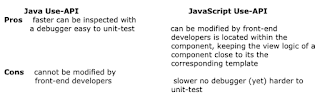
HTL Use-API
The following table gives an overview of the pros and cons of each API.

For page components, it is recommended to use a mixed model, where all model logic is located in Java, providing clear APIs that are agnostic to anything that happens in the view (i.e. within the components). AEM comes with great default models like the Page or the Resource API that should be able to cover most cases.

All view logic that is specific to a component should be placed within that component as JavaScript because it belongs to that component.


By aem4beginner

April 10, 2020
Estimated Post Reading Time ~

Dueling with Java Use API

Today, we are going to look into a more popular way of dealing with server-side logic using Java Use API.
We will be creating a simple text component (similar to the one in the previous post) and will use Java backend logic to do our task.

What on earth is WCMUsePojo?

You must have heard about the WCMUsePojo term while developing with AEM. What is it? Actually, it is a class that enables us to talk to the front end of our component. It is similar to the JavaScript Use API in usage. 

Since we likely need a way to provide back-end logic to components in AEM’s component development mechanism, we write Use API logic

We also know that HTL is a limited template language that allows doing only small basic operations, and the heavy lifting logic should be done inside a Java class or a server-side JS.

This provides better decoupling of the business logic and so your code will be more easily maintainable and also easier to debug. All of this is achieved by extending WCMUsePojo in our custom class which provides us with the capability to deal with JCR.

Example

After understanding the purpose and usage of the API, it's time to see the concepts in action.
  • Create a new AEM project using AEM Multimodule Project and deploy in your AEM instance.
  • Go to CRXDE and under your project in /apps create a new component with the following configuration
Create a component
  • After creating the component node, create a cq:dialog underneath and configure it as follows -
<?xml version="1.0" encoding="UTF-8"?>
<jcr:root xmlns:sling="http://sling.apache.org/jcr/sling/1.0" xmlns:cq="http://www.day.com/jcr/cq/1.0" xmlns:jcr="http://www.jcp.org/jcr/1.0" xmlns:nt="http://www.jcp.org/jcr/nt/1.0"
    jcr:primaryType="nt:unstructured"
    jcr:title="Text Component 2.0"
    sling:resourceType="cq/gui/components/authoring/dialog">
    <content
        jcr:primaryType="nt:unstructured"
        sling:resourceType="granite/ui/components/foundation/container">
        <layout
            jcr:primaryType="nt:unstructured"
            sling:resourceType="granite/ui/components/foundation/layouts/tabs"
            type="nav"/>
        <items jcr:primaryType="nt:unstructured">
            <tab
                jcr:primaryType="nt:unstructured"
                jcr:title="Properties"
                sling:resourceType="granite/ui/components/foundation/container">
                <layout
                    jcr:primaryType="nt:unstructured"
                    sling:resourceType="granite/ui/components/foundation/layouts/fixedcolumns"/>
                <items jcr:primaryType="nt:unstructured">
                    <columns
                        jcr:primaryType="nt:unstructured"
                        sling:resourceType="granite/ui/components/foundation/container">
                        <items jcr:primaryType="nt:unstructured">
                            <title
                                jcr:primaryType="nt:unstructured"
                                sling:resourceType="granite/ui/components/foundation/form/textfield"
                                class="field-whitespace"
                                fieldDescription="Enter the title"
                                fieldLabel="Title"
                                name="./title"/>
                            <description
                                jcr:primaryType="nt:unstructured"
                                sling:resourceType="granite/ui/components/foundation/form/textarea"
                                class="field-whitespace"
                                fieldDescription="Enter the description"
                                fieldLabel="Description"
                                name="./description"/>
                        </items>
                    </columns>
                </items>
            </tab>
        </items>
    </content>
</jcr:root>
  • Now go to the eclipse in the core child project and create a class named TextComponent2.java and paste the following code in it
package org.redquark.demo.core.cqcomponents;

import javax.jcr.Node;

import org.redquark.demo.core.models.TextComponent2Model;
import org.slf4j.Logger;
import org.slf4j.LoggerFactory;

import com.adobe.cq.sightly.WCMUsePojo;

/**
 * @author Anirudh Sharma
 * 
 * This class has the back-end logic for the Text Component 2.0
 */
public class TextComponent2 extends WCMUsePojo {

 /**
  * Logger
  */
 private static final Logger log = LoggerFactory.getLogger(TextComponent2.class);

 /**
  * Model object
  */
 private TextComponent2Model model;

 /**
  * Overridden activate method
  */
 @Override
 public void activate() throws Exception {

  try {

   log.info("Text Component 2.0 backend logic starts");

   /**
    * Initializing the model object to set the values
    */
   model = new TextComponent2Model();

   /**
    * Getting the current node from the resource object which is available in Use
    * API
    */
   Node node = getResource().adaptTo(Node.class);

   /**
    * Check if the node has title property
    */
   if (node.hasProperty("title")) {

    /**
     * Reading the title property from the string
     */
    String title = node.getProperty("title").getString();

    /**
     * Setting the value entered by the user in the model object
     */
    model.setTitle(title);

   }

   /**
    * Check if the node has description property
    */
   if (node.hasProperty("description")) {

    /**
     * Reading the title property from the string
     */
    String description = node.getProperty("description").getString();

    /**
     * Setting the value entered by the user in the model object
     */
    model.setDescription(description);

   }

  } catch (Exception e) {

   log.error(e.getMessage(), e);
  }
 }

 /**
  * This method is wrapper to return the model object
  * 
  * @return {@link TextComponent2Model}
  */
 public TextComponent2Model getModel() {
  return model;
 }
}
    This class requires a model class to save the values in memory. For this, I created one simple model class with two properties - title and description (we mimicked the edit dialog properties). Now, create a model class TextComponent2Model.java and paste the following code in it.
  • Let's look at the class TextComponent2.java and understand its code. First, we have extended the class WCMsePojo to make use of Java Use API. 
  • Now, in the overridden activate() method, we will write the logic. We are getting the adapted Node object from the getResource() method which is available due to the use of WCMUsePojo class. We then are checking the existence and getting the properties from the JCR using javax.jcr.Node API. After getting the properties, we are setting them in the model object.
  • Now, rename text2.jsp to text2.html and paste the following code in it
Text Component 2.0 - Showcases Java Use API

<div data-sly-use.text2="org.redquark.demo.core.cqcomponents.TextComponent2">
<h1>Title: ${text2.model.title}</h1>
<p>Description: ${text2.model.description}</p>
</div>
  • Here, we are using data-sly-use to include the Java file (TextComponent2.java), then we are accessing the values via the model object.
  • Now drag and drop the component on the page and configure it using the edit dialog. You will see the passed values on your page.


By aem4beginner

Dueling with JavaScript Use API

In this post, we are going to look into the concepts of Use API.

This API lets us write server-side code which can be consumed by HTL. AEM provides support for two types of Use API - Java Use API and JavaScript Use API. In this post, we are going to learn about JavaScript Use API and in the next post, we will look into Java Use API.

JavaScript Use API

A JavaScript Engine (for e.g. Google's V8 Engine) is responsible for executing JavaScript in the browser. But when we are using Use API, what makes a JavaScript engine to execute it is Rhino. It is an open-source implementation of JavaScript written entirely in Java.

Since JavaScript is translated into Java, we have Java libraries at our disposal. To understand how we can use JavaScript Use API, let's take an example.

Example

  • Create a simple text component with a basic configuration as follows 
Create a component
  • Create nodes and properties under the component node as per the following XML file
<?xml version="1.0" encoding="UTF-8"?>
<jcr:root xmlns:sling="http://sling.apache.org/jcr/sling/1.0" xmlns:cq="http://www.day.com/jcr/cq/1.0" xmlns:jcr="http://www.jcp.org/jcr/1.0" xmlns:nt="http://www.jcp.org/jcr/nt/1.0"
    jcr:primaryType="nt:unstructured"
    jcr:title="Text component"
    sling:resourceType="cq/gui/components/authoring/dialog">
    <content
        jcr:primaryType="nt:unstructured"
        sling:resourceType="granite/ui/components/foundation/container">
        <layout
            jcr:primaryType="nt:unstructured"
            sling:resourceType="granite/ui/components/foundation/layouts/tabs"
            type="nav"/>
        <items jcr:primaryType="nt:unstructured">
            <tab
                jcr:primaryType="nt:unstructured"
                jcr:title="Properties"
                sling:resourceType="granite/ui/components/foundation/container">
                <layout
                    jcr:primaryType="nt:unstructured"
                    sling:resourceType="granite/ui/components/foundation/layouts/fixedcolumns"/>
                <items jcr:primaryType="nt:unstructured">
                    <columns
                        jcr:primaryType="nt:unstructured"
                        sling:resourceType="granite/ui/components/foundation/container">
                        <items jcr:primaryType="nt:unstructured">
                            <title
                                jcr:primaryType="nt:unstructured"
                                sling:resourceType="granite/ui/components/foundation/form/textfield"
                                class="field-whitespace"
                                fieldDescription="Enter the title"
                                fieldLabel="Title"
                                name="./title"/>
                            <description
                                jcr:primaryType="nt:unstructured"
                                sling:resourceType="granite/ui/components/foundation/form/textarea"
                                class="field-whitespace"
                                fieldDescription="Enter the description"
                                fieldLabel="Description"
                                name="./description"/>
                        </items>
                    </columns>
                </items>
            </tab>
        </items>
    </content>
</jcr:root>
  • Now, create a new file text.js under the path  /apps/demoproject/components/content/text  and paste the following code in it
"use strict";
use(function() {

var text = {};

text.title = granite.resource.properties["title"];
text.description = granite.resource.properties["description"];

return text;
});
    Here, note that we are using use(function()) which signifies the usage of the Use API and in the function, at line #4, we are initializing a JS object call text. 
  • Then, we created two members of the text object, title, and description. we are setting these with the JCR properties title and description respectively. Note that to access these values from the JCR, we are using granite.resource.properties[] object.
  • In line #9, we are returning the text object.
  • Now rename text.jsp to text.html and paste the following code in it.
Sample Text

<div data-sly-use.text="text.js">
<h1>Title: ${text.title}</h1>
<p>Description: ${text.description}</p>
</div>
    Here we are using data-sly-use.text="text.js" which includes the JS file in the HTML code. You have to use the right path of the file if the HTML file and the referred file are not in the same location. This code gets the text object and accesses the properties via dot (.) operator.
  • Now drag and drop the component on the page and configure it using the edit dialog. You will see the passed values on your page.


By aem4beginner

April 7, 2020
Estimated Post Reading Time ~

Movie component using Sightly and WCM– USE API in AEM 6.1


Sightly was the part of the AEM 6.0 release. For people who are a beginner in sightly, it might be difficult to forget the practices of working with JSP and using scriptlets in your JSP files. To make you sure you are comfortable with sightly basics we started release basic Sightly component and examples.

Here’s is one more I am going to demonstrate a movie component that uses tabs and OSGI services.

Overview of component…

The general use case for this component can be of sharing movie details and reviews. I am sure you might have seen on a lot of movie booking sites where for a movie trailer, details, reviews, ratings, and upcoming movies. We tried creating a similar component.

Let’s get started with authoring it…

1. Use Tab Component from Sidekick on your page


2. Component is having many tabs to the author, some of them I have shown below:
Header title you want to give to all tabs


Details from where the banners of upcoming movies will be taken


Authoring movies details and trailers from DAM


Add Reviews from any two people


3. Once authoring is done, rendered component will look like this
Movie trailer and details


Experience from author and rating by him


Reviews from the outside world


Banners of upcoming movies taken from path authored in component

Time to move to the code part…

In order to show the trailer, I have used the video.js library. Banner for the upcoming movies is coming from the path authored. A class implementing sightly WCMUse interface path the data from dialog to OSGI service which further calls the query builder.

package com.moviecomponent.moviecomponent.core.service;

import java.util.ArrayList;
import java.util.List;
import org.slf4j.Logger;
import org.slf4j.LoggerFactory;

import com.adobe.cq.sightly.WCMUse;

public class MovieService extends WCMUse {
 Logger logger = LoggerFactory.getLogger(MovieService.class);
 protected int numberOfMovies;
 protected String path;

 MovieInterface service;
 private List < String > file;

 @Override
 public void activate() {

  this.numberOfMovies = Integer.valueOf(getProperties().get("maxMovies", ""));
  this.path = getProperties().get("moviesPath", "");

  service = getSlingScriptHelper().getService(MovieInterface.class);
 }

 public List < String > getFiles() {
  try {
   logger.info("The search term is " + this.numberOfMovies);
   this.file = new ArrayList();
   this.file = service.getUpcomingMovies(numberOfMovies, path);

  } catch (Exception e) {

  } finally {
   return this.file;
  }
 }
}

Once all the content has been authored and retrieved from the repository, it will be rendered by sightly file

<section role="main">
    <div class="container">
        <div class="row">
            <div class="twelve columns">
                <article>
                    <h2 style="margin: 6px 5%">${properties.header}</h2>
                    <div class='tabs tabs_animate'>
                        <ul class='horizontal'>
                            <li><a href="#tab-1">${properties.movieDetails}</a>
                            </li>
                            <li><a href="#tab-2">${properties.experience}</a>
                            </li>
                            <li><a href="#tab-3">${properties.reviews}</a>
                            </li>
                            <li><a href="#tab-4">${properties.contact}</a>
                            </li>
                            <li><a href="#tab-5">${properties.random}</a>
                            </li>
                        </ul>
                        <div id='tab-1'>
                        <div id="mvideo">
 
                            <video id="my-video" class="video-js" controls preload="auto" width="640" height="264" poster="${properties.fileReference}" data-setup="{}">
                                <source src="${properties.video}" type='video/mp4'>
                                        <p class="vjs-no-js">
                                            To view this video please enable JavaScript, and consider upgrading to a web browser that
                                            <a href="http://videojs.com/html5-video-support/" target="_blank">supports HTML5 video</a>
                                        </p>
                            </video>
                            </div>
                            <div id="moviedata">
                                <p><span>Movie : ${properties.movieName} <span> </p>
                                <p>Release Date : ${properties.releaseDate} </p>
                                <p>Director : ${properties.directors} </p>
                                <p>Length : ${properties.movieLength}</p>
                                <p>Production House : ${properties.productionHouse}</p>
                                <p>Language : ${properties.language}</p>
                                <p>Note : ${properties.note}</p>
                            </div>
 
                            <div data-sly-resource="${ @path='tab-1',resourceType='wcm/foundation/components/parsys'}"></div>
                        </div>
                        <div id='tab-2'>
                            <p id="experience">Our Experience with ${properties.movieName}</p>
                            <p id="rating">Ratings <img src="/content/dam/moviecomponent/rating/${properties.rating}-star.png" />
                            </p>
                            <p id="rating">Experience..... </p>
                            <div id="experiencetext"> ${properties.movieExperience @ context="html"}</div>
 
                            <div data-sly-resource="${ @path='tab-2',resourceType='wcm/foundation/components/parsys'}"></div>
                        </div>
                        <div id='tab-3'>
 
                            <div id="reviewtext"><i> ${properties.review2description @ context="html"}</i>
                            </div>
                            <p id="reviewer"> -- by ${properties.review1person}</p>


                            <div id="reviewtext"><i> ${properties.review2description @ context="html"}</i>
                            </div>
                            <p id="reviewer"> -- by ${properties.review2person}</p>
 
                        </div>
                        <div id='tab-4'>
                        <div id="experiencetext">${properties.contactDescription}</div>
                            <p id="rating"><span>Contact Person Name </span> ${properties.contactPerson}</p>
                            <p id="rating"><span>Contact Person Position </span>${properties.contactPosition}</p>
                            <p id="rating"><span>Contact Person Email </span>${properties.contactEmail}</p>
                            <p id="rating"><span>Contact Person Number </span>${properties.contactNumber}</p>
 
                        </div>
                        <div id='tab-5'>
                        <div  data-sly-use.v="com.moviecomponent.moviecomponent.core.service.MovieService">
                            <p data-sly-list="${v.files}"> 
                                <img src="${item}" height=250 width=400 style="padding:4px"></img>
                            </p>   
                        </div>
 
                        </div>
                  </div>
                </article>
                </div>
            </div>
 
        </div>
</section>

Code is available on the Github repository and the complete article is available in AEM Helpx Articles.


By aem4beginner