Showing posts with label Node JS. Show all posts

January 4, 2021
Estimated Post Reading Time ~

NodeJS Installation

Following are the instruction to install and configure NodeJS
  • Installation of NodeJS in various environments.
  • Installation is done on Centos, Ubuntu machines.
  • NodeJS version 6.x, 7.x and 8.x
NodeJS Installation on Centos 7.x
Step-1: Install dependencies
sudo yum install gcc-c++ make

Step-2: Add NodeJS Repository
# 6.x 
sudo curl -SL https://rpm.nodesource.com/setup_6.x | bash - 

# 7.x 
sudo curl -sL https://rpm.nodesource.com/setup_7.x | bash - 

# 8.x 
sudo curl -sL https://rpm.nodesource.com/setup_8.x | bash -

Step-3: Install NodeJS
sudo yum -y install nodejs npm

Step-4: Check the Installation 
version
$ node -v $ npm -v

NodeJS Installation on Ubuntu 16.04 LTS
Step-1: Install the dev dependencies
sudo apt-get install python-software-properties build-essential

Step-2: Add NodeJS Repository
# Add NodeJS 6.x Repository 
sudo curl -sL https://deb.nodesource.com/setup_6.x | sudo -E bash - 

# Add NodeJS 7.x Repository 
sudo curl -sL https://deb.nodesource.com/setup_7.x | sudo -E bash - 

# Add NodeJS 8.x Repository 
sudo curl -sL https://deb.nodesource.com/setup_8.x | sudo -E bash -

Step-3: Install Node and NPM
sudo apt-get install nodejs

Step-4: Check the Installation version
$ node -v 
$ npm -v


By aem4beginner

NodeJS Nginx Reverse Proxy

You can follow the guides below to install and configure Nginx and NodeJS
  1. Nginx Installation on Centos and Ubuntu
  2. NodeJS Installation on Centos and Ubuntu
  3. Assuming the NodeJS application is running on PORT->3000
Server Block Configuration for NodeJS Nginx Reverse Proxy
upstream skydevops_upstream {
    server 127.0.0.1:3000;
    keepalive 64;
}

server {
    listen 80;
    server_name nodejs.yebbare.com;
    root /home/shashi/;

    location / {
        proxy_set_header X-Forwarded-For $proxy_add_x_forwarded_for;
        proxy_set_header Host $http_host;
        proxy_set_header X-NginX-Proxy true;
        proxy_http_version 1.1;
        proxy_set_header Upgrade $http_upgrade;
        proxy_set_header Connection "upgrade";
        proxy_max_temp_file_size 0;
        proxy_pass http://skydevops_upstream/;
        proxy_redirect off;
        proxy_read_timeout 240s;
    }
}


By aem4beginner

NPM: Node.JS Package Manager

JavaScript is the most widely used language in Website and Web-Application development. There is an unlimited number of resources and libraries. Whilst developing, initially, the number of libraries are minimal and easy to manage, as the project progresses managing the libraries will be a tedious process. That's where NPM comes into the picture.

Node Package Manager or simply NPM is a package manager most widely used in conjunction with Node.JS and many other Javascript. NPM is used because it gives exceptional control over the dependencies in the project.

# Install a Package 
$ npm install 

# Install Specific version of a package 

$ npm install @version 
$ npm install abcd@1.2.3

COMMAND LINE OPTIONS:
Command-line is where we spend most of our time, and <strong>npm</strong> the command line is very powerful and the following are a few things about the npm command-line options. NPM documentation is the ultimate location to get end-to-end information about the command-line options. Following are the most widely used commands;

install:
This command will install a package and any package that depends on. Following are the options available


access:
This command will allow you to set access control on a private package, subcommands available are public, restricted, grant, revoke, ls-packages, ls-collaborators, and edit

bin:
This command will print out the location where npm will install executables


cache:
This command is Used to add, list, or clean the npm cache folder.


config:
npm gets its config settings from the command line, environment variables, npmrcfiles, and in some cases, the package.json file.

dedupe:
The deduplication algorithm walks the tree, moving each dependency as far up in the tree as possible, even if duplicates are not found. This will result in both a flat and deduplicated tree.

doctor:
npm doctor runs a set of checks to ensure that your npm installation has what it needs to manage your JavaScript packages. npm is mostly a standalone tool, but it does have some basic requirements that must be met:
  • Node.js and git must be executable by npm.
  • The primary npm registry, registry.npmjs.com, or another service that uses the registry API, is available.
  • The directories that npm uses, node_modules (both locally and globally), exist and can be written by the current user.
  • The npm cache exists, and the package tarballs within it aren’t corrupt.


By aem4beginner

April 21, 2020
Estimated Post Reading Time ~

Basics of Node.js

Introduction to Node.js
The modern web application has really come a long way over the years with the introduction of many popular frameworks such as bootstrap, Angular JS, etc. All of these frameworks are based on the popularJavaScript framework.
But when it came to developing server based applications there was just kind of a void, and this is where Node.js came into the picture.
Node.js is also based on the JavaScript framework, but it is used for developing server-based applications. While going through the entire tutorial, we will look into Node.js in detail and how we can use it to develop server based applications.

What is Node.js?
Node.js is an open-source, cross-platform runtime environment used for development of server-side web applications. Node.js applications are written in JavaScript and can be run on a wide variety of operating systems.
Node.js is based on an event-driven architecture and a non-blocking Input/Output API that is designed to optimize an application's throughput and scalability for real-time web applications.
Over a long period of time, the framework available for web development were all based on a stateless model. A stateless model is where the data generated in one session (such as information about user settings and events that occurred) is not maintained for usage in the next session with that user.
A lot of work had to be done to maintain the session information between requests for a user. But with Node.js there is finally a way for web applications to have a real-time, two-way connections, where both the client and server can initiate communication, allowing them to exchange data freely.

Why use Node.js?
Over the years, most of the applications were based on a stateless request-response framework. In these sort of applications, it is up to the developer to ensure the right code was put in place to ensure the state of web session was maintained while the user was working with the system.
But with Node.js web applications, you can now work in real-time and have a 2-way communication. The state is maintained, and the either the client or server can start the communication.

Features of Node.js
Let's look at some of the key features of Node.js
Asynchronous event driven IO helps concurrent request handling – This is probably the biggest selling points of Node.js. This feature basically means that if a request is received by Node for some Input/Output operation, it will execute the operation in the background and continue with processing other requests.
This is quite different from other programming languages. A simple example of this is given in the code below

var fs = require('fs');
fs.readFile("Sample.txt", function(error, data) {
 console.log("Reading Data completed");
});

  • The above code snippet looks at reading a file called Sample.txt. In other programming languages, the next line of processing would only happen once the entire file is read.
  • But in the case of Node.js the important fraction of code to notice is the declaration of the function ('function(error,data)'). This is known as a callback function.
  • So what happens here is that the file reading operation will start in the background. And other processing can happen simultaneously while the file is being read. Once the file read operation is completed, this anonymous function will be called and the text "Reading Data completed" will be written to the console log.
Node uses the V8 JavaScript Runtime engine, the one which is used by Google Chrome. Node has a wrapper over the JavaScript engine which makes the runtime engine much faster and hence processing of requests within Node also become faster.

Handling of concurrent requests – Another key functionality of Node is the ability to handle concurrent connections with a very minimal overhead on a single process.

The Node.js library used JavaScript – This is another important aspect of development in Node.js. A major part of the development community are already well versed in javascript, and hence, development in Node.js becomes easier for a developer who knows javascript.

There are an Active and vibrant community for the Node.js framework. Because of the active community, there are always keys updates made available to the framework. This helps to keep the framework always up-to-date with the latest trends in web development.

Who uses Node.js
Node.js is used by a variety of large companies. Below is a list of a few of them.
  • Paypal – A lot of sites within Paypal have also started the transition onto Node.js.
  • LinkedIn - LinkedIn is using Node.js to power their Mobile Servers, which powers the iPhone, Android, and Mobile Web products.
  • Mozilla has implemented Node.js to support browser APIs which has half a billion installs.
  • Ebay hosts their HTTP API service in Node.js
When to Use Node.js
Node.js is best for usage in streaming or event-based real-time applications like
  1. Chat applications
  2. Game servers – Fast and high-performance servers that need to processes thousands of requests at a time, then this is an ideal framework.
  3. Good for collaborative environment – This is good for environments which manage document. In document management environment you will have multiple people who post their documents and do constant changes by checking out and checking in documents. So Node.js is good for these environments because the event loop in Node.js can be triggered whenever documents are changed in a document managed environment.
  4. Advertisement servers – Again here you could have thousands of request to pull advertisements from the central server and Node.js can be an ideal framework to handle this.
  5. Streaming servers – Another ideal scenario to use Node is for multimedia streaming servers wherein clients have request's to pull different multimedia contents from this server.
Node.js is gooda when you need high levels of concurrency but less amount of dedicated CPU time.

Best of all, since Node.js is built on javascript, it's best suited when you build client-side applications which are based on the same javascript framework.

When to not use Node.js
Node.js can be used for a lot of applications with various purpose, the only scenario where it should not be used is if there are long processing times which is required by the application.

Node is structured to be single threaded. If any application is required to carry out some long running calculations in the background. So if the server is doing some calculation, it won't be able to process any other requests. As discussed above, Node.js is best when processing needs less dedicated CPU time.


By aem4beginner

Node.Js Vs AngularJS: Know the Difference

What is Node JS?
Node.js is a cross-platform runtime library and environment for running JavaScript applications outside the browser. This is a free and open source tool used for creating server-side JS applications.

Node.js applications are written in JavaScript. This application can runs within the Node.js runtime on Linux and Microsoft Windows. This framework offers a rich library of various JavaScript modules to simplify web development process.

What is Angular JS?
AngularJS is a structural framework for developing dynamic web apps. It allows developers to use HTML as template language and lets HTML's syntax to express application's components briefly but clearly.
It is a full-featured JavaScript framework, with the primary goal of simplification. It provides support for developing dynamic, single page web apps and supports the (MVC) programming structure.

Node JS VS. Angular JS


What Is Better Node JS Or Angular JS?
Both Node.js and AngularJS platforms are targeted at building web applications using JavaScript. However, both of them are different in their architecture and working. Node.js mainly used to build server-side applications. AngularJS is suited for building single-page client-side web applications.

These two frameworks are high performing, advanced and widely used worldwide. So one should select according to his/her project need.

Conclusion:
  • Node.js is a cross-platform runtime library and environment for running JavaScript applications outside the browser.
  • Node.js offers a rich library of various JavaScript modules that can simplify coding.
  • AngularJS is a structural framework for developing dynamic web apps.
  • The goal of the Angular JS framework is to provide simplified the development process.
  • Node JS is Ideal for developing small size projects while Angular JS is a great option for long size projects.
  • Both Node.js and AngularJS platforms are targeted at building web applications using JavaScript. However, both of them are different in their architecture and working


By aem4beginner

Node.js Vs Python: What's the Difference

What is Node.js?
Node.js is a server-side platform built on Google Chrome's JavaScript Engine. It uses a non-blocking, event-driven I/O model. It allows developers to create data-intensive real-time applications that run across distributed devices. Its applications are written in JavaScript. It can be run on OS X, Microsoft Windows, and Linux operating systems. It is widely used to run real-time server applications.

What is Python?
Python is an object-oriented, high level, dynamic and multipurpose programming language. Python's syntax and dynamic typing with interpreted nature, make it an ideal language for scripting.
It supports multiple programming patterns, including object-oriented programming, functional programming, or procedural styles. Moreover, it an interpreted language which means it cannot convert to computer-readable code before its runs at runtime.

In this compariosn, we will cover
  1. Features of Node js
  2. Features of Python
  3. Node JS Vs. Python
  4. When to use Node js?
  5. When to use Python?
Features of Node js
  • It uses a single threaded model with event looping. This type of event mechanism benefits the server to respond in a non-blocking way.
  • It is built on V8 JavaScript Engine makes it fastest code execution library.
  • There is no buffering in Node.js as applications output the data in pieces.
Features of Python
  • It allows low-level modules inclusion to the Python interpreter. These modules allow programmers to add or customize their tools.
  • It provides interfaces to all major commercial databases.
  • It supports functional and structured programming methods as well as OOP.
  • It offers high-level dynamic data types and supports dynamic type checking.
  • It can be easily integrated with C, C++, COM, ActiveX, CORBA, and Java.

Node.JS Vs. Python
Node.JS
Python
Node.js is best suited for asynchronous programmingPython is not exactly the best option for asynchronous programming.
Node.js is pure JavaScript, so its basics remain simple for the developers to learn. The biggest advantage of using Python is that developers need to write fewer lines of code.
Node.js lacks the clean coding standards. That's why it cannot be recommended for larger projects. It is ideal for a large project as it can do anything that can be done using PHP code.
Node.js is an ideal platform available right now to deal with real-time web applications. Not an ideal platform to deal with real-time web applications.
It best suited for small projects to enable functionality which needs less amount of scripting. Python is suited for developing larger projects.
Best for memory intensive activities. Not advisable for memory intensive activities.
Node.js is a better choice if your focus is on web applications and website development. Python is an ideal platform to do multiple things - web applications, integration with back-end applications, numerical computations, machine learning, and network programming.
Node.js utilizes JavaScript interpreter. Python using PyPy as Interpreter.
Node.js supports callback. Its programming is based on event/callback that makes it process Faster. It supports generator

Selecting a development platform is significant steps in the app development phase. Node.JS and Python are certainly two highly discussed languages nowadays. Let where we can use Node JS and when to use python.

When to use Node js?
As Node.js is a platform built on Chrome's JavaScript runtime it helps to develop building scalable network applications. It uses an event-driven, non-blocking I/O model which makes it an ideal option for developing for data-intensive real-time applications.
Node.js offers greater performance and speed. It is an ideal solution for developing messaging or chatting applications. It is also useful for developing heavy-load applications and e-commerce sites that depend on the speed of processing.

Apps best suited with Node JS:

  • I/O bound Applications
  • Data Streaming Applications
  • Data Intensive Real-time Applications (DIRT)
  • JSON APIs based Applications
  • Single Page Applications
When to use Python?
Python has a library of open source data analysis tools, web frameworks, and testing instruments. Therefore, its ecosystem one of the largest out of any programming community.

Python is a most accessible language for new programmers as community provides many introductory resources. The language is also taught in universities and used for working with beginner-friendly devices such as the Raspberry Pi.
Python is also featuring consistency, stability, and easiness of use. It is highly preferred for developing scientific applications, big data solutions, and government projects.

Apps best suited with Python

Conclusion:
  • Node.js is a server-side platform. It is built on Google Chrome's JavaScript Engine. It offers features like single thread, very fast performance and no buffering.
  • Python is an object-oriented, high level, dynamic and multipurpose programming language. It has features like support for major databases, functional and statured programming, etc.
  • Node.js can be used for client and server web development.
  • Python is best suited for developing scientific and big data solutions.


By aem4beginner

April 13, 2020
Estimated Post Reading Time ~

How to compile LESS using Node JS

You can use Node JS to compile LESS files into CSS files. The first thing to do is to install Node JS on your computer, For information, see:
https://blog.teamtreehouse.com/install-node-js-npm-windows

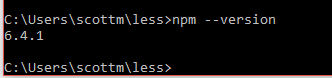
Once you have Node JS installed on your machine, test the installation:
npm -version

If this command is successful, you will see the installed version.


In your working folder, place a LESS file named simple.less. For example, you can use this LESS code:

@primarycolor: #FF7F50;
@color:#800080;
h2{
color: @primarycolor;
}
h3{
color: @color;
}

Next, create an HTML file named index.html:
<head>
<link rel="stylesheet" href="simple.css" type="text/css" />
</head>
<body>
<h2>A simple example of Less</h2>
<h3>Hello World</h3>
</body>
</html>
In this working folder, you have a simple.less and index.html. In the HTML file, notice the reference to simple.css. This file is produced by compiling the LESS file into a CSS file. To compile the LESS file into a CSS file, use this command:

lessc simple.less simple.css

In your working folder, you will now have simple.css.

h2 {
color: #FF7F50;
}
h3 {
color: #800080;
}

Open the HTML in a browser, and you will see the rendered HTML with the CSS.

You have now learned how to compile a LESS file into a CSS file by using Node JS.


By aem4beginner