Showing posts with label ACS Commons. Show all posts

March 23, 2021
Estimated Post Reading Time ~

ACS Commons Tools - Environment Indicator

In this blog post, I will be discussing some of the tools that ACS Commons provides which are helpful in the course of development as well as provide easy-to-use functionalities.

1) AEM Environment Indicator
During the course of deployment to any environment, we usually open multiple environments on the browser and make changes to different environments. Since there is less turnaround time for fixing during deployment, it usually results in a humane error.

Example: If we are deploying to a pre-prod environment we usually have a stage and local environment open in the browser and might copy values from stage to pre-prod by mistake.

ACS Commons provides a utility through which we can mark different environments with their name. This will reduce the confusion of which environment we are working in.

In order to enable it, go to /system/console/configMgr and search AEM Environment Indicator.


Enter the below values in order to enable the Indicator for the environment.


Properties :
1) Color: Marks the color of the indicator. Takes any valid CSS bg color value.
2) CSS Override: CSS to style the indicator div. All CSS should be applied to #acs-commons-env-indicator.
Note: z index value should have a higher value.
3) Inner HTML: Valid HTML or text for the name of the indicator
4) Browser Title: Prefix for the browser title
5) Excluded WCM Modes: Multi-value property for excluding WCM modes.

After configuring properties, click on OK. You'll be able to see the indicator in your environment.
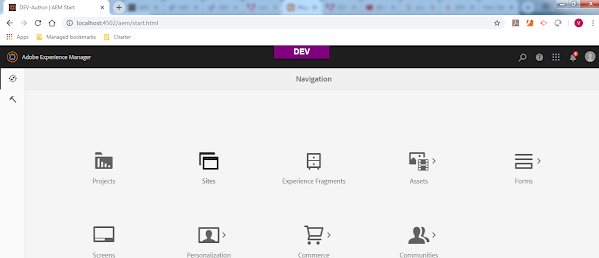


We can specify the name of different environments by putting the OSGI config com.adobe.acs.commons.wcm.impl.AemEnvironmentIndicatorFilter in the run modes.

2) ACS Named Image Transform Servlet

ACS commons provide image transformations via OSGI configuration through invoking a parameterized GET request. This can be used to generate renditions of the image on run time, thereby putting less storage on the DAM.

In order to utilize it go to /system/console/configMgr and search ACS AEM Commons-Named Image Transformer Factory
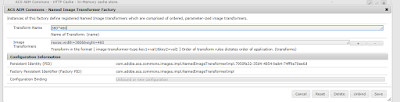
There are two properties that are required:

1) Transform Name: Name of the transformation through which we want to apply the image transformations.
Example: We can define the name of the renditions and provide the image transform for it.

2) Image Transformers: Multivalue property where we can specify different transformations that can be applied to the image.
Example: In the above example, I have used resize property with width and height.

To check the transformation of the image, open a particular image and add it below to its source URL.

.tranform/name-of-transform/image.png

Example: http://localhost:4502/content/dam/we-retail/en/activities/climbing/climber-gear-indoor.jpg.transform/380*460/image.png

This will result in an image with width as 380 and height as 460.

If we apply multiple transforms differently , the transformations will be applied in the same order. Example a resize and crop can yield result differently than crop and resize.

There are multiple other transformations that can be applied to the image. For further details :
https://adobe-consulting-services.github.io/acs-aem-commons/features/named-image-transform/index.html

Use the PID com.adobe.acs.commons.images.impl.NamedImageTransformerImpl for different run modes.

If you want to check what all resource types are supported or modify the existing. Search NamedImageTransformServlet in /system/console/configMgr
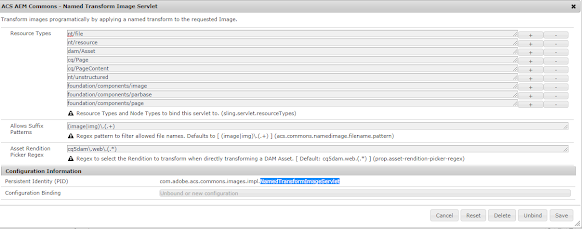


Use the PID
com.adobe.acs.commons.images.impl.NamedTransformImageServlet for different run modes.


By aem4beginner

January 4, 2021
Estimated Post Reading Time ~

ACL Packager ACS Commons

SYNOPSIS:
Following is the guide to creating a package containing access control entries that could be copied from one ENV to another. We shall use the ACL packager to package the required things. Using ACL packager we generate a package, then adding extra filters to remove the admin and anonymous users and package it. Later download the package, extract and add Merge mode to the user and group filters, and archive the package. This package can be now used on target machines.

PREREQUISITES:
ACS Commons Package – Can be installed using the guide ACS Commons Installation

GUIDE:
Step-01: Goto Tools > Operations > Configuration [http://localhost:4502/miscadmin]


Step-02: Create an ACL Package


Step-03: Edit the Configuration


Step-04: Step-by-Step explanation


Step-05: Exclude Admin and Anonymous user from the package


Step-06: Examine the Package on Package Manager


Step-07: Excluding the admin and anonymous users


Step-08: Build the package


Step-09: Successfully Built Package


Step-10: Download Package so that it can be used on the TARGET machines

Step-11: Extract and Edit the download package


Step-12: Edit the filter.xml and add merge mode


Step-13: Re-ZIP and Install on Target Machines


By aem4beginner

ACS Commons Installation

Following is the guide to install the ACS Commons package on the AEM instance.

Step-01: Go to the following link to ACS Commons Package


Step-02: Directly download the latest version from the following link


[code lang=’bash’]
$ https://github.com/Adobe-Consulting-Services/acs-aem-commons/releases/download/acs-aem-commons-3.17.0/acs-aem-commons-content-3.17.0.zip
[/code]

Step-03: Open CRXDE and select the Package Manager


Step-04: On Package Manager, select UPLOAD PACKAGE


Step-05: Browse and Upload the downloaded ACS commons package


Step-06: Install the uploaded Package


Step-07: Verifying Package installation


By aem4beginner

January 2, 2021
Estimated Post Reading Time ~

ACS AEM Commons Audit Log Search

On a recent project, we had some issues around go-live where production content was being overwritten, deleted, or changed. We needed to figure out what was causing these

issues quickly, as this was affecting author productivity and could potentially cause content issues if the wrong content went live.

At the time, we used queries in CRXDELite to search the AEM Audit Log for events to diagnose the issue, however, I felt like there had to be some better way. Surprisingly, AEM does not include a way to search the Audit Log in a GUI.

Donating to ACS AEM Commons
Since this was clearly a need, I created an Audit Log search console and donated it to the ACS AEM Commons project, an Open Source collection of tools and utilities for the AEM platform maintained by Adobe.

The Audit Log Search console was accepted and is now available in ACS AEM Commons version 3.7.0 and newer for AEM 6.2 and version 2.10.0 and newer for AEM 6.0.

Using Audit Log Search

To use the Audit Log Search:
Download AEM ACS Commons version 3.7.0 or later if you are using AEM 6.2+ or version 2.10.0 if you are using AEM 6.0 or 6.1
Navigate to /etc/acs-commons/audit-log-search.html on your environment
Enter your search parameters
Click the Search Audit Log button

This will perform the search and return the results in the table below.


You can read more on the ACS AEM Commons website. Hopefully, this helps you more easily track down who changed what and when in your AEM instance.


By aem4beginner

September 22, 2020
Estimated Post Reading Time ~

Custom Dispatcher flush rule setup | acs commons

Create a custom dispatcher flush rule for your content, which an author can trigger using UI, without any involvement of developer and DevOps person. This is a single click activity for an author to invalidate the dispatcher cache.

For this ACS-commons provide a powerful which we need to configure in our AEM author instance. Here are the steps to set up the custom dispatcher flush using acs-commons.


Step 1: Log in to AEM instance.


Step 2: Download the acs-commons latest version from acs official site and install the acs-commons package in your AEM instance using AEM package manager [http://localhost:4502/crx/packmgr].


Step 3: After the successful installation of acs-commons, browse to AEM tools section. http://localhost:4502/miscadmin. 


Step 4: Now create a dispatcher flush page to set up your dispatcher configuration. Below is the screenshot.

1. Click on the Dispatcher Flush directory from the left rail.

2. Click on the new button from the menu bar, and select the option, New Page. As soon as you click on the New Page option a new window will appear. As highlighted below.

3. Put the Title and Name for the page. e.g. custom dispatcher flush

4. Click on the create button.

5. This will create a custom-dispatcher-flush page under the Dispatcher Flush directory.


Custom dispatcher flush

Step 5: Open this newly created "custom dispatcher flush" page. To open double click on the page name. Our custom dispatcher flush page will look like as below.

Note: In the above screenshot we could see under the Active Dispatcher Flush Agent there is no active dispatcher flush replication agent is showing.

Step 6: Click on the Edit option from next to the Dispatcher Flush Configuration. Once we click on Edit, the configuration settings option will appear. Here we have to set the following;
1. Flush method - We need to specify whether we want to invalidate the caching or completely delete the caching from the dispatcher server.
2. Paths to flush - We will list all the path and pages which we want to invalidate or delete from the dispatcher server. 

Step 7: Now we have to enable the Dispatcher Flush agent queue on AEM author. [http://localhost:4502/etc/replication/agents.author/flush.html]. If the AEM instance is already configured with dispatcher then we need not do anything extra in this case, just verify the Dispatcher Flush agent from the above-mentioned path. 

In case the dispatcher Flush is not setup then configure the following in properties in the configuration setting.

1. Edit the Dispatcher Flush settings. Click on the Edit button from the below screen.

2. Enabled - Check enabled option.

3. Move to the transport tab and set the following

a. URI - URL of the dispatcher server.

b. User - a transport user name

c. Password - password of transport user


Our dispatcher configuration is set, now using the Test Connection option we can verify the configuration setting and ensure everything is fine. 


Step 8: We have done with our custom dispatcher setup.
Step 9: Now go back to your custom dispatcher page which we had created in Step 4. Open the page and see the changes. In the dispatcher flush page now we could see Flush paths on the Dispatcher button and Dispatcher Flush under Active Dispatcher Flush Agent.
Step 10: Click on Flush Paths on the Dispatcher button highlighted in red to invalidate and delete the caching from the dispatcher server. Below is the screenshot. After triggering the flush go and validate the status of the cached content.

Dispatcher flush


References:

Adobe consulting services: 


By aem4beginner

May 26, 2020
Estimated Post Reading Time ~

The advent of Add-on Advantages in AEM: ADX Tools

Adobe Experience Manager (AEM) provides a multitude of OOTB features to comfort the lives of users in various fields. Enriching those features by providing user-friendly consoles for specific tasks would be like an icing on the cake! This is the concept behind ADX Tools – a collection of user-friendly wizards that enhance AEM functionalities.

During release activities, there are many scenarios where admins or editors wish for an easy to use the console as experiencing a productive workday feels euphoric for everyone! Sometimes, the administrator also wishes for wizards to ease up their tasks for the maintenance of AEM.

As a popular saying goes,
‘Good things come in small packages’,

ADX Tools is an amalgamation of a myriad of features in AEM developed at Argil DX, that would garnish the OOTB AEM features giving users a friendly console and quick results to save time. It is a package providing various wizards to cater to the requirements of admins or authors to make some of their tasks easier.


Let’s take a sneak peek into the utility of the tools and problems that they resolve!

Packages in AEM can become obsolete after some time and admins will accept that they consume a lot of repository space. Sometimes, it is difficult to debug the problem of growing repository size. Package Purging Tool is a silver lining in the cloud for admin as it provides a console to deal with this issue and helps purge packages in bulk.

AEM Tree Activation can be enhanced by adding some easy-to-use features and providing answers to various queries of replication. Many questions revolve around selecting the replication paths or getting a console for bulk activation, deactivation, or delete operations and choosing relevant replication agents. Selective Replication Tool is a one-stop solution for all the replication activities.

There are instances when AEM admins want to manage AEM users conveniently from a single console i.e. be able to disable the users who are no longer required to login to the system or delete the users who have left the organization or enable some users who have just switched the projects. Also, admins might want to look at the percentage of users logged into the system for a specified time. User Status Report will give a detailed list of active, inactive, disabled, or system users based on their login time.

It is usually a tough task to create packages by adding a huge list of filters manually and managing the child nodes and DAM renditions. Selective Content Packaging automates this task and simplifies the burden of content authors to create packages from an excel file as input. It also gives detailed packaging logs and a history of packages created.

During release procedures, admins require a list of pages that have been modified or reauthored since the last release to be able to package them. Or a list of pages that have been modified but not replicated yet. Content Report is an answer to all such reporting queries to make the lives of content authors simpler in terms of managing the project.

OOTB Live Usage Report shows the live usage of components on pages. Sometimes, due to heavy content on the site, the response is slow. Wouldn’t it be easier for authors to get live usage of multiple components belonging to multiple sites all in one single click? The New Components Usage Report is a console for providing multi-site, multi-component reports with many more interesting features.

So, ADX AEM Tools is a consolidation of some additional features that enrich the OOTB features in AEM and can provide a real deal of ease for users.

Downloading and installing the ADX Tools is fairly simple. You can watch the step-by-step video of the ADX Tools installation.


By aem4beginner

On-Deploy Scripts – an ACS AEM Commons Utility

Developers need to perform certain tasks during deployment to the AEM server. Component reauthoring is one of the major tasks for a developer to make changes to existing components. In this article, we’ll talk about using on-deploy scripts to simplify reauthoring tasks in AEM.

Problem Statement:
If the component is to be configured on one or two pages, then reauthoring is simple. However, if the component needs to be configured on many pages, then it’s tedious for an author to reauthor the same component on every page.

This is one of the scenarios in which we can use an on-deploy script. Here is a list of problems we will try to solve.

What Problems Are We Trying to Solve?
Running ad-hoc script manually
Update the content without reauthoring
Admin update that needs to do on all server
Mass content updates
One-time content creation
Removing obsolete content
Deleting all nodes of a particular resource type
Available Methodology to Solve the Above Problems

Using Servlet
Using Ad-hoc scripts
Issues with Servlet or Ad-hoc Scripts

Security Risk
Password Expose
Anyone can execute
The server remains in the broken state till we run Ad-hoc script or if it fails
Making sure you run scripts on deployment else existing functionality breaks
Keeping track of scripts that have been run becomes difficult
ACS AEM Commons provides a useful utility called “On-Deploy Scripts,” which help developers create one-time scripts that execute upon deployment to an AEM server. This feature is available for v3.15.0 and higher versions of ACS-AEM Commons.

So, to overcome this problem we can use On-Deploy Scripts.

Advantages of On-Deploy Scripts:

On-Deploy Scripts allows developers to create one-time scripts that execute upon deployment to an AEM server. Some advantages of this one-time script creation feature are given below.

Fully automated
Continuous integration gives you automatic testing on Pre-prod
Scripts execute along with deployment – more broken state
Automation removes chances for error
Script status is preserved to be validated later
Available with version v3.15.0

How To use:
Install v3.15.0 or higher version ACS-AEM Commons
Enable on-deploy script feature
Create OSGi configuration
“com.adobe.acscommons.ondeploye.impl.OnDeployExecutorImpl.xml”

<?xml version="1.0" encoding="UTF-8"?>
<jcr:root xmlns:sling="http://sling.apache.org/jcr/sling/1.0"
xmlns:jcr="http://www.jcp.org/jcr/1.0"
                      jcr:primaryType="sling:OsgiConfig"/>
Implement Script Provider Service
Override the getScripts () method.
@Component(immediate = true)
@Service
@Properties({
                @Property(name = "service.description", value = "Developer 
service that identifies code scripts to execute upon deployment")
})
public class OnDeployScriptProviderImpl implements OnDeployScriptProvider 
{
      @Override
      public List<OnDeployScript> getScripts() {
               return Arrays.asList(
                               new ScriptCreateNode(),
                               new ScriptSearchUpdateResourceType()
                );}}
Create Script and Add Script Provider
Override execute () method
public class ScriptUpdateProperty extends OnDeployScriptBase  implements
OnDeployScript {
         @Override
         protected void execute() throws Exception {

Node = nodeupdate = getOrCreateNode(“content/we-
retail/us/en/onDeployePage/jcr:content”,”cq:Page”,”cq:PageContent”);

Nodeupdate.setProperty(“sling:resourceType”,”weretail/components/structure/page”);}}}
Make sure acs-commons-on-deploy-scripts-service user has all necessary permissions
Just install the package
Check status at /var/acs-commons/on-deploy-script-status

Demo:
A working demo present on bitbucket https://bitbucket.org/argildx/aemdev-meetup-s1/overview


By aem4beginner

Ensure Service User – An ACS AEM Commons Utility

Prior to AEM 6.2, developers used administrative resource resolver to access JCR programmatically. Now, Ensure Service User in AEM will make the process less error-prone and easier to manage.

Problem Statement: 
Let us assume that a developer needs to access the resource from the content path programmatically. Before AEM 6.2, administrative resource resolver was one of the ways to achieve the same. In addition to providing access to the content path(s), administrative resource resolver provides access to the complete repository thereby making the application prone to making undesired changes (e.g. nodes under /libs, /apps etc.). 

Since AEM 6.2, administrative resource resolver has been deprecated by Adobe and to address the above issue Adobe introduced “Service User”.  

Service User: 
A service user is a JCR user with no set password and limited privileges necessary to perform a specific task. No password requirement means that it will not be possible to log in with a service user. 

JCR is accessed using service users instead of the administrative resource resolver. 

Below are two plus points about Service User. 

A service user per bundle with a limited set of permissions. 
It does not have a password so no one can log in. 
Problems With Service User: 
Manual activity on every server. 
Assign permission on every server. 
Management of these permissions is prone to error. 
Again, there is a lot of manual work for developers to set up service users in different environments. 

To overcome this problem, ACS Common provides a different way to bootstrap AEM projects with different functionality, a set of reusable components, and an AEM development kit.  

Here, we are going to discuss great utilities of ACS common named “Ensure Service User”.  

Ensure Authorizable or Ensure Service User: 
Ensure Service User is provided by ACS commons. Here are some points about Ensure Service User. 

Create once and use everywhere. 
Define service user and their ACL in OSGi configuration. 
Less error-prone and easy to maintain. 
You can manage the group and hierarchies for the service users. 
Available since version v3.8.0. 

How to use: 
Here step by step procedures are described to use “Ensure Service User”. 

Create an OSGi configuration for service user using factory configuration 
com.adobe.acs.commons.users.impl.EnsureServiceUser-meetupUser.xml 

<?xml version="1.0" encoding="UTF-8"?> <jcr:root xmlns:sling="http://sling.apache.org/jcr/sling/1.0" xmlns:cq="http://www.day.com/jcr/cq/1.0"   xmlns:jcr="http://www.jcp.org/jcr/1.0" xmlns:nt="http://www.jcp.org/jcr/nt/1.0"   jcr:primaryType="sling:OsgiConfig"   principalName="meetup-service-user"   type="add"   ensure-immediately="{Boolean}true"   aces="[type=allow;privileges=jcr:read\,rep:write;path=/content]"/> 
Here please note followings points: 

Principal Name: 
The principal name is the name of your service user. It can be just a principal name or principal name with a relative path or principal name with an absolute path.  

Remember, service users may only exist under the “/home/users/system” path. 

For example: 
1. Your Input: meetup-service-user  

Service User will be created under path: “/home/users/system/meetup-service-user” 
2. Your Input: /my-company/meetup-service-user or my-company/meetup-service-user or /my-company/meetup-service-user 

Service User will be created under path: “/home/users/system/my-company/meetup-service-user” 

3. Your Input: /home/users/system/my-company/meetup-service-user 

Service User will be created under path: “/home/users/system/my-company/meetup-service-user” 

Note:
If a system user exists with the same principal name at a DIFFERENT location, this tool assumes that the service user is correct and not attempt to move it to the specified location in this configuration. 
If a principal name is specified for an AEM or ACS AEM Commons provided system user, the ensure user process will fail. This list may not always be exhaustive and up to date and meant to help protect against collisions. 

Type:  
ACS AEM Commons provides the facility to add or remove Service Users. Here we are creating the service user. 

Option “add”: Ensure the existence of service users. 
Option “remove”: Ensure that service user is removed. 

Ensure-Immediately:  
Two options are available, we can set it either true or false. By default, it is true. 

Option “true”: When set to true, the insurance is performed whenever this bundle is loaded. 

Aces:  Array of ACE (access control entry) definitions to ensure for the principal. 

Format: type=allow;privileges=jcr:read,rep:write;path=/content/foo;rep:glob=/jcr:content/* 

type: allow OR deny, it is a required property. 
privileges: comma-delimited list of valid JCR privileges, it is a required property. 
path: an absolute content path in which the ACE will be applied, it is a required property.
  
1. Service user mapping with OSGi Service. 
Map your service user with Resource resolver service. 

org.apache.sling.serviceusermapping.impl.ServiceUserMapperImpl.amended-meetupUser.xml 

<?xml version="1.0" encoding="UTF-8"?><jcr:root xmlns:sling="http://sling.apache.org/jcr/sling/1.0" xmlns:jcr="http://www.jcp.org/jcr/1.0"  jcr:primaryType="sling:OsgiConfig"  user.mapping="[com.argildx.argildx-meetup:ResourceResolverUtil=meetup-service-user]"/> 

2. Use this service to get a resource resolver instance. 
public class ResourceResolverUtil { 

  /** The resource resolver factory. */   

@Reference private transient ResourceResolverFactory resourceResolverFactory; 

  /** Gets the resource resolver. 

   * @return the resource resolver  */ 

public ResourceResolver getResourceResolver() { 

    ResourceResolver resourceResolver = null; 

    try {      final Map<String, Object> authInfo = Collections.singletonMap(ResourceResolverFactory.SUBSERVICE, (Object) "ResourceResolverUtil");       

resourceResolver = resourceResolverFactory.getServiceResourceResolver(authInfo);     

} catch (LoginException le) { 

}     

return resourceResolver;   

}} 
 
Demo: 
A working demo present on bitbucket can be viewed on the following  link: https://bitbucket.org/argildx/aemdev-meetup-s1/overview 


By aem4beginner

May 19, 2020
Estimated Post Reading Time ~

4 Ways AEM Commons Can Save You Time

Have you ever been working with a component in AEM and wished it had one little enhancement to make your life easier? It’s true that in many cases AEM’s out-of-the-box (OOTB) functionality is sufficient to get most tasks completed. But sometimes all developers feel like the issue they are facing is likely a common one and may have already been solved. If either of these is the case for you, then you should check out the AEM Commons and AEM Tools packages! They are packed with AEM functionality that can help you from day one!
A Wild Solution Appears!

AEM Commons and Tools are a set of reusable components and features created to ease the lifecycle of AEM 6.0+ development. These features are stored in open-sourced packages, meaning implementation can be tweaked to a fit a specific client’s needs. Neither require the use of 3rd party dependencies, or make changes to standard AEM functionality by default. Finally, both packages are incredibly easy to install: simply download the .zip files from github and then install them using the Package Manager.
While there are quite a few different components and tools in each package, I’m going to highlight of a few that we found interesting and useful.

Dynamic RTE Configuration
How many times has each of a client’s business units needed different implementations of an RTE (Rich Text Editor) Component? One site may have specific styling requirements, while another needs to make use of some special characters. Typically, this situation leads developers to make two very similar components that may only differ in configuration… we have just entered any developer’s nightmare. Duplicate code scattered around a codebase, makes for a true maintenance disaster. Enter Dynamic RTE Configuration, an AEM Commons plugin that allows for multiple configurations of a single RTE component across different sites. By creating a node structure under /etc/rteconfig for multiple sites, for example: /etc/rteconfig/siteA and /etc/rteconfig/siteB, specific rules can be specified for different content paths.

Version Comparison Tool
AEM’s OOTB tool to compare resource versions is definitely a feature that we wish had just a little bit more functionality. In the current OOTB functionality, only two versions can be compared at a time, which can sometimes make tracking down a specific change in content difficult. Compound this issue with the fact that some clients have 100’s of authors, who can all be making changes to the same resources. The Version Comparison tool in AEM Commons allows multiple versions of a resource to all be compared at the same time. It even allows for disabling properties that you are uninterested in (system properties that might change with every version). So hunting down the specific information you are looking for becomes much easier.

CSV Asset Importer
Sometimes it’s hard to remember your site (or life) before AEM, but believe me, it existed! I’m sure that site had a lot of valuable resources, that became the focus (dread) of lots of meetings about how/if to move them to your shiny new AEM instance. I’m sure the business was already fearful of the nasty word migration… things get lost, data becomes corrupt, and manual processes take too long.

Fortunately I have good news, gone are the days of painful manual migrations of previous resources! A nice feature in the AEM Tools package is the CSV Asset Importer. It is a tool that reads in a CSV (Comma Separated Value) file containing assets and some metadata about them, and automatically imports them to the desired location in your AEM instance. There are only a few required fields in the CSV, where the resource file currently exists, and where you would like the file to be imported in AEM. Additionally, properties that should be added to the new resources can be listed with their type, and value specified (multi-values are supported).

Test Page Generator
Sticking with the theme of automation, the last tool we will highlight is the Test Page Generator in the AEM Tools package. This tool is capable of automatically creating any number of pages in your AEM instance. It is very handy for doing any kind of scalability or performance testing. A unique functionality for this tool is how you can specify properties to be added to each new page. Their values can even be dynamically calculated with server-side javascript code. For example, this could be useful for creating test pages that each have different geolocation code as a property value.

Closing Time
These are just a few of the many helpful tools inside the Adobe Commons and Tools packages. Go check them out and I bet you will find something you can use. Being an open-source project, you also never know what other new features they will have (or you will implement) in the future!


By aem4beginner

May 15, 2020
Estimated Post Reading Time ~

Extending the ACS AEM Commons Generic List to Support Multiple Fields


The Adobe Experience Manager ACS Commons Generic List facilitates authorable Title / Value pairs that can be used to populate dropdowns from a centrally authored location. The functionality of the Generic List is limited to the Title and Value pairs, but there could be other use cases for centrally managed metadata that can be easily chosen from a dropdown. This example will extend the Generic List to manage metadata for organizational units/departments.

The Generic List implementation is final, so not extendable, but the underlying interface only relies on the jcr:title/value pairs to be present. We will use this and add additional fields that we can adaptTo to our own implementation. The Generic List was built before the prevalence of Sling Models, so for this example, we will try to simplify this by utilizing Sling Models.

Example Implementation on Github: https://github.com/msullivan-r2i/acs-genericlist-extension

Implementing the List Extension

department.java
This is the Sling Model that will add email and phone values to the existing jcr:title and value fields. It implements GenericList.Item, however, this is not strictly required. The mechanisms that populate the dropdown will not use the Department implementation and rely on the underlying jcr:title & value fields and utilize the ACS implementation.

@Model(adaptables=Resource.class)
public class Department implements GenericList.Item {

static final String TITLE_PREFIX = NameConstants.PN_TITLE + ".";

@Inject
private Resource resource;

@Inject @Named("jcr:title") @Default(values="")
public String title;

@Inject @Default(values="")
public String value;

@Inject @Default(values="")
public String phone;

@Inject @Default(values="")
public String email;

public String getTitle() {
return title;
}

public String getTitle(Locale locale) {
/* see full file */
}

private String getLocalizedTitle(Locale locale) {
return resource.getValueMap().get(TITLE_PREFIX + locale.toString().toLowerCase(), String.class);
}

public String getValue() {
return value;
}

public String getPhone() {
return phone;
}

public String getEmail() {
return email;
}
}
department-generic-list.html
This renders the item in the Generic List authoring page. The ACS Implementation uses JSP and not Sling Models, but this is a little simpler.


<sly data-sly-use.department="com.example.core.genericlist.Department">
<li>
<span data-sly-test="${!department.title}" style="color: red;">Please enter a title</span>
<sly data-sly-test="${department.title}">
Title: ${department.title} <br />
Value: ${department.value} <br />
Phone: ${department.phone} <br />
Value: ${department.email} <br />
</sly>
</li>
</sly>
dialog.xml 

The Generic List is still Classic UI only, so we keep the jcr:title and value fields and add our email and phone fields.
<?xml version="1.0" encoding="UTF-8"?>
<jcr:root xmlns:cq="http://www.day.com/jcr/cq/1.0" xmlns:jcr="http://www.jcp.org/jcr/1.0" xmlns:nt="http://www.jcp.org/jcr/nt/1.0"
jcr:primaryType="cq:Dialog"
title="Department - Generic List Item"
xtype="panel">
<items jcr:primaryType="cq:WidgetCollection">
<title
jcr:primaryType="cq:Widget"
fieldLabel="Title"
name="./jcr:title"
xtype="textfield"/>
<value
jcr:primaryType="cq:Widget"
fieldDescription="This is typically the text used internally or for URL generation"
fieldLabel="Value"
name="./value"
xtype="textfield"/>
<phone
jcr:primaryType="cq:Widget"
fieldLabel="Phone"
name="./phone"
xtype="textfield"/>
<email
jcr:primaryType="cq:Widget"
fieldLabel="Email Address"
name="./email"
xtype="textfield"/>
</items>
<listeners
jcr:primaryType="nt:unstructured"
afterrender="function() { ACS.CQ.GenericListItem.addTitleFields(this); }"/>
</jcr:root>

Usage
Department Helper

The DepartmentHelper provides two methods, one to get a specific Department model given a value. The other to give a list of all of the models.

A department and department sample components are in the example project.
Department Component

The department component shows how to implement the dialog field to allow an author to choose a department from a dropdown. It then utilizes a WCMUsePojo helper to display the details of the selected department.

department/cq:dialog
We are referencing the ACS genericlist/datasource ui component to populate the dropdown, so this requires jcr:title and value fields be present for each item.

<department
jcr:primaryType="nt:unstructured"
sling:resourceType="granite/ui/components/coral/foundation/form/select"
fieldLabel="Department"
name="./department">
<datasource
jcr:primaryType="nt:unstructured"
sling:resourceType="acs-commons/components/utilities/genericlist/datasource"
path="/etc/acs-commons/lists/departments" />
</department>
department.html
The DepartmentHelper takes the value of the selected department from the dropdown and returns an adapted Department model.

<div class="cmp-department"
data-sly-use.departmentHelper="${'com.example.core.genericlist.DepartmentHelper' @ value=properties.department }"
data-sly-test.department="${departmentHelper.department}">
<h1>${department.title}</h1>
<ul>
<li>${department.phone}</li>
<li>${department.email}</li>
</ul>
</div>
<h1 data-sly-test="${!department}">Select a Department</h1>
Departments Component
The department component iterates over all of the departments in the list in node order.

departments.html

<div class="cmp-departments"
data-sly-use.departmentHelper="com.example.core.genericlist.DepartmentHelper"
data-sly-test.departments="${departmentHelper.allDepartments}"
data-sly-test.hasDepartments="${departments.size > 0}">
<div data-sly-list.department="${departments}">
<h1>${department.title}</h1>
<ul>
<li>${department.phone}</li>
<li>${department.email}</li>
</ul>
</div>
</div>
<h1 data-sly-test="${!hasDepartments}">Add departments to the department generic list named <pre>/etc/acs-commons/lists/departments</pre></h1>
Optional Implementation
The example also creates a new template that can be placed under /etc/acs-commons/genericlist and an /etc/designs/acs-genericlist-example design definition that allows our department-generic-list component to be added to that page template. There is also a page component that simply extends the acs genericlist page component to give the design something unique to bind to.

This is optional and the extended generic list item could be allowed through the standard design ui.

i18N

This implementation doesn’t consider I18n, and the ACS list seems to do this through the dictionary. If this is a requirement, perhaps moving these out of /etc and into /content/../locale could allow for translations of this metadata as long as the values stayed the same.

Source: https://aemhq.com/posts/extending-the-acs-aem-commons-generic-list-to-support-multiple-fields/


By aem4beginner

May 8, 2020
Estimated Post Reading Time ~

How to Use ACS Commons Multifield With Datepicker

This article details on how to create a component that contains multiple fields, Date being one of them

ACS Commons allows 2 ways to store the data into the repository.
  1. JSON Store
  2. NODE Store
Using JSON_STORE
Details:
1. cq_dialog.xml

<scheduleEvents jcr:primaryType=“nt:unstructured" sling:resourceType="granite/ui/components/foundation/form/multifield” class="full-width">  
    <field jcr:primaryType=“nt:unstructured" sling:resourceType="granite/ui/components/foundation/form/fieldset” acs-commons-nested=“JSON_STORE" name="./scheduleEvents”>  
    <layout jcr:primaryType=“nt:unstructured" sling:resourceType="granite/ui/components/foundation/layouts/fixedcolumns” method="absolute”/>  
    <items jcr:primaryType="nt:unstructured”>  
      <column jcr:primaryType=“nt:unstructured" sling:resourceType="granite/ui/components/foundation/container”>  
         <items jcr:primaryType="nt:unstructured”>  
            <eventDate jcr:primaryType=“nt:unstructured" sling:resourceType="granite/ui/components/foundation/form/datepicker” type=“date" displayedFormat="YYYY-MM-DD” fieldLabel="Event Date” fieldDescription="Scheduled date of the event.” name="./eventDate”/>  
         </items>

Note acs-commons-nested=“JSON_STORE”

2. Backend code snippet

@ValueMapValue(name="scheduleEvents")  
protected String[] scheduleEventsArray = null;  
...  
if (scheduleEventsArray != null && scheduleEventsArray.length > 0) {  
  for( String section : scheduleEventsArray ) {  
    Map<String, String> props = (Map<String, String>) new Gson().fromJson(section, Map.class);  
      eventDate = props.get("eventDate”);

Using NODE_STORE
Details:
1. cq_dialog.xml

<scheduleEvents jcr:primaryType=“nt:unstructured" sling:resourceType="granite/ui/components/foundation/form/multifield” class="full-width">  
    <field jcr:primaryType=“nt:unstructured" sling:resourceType="granite/ui/components/foundation/form/fieldset” acs-commons-nested=“NODE_STORE" name="./scheduleEvents”>  
    <layout jcr:primaryType=“nt:unstructured" sling:resourceType="granite/ui/components/foundation/layouts/fixedcolumns” method="absolute”/>  
    <items jcr:primaryType="nt:unstructured”>  
      <column jcr:primaryType=“nt:unstructured" sling:resourceType="granite/ui/components/foundation/container”>  
         <items jcr:primaryType="nt:unstructured”>  
            <eventDate jcr:primaryType=“nt:unstructured" sling:resourceType="granite/ui/components/foundation/form/datepicker” type=“date" displayedFormat="YYYY-MM-DD” fieldLabel="Event Date” fieldDescription="Scheduled date of the event.” name="./eventDate”/>  
         </items>
b. Note acs-commons-nested=“NODE_STORE”

2. Backend code snippet
Resource eventsResource = resource.getChild( "scheduleEvents" );  
Iterator<Resource> allEventsResources = eventsResource.listChildren();  
  while ( allEventsResources.hasNext() ){  
     Resource eventResource = allEventsResources.next();  
      valuemap = eventResource.getValueMap();  
       eventDate = valuemap.get("eventDate", Calendar.class);

Source: https://techinpieces.com/how-to-use-acs-commons-multifield-with-datepicker-skip-to-end-of-metadata/


By aem4beginner

April 28, 2020
Estimated Post Reading Time ~

Flush the dispatcher cache for DAM assets used on multiple websites(Domains) through ACS AEM Commons - Dispatcher Flush Rules

In some cases, the same DAM asset is used on multiple websites(Domains) and the individual websites caches the assets locally, the regular replication agent configuration will not clear the cache for all the websites that use the common DAM asset.

This post will explain the approach to flush the dispatcher cache for common DAM assets used om multiple websites through ACS AEM Commons - Dispatcher Flush Rules - Adobe Experience Manager(AEM).

Install acs-aem-commons-content-3.9.0.zip package(ignore if it is already available):

ACS commons package download link:
https://github.com/Adobe-Consulting-Services/acs-aem-commons/releases/tag/acs-aem-commons-3.9.0

Configure the ResourceOnly Flush agent in publisher:
Create the Flush agent in publisher with following configuration


Configure the Dispatcher IP address in the URL


Configure Dispatcher Flush Rules in publisher:
Login to Adobe Experience Manager Web Console Configuration - http://localhost:4502/system/console/configMgr

Add New configurations under “ACS AEM Commons - Dispatcher Flush Rules” with below properties

Replication Action Type = Invalidate Cache
Flush Rules (ResourceOnly) = /content/dam/(.*)=/dam-sitea/content/dam/$1&/dam-siteb/content/dam/$1&/dam-sitec/content/dam/$1


Enable the configureation for all the sites.Prefix the DAM path with unique name for every site e.g dam-sitea, dam-siteb, this prefix path will be used in dispatcher configuration to identify the Host header.

Configure Dispatcher:
Configure the below mentioned LocationMatch configuration in httpd.conf file(the configuration can be kept in a different file and included into httpd.conf file for better management)

<LocationMatch "^/dispatcher/invalidate.cache$">

# DAM Flush - Site TR
SetEnvIfNoCase CQ-Path "/dam-sitea/.*" FLUSH_HOST=example-sitea.com
RequestHeader set Host %{FLUSH_HOST}e env=FLUSH_HOST

# DAM Flush - Site Finance
SetEnvIfNoCase CQ-Path "/dam-siteb/.*" FLUSH_HOST=example-siteb.com
RequestHeader set Host %{FLUSH_HOST}e env=FLUSH_HOST

# DAM Flush - Site Arg
SetEnvIfNoCase CQ-Path "/dam-sitec/.*" FLUSH_HOST=example-sitec.com
RequestHeader set Host %{FLUSH_HOST}e env=FLUSH_HOST

#Additional site configuration

#This two lines should be below all the DAM Flush configurations
RequestHeader edit CQ-Path "^/dam-([^/]+)/" "/"
RequestHeader edit CQ-Handle "^/dam-([^/]+)/" "/"

#Configurations for content below

</LocationMatch>

Configure the CQ-path with the prefix defined in Dispatcher Flush Rules and configure the hostname of the corresponding site in the FLUSH_HOST

Whenever new sites are getting added - Configure the new site in Dispatcher Flush Rules and dispatcher LocationMatch configuration

After enabling this configuration, whenever the common assets are activated the local cache for all the website will be flushed - Only the activated resource will be invalidated as the ResourceOnly configuration is enabled in agent configuration, the .stat file will not be touched.


By aem4beginner