Showing posts with label Ajax. Show all posts

December 22, 2022
Estimated Post Reading Time ~

4 different ways to create an Ajax request in Javascript.

4 different ways to create an Ajax request in Javascript.


1. Using the XMLHttpRequest object:


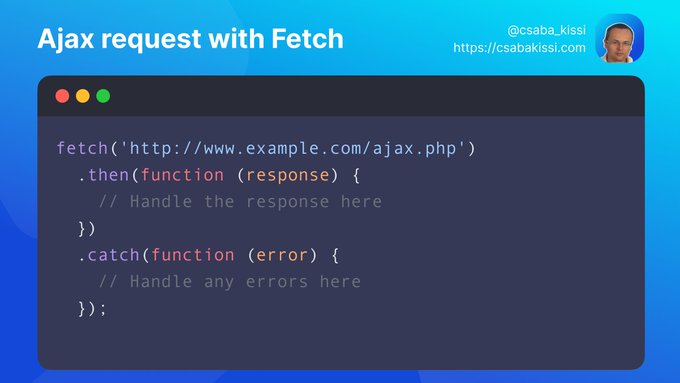
2. Using the fetch() method:


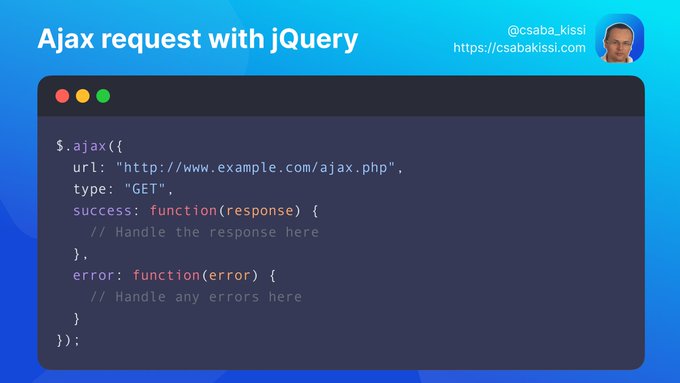
3. Using jQuery.ajax() method (if you're still using JQuery):


4. Using an Axios library. 
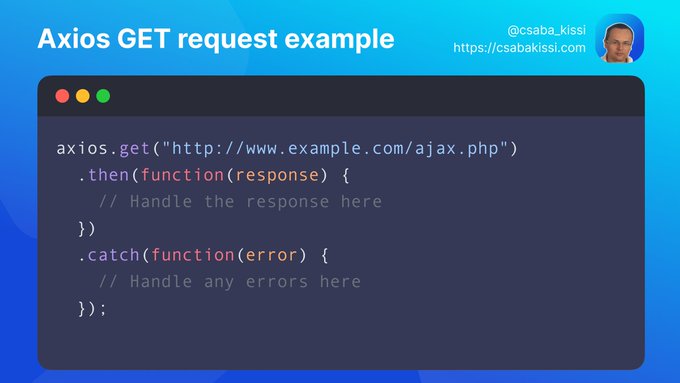
To create an Ajax request using Axios, you can use the axios.get() or http://axios.post() methods, depending on the type of request you want to make. For example, to send a GET request, you can use the following code:


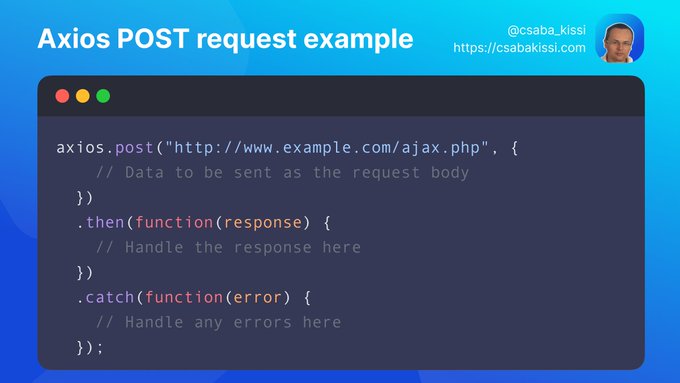
To send a POST request, you can use the http://axios.post() method instead:


Both of these methods accept a URL as the first argument, followed by an optional config object that allows you to specify the request method, headers, data, and other options.

You can then use the then() method to handle the response and the catch() method to handle any errors that may occur.

Source:


By aem4beginner

May 9, 2020
Estimated Post Reading Time ~

How to call Servlet using AJAX calling in AEM

Here is the sample ajax call to call a SlingServlet which is registered in cq.

  • Here we will get the values of below two textfields and pass to the servlet by using their 'id'.
  • After this you need to get the values in that appropriate servlet and apply your business logic.

<script>
$(document).ready(function() { 
$( ".perform" ).click(function() {
       var failure = function(err) {
             alert("Unable to retrive data "+err);
   };

  var val1=$('v1').val();
  var val2=$('v2').val();

    //Use JQuery AJAX request to post data to a Sling Servlet
    $.ajax({
         type: 'POST',  
         url:'/bin/imgcounter',
         data:{'value1' : val1,'value2' : val2},          //passing values to servlet
         success: function(msg){
            //Success logic here(The response from servlet)
         }
     });
    location.reload();
  });
    
});
</script>

 <form action="<%=currentPage.getPath()%>.html">
            Value1:<input type="text" id="v1"/>
            Value2:<input type="text" id="v2"/>
           <input type="submit" class="perform" value="Post to servlet!!!"/>
</form>


By aem4beginner

April 27, 2020
Estimated Post Reading Time ~

window.location.href is not working while clicking on hyper link in IE

I was trying to redirect to a page while clicking on a hyperlink with JQuery Ajax and javascript windows.location.href

<a id="signout" href="">signOut<a/>

<script>
$("#signout").click(function(){

$.ajax({
type : "POST",
async: false,
url : "/services/logout",
success : function() {
window.location="/content/test/test.html";
},
error : function() {
window.location="/content/test/test.html";
}
});
} );
</script>

This is working perfectly in both Firefox and Chrome but it is not working in IE.

In IE while redirecting the URL is stripped off to /content/test/(test.html got removed while performing the redirect)

The issue can be fixed as below by adding # in the href attribute.

<a id="signout" href="#">signOut<a/>


By aem4beginner

April 26, 2020
Estimated Post Reading Time ~

Prefill text field with http, mailto

You can use the below sample code to prefill an input text field with URL/ EMail prefixes based on user input. It prefixes mailto syntax if user input forms an email pattern.

(function($) {
    "use strict";
    $(document).on("change", ".js-coral-pathbrowser-input", function(e) {
        // If it's a relative path - do nothing
        if (this.value.indexOf('/') != 0) {
            // It's not a relative path - treat it as either a mail address or webb address
            if ((this.value.indexOf('@') > -1) && (this.value.indexOf('mailto:') == -1)) {
                // It's a mail address
                $(this).prop("value", 'mailto:' + this.value);
            } else if ((this.value.indexOf('http://') == -1) && (this.value.indexOf('https://') == -1) && (this.value != "") && (this.value.indexOf('mailto:') == -1) && ($(this).parent().parent().hasClass('js-cq-TagsPickerField') == false)) {
                // It's a webb address
                $(this).prop("value", 'http://' + this.value);
            }
        }
        if (this.value.indexOf(' ') >= 0) {
            $(this).prop("value", $.trim(this.value));
            $(this).prop("value", this.value.replace(new RegExp(' ', 'g'), '%20'));
        }
    });
})(Granite.$);


You need to put the above code in a clientlibs JS file with the category "cq.authoring.dialog".


By aem4beginner

Auto populate title field based on Path browser path selection

To auto-populate page title in a title field based on path value selected in path browser field, you can refer following code snippet-

$(document).ready(function() {
    var textInput;
    var textToInput;
    var inputText;
    var ui = $(window).adaptTo("foundation-ui");
    var s = $(document).on("dialog-ready", function() {
        textInput = $('.js-coral-pathbrowser-button').parent().prev();
        textToInput = $('.js-coral-pathbrowser-button').parent().parent().parent().parent().parent().parent().parent().find("input[name='./page'].coral-Form-field");
      
        $(document).on("click", ".js-coral-pathbrowser-confirm", function() {
            setTimeout(function() {
                inputText = $(textInput).val();
                //$(textToInput).val(inputText.substring(inputText.lastIndexOf("/")+1).split('.')[0]);
                if (!$(textToInput).val()) {
                    $(textToInput).val(inputText.substring(inputText.lastIndexOf("/") + 1));
                }
            }, 1000);
        })
        $(document).on('click', '.js-coral-pathbrowser-button', function() {
            textInput = $(this).parent().prev();
            textToInput = $(this).parent().parent().parent().parent().parent().parent().parent().find("input[name='./page'].coral-Form-field");
        })
        $(document).on("change", " .js-coral-pathbrowser-input", function() {
            inputText = $(this).val();
            if (inputText.indexOf("/content") > 0) {
                textToInput = $(this).parent().parent().parent().parent().parent().parent().parent().find("input[name='./page'].coral-Form-field");
                
                if (!$(textToInput).val()) {
                    $(textToInput).val(inputText.substring(inputText.lastIndexOf("/") + 1));
                }
            }
        });
    });
});


Change the field selector input[name='./page'].coral-Form-field as per your dialog configuration where the title value is to be auto-populated.

You need to put the above code in a clientlibs JS file with the category "cq.authoring.dialog".


By aem4beginner

Hide a field based on the User Role in a Dialog

If you need to hide a field in a dialog based on User role i.e. user group, you can do it through an Ajax call-

$.ajax({
    type: "GET",
    url: "/libs/granite/security/currentuser.json.rw.userprops.json?props=declaredMemberOf",
    cache: false
}).done(function(data, textStatus, jqXHR) {
    var isMember = false;
    /* The Group ID for which the widget has to be disabled */
    var groupId = "site-editor";
    var membershipInfo = data.declaredMemberOf;
    if (membershipInfo) {
        for (var membershipIdx = 0; membershipIdx < membershipInfo.length; membershipIdx++) {
            if (membershipInfo[membershipIdx].authorizableId == groupId) {
                isMember = true;
                break;
            }
        }
    }
    /*This example disables the Hide in Navigation checkbox on Page Properties dialog of the page*/
    if (isMember) {
        $('[name="./hideInNav"]').prop('disabled', 'true');
    }
});


Ajax call should be invoked at the "dialog-ready" event of the document. You need to put the above code in a clientlibs JS file with the category "cq.authoring.dialog". 


By aem4beginner

Adobe AEM - Cross Domain AJAX Request

A common problem for developers is a browser to refuse access to a remote resource. Usually, this happens when you execute AJAX cross-domain request using jQuery or plain XMLHttpRequest. As result is that the AJAX request is not performed and data are not retrieved.

Figure 1. The same-origin policy restriction in effect

ERROR:
XMLHttpRequest cannot load http://remote-domain/url. No 'Access-Control-Allow-Origin' header is present on the requested resource. Origin 'https://localhost:4502' is therefore not allowed access

SAME-ORIGIN POLICY
This is a security policy who defines the rules of how a web page can access an external resource (e.g. fonts, AJAX requests). Under the same-origin policy, web browsers do not permit a web page to access resources who origin differs from that of the current page. The origin is considered to be different when the scheme, hostname or port of the resource does not match that of the page. Overcoming the limitations of same-origin security policy is possible using a technique called Cross-origin resource sharing or simply CORS.

CROSS-ORIGIN RESOURCE SHARING
CORS is a mechanism that defines a procedure in which the browser and the web server interact to determine whether to allow a web page to access a resource from different origin.

Figure 2. Cross-domain ajax request
When you do a cross-origin request, the browser sends the Origin header with the current domain value.origin: http://zinoui.com

When the server receives the request, check whether the origin header is within the allowed list, and sends a response with Access-Control-Allow-OriginAccess-Control-Allow-Origin: http://zinoui.com

If you want to allow access for all, use a wildcard '*'Access-Control-Allow-Origin: *

AJAX CROSS DOMAIN REQUEST
1. Simple request

A simple cross-domain request is one that:
Does not send custom headers (such as X-PINGOTHER, etc.)
Only uses GET, POST or HEAD request methods
This is how the simple cross domain ajax request should looks like:

<script type="text/javascript">
// jQuery cross domain ajax
$.get("http://www.example.org/ajax.php").done(function (data) {
    console.log(data);
});

// using XMLHttpRequest
var xhr = new XMLHttpRequest();
xhr.open("GET", "http://www.example.org/ajax.php", true);
xhr.onload = function () {
    console.log(xhr.responseText);
};
xhr.send();
</script>

2. Preflight requests
Setting custom headers to XHR triggers a preflight request. With simple words this means that preflight requests first send an HTTP request by the OPTIONS method to the resource on the remote domain, to make sure that the request is safe to send. According to W3C for non-same origin requests using the HTTP GET method a preflight request is made when headers other than Accept and Accept-Language are set.

<script type="text/javascript">
// jQuery preflight request
$.ajax({
    type: "GET",
    headers: {"X-My-Custom-Header": "some value"},
    url: "http://www.example.org/ajax.php"
}).done(function (data) {
    console.log(data);
});

// XMLHttpRequest preflight request
var xhr = new XMLHttpRequest();
xhr.open("GET", "http://www.example.org/ajax.php", true);
xhr.setRequestHeader("X-My-Custom-Header", "some value");
xhr.onload = function () {
    console.log(xhr.responseText);
};
xhr.send();
</script>
3. Request with credentials
By default, for nonsame origin requests, browsers will not send credentials (such as HTTP Cookies, HTTP Authentication, and client-side SSL certificates). A specific attribute has to be set on the XMLHttpRequest object when it is invoked.
<script type="text/javascript">
// jQuery CORS example
$.ajax({
    xhrFields: {
        withCredentials: true
    },
    type: "GET",
    url: "http://www.example.org/ajax.php"
}).done(function (data) {
    console.log(data);
});

// XMLHttpRequest
var xhr = new XMLHttpRequest();
xhr.open("GET", "http://www.example.org/ajax.php", true);
xhr.withCredentials = true;
xhr.onload = function () {
    console.log(xhr.responseText);
};
xhr.send();
</script>

4. The Response
Let's see how the server response should look like:

<?php
// http://www.example.org/ajax.php
if (!isset($_SERVER['HTTP_ORIGIN'])) {
    // This is not cross-domain request
    exit;
}

$wildcard = FALSE; // Set $wildcard to TRUE if you do not plan to check or limit the domains
$credentials = FALSE; // Set $credentials to TRUE if expects credential requests (Cookies, Authentication, SSL certificates)
$allowedOrigins = array('http://zinoui.com', 'http://jsfiddle.net');
if (!in_array($_SERVER['HTTP_ORIGIN'], $allowedOrigins) && !$wildcard) {
    // Origin is not allowed
    exit;
}
$origin = $wildcard && !$credentials ? '*' : $_SERVER['HTTP_ORIGIN'];

header("Access-Control-Allow-Origin: " . $origin);
if ($credentials) {
    header("Access-Control-Allow-Credentials: true");
}
header("Access-Control-Allow-Methods: POST, GET, OPTIONS");
header("Access-Control-Allow-Headers: Origin");
header('P3P: CP="CAO PSA OUR"'); // Makes IE to support cookies

// Handling the Preflight
if ($_SERVER['REQUEST_METHOD'] == 'OPTIONS') { 
    exit;
}

// Response
header("Content-Type: application/json; charset=utf-8");
echo json_encode(array('status' => 'OK'));
?>

Few notes:
A wildcard '*' cannot be used in the 'Access-Control-Allow-Origin' header when the credentials flag is true.
Gecko 11.0 (Firefox 11.0 / Thunderbird 11.0 / SeaMonkey 2.8) removed support for using the withCredentials attributes when performing synchronous requests.
BROWSER SUPPORT
Chrome 3+, Firefox 3.5+, IE 10+, Opera 12+, Safari 4+


By aem4beginner

Ajax requests getting cached in IE and Firefox

Usecase: Debug ajax cache issues in IE and Firefox.

Issue: Ajax requests return wrong or same data in IE and Firefox since the requests get cached in the browser. Requests work for the first time, from the next time browser will give the same result.

Root Cause: When a GET request is made to a web service, IE will automatically cache the responses from GET requests. Once IE has successfully made a GET request, it will no longer make a new AJAX call until the cache expires on that object.

Solutions:
  1. Use POST: Use POST requests instead of GET requests in your application. However, this is bad practiced, simply because POST requests should only be used when you are submitting data or modifying a resource on the server.
  2. Response Headers: You can prevent caching by sending additional headers along with your response. By specifying the “Cache-Control” header with a value of “no-cache,no-store” and returning it with the web service response you can instruct the browser not to cache the result. For example in C#:HttpContext.Current.Response.AddHeader("Cache-Control","no-cache,no-store");
  3. Cache Buster: A cache-buster is a dynamic parameter that you append to a request which makes each request unique, most commonly a random number or the current date/time ticks. var url = '/get/userDetails?buster='+new Date().getTime();
  4. Disable Cache for JQuery AJAX Request: If you’re using JQuery to perform your Ajax requests, you can add cache: false to the parameter list like so:
$.ajax({
    url: url,
    cache: false,
    dataType: 'json',
    type: "GET",
    data: data,
    success: func,
    error: ajaxError
});

If you want to globally set up a cache for all JQuery AJAX requests uses below code.
$.ajaxSetup({ cache: false });


By aem4beginner

April 25, 2020
Estimated Post Reading Time ~

AEM Ajax Pagination using the Sightly List Component

This post shows how to change the Sightly List Component pagination behavior from refreshing the whole page to only refreshing the List Component section using Ajax.

This brings a better user experience without loading unnecessary scripts.

Create Your Own List Component

First, copy the List Component (/libs/wcm/foundation/components/list) to your application folder:


Now, change the property sling:resourceSuperType to wcm/foundation/components/list

In order to differentiate the two components (the native and ours) change the property jcr:title to List – Sightly – Pagination


list.js

We now need to change a little bit the back script list.js file (/apps/test/list/list.js).

Only replace the var _getPrevPage and _getNextPage values to:

var _getPrevPage = function(listConfig) {
var prevPage;

if (listConfig.pageStart > 0) {
var startPoint = listConfig.pageMax > 0 &&
pageStart > listConfig.pageMax ?
pageStart – listConfig.pageMax : 0;
prevPage = CONST.PARAM_PAGE_START + “=” + startPoint;

}
return prevPage;
};

var _getNextPage = function(listConfig, hasMore) {
var nextPage;

if (hasMore) {
var startPoint = listConfig.pageStart + listConfig.pageMax;
nextPage = CONST.PARAM_PAGE_START + “=” + startPoint;
}
return nextPage;
}

list.html
The following code is from the list.html file. It defines a new div tag with a specific id that we are going to use for changing the contained HTML via Ajax.

A workaround we have to do with Sightly in order to pass as parameter the component’s properties to JavaScript functions is to put <a> tags JavaScript functions @ context=’scriptString’
<div data-sly-unwrap=”${wcmmode.edit}” class=”cq-dd-pages”
data-sly-use.listComponent=”list.js”
data-slyuse.emptyRenderer=”emptylist.html”
data-sly-use.itemTemplate=”listitem.html”>
<div data-sly-call=”${emptyRenderer.emptylisttemplate @ list=listComponent}”
data-sly-unwrap>
</div>
<link data-sly-test=”${properties.feedEnabled}” rel=”alternate”
type=”application/atom+xml” title=”Atom 1.0 (List)”
href=”${resource.path}.feed” />
<div id=”listId_${currentNode.name}”>
<ul data-sly-element=”${listComponent.element}”
data-sly-list.listItem=”${listComponent.list}”
class=”foundation-ordered-list-container”>
<li data-sly-call=”${itemTemplate[listComponent.type] @
renderItem=listItem}”
class=”foundation-list-item”>
</li>
</ul>
<div data-sly-test=”${!listComponent.isEmpty &&
listComponent.isPaginating}” class=”pagination”>
<div data-sly-test=”${listComponent.previousLink}” class=”previous”>
<a onclick=”paginateAjax(
‘${currentNode.path @ context=’scriptString’}’,
‘${ listComponent.previousLink@ context=’scriptString’}’,
‘${currentNode.name @ context=’scriptString’}’ )”>
&laquo; Previous
</a>
</div>
<div data-sly-test=”${listComponent.nextLink}” class=”next”>
<a onclick=”paginateAjax(
‘${currentNode.path @ context=’scriptString’}’,
‘${ listComponent.nextLink@ context=’scriptString’}’,
‘${currentNode.name @ context=’scriptString’}’)” >
Next &raquo;
</a>
</div>
</div>
</div>
</div>
clientlibs
Let’s now create the clientlibs for the List Component. In order to make this post as short as possible, we are going to use the same name for categories that the Geometrixx template uses (apps.geometrixx-main):


js.txt
#base=js
list.js

list.js
function paginateAjax(path,link,nodeName){
$CQ.ajaxSetup({
xhrFields: {withCredentials: true}
});

$CQ.ajax(path+”.html?”+link).done(
function(data) {
$CQ(“#listId_”+nodeName).html($CQ(data));
});
}


Finally, drop the component to http://localhost:4502/cf#/content/geometrixx/en/toolbar.html and configure it:


The trick here is that if we put the following URL in a browser:
http://localhost:4502/content/geometrixx/en/toolbar/jcr:content/par/list.html?start=5 it shows us the component’s HTML that we need for the Ajax pagination.

Now you have the Sightly list component paginating via Ajax!


By aem4beginner

April 19, 2020
Estimated Post Reading Time ~

Request cq:Components with AJAX

It's quite evident CQ utilizes AJAX frequently.
If you've ever opened your network tab while using CQ you'll see asynchronous requests going off here and there. When authoring new components, navigating content, developing in CRXDE lite and much more. If you're unsure what it is, AJAX lets us make asynchronous server request to content without having to do a full page reload.
As a CQ developer, we create may cq:Component's that are rendered with a page request but what if we want to create one that is requested via AJAX.

Well, why do we need to do this in CQ?

Sometimes we want a sleeker and more fluid user experience and not a full page reload every time for things like search or galleries.
However, in a lot of cases, it has to do with our Dispatcher. If we want dynamic pieces of content based on different users or situations we need to request via AJAX because the Dispatcher caches our rendered HTML for us so we don't have to re-render our pages for every request. This does not mean we cannot still leverage the Dispatcher, our separate request can also be cached ( using selectors ) with the default dispatcher settings.
With CQ Personalization Framework we collect specific data on the client-side and want it to render differently from user to user, AJAX needs to be used in this scenario as well.
 

How is this usually done?

Most common cases we need to create separate service that returns json to request the data we want. We request the data and merge it to an HTML template with Javascript. So we need to create some new things here
  1. A service
  2. An HTML template or even worse HTML embed in Javascript
  3. Some additional component-specific Javascript
  4. cq:Component

What if there is an easy solution to create a component with AJAX using a Sling trick

A nice feature that I don't know if a lot of people are aware of is that you can request specific components on your page by request the URL to the component Node.
You still need to create two things but your Javascript can possibly be reused for any AJAX component you create in the future.
  1. cq:Component
  2. Javascript library
We use the knowledge of our node structure and make a request along the lines of this

/my-page/jcr:content/my-component.{selector}.html?{url-param}={param-value}

Since we want our component to render differently in different situations we can either use selectors or URL parameters to do such and handle them in our component.
Then all we do is re-request our component and replace it on completion.
 
$.get("/my-page/jcr:content/my-component.{selector}.html?{url-param}={param-value}") 
 .success(function(data){ 
 $("component-id").replaceWith($(data)); 
}); 
In our JSP we add some if statements using JSTL to render our content differently.
It's up to you to decide how and when you want to change your output based on selectors or request parameters. 
<c:set var="selectorArray" value="${'|'}${fn:join(slingRequest.selectors, '|')}${'|'}" />
<c:if test="${ fn:contains(selectorArray, '|testSelectorVal|') }">
 //something rendered differently
</c:if>
<c:set var="paramValArray" value="${'|'}${fn:join(paramValues['testParam'], '|')}${'|'}" />
<c:if test="${ fn:contains(paramValArray, '|testParamVal|') }">
 //something rendered differently
</c:if> 

Avoid Hard Coding

If we don't want to hard code our id, paths, selectors, and parameters and we want to be able to put more than one of these components per page
I recommend using unique identifiers, a data-attribute, and a class.
<div id="${currentNode.identifier}" class="ajax-container"
    data-ajax-path="${currentNode.path}">
</div>
We will create a Javascript module with the following function design as desired, this should be inside a cq:clientLibs folder.
 window.AjaxComponent = (function(){
  var module = {};
  var buildFullPath = function(path,selectors,params){...};
  module.executeCompentAjaxCall = function(id,path,selectors,params){
   $.get(buildFullPath(path,selectors,params))
    .done(function(data){ 
   $(id).replaceWith($(data));
   });
  };
  module.getSelectors = function(){...};
  module.getParams = function(){...};
   $(document).ready(function(){
    $(".ajax-container").each(function(i,ajaxContainer){
    module.executeCompentAjaxCall($(ajaxContainer).attr("id"),
     $(ajaxContainer).attr("data-ajax-path"), 
      module.getSelectors(), module.getParams());
   });
  return module;
 })();
 

These are just suggestions and you may develop your Javascript library however you desire. This assumes your method of getting selectors and parameters are the same for every component and that you want your component requested on document ready.

If our AJAX request is called on document ready, I recommend hiding it via CSS first then showing the updated content or not rendering anything initially so we don't get a flickering effect. If the request is on user interaction a loading overlay is nice while the content is being requested.

In Conclusion 

Requesting the entire component via Sling saves us a lot of work and is a very clean solution with less development effort.  The main drawback is we are requesting slightly more data than using a JSON service. 
If you plan on having dynamic content in one of your cq:Components use AJAX and this technique!


By aem4beginner

April 14, 2020
Estimated Post Reading Time ~

Creating an AEM HTML Template Language Component that posts data using AJAX

You can create an Adobe Experience Manager (AEM) HTML Template Language (HTL) component that is able to post data to a Sling Servlet and display data returned by the servlet. An HTL component can perform POST/GET operation using AJAX. For example, you can perform a search operation by posting a user ID. Then the servlet can perform a lookup on a data set and return the data. This article walks you through how to build an AEM HTL component that can post data to an AEM Sling Servlet and then display the results, as shown in the following illustration.


To read this development article, click https://helpx.adobe.com/experience-manager/using/htl_ajax.html.


By aem4beginner

April 13, 2020
Estimated Post Reading Time ~

Using AJAX requests to display Adobe CQ users in a grid control

You can use an AJAX request to retrieve Adobe CQ users and display the result set in a data grid control. To retrieve user data from Adobe CQ, you use a com.day.cq.security.UserManager instance that belongs to the Adobe CQ API. This API provides access to both Adobe CQ users and groups. The following illustration shows Adobe CQ users displayed within a grid control.

Adobe CQ users
This development article guides you through creating this AEM application that retrieves CQ user data and displays the data on a client web page. To view this development article, click:

http://helpx.adobe.com/experience-manager/using/using-ajax-requests-display-cq.html


By aem4beginner

April 12, 2020
Estimated Post Reading Time ~

How do you do basic AJAX?

I’ve been playing with Ajax related technologies for a little over a year now and there seem to be so many ways of doing things that it’s become this mish-mash of things good and crap. The way I like to use Ajax is making use of XmlHttpRequest or the ajax framework of choice to make the calls to the server end, get the appropriate data (or process it if need be on the server end) and then doing some UI rendering on the client end after that. Now, the natural way to do this, of course, is in a javascript callback function where you’d start modifying elements on your page. The question is, how do you do that? I’ve come across three (well, I had one sort of literally shoved down my throat that left a bad after taste) and I’ll write them out.

1. Get back the response object, and then insert the data appropriately by making the xml dom object methods.

2. Get back the response object, and then create a whole bunch of html in a string and pass that into the innerHTML of some div element. This is still acceptable for me where I might have to consider the implications of browser-specific issues with dom method usage. The classic one I’ve found is when I have to write setAttribute(“class”, something) AND setAttribute(“className”, something) for it to work on IE and Firefox. If I just wrote a string and passed it to innerHTML, I can just write the html in it that would be more browser-friendly than the dom methods.

3. Get back the response object which itself has presentation logic that the client just passes to innerHTML of a UI element. Am I being snobbish or elitist to think that this is stupidness? Or maybe it’s the object-oriented programmer in me squirming to still maintain elements of object-oriented programming in a programming domain where you have to use a whole bunch of hacks to do anything that resembles good coding practices (which then nullifies the effort to bring about some order to the way we integrate html with back end systems). It’s not that I’m just being a purist in not wanting to receive presentation content directly from a service call that was meant to be a search or an action. It’s just that this approach seems to make programming more like taking a whole bunch of darts and flinging them at a dartboard and hoping that somehow they all stick in the right order in the right place. Debugging any problems becomes a nightmare. Not only that, whoever’s going to come to maintain this code after you leave is going to curse you for being an insensitive git.


Source: https://chanchal.wordpress.com/2008/06/13/how-do-you-do-basic-ajax/


By aem4beginner

April 9, 2020
Estimated Post Reading Time ~

Uploading a file using only Ajax

We often need to upload a file without a refreshing page or even before the user submits the complete form.
We have been using flash uploaders or i-frames to achieve that. However, now it is possible to upload a file using only ajax and javascript.
The first thing we need is an HTML form that will allow the user to select the file that they wish to upload. Let's create a form with a file type in it
In grails, we prefer to use g:form tag
1
2
3
4
5
6
7
8
9
&lt;g:form name=&quot;myForm&quot;&gt;
   &lt;div&gt;
      &lt;label for=&quot;name&quot;&gt;
        &lt;strong&gt;Name&lt;/strong&gt;
      &lt;/label&gt;
   &lt;input id=&quot;name&quot; name=&quot;name&quot; type=&quot;text&quot;/&gt;
  &lt;/div&gt;
  &lt;input type=&quot;file&quot; name=&quot;inputFile&quot;&gt;
&lt;/g:form&gt;
We can even use a normal form tag:
1
2
3
4
5
6
7
8
9
&lt;form method=&quot;post&quot; enctype=&quot;multipart/form-data&quot;&gt;
   &lt;div&gt;
        &lt;label for=&quot;name&quot;&gt;
            &lt;strong&gt;Name&lt;/strong&gt;
        &lt;/label&gt;
        &lt;input id=&quot;name&quot; name=&quot;name&quot; type=&quot;text&quot;/&gt;
   &lt;/div&gt;
   &lt;input type=&quot;file&quot; id=&quot;inputFile&quot;  name=&quot;inputFile&quot;&gt;
&lt;/form&gt;
Now let's include jQuery form plugin which will provide us functionality to upload files using ajax
Now all we need to do is call ajaxSubmit method, which is provided by jQuery form plugin
with options.
1
2
3
4
5
6
7
8
&lt;script type=&quot;text/javascript&quot;&gt;
   $('form').ajaxSubmit({
        async: true,
        url: myCustomUrl,
        success : function(){
           ..... // Add your success handler code here
        }
&lt;/script&gt;
I also created a demo app, showing this behavior. Feel free to check it out.
Source: https://www.tothenew.com/blog/uploading-a-file-using-only-ajax/


By aem4beginner