Showing posts with label Micro Services. Show all posts

May 26, 2020
Estimated Post Reading Time ~

AEM Welcomes the Mighty Microservices

The idea of programmers aiming at designing applications that are modular in concept has been around the corner since the inception of application development. The concept of modularization has however evolved over decades only to deliver superior inventions.

When we talk about Adobe Experience Manager (AEM), it is also equipped to serve modular applications (meaning that it is capable of supporting a microservices architecture), thanks to OSGI (Open Source Gateway Initiative). OSGi “provides the standardized primitives that allow applications to be constructed from small, reusable, and collaborative components. These components can be composed of an application and deployed. This allows easy management of bundles as they can be stopped, installed, started individually. The interdependencies are handled automatically.” (Read more) All these work well, in fact very well.

AEM based applications are often complex, consisting of multiple complex bundles that individually connect to cumbersome APIs and whatnot. Such architectures seem quite natural and obvious in AEM-based systems — everything is deployed on a single instance and as and when you want to scale horizontally, you add another instance. Simple and it works, at least in theory.

In practice, some parts of an application are used far more extensively than others and hold far more resources. Adding an entire AEM instance to scale a particular module doesn’t make sense when the TCO for one instance is already high. In totality, traditional AEM applications end up being a monolith.

Comes microservices to the rescue. You scale a module stored on a different server. Where is the AEM Server? Well, it’s still there, acting as another service.

Argil DX has developed F-AI-shion Police with the above approach.

F-AI-shion Police
Fig: High-level architecture of F-AI-shion Police

Here, we’re invoking “Object Detection Service” from UI (JavaScript) of our page component.

The Object Detection Service in this tool resides on a server of their own. You scale according to your needs making cost-effective decisions. These architectural decisions are of great business value.


By aem4beginner

May 8, 2020
Estimated Post Reading Time ~

Microservices vs. Monoliths

What are microservices and what are monoliths?
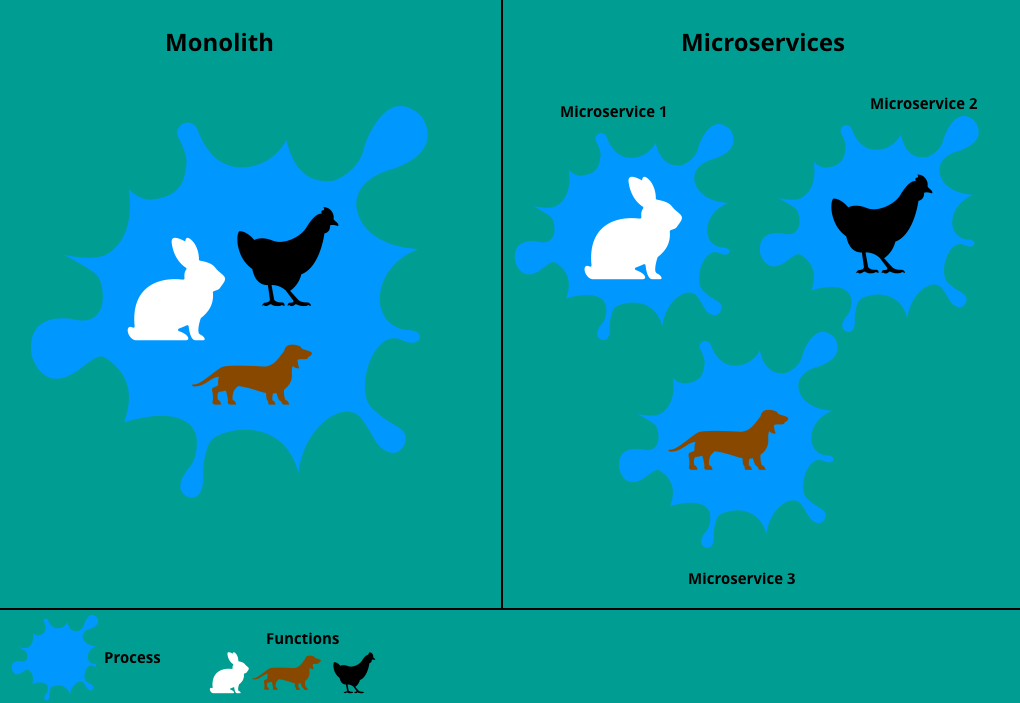
The difference between the monolith and microservice architecture

The task that microservices perform is quite simple: The mapping of software in modules. Now the statement could be made that classes, packages, etc. also fulfill the same task. That’s right, but the main difference lies in deployment. It is possible to deploy a microservice without “touching” the other microservices.

Classic monoliths, on the other hand, force deployment of the entire “project”.

Advantages of microservices and disadvantages of monoliths
1. Imagine that you are working on a project that contains thousands or even tens of thousands of lines of code. With each new function, the lines of code grow. Every DEV loses the overview here. Some a little earlier, the other a little later. Ultimately, it is impossible to keep track.
In addition, with each new feature, strange things are created elsewhere. This makes it very difficult to locate bugs and robs any developer of the last nerve.
Unlike monoliths, microservices are defined in small modules. Each microservice serves a specific task. Thus, manageability is granted a lot easier.

2. The data for monoliths are located in a pool, to which each submodule can access via the interface. If you make a change to the data structure, you have to adapt each submodule, otherwise, you have to expect errors.
Microservices are responsible for their own data, and the structure is absolutely irrelevant. Each service can define its structure. Changes to the structure also have no impact on other services, which saves a lot of time and, above all, prevents errors.

3. Microservices are only dependent on microservices that communicate with each other so that in the event of a bug, not the entire system fails. In the monolithic approach, however, the bug of one module means the failure of the entire system.

4. Another disadvantage arises with an update. All monoliths are over installed, which costs an enormous amount of time.
For the microservices, only the services where changes have been made are installed. This saves time and nerves.

5. Detecting errors in the monolithic approach can take a long time for large projects.
Microservices, on the other hand, are “small” and greatly simplify troubleshooting.

6. The team of a monolithic architecture works as a whole, which makes the technical coordination difficult.
The teams of a microservice architecture, however, are divided into small teams, so that the technical coordination is simplified.

Conclusion
The microservice approach divides a big task into small subtasks. This method greatly simplifies the work for developers because on the one hand, the overview is easy to keep in contrast to the monolithic approach, and on the other hand, the microservices are independent of the other microservices.

Source: https://www.north-47.com/knowledge-base/microservices-vs-monoliths/


By aem4beginner

Securing your microservices with OAuth 2.0. Building Authorization and Resource server

We live in a world of microservices. They give us an easy opportunity to scale our application. But as we scale our application it becomes more and more vulnerable. We need to think of a way of how to protect our services and how to keep the wrong people from accessing protected resources. One way to do that is by enabling user authorization and authentication. With authorization and authentication, we need a way to manage credentials, check the access of the requester and make sure people are doing what they suppose to.

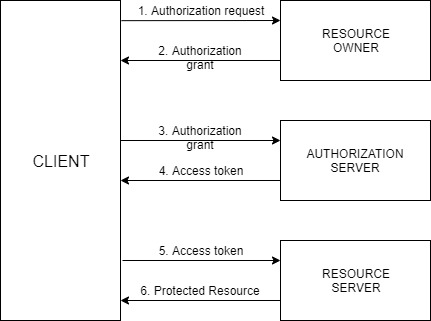
When we speak about Spring (Cloud) Security, we are talking about Service authorization powered by OAuth 2.0. This is how it exactly works:


The actors in this OAuth 2.0 scenario that we are going to discuss are:
  1. Resource Owner – Entity that grants access to a resource, usually you!
  2. Resource Server – Server hosting the protected resource
  3. Client – App making protected resource requests on behalf of a resource owner
  4. Authorization server – server issuing access tokens to clients
The client will ask the resource owner to authorize itself. When the resource owner will provide an authorization grant with the client will send the request to the authorization server. The authorization server replies by sending an access token to the client. Now that the client has access token it will put it in the header and ask the resource server for the protected resource. And finally, the client will get the protected data.

Now that everything is clear about how the general OAuth 2.0 flow is working, let’s get our hands dirty and start writing our resource and authorization server!

Building OAuth2.0 Authorization server
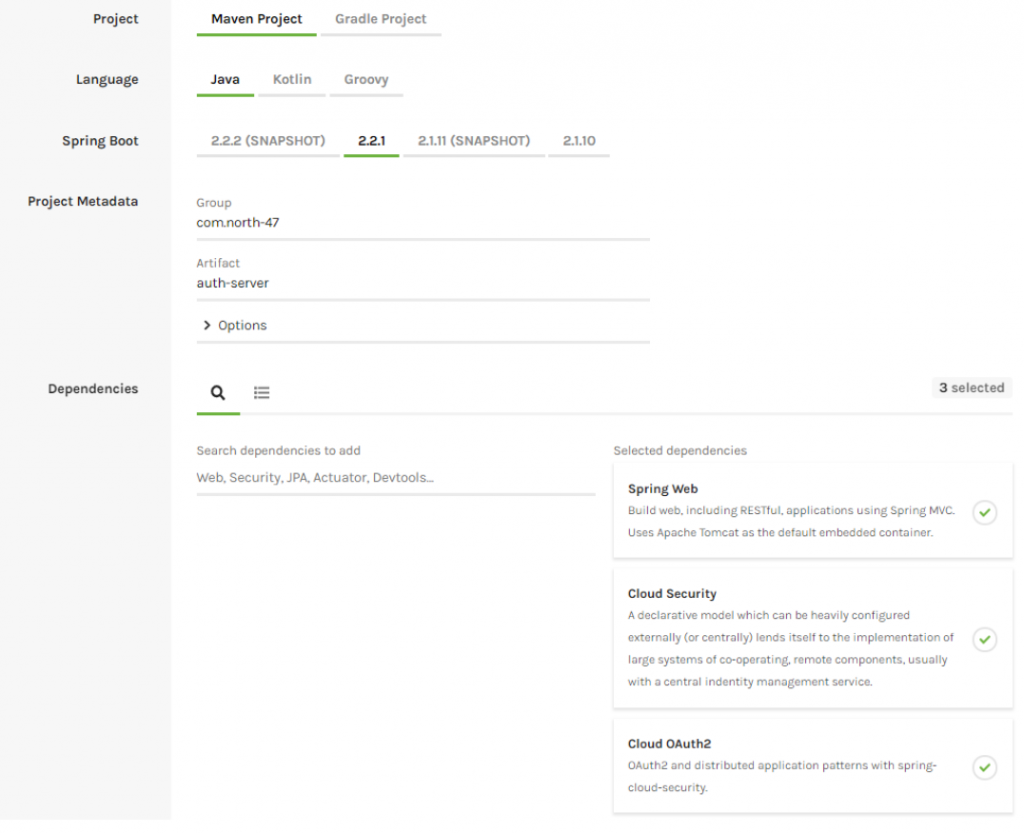
Let’s start by creating our authorization server using the Spring Initializr. Create a project with the following configuration:
  • Project: Maven Project
  • Artefact: auth-server
  • Dependencies: Spring Web, Cloud Security, Cloud OAuth2

Download the project, copy it into your workspace and open it via your IDE. Go to your main class and add the @EnableAuthorizationServer annotation.

@SpringBootApplication
@EnableAuthorizationServer
public class AuthServerApplication {
    public static void main(String[] args) {
        SpringApplication.run(AuthServerApplication.class, args);
    }
}


Go to the application.properties file and make the following modification:
  • Change the server port to 8083
  • Set the context path to be “/api/auth”
  • Set the client id to “north47”
  • Set the client secret to “north47secret”
  • Enable all authorized grant types
  • Set the client scope to read and write
server.port=8083

server.servlet.context-path=/api/auth

security.oauth2.client.client-id=north47
security.oauth2.client.client-secret=north47secret
security.oauth2.client.authorized-grant-types=authorization,password,refresh_token,password,client_credentials
security.oauth2.client.scope=read,write

The client id is a public identifier for applications. The way that we used it is not a good practice for the production environment. It is usually a 32-character hex string so it won’t be so easy guessable.

Let’s add some users into our application. We are going to use in-memory users and we will achieve that by creating a new class ServiceConfig. Create a package called “config” with the following path: com.north47.authserver.config and in there create the above-mentioned class:

@Configuration
public class ServiceConfig extends GlobalAuthenticationConfigurerAdapter {
 
    @Override
    public void init(AuthenticationManagerBuilder auth) throws Exception {
        auth.inMemoryAuthentication()
                .withUser("filip")
                .password(passwordEncoder().encode("1234"))
                .roles("ADMIN");
    }
 
    @Bean
    public BCryptPasswordEncoder passwordEncoder() {
        return new BCryptPasswordEncoder();
    }
}

With this we are defining one user with username: ‘filip’ and password: ‘1234’ with a role ADMIN. We are defining that BCryptPasswordEncoder bean so we can encode our password.

In order to authenticate the users that will arrive from another service we are going to add another class called UserResource into the newly created package resource (com.north47.autserver.resource):

@RestController
public class UserResource {
 
    @RequestMapping("/user")
    public Principal user(Principal user) {
        return user;
    }
}

When the users from other services will try to send a token for validation the user will also be validated with this method.

And that’s it! Now we have our authorization server! The authorization server is providing some default endpoints which we are going to see when we will be testing the resource server.

Building Resource Server
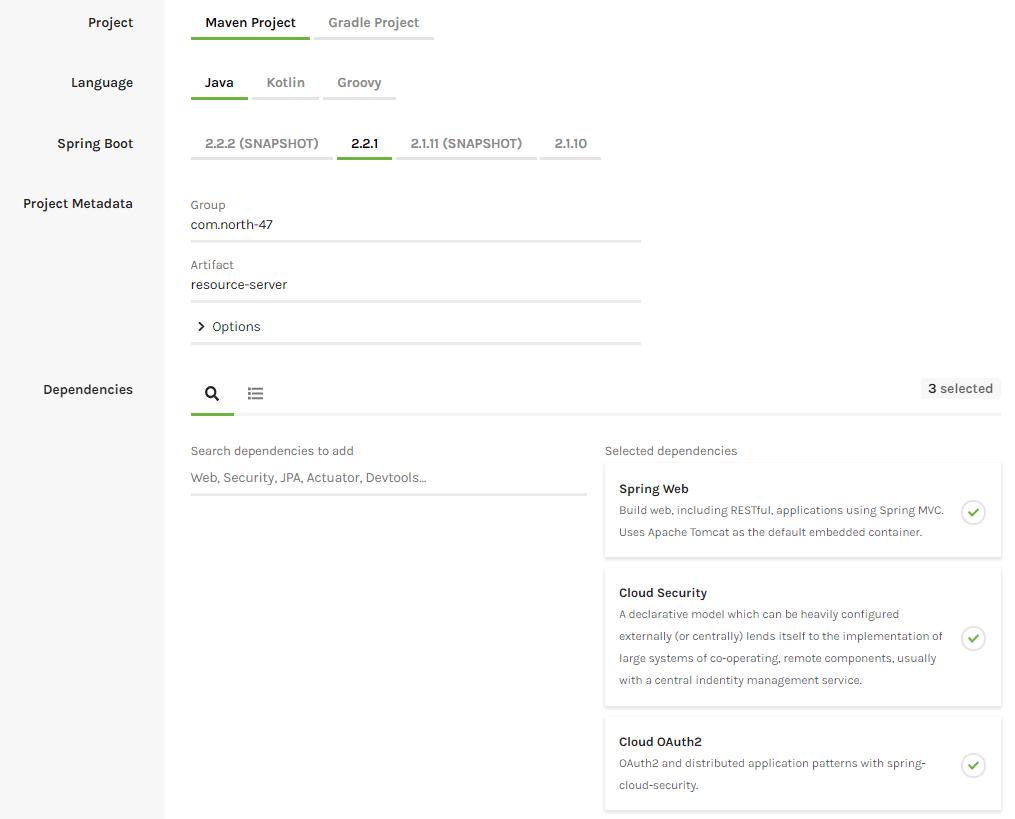
Now let’s build our resource server where we are going to keep our secure data. We will do that with the help of the Spring Initializr. Create a project with the following configuration:
  • Project: Maven Project
  • Artefact: resource-server
  • Dependencies: Spring Web, Cloud Security, Cloud OAuth2


Download the project and copy it in your workspace. First, we are going to create our entity called Train. Create a new package called domain into com.north47.resourceserver and create the class there.

public class Train {

    private int trainId;
    private boolean express;
    private int numOfSeats;

    public Train(int trainId, boolean express, int numOfSeats) {
        this.trainId = trainId;
        this.express = express;
        this.numOfSeats = numOfSeats;
    }

   public int getTrainId() {
        return trainId;
    }

    public void setTrainId(int trainId) {
        this.trainId = trainId;
    }

    public boolean isExpress() {
        return express;
    }

    public void setExpress(boolean express) {
        this.express = express;
    }

    public int getNumOfSeats() {
        return numOfSeats;
    }

    public void setNumOfSeats(int numOfSeats) {
        this.numOfSeats = numOfSeats;
    }

}

Let’s create one resource that will expose an endpoint from where we can get the protected data. Create a new package called resource and there create a class TrainResource. We will have one method only that will expose an endpoint behind we can get the protected data.

@RestController
@RequestMapping("/train")
public class TrainResource {

    @GetMapping
    public List<Train> getTrainData() {
 
        return Arrays.asList(new Train(1, true, 100),
                new Train(2, false, 80),
                new Train(3, true, 90));
    }
}

Let’s start the application and send a GET request to http://localhost:8082/api/services/train. You will be asked to enter a username and password. The username is user and the password you can see from the console where the application was started. By entering this credentials will give the protected data.

Let’s change the application now to be a resource server by going to the main class ResourceServerApplication and adding the annotation @EnableResourceServer.

@SpringBootApplication
@EnableResourceServer
public class ResourceServerApplication {
 
    public static void main(String[] args) {
        SpringApplication.run(ResourceServerApplication.class, args);
    }
}

Go to the application properties file and do the following changes:
server.port=8082
server.servlet.context-path=/api/services
security.oauth2.resource.user-info-uri=http://localhost:8083/api/auth/user


What we have done here is:
Changed our server port to 8082
Set context path: /api/services
Gave user info URI where the user will be validated when he will try to pass a token

Now if you try to get the protected data by sending a GET request to http://localhost:8082/api/services/train the server will return to you a message that you are unauthorized and that full authentication is required. That means that without a token you won’t be able to access the resource.

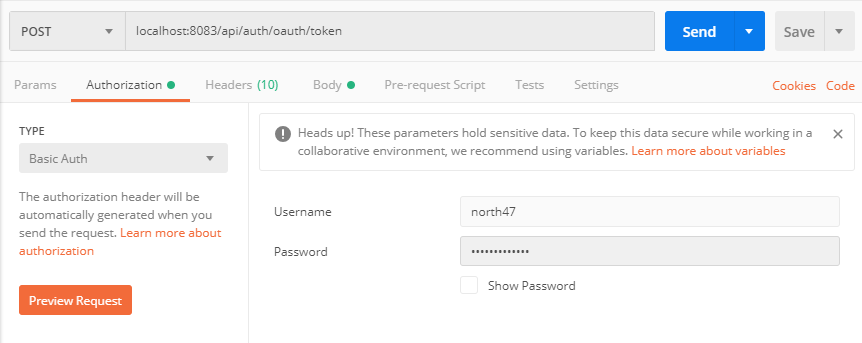
So that means that we need a fresh new token in order to get the data. We will ask the authorization server to give us a token for the user that we previously created. Our client in this scenario will be the postman. The authorization server that we previously created is exposing some endpoints out of the box. To ask the authorization server for a fresh new token send a POST request to the following URL: localhost:8083/api/auth/oauth/token.

As it was said previously that postman in this scenario is the client that is accessing the resource, it will need to send the client credentials to the authorization server. Those are the client id and the client secret. Go to the authorization tab and add as a username the client id (north47) and the password will be the client secret (north47secret). On the picture below is presented how to set the request:


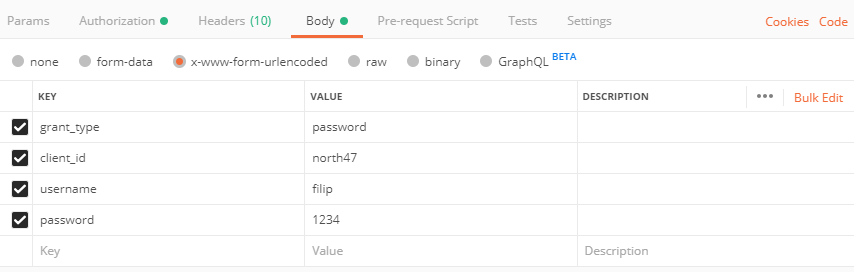
What is left is to say the username and password of the user. Open the body tab and select x-www-form-urlencoded and add the following values:
  • key: ‘grant_type’, value: ‘password’
  • key: ‘ client_id’, value: ‘north47’
  • key: ‘ username’, value: ‘filip’
  • key: ‘password’, value ‘1234’


Press send and you will get a response with the access_token:

{
    "access_token": "ae27c519-b3da-4da8-bacd-2ffc98450b18",
    "token_type": "bearer",    "refresh_token": "d97c9d2d-31e7-456d-baa2-c2526fc71a5a",    "expires_in": 43199,    "scope": "read write"
}


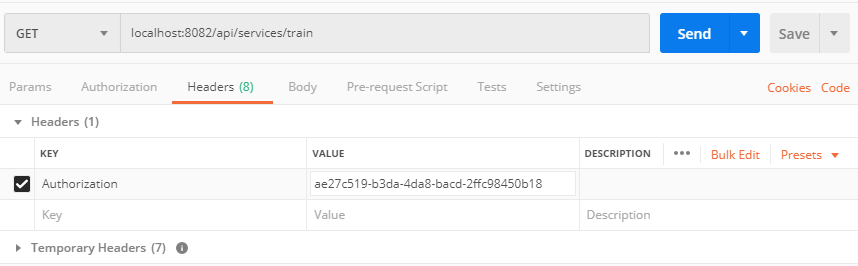
Now that we have the access token we can call our protected resource by inserting the token into the header of the request. Open postman again and send a GET request to localhost:8082/api/services/train. Open the header tab and here is the place where we will insert the access token. For a key add “Authorization” and for value add “Bearer ae27c519-b3da-4da8-bacd-2ffc98450b18”.


And there it is! You have authorized itself and got a new token which allowed you to get the protected data.

You can find the projects in our repository:
Resource server
Authorization server

Source: 
https://www.north-47.com/knowledge-base/securing-your-microservices-with-oauth-2-0-building-authorization-and-resource-server/


By aem4beginner

May 4, 2020
Estimated Post Reading Time ~

Microservices Architecture for AEM

Modularization is not a new concept in software development. Modular programs were created in times when most of us were not even in this world yet. Although this kind of software design is a quite old technique, its implementations have been evolving throughout decades resulting in number of great inventions. In the AEM world we also have the ability to create modular applications as AEM is built on top of OSGi – a framework which is designed to support modular systems. And it works well. Pieces of functionality are gathered into logical units called bundles, they communicate with other bundles through clearly defined interface (OSGi services). Developers working with AEM on daily basis know that perfectly.

However, AEM-based applications are often very complex systems providing not only pure CMS capabilities, but also consisting of multiple integrations with other systems like room booking, real-time stock market data, identity management, federated search, etc. Thanks to OSGi modularization, you can implement all of the integrations as separate modules and run them all on an AEM instance. Such an approach seems quite natural for AEM-based systems - everything is deployed into single AEM instance and if your system expects more traffic you can scale it horizontally by adding another instance. Simple and it works. At least in theory.

In practice, we can often observe that some parts of a complex system are used much more extensively than others and require far more resources. Scaling of such a system may be challenging since the only option we have is to add another AEM instance. Unfortunately, this is not an easy operation, especially if you don’t use MongoDB setup. Additionally, it may generate significant costs on infrastructure and licencing. As a result, even if a system is designed to be modular, from scalability point of view it’s still a monolith - particular parts of the system can’t be scaled independently. So how can we deal with such issue?

If we think of highly-scalable enterprise systems it’s worth considering moving from AEM-based design to microservices architecture. In this approach, some bigger logical parts are deployed separately, outside of AEM – all of these parts are called services. Of course, AEM is still there (it’s another service) and plays one of the most important roles - it delivers the user experience, i.e. websites, pages, their layout and static content. Most of the dynamic content though, is provided by other services deployed e.g. as a stand-alone applications on Tomcat or Node.js servers. The assembly of pages served by AEM and the dynamic content from other services is done with use of… another service. Sounds complicated? Although from deployment point of view it’s more complex than simple AEM-based approach, it brings a couple of significant advantages:
  • Improved scalability – each service can be scaled separately. If you expect a lot of traffic and the majority of processing is related e.g. to search, then you can add another instance of search service only. You don’t need to replicate the whole system.
  • Easier deployment – since the services are independent you can upgrade each of them easily whereas other services remain untouched.
  • Faster development – you are not limited to OSGi technology, so you can develop each service with solutions which best suit the service needs.
  • Reduced cost and time-to-market – thanks to above, the overall cost of change implementation and time needed to deploy it to production is reduced significantly
An example microservice architecture is depicted on a diagram below. If you want to know more on how microservices in AEM world work in practice, please join my session at the AEMHub conference, starting 8th of September in London. I will show you how this approach can be implemented and what benefits it brings.


By aem4beginner

April 21, 2020
Estimated Post Reading Time ~

April 17, 2020
Estimated Post Reading Time ~

Technology choices for Micro Services

Microservices are tiny and mostly, large in number for a typical enterprise application. Microservices are RESTful. That means technologies facilitate creating REST services with minimal efforts minus all overheads.

  • Spring boot – Fat jar (embedded web container), convention over configuration model.
  • Spring Boot makes it easy to create stand-alone, production-grade Spring based Applications that you can “just run”. We take an opinionated view of the Spring platform and third-party libraries so you can get started with minimum fuss. Most Spring Boot applications need very little Spring configuration.
  • Link – projects.spring.io/spring-boot
  • Dropwizard – Framework bundling the best of the JAVA ecosystem to create REST back end with minimal fuss. Jetty for HTTP, Jersey for JAX-RS, Jackson for JSON and few more.
  • Link – dropwizard.io
  • Wildfly swarm – Lightweight, fat jar model of wildfly.
  • Link – wildfly-swarm.io
  • Play framework – Another Java / Scala framework that allows building modern web applications.
  • Link – playframework.com
  • Grails – Groovy (JVM language) based web application framework.
  • Link – grails.org


By aem4beginner

AEM in Micro Services world!!!

Source:
http://www.computepatterns.com/277/aem-in-micro-services-world/


By aem4beginner

April 6, 2020
Estimated Post Reading Time ~

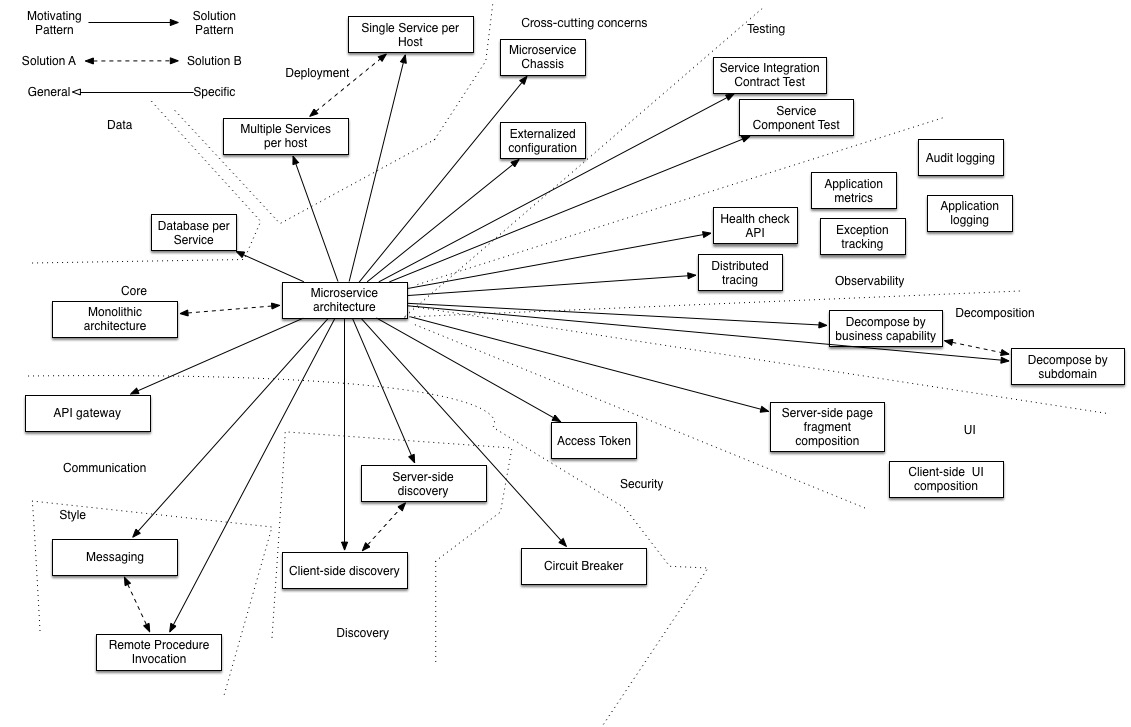
Microservice Design Patterns

Must learn microservice design patterns from Chris. Do check microservices.io for details.

Once you go through these, you would’ve answered for most of the common concerns around designing microservices.

Source: 


By aem4beginner

March 22, 2020
Estimated Post Reading Time ~

Microservices & Serverless Architecture

Microservices
Microservices came into picture because of the Monolithic applications wherein all the logical code is put into the same codebase. The parts in here are tightly coupled with each other, so deploying this means that either a part or the whole application is deployed. In this scenario we should be careful for the errors because a small error can also break our deployment and put our whole server down.
So because of this tightly coupled code base in monolithic application and the high chances of breakdown because of the errors which could be interdependent the concept of Micro services came into picture.
instead we could have different parts of our application which could connect with HTTP API interface the requirement. So if a change is made into our codebase, we are only changing a part of it and not the whole application.  

So Micro services has some PROS and CONS as well which we can have a look-   

ADVANTAGES
1. Using Micro services, different teams can work on the services separately and each part of the application can be build separately as the microservices component are decoupled.
2. With Microservices we can scale horizontally and can scale only those services which are bottlenecks as they are decoupled.


DISADVANTAGES
1. One of the disadvantages of the microservices is its complexity. As the whole application is spitted into different microservices so it entitles more things to manage. It requires planning, a lot of effort. Resources and skills.
2. Consistency of the data becomes harder as every services has a separate database
3. As in microservices each service communicates externally with an API so it raises a security concern.
4. As we can use different programming languages on different separate services, but it make a overhead to deploy different languages and also its very harder for devs to switch between the development of each service.
Serverless Architecture
Serverless architecture is based out of the cloud computing approach to build apps and services without the need of infrastructure.
Here the code execution is done by server, so a developer can deploy code and feel free about scaling and the stuffs like server maintenance its provision, database management etc.
So, a serverless architecture has 2 concepts –
1. Faas (Function as a Service) : Here we can upload our developed functionality and let them run independently. One of the examples of this is AWS Lamda, which runs on event and this event can be triggered by any device on whatsoever programming language we can use.
2. Baas (Backend as a Service) : So Here the backend related stuffs like Database Management, Cloud storage, user Authentication, push notification, hosting etc can be outsourced and the developers only have to work on front end part.
Advantage
1. As we don’t have to worry about the infrastructure and the provisioning required, application can be deployed easily.
2. As the serverless architecture have accessible points on a global scale so its easier to manage users from any corner of the globe.
3. We can give more time to the UX of the application as don’t have to care about the infrastructure.
Disadvantage
Integration testing of the Architecture that are serverless is tough. In Faas unit for testing are way smaller than with the other architectures. We may have to deploy a Faas artifact separately for each function in our application.

Conclusion
Out of the two architectures, it all depends on the requirements. If the application is simple and clean, then we can go for monolithic architecture.
So, if suppose there is a requirement of launching the product as soon as possible then we can opt for monolithic because there is no complexity which is there in distributed systems and the deployment time is least. But suppose if you add features to your product every now and then, then monolith is not a good choice. We may have to transfer our system to microservices to avoid hold up situations in performance. So, adding new features and deployment is not going to affect the entire application, and the application will still work.
However, the serverless architecture is more of deployment rather than development and it overcomes the overhead of scaling, maintenances and are managed by their own so it reduces the resource overhead cost too.


By aem4beginner