Showing posts with label Indexing. Show all posts

January 2, 2021
Estimated Post Reading Time ~

Increasing Desired Search Results with Oak Indexing Analyzer

Oak Index Analyzer provides attributes that help in boosting search to get the desired results. The way it works is that each of the indexes can be defined with analyzer nodes with properties defined on them. When the re-index happens, the analyzer nodes control the way the indexes are created and help the queries fetch more accurate results.

Stemming
In JCR Query, any full-text search uses the equivalent match for the given word. This may not deliver all the desired results a user wants to see, even though the content is present in the repository. Stemming helps to avoid that by providing a linguistic-like search based on the words given. For example: When stemming is provided on the index, the word “sleeve” will fetch results that have words like “sleeved.”

Before applying PorterStem, the search for the word “sleeve” fetches five results. It only fetches nodes matching the exact word “sleeve.” See the result below image.


(Click images to enlarge them)

After applying PorterStem, the search for the same word “sleeve” fetches nine results. It fetches nodes that match both words “sleeve” and “sleeved.” See the result below image.


Synonyms
Computer search results will display only the text with an exact match in the full-text search. This may not be the desired result for companies to make the end-user stay on the website. This technical difficulty is eliminated by the Synonyms configuration on the index. In the configuration, we can map two words to be synonymous with each other; when a search is done with one word, it will return combined results for both words.

See the below image for a search of the word “Jacket” before configuration.


See the below image for a search of the word “Jacket” after synonym configuration, which results both “jacket” and “coat.”


Stop Word
In the real world, there are situations where don’t have to index for blacklisted words, thus avoiding them from the search results. Mostly like profanity words. Stop Word configuration on index helps us to do this.

See the below image, assuming the word “retail” as a blacklisted word before stop word configuration.


See the below image, assuming the word “retail” as a blacklisted word, after Stop Word configuration.


By aem4beginner

Rebuild Indexes in AEM with OAK Index Manager

Looking to rebuild indexes in Adobe Experience Manager? Need to boost query performance? Apart from optimized code, indexing plays a very important role in an application running smoothly. If you have more queries, you need to index your nodes in order to quickly get a response.

In a recent project, I found a problem related to performance. The issue occurred when I was querying AEM, and the server responded slowly.

Before AEM 6, Jackrabbit was used, and it would index content by default. AEM 6.0 and onward, OAK repository is used, and indexes need to be created when necessary.

If you see a warning message in logs like the one below, it means indexing needs to be done for those nodes:

WARN Traversed 1000 nodes with filter Filter(query=select …) consider creating an index or changing the query

You can use the following tool to define the index for a query: http://oakutils.appspot.com/generate/index

If nodes are not indexed, it can create problems in production systems, making the system VERY slow. I faced this issue with one of my clients, where we had a large number of DAM assets, and searching for assets through Asset Search in AEM was making the system incredibly slow – sometimes even bringing the server down.

To solve this problem, we found that DAM asset nodes need to be indexed. This allows the query to respond much faster.

Below are the steps we followed to index DAM nodes:
  • In CRXDE, open this node: /oak:index/damAssetLucene
  • Make sure that in /oak:index/damAssetLucene/jcr:content, there is a property: evaluatePathRestrictions = true
  • Create properties under “/oak:index/damAssetLucene/indexRules/dam:Asset/properties,” which can be used for searching assets in DAM. See screenshot below.
  • Go to /oak:index/damLucene and change reindex property to true
  • After saving the change, the indexing will be triggered immediately
You can monitor the process in the AEM log. For example, in the terminal, use the following command to monitor whether the index has finished:

tail -f /apps/aem/crx-quickstart/logs/error.log|grep “Reindexing (async) completed”

When the index is done, you will see the following message.


How to Reindex
If a reindex is needed in the future, you can use the following approaches.
Approach 1: Reindex using CRXDE Lite
Change the reindex property to true
Save the change

The reindex will trigger immediately. After re-indexing is complete, the reindex property will automatically change back to false.

Approach 2: Reindex using OAK Index Manager
  • Download and install OAK Index Manager through https://adobe-consulting-services.github.io/acs-aem-commons/
  • Access OAK Index Manager through http://host:port/etc/acs-commons/oak-index-manager.html
  • Reindex
Any other tips around this topic, or questions? Feel free to leave a comment below


By aem4beginner

January 1, 2021
Estimated Post Reading Time ~

Lucene Index in AEM - Part 3

This post illustrates the use of analyzers in full-text search with sample use case.
Apache Lucene Analyzers :
Analyzers as with the name is used to analyze the text both at the time of indexing and at the time of searching (via query execution)
  • An analyzer examines the text of fields and generates a token stream. It can be either a
    • Single Java class or
    • Composed of a series of Tokenizer and Filter Java classes.
  • Tokenizer breaks the data into lexical units or tokens
  • Filters then examines these tokens -> amends/discard/create new one based on the configuration
  • Series of Tokenizer + Filters => Analyzer
  • There are direct Analyzer classes, Tokenizer and Filters available OOB. Based on our requirement we can choose to use either direct Analyzer or Tokenizer + Filter combination.(Analyzer via composition)
Examples:
Analyzer -

  • StandardAnalyzer (org.apache.lucene.analysis.standard.StandardAnalyzer)
  • Removes stop words, converts to lowercase, recognize URLs and emails - most commonly used
Tokenizer -
  • Standard (org.apache.lucene.analysis.standard.StandardTokenizerFactory)
  • Splits the text field into tokens, treating whitespace and punctuation as delimiters.
Filters :
  • Stopwords Filter (org.apache.lucene.analysis.core.StopFilterFactory) - Removes stop words
  • Lowercase Filter (org.apache.lucene.analysis.core.LowerCaseFilterFactory) - Converts token to lowercase
  • PorterStem Filter (org.apache.lucene.analysis.en.PorterStemFilterFactory) - Creates stem words from the tokens
In Lucene Full Text Index defintion,
  • If we are opting to using direct Analyzer class, fully qualified Java class name is to be mentioned (using a property called "class" - highlighted in demo video)
  • If we are using Tokenizer and Filter combination. name without Factory suffix can be used. (Standard for StandardTokenizerFactory and PorterStem for PorterStemFilterFactory - this is again highlighted in demo video)
  • Note : If we are using Analyzer via composition, class property need to be removed.
Use case:
We will look into the common need for a full text search - Synonym and Stemming support
In we-retail DAM assets,
/content/dam/we-retail/en/activities (which again has biking, climbing. hiking etc as its kind)
We will create stemming filter as part of analyzers in Lucene Full text Index to fetch assets related to "activities" when we search using its stem word like "activity"
/content/dam/we-retail/en/products/apparel (which again has gloves, coats, pants and so on under apparel cateory)
We will create Synonym filter as part of analyzers in Lucene Full text Index to fetch assets related to "apparel" when we search using its synonyms like "clothing or garments"

Stemming:
  • Highlights the use of PorterStem Filter with Standard Tokenizer (Analyzer via composition)
  • EnglishAnalyzer class is used which has PorterStemFilter in it. (Direct Analyzer class)
Synonym:
Synonym Filter with Standard Tokenizer is used (Analyzer via composition)


By aem4beginner

Lucene Index in AEM - Part 2

This post illustrates about full text search scenario and steps to create custom Lucene Full Text Index.

On a high level, for full text search, we need to index all nodes and properties (these are the two major means in which our content is held in the repository)

For property:
In order to make a specific property to be indexed for both full text and property constraint scenario, then in the property definition of respective indexRule, we need to add below property for

Full text:
Name                                         Type                                         Value
nodeScopeIndex                         Boolean                                     true

For property constraint: (name and isRegexExp are interrelated as already explained in previous post)
Name                                         Type                                         Value
propertyIndex                             Boolean                                     true
name                                          String             propertyname or regex pattern
isRegexExp                                 Boolean                                 false or true


Example : jcr:title property of a page might be used in queries with property constraints or we might need to get the results of full text/contains queries based on the jcr:title or both.

For node:
indexRules specific to a nodeType together with aggregates definition for its related child nodes to be indexed implies the nodes to be indexed as part of Lucene Full text Index.
Example :
  • For a full text functionality to display all pages and assets as part of specific project say, xyx. Then we can create custom Lucene Full Text Index targeting project specific paths, related node types - cq:Page and dam:Asset (in indexRules and aggregates defintion) and hence its properties.
  • If we are not creating custom + if we use "type" predicate as "cq:Page" and "dam:Asset" for our fulltext query(group query to bring in both "type") -> OOB cqPageLucene and damAssetLucene will be considered based on its definition.
OOB Lucene Full Text Index:(/oak:index/lucene)
  • We are aware that nt:base is the super type of all available node types like nt:unstructured, cq:Page, dam:Asset, dam:AssetContent and so on (for any node type for that matter)
  • Given this understanding, in our local instance (without any custom index definition), execute a query with "fulltext" predicate -> "/oak:index/lucene" (OOB Lucene Full Text Index) will be used.
  • If we observe this index, we have indexRules configured for the nodeType - nt:base with whole list of properties defined under that.
  • Except for last three properties, rest all would have property named "index" -> false (screenshot below for reference)

  • Key to note here is the last property (highlighted in below screenshot) which will index all the properties of node nt:base (which in turn implies all nodes as nt:base is the supertype of all available node types)
  • For this reason, for a full text query without "type" predicate, this index(/oak:index/lucene) will be used.
  • Also, on the nt:base node, we have a property named "includePropertyTypes" with value being String and Boolean. It indicates that it can index properties which are of type String and Boolean data type.


With this understanding on how nodes and properties can be indexed as part of Lucene Full text Index, we will create a custom Lucene Full Text index with sample use case.

Use case:
Get all the assets which are related to "biking" in we-retail assets.
Will divide into two scenarios - >
  • Full text without "type" predicate (to show case the explanation above related to OOB Lucene full text index - /oak:index/lucene)
  • Full text with desired "type" predicate.
Without "type" predicate:
path=/content/dam/we-retail
fulltext=biking
p.limit=-1

With "type" predicate:
path=/content/dam/we-retail
type=dam:Asset
fulltext=biking
p.limit=-1

For the sake of creating custom Lucene Full text Index for a new node type, have amended the query as below with type as "dam:AssetContent" (In previous post, we have created damAssetContentLucene for illustrating Lucene Property Index, will be amending on top of it for fulltext query)
path=/content/dam/we-retail
type=dam:AssetContent
fulltext=biking
p.limit=-1


By aem4beginner

Lucene Index in AEM - Part 1

Lucene index supports both property constraints and full-text constraints. Based on the index definition, it can be used to evaluate property constraints, full-text constraints, path restrictions, and sorting.

Lucene Index Definition/Structure - High level:
Mandatory Properties
NameTypeValue
typeStringlucene
asyncString[]Possible values - async, nrt, fultext-async
Optional/Supporting Properties
compatVersionLong2
Oak uses Lucene index implementation that does not support property constraints, index time aggregation by default. In order to use these features, set this property with value 2
blobSizeLong32768 (32kb - Default Value)
Size of each index file in repository. (for splitting while storing in NodeStore)
maxFieldLength Long10000 (Default value)
Numbers of terms indexed per field
nameStringname of the index
This will be used while logging
indexPathStringPath of the index definition
If the index definition named customluceneIndex is defined under /oak:index in the repo, then /oak:index/customluceneIndex is the value for this property.
includedPaths String[]List of paths to be included in the indexing
Only nodes defined under this path will be indexed
excludedPaths String[]List of paths to be excluded from indexing
Nodes defined under this path will not be indexed
queryPaths String[]List of paths for which this index is to be used
an index is used/picked for a query with specific path predicate - those paths can be provided here.
evaluatePathRestrictions Booleanfalse (Default)
If set to true, the index will evaluate path restrictions.
Query with path predicate is respected while fetching results from index.
Example:
If we search for a text "we-retail" under the DAM path - /content/dam/we-retail
Index definition without this property - will return all the results which has the text - "we-retail". Query Engine will filter out results that are not under /content/dam/we-retail
Index definition with this property(value-true) - will return results under that path alone. 
codec StringName of Lucene Codec to use.
full-text lucene indexing uses OakCodec by default which disables compression -> index size grows because of this.
To enable compression, we should set this property to -> Lucene46
Example: Full text Lucene available at /oak:index/lucene OOB
refresh Booleantrue
Refreshes stored index definition
On the next async job execution cycle, the index definition would be refreshed and this property will be removed upon refresh
functionName StringName to be used to enable index usage with native query support
For native queries(rep:native), we have the means to mention the index type. (Possible values supported are lucene or solr)
In the case of using Lucene, if multiple Lucene indexes are available and if we want to use a specific one for our query, then we can create this functionName property with some meaningful name as value(kind of identifier for this index) 
This name will then be used in native queries.
Example:
//*[rep:native('functionNameValue', 'native search query expression']
Index definition with this functionName will be picked for query execution.
useIfExists StringUseful in blue-green deployments, when using Composite Node Store
(Since Oak version 1.10.0)
In AEM, it is 6.5 version which has Oak version to be 1.10.2
Properties/Node that gets created automatically
reindexBooleanfalse
reindexCountLong1, very first time when the Lucene index is created + first async job is run
the number gets incremented by 1 every time a reindex is triggered.
(+) indexRules
(Node)
nt:unstructuredThis node with properties + few child nodes will be automatically created when we create Lucene index with mandatory properties.
Significance:
Used to define node types and their properties to be indexed as part of this index definition. 
It can have any number of nodes defining the node types and each in turn can have any number of nodes defining the respective node's properties.
Example: OOB cqPageLucene has indexRules defined for node type - "cq:Page" and properties of cq:Page => jcr:title, cq:lastModified, etc (each of these properties is a child node under the node cq:Page)
/oak:index/cqPageLucene/indexRules/cq:Page
Other additional child nodes as part of Lucene index
(+) aggregates
(Node)
nt:unstructuredIt is defined based on the primary node type and relative path patterns
It can have any number of node types and each, in turn, can have include(n) rules (for defining relative paths)
Significance:
To include the contents of descendant nodes into a single node to easier search on content that is scattered across multiple nodes.
If we would like to index jcr:content(cq:PageContent) of cq:Page up to certain depth, we can make use of aggregates node.
Example: cqPageLucene has aggregates defined for node type - "cq:PageContent" and include0 to include3(4 nodes) for defining paths up to the desired depth.
where each of the include rules will represent one hierarchy down with respect to the cq:PageContent
/oak:index/cqPageLucene/aggregates/cq:PageContent
(+) analyzers
(Node)
nt:unstructuredOption to specify Analyzer class directly or via composition (defining Tokenzier + Filter)
Significance:
Analyzers are used to analyze text while indexing and while searching via query execution.
It converts the given text into smaller units called Tokens (with help of Tokenizers + Filters) for the ease of searching
There are many in-built Analyzers that extract keywords from text, converts to lower case, removes stop words/common words, etc.
Most commonly used OOB Analyzer - StandardAnalyzer(org.apache.lucene.analysis.standard.StandardAnalyzer) which will filter stop words, punctuation, and converting to lower case. It can also recognize URLs 
Usage: For Full-text search scenario - features like synonyms, stemming support.
Will try to create a custom use case illustrating this in upcoming posts.
(+) tika
(Node)
nt:unstructuredOak uses Apache Tika to extract text from binary content.
Usage: Again in the full-text scenario, for displaying related binary results as part of the search. 
Example: Search for a text - "we-retail" to display related images/pdf or any other related binary content. 
Will try to create a custom use case illustrating this in upcoming posts.

The table above is high-level information of Lucene Index Definition - High-level purpose of index rules, aggregates, analyzers, and tika
Each of these in turn has further configurations (child nodes and respective properties) and has more details to it, will add in upcoming posts for better clarity.

Next step, we will create a custom Lucene Property Index with mandatory properties.

Use case: Get all assets that have "cq:parentPath" property.
path=/content/dam/we-retail
type=dam:AssetContent
1_property=cq:parentPath
1_property.operation=exists
p.limit=-1


By aem4beginner

Property Index in AEM 2

This post illustrates the usage of supporting properties that are part of the Oak Property Index with the sample use case.

Use case:
DAM assets have a property called "cq:parentPath" (jcr:content node of type - dam:AssetContent has this property which has the value to be its parent folder path)
Example : /content/dam/we-retail/en/features/cart.png/jcr:content


We will write a query to get all assets from we-retail/en locale which has cq:parentPath property
path=/content/dam/we-retail/en
type=dam:AssetContent
1_property=cq:parentPath
1_property.operation=exists
p.limit=-1

Create Property Index for "cq:parentPath" with mandatory properties alone.

With this setup, this index will be picked for all queries involving this property constraint + any "path" predicate.
Now to make this index to be used/picked for only certain paths we can control using includedPaths and/or excludedPaths

includedPaths:
Add below property in newly created index node - /oak:index/cqParentPath
Name                                         Type                                     Value
includedPaths                             String[]             /content/dam/we-retail/en

Index will be picked if we use the path predicate to be - /content/dam/we-retail/en or anything under /content/dam/we-retail/en/*
Index will not be picked if we use any path other than - /content/dam/we-retail/en
Example : /content/dam/we-retail or any other path altogether.

excludedPaths:
Add below property in newly created index node - /oak:index/cqParentPath
Name                                      Type                                     Value
excludedPaths                         String[]            /content/dam/we-retail/en/products

Index will not be picked if we use the path predicate to be - /content/dam/we-retail/en/products
Index will be picked if we use the path other than the content hierarchy that is part of excludedPaths.
Example:
Below paths will let the index gets picked
  • /content/dam/we-retail/en/.* or any other project dam path- /content/dam/learnings
But not the below (all 3 are part of excludedPaths)
  • /content/dam
  • /content/dam/we-retail
  • /content/dam/we-retail/en
Both together:
If below two properties are available in newly created index node - /oak:index/cqParentPath
Name                                         Type                                         Value
excludedPaths                         String[]         /content/dam/we-retail/en/products
includedPaths                          String[]         /content/dam/we-retail/en

Index will get picked for all paths under /content/dam/we-retail/en/.* except products.
Not for the below (all 3 are part of excludedPaths)
  • /content/dam
  • /content/dam/we-retail
  • /content/dam/we-retail/en (Though this is available in includedPaths, when used together with excludedPaths like above where this hierarchy is a part -> index will not be selected)
valuePattern:
Use case : Get all assets which has cq:parentPath value to be - /content/dam/we-retail/en/stores
path=/content/dam/we-retail
type=dam:AssetContent
1_property=cq:parentPath
1_property.value=/content/dam/we-retail/en/stores
p.limit=-1


Observing the value of cq:parentPath, regex pattern can be framed as
all lower case alphabets + contains "/" + can have hyphen(-) which is [a-z/\\-]+
Name                                         Type                                  Value
valuePattern                               String                             [a-b/\\-]+

valueExcludedPrefixes and valueIncludedPrefixes:
Use case :

In we-retail content, we have pages with jcr:title - "Experience" for Language master, CA and US locale (3 result set)
We will use the prefix "Exp" from this value for illustrating valueExcludedPrefixes and valueIncludedPrefixes

Query to get all pages with jcr:title - Experience
path=/content/we-retail
type=cq:Page
1_property=@jcr:content/jcr:title
1_property.value=Experience
p.limit=-1


Create Property Index for "jcr:title" with mandatory properties alone.


valueIncludedPrefixes:
Add below property in newly created index node - /oak:index/jcrTitle
Name                                     Type                                     Value
valueIncludedPrefixes             String[]                                     Exp

The index will be picked if the "property.value" predicate starts with "Exp"
The index will not be picked if the "property.value" predicate starts with anything other than "Exp"
valueExcludedPrefixes:
Add below property in newly created index node - /oak:index/jcrTitle

Name                                     Type                                     Value
valueExcludedPrefixes             String[]                                 Exp

The index will be picked if the "property.value" predicate starts with anything other than "Exp"
The index will not be picked if the "property.value" predicate starts with "Exp"

declaringNodeTypes and unique:
Usage is available OOB in below Property Index definitions.

  • /oak:index/principalName
  • /oak:index/authorizableId
For illustrating the purpose and easy follow along, have considered using existing properties as part of sample content - we.retail (for framing queries)
Play around in your local instance with your custom use case.
In real-time projects, choice of index type/mode and hence its supporting properties to be carefully arrived at considering the query predicates used for a specific functionality + content volume in a long run.


By aem4beginner

Property Index in AEM - Index properties and steps to create custom index

Property Index is for queries involving property constraints - equality, exist/not null check on the property.
Oak property Index:
  • The node of type "oak:QueryIndexDefinition" with 
  • Mandatory Properties
    NameTypeValue
    typeStringproperty
    propertyNamesName[]list of properties for which the index needs to be created.
    Example:
    jcr:title, cq:lastModified, hideInNav property for a page content
    cq:ParentPath property for an AEM Asset
    Optional/Supporting Properties
    declaringNodeTypesName[]list of node types for which the index is applicable for
    Example:
    cq:PageContent
    rep:Authorizable
    uniqueBooleantrue 
    • Applicable for queries with a unique constraint
    • This property should be used along with declaringNodeTypes
    • Example: /oak:index/authorizableId
    includedPathsString[]paths that are included in this index. If not set, it is "/"
    For queries with path restrictions that are not excluded and part of included paths
    Example:

    Scenario 1: If two properties are used together. (as highlighted in red)
    The index will be picked if
    • query has "path" predicate to be "/content/dam/we-retail/en/people" 
    will not be picked if
    • query has "path" predicate to be "/content/dam/we-retail/en/products"
    • a query has "path" predicate to be "/content/dam/we-retail/en" (this path is available as part of excluded paths)
    Scenario 2: If includedPaths property alone is mentioned. Then
    The index will be picked if
    • query has "path" predicate to be "/content/dam/we-retail/en" or 
    • anything under  "/content/dam/we-retail/en" (/en/.*) heirarchy.
    will not be picked if
    • query has "path" predicate to be "/content/dam/we-retail"
    excludedPathsString[]paths that are excluded in this index. If not set, it is "none"
    For queries with path restrictions that are not excluded and part of included paths
    Example:
    Scenario 1: 
    Same as above
    Scenario 2: In the same example snap above, If excludedPaths property alone is mentioned
    The index will not be picked if
    • query has "path" predicate to be "/content/dam/we-retail/en/products"
    will be picked if
    • query has "path" predicate to be "/content/dam/we-retail/en/.*" 
    valuePatternStringRegex of all indexed values.
    The index will be used when the property value matches the pattern
    Example:
    If a property value is all lowercase alphabets, then valuePattern -> [a-z]+
    The index will be picked if 
    • the query has a "property.value" predicate matching this pattern.
    valueExcludedPrefixesString[]The prefix of property values to be excluded
    The index will be picked if the property value does not start with the given prefix 
    Example:
    The index will be picked if 
    • the query has a "property.value" predicate that doesn't start with the prefix
    Use case:
    When cq:tag is tagged to page/asset, the value will be namespace:tagid
    Index definition can then restricted for a specific namespace value using this valueExcluded/valueIncludedPrefixes
    valueIncludedPrefixesString[]The prefix of property values to be included
    The index will be picked if the property value starts with the given prefix 
    Used for equality, like conditions.
    Example:
    The index will be picked if 
    • a query has a "property.value" predicate that starts with the prefix
    entryCountLongestimated number of path entries 
    This is related to cost estimation. high entry count -> high cost
    keyCountLongestimated number of key entries
    Again related to cost estimation. It is inversely proportional here.
    Low key count -> high cost; high key count -> low cost.
    useIfExistsStringUseful in blue-green deployments, when using Composite Node Store
    (Since Oak version 1.10.0)
    In AEM, it is 6.5 version which has Oak version to be 1.10.2
    Property to support async reindexing
    reindex-asyncBooleantrue
    (Asynchronous Reindexing is explained in detail below with video demo)
    Properties that gets created automatically
    reindexBooleanfalse
    reindexCountLong1, the very first time when the property index is created.
    the number gets incremented by 1 every time reindex is triggered.
    async Stringasync-reindex 
    (Related to asynchronous reindexing, explained below)
Steps to create custom property index:
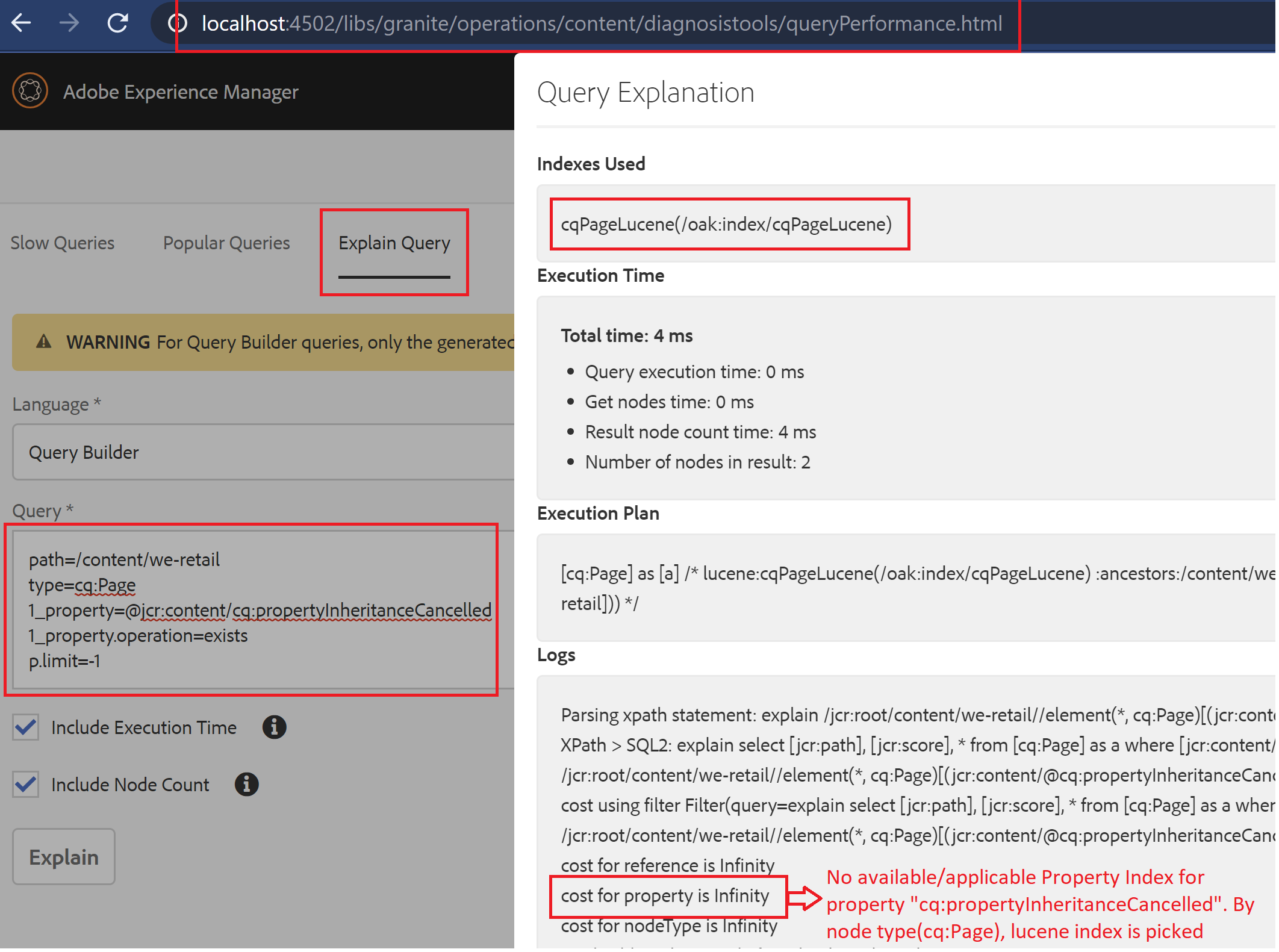
Sample query involving property constraint - Get all live copy pages which have overwritten the properties/which has cq:propertyInheritanceCancelled
    • path=/content/we-retail
    • type=cq:Page
    • 1_property=@jcr:content/cq:propertyInheritanceCancelled
    • 1_property.operation=exists
    • p.limit=-1
  • "Explain Query" response for the above query :
  • explainquery-console
  • Now is the time to create a Property Index for the property - cq:propertyInheritanceCancelled
    • Navigate to CRXDE -> /oak:index node
    • Being on oak:index node, Create a new node of 
      • name  -> cqPropertyInheritanceCancelled (in par with the naming convention of OOB indexes) 
      • type  -> oak:QueryIndexDefinition
    • Add below mandatory properties
      • NameTypeValue
        typeStringproperty
        propertyNamesName[]cq:propertyInheritanceCancelled
    • Behind the scene: Property Index works in Synchronous mode of Indexing, the moment index definition is persisted, it will start indexing the related content. 
    • On "Refresh" of newly created index node  -> below two properties are reflected automatically
      • NameTypeValue
        reindex Booleanfalse
        reindexCount Long1
    • Note: 
      • Refresh to reflect the properties that are automatically created. 
      • New property index node along with two mandatory properties to be persisted in one shot.

  • Execute the sample query again and observe the index used: 
  • Observation/Conclusion:
    • For a query involving property constraint, if both property and lucene index is available -> In general, Property Index will be picked. (Cost value is low for property index compared to lucene index as evident from the above screenshot for this use case)
    • Initially when we executed the query without property index, lucene index related to the type(cq:Page) we used in the query is picked which is "cqPageLucene"
With this, we are done with creating a Property Index for a specific property with mandatory properties.
Reindexing Property Index:
One of the possible causes for reindexing is, change in the existing index definition. Reindexing can be done in two ways for a Property Index.
    • Synchronous way
      • By updating reindex property to true. 
      • Once it is finished indexing, it will automatically set it back to false with an update to reindexCount value(value will be incremented by 1 from the existing value)
    • Asynchronous reindexing
      • Property index updates is assigned to a dedicated background job and when the indexing is done, the property definition will be switched back to synchronous updates mode
      • To enable this, 
        • ActionNameTypeValue
          Addreindex-asyncBooleantrue
          Update
          (value from false->true)
          reindexBooleantrue
      • Note: Both these updates to be persisted in one shot (do not trigger save with one property update)
      • As a result of this, below property would be automatically created. 
        • NameTypeValue
          asyncStringasync-reindex
      • Navigate to JMX console - http://localhost:4502/system/console/jmx and invoke the MBean - PropertyIndexAsyncReindex#startPropertyIndexAsyncReindex.
      • Once when the job is completed, 
        • automatically created property async will be removed
        • reindex property would be set to false
        • reindexCount would be incremented to 1 from its existing value.


By aem4beginner

Indexing in AEM - Indexing modes and Index types

In order for queries to perform well, Oak supports the indexing concept which will index content stored in the repository based on the index definition/type/indexing mode.
  • Indexing works by comparison of the node state (Difference between base state and modified state ) where NodeState(org.apache.jackrabbit.oak.spi.state.NodeState) represents a specific immutable state of the node.
  • Below mentioned types of indexing modes are defined based on how this comparison is made + when the index content gets updated. 
Indexing modes:
  • Synchronous Indexing
    • This mode updates index content as part of the commit to the actual content. In other words, content update and the respective update in the index will happen together (as with the name synchronous)
    • Supported Index Type: Property Index
  • Asynchronous Indexing
    • Index update is done via a scheduled jobs(AsyncIndexJobUpdate) defined at a specific interval. (5 seconds OOB)
    • As indexing in this mode happens asynchronously irrespective of the updates to the content, there is a chance of slight lag behind the latest repository state and will be eventually consistent.
    • Supported Index Type: Lucene Index and Solr Index
    • Example: /oak:index/cqTagLucene

  • Near Real-time (NRT) Indexing
    • Indexing happens in two modes/at two places
      • Persisted Index: Index updated via job mentioned above, AsyncIndexJobUpdate.
      • Local Index: In addition to persisted index, indexes will be created locally with help of copy-on-read support(Config as part of org.apache.jackrabbit.oak.plugins.index.lucene.LuceneIndexProviderService). It keeps data between two async index job runs.
        • Note: We can choose to provide a local index path as part of the config. If not mentioned, it will be stored in the "index" directory of our instance repository home.
    • In other words, content that is updated after the last async job run and before commencing the job at the next periodic interval will be able to show up quickly. (With both persisted and local index in place)
    • Supported Index Type: Lucene Index
    • Usage:
      • NRT indexing mode has two variations - nrt and sync.
      • NRT Indexing mode - nrt
        • async property on oak:index is set as ['async', 'nrt']
        • The local index is updated asynchronously
      • NRT Indexing mode - sync
        • async property on oak:index is set as ['async', 'sync']
        • The local index is updated synchronously. This mode indexes slowly compared to nrt mode.
  • Example: Few OOB Lucene index works on "NRT indexing mode -nrt". One such is in /oak:index/cqPageLucene
Types of Oak Index:
  • Property Index
    • Useful for queries that have property constraints that are not full text.
    • Identified by the following properties:
      • type -> property
      • propertyNames -> property name for which index is to be created [Name array]
  • Lucene Index
    • Lucene Fulltext Index
      • Useful for queries involving full-text conditions.
      • Identified by the following properties:
        • type -> Lucene
        • async -> async
    • Lucene Property Index
      • Same as property index mentioned above. Given that it is Lucene property index, it will index in async mode.
      • Identified by the following properties:
        • type -> lucene
        • async -> async
        • fullTextEnabled -> false [Boolean]
        • includePropertyNames -> property names for which index is to be created [String array]
  • Solr Index
    • Used when Apache Solr is used for search functionality.
    • Identified by the following properties:
      • type -> solr
      • async -> async
  • Ordered Index (deprecated)
Note:
  • Based on the query predicates we use, indexes used will differ accordingly (Difference is explained with example query below)
  • Apart from the key properties highlighted above, there are other supporting properties/nodes for an index definition. Will be covered separately for better clarity.
Index Manager, Admin UI:
We have Admin UI OOB for displaying the indexes available in our instance.
  • Navigate to Tools -> Operations -> Diagnosis -> Index Manager
  • We have filter options to filter based on the index name, type, path.
  • On selecting a specific index, we have two options - Index Info, Consistency check.


For node and property level details of oak:index by type, use query predicates like below in
querydebug.html
(From the result set, we can navigate to CRXDE of the respective node and observe the nodes, properties)
  • Get all Property Indexes:
path=/oak:index
type=oak:QueryIndexDefinition
1_property=type
1_property.value=property
p.limit=-1

  • Get all Lucene Indexes:
path=/oak:index
type=oak:QueryIndexDefinition
1_property=type
1_property.value=lucene
p.limit=-1

  • Get all indexes of mode NRT, with scheme nrt:
path=/oak:index
type=oak:QueryIndexDefinition
1_property=type
1_property.value=lucene
2_property=async
2_property.value=%nrt
2_property.operation=like
p.limit=-1


Play around in local (to understand the index modes and types used for your queries)
  • Use query predicates used in your project/create one and execute in the "Explain Query" console mentioned above.
  • Observe the indexes used.
  • Sample full text query to search for the text "we-retail" in pages:
fulltext=we-retail
path=/content/we-retail
type=cq:Page
p.limit=-1

  • Explain Query console with below query.

  • Hit on Explain will result in the below display 

  • The same query without a "type" predicate will result in a different index being used.


Observation:
  • As evident from the above example, if the type is used, the Lucene index which has a definition for a specific type will be picked. (In this case, the type used : cq:Page and index: cqPageLucene)
  • type is removed, full text Lucene index is used - /oak:index/lucene (async mode -> fulltext-async)
Note  
Each of the bulletins explained above by itself is a vast topic and has more details to it. Will try to cover it in upcoming posts.


By aem4beginner

December 31, 2020
Estimated Post Reading Time ~

Need for Query and Index in AEM

For functionalities like full-text search, retrieve content based on certain property or conditions associated with property/to avoid iterations on a huge volume of content under the root, we write query-based logic in AEM.

Languages supported:
  • XPATH
  • JCR-SQL2
XPath:
  • Created using AEM Query Builder API. - com.day.cq.search.*
  • From a development point of view, we need to be aware of standard OOB predicates to arrive at the XPATH query.
JCR-SQL2:
  • JCR-SQL2 queries are created using QueryManager - javax.jcr.query.QueryManager
  • QueryManager is acquired through JCR Session - session.getWorkspace().getQueryManager()
Query Processing:
  • Before AEM 6.0/Jackrabbit 2, everything in AEM is indexed by default.
  • With Jackrabbit Oak, we can create custom indexes based on the need. OOB indexes are available under /oak:index node in the repository.
  • Oak Query Engine
    • Process queries in the form of JCR-SQL2.
      • This means if we write queries using QueryBuilder API involving predicates, it will result in an XPath query.
      • QueryEngineImpl(org.apache.jackrabbit.oak.query.QueryEngineImpl) then parses XPATH query and converts to SQL2.
  • Uses a cost-based query optimizer to get the cost involved to process the query from all the available indexes.
  • All the available indexes under oak:index will estimate the cost.
  • The cost of traversal is also calculated.
  • The cost value of the index can be "Infinity". This implies that respective index cannot deal with specific condition/respective indexes cannot query the data.
  • Query Engine then picks the index which has the lowest estimated cost.
  • Note:
    • The cost value is an estimated worst-case value and hence need not be accurate.
    • The above-said process happens whenever a query is executed.
Example:
  • If a query is written to get all pages with specific "jcr:title" value, query engine need not traverse the entire repository for jcr:title, instead looks for selected index(based on cost) and then fetch/filter results from that indexed content.
  • oak:index definition for jcr:title of page is available OOB in /oak:index/cqPageLucene/indexRules/cq:Page/properties/jcrTitle
Need for creating the custom index:
  • When the query engine has to traverse the entire repository/more than allowed nodes(per configuration, its100000 - Apache Jackrabbit Query Engine Settings - In-memory read limit) for what we have queried for, it will result in a slow query and eventually throw UnsupportedOperationException to stop further processing. (Observing the logs, we would notice a warn level message suggesting to create an index as shown below)
*DEBUG* [0:0:0:0:0:0:0:1 [1588022611960] GET /libs/cq/search/content/querydebug.html HTTP/1.1] org.apache.jackrabbit.oak.query.QueryImpl no proper index was found for filter Filter(query=select [jcr:path], [jcr:score], * from [nt:unstructured] as a where isdescendantnode(a, '/') /* xpath: /jcr:root//element(*, nt:unstructured) */, path=//*)
*WARN* [0:0:0:0:0:0:0:1 [1588022611960] GET /libs/cq/search/content/querydebug.html HTTP/1.1] org.apache.jackrabbit.oak.query.QueryImpl Traversal query (query without index): select [jcr:path], [jcr:score], * from [nt:unstructured] as a where isdescendantnode(a, '/') /* xpath: /jcr:root//element(*, nt:unstructured) */; consider creating an index

Screenshot of OSGI config for reference:


Play around in your local instance (to visualize the flow mentioned above)
Create a new logger entry in sling log for the below-highlighted APIs
Navigate to http://localhost:4502/libs/cq/search/content/querydebug.html and frame a sample query predicates and execute. (Can also try to intentionally induce a traversal query in local and observe the logs)

path=/content/we-retail
type=cq:Page
1_property=@jcr:content/jcr:title
1_property.value=English
p.limit=-1


Observe the logs either in a log file or directly in /system/console/slinglog (Have highlighted the points mentioned in the flow)


By aem4beginner