Showing posts with label UNIT Testing. Show all posts

January 2, 2021
Estimated Post Reading Time ~

How To Switch From WCMUsePojo To Sling Models in AEM Part Two – JUnit Test

As you may know, unit testing and test-driven development (TDD) are important for making sure your code complies with the design, is scalable among your team, and provides automated regression. Often times, the JUnit test and component back-end Java code come hand in hand. An AEM developer who writes the component logic is also responsible to write the JUnit test code for the class. Here in part two, I am going to discuss how you can make the switch in terms of the JUnit test.

I have seen two approaches to writing the JUnit test class for a component class that extends the WCMUsePojo class. One is using Mockito and mocking each AEM/Sling object (i.e. bindings, resource, page, properties, SlingHttpServletRequest, SlingHttpServletResponse…) you will need for your test class, wiring those mocks with each other using Mockito’s when().thenReturn(), or PowerMockito.doReturn().when(), and activating the ComponentUse class with the properties and bindings passed in from each test case. The second approach is using AemContext class from wcm.io and setting it as your JUnit test rule, and then using a test content json file in your Test Resources Root folder to provide test page/resource content for your test cases.

If you haven’t heard of wcm.io, it’s an open-source project that is hosted on GitHub and provides handy libraries and extensions for AEM developers. We will be focusing on the AEM Mocks feature in wcm.io specifically, as it can be used and helpful for both WCMUsePojo and Sling Models test classes.

One of the reasons I like using AEM Mocks here is that it’s very robust and provides access to all mocked environments in the Sling project (Sling Mocks, OSGI Mocks, and JCR Mocks) and also all the context objects (i.e. SlingBindings, resource, page, properties, SlingHttpServletRequest…), so you don’t need to create and wire mocked objects individually and you can then write cleaner test codes. Secondly, it fully supports Sling Models.

Here, I am taking the title component I developed from my previous blog as an example. I have written two sample JUnit test classes, one is for TitleUse.java, which extends WCMUsePojo, the other is for TitleModel.java, which is a Sling Models class. You can find all the source code in my GitHub project.

Note: this was tested on AEM 6.2, 6.3
When you use the AemContext object in your test class, and your project skeleton was generated by Adobe Maven Archetype 10, like mine, you may find several issues when you run the test code. Those can be fixed by modifying the Maven dependencies in your POM file. Issues:

1. java.lang.NoClassDefFoundError: org/junit/rules/TestRule
java.lang.ClassNotFoundException: org.junit.rules.TestRule
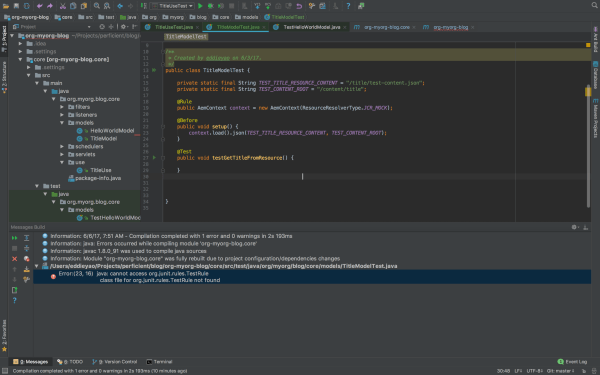

Resolved by: validating the maven dependencies of test scope, here’s a working copy in my parent POM:
<dependency>
<groupId>junit</groupId>
<artifactId>junit</artifactId>
<version>4.12</version>
<scope>test</scope>
</dependency>
<dependency>
<groupId>org.slf4j</groupId>
<artifactId>slf4j-simple</artifactId>
<version>1.7.6</version>
<scope>test</scope>
</dependency>
<dependency>
<groupId>org.mockito</groupId>
<artifactId>mockito-core</artifactId>
<version>1.10.19</version>
<scope>test</scope>
</dependency>
<dependency>
<groupId>org.powermock</groupId>
<artifactId>powermock-api-mockito</artifactId>
<version>1.6.4</version>
<scope>test</scope>
</dependency>
<dependency>
<groupId>org.powermock</groupId>
<artifactId>powermock-module-junit4</artifactId>
<version>1.6.4</version>
<scope>test</scope>
</dependency>
<dependency>
<groupId>org.apache.commons</groupId>
<artifactId>commons-imaging</artifactId>
<version>1.0-R1534292</version>
<scope>test</scope>
</dependency>
<dependency>
<groupId>io.wcm</groupId>
<artifactId>io.wcm.testing.aem-mock</artifactId>
<version>2.1.0</version>
<scope>test</scope>
<exclusions>
<exclusion>
<groupId>org.apache.commons</groupId>
<artifactId>commons-imaging</artifactId>
</exclusion>
</exclusions>
</dependency>
<!-- for testing we need the new ResourceTypeBasedResourcePicker -->
<dependency>
<groupId>org.apache.sling</groupId>
<artifactId>org.apache.sling.models.impl</artifactId>
<version>1.3.0</version>
<scope>test</scope>
</dependency>

lang.NoSuchMethodError:
org.osgi.framework.BundleContext.getServiceReference(Ljava/lang/Class;)Lorg/osgi/framework/ServiceReference;

Resolved by: validating the version of the osgi-core library, here’s a working copy in my parent POM:
<dependency>
<groupId>org.osgi</groupId>
<artifactId>osgi.core</artifactId>
<version>6.0.0</version>
<scope>provided</scope>
</dependency>
<dependency>
<groupId>org.osgi</groupId>
<artifactId>osgi.cmpn</artifactId>
<version>6.0.0</version>
<scope>provided</scope>
</dependency>
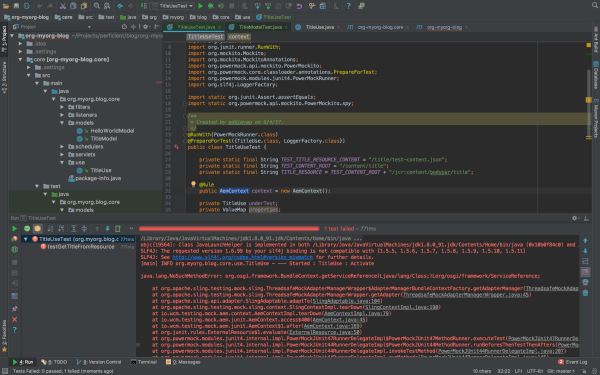

lang.NoSuchMethodError: org.slf4j.helpers.MessageFormatter.arrayFormat(Ljava/lang/String;[Ljava/lang/Object;]Lorg/slf4j/helpers/FormattingTuple;

Resolved by: validating the version of the slf4j library, here’s a working copy in my parent POM:
<dependency>
<groupId>org.slf4j</groupId>
<artifactId>slf4j-api</artifactId>
<version>1.7.6</version>
<scope>provided</scope>
</dependency>
<dependency>
<groupId>org.slf4j</groupId>
<artifactId>slf4j-simple</artifactId>
<version>1.7.6</version>
<scope>test</scope>
</dependency>


The package version numbers above are based on AEM 6.3, since I am using Sling Models API 1.3 features like associating a model class with a resource type and exporter framework. If you are on AEM 6.2 or lower, you may find some imported packages cannot be resolved in your bundle, you can either manually install the Sling Models 1.3 bundle, or adjust your package version number. Simply check the unresolved bundle in Package Dependencies (http://localhost:4502/system/console/depfinder) and locate the maven dependency in your POM file. Also, be aware of the version number of uber-jar or other bundles to provide AEM APIs and match those with your AEM version.

The Adobe Maven Archetype (10 or 11) didn’t generate a test resource structure, so if you want to use test resources for your test classes, you will need to set up the structure in your project.

Basically, you will create a folder under /core/src/test/resources, and put your component test resources in there. In IntelliJ, after you create the directory, you can mark it as Test Resource Root. The resource files you put in the resources folder can be loaded from your test class.

Now that you have everything set up for you to write JUnit test cases for your component class, here’re the steps:

1. Create the test class in the same package path under /core/src/test/java.
2. Know the JUnit annotations that you are going to use.
a. If you are using wcm.io’s AEM mock context object, you will need the @Rule annotation. The rule will run any Before methods, then the Test method, and finally any After methods, throwing an exception if any of these fail, so you don’t need to define the object repeatedly in those scenarios.
b. @Before annotation is used for set up methods (like assigning common mocked values, loading test content and binding it to Sling request variables) to be called before the actual test cases run.
c. @Test annotation holds statements for each test case to be run for the test class.

3. For Sling Models specifically:
a. If you are using wcm.io’s AEM mock context object, you will need to register models from package by context.addModelsForPackage("org.myorg.blog.core.models");
b. If you are using resourceType feature in Sling Models API 1.3, you may register ResourceTypeBasedResourcePicker service in mocked OSGI environment, by context.registerService(ImplementationPicker.class, new ResourceTypeBasedResourcePicker());
c. If you are using @ScriptVariable in your Sling Models class to provide script objects (i.e. currentPage, properties…), you may use SlingBindings class in your test class to add those objects by

slingBindings = (SlingBindings) context.request().getAttribute(SlingBindings.class.getName());

slingBindings.put(WCMBindings.CURRENT_PAGE, page);

d. Call the Sling Models class by underTest = context.request().adaptTo(TitleModel.class);

4. Write different test cases based on your code design and logic
5. Run your unit test class
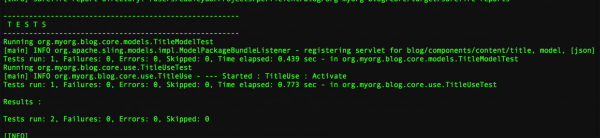
Differences between writing test class for WCMUsePojo (ComponentUseTest.java) and for Sling Models (ComponentModelTest.java):

1. In ComponentUseTest you mock/spy an instance of your use class, whereas in ComponentModelTest you call the Sling Models class directly;

2. In ComponentUseTest you heavily rely on Mockito/PowerMockito to mock the objects returned from WCMUsePojo APIs, whereas in ComponentModelTest you can just set up the context objects and Sling Models will be able to inject the properties/script variables from those context objects;

3. In ComponentUseTest you initialize the use class by calling activate() the method, whereas in ComponentModelTest you initialize the Sling Models class by calling adaptTo() method.

I hope after this article, you get more knowledge about writing JUnit test class for your component Java code and know the difference between writing test class for WCMUsePojo and for Sling Models.

If you want to know more about unit testing and AEM mocks, I found these two decks online that are helpful, one is an AEM GEMS resource, the other is an adaptTo() presentation. And if you missed my first post on switching from WCMUsePojo API to Sling Models in Adobe Experience Manager, you can read it here.


By aem4beginner

December 31, 2020
Estimated Post Reading Time ~

Unit Testing Hands on - For WCMUsePojo

This post illustrates the unit test for WCMUsePojo, Java class for backend logic as part of AEM Component development.

Quick Recap about WCMUsePojo:
  • WCMUsePojo initializes the objects associated with Bindings (Eg: WCMBindings/SlingBindings) via its init(Bindings) method which in turn calls the activate() method for post initialization tasks.
  • This init(Bindings bindings) method gets called if the POJO is instantiated in HTL via data-sly-use attribute.
  • Bindings(javax.script.Bindings) extends Map(java.util.Map) and hence it is basically a map object where key (type String)is the global variable and value is the respective object.
  • Once when the bindings are initialized, we are able to make use of the global variables which is available to us via methods like getCurrentPage(), getProperties(), etc.
Example:
When we call getCurrentPage() to get page object, below happens behind the scene (considering the above flow)
  • getCurrentPage() -> bindings.get(WCMBindings.CURRENT_PAGE) where WCMBindings.CURRENT_PAGE or WCMBindingsConstants.NAME_CURRENT_PAGE is a scripting variable/reference variable(currentPage) pointing to Page object.
Given the background on WCMUsePojo, writing a unit test case for the same involves the following
  • Mocking Bindings API (javax.script.Bindings)
  • Dummy implementation for bindings.get() call
  • Create an instance of WCMUsePojo class
  • Call init(mockedBindings) method of WCMUsePojo
  • Call method (under test) of WCMUsePojo
Mocking Bindings API:
Use either @Mock annotation or mock() method from org.mockito.* API
    @Mock
    private Bindings mockBindings;
    or
    Bindings mockBindings = mock(Bindings.class)

Dummy implementation for bindings.get() call
  • Use when and thenReturn methods from org.mockito.* API
  • when(mockBindings.get(WCMBindingsConstants.NAME_CURRENT_PAGE)).thenReturn(pageObj);
  • Where pageObj can be created using mocked page resource definition.
    • Load page resource JSON to dummy content path (aemContext.load() - Content Loader option)
    • Set the aemContext to respective resource/path and hence acquire Page object from it.
Example:
private final String PAGE_CONTENT_PATH = "/content/learnings/en/sample";
private final String PAGE_MOCK_JSON= "/learnings/core/models/SampleWCMUsePojoPageCnt.json";
aemContext.load().json(PAGE_MOCK_JSON, PAGE_CONTENT_PATH);
Resource currentPageResc = aemContext.currentResource(PAGE_CONTENT_PATH);
Page pageObj = aemContext.pageManager().getPage(currentPageResc.getPath());
when(mockBindings.get(WCMBindingsConstants.NAME_CURRENT_PAGE)).thenReturn(pageObj);
                    or
Resource resource = aemContext.resourceResolver().getResource(PAGE_CONTENT_PATH );
Page pageObj = resource.adaptTo(Page.class);
when(mockBindings.get(WCMBindingsConstants.NAME_CURRENT_PAGE)).thenReturn(pageObj);
                    or
Page pageObj = aemContext.create().page(PAGE_CONTENT_PATH );
when(mockBindings.get(WCMBindingsConstants.NAME_CURRENT_PAGE)).thenReturn(pageObj);

Create an instance of WCMUsePojo Class
Let say WCMUsePojo class to be tested is SampleWCMUsePojo.class and the Test Java class for the same is SampleWCMUsePojoTest.class
    SampleWCMUsePojo pojoObj = new SampleWCMUsePojo();

Call init(Bindings bindings)
In actual code, this method gets called automatically when the POJO is instantiated via a data-sly-use call in HTL.
For Test class, we are calling this method explicitly after instantiating the POJO per the previous step
    pojoObj.init(mockBindings);

Call method under Test:
Given that we have instantiated the POJO under test and set dummy implementation for bindings per the above steps, now is the time to call the method under test.
    String actualTitle = pojoObj.getPageTitle();
    String expectedTitle = "Sample Title";
    assertEquals(expectedTitle, actualTitle);

Code Example :
Very Simple Use case :

If title and path are not authored in dialog, it has to return the currentPage title and path respectively. If it is authored, it has to return the same.
We need to consider/write tests for two possibilities within this
  • Getting title and path from dialog/component content resource node (component node under content where the component is authored)
    • Create mock resource JSON from component node under the content path. (type -> nt:unstructured)
    • Example: /content/learnings/en/wcmusepojo-unit-test-demo/jcr:content/root/responsivegrid/samplewcmusepojo.tidy.-1.json where samplewcmusepojo is the component name.
  • Getting title and path from the currentPage object.
    • Create mock page resource JSON from page node (type -> cq:Page)
    • Example: /content/learnings/en/wcmusepojo-unit-test-demo.tidy.-1.json
Full code of Simple WCMUsePojo Java class, Test class, and mock resource JSON is available on GitHub
In a similar fashion, we can extend the dummy implementation for binding of desired global objects and hence write test statements per the actual code logic.


By aem4beginner

Unit Testing Hands on - For Sling Servlet

This post is about creating a Unit Test class for Sling Servlet, another commonly used Java class as part of an AEM application.
In Sling servlets, we have

SlingSafeMethodsServlet - read only servlet supporting GET (doGet)
SlingAllMethodsServlet - Supports POST, PUT and DELETE (doPost/doPut/doDelete)


In either case, we have request and response objects using which desired code logic is written in Servlet.
For Unit testing, we have Mock sling request and sling response from Sling Mocks (org.apache.sling.testing.mock.sling.servlet.MockSlingHttpServletRequest and org.apache.sling.testing.mock.sling.servlet.MockSlingHttpServletResponse respectively)

Writing unit test for Servlet involves the following
  • Instantiate Servlet to be tested.
  • Get mock request and response from AemContext
  • Prepare the mock request object (per the code logic before calling doGet/doPost)
  • Call doGet/doPost method of Servlet to be tested
  • Assert the Servlet response (per the code logic)
Instantiate Servlet to be tested.
Considering the Servlet to be tested is UnitTestServlet.java,
    UnitTestServlet unitTestServletObj = new UnitTestServlet();

Get request and response from AemContext:
From the AemContext object, we can create a request and response which is MockSlingHttpServletRequest and MockSlingHttpServletResponse respectively as explained above.
    MockSlingHttpServletRequest mockSlingRequest = aemContext.request();
    MockSlingHttpServletResponse mockSlingResponse = aemContext.response();


Prepare a mock request object:
  • Consider a scenario where we have a Servlet to retrieve values from the request and perform logic based on that.
  • Lets say, parameter named "siteName" is retrieved from request via request.getParameter("siteName") where siteName is being passed from HTML form or ajax request/any related.
  • Now for unit testing, we need to explicitly set the parameter to the mock request. So when the Servlet method is tested and when the above line executes, we will have a value for the "siteName".
Prepare Map object and set it to mock sling request as below

private Map<String, Object> parameterMap = new HashMap<String, Object>();
parameterMap.put("siteName", "aemlearnings");
mockSlingRequest.setParameterMap(parameterMap);


Similarly, we can gain access to other methods available in MockSlingRequest to prepare mock sling request (mockSlingRequest) per the code logic for testing. (mockSlingRequest.setResource(), mockSlingRequest.addHeader and so on)

Call doGet/doPost method of Servlet to be tested:

Once when the mock sling request object is prepared, we can call the respective method using the servlet object that we instantiated per the first step.
    unitTestServletObj.doGet(mockSlingRequest, mockSlingResponse);

When this line gets executed, code logic in the actual doGet method will be executed. If there is anything that is missed to set up in the Test class file, then this line might throw "NullPointerException"

Example:
Let say code logic in doGet makes use of an OSGI service + if that OSGI service is not registered in Test class file/ in a mock sense, if we don't define any dummy implementation for any of the lines of code, then the respective object will be null and hence exception in the above line of execution (or if an exception is handled, it will ultimately result in an error related to Assertion)

Assert the Servlet response:
Based on the code logic related to the response object, we can assert accordingly.
Example to assert the status code/check the content type set/anything written to the response object.

/* Checking content Type */
assertEquals("application/json", mockSlingResponse.getContentType());
/* Checking response status code */
assertEquals(200, mockSlingResponse.getStatus());
/* Checking output of servlet */
assertTrue(mockSlingResponse.getOutputAsString().contains("Response String from Servlet")); [where the actual line of code for this is something like - resp.getWriter().write("Response String from Servlet=" + responseStr);]


Code on GitHub:
Full Sample Servlet and Unit Test class for the same is available in GitHub
As such it doesn't refine to a specific functionality but to illustrate the below
  • Reference an OSGi Service
  • Call a dummy REST API (available from POSTMAN) and writes the API response to the Servlet response object.
Reference an OSGI service:
We have an option to register/inject OSGi service with the help of AemContext.
Considering an OSGI service (with config) is referenced in a Servlet, then in Test class file, we need to register that service using AemContext - We have few related methods from AemContext for the same. Based on the nature of the OSGi service referenced, we can use the respective method accordingly.

A full list of methods related to this is available under the "Methods from OSGIContextImpl" section in API Doc

Prepare the config properties using a Map object
Use registerInjectActivateService method from AemContext

    private SampleOSGIService mockSampleOSGIService; // OSGI service
    private Map<String, String> configProps = new HashMap<String, String>();
    configProps.put("apiEndpoint", "https://postman-echo.com");
    configProps.put("apiKey", "XYZ");
    configProps.put("siteName", "aemlearnings");
    mockSampleOSGIService = aemContext.registerInjectActivateService(new      
    SampleOSGIServiceImpl(), configProps);

Other use cases part of a Servlet:
  • Logic related to accessing a resource from request/performing any iteration/related actions on AEM APIs like Page or Asset or Tag or any related/Query Builder based logic to get the result based on some condition via predicates Map and so on.
  • We can mock the respective API if it is not directly available from AemContext -> provide dummy implementation and hence assert accordingly.


By aem4beginner

Unit Testing in AEM - Hands on

This post is about hands-on on Unit Testing Java class, part of an AEM application.
We will be using AEM Mocks from io.wcm.testing.mock.aem.junit5.* and Mockito framework - org.mockito.*

JUnit Version: JUnit 5
AEM Maven archetype: 22
IDE: Eclipse
Testing related maven dependency: (available by default in AEM Maven archetype)
  • JUnit5 (org.junit)
  • AEM mocks (io.wcm.testing.aem-mock.junit5)
  • Mockito framework (org.mockito)
We mostly follow the "Implementation first development" approach - Desired functionality is first coded and then a test case is written for the same.

For creating Test Java class,
  • Create Test Java Class
  • Create AemContext
  • Implement a setUp method (creating a test fixture, annotated with @BeforeEach)
  • Implement methods to be tested. (annotated with @Test)
Create Test Java Class:
In Eclipse IDE, right-click on the Java class to be tested ->
New -> Other -> JUnit -> JUnit Test case

We will have options to choose
  • JUnit version (as we have JUnit5 defined in project pom, JUnit Jupiter should be selected)
  • Displays the location of the Test file (packages/filename)
  • Methods to be part of Test class file - setUp method is selected by default where we define test fixture
  • Method to be considered for the test - List of methods in our Java class to be tested will be available for selection.
  • After this initial selection, we have our test class file generated. (JUnit level annotations like @Test, @BeforeEach will be automatically added based on our selection in the process of creating Test Java class)
Create AemContext:
In order to initialize and make use of AEM context throughout all the test methods/set up method in a Test class file,
  • We annotate the class using
    • @ExtendWith(AemContextExtension.class)
  • Create instance variable for AemContext object as follows
    • private final AemContext aemContext = new AemContext();
Implement setUp()/@BeforeEach method:
As with the name of annotation(@BeforeEach for setUp method), this is called before executing each test method.
Note: For illustration, we will consider Sling Models - commonly used as part of AEM component development
In our case,
  • Class under test(Sling Model) to be registered/added to AemContext
    • The below line will register the class with @Model annotation. We have another method from AemContext to add models at the package level - addModelsforPackage. 
        aemContext.addModelsForClasses(CompUnderTestModel.class);
  • Mock resource definitions set up are to be done here.
  • For models adapted as a resource (where we act upon the resource in the repo), we are creating a mock resource structure in the form of JSON to test the actions on the resource.
  • The below line will add the created mock resource structure to AemContext to act upon.
private final String CONTENT_PATH = "/content/learnings/compundertestmodel";
private final String MOCK_RESC_JSON = "/learnings/core/models/CompUnderTestModel.json";
aemContext.load().json(MOCK_RESC_JSON, CONTENT_PATH);
MOCK_RESC_JSON is the json file created under class path - /src/test/resources (/src/test/resources/learnings/core/models/CompUnderTestModel.json)
CONTENT_PATH - Any meaningful dummy content path.

  • Alternatively, we have few other methods from AemContext for creating test content - create/build for creating Content Builder and Resource Builder objects respectively
Implement/Understanding @Test methods (behind the scene):
  • As part of the mock resource definition in the previous step, we loaded the JSON to the dummy content path. Now the logic in the test method would be to access that dummy content path and its loaded resource props to test against the expected.
  • Example:
    • The sling model is written to retrieve a title.
    • Author the component in a page, fulfill the dialog values.
    • Get the JSON structure of authored resource (path of the component authored under specific page followed by .tidy.json)
    • Use that for creating a mock resource JSON file.
    • Let's say, the authored Title in the dialog to be "Sample Title".
    • Then in the test method to test assertEquals(expected, actual), set the
      • expected String -> Hardcode the value, the same as the one authored in the component- "Sample Title"
        • String expectedString = "Sample Title";
      • actual String -> Retrieve the title from aemContext(which is loaded with mock resource structure at dummy content path)
        • Resource currentResc = aemContext.currentResource("/content/learnings/compundertestmodel");
        • ValueMap currentRescVal = currentResc.getValueMap();
        • String actualString = currentRescVal.get("title", String.class);
        • assertEquals(expectedString, actualString);
  • This distinction of actual and expected + each and every line of our actual code under test will help arrive at the desired test fixture and to perform other related tests like assertNotEquals/ assertTrue/ assertFalse and so on. In this case, setting up the aemContext correctly and hence implement test methods accordingly.
Few sample snippets/test statements for reference:
Create Page :

pageManager() is available in the aemContext and hence we are using it to test the "create" method of the same.

CreatePage.java
/* Create Page */
PageManager pageMgr = rescResolver.adaptTo(PageManager.class);
try {
if(null != pageMgr) {
String pageName = pageTitle.toLowerCase().replace(" ", "_");
Page newPage = pageMgr.create(pagePath, pageName, templatePath, pageTitle, true);
if(null != newPage) {
createdPagePath = newPage.getPath();
}
}

} catch (WCMException e) {
LOG.error("WCM Exception={}", e.getMessage());
}

CreatePageTest.java
private final String PAGE_TITLE = "Page Creation For Test";
private final String TEMPLATE_PATH = "/conf/learnings/settings/wcm/templates/content-page-template";
private final String CONTENT_PATH = "/content/learnings/compundertestmodel"; //any dummy content path
private final AemContext aemContext = new AemContext();
@Test
void testGetCreatedPagePath() {
String pageName = getPageName();
String expectedPath = CONTENT_PATH + "/page_creation_for_test";
String actualPath = "";
try {
// pageManager() is available in aemContext. Hence used directly to test create page functionality
Page page = aemContext.pageManager().create(CONTENT_PATH, pageName, TEMPLATE_PATH, PAGE_TITLE, true);
if (null != page) {
actualPath = page.getPath();
}
assertEquals(expectedPath, actualPath);
} catch (WCMException e) {
System.out.println("WCMException=" + e.getMessage());
}

}
private String getPageName() {
String pageName = PAGE_TITLE.toLowerCase().replace(" ", "_");
return pageName;
}


Create Tag by Title:
Tag Manager is not available in aemContext and hence
  • we annotate the class with MockitoExtension along with AemContextExtension which will be @ExtendWith({ AemContextExtension.class, MockitoExtension.class })
  • we mock the API using @Mock from org.mockito
  • provide dummy implementation via its "when" and "thenReturn" methods.
Mockito throws an UnsupportedStubbingException, when an initialized mock is not used in test methods. To skip this exception/validation, we are using "lenient".

CreateTagByTitle.java
TagManager tagMgr = rescResolver.adaptTo(TagManager.class);
try {
Tag tag = tagMgr.createTagByTitle(pageTitle);
if(null != tag) {
createdTagPath = tag.getPath();
}

} catch (AccessControlException e) {
LOG.error("AccessControlException={}", e.getMessage());
} catch (InvalidTagFormatException e) {
LOG.error("InvalidTagFormatException={}", e.getMessage());
}


CreateTagByTitleTest.java
private final String PAGE_TITLE = "Page Creation For Test";
private final String TAGS_DEFAULT = "/content/cq:tags/default";
/* Mock the desired APIs - Starts */
@Mock
private TagManager tagMgr;

@Mock
private Tag tag;
/* Mock the desired APIs - Ends */
@BeforeEach
void setUp() throws Exception {
aemContext.addModelsForClasses(CompUnderTestModel.class);
/* Provide dummy implementation to the mocked APIs - Starts */
lenient().when(tagMgr.createTagByTitle(PAGE_TITLE)).thenReturn(tag);
lenient().when(tag.getPath()).thenReturn(TAGS_DEFAULT + "/" + getPageName());
/* Provide dummy implementation to the mocked APIs - Ends */
}

@Test
void testGetCreatedTagPath() {
String actualTagPath = "";
String expectedTagPath = TAGS_DEFAULT + "/" + getPageName();
try {
Tag tag = tagMgr.createTagByTitle(PAGE_TITLE);
if (null != tag) {
actualTagPath = tag.getPath();
}
assertEquals(expectedTagPath, actualTagPath);
} catch (AccessControlException e) {
System.out.println("AccessControlException=" + e.getMessage());
} catch (InvalidTagFormatException e) {
System.out.println("InvalidTagFormatException=" + e.getMessage());
}
}
private String getPageName() {
String pageName = PAGE_TITLE.toLowerCase().replace(" ", "_");
return pageName;
}

A full list of available methods from AemContext is available in the API doc
Complete Test Java class file for a Sling Model is explained with Video demo in WKND Tutorial

This is more of a starter to write Test Java class and we have many other options as part of Aem Mocks (from io.wcm) and several use cases like registering OSGI service, test class for servlets and so on which will be covered in upcoming posts.


By aem4beginner

Unit testing in AEM - Introduction

This post is about an introduction to Unit testing the Java class part of AEM application by starting with a quick recap of the JUnit framework followed by Mocking and APIs available specific to AEM with respect to testing.

Java class that we write as part of AEM involves Sling API/JCR API/AEM related APIs and it all ultimately targets the content on our repository. In other words, the logic revolves around the content which in the AEM context, is a Resource/Node and its related properties (may it be a Sling model/WCMUsePojo/Sling Servlets/OSGI component/any related for that matter)

A quick recap of the basics:
JUnit is the testing framework for Java and is available under the package - org.junit.*
It provides Test Fixture, Test Runner, and Test class

The test fixture is a fixed state of objects in which tests are run. One of the methods it includes which is relevant for us is the setUp method that we write in Test class.(Annotated with @BeforeEach, JUnit5 / @Before, JUnit 4)
Test class has methods to be tested which are annotated with @Test
Test Runner
  • Is used to execute the test cases and is defined with help of @RunWith Annotation
  • There are several runner implementations available based on the need for custom test execution. One such which is related to our subject is MockitoJunitRunner
JUnitCore
  • Is used to start the Test class (As we execute the test in build phase or if we run as JUnit Test in IDE, it is by means of this JUnitCore class - JUnitCore.runClasses(OurTestClass.class) behind the scene)
  • It uses Java Reflection to find the runner of the Test class.
  • The runner has then instantiated which in turn instantiates the Test class and hence executes test methods per the annotations defined.
MockitoJunitRunner:
  • Mockito is a framework for mocking - org.mockito.junit.MockitoJUnitRunner
Mocking:
  • Mocking provides dummy implementation to an interface.
  • Creating mock objects for an interface/proxy for the actual implementation of an interface.
Mocking Example:
  • We have an OSGI service(say, SampleService) that exposes OSGI config values and is referenced in a Sling Model.
  • SampleServiceImpl will have logic to get the OSGI config values from its Activate method.
  • Sling Model will have a piece of code to get OSGI config value from the service it references. Let's say,
    • sampleService.getAPIUrl()
  • With this setup, when we write a Test class for Sling Model, we need to have the means to instruct the action to happen when the above line is executed. (that is the implementation for SampleService to use in the Test class)
  • For this reason, we first mock the service referenced using @Mock annotation.
    • @Mock
    • private SampleService sampleService;
  • With the help of "when" and "thenReturn" methods, we provide the implementation to the mocked interface.
    • when(sampleService.getAPIUrl()).thenReturn("provide a URL that you actually have as part of config");
  • Actual Implementation :
    • Retrieves APIUrl from config available in activate method of an OSGI component/service implementation
  • Mocked/Proxy Implementation:
    • Hardcoding/providing the direct Url/anything as defined in thenReturn method
Mocks available under Apache Sling project
  • Sling Mocks
  • OSGI Mocks
  • JCR Mocks
AEM Mocks : (By wcm.io)
  • AemContextExtension in case of JUnit 5, @Rule named AemContext in case of JUnit 4
  • Access to all above mocks (from Apache Sling project)
  • Access to AEM specific APIs - AEM WCM APIs, AEM DAM APIs, etc. A list of all supported APIs are listed here
Other Mocking related implementation:
We have few other Mocking-related implementations (To name a few EasyMock, PowerMock, JMock, etc) Out of that, would like to mention about PowerMock framework which is used to mock static, final, and private methods. (this is not possible directly with Mockito Framework)

How Test class in AEM project works:
As the Test class is executed as part of the build phase, there is no means of AEM repo set up available at the time of the build phase.
Given this understanding, for writing test class and hence executing the test, we need to mock/load the resource definitions (in the form of JSON) to the path say "/content".
With AEM Mocks available from wcm.io framework (which has mock implementations of Sling API, JCR API, OSGi, and AEM related APIs), we can go about using
  • AemContextExtension via @ExtendWith Annotation in case of JUnit 5.
  • @Rule named AemContext in the case of JUnit 4.
We will then use this AemContext object's methods to get resourceResolver / set currentResource to the path we created in classpath / can load the JSON to this path and so on.
In short, any operations that we would do against a repo is provided by this AemContext object.
There are some exceptional cases where not all methods of service provided by AemContext is implemented. In such a case, we might need to use MockitoJunitRunner along with AemContext.
  • Mock the service for which implementation of a specific method is not available.
  • Provide the dummy implementation and then register the respective service to AemContext.
Note: This exceptional case is highlighted in the WKND tutorial Unit Testing example.

Need for mocking resource definitions(JSON) in the class path :
Let's say, we have a logic to create a page programmatically in a specific location in the repo.
  • pageMgr.createPage(...)
When the code is built and deployed in AEM without any errors/bundle is active, it creates a page in the desired location as programmed.
Now when it comes to testing, which happens in an IDE as we trigger the build (module test is called), there is no repository set up available to act on. In particular, there is no means to test if the line - pageMgr.createPage(...) will help create a page in the repository successfully.
For this, we can mock the content hierarchy with respective properties.
  • Let say, our Sling Model under test is available in com.aem.learnings.models.SampleModel
  • Then under /core/src/main/resources, in the path of the Sling Model, we can place the JSON file (That is /core/src/main/resources/com/aem/learnings/models/SampleModel.json)
  • With help of AemContext object, we can load this JSON to the path named - "/content") as follows
    • ctx.load().json("/com/aem/learnings/models/SampleModel.json", "/content");
In the case of createPage, we can use this as a starting point and write logic accordingly. Similarly, delete/ modify/ properties retrieval and all related operations can happen against this.
Note:
  • /content that we used can be any meaningful custom path, need not be /content always
Conclusion/Brief flow:
  • AemContext from wcm.io can be used for writing a Test class
  • Use that context object to gain access to mocked Sling, OSGI, JCR APIs, and AEM specific APIs
  • In case any of the mocked APIs (that wcm.io supports) doesn't have any method implementation, we need to mock the respective API explicitly via @Mock (using MockitoJUnitRunner)
  • Based on our code flow of class under test, we need to register the mocked objects (as in the previous step) to our AemContext.
With this high-level understanding of all the above, we will be able to write a test class for our Java program as part of the AEM application with ease.
Follow up post will be less of theory and more of coding with a sample test case.


By aem4beginner

Unit testing in AEM - Debugging issues in Test class

This post is for illustrating the possible errors/exception we get while writing Test class. Also highlights the possible ways of creating Test content and the ResourceResolverType available for creating AemContext (from io.wcm framework)

Test content:
  • The most important aspect of Unit Testing is creating Test content which in the AEM sense is to provide a means of the repository at the time of code build phase to test our Java code (written interacting with a repo)
  • For creating the same, we already saw that there are 3 possible APIs - Content Loader, Content Builder, and Resource Builder available.
  • Most often we use Content Loader making use of JSON file at classpath and loading it to dummy content path. Below are the sample snippet making use of the other two APIs.
Content Builder :
private final AemContext aemContext = new AemContext(ResourceResolverType.JCR_MOCK);
ContentBuilder contentBuilder = aemContext.create();
With this contentBuilder object, we can create page, asset, tag etc - Full list of methods available with ContentBuilder API is in doc.

Resource Builder:
private final AemContext aemContext = new AemContext(ResourceResolverType.JCR_MOCK);
ResourceBuilder rescBuilder= aemContext.build();
With this rescBuilder object, we can create resource with properties - Full list of methods available with ResourceBuilder API is in doc.

Resource Resolver Types (as available from io.wcm)
RESOURCERESOLVER_MOCK - new AemContext(ResourceResolverType.RESOURCERESOLVER_MOCK);
  • Mock for Resource Resolver / Factory
  • Access to all Sling API
  • No underlying JCR repository and hence the usage of JCR API is not possible.
    • (Example: Adapting to JCR objects will return null)
  • This type is very fast
  • Usage: If no JCR APIs are involved, we can make use of RESOURCERESOLVER_MOCK while creating AemContext.
JCR_MOCK - new AemContext(ResourceResolverType.JCR_MOCK);
  • JCR In-memory mock as an underlying repository.
  • Support most of the JCR features with an exception of extended features like Eventing, Search, Versioning, etc.
  • This is slow compared to RESOURCERESOLVER_MOCK
  • Usage: If both Sling API and JCR APIs are involved, make use of JCR_MOCK.
JCR_OAK - new AemContext(ResourceResolverType.JCR_OAK);
  • Uses a real JCR Jackrabbit Oak repository.
  • This is slow compared to JCR_MOCK
  • Usage: Common use case would be for logic involving JCR query, JCR Observation
Note: We can create AemContext without specifying ResourceResolverType as well - new AemContext()

Debugging/Troubleshooting:
Null pointer Exception:
  • Let's consider we are writing Test class for Sling Model and in Test class, we have created AemContext, mock content and instantiated the Sling model (via request or resource of aemContext)
  • In case if any of the APIs/objects used in the sling model in -> init method / in constructor injected scenario is not available to Test class, it will result in the Sling Model object being null.
  • If a null check is handled, it will result in the next possible scenario.
Example :
  • In the example below, the "currentPageObj" in the "init" method is an instance variable and is initialized in Injected Constructor.
  • If currentPage object in the constructor (to initialize the "currentPageObj") is not set to AemContext, then currentPage in the constructor is null while the Sling model is instantiated in Test class and hence null for currentPageObj in init method -> Ultimately Sling Model object will be null in Test class.
@Model(adaptables = { Resource.class,
SlingHttpServletRequest.class }, defaultInjectionStrategy = DefaultInjectionStrategy.OPTIONAL)
public class SlingModelConstructor {

private Page currentPageObj;

public String getTitle() {
return title;
}

private String title;

/* Constructor Injection */
@Inject
public SlingModelConstructor(@ScriptVariable @Named("currentPage") Page currentPage) {
currentPageObj = currentPage;
}

@PostConstruct
protected void init() {
title = currentPageObj.getTitle();
}

}


In the Test class snippet below, we have used ContentBuilder to create a Page object and is set to AemContext and then Sling Model is instantiated via request from AemContext. In this way, the valid object is created and will be available to access its methods.

@ExtendWith({ AemContextExtension.class, MockitoExtension.class })
class SlingModelConstructorTest {

private SlingModelConstructor modelObj;

private Page page;

private final AemContext aemContext = new AemContext(ResourceResolverType.JCR_MOCK);

@BeforeEach
void setUp() throws Exception {
aemContext.addModelsForClasses(SlingModelConstructor.class);
ContentBuilder cntBuilder = aemContext.create();
page = cntBuilder.page("/content/learnings", "/conf/learnings/templates/content-temp", "Sample Page - Aug 2020");
/* Page is set to AemContext object */
aemContext.currentPage(page);
/* Sling Model Instantiation */
modelObj = aemContext.request().adaptTo(SlingModelConstructor.class);
}

@Test
void testGetTitle() {
String expectedTitle = "Sample Page - Aug 2020";
assertNotNull(modelObj);
String actualTitle = modelObj.getTitle();
assertEquals(expectedTitle, actualTitle);
}

}


Assertion Failed :
  • If the assertion conditions are not satisfied, then it will result in AssertionFailedError.
  • From the literal sense, we know if expected and actual are not the same, then it results in this sort of error.
  • Most often we get this in the below situation.
  • Example:
    • In the same example as above in a Test class -> assume Page object is not set to AemContext -> Sling Model object retrieved -> null check is handled while invoking its method - In this case, it is getTitle() method, it would result in AssertionFailed error. (Expected would be some String while the actual title we get is null)
@ExtendWith({ AemContextExtension.class, MockitoExtension.class })
class SlingModelConstructorTest {

private SlingModelConstructor modelObj;

private Page page;

private final AemContext aemContext = new AemContext(ResourceResolverType.JCR_MOCK);

@BeforeEach
void setUp() throws Exception {
aemContext.addModelsForClasses(SlingModelConstructor.class);
modelObj = aemContext.request().adaptTo(SlingModelConstructor.class); // No Page object set and model is directly instantiated
}

@Test
void testGetTitle() {
String expectedTitle = "Sample Page - Aug 2020";
String actualTitle = null ;
if(null != modelObj){ // modelObj will be null and this block won't execute
actualTitle = modelObj.getTitle();
}
assertEquals(expectedTitle, actualTitle); // actualTitle will be null and hence AssertionFailedError

}

}


Mocking the right resource:
  • If we are to create a mock resource JSON for performing tests, we need to understand which line of code to be tested and the respective resource can be retrieved from the actual content (from repo/CRXDE) using selector - "tidy.-1.json" on the respective resource.
  • By the term "respective resource",
    • It means node/resource of type cq:Page if we are to test page related functionality.
    • It means node/resource of type nt:unstructured/component node under the content path if we are to test component related logic via ValueMap.
Others:
  • Apart from the above, if any of the code statements making use of a specific API is not available within the method under test, then it will throw its respective exception according to the API used.
  • There are cases where certain methods or properties are not available with Testing APIs themselves. One such case which was raised in the Community forum recently, jcr:created property is not accessible
Conclusion:
  • The first immediate reach is AemContext from io.wcm framework, if anything is not accessible within that, explore Mocking related frameworks and its methods -> provide dummy implementation per the code statements.
  • With the understanding of the flow of how to test class works + making use of available Testing/Mocking APIs + method under test + functionality it executes + control flow when a specific line is executed, we will be able to write test class with ease and debug in case of any issues in test class execution.


By aem4beginner

December 28, 2020
Estimated Post Reading Time ~

AEM Sling Servlet Unit Test Example Using wcm.io AEM Mocks, Servlet by Resource Type

This article will demonstrate how to write AEM Unit tests for @SlingServletResourceTypes (OSGi DS 1.4 (R7) component property type annotations) using the Junit4 testing framework. With developers being more visual, the source code is posted below.

Environment:
AEM project archetype 19 (link)
Mockito 2.27.0 (link)
AEM Mocks JUnit 4 2.7.2 (link)

This example uses the AEM project archetype 19 to generate a new AEM project, Junit 4 will be used as the testing framework, Mockito 2.27.0 will be used as the mocking framework, and AEM Mocks will be used to mock AEM objects and AEM API.

What’s really great about the latest versions of AEM mocks, is that the setup is very minimal. After spinning up a new AEM project from the AEM project archetype 19, you simply need to include the AEM Mocks dependency, and you are ready to go!

Using OSGI R7 annotations for your AEM project requires some additional dependencies. 

Test Framework Dependencies
// pom.xml
<!-- Maven Surefire Plugin -->
<plugin>
    <groupId>org.apache.maven.plugins</groupId>
    <artifactId>maven-surefire-plugin</artifactId>
    <version>2.20</version>
    <configuration>
        <junitArtifactName>junit:junit:4</junitArtifactName>
    </configuration>
</plugin>
...
<dependencies>
    ...
    <dependency>
        <groupId>io.wcm</groupId>
        <artifactId>io.wcm.testing.aem-mock</artifactId>
        <version>2.7.2</version>
        <scope>test</scope>
    </dependency>
    ...
</dependencies>

// core/pom.xml
<dependencies>
    ...
    <dependency>
        <groupId>io.wcm</groupId>
        <artifactId>io.wcm.testing.aem-mock</artifactId>
    </dependency>
    ...
</dependencies>

Sling Servlet Resource Types Class : SlingServletResourceTypes.class

package com.sourcedcode.core.servlets;

import com.day.cq.wcm.api.Page;
import com.fasterxml.jackson.databind.ObjectMapper;
import org.apache.sling.api.SlingHttpServletRequest;
import org.apache.sling.api.SlingHttpServletResponse;
import org.apache.sling.api.resource.Resource;
import org.apache.sling.api.resource.ResourceResolver;
import org.apache.sling.api.servlets.SlingSafeMethodsServlet;
import org.apache.sling.servlets.annotations.SlingServletResourceTypes;
import org.osgi.service.component.annotations.Component;

import javax.servlet.Servlet;
import java.io.IOException;
import java.util.ArrayList;
import java.util.Iterator;
import java.util.List;

import static com.day.crx.packaging.JSONResponse.APPLICATION_JSON_UTF8;
import static org.apache.sling.api.servlets.HttpConstants.METHOD_GET;

/**
 * A demonstration sling servlet resource type class to demonstrate unit testing.
 * Appending ".example.json" on any resource will activate the doGet() method below, and return Json data.
 * Json Data returned is data from the immediate children of the "/content/we-retail', parent resource node.
 */
@Component(service = Servlet.class)
@SlingServletResourceTypes(
        resourceTypes = "sling/servlet/default",
        methods = METHOD_GET,
        extensions = "json",
        selectors = "example")
public class SlingServletResourceTypesExampleDS14Servlet extends SlingSafeMethodsServlet {

    @Override
    protected void doGet(SlingHttpServletRequest req, SlingHttpServletResponse res) throws IOException {
        res.setContentType(APPLICATION_JSON_UTF8);
        res.setStatus(SlingHttpServletResponse.SC_OK);
        List<PageItem> pageItems = getPageItems(req);
        String json = new ObjectMapper().writeValueAsString(pageItems);
        res.getWriter().write(json);
    }

    private List<PageItem> getPageItems(SlingHttpServletRequest req) {
        List<PageItem> pageItems = new ArrayList<>();
        ResourceResolver resolver = req.getResourceResolver();
        Resource weRetail = resolver.getResource("/content/we-retail");
        if (weRetail != null) {
            Iterator<Resource> it = weRetail.listChildren();
            while (it.hasNext()) {
                Resource resource = it.next();
                if (resource.getResourceType().equalsIgnoreCase(com.day.cq.wcm.api.NameConstants.NT_PAGE)) {
                    Page page = resource.adaptTo(Page.class);
                    if (page != null) {
                        pageItems.add((new PageItem(page.getTitle(), resource.getPath())));
                    }
                }
            }
        }
        return pageItems;
    }

    /**
     * Inner class PageItem, for creating PageItem objects.
     */
    public class PageItem {

        private String pageTitle;

        private String pagePath;

        PageItem(String pageTitle, String pagePath) {
            this.pageTitle = pageTitle;
            this.pagePath = pagePath;
        }

        public String getPageTitle() {
            return pageTitle;
        }

        public String getPagePath() {
            return pagePath;
        }
    }
}

Results of the output from the working as expected SlingServletResourceTypesTest.class.


Sling Servlet Resource Types Test Class : SlingServletResourceTypesTest.class


package com.sourcedcode.core.servlets;

import com.fasterxml.jackson.databind.JsonNode;
import com.fasterxml.jackson.databind.ObjectMapper;
import io.wcm.testing.mock.aem.junit.AemContext;
import org.apache.sling.testing.mock.sling.ResourceResolverType;
import org.apache.sling.testing.mock.sling.servlet.MockSlingHttpServletRequest;
import org.apache.sling.testing.mock.sling.servlet.MockSlingHttpServletResponse;
import org.junit.Before;
import org.junit.Rule;
import org.junit.Test;
import org.junit.runner.RunWith;
import org.mockito.InjectMocks;
import org.mockito.Mock;
import org.mockito.junit.MockitoJUnitRunner;

import java.io.IOException;

import static com.day.crx.packaging.JSONResponse.APPLICATION_JSON_UTF8;
import static junitx.framework.Assert.assertEquals;
import static org.junit.Assert.assertTrue;

@RunWith(MockitoJUnitRunner.class)
public class SlingServletResourceTypesExampleDS14ServletTest {

    @Rule
    public final AemContext context = new AemContext(ResourceResolverType.JCR_MOCK);

    @Mock
    private MockSlingHttpServletRequest req;

    @Mock
    private MockSlingHttpServletResponse res;

    @InjectMocks
    private SlingServletResourceTypesExampleDS14Servlet underTest;

    @Before
    public void setup() {
        underTest = new SlingServletResourceTypesExampleDS14Servlet();
        req = context.request();
        res = context.response();
    }

    @Test
    public void doGet_shouldReturnHeaderAsExpected() throws IOException {
        underTest.doGet(req, res);
        assertEquals(res.getContentType(), APPLICATION_JSON_UTF8);
    }

    @Test
    public void doGet_shouldReturnPageItemListJsonAsExpected_0() throws IOException {
        underTest.doGet(req, res);
        String jsonString = res.getOutputAsString();
        ObjectMapper mapper = new ObjectMapper();
        JsonNode actualObj = mapper.readTree(jsonString);
        assertEquals(0, actualObj.size());
    }

    @Test
    public void doGet_shouldReturnPageItemJsonAsExpected_properties_values() throws IOException {
        createPagesInJcrMock();
        underTest.doGet(req, res);
        String jsonString = res.getOutputAsString();
        ObjectMapper mapper = new ObjectMapper();
        JsonNode actualObj = mapper.readTree(jsonString);
        JsonNode firstItem = actualObj.get(0);
        assertTrue(firstItem.has("pageTitle"));
        assertTrue(firstItem.has("pagePath"));
        assertEquals( "United states", firstItem.get("pageTitle").textValue());
        assertEquals("/content/we-retail/us", firstItem.get("pagePath").textValue());
    }

    /**
     * Test helper method to create 3 pages in the on-memory JCR Mock instance.
     */
    private void createPagesInJcrMock() {
        context.create().page("/content/we-retail", "/", "We Retail");
        context.create().page("/content/we-retail/us", "/", "United states");
        context.create().page("/content/we-retail/ca", "/", "Canada");
    }
}

NOTES:


By aem4beginner

AEM Sling Models Unit Test Example Using wcm.io AEM Mocks

Creating new AEM components, we sometimes need backend logic to compute user requests with business logic. There are multiple ways of doing so, like using the Java-Use API or Javascript-Use API, but the most popular and best practice of writing business logic for an AEM component will be using Sling Models.

This article will demonstrate how to write AEM Unit tests for sling models using the Junit4 testing framework. With developers being more visual, the source code is posted below.

Environment:
AEM project archetype 19 (link)
Mockito 2.27.0 (link)
AEM Mocks JUnit 4 2.7.2 (link)

This example uses the AEM project archetype 19 to generate a new AEM project, Junit 4 will be used as the testing framework, Mockito 2.27.0 will be used as the mocking framework, and AEM Mocks will be used to mock AEM objects and AEM API.

What’s really great about the latest versions of AEM mocks, is that the setup is very minimal. After spinning up a new AEM project from the AEM project archetype 19, you simply need to include the AEM Mocks dependency, and you are ready to go!

Dependencies
// pom.xml
<!-- Maven Surefire Plugin -->
<plugin>
    <groupId>org.apache.maven.plugins</groupId>
    <artifactId>maven-surefire-plugin</artifactId>
    <version>2.20</version>
    <configuration>
        <junitArtifactName>junit:junit:4</junitArtifactName>
    </configuration>
</plugin>
...
<dependencies>
    ...
    <dependency>
        <groupId>io.wcm</groupId>
        <artifactId>io.wcm.testing.aem-mock</artifactId>
        <version>2.7.2</version>
        <scope>test</scope>
    </dependency>
    ...
</dependencies>

// core/pom.xml
<dependencies>
    ...
    <dependency>
        <groupId>io.wcm</groupId>
        <artifactId>io.wcm.testing.aem-mock</artifactId>
    </dependency>
    ...
</dependencies>

Sling Model Class: Header.class

package com.sourcedcode.core.models;

import com.day.cq.wcm.api.Page;
import org.apache.sling.api.resource.Resource;
import org.apache.sling.api.resource.ResourceResolver;
import org.apache.sling.models.annotations.DefaultInjectionStrategy;
import org.apache.sling.models.annotations.Model;
import org.apache.sling.models.annotations.injectorspecific.ChildResource;
import org.apache.sling.models.annotations.injectorspecific.ScriptVariable;
import org.apache.sling.models.annotations.injectorspecific.ValueMapValue;

import javax.annotation.PostConstruct;
import javax.inject.Inject;

@Model(adaptables = Resource.class,
resourceType = Header.RESOURCE_TYPE,
defaultInjectionStrategy = DefaultInjectionStrategy.OPTIONAL)
public class Header {

protected static final String RESOURCE_TYPE = "sourcedcode/components/structure/header";

@ValueMapValue
private String contactUsPath;

@ScriptVariable(name="currentPage")
private Page currentPage;

@ChildResource(name="link")
Resource childResource;

@SlingObject
private ResourceResolver resolver;

private String contactUsPageSecretChar;

@PostConstruct
public void init() {
setContactUsPageSecretChar();
}

private void setContactUsPageSecretChar() {
Resource resource = resolver.getResource(contactUsPath);
if (resource != null) {
Page contactUsPage = resource.adaptTo(Page.class);
contactUsPageSecretChar = contactUsPage.getTitle();
}
}

public String getContactUsPageSecretChar() {
return contactUsPageSecretChar.substring(contactUsPageSecretChar.length() - 1);
}

// demo of testing the @ScriptVariable("currentPage") annotation
public String getPageTitle() {
return currentPage.getPageTitle();
}

// demo of testing the @ChildResource annotation
public String getChildLinkPropFlag() {
return childResource.getValueMap().get("flag", "");
}
}


Sling Model Test Class : HeaderTest.class
package com.sourcedcode.core.models;

import com.adobe.cq.commerce.common.ValueMapDecorator;
import com.day.cq.wcm.api.Page;
import com.google.common.collect.ImmutableMap;
import io.wcm.testing.mock.aem.junit.AemContext;
import org.apache.sling.api.resource.Resource;
import org.apache.sling.testing.mock.sling.ResourceResolverType;
import org.junit.Rule;
import org.junit.Test;
import org.junit.runner.RunWith;
import org.mockito.InjectMocks;
import org.mockito.Mock;
import org.mockito.junit.MockitoJUnitRunner;

import static junitx.framework.Assert.assertEquals;
import static org.mockito.Mockito.when;

@RunWith(MockitoJUnitRunner.class)
public class HeaderTest {

@Rule
public final AemContext context = new AemContext(ResourceResolverType.JCR_MOCK);

// the context.resourceResolver() is auto injected by the AemContext, cannot be mocked.
// ResourceResolver resolver;

// mocking the global AEM object "currentPage".
// variable does not need to match the variables in the underTest.class
@Mock
private Page currentPage;

// injects all the mocks into the tested object.
@InjectMocks
private Header underTest;

@Test
public void itShouldReturnTheCorrectSecretCharWhenResourceExist() {
// using the AEM context to create an AEM resource in the context, to set properties for the resource.
// the resource path can be anything made up.
Resource headerResourceContext = context.create().resource("/content/sourcedcode/home/jcr:content/header", new ValueMapDecorator(ImmutableMap.<String, Object> of(
"contactUsPath", "/content/sourcedcode/contact",
"anotherProperty", "example")));

// create mock page, resolved by the resolver.
context.create().page("/content/sourcedcode/contact", "", ImmutableMap.<String, Object>builder()
.put("jcr:title", "Contact Us Page")
.build());

underTest = headerResourceContext.adaptTo(Header.class);
assertEquals("e", underTest.getContactUsPageSecretChar());
}

@Test
public void itShouldReturnTheCorrectCurrentPageTitle() {
when(currentPage.getPageTitle()).thenReturn("Home Page");
assertEquals("Home Page", underTest.getPageTitle());
}

@Test
public void itShouldReturnTheCorrectChildLinkProperty() {
context.build().resource("/content/sourcedcode/home/jcr:content/header")
.siblingsMode()
.resource("link", "flag", "newPage");
underTest = context.resourceResolver().getResource("/content/sourcedcode/home/jcr:content/header").adaptTo(Header.class);
assertEquals("newPage", underTest.getChildLinkPropFlag());
}

}


Common Questions for Writing Test Code for Sling Models
  • How do I initial properties in my sling model object? First, ensure that your sling model allows a resource.class to be adaptable, then in your sling model test class, create a mockResource object, setup up the mockResource object, and adapt to the sling model class that you are trying to test.
  • Which Context should I be used when testing for sling models? You should use the JCR_MOCK context.


By aem4beginner

Writing AEM WCMUsePojo JUnit Test Example

This article will demonstrate how to write AEM Unit tests for building WCMUsePojo Java classes using the Junit4 testing framework. With developers being more visual, the source code is posted below.

In this example, I am building a Sightly utils class that helps me append .html to page paths that are configured by the author. The utils class can be used by any AEM components during development. A value is passed through a parameter in this demo.

Technologies here used are:
  • AEM project archetype 19 (link)
This example uses the AEM project archetype 19 to generate a new AEM project, Junit 4 will be used as the testing framework.

Sightly Example Use:
<!-- somecomponent -->
<div class="somecomponent">
    <a href="${lnk.link}" target="_blank" rel="noopener noreferrer">
        Click Here
    </div>
</div>


WCMUsePojo Example Code:

package com.sourcedcode.core.wcm.utils;

import com.adobe.cq.sightly.WCMUsePojo;
import org.apache.commons.lang3.StringUtils;

public class LinkChecker extends WCMUsePojo {

private static final String LINK = "link";

private String link;

@Override
public void activate() {
resolveLink();
}

/**
* Resolves the path of a JCR page path with a .html extension
*/
private void resolveLink() {
link = get(LINK, String.class);
if (StringUtils.isNotEmpty(link)) {
if (!link.contains(".html")) {
link += ".html";
}
}
}

public String getLink() {
return link;
}

}


WCMUsePojo Unit Test Example Code:

package com.sourcedcode.core.wcm.utils;

import org.junit.Test;

import javax.script.Bindings;

import static junitx.framework.Assert.assertEquals;
import static org.mockito.Mockito.mock;
import static org.mockito.Mockito.when;

public class LinkCheckerTest {

@Test
public void testLinkValueWithNoHTML() {
Bindings bindings = mock(Bindings.class);
when(bindings.get("link")).thenReturn("/content/sourcedcode/home");
LinkChecker use = new LinkChecker();
use.init(bindings);
assertEquals("/content/sourcedcode/home.html", use.getLink());
}

@Test
public void testLinkValueWithHTML() {
Bindings bindings = mock(Bindings.class);
when(bindings.get("link")).thenReturn("/content/sourcedcode/home.html");
LinkChecker use = new LinkChecker();
use.init(bindings);
assertEquals("/content/sourcedcode/home.html", use.getLink());
}

}


Tip:
I hope the example above helps you out with your development of Java Classes that extend the WCMUsePojo Class. Instead of writing a new WCMUsePojo Class, you can utilize magic that sightly 1.4 offers.

Sightly 1.4 offers a quicker way for you to add extensions to a given url, as examples below:

${'sourcedcode/home' @ extension='html'}
<!-- outputs: sourcedcode/home.html -->

${'sourcedcode/home.json' @ extension='html'}
<!-- outputs: sourcedcode/home.html -->

${'sourcedcode/home.selector.json' @ extension='html'}
<!-- outputs: sourcedcode/home.selector.html -->

${'sourcedcode/home.json/suffix' @ extension='html'}
<!-- outputs: sourcedcode/home.html/suffix -->

${'sourcedcode/home.json?key=value' @ extension='html'}
<!-- outputs: sourcedcode/home.html?key=value -->

${'sourcedcode/home.json#fragment' @ extension='html'}
<!-- outputs: sourcedcode/home.html#fragment -->

${'sourcedcode/home.json' @ extension}
<!-- outputs: sourcedcode/home -->


// documentation
https://github.com/adobe/htl-spec/blob/master/SPECIFICATION.md


Common Questions for Writing Test Code for WCMUsePojo Classes
How do I pass a parameter to the WCMUsePojo class in AEM? Call the fully qualified Java class name in sightly, and use the @ symbol to pass the parameter. 


By aem4beginner

How to write JS Unit Test cases for AEM ClientLibraries using JEST

This article demonstrates how to set up and run the Javascript Jest unit test for client libraries. As a part of this setup, code coverage will be produced by Jest. With this implementation, we will utilize the frontend-maven-plugin, where it makes it possible to run npm scripts apart of the maven build.

Most of the time, AEM developers must create new components in AEM with javascript rich experiences. These experiences may be allowing the end-users to toggle the navigation header, submit a search query, or even to control a slide show. Most of the time we would not need to build a full-blown complex Javascript heavy application using the latest ES6 syntax, ES6 javascript modules, Webpack, etc ReactJS, and AngularJS is not required.

With a not full-blown Javascript application, we are encouraged to write Javascript logic directly into a client library with ES5; with tools and libraries like Jquery, Underscore JS, Mustache JS, etc… so the Adobe Granite HTML Library Manager will be working as expected.

What is Jest?
Jest is the unit testing framework for front-end driven projects. It is developed and used by Facebook themselves.

Some features of Jest are:
  • Automatically find tests with files suffixed as test.js; example Header.test.js.
  • Supports dependency injection.
  • Supports mocks.
  • Runs your tests with a fake DOM implementation
  • and, Runs tests in parallel processes
Setup Introduction
This example is based on an AEM project built using the AEM project using the AEM Project Archetype 20.

For this example, I have created a javascript file of Helper.js that sits directly under the clientlib-site folder. This client library will exist in the AEM Project Archetype 20 build. Javascript tests should sit within the same directory as the Helper.js file under __tests__, as ./__tests__/Helper.test.js.


On a standard AEM application build, I will run mvn clean install. The application will build as follows:


The run down:
  • developer runs: mvn clean install.
  • The core bundle will be built, unit tests from the core maven module will be run.
  • onSuccess, proceed to the next step; onFail stop build.
  • Javascript Jest unit tests from the ui.apps maven module will be invoked, and code coverage from the Jest test will be produced.
  • onSuccess, proceed to the next step; onFail stop build.
  • The ui.apps.zip will live in the target folder.
How to Setup JEST on an AEM Project

This setup has been tested on the latest AEM Project Archetype 20 project build. If you wish to follow this tutorial, please first build the AEM Project Archetype 20 project.

1. Add Helper.js

// create file under directory
// ui.apps/src/main/content/jcr_root/apps/sourcedcode/clientlibs/clientlib-site/js/Helper.js


window.JestTest = window.JestTest || {};

JestTest.Helpers = (function () {

function add(num1, num2) {
return num1 + num2;
}

function divide(num1, num2) {
return _secretDivide(num1, num2);
}

function _secretDivide(num1, num2) {
return num1 / num2;
}

return {
add: add,
divide: divide
}

}());

2. Add Helper.test.js

// create file under directory
// ui.apps/src/main/content/jcr_root/apps/sourcedcode/clientlibs/clientlib-site/js/__tests__/Helper.test.js


require('../Helpers');
let Helpers = window.JestTest.Helpers;

beforeAll(() => {
Helpers = window.JestTest.Helpers;
});

afterAll(() => {
Helpers = {};
});

it('it should calculate additions as expected 1 + 2 = 3', () => {
expect(Helpers.add(1, 2)).toEqual(3);
});

it('it should calculate additions as expected 0 + 2 = 2', () => {
expect(Helpers.add(0, 2)).toEqual(2);
});

it('it should calculate divisions as expected 0 / 2 = 0', () => {
expect(Helpers.divide(0, 2)).toEqual(0);
});

3. Edit the ui.apps/pom.xml to exclude all directories of __tests__ from being built as apart of the AEM content package (ui.apps)

// add below configuration under -> ui.apps/pom.xml

<!-- out of the box AEM Archetype 20 org.apache.jackrabbit setup -->
<plugin>
    <groupId>org.apache.jackrabbit</groupId>
    <artifactId>filevault-package-maven-plugin</artifactId>
    <extensions>true</extensions>
    <configuration>
        <group>com.sourcedcode</group>
        <embeddeds>
            <embedded>
                <groupId>com.sourcedcode</groupId>
                <artifactId>com.sourcedcode.core</artifactId>
                <target>/apps/sourcedcode/install</target>
            </embedded>
        </embeddeds>
        <subPackages>
            <subPackage>
                <groupId>com.adobe.cq</groupId>
                <artifactId>core.wcm.components.all</artifactId>
                <filter>true</filter>
            </subPackage>
            <subPackage>
                <groupId>com.adobe.cq</groupId>
                <artifactId>core.wcm.components.examples</artifactId>
                <filter>true</filter>
            </subPackage>
        </subPackages>


        <!-- custom excludes XML properties -->
        <excludes>
            <exclude>**/*test*</exclude>
        </excludes>
    </configuration>
</plugin>

4. Include the plugin com.github.eirslett, under ui.apps/pom.xml

// add below configuration under -> Setup ui.apps/pom.xml

<plugin>
    <groupId>com.github.eirslett</groupId>
    <artifactId>frontend-maven-plugin</artifactId>
    <version>${frontend-maven-plugin.version}</version>
    <configuration>
        <skip>${skipTests}</skip>
    </configuration>
    <executions>
        <execution>
            <id>install node and npm</id>
            <phase>validate</phase>
            <goals>
                <goal>install-node-and-npm</goal>
            </goals>
            <configuration>
                <nodeVersion>${node.version}</nodeVersion>
                <npmVersion>${npm.version}</npmVersion>
            </configuration>
        </execution>
        <execution>
            <id>npm ci</id>
            <phase>initialize</phase>
            <goals>
                <goal>npm</goal>
            </goals>
            <configuration>
                <arguments>install</arguments>
            </configuration>
        </execution>
        <execution>
            <id>npm run test</id>
            <phase>generate-resources</phase>
            <goals>
                <goal>npm</goal>
            </goals>
            <configuration>
                <arguments>run test</arguments>
            </configuration>
        </execution>
    </executions>
</plugin>

5. Include shared maven project properties in parent/pom.xml

// add below configuration under -> parent/pom.xml

<properties>
    <!-- out of the box AEM Archetype 20 properties -->
    <aem.host>localhost</aem.host>
    <aem.port>4502</aem.port>
    <aem.publish.host>localhost</aem.publish.host>
    <aem.publish.port>4503</aem.publish.port>
    <sling.user>admin</sling.user>
    <sling.password>admin</sling.password>
    <vault.user>admin</vault.user>
    <vault.password>admin</vault.password>
    <core.wcm.components.version>2.5.0</core.wcm.components.version>
    <bnd.version>4.2.0</bnd.version>
    <project.build.sourceEncoding>UTF-8</project.build.sourceEncoding>
    <project.reporting.outputEncoding>UTF-8</project.reporting.outputEncoding>

    <!-- custom properties -->
    <skipTests>false</skipTests>
    <frontend-maven-plugin.version>1.6</frontend-maven-plugin.version>
    <node.version>v10.15.0</node.version>
    <npm.version>6.5.0</npm.version>
</properties>

6. Setup ui.apps/package.json

// add below configuration under -> ui.apps/package.json

{
"name": "com.sourcedcode",
"version": "1.0.0",
"description": "This is an example of testing AEM component's clientlib (with JavaScript) using NodeJS and maven build",
"scripts": {
"test": "jest --coverage"
},
"author": "SourcedCode",
"license": "ISC",
"devDependencies": {
"babel-jest": "^23.6.0",
"babel-preset-env": "^1.7.0",
"babel-preset-react": "^6.24.1",
"jest": "^23.6.0",
"babel-preset-es2015": "^6.24.1",
"babel-preset-stage-2": "^6.24.1"
}
}


7. Add and Setup file ui.apps/.babelrc

// create a file names .babelrc
// add below configuration under -> ui.apps/.babelrc

{
"presets": ["babel-preset-es2015", "babel-preset-stage-2"]
}


The Results
On a successful build, the results will be as shown:


On a successful build, the Jest coverage report will be generated. You can find the generated reports under “ui.apps/coverage”. Click here to learn more about the Jest coverage.


Known Issues:
Please disregard marked [ERROR] tags, as this is a known issue #584. When your Javascript unit tests are invalid, the build will not be successful, and the build will not proceed.

To ensure that you do not lose confidence in the Maven Front-end Plugin, here is an example of Adobe using the same library in its production AEM Core Components project.

Last Tips
  • You can run mvn clean install -DskipTests=true if you want to build your AEM project without running Java or Javascript tests; this setup enabled you to do so.
  • You can also change directory (CD) into the ui.apps module, and run npm tests, to only run the Jest Tests.
Source: https://sourcedcode.com/blog/aem/how-to-write-javascript-unit-tests-for-aem-client-libraries-with-jest


By aem4beginner