Showing posts with label Querying. Show all posts

March 22, 2021
Estimated Post Reading Time ~

How to Analyze Queries and create OAK Index definitions in AEM

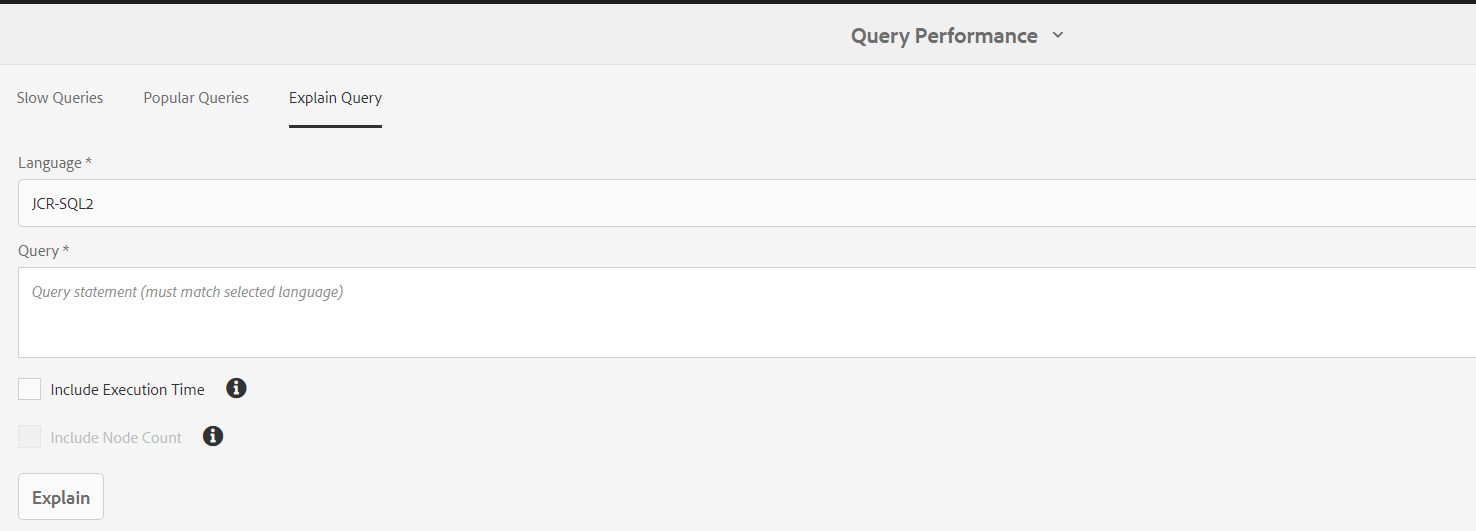
In AEM there are many tools to diagnosis the AEM repository. Query performance manager is one of them. By using this tool, we can find both slow and popular queries. And, it will explain the given query which index it is being used, how much time will take to run. This will explain the JCR-SQL2, SQL, XPath, and Query Builder queries.

To open the Query performance Manager tool. From AEM start page Navigate to Tools --> Operations --> Diagnosis --> Query Performance


Navigate to Query performance tool. Where you can see the Slow queries and Popular Queries. you can select any query and click on the explain query to see which index definition used and how much time it took to execute.

When your query executes, you will see the warning logger messages like below
*WARN* [sling-default-4-com.sony.sie.scheduler.ActivatePageSchedulerUS:05e1d8c7-d160-4ac5-8133-7d63c940ac1b] org.apache.jackrabbit.oak.query.QueryImpl Traversal query (query without index): <your query> consider creating an index

Or you in Query performance tool you will find the slow queries. To optimize those, you can create Oak Index Definition to index content for your queries.

How to create Oak Index Definition for your Query
In AEM there few OOTB index definitions that are created under “/oak:index”. You can create your own index definition under this path. You create the two types of indexes property index or Lucence Index. Oak Index Definition Generator will help you to create Oak index definitions based on your queries. You can input your query it will generate the Index definition format as Text/ JSON / XML. For AEM choose XML format. After generating the XML compare it with any OOTB definition and make sure the property types are matching or not? You may see the below warning messages if the property definition is not configured properly. For property, definitions refer to the documentation.

“org.apache.jackrabbit.oak.plugins.index.property.PropertyIndexLookup Expected 'NAMES' as type of
property 'propertyNames' but found 'STRING'. Node - '{ jcr:primaryType = oak:QueryIndexDefinition,
jcr:createdBy = Ensure Oak Index, declaringNodeTypes = [cq:AuditEvent], propertyNames = cq:time,
jcr:created = 2020-06-03T17:52:47.983Z, type = property, reindex = false, reindexCount = 3,
:index = { ... } }'

Refer documentation when to use the Lucence index and Property index.


By aem4beginner

January 1, 2021
Estimated Post Reading Time ~

Lucene Index in AEM - Part 3

This post illustrates the use of analyzers in full-text search with sample use case.
Apache Lucene Analyzers :
Analyzers as with the name is used to analyze the text both at the time of indexing and at the time of searching (via query execution)
  • An analyzer examines the text of fields and generates a token stream. It can be either a
    • Single Java class or
    • Composed of a series of Tokenizer and Filter Java classes.
  • Tokenizer breaks the data into lexical units or tokens
  • Filters then examines these tokens -> amends/discard/create new one based on the configuration
  • Series of Tokenizer + Filters => Analyzer
  • There are direct Analyzer classes, Tokenizer and Filters available OOB. Based on our requirement we can choose to use either direct Analyzer or Tokenizer + Filter combination.(Analyzer via composition)
Examples:
Analyzer -

  • StandardAnalyzer (org.apache.lucene.analysis.standard.StandardAnalyzer)
  • Removes stop words, converts to lowercase, recognize URLs and emails - most commonly used
Tokenizer -
  • Standard (org.apache.lucene.analysis.standard.StandardTokenizerFactory)
  • Splits the text field into tokens, treating whitespace and punctuation as delimiters.
Filters :
  • Stopwords Filter (org.apache.lucene.analysis.core.StopFilterFactory) - Removes stop words
  • Lowercase Filter (org.apache.lucene.analysis.core.LowerCaseFilterFactory) - Converts token to lowercase
  • PorterStem Filter (org.apache.lucene.analysis.en.PorterStemFilterFactory) - Creates stem words from the tokens
In Lucene Full Text Index defintion,
  • If we are opting to using direct Analyzer class, fully qualified Java class name is to be mentioned (using a property called "class" - highlighted in demo video)
  • If we are using Tokenizer and Filter combination. name without Factory suffix can be used. (Standard for StandardTokenizerFactory and PorterStem for PorterStemFilterFactory - this is again highlighted in demo video)
  • Note : If we are using Analyzer via composition, class property need to be removed.
Use case:
We will look into the common need for a full text search - Synonym and Stemming support
In we-retail DAM assets,
/content/dam/we-retail/en/activities (which again has biking, climbing. hiking etc as its kind)
We will create stemming filter as part of analyzers in Lucene Full text Index to fetch assets related to "activities" when we search using its stem word like "activity"
/content/dam/we-retail/en/products/apparel (which again has gloves, coats, pants and so on under apparel cateory)
We will create Synonym filter as part of analyzers in Lucene Full text Index to fetch assets related to "apparel" when we search using its synonyms like "clothing or garments"

Stemming:
  • Highlights the use of PorterStem Filter with Standard Tokenizer (Analyzer via composition)
  • EnglishAnalyzer class is used which has PorterStemFilter in it. (Direct Analyzer class)
Synonym:
Synonym Filter with Standard Tokenizer is used (Analyzer via composition)


By aem4beginner

Property Index in AEM 2

This post illustrates the usage of supporting properties that are part of the Oak Property Index with the sample use case.

Use case:
DAM assets have a property called "cq:parentPath" (jcr:content node of type - dam:AssetContent has this property which has the value to be its parent folder path)
Example : /content/dam/we-retail/en/features/cart.png/jcr:content


We will write a query to get all assets from we-retail/en locale which has cq:parentPath property
path=/content/dam/we-retail/en
type=dam:AssetContent
1_property=cq:parentPath
1_property.operation=exists
p.limit=-1

Create Property Index for "cq:parentPath" with mandatory properties alone.

With this setup, this index will be picked for all queries involving this property constraint + any "path" predicate.
Now to make this index to be used/picked for only certain paths we can control using includedPaths and/or excludedPaths

includedPaths:
Add below property in newly created index node - /oak:index/cqParentPath
Name                                         Type                                     Value
includedPaths                             String[]             /content/dam/we-retail/en

Index will be picked if we use the path predicate to be - /content/dam/we-retail/en or anything under /content/dam/we-retail/en/*
Index will not be picked if we use any path other than - /content/dam/we-retail/en
Example : /content/dam/we-retail or any other path altogether.

excludedPaths:
Add below property in newly created index node - /oak:index/cqParentPath
Name                                      Type                                     Value
excludedPaths                         String[]            /content/dam/we-retail/en/products

Index will not be picked if we use the path predicate to be - /content/dam/we-retail/en/products
Index will be picked if we use the path other than the content hierarchy that is part of excludedPaths.
Example:
Below paths will let the index gets picked
  • /content/dam/we-retail/en/.* or any other project dam path- /content/dam/learnings
But not the below (all 3 are part of excludedPaths)
  • /content/dam
  • /content/dam/we-retail
  • /content/dam/we-retail/en
Both together:
If below two properties are available in newly created index node - /oak:index/cqParentPath
Name                                         Type                                         Value
excludedPaths                         String[]         /content/dam/we-retail/en/products
includedPaths                          String[]         /content/dam/we-retail/en

Index will get picked for all paths under /content/dam/we-retail/en/.* except products.
Not for the below (all 3 are part of excludedPaths)
  • /content/dam
  • /content/dam/we-retail
  • /content/dam/we-retail/en (Though this is available in includedPaths, when used together with excludedPaths like above where this hierarchy is a part -> index will not be selected)
valuePattern:
Use case : Get all assets which has cq:parentPath value to be - /content/dam/we-retail/en/stores
path=/content/dam/we-retail
type=dam:AssetContent
1_property=cq:parentPath
1_property.value=/content/dam/we-retail/en/stores
p.limit=-1


Observing the value of cq:parentPath, regex pattern can be framed as
all lower case alphabets + contains "/" + can have hyphen(-) which is [a-z/\\-]+
Name                                         Type                                  Value
valuePattern                               String                             [a-b/\\-]+

valueExcludedPrefixes and valueIncludedPrefixes:
Use case :

In we-retail content, we have pages with jcr:title - "Experience" for Language master, CA and US locale (3 result set)
We will use the prefix "Exp" from this value for illustrating valueExcludedPrefixes and valueIncludedPrefixes

Query to get all pages with jcr:title - Experience
path=/content/we-retail
type=cq:Page
1_property=@jcr:content/jcr:title
1_property.value=Experience
p.limit=-1


Create Property Index for "jcr:title" with mandatory properties alone.


valueIncludedPrefixes:
Add below property in newly created index node - /oak:index/jcrTitle
Name                                     Type                                     Value
valueIncludedPrefixes             String[]                                     Exp

The index will be picked if the "property.value" predicate starts with "Exp"
The index will not be picked if the "property.value" predicate starts with anything other than "Exp"
valueExcludedPrefixes:
Add below property in newly created index node - /oak:index/jcrTitle

Name                                     Type                                     Value
valueExcludedPrefixes             String[]                                 Exp

The index will be picked if the "property.value" predicate starts with anything other than "Exp"
The index will not be picked if the "property.value" predicate starts with "Exp"

declaringNodeTypes and unique:
Usage is available OOB in below Property Index definitions.

  • /oak:index/principalName
  • /oak:index/authorizableId
For illustrating the purpose and easy follow along, have considered using existing properties as part of sample content - we.retail (for framing queries)
Play around in your local instance with your custom use case.
In real-time projects, choice of index type/mode and hence its supporting properties to be carefully arrived at considering the query predicates used for a specific functionality + content volume in a long run.


By aem4beginner

Indexing in AEM - Indexing modes and Index types

In order for queries to perform well, Oak supports the indexing concept which will index content stored in the repository based on the index definition/type/indexing mode.
  • Indexing works by comparison of the node state (Difference between base state and modified state ) where NodeState(org.apache.jackrabbit.oak.spi.state.NodeState) represents a specific immutable state of the node.
  • Below mentioned types of indexing modes are defined based on how this comparison is made + when the index content gets updated. 
Indexing modes:
  • Synchronous Indexing
    • This mode updates index content as part of the commit to the actual content. In other words, content update and the respective update in the index will happen together (as with the name synchronous)
    • Supported Index Type: Property Index
  • Asynchronous Indexing
    • Index update is done via a scheduled jobs(AsyncIndexJobUpdate) defined at a specific interval. (5 seconds OOB)
    • As indexing in this mode happens asynchronously irrespective of the updates to the content, there is a chance of slight lag behind the latest repository state and will be eventually consistent.
    • Supported Index Type: Lucene Index and Solr Index
    • Example: /oak:index/cqTagLucene

  • Near Real-time (NRT) Indexing
    • Indexing happens in two modes/at two places
      • Persisted Index: Index updated via job mentioned above, AsyncIndexJobUpdate.
      • Local Index: In addition to persisted index, indexes will be created locally with help of copy-on-read support(Config as part of org.apache.jackrabbit.oak.plugins.index.lucene.LuceneIndexProviderService). It keeps data between two async index job runs.
        • Note: We can choose to provide a local index path as part of the config. If not mentioned, it will be stored in the "index" directory of our instance repository home.
    • In other words, content that is updated after the last async job run and before commencing the job at the next periodic interval will be able to show up quickly. (With both persisted and local index in place)
    • Supported Index Type: Lucene Index
    • Usage:
      • NRT indexing mode has two variations - nrt and sync.
      • NRT Indexing mode - nrt
        • async property on oak:index is set as ['async', 'nrt']
        • The local index is updated asynchronously
      • NRT Indexing mode - sync
        • async property on oak:index is set as ['async', 'sync']
        • The local index is updated synchronously. This mode indexes slowly compared to nrt mode.
  • Example: Few OOB Lucene index works on "NRT indexing mode -nrt". One such is in /oak:index/cqPageLucene
Types of Oak Index:
  • Property Index
    • Useful for queries that have property constraints that are not full text.
    • Identified by the following properties:
      • type -> property
      • propertyNames -> property name for which index is to be created [Name array]
  • Lucene Index
    • Lucene Fulltext Index
      • Useful for queries involving full-text conditions.
      • Identified by the following properties:
        • type -> Lucene
        • async -> async
    • Lucene Property Index
      • Same as property index mentioned above. Given that it is Lucene property index, it will index in async mode.
      • Identified by the following properties:
        • type -> lucene
        • async -> async
        • fullTextEnabled -> false [Boolean]
        • includePropertyNames -> property names for which index is to be created [String array]
  • Solr Index
    • Used when Apache Solr is used for search functionality.
    • Identified by the following properties:
      • type -> solr
      • async -> async
  • Ordered Index (deprecated)
Note:
  • Based on the query predicates we use, indexes used will differ accordingly (Difference is explained with example query below)
  • Apart from the key properties highlighted above, there are other supporting properties/nodes for an index definition. Will be covered separately for better clarity.
Index Manager, Admin UI:
We have Admin UI OOB for displaying the indexes available in our instance.
  • Navigate to Tools -> Operations -> Diagnosis -> Index Manager
  • We have filter options to filter based on the index name, type, path.
  • On selecting a specific index, we have two options - Index Info, Consistency check.


For node and property level details of oak:index by type, use query predicates like below in
querydebug.html
(From the result set, we can navigate to CRXDE of the respective node and observe the nodes, properties)
  • Get all Property Indexes:
path=/oak:index
type=oak:QueryIndexDefinition
1_property=type
1_property.value=property
p.limit=-1

  • Get all Lucene Indexes:
path=/oak:index
type=oak:QueryIndexDefinition
1_property=type
1_property.value=lucene
p.limit=-1

  • Get all indexes of mode NRT, with scheme nrt:
path=/oak:index
type=oak:QueryIndexDefinition
1_property=type
1_property.value=lucene
2_property=async
2_property.value=%nrt
2_property.operation=like
p.limit=-1


Play around in local (to understand the index modes and types used for your queries)
  • Use query predicates used in your project/create one and execute in the "Explain Query" console mentioned above.
  • Observe the indexes used.
  • Sample full text query to search for the text "we-retail" in pages:
fulltext=we-retail
path=/content/we-retail
type=cq:Page
p.limit=-1

  • Explain Query console with below query.

  • Hit on Explain will result in the below display 

  • The same query without a "type" predicate will result in a different index being used.


Observation:
  • As evident from the above example, if the type is used, the Lucene index which has a definition for a specific type will be picked. (In this case, the type used : cq:Page and index: cqPageLucene)
  • type is removed, full text Lucene index is used - /oak:index/lucene (async mode -> fulltext-async)
Note  
Each of the bulletins explained above by itself is a vast topic and has more details to it. Will try to cover it in upcoming posts.


By aem4beginner

December 28, 2020
Estimated Post Reading Time ~

How to use AEM JCR SQL2 query strings to query for nodes in Java Content Repository

JCR-SQL2 (Java Content Repository – Structured Query Language 2) is a domain-specific language used to query JCR nodes held in the JCR repository. The syntax for JCR-SQL2 is fairly similar to SQL, so if you have some experience with SQL, this tutorial will be a walk in the park for you.

The best way to learn the power of the JCR-SQL2 language is to try it out on CRX/DE Lite. Without future or do, below will be a lesson on JCR-SQL2. To locate CRX/DE Lite’s query tool, visit http://localhost:4502/crx/de/index.jsp, then select on the tools drop-down, and choose query.


JCR-SQL2 Syntax

1. The JCR-SQL2 SELECT Statement

  • The SELECT statement is used to select all JCR nodes that match the JCR node’s primary type.
  • Returns in CRX/DE Lite: A list of JCR nodes in the results table with their corresponding paths.
  • Returns in OSGI Bundle (Sling API): All the found nodes stored in the Iterator<Resource> object.
  • Returns in OSGI Bundle (JCR API): The QueryResult object where you can call getNodes() method to get the NodeIterator object.
-- nt:base is a primary type that represents every single node in the JCR.
-- returns all nodes in the JCR.
SELECT * FROM [nt:base]

-- returns all [cq:Page] nodes
SELECT * FROM [cq:Page]

-- returns all [dam:Asset] nodes
SELECT * FROM [dam:Asset]

2. The JCR-SQL2 NAME() Statement
  • Select nodes with a specific node name.
  • Returns in CRX/DE Lite: A list of JCR nodes in the results table with their corresponding paths.
  • Returns in OSGI Bundle (Sling API): All the found nodes stored in the Iterator<Resource> object.
  • Returns in OSGI Bundle (JCR API): The QueryResult object where you can call getNodes() method to get the NodeIterator object.
-- returns all [cq:Page] nodes WHERE the node's name is equal to "we-retail"
SELECT * FROM [cq:Page] AS nodes WHERE NAME(nodes) = "we-retail"

-- returns all [dam:Asset] nodes WHERE the node's name is equal to "we-retail"
SELECT * FROM [dam:Asset] AS nodes WHERE NAME(nodes) = "we-retail"


3. The JCR-SQL2 ISDESCENDANTNODE Statement
  • Select nodes under a file path.
  • Returns in CRX/DE Lite: A list of JCR nodes in the results table with their corresponding paths.
  • Returns in OSGI Bundle (Sling API): All the found nodes stored in the Iterator<Resource> object.
  • Returns in OSGI Bundle (JCR API): The QueryResult object where you can call getNodes() method to get the NodeIterator object.
-- returns all nodes WHERE nodes exist under "/content/we-retail"
select * FROM [nt:base] WHERE ISDESCENDANTNODE ([/content/we-retail])

-- returns all [cq:Page] nodes WHERE nodes exist under "/content/we-retail"
SELECT * FROM [cq:Page] WHERE ISDESCENDANTNODE ([/content/we-retail])

-- returns all [dam:Asset] nodes WHERE nodes exist under "/content/dam/we-retail"
SELECT * FROM [dam:Asset] WHERE ISDESCENDANTNODE ([/content/dam/we-retail])

-- returns all [nt:unstructured] nodes WHERE nodes exist under "/content/we-retail"
SELECT * FROM [nt:unstructured] WHERE ISDESCENDANTNODE([/content/we-retail])

4. The JCR-SQL2 CONTAINS Statement

  • Select nodes where the properties contain a value.
  • Returns in CRX/DE Lite: A list of JCR nodes in the results table with their corresponding paths.
  • Returns in OSGI Bundle (Sling API): All the found nodes stored in the Iterator<Resource> object.
  • Returns in OSGI Bundle (JCR API): The QueryResult object where you can call getNodes() method to get the NodeIterator object.
-- returns all nodes WHERE node's property jcr:title CONTAINS "we-retail"
SELECT * FROM [nt:base] AS nodes WHERE CONTAINS(nodes.title, "we-retail")

-- returns all [cq:Page] nodes where node's property jcr:title CONTAINS "we-retail"
SELECT * FROM [cq:Page] AS nodes WHERE CONTAINS(nodes.title, "we-retail")

5. The JCR-SQL2 LIKE Operator

  • The LIKE operator is used to search for a specified pattern in node properties.
  • There are two wildcards used in conjunction with the LIKE operator: % and _
  • Returns in CRX/DE Lite: A list of JCR nodes in the results table with their corresponding paths.
  • Returns in OSGI Bundle (Sling API): All the found nodes stored in the Iterator<Resource> object.
  • Returns in OSGI Bundle (JCR API): The QueryResult object where you can call getNodes() method to get the NodeIterator object.
-- returns all [cq:PageContent] nodes WHERE nodes exist under "/content"
-- AND node's property jcr:title starts with any values and ends with "w"
SELECT * FROM [cq:PageContent] AS nodes WHERE ISDESCENDANTNODE ([/content])
AND nodes.[jcr:title] LIKE "%w"

-- returns all [cq:PageContent] nodes WHERE nodes exist under "/content"
-- AND node's property jcr:title starts with "w" and ends with any values
SELECT * FROM [cq:PageContent] AS nodes WHERE ISDESCENDANTNODE ([/content])
AND nodes.[jcr:title] LIKE "w%"

-- returns all [cq:PageContent] nodes WHERE nodes exist under "/contentl"
-- AND node's property jcr:title matching "w" in any position
SELECT * FROM [cq:PageContent] AS nodes WHERE ISDESCENDANTNODE ([/content])
AND nodes.[jcr:title] LIKE "%w%"

-- returns all [cq:PageContent] nodes WHERE nodes exist under "/content"
-- AND node's property jcr:title start with any values and have "w" in the second position and ends with any values
SELECT * FROM [cq:PageContent] AS nodes WHERE ISDESCENDANTNODE ([/content])
AND nodes.[jcr:title] LIKE "_w%"

6. The JCR-SQL2 IS NOT NULL Property
  • Used for validation of property’s value is not null.
  • Returns in CRX/DE Lite: A list of JCR nodes in the results table with their corresponding paths.
  • Returns in OSGI Bundle (Sling API): All the found nodes stored in the Iterator<Resource> object.
  • Returns in OSGI Bundle (JCR API): The QueryResult object where you can call getNodes() method to get the NodeIterator object.
-- returns all nodes WHERE nodes exist under "/content"
-- AND node's property jcr:title IS NOT NULL
SELECT * FROM [nt:base] AS nodes WHERE ISDESCENDANTNODE ([/content])
AND nodes.[jcr:title] IS NOT NULL

-- returns all [cq:PageContent] nodes WHERE nodes exist under "/content"
-- AND node's property jcr:title IS NOT NULL
SELECT * FROM [cq:PageContent] AS nodes WHERE ISDESCENDANTNODE ([/content])
AND nodes.[jcr:title] IS NOT NULL

7. The JCR-SQL2 ORDER BY Keyword
  • The ORDER BY keyword is used to sort the result-set in ascending or descending order.
  • Returned values are sorted by default in ascending order.
  • Returns in CRX/DE Lite: A list of JCR nodes in the results table with their corresponding paths.
  • Returns in OSGI Bundle (Sling API): All the found nodes stored in the Iterator<Resource> object.
  • Returns in OSGI Bundle (JCR API): The QueryResult object where you can call getNodes() method to get the NodeIterator object.
-- returns all nodes WHERE nodes exist under the "/content/we-retail"
-- ORDER BY jcr:created ascending
SELECT * FROM [nt:base] AS nodes WHERE ISDESCENDANTNODE ([/content/we-retail])
ORDER BY nodes.[jcr:created]

-- returns all nodes WHERE nodes exist under the "/content/we-retail"
-- ORDER BY node's property jcr:created descending
SELECT * FROM [nt:base] AS nodes WHERE ISDESCENDANTNODE ([/content/we-retail])
ORDER BY nodes.[jcr:created] DESC

8. The JCR-SQL2 CAST() Statement
  1. Convert an expression from one data type to another.
  2. Cast Types:
  • STRING
  • BINARY
  • DATE
  • LONG
  • DOUBLE
  • DECIMAL
  • BOOLEAN
  • NAME
  • PATH
  • REFERENCE
  • WEAKREFERENCE
  • URI

  • Returns in CRX/DE Lite: A list of JCR nodes in the results table with their corresponding paths.
  • Returns in OSGI Bundle (Sling API): All the found nodes stored in the Iterator<Resource> object.
  • Returns in OSGI Bundle (JCR API): The QueryResult object where you can call getNodes() method to get the NodeIterator object.
-- returns all [cq:PageContent] nodes WHERE nodes exist under the "/content/we-retail"
-- AND node's navRoot equals to "true"
SELECT * FROM [cq:PageContent] as nodes WHERE ISDESCENDANTNODE ([/content/we-retail])
AND nodes.[navRoot] = CAST("true" AS BOOLEAN)

-- returns all [cq:PageContent] nodes WHERE nodes exist under the "/content/we-retail"
-- AND node's creation date is greater than "April 1st, 2018"
SELECT * FROM [cq:PageContent] AS nodes WHERE ISDESCENDANTNODE ([/content/we-retail])
AND nodes.[jcr:created] > CAST("2018-04-01T00:00:00.000Z" AS DATE)

-- returns all [cq:PageContent] nodes WHERE nodes exist under the "/content/we-retail"
-- AND node's maxRating is less than "5.0"
SELECT * FROM [cq:PageContent] as nodes WHERE ISDESCENDANTNODE ([/content/we-retail])
AND nodes.[maxRating] < CAST("5.0" AS DECIMAL)

Note: 
When is the perfect time to use JCR-SQL2?
  • Build a images and documents search component, if your AEM site that allows consumers to search for images or documents.
  • Build a blog post search component, If your AEM site has a blog section.
  • Build a secure resources query API, If you are allowing 3rd party applications to query and find nodes in your AEM site.
There are many other things to utilize JCR-SQL2 to query nodes, but these are just some quick examples.


By aem4beginner

May 10, 2020
Estimated Post Reading Time ~

How to query JCR data in Adobe AEM

Different handy techniques to write JCR query in AEM/CQ:
For a Detailed Study on JCR Queries Please see this article.
JCR SQL 2 FULL Tutorial: CHEAT SHEET

Java content repository, better known as JCR is a modern approach to our database solutions.
While working on JCR I found many rather simple techniques to write JCR queries from our JAVA application.
Some of them have been described below to help fellow developers.

For this example, we will try to fetch all the "employee" nodes under the "codermagnet" parent node.
Jcr%2BQuery%2BExample%2Bby%2BCodermagnet

Download the Jack Rabbit Jar File form
http://www.apache.org/dyn/closer.cgi/jackrabbit/2.8.1/jackrabbit-standalone-2.8.1.jar
and place the Jack Rabbit jar in the build path of your project.

OPTION 1: Querying JCR using QueryManager API
Create a new class file as shown below.

File: JCRQueryExample.java
package net.codermag.jcr.test;

import javax.jcr.Node;
import javax.jcr.NodeIterator;
import javax.jcr.Repository;
import javax.jcr.Session;
import javax.jcr.SimpleCredentials;
import javax.jcr.query.Query;
import javax.jcr.query.QueryManager;
import javax.jcr.query.QueryResult;

import org.apache.jackrabbit.commons.JcrUtils;
import org.apache.jackrabbit.core.TransientRepository;

public class JCRQueryExample { 
 public static void main(String[] args) throws Exception {

  // Create a Session
  Repository repository = new TransientRepository();
  repository = JcrUtils.getRepository("http://localhost:4502/crx/server");
  Session session = repository.login(new SimpleCredentials("admin","admin".toCharArray()));

  //Building and Executing the Query
  QueryManager queryManager = session.getWorkspace().getQueryManager();
  String sqlStatement = "SELECT * FROM [nt:base] AS s WHERE ISDESCENDANTNODE([/content/codermagnet/employees])";
  Query query = queryManager.createQuery(sqlStatement, "JCR-SQL2");
  QueryResult result = query.execute();

  //Doing Something with the nodes returned.. Printing the paths
  NodeIterator iterator = result.getNodes();
  while (iterator.hasNext()) {
   System.out.println(((Node) iterator.next()).getPath());
  }
 }
}

Output:
/content/codermagnet/employees/kuper
/content/codermagnet/employees/john
/content/codermagnet/employees/harry
/content/codermagnet/employees/smith

OPTION 2: Quering JCR using ResourceResolver.findResources() method.
Another very handy and short way of doing this is illustrated below. This is my favorite as its a one-liner query and is cute, clean, and fast. One point that we need to remember while doing this is that for this second option we need the implicit "ResourceResolver" object. So this is more appropriate to be used as some sort of sling service inside our JCR application.

File: JCRQueryExample2.java
package net.codermag.jcr.test;

import java.util.ArrayList;
import java.util.Iterator;
import java.util.List;
import javax.jcr.Node;
import javax.jcr.query.Query;
import org.apache.sling.api.SlingHttpServletRequest;
import org.apache.sling.api.resource.Resource;
import org.apache.sling.api.resource.ResourceResolver;

public class JCRQueryExample2 {

 public List<Node> getNodes(SlingHttpServletRequest request)
   throws Exception {

  List<Node> nodes = new ArrayList<Node>();
  ResourceResolver resolver = request.getResourceResolver();
  
  // Executing query in One Line....!!!!
  Iterator<Resource> nodeIter = resolver
    .findResources("SELECT * FROM [nt:base] AS s WHERE ISDESCENDANTNODE([/content/codermagnet/employees])",
      Query.JCR_SQL2);
   
  // Converting the Resource object to Node and then storing as arraylist
  while (nodeIter.hasNext()) {
   nodes.add(nodeIter.next().adaptTo(Node.class));
  }
  return nodes;
 }
}

Option 3: Quering JCR using QueryBuilder API
File:JCRQueryExample3.java

Note: For testing the below XPATH query beforehand you can use the QueryBuilder debugger console at this URL
http://localhost:4502/libs/cq/search/content/querydebug.html

package com.realogy.sir.core.servlets;

import java.util.HashMap;
import java.util.Map;
import javax.jcr.Session;
import org.apache.sling.api.SlingHttpServletRequest;
import com.day.cq.search.PredicateGroup;
import com.day.cq.search.Query;
import com.day.cq.search.QueryBuilder;
import com.day.cq.search.result.Hit;
import com.day.cq.search.result.SearchResult;

public class JCRQueryExample3 {

 public void getNodes(SlingHttpServletRequest request)throws Exception {

  //Form the map and fill all the required parameters in the map
  Map<String,String> map = new HashMap<String,String>();
  map.put("path", "/content/codermagnet/employees");
  map.put("type", "nt:base");
  map.put("orderby","@name");
  
  //Quering JCR using com.day.cq.search.QueryBuilder API
  PredicateGroup predicateGroup = PredicateGroup.create(map);
  QueryBuilder builder = request.getResourceResolver().adaptTo(QueryBuilder.class);
  Query query = builder.createQuery(predicateGroup, request.getResourceResolver().adaptTo(Session.class));
  SearchResult result = query.getResult();

  //Do something with the results
  for (Hit hit : result.getHits()) {
   String path = hit.getPath();
   System.out.println(path);
  } 
 }
}

Output:
/content/codermagnet/employees/harry
/content/codermagnet/employees/john
/content/codermagnet/employees/kuper
/content/codermagnet/employees/smith

You can use Option 2 and Option 3 when writing servlets or inside scriptlet tags in AEM JSP pages where you have access or can derive the "resourceResolver" implicit object. In the above option, I have derived the "resourceResolver" object from the org.apache.sling.api.SlingHttpServletRequest that is passed to the method.


By aem4beginner

May 3, 2020
Estimated Post Reading Time ~

URL Queries for debugging in AEM

“?wcmmode=disabled” this would give you a view similar to what you would get in a publish instance. Of course, you can replace disabled with other WCMmodes.

It turns out there are others. These are the ones I find most useful:
  • ?debug=layout: This will give you information about all the components you have on the page.
  • ?debugClientLibs=true: Writes out all clientlibs using the individual source files, without aggregation like you would normally get. 
Warning: This can sometimes make your page a LOT slower to render. You can also get similar behavior by changing the settings in the "Adobe Granite HTML Library Manager" OSGi service.
  • CTRL+SHIFT+U: Use this with ?debugClientLibs=true to show timing information across the page. How long things take to load, etc.
http://localhost:4502/libs/cq/ui/content/dumplibs.html
Shows you all information around the clientlibs used in your AEM environment.

To view logs directly via url (only works on author mode):
server:port/bin/crxde/logs?tail=2000


By aem4beginner

May 1, 2020
Estimated Post Reading Time ~

A servlet to Query Components inside your apps folder.

If you want to get your list of components inside your project apps folder in the form of json response, then here's a servlet for you.

The servlet is registered at path - /bin/generate/componentsreport to which you need to pass your project folder path (default is /apps) as a query-param and it will output the list of components (their name and path) as a json response.

What this servlet is doing is - it is forming a Predicate Map of Query having the path (apps path from the input you provide) and node type (cq:Component) and using it in QueryBuilder API and fetching the results in form of component paths.
Further it is processing the hits (components path) from the search result to form the json response which you can consume by dong an ajax call.

This is the servlet for it

package com.aem.community.wf.core.servlets;

import org.apache.felix.scr.annotations.Reference;
import org.apache.felix.scr.annotations.sling.SlingServlet;
import org.apache.sling.api.SlingHttpServletRequest;
import org.apache.sling.api.SlingHttpServletResponse;
import org.apache.sling.api.resource.Resource;
import org.apache.sling.api.resource.ResourceResolver;
import org.apache.sling.api.resource.ResourceResolverFactory;
import org.apache.sling.api.resource.ValueMap;
import org.apache.sling.api.servlets.SlingSafeMethodsServlet;
import org.apache.sling.commons.json.JSONArray;
import org.apache.sling.commons.json.JSONObject;
import org.slf4j.Logger;
import org.slf4j.LoggerFactory;

import com.day.cq.search.PredicateGroup;
import com.day.cq.search.Query;
import com.day.cq.search.QueryBuilder;
import com.day.cq.search.result.Hit;
import com.day.cq.search.result.SearchResult;

import javax.jcr.Session;
import java.io.IOException;
import java.util.HashMap;
import java.util.Map;

@SlingServlet(paths = "/bin/generate/componentsreport")
public class ComponentQueryServlet extends SlingSafeMethodsServlet {

 private static final long serialVersionUID = 1L;
 private final Logger logger = LoggerFactory.getLogger(this.getClass());
 
 @Reference
        private QueryBuilder builder;
 
 @Reference
        private ResourceResolverFactory resolverFactory;
 
 @SuppressWarnings("deprecation")
 @Override
        protected void doGet(SlingHttpServletRequest request, 
                SlingHttpServletResponse response) throws IOException {
        
  
     String compPath = request.getParameter("comppath");   
     if(compPath == null){
      compPath = "/apps";
     }
     long totalMatches = 0;
     
     response.setCharacterEncoding("UTF-8");
 response.setContentType("application/json");
     
     JSONObject json = new JSONObject();
     JSONArray jsonarray = new JSONArray();
     JSONObject tempJson;
     
     try { 
      ResourceResolver resolver = request.getResourceResolver();
      Session session = resolver.adaptTo(Session.class);
      
      Map map = new HashMap();             
         map.put("path", compPath);
         map.put("type", "cq:Component");
         map.put("p.offset", "0");
         map.put("p.limit", "-1");
                           
         Query query = builder.createQuery(PredicateGroup.create(map),
                                                                     session);                    
                     
         SearchResult result = query.getResult();
         totalMatches = result.getTotalMatches();                             
         String hitpath;
         Resource compResource;
         String compTitle;
         
         for (Hit hit : result.getHits()) {
                hitpath = hit.getPath();   
                tempJson = new JSONObject();
                
                compResource = resolver.getResource(hitpath); 
         if (compResource != null) { 
                    ValueMap valueMap = compResource.getValueMap(); 
                    compTitle = valueMap.get("jcr:title", String.class);
                    tempJson.put("componentname", compTitle);
                }
         tempJson.put("componentpath", hitpath);
         jsonarray.put(tempJson);
         }
         json.put("totalcomponents", totalMatches);
         json.put("components", jsonarray);
         logger.info("Total" + totalMatches + "paths were found: \n");
         
     } catch (Exception e) {
      logger.error("Exception caught: "+e);
 }
     response.getWriter().print(json.toString());
    
    }
}

Below is the sample url to call this servlet bypassing apps folder path-
http://localhost:4502/bin/generate/componentsreport?comppath=/apps/weretail

And this is the screenshot of the response by hitting above url-


By aem4beginner

April 27, 2020
Estimated Post Reading Time ~

Query the pages with the properties of child node

SELECT * FROM [cq:Page] AS page WHERE ISDESCENDANTNODE(page ,"<<Parent folder of pages>>") AND [jcr:content/<<child node name>>/<<child node property>>]=<<value>>

e.g
SELECT * FROM [cq:Page] AS page WHERE ISDESCENDANTNODE(page ,"/content") AND [jcr:content/test_node/test_property=test

http://<<AEM Host>>:<<AEM Port>>/crx/explorer/ui/search.jsp - Paste the query and click on Search Now.


By aem4beginner

April 23, 2020
Estimated Post Reading Time ~

AEM Common Create custom oak indexes for all frequently used search queries.

Recommendation
Unlike Jackrabbit 2, Oak does not index content by default. Custom indexes need to be created when necessary, much like with traditional relational databases.

If there is no index for a specific query then the whole repository will be traversed. The query will still work but probably be very slow.
If Oak encounters a query without an index, a WARN level log message is printed:

*WARN* Traversed 1000 nodes with filter Filter(query=select ...) consider creating an index or changing the query

Create custom oak indexes for all frequently used search queries.
Create the custom indexes under the oak:index node for all search properties that you want to search

For each custom Lucene-based index, try to set includedPaths (String[]) setting to restrict the index to only apply to certain content paths. Then restrict applicable searches to those paths included by the index.

Solution1: To identify the slow running queries.
1. Download the Jar file of relevant Oak version of AEM server
https://files.acrobat.com/a/preview/8216d8ac-1367-4960-a200-6622d7044051

2. Execute the jar file from terminal/command prompt using below command java -Xmx1024m -jar qla.jar
1. Example for file at location "/adobe/ToolsDailyUsage/cq6/author/crx-quickstart/logs/error.log" the command is
java -Xmx1024m -jar qla.jar "/adobe/ToolsDailyUsage/cq6/author/crx-quickstart/logs/error.log"
2. The output of my instance is shown below


Step 2: Create Custom Indexes to boost the performance of the search queries.
The Property Index
Order Index
Property Order Index, The Lucene Full-Text Index


By aem4beginner

AEM Common How to identify Slow running Queries.

Solution1: To identify the slow running queries.
1. Download the Jar file of relevant Oak version of AEM server
https://files.acrobat.com/a/preview/8216d8ac-1367-4960-a200-6622d7044051

2. Execute the jar file from terminal/command prompt using below command java -Xmx1024m -jar qla.jar

1. Example for file at location "/adobe/ToolsDailyUsage/cq6/author/crx-quickstart/logs/error.log" the command is
java -Xmx1024m -jar qla.jar "/adobe/ToolsDailyUsage/cq6/author/crx-quickstart/logs/error.log"
2. The output of my instance is shown below


By aem4beginner

April 22, 2020
Estimated Post Reading Time ~

Oak Query Engine Optimization Parameters and how to set these parameters in JMX console in AEM

Statement - Query engine Optimization parameters
Environment - AEM 6.3 GA

Solution:
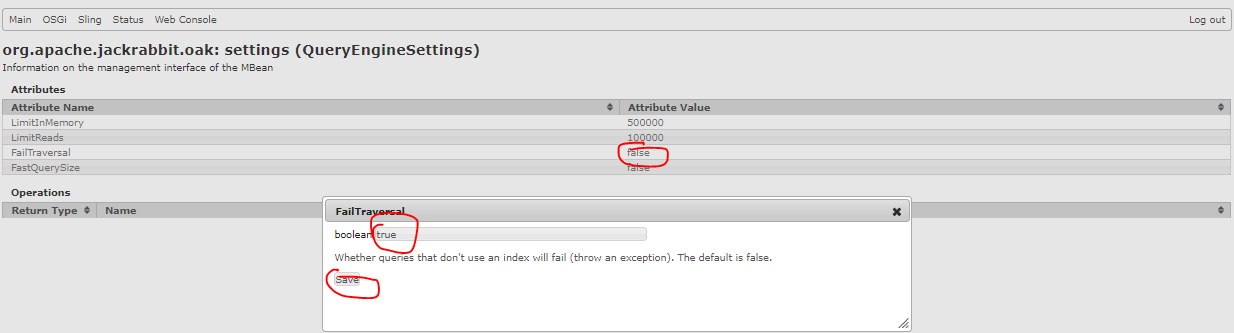
Go to the Felix console URL: http://localhost:4502/system/console/jmx/org.apache.jackrabbit.oak%3Aname%3Dsettings%2Ctype%3DQueryEngineSettings
below are the QueryEngine parameters and set the values based on need.
Attributes
 
Attribute NameAttribute Value
LimitInMemory500000
LimitReads100000
FailTraversalTRUE
FastQuerySizeFALSE

Click on each of these attribute value to increase/decrease as shown in below.


To return the query result size should return an estimation for large queries set the FastQuerysize to True

Set FailTraversal to True Whether queries that don't use an index will fail (throw an exception) as shown in below screenshot.

That's it!


By aem4beginner

How to find Popular and Slow Queries in AEM through JMX console

Statement - Popular and Slow Queries in AEM through JMX console
Environment - AEM 6.3 GA

Solution:
Go to the Felix console URL: http://localhost:4502/system/console/jmx/org.apache.jackrabbit.oak%3Aname%3DOak+Query+Statistics%2Ctype%3DQueryStat
You can observe the top 15 popular queries as shown in below screenshot.


Top 15 Slow Queries tweak slow queries/rewrite slow queries for better performance or create indexes for those slow queries.

Below is the screenshot to clear popular and slow queries, Click on each of the below Operation and click on invoke.


By aem4beginner