Showing posts with label POST. Show all posts

December 28, 2020
Estimated Post Reading Time ~

How to make a simple HTTP POST request to AEM with a HTTP Rest Client, Postman

During development in the AEM author instance, you would like to test your servlet using an HTTP Rest Client such as Postman. When making a POST request on the Rest Client, you will experience 2 errors. An authentication error, and a 403 forbidden error.

What’s Happening?
Firstly, in a typical development approach, you will be working on your author developers instance. Your Rest Client is making a POST request on the author instance, http://localhost:4502. You will get an authentication error.

Secondly, your POST request is being filtered and restricted by the “Apache Sling Referrer Filter” and “Adobe Granite CSRF Filter”. By default, the Apache Sling Referrer Filter blocks any incoming POST requests, and the Adobe Granite CSRF Filter blocks any incoming POST requests without the CSRF-Token token in the header.

How to solve this?
We can solve this issue by including basic auth type in Postman, then allowing incoming POST requests in the Apache Sling Referrer Filter OSGI configurations, and remove the requirement of the CSRF-Token in the Adobe Granite CSRF Filter OSGI configurations.

Resource – Simple Servlet:
Step 1: Configure Basic Auth in Postman
Launch Postman, then navigate to the Authentication tab. Ensure type is set to “Basic Auth”, and username and password are set to “admin”; this is the default username and password for the administrator user while developing on the author instance.


Step 2: Configure Apache Sling Referrer Filter
  • Enable allow empty
  • Remove the POST method from filters
In OSGI configurations (http://localhost:4502/system/console/configMgr), locate “Apache Sling Referrer Filter”. Enable the allowed empty property, and remove the post method from the filter property.


Step 3: Configure Adobe Granite CSRF Filter
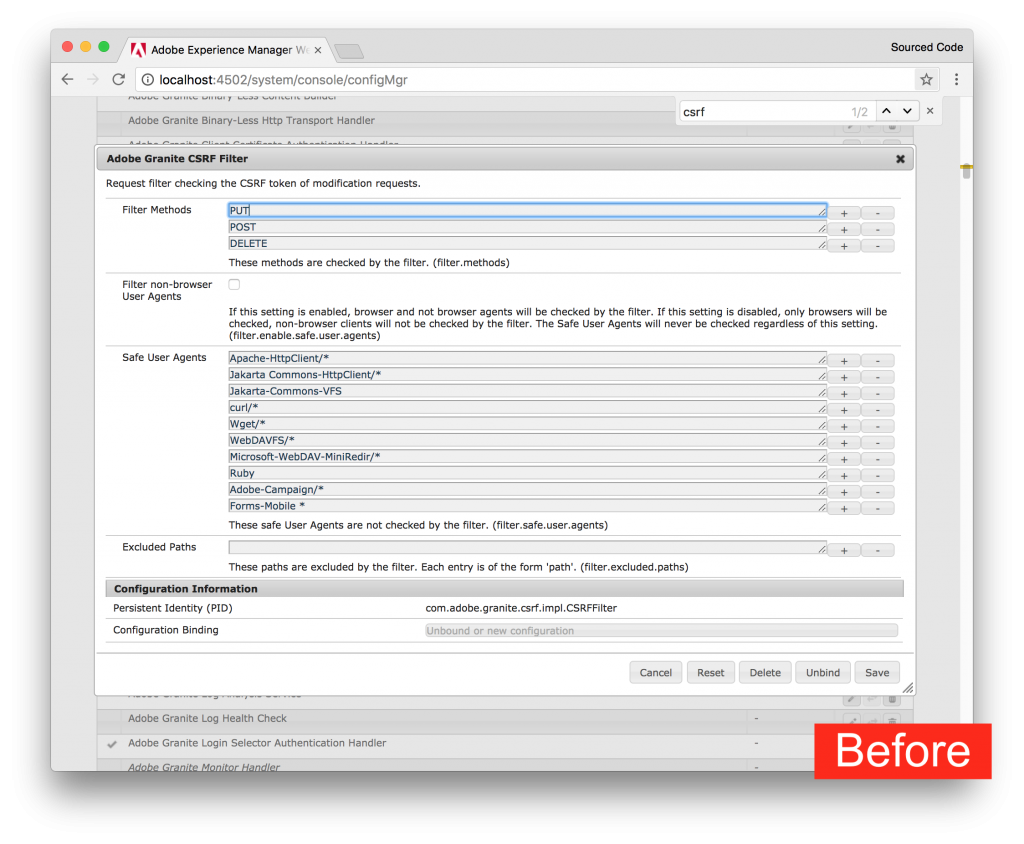
  • Remove the POST method from filters
In OSGI configurations (http://localhost:4502/system/console/configMgr), locate “Adobe Granite CSRF Filter”. Remove the post method from the filter property.


Note:
  • After making configurations to the two OSGI configurations, you should be able to make a POST request from your HTTP REST Client to your AEM instance.
  • For production, set Apache Sling Referrer Filter and Adobe Granite CSRF Filter settings back to default. Unless if you are giving access to other servers to make POST requests to your AEM application.


By aem4beginner

October 17, 2020
Estimated Post Reading Time ~

Calling POST Servlet using resourceTypes, selectors and extensions in AEM

Saw some query on Adobe community forum on how to make a POST call to a servlet using sling.servlet.resourceTypes and using selectors. So here I am with my short article on how we can call a POST servlet using the same.

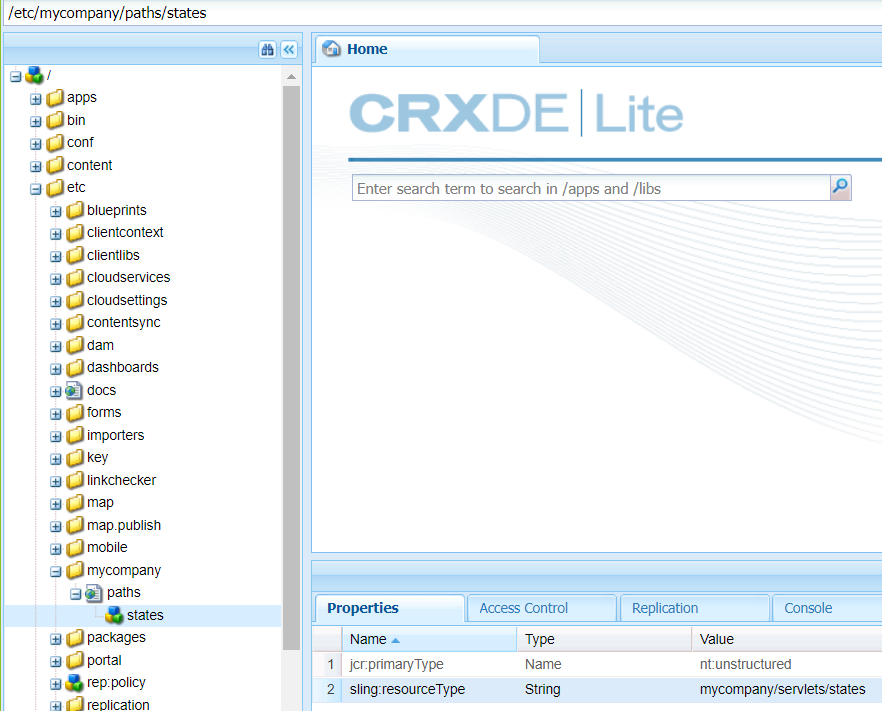
Creating a resource in crx:
Let’s say I have a node in AEM crx at /etc/mycompany/paths/states and add the resourceType on states node i.e mycompany/servlets/states


Once we are done creating the resource in CRX, we will create a corresponding JAVA class and define this resourceType along with selectors and extension to load the data.

@Component(service = Servlet.class, property = {
Constants.SERVICE_DESCRIPTION + "=" + "Servlet to get the States details",
ServletResolverConstants.SLING_SERVLET_METHODS + "=" + HttpConstants.METHOD_POST,
ServletResolverConstants.SLING_SERVLET_RESOURCE_TYPES + "=" + "mycompany/servlets/states",
ServletResolverConstants.SLING_SERVLET_SELECTORS + "=" + "api.getStates",
ServletResolverConstants.SLING_SERVLET_EXTENSIONS + "=" + "json" })
public class GetStateDetailsServlet extends SlingAllMethodsServlet {

private static final long serialVersionUID = 1L;

private static final Logger LOG = LoggerFactory.getLogger(GetStateDetailsServlet.class);

@Override
protected void doPost(final SlingHttpServletRequest request, final SlingHttpServletResponse response) {

response.getWriter().println("Hello World!!");

}
}


Once we are done creating the corresponding servlet for using the below property:

1. sling.servlet.resourceTypes: We provide the resourceType of the CRX node.
2. sling.servlet.selectors: We provide the selectors for our servlet URL.
3. sling.servlet.extensions: We provide the extension which we want to use along with the selectors to load the response.

So, the final end point that we will access to get the response will be something like this localhost:4502/etc/mycompany/paths/states.api.getStates.json


By aem4beginner

August 25, 2020
Estimated Post Reading Time ~

Overview on the POST Request using Postman

In the previous tutorials, we have learnt about how to send a GET Request and we also learnt about the Request Parameters. From our Rest basics we already know what an HTTP Request and HTTP Response is.If you have not read these two tutorials yet, please do that before proceeding. In this chapter we will focus on another type of request method which is POST Request in Postman.

What is a POST Request?
A POST is an HTTP Verb similar to a GET request, this specifies that a client is posting data on the given Endpoint. A POST request is a method that is used when we need to send some additional information inside the body of the request to the server. When we send a POST request we generally intend to have some modification at the server such as updation, deletion or addition. One of the classic example of a POST request is the Login page. When you first Sign Up for anything, let say Facebook, you send your personal information such as password to the server. The server creates a new account with the same details and that account is added permanently on the Facebook server. You just created a new resource on to the server. POST requests are very popular and are mostly used whenever you are sending some sensitive information such as submitting a form or sending sensitive information to the server.

In this tutorial we will explore different features of POST Requests and how we can create them in Postman. Before we will try to use an example to get a clear idea about a POST Request.

POST Request in Postman
Every REST endpoint has its own HTTP verb associated with it. If an endpoint specifies that it should be called using POST http verb, then clients are bound to call the Endpoint with POST HTTP verb only. Lets first check what happens when we request GET method instead of POST method for a POST Endpoint. Also to check that what happens when we do POST Request without Body.
GET Request on POST Endpoint

1.Use the API http://restapi.demoqa.com/customer/register (This API is used for registering a new customer) in the Postman endpoint bar and press Send. Make sure that GET is selected in the Method type dropdown.


2. See the HTTP status code, it will be 405 Method not allowed. Which means that we are hitting the endpoint with an incorrect method type. The below image shows the details.


3. See the response below under the Body tab and focus on fault error.


It means that the method type we used is not valid and another method type is expected. So we will try to change that and see if we get the correct response.

POST Request without Body
1. Change the method type to POST and press SEND


2. Now, look at the Response Body and Response Status code.


Fault Invalid Post Request means that the post data that we entered is not valid. Recall that we add the information inside the body of the request, so we need to enter something into the request body and see if that format matches the format expected. Also, you can see at the status code which says 400 BAD Request. It means that the request parameters are not matching the server parameters to get a response.

Post Request in Postman
1. Now let us add a Request Body to our POST request. Every Endpoint will be documented with what kind of Method type and the format of the body that it expects. Let us see what body this request expects and how to add it. For that click on the Body tab.


2. Click on raw and select format type as JSON, since we have to send incorrect format which the server expects.


3.This endpoint expects a Json body which contains the details of the new user. Below is a sample Json body. Copy and Paste the following in the body tab of Postman.

{
“FirstName” : “value”
“LastName” : “value”,
“UserName” : “value”,
“Password” : “value”,
“Email” : “Value”
}


Change the attribute value to any value you want (take reference from the below image).


4. Press Send and see the Response Body and Response Status.


The error Fault User Already Exits means that in the database, a similar entry has already been created by you or anyone else earlier. Whereas if you see that the Response Status is 200 OK, which means that server accepted the request and sent back a successful response. We can also infer from this that the response body was correct and the server was able to interpret the response body. Now in this API Request, Email and Username should be unique. So you can change those values (anyone will also work).

If the values are unique, you will get this response


The operation completed successfully means that your entry has been created successfully in the database.

So, by this example, it is clear that whenever we need to send a POST request, it should be accompanied by the Body. The body should be in the correct format and with the correct keys to get a correct response from the server. Now, we will learn in detail about every feature of Post request in Postman.

Different ways to send the data in a POST Request in Postman
As we discussed earlier, sending a POST request means sending a request with the data wrapped inside the body of the request. There can be different types of data and similarly, there are different ways of sending data. As you will follow these steps, you will learn in detail about it.

1.Select the method request type as POST in the builder as shown.


As soon as you select the POST request type in Postman you will see that the option Body is enabled which has different options to send the data inside the body. These options are:
Form-data
X-www-form-urlencoded
Raw
Binary


Form Data
Form data as the name suggests is used to send the data that you are wrapping inside the form like the details you enter when you fill a form. These details are sent by writing them as KEY-VALUE pairs where the key is the “name” of the entry you are sending and value is its value. The following steps will make it clear.

1.Select form-data


2. Add the following KEY-VALUE pair
First name: Harish
Last name: Rajora


Here, the first name in the field of some form (text field here) that is needed to be entered and Harish is its value i.e. the value the user has entered. Similarly goes for Last name id.

x-www-form-urlencoded
Form data and x-www-form-urlencoded are very similar. They both are used for almost the same purposes. But the difference between the form data and x-www-form-urlencoded is that the url will be encoded when sent through x-www-form-urlencoded. Encoded means the data which is sent will be encoded to different characters so that it is unrecognizable even if it is under attack.


Raw
Raw is the most used part or option while sending the body in the POST method. It is important from the point of view of Postman. Raw means the body message is shown as a stream of bits representing the request body. These bits will be interpreted as a string server.

1. Click on the dropdown besides binary and there can be seen all the options in which you can send the request


2. Click on JSON(application/json)


3. In the editor below copy and paste this
{
“first name”: “Harish”,
“last name”: “Rajora”
}


This is the same data that was sent previously with form-data but instead it is now sent with the JSON format.

Binary
Binary is designed to send the information in a format that cannot be entered manually. Since everything in a computer is converted to binary, we use these options which cannot be written manually such as an image, a file etc. To use this option

1.Click on binary, a CHOOSE FILES option will be available


2. Choose any file, such as an image file.


Note: If you wish to send to the server some data along with the file then it can also be done in the form-data.

Click on the form-data


Enter file as a key


and you will see a hidden drop-down which says Text as default. You can choose any file format and then select the file from the system.

Always remember what your server is expecting. You cannot send another format than what your server expects, otherwise, there will be no response or incorrect response which can obviously be seen by the status code of the response. So now, we have learned about the POST method and how to use it in Postman. We will move on to the next tutorial now which is Collections.


By aem4beginner

May 27, 2020
Estimated Post Reading Time ~

AEM CSRF Issue / Forbidden POST Call in AEM

AEM providing CSRF Protection from 6.0 version onwards. if you are using granite. jQuery dependency it will automatically provide CSRF protection framework.

if you are not using cq provided jQuery you must add granite.csrf.standalone as a dependency.

if you don't want to use the above client libs as a dependency. you can pass 'CSRF-Token' as header property for async XHR request. Call to '/libs/granite/csrf/token.json' will give 'CSRF-Token' value.


By aem4beginner

April 27, 2020
Estimated Post Reading Time ~

org.apache.sling.security.impl.ReferrerFilter Rejected empty referrer header for POST request in AEM

We will receive the following exception while testing the Adobe Experience Manager(AEM) POST Servlets from Rest client.


15.12.2014 22:55:01.434 *INFO* [0:0:0:0:0:0:0:1 [1418664301434] POST /services/EmailServlet HTTP/1.1] org.apache.sling.security.impl.ReferrerFilter Rejected empty
referrer header for POST request to /services/EmailServlet

This error is is due to the Apache Sling Referrer Filter will not allow empty Referer address by default.

For testing purpose, we can allow empty referrer by changing the Apache Sling Referrer Filter.

Apache Sling Referrer Filter configuration
Go to the Felix Console - http://localhost:4502/system/console/configMgr
Search for "Apache Sling Referrer Filter"
Select "Allow Empty"


This should be only enabled for testing purposes in the dev environment.


By aem4beginner

April 11, 2020
Estimated Post Reading Time ~

AEM, form Submission & Handling POST requests

In this article, I’ll be specifically talking about how to handle POST requests in AEM and what options we have.

Please note that Adobe has added more security around handling POST requests from AEM 6.x onwards to prevent CSRF attack. If you don’t configure AEM correctly, POST requests will not work even after using any of the methods explained in this article.  You can read more about security configurations and restriction at:

It is very common to use cases to have external applications POST some data to an AEM page (e.g. /content/en/home.html) or even submit a form (POST) to the same URL. But, as you know that in AEM POST works differently and any POST call to AEM is intercepted by Sling’s POST servlet (org.apache.sling.servlets.post.impl.SlingPostServlet).

In some cases org.apache.sling.servlets.post.impl.SlingPostServlet is very useful when you actually want to perform CRUD (create, read, update and delete) operation on JCR nodes. If you are interested in manipulating nodes in AEM and don’t want to deal with low-level JCR session and access right etc. then look at some simple but, very powerful examples at below URL:


Let’s go back to our original topic and define a use case for this article. Let’s say we have a page /content/en/home.html and the following are acceptance criteria:

1. GET requests should render the original page as HTML (/content/en/home.html).
2. POST request to the same page should also render the same page and should persist the original request object (request parameters etc.)
3. The external application should be able to POST data to /content/en/home.html and we should be able to access it via request.getParameter(“WHATEVER_PARAM_NAME”)

Out of box first use case just works without any customizations. But, if you try to POST something to the same URL you’ll not get the expected result because Sling’s POST servlet will intercept the request and will think we are trying to perform some CRUD operation but that is not what we want in this case.

Sling provides a very useful utility to check which script/servlet will be invoked and if there are multiple eligible servlets that can handle the request then what will be the order. On your author instance navigate to below URL and enter any URL and choose request method (GET, POST, etc.) and click resolve. The result will show a list of servlets and their order.


By default the order of POST request processing is as follows:
1. com.adobe.granite.rest.impl.servlet.DefaultServlet (OptingServlet)
2. org.apache.sling.servlets.post.impl.SlingPostServlet
3. org.apache.sling.jcr.webdav.impl.servlets.SlingWebDavServlet

So, what options we have?
1. Create a Sling servlet
2. Add a POST.jsp at the template level and update form action so that it points to jcr:content e.g. (/content/en/home/jcr:content.html).  We need to add jcr:content in URL because this is the node where we have sling:resourceType defined which will tells sling’s resolver where our POST.jsp is sitting that is capable of handling POST request. If we don’t include jcr:content in the path then Sling’s POST servlet will handle the request.
3. Just include “.external”  (e.g.  (/content/en/home.external.html) selector to your POST request URL. Does this sound simple? Yes, it is.

I’ll not explain the first 2 options as you can find ample of examples for those 2 options on the internet. I am going to talk about the power of the 3rd option in this article. So how do this works?

In AEM every page (.html) has a primary type jcr:primaryType = cq: Page and there are set of scripts that are mapped with this primary type which intercepts the request and renders a page differently based on factors like selector, type of request method (by default only GET is handled), etc. You can find these mapping scripts for cq:Page under the folder /libs/foundation/components/primary/cq/Page. One of the scripts under this folder is external.POST.jsp and this is the script which is responsible for handling a POST request with “.external” selector. If you look at the implementation of external.POST.jsp you’ll notice that implementation is very simple, it just creates a wrapper around existing POST request and overrides the getMethod() method of SlingHttpServletRequestWrapper class so that it returns GET and forward control page URL (by removing selector) with this wrapped request and response object.

The very simple but powerful technique when you want to handle both GET and POST requests coming to a page.


By aem4beginner

April 8, 2020
Estimated Post Reading Time ~

Property Merge POST Processor in AEM

Purpose
Collect data from multiple dialog inputs and combine them into a single property.
This is great for creating multiple Dialog inputs, say for tags, restricting each input specifically to that Tags use case, but storing the data to the common cq:tags property.

While pointing multiple dialog fields to a single property and combining the values is supported, OOTB, each dialog field will display the combined set of values.


How to Use
Add the following POST parameters

  • :<sourceProp1>@PropertyMerge=<destinationProp> :<sourceProp2>@PropertyMerge=<destinationProp> :<destinationProp>@PropertyMerge.AllowDuplicates=true|false :<destinationProp>@PropertyMerge.TypeHint=String|Date|Long|Double|Boolean
Example
  • :aTags@PropertyMerge=abcTags 
  • :bTags@PropertyMerge=abcTags 
  • :cTags@PropertyMerge=abcTags 
  • :abcTags@PropertyMerge.AllowDuplicates=true 
  • :abcTags@PropertyMerge.TypeHint=String 
  •  :dTags@PropertyMerge=deTags 
  • :eTags@PropertyMerge=deTags 
  • :deTags@PropertyMerge.AllowDuplicates=false 
  • :deTags@PropertyMerge.TypeHint=String
Adding the above as request params will merge aTags, bTags, cTags into abcTags and dTags, eTags into deTags
Note the : prefix to ensure these params are ignored by the OOTB Sling POST Servlet, and not written to the underlying resource.

Special case: Merging all tags
You can also specify a special value for source property Operation.mergeAllTags which will enable a mode wherein the processor evaluates all incoming data for values that look like tags, and merge all of them to the designated property.

Example
:Operation.mergeAllTags@PropertyMerge=allTags

TouchUI Asset editing support
As of ACS Commons 3.13.0, this feature now supports the asset schema metadata forms. You can merge invidual fields, or use the new merge-all-tags feature as well. You must take great care to exercise some constraints, for example all your metadata properties should begin with jcr:content/metadata/ – note that there is no beginning slash.


This example shows how to use Operation.mergeAllTags from an asset schema editor. It is possible to also merge specific fields by name, but you will have to add one hidden field for each, with names for each field like so:

:jcr:content/metadata/dam:tag-field1@PropertyMerge :jcr:content/metadata/dam:tag-field2@PropertyMerge 
... etc

Caution about field visibility
If you are combining tags, it is a good idea to make sure that the target propery is not visible or otherwise part of the form (not even a hidden field.) This is because the sling post processor will re-instate all of the old values each time, making it impossible to for removed tags to get cleaned out. However, if the merged tag propert is not shown or part of the form, then the underlying values should be correct. You can verify this by looking at the node properties in CRX DE Lite.

Example of ExtJS Dialog XML 
<?xml version="1.0" encoding="UTF-8"?> <jcr:root xmlns:sling="http://sling.apache.org/jcr/sling/1.0" xmlns:cq="http://www.day.com/jcr/cq/1.0" xmlns:jcr="http://www.jcp.org/jcr/1.0" xmlns:nt="http://www.jcp.org/jcr/nt/1.0" 
 jcr:primaryType="cq:Dialog" 
 activeTab="0" 
 xtype="tabpanel"> 
 <items jcr:primaryType="cq:WidgetCollection"> 
 <tab1 
 jcr:primaryType="cq:Widget" 
 xtype="panel"> 
 <items jcr:primaryType="cq:WidgetCollection"> 
 <animal-tags 
 jcr:primaryType="cq:Widget" 
 fieldLabel="Animal Tags" 
 name="./animalTags" 
 xtype="tags"/> 
 <plant-tags 
 jcr:primaryType="cq:Widget" 
 fieldLabel="Plant Tags" 
 name="./plantTags" 
 xtype="tags"/> 
 <cq-tags 
 jcr:primaryType="cq:Widget" 
 fieldLabel="Merged 
Tags" name="./cq:tags" 
 readonly="{Boolean}true" 
 xtype="tags"/> 
 <animal-tags-property-merge 
 jcr:primaryType="cq:Widget"
 ignoreData="{Boolean}true" 
 name=":animalTags@PropertyMerge" 
 value="cq:tags" xtype="hidden"/> 
 <plant-tags-property-merge 
 jcr:primaryType="cq:Widget" 
 ignoreData="{Boolean}true" 
 name=":plantTags@PropertyMerge" 
 value="cq:tags" x
type="hidden"/> 
 <cq-tags-property-merge-allow-duplicates 
 jcr:primaryType="cq:Widget" 
 ignoreData="{Boolean}true" 
 name=":cq:tags@PropertyMerge.AllowDuplicates" 
 value="false" 
 xtype="hidden"/> 
 <cq-tags-property-merge-type-hint 
 jcr:primaryType="cq:Widget" 
 ignoreData="{Boolean}true" 
 name=":cq:tags@PropertyMerge.TypeHint" 
 value="String" 
 xtype="hidden"/> 
 </items> 
 </tab1> 
 </items> 


By aem4beginner

April 3, 2020
Estimated Post Reading Time ~

When trying to fake a post request, you get the following error in the logs

The ProblemPOST /my/post/url HTTP/1.1] org.apache.sling.security.impl.ReferrerFilter Rejected empty referrer header for POST request to /my/post/url

The solution problem here is that you are not correctly spoofing the Referer address. To avoid this problem when testing, you can disable Referer filter checking by going to localhost:/4502/system/console/components, go to Apache Sling Referrer Filter and check the "Allow Empty" checkbox.

This will disable the referrer security check-in CQ5 for your developer instance.

NOTE: 
Do Not Do This For Publicly Accessible Cq5/Aem Instances As It Poses A Security Risk


By aem4beginner

March 13, 2020
Estimated Post Reading Time ~

AEM CSRF Issue / Forbidden POST Call in AEM

AEM providing CSRF Protection from 6.0 version onwards. if you are using granite. jquery dependency it will automatically provide CSRF protection framework.

if you are not using CQ provided jQuery you must add granite.csrf.standalone as a dependency.

if you don't want to use above client libs as a dependency. you can pass 'CSRF-Token' as header property for async XHR request. Call to '/libs/granite/csrf/token.json' will give 'CSRF-Token' value.


By aem4beginner