Showing posts with label Content. Show all posts

January 2, 2021
Estimated Post Reading Time ~

Updating AEM content with Sling Pipes

You are still updating content manually? Try out Sling pipes.

Several weeks ago I saw some tweet about how Adobe guys are using Sling pipes for updating their AEM content, so I was curious and I try it out.

Let's see what I have found out...

Sling pipes are a simple tool for executing CRUD operations over resources in the AEM repository. But is it powerful enough to replace your groovy scripts? Let's discover it in the following examples.

Introduction
Just to get your attention, let's say in past you have made some bad decisions during the development of some of your components and now you need to update all content with that component. With Sling Pipes that is very easy.

Example
plumber.newPipe(resourceResolver) 
 .echo("/content/yoursite") .$("nt:unstructured[sling:resourceType=projectName/components/content/imageSlider]") 
 .write("autoplay", true) 
 .run()

5 lines? Yes, you can set autoplay property to true in all your content with imageSlider component in 5 lines, and I'm pretty much sure you can't do that so simply with your groovy code, or you can do it manually in crx/de for the whole day...

So what the hell is happening in this code, what are these methods?!

I will explain it later in more details but in tl;dr;
  • plumber is OSGi service and to start of all this magic you need to pass resourceResolver object to newPipe method. After that, you need to call pipes (methods) to achieve what you want.
  • echo("path") is used to receive root resource on specific path.
  • $(expression) is a wrapper of Sling query expressions and I'm using it here to filter out specific resources with imageSlider component
  • write(conf) is a pipe to write/update resources/properties, in this case, I'm creating or updating autoplay property with value true
  • run() is used to execute code
Still interested? Let me explain to you Sling pipes in more detail.

About Sling Pipes
Sling pipes is a toolset for doing extract - transform - load operations by chaining proven code blocks. A sling pipe is essentially a sling resource stream, encapsulating well-known sling operations.

There are 3 types of pipes:
  • reader pipes - used to get resources
  • writer pipes - for writing/updating resources in repository, depending on configuration and input
  • logical pipes - they refer to other pipes, chaining them or using their results in a general way
Reader pipes
Used to get resources.

Base pipe: echo(path)
Used to receive resource on given path

Let's say you want to get "/content/we-retail" resource. plumber.newPipe(resourceResolver) 
 .echo("/content/we-retail") 
 .run()

XPathPipe: xpath(expr)

Used to receive resource with given xpath query

Let's say you want to get all nt:unstructured resources with heroimage component under "/content/we-retail". 
plumber.newPipe(resourceResolver)
 .xpath("/jcr:root/content/we-retail//element(*, nt:unstructured)[(@sling:resourceType = 'weretail/components/content/heroimage')]") 
 .run()

Sling Query Pipes
Wrapper for executing Sling Query methods in sling pipe way.
  • Find Pipe: $(expr)
  • Children Pipe: children(expr)
  • Siblings Pipe: siblings(expr)
  • Parent Pipe: parent()
  • Closest Pipe: closest(expr)
Here is more details about Sling Query

Same example as previous one, let's say you want to get all resources with heroimage component under "/content/we-retail". plumber.newPipe(resourceResolver) 
 .echo("/content/we-retail") .$("nt:unstructured[sling:resourceType=weretail/components/content/heroimage]") .run()

Writer pipes
Used to modify resources.

Write Pipe: write(conf)
Used to write given nodes and properties to current input resource

Let's say you want to create/update property "foo" with value "bar" and property "foo2" with value "bar2".

Please let me know is it possible to write different values except strings, like long, date, boolean?
plumber.newPipe(resourceResolver) 
 .echo("/content/we-retail") .write('foo','bar','foo2','bar2') 
 .run()

PathPipe: mkdir(expr)
Used to create resources on a given location.

Let's you want to create resource "master" on "/content/we-retail/master" location. This will create "sling:Folder" node.

Please let me know if is it possible to specify a different jcr:primaryType?plumber.newPipe(resourceResolver) 
 .mkdir("/content/we-retail/master") 
 .run()

MovePipe: mv(expr)
Moves resource or property to the target path

Following example will move master resource from "/content/we-retail/master" to "/content/we-retail/language-master".
plumber.newPipe(resourceResolver) 
 .echo("/content/we-retail/master") 
 .mv("/content/we-retail/language-master") 
 .run()

RemovePipe: rm()
Removes resource or property on a specific location.

The following example will remove master resource on the given path "/content/we-retail/master".1 2 3 4 plumber.newPipe(resourceResolver) .echo("/content/we-retail/master") .rm() .run()

PackagePipe: pkg(expr)
Creates a package and add current resource as a filter.

The following example will package all we retail content1 2 3 4 plumber.newPipe(resourceResolver) .echo("/content/we-retail") .pkg("/etc/packages/we-retail-content.zip") .run()


How to use it in your AEM project
Okay, how to run all this in your AEM project? You can configure and execute pipes with java, groovy console, HTTP, or JMX

Dependencies
You need to add "org.apache.sling.query" & "org.apache.sling.pipes" as dependencies and you need to embedded them as part of your bundle or install it as separate bundles (my recommended way). 

<dependency> 
 <groupId>org.apache.sling</groupId> <artifactId>org.apache.sling.query</artifactId> 
 <version>4.0.2</version> 
 <scope>provided</scope> 
</dependency> 
<dependency> 
 <groupId>org.apache.sling</groupId> <artifactId>org.apache.sling.pipes</artifactId> 
 <version>3.1.0</version> 
 <scope>provided</scope> 
</dependency>

<plugin> 
 <groupId>org.apache.jackrabbit</groupId> 
 <artifactId>filevault-package-maven-plugin</artifactId> <extensions>true</extensions> 
 <configuration> 
 <allowIndexDefinitions>true</allowIndexDefinitions> <packageType>mixed</packageType> 
 <group>pipes</group> 
 <embeddeds> 
 <!--sling pipes related--> 
 <embedded> <groupId>org.apache.sling</groupId> <artifactId>org.apache.sling.query</artifactId> 
 <target>/apps/pipes-vendor-packages/application/install</target> 
 </embedded> 
 <embedded> 
 <groupId>org.apache.sling</groupId> <artifactId>org.apache.sling.pipes</artifactId> 
 <target>/apps/pipes-vendor-packages/application/install</target> 
 </embedded> </embeddeds> 
 </configuration> 
</plugin>

Code execution

You can write in the groovy console. 
def plumber = getService("org.apache.sling.pipes.Plumber") 

plumber.newPipe(resourceResolver) 
 .echo("/content/yoursite") .$("nt:unstructured[sling:resourceType=projectName/components/content/imageSlider]") 
 .write("autoplay", true) 
 .run()

You can write in your Java class. 
@Component(service = SlingPipesExamples.class, immediate = true) 
public class SlingPipesExamples { 
 private static final Logger logger = LoggerFactory.getLogger(SlingPipesExamples.class); 

 private static final String SERVICE_USER = "sling-pipes-service-user"; 

 @Reference 
 private ResourceResolverFactory resourceResolverFactory; 

 @Reference 
 private Plumber plumber; 

 public void example() { 
 try (final ResourceResolver resourceResolver = this.resourceResolverFactory.getServiceResourceResolver(this.getAuthenticationInfo())) { 
 PipeBuilder pipeBuilder = this.plumber.newPipe(resourceResolver); 
 // your logic with pipes 
 } catch (final LoginException e) { 
 logger.error("Exception during creating service resource resolver ", e); 
 } 
 }
 private Map<String, Object> getAuthenticationInfo() {
 return Collections.singletonMap(ResourceResolverFactory.SUBSERVICE, SERVICE_USER); 
 } 
}

You can create a resource on a specific location e.g "/etc/sling-pipes/example" and execute it with an HTTP request
<?xml version="1.0" encoding="UTF-8"?> 
<jcr:root xmlns:sling="http://sling.apache.org/jcr/sling/1.0"     xmlns:jcr="http://www.jcp.org/jcr/1.0" 
 jcr:description="Create directory pipe" 
 jcr:primaryType="sling:OrderedFolder" 
 sling:resourceType="slingPipes/mkdir" 
 expr="/content/sling-pipes/foo"/>

Sum up
Basicly that's it what I discover so far. In general I like Sling Pipes, specialy how with few lines of code you can do a lot of stuff. Didn't try with some more complex examples but I guess it would be almost the same.
For more details take a look into offical documentation.


By aem4beginner

October 2, 2020
Estimated Post Reading Time ~

Issues in sorting the results based on Published Date in AEM

Problem Statement:
Need to sort a page hierarchy based on the last published date. So the page which is being published last should be visible first.

The problem looks very simple but it was not that simple. Using an AEM query, pages can be sorted based on "cq:lastReplicated" and it works perfectly fine for the author. But when the code is being deployed in the publish server, the query was not giving the same results as the author.

Here is the query to sort pages based on cq:lastReplicated:
path=/content/we-retail
type=cq:Page
orderBy=@jcr:content/cq:lastRelicated
orderby.sort=dec


Why the query was not providing the same results in Publish as an author?
The publish server doesn't have "cq:lastReplicated" property and that’s how the logic is getting failed.

What I tried?
Approach 1: After a bit of research, I found out that "cq:lastReplicationAction, cq:lastReplicated, cq:lastReplicatedBy properties are not carried over the publish by OOTB AEM design". In order to carry these properties, disable this component "com.day.cq.replication.impl.ReplicationPropertiesFilterFactory" in the author instance.
Fig1: com.day.cq.replication.impl.replicationPropertiesFactory Component

The components gets enabled when the server restarts.To make it not getting enabled on server restart, Use "ACS AEM Commons -OSGi Component disabler" OSGi configuration to disable it permanently.

Fig2: ACS AEM Commons-OSGiComponent Disabler COnfiguration

After this, when a page gets activated, all the replication properties started to be carried over to the publishing server and it seems that the problem is solved now, but still, the results were not the same as expected.

Why this approach didn't work out?
1. If a new page gets created in the author at 2:00 AM and publishes the page then there is no cq:lastreplicated in the publish server for the first time.

2. If you have a page being published at 2:00 AM and now you are again publishing it at 3:00, the lastReplicated Date in the publish server will be 2:00 AM because when a node gets replicated from the author, first it goes it to publish and then it updates the date in author. So by this, publishers were not having the replicated date matched by the author but one step behind the author.

cq:lastReplicated Date in author ≠ cq:lastReplicated Date in publish

So making "cq:lastReplicated" property available to publish didn’t solve the problem.

Approach 2: Then I realized that the "cq:lastReplicated" date in the author is the same as "cq:lastModified" date in publishing. Because for publish when it gets the data, it consider that as last modified for the node.Ideally, these values will be the same (ignoring seconds), if a page gets published and it immediately goes to the publish server.

Note: publish server doesn't take the cq:lastModified date from the author, but it updates its own date based on when it gets the data.

It means cq:lastModified date is not carried over to publish from the author.
So then how we can conclude this:
cq:lastReplicated Date in author ≅ 
cq: lastModified date in publish

Conclusive Points: So now there are two ways:
1. Either you can make your query based on the "cq:lastModified" date for both author/publish but you need to make the author aware that in author, results are based on last modified but in publish, it will be based on like the last Published date.
2. Or you can make your query based on the run modes. If run mode is author make the query based on "cq:lastreplicated" date. But in case of publish, make the query based on the "cq:last Modified" date.

So that's how Approach 2 solved the issue.

Source: http://www.sgaemsolutions.com/2020/04/issues-in-sorting-results-based-on.html


By aem4beginner

October 1, 2020
Estimated Post Reading Time ~

Update Content using Launches in AEM

Launches in AEM enable you to efficiently develop content for a future release. A launch is created to allow you to make content changes for future publication (while maintaining current pages). After editing the launch page, you need to promote the Launch. So the edited launch page will be published on the live date.

For example, you have an online store and you need to display promotional info x-mas and New Year. To do this, you can create a launch page and set it to publish on 25th Dec. Create another launch page for New Year.

Creating a Launch:
Launch can be created from two consoles in AEM

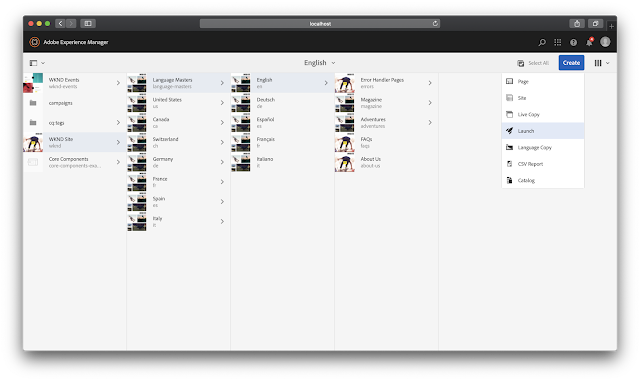
From Navigation -> Sites -> Create button ->Launch
From Tools -> Sites -> Launch
Navigate to Sites, create a Launch


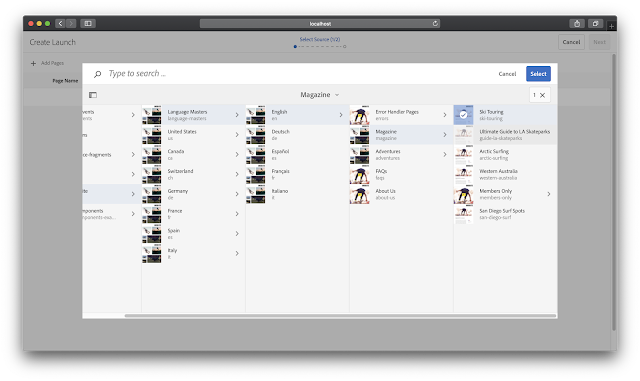
Select Page
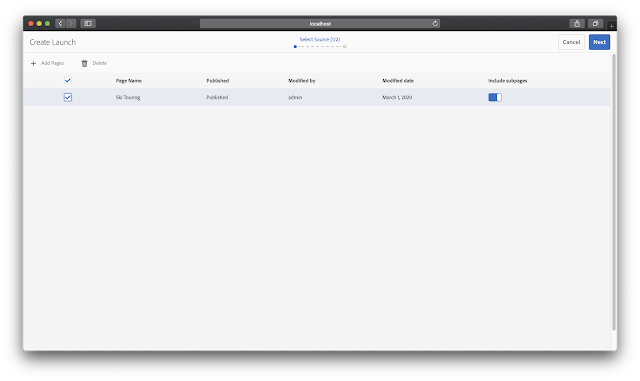
Now you can see Launch page is created, click next.

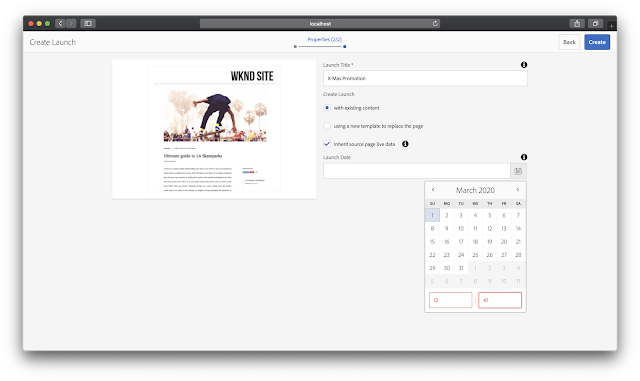
Add Launch properties and date to be published.
Click on Create to save your Launch Page. Click on Open to edit your content on your Launch page.

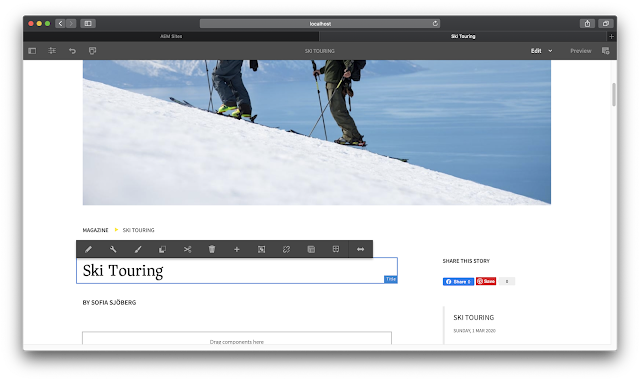
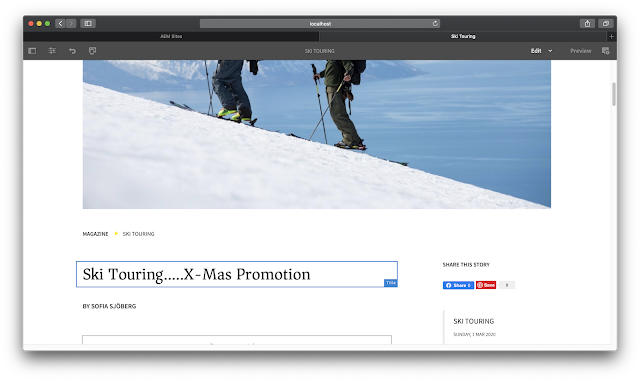
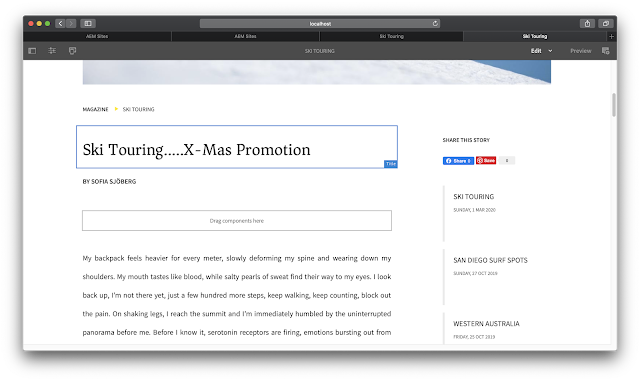
Let's edit this text component to display some promotional text.
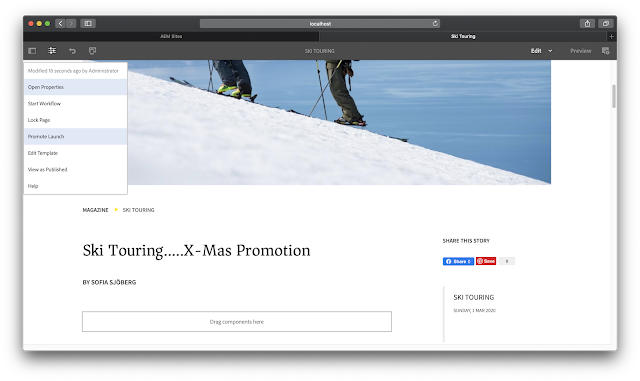
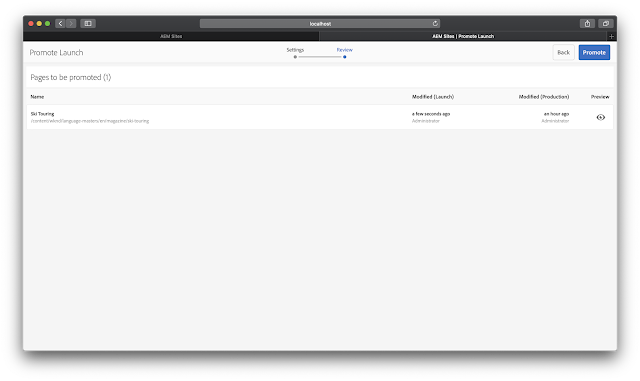
Now promote the Launch.

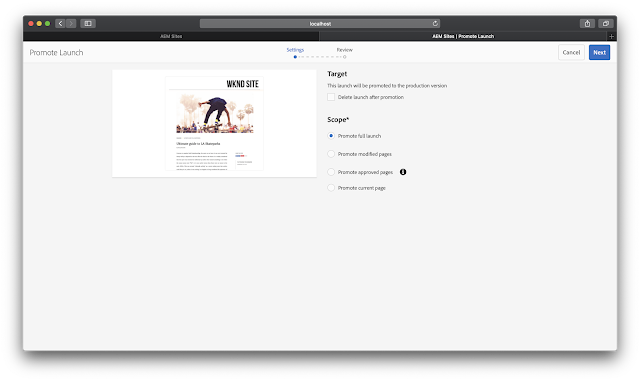
Select the scope of the Launch and click Next.

Launch Page is created successfully

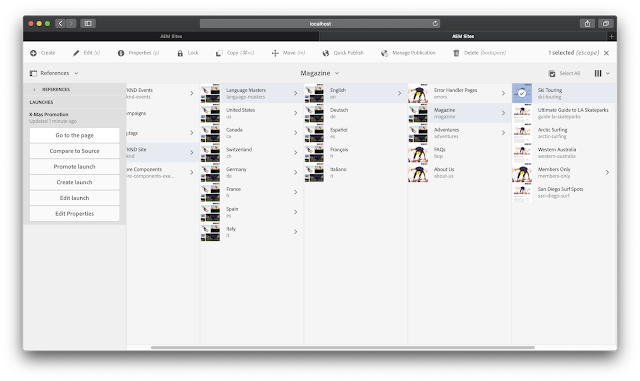
We can see a list of launches created for a specific page by navigating to References -> Launches.
Content changes will be published as mentioned in the config.


By aem4beginner

Hide /content root path in publish and website domains

How do we hide the '/content/sitename' from the URL?
It is always good to hide the content path from the public domain or publish server urls. Let us see one of the best approaches for the same.

Say we have our website in below domain URL,
https://[websitename.com]/content/sitename/fr/home.html

And hosted AEM with below URL,
http://<hostname>:<port>/content/sitename/fr/home.html

As a best practice and recommended option, we have to ensure the '/content/sitename' is hidden from appearing in the public domain.

Here I am going to explain one of the best approaches to achieving the same. To achieve this, we will have to configure things on both publish and dispatcher.

Configurations on PUBLISH:

Configuring the Apache Sling Resource Resolver Factory to ensure the URLs are re-written at the PUBLISH server.

Apache Sling Resource Resolver Factory - add below configurations under section - 'URL Mapping'

/content/sitename/(.*)</$1
/content/sitename/fr$1>/fr(.*)

Once you save the configuration and hit the webpage with http://<hostname>:<port>/fr/home.html, you will be able to see the home page over publishing instance(without /content/sitename).

Note: After saving, it takes some time to auto-restart the relevant bundles.

Configurations on DISPATCHER:

Now we are able to hit the publish server without a content path. Now let us see how this can be achieved over dispatcher or the publish domain URL.

Step1: Ensure the 'mod_rewrite' module is loaded in apache.
#
# This file loads most of the modules included with the Apache HTTP
#
LoadModule rewrite_module modules/mod_rewrite.so

Step 2: To do this set 'DispatcherUseProcessedURL' property to 1 - This will ensure the dispatcher using processed URLS.
<IfModule disp_apache.c>
# This is enabled to ensure re-writes taking effect
DispatcherUseProcessedURL 1
</IfModule>

Step 3: Now update the virtual host file and add the below rules in it.(Usually, this configuration file sits in the conf.d module)
<IfModule mod_rewrite.c>

RewriteEngine on
RewriteRule ^(.+)/$ $1

#shorten the URL
RewriteRule ^/content/sitename/(.*).html$ $1.html [R,L]
#Redirect the fr to the root folder to the home page

RewriteRule ^/?$ fr/home.html [R,L]

Now after restarting the Apache and hit the public domain URL
https://[websitename.com]/fr/home.html, you can see the home page is loading.


By aem4beginner

August 19, 2020
Estimated Post Reading Time ~

How to Create AEM Delta Content Packages using Groovy Script

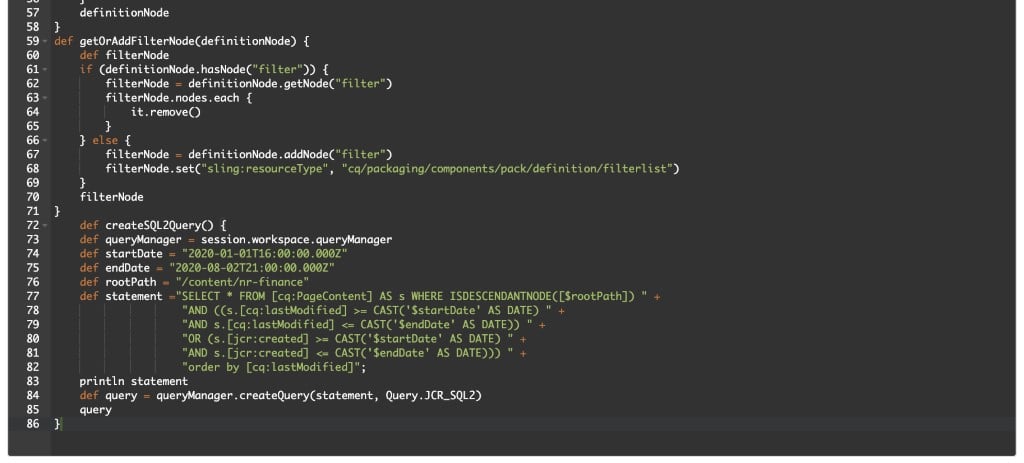
In today’s world, most of the developers try to find the delta content manually in AEM by checking the timestamp of pages and assets and add these paths in the filers of AEM package. Though its not an incorrect way, but there are high chances of missing some pages or assets doing so. So, we have curated this article to help AEM developers find the pages and assets that has been created/modified during specific given time frame and automates the package creation process.

The AEM Groovy Console provides an interface for running Groovy scripts in Adobe Experience Manager. Scripts can be created and executed to manipulate content in the JCR, call OSGi services, or execute adhoc code using the AEM, Sling, or JCR APIs without any interruptions to AEM instance.

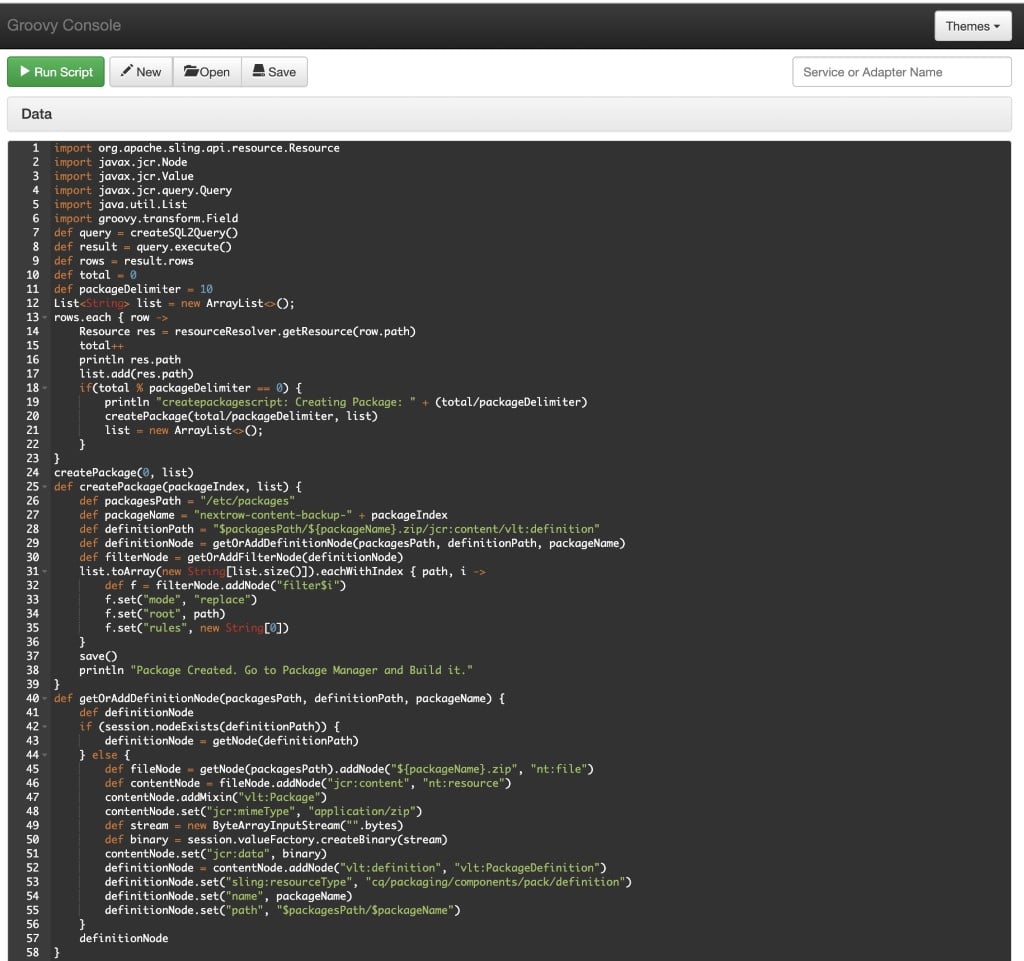
If you have ever come across a situation where in you need to create delta content packages in AEM instances, then this blog is for you. We are going to create and execute a groovy script which creates a series of content packages in package manager, which are modified or created over a specific date range.

Pre-requisites:
Download and install the groovy console package, which is compatible with your AEM version. Below table shows the compatibility versions of AEM and Groovy Console.

Implementation:
In order to find the delta content for a specific date range, we are going to use SQL2 query and find out if any new pages or assets have been created or any existing pages and assets have been modified in AEM instance. We are going to utilize the JCR properties like jcr:created and cq:lastModified in our SQL2 query.


Sample SQL2 Query:
SELECT * FROM [cq:PageContent] AS s WHERE ISDESCENDANTNODE([/content/nextrow]) AND ((s.[cq:lastModified] >= CAST(‘2020-07-28T16:00:00.000Z’ AS DATE) AND s.[cq:lastModified] <= CAST(‘2020-07-30T21:00:00.000Z’ AS DATE)) OR (s.[jcr:created] >= CAST(‘2020-07-28T16:00:00.000Z’ AS DATE) AND s.[jcr:created] <= CAST(‘2020-07-30T21:00:00.000Z’ AS DATE))) order by [cq:lastModified]
Groovy script:


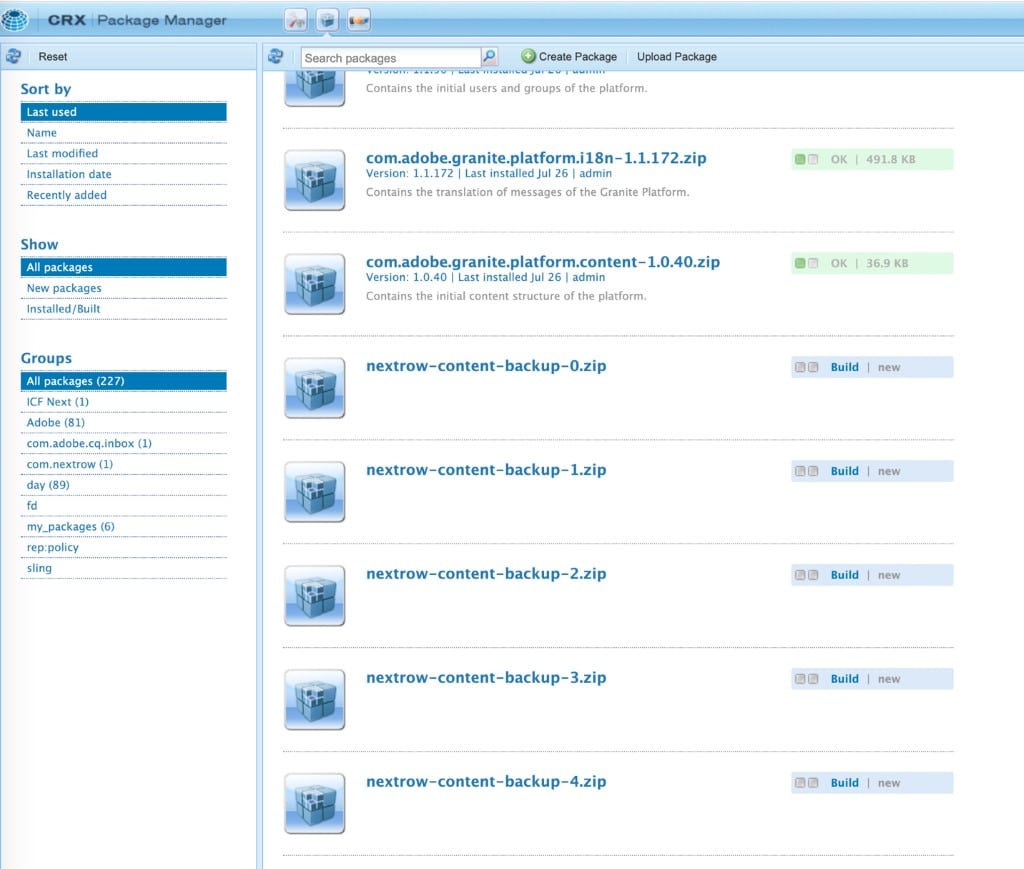
Output:
After we run the above groovy script, a series of content packages will get created in package manager. Go to package manager (http://localhost:4502/crx/packmgr/index.jsp) and build the content packages.


So as you may have noticed that Groovy scripts could be quite useful, easy to use, and very handy for any AEM developer to manipulate content in one go.


By aem4beginner

May 15, 2020
Estimated Post Reading Time ~

Importing and Exporting Content

Importing and exporting structured content for bulk editing is one of the common requirements of every project. the data opens in Excel, the editor changes and saves it, uploads the Excel file back into CQ5 and everything is there. The usual approach to implement this use case is to render a CSV file, which can be easily created and parsed, so everything should be fine, right?

Excel and CSV
Your dreaded enemy in this case is called character encoding. CSV files do not provide any means of defining the character encoding to be used, so the application has to 'guess' the proper encoding. If you are using UTF-8 (and you should), you can at least add an indicator, the so-called BOM that which can be used by the application to identify the encoding. Enter Excel. If you are running on Windows, an UTF-8 encoding with BOM is displayed correctly, but not on a Mac, and apparently the only way to get it right on both systems ist to use UTF-16LE with BOM. Which is awful. But if you get over the encoding, and even have the field and line separators right, the fun really starts. Because Excel doesn't save the file as is, maintaining the encoding (or the BOM). It saves the file in the locale of the current computer. So for a global company, you can be pretty sure that whatever the editors will upload ends up as gibberish. So, how to cope with the situation? We have found a not-so-pretty but at least reliably working approach covering the entire use case. Here's how it goes:

Exporting
To export the file, go with html. A minimal header suffices; and the data can go into the table just as is. You may even use th tags, so you get something like this:

<!DOCTYPE html PUBLIC "-//W3C//DTD XHTML 1.0 Strict//EN" "http://www.w3.org/TR/xhtml1/DTD/xhtml1-strict.dtd">
<html>
<head>
<meta http-equiv="content-type" content="text/html; charset=UTF-8"/>
</head>
<body>
<table>
<tr>
<th>Field 1</th>
<th>Field 2</th>
<th>Field 3</th>
</tr>
<tr>
<td>Value 1</td>
<td>Value 2</td>
<td>Value 3</td>
</tr>
...
</table>
</body>
</html>


This page is then delivered as .xls file, i.e. the content type and the content disposition are set to xls:

response.setHeader("Content-Type", "application/vnd.ms-excel;charset=utf-8");
response.setHeader("Content-Disposition", "attachment;filename=" + currentPage.getTitle() + ".xls");

This file opens nicely in Excel on all tested machines (and the headers are even bold and centered, look at that!)

Import
Still, how do you get that information back into CQ5 after the editor manipulated the data? Saving and uploading the file is kind of tricky, as Excel will create very different output based on the locale of the editor's machine. The easiest way to enable an import therefore is - an input field.

If you provide an input field like a textarea via a dialog and the editor copies over the cells from excel, the cells are filled in as TSV. You can easily parse it with a CSV parser, for example the one by Stephen Ostermiller. The character encoding on the other hand can be ensured by the browser: Since the content is copied from Excel to the browser on the same machine, it doesn't mess up the encoding. The browser is triggered to submit the content in a fixed encoding, so you receive all answers in UTF-8.

Et voilà, you have covered the entire cycle of export, editing and import in a editor-friendly way and still pretty stable against the quirks of character encoding and various plattforms.

Do you have a simpler solution, or do you see any issues with this approach?


By aem4beginner

May 13, 2020
Estimated Post Reading Time ~

Creating Content Root to define allowed templates

Before pages can be authored through the UI, a content root needs to be set up for your project. The content root will define the allowed templates for the site and is used to set other global configurations. By convention, the content root is not intended to be the Home page for the site and instead will redirect to the true home page.

This will be done in CRXDE Lite:
1) Create a node named mysite of type cq:Page beneath /content

2) Create a node named jcr:content of type cq:PageContent beneath /content/mysite

3) Add the following properties to the newly created jcr:content node:

sling:redirect Boolean true sling:redirectStatus Long 302 sling:resourceType String foundation/components/redirect will use the Foundation Redirect component to perform the redirect.


By aem4beginner

May 10, 2020
Estimated Post Reading Time ~

Storing JSON string in .content.xml

Given the JSON string of:
{ "firstname" : "Owen", "lastname" : "Bringino", "country" : "Philippines" }

If the above JSON string will be assigned as property value inside an XML document, then it will be encoded as:
"{&quot;firstname&quot;:&quot;Owen&quot;,&quot;lastname&quot;:&quot;Bringino&quot;,
&quot;country&quot;:&quot;Philippines&quot;}"

However, you may need to explicitly cast it to String when defined inside .content.xml as shown in the code snippet below:

<jcr:root ...>
    <jcr:content ...>
        <record jcr:primaryType="nt:unstructured"
            member= "{String}{&quot;firstname&quot;:&quot;Owen&quot;,
                     &quot;lastname&quot;:&quot;Bringino&quot;,
                     &quot;country&quot;:&quot;Philippines&quot;}" />   
    </jcr:content>
</jcr:root>

Without the {String} type hint, you may not be able to see the "member" property in JCR/CRXDE after deployment or upload.


By aem4beginner

May 2, 2020
Estimated Post Reading Time ~

AEM Design patterns: Admin pages and dynamic content

A common requirement in AEM projects is for authors to centrally manage some type of data, e.g. Events, and have that information display across the entire site.

There are a few technical challenges to overcome using this pattern — almost all involving caching. Dispatcher caches entire pages as single files. To update part of the page means clearing the entire file off dispatcher — along with the assorted performance cost.

Let’s take an example problem: an up-to-date events calendar that displays on every page of the site.

There are a few ways you could handle this:
1. Have dispatcher auto invalidate all pages on the site after a certain interval. This would work and be the easiest to develop but have serious negative performance implications, especially if events were updated regularly.

2. Create a servlet to create a JSON feed that is then used to create the events calendar on the front end. In this case, you would simply need to clear the cache for the JSON feed each time events were updated. The downside is that these events will not be available for SEO, which may or may not be acceptible.

3. Use server side include technology (SSI) or Edge side includes (ESI) to allow injection of these html fragments at either the dispatcher/webserver level or at the CDN level. The upside of this approach is that pages are still cached and available for SEO and there is less front-end JS load which easier on clients and mobile devices. The downside is that SSI and ESI are somewhat harder to develop against and test.

I’ll cover both approaches in this and future posts. For most AEM clients I believe that option #2 — using AJAX, is the best overall option. It’s generally easy to develop, well understood by developers, and relatively easy to test. As an added bonus, you will have an easy to parse events feed that can be used by 3rd party partners.

Building a JSON/XML feed from administration screens.
Hopefully if you are reading this blog you are already using Sling Models. If so, great! but I have some bad news. For some reason that I haven’t had a chance to investigate the annotations for sling models and the annotations for Jackson and JAXB don’t always play nice together. It’s possible for this that you will need to create a “feed” class with identical fields that gets the Jackson/JAXB annotations and the normal “model” class that you use inside of AEM for other purposes. Just a heads up!

That being covered, the rest is pretty simple. The details will vary a bit depending on your exact business requirements. A good rule of thumb is to create your servlet under a path like the following:
/bin/feeds/events.json

And use selectors for other aspects of the query, e.g. a date range:
/bin/feeds/events.10–24–2014.11.30.2014.json

You can also use extensions for filtering while maintaining caching:
/bin/feeds/events.10–24–2014.11.30.2014.json/TopEvents

Once events for a certain range are fully authored, they aren’t likely to change. This approach and URL structure maintains the dispatcher caching of your feeds and maximizes performance.

The second half of the puzzles is how to clear the dispatcher cache when new events are authored. Your authoring won’t be taking place under /bin/feeds but more likely a path like /content/admin/events/…

The good news is that this problem is already solved for you. The ACS Commons bundle has two utilities to help with this: a dispatcher flush service that allows you to automatically flush paths if data under a different path is changed and activated. A perfect fit for our needs.

The second tool is a manual dispatcher flush ui. If for some reason you need to clear a cache manually, this makes this much easier.


By aem4beginner

April 29, 2020
Estimated Post Reading Time ~

How to Create and Consume Content using Apache Sling

Apache Sling is one of the core technologies used in Adobe Experience Manager (formerly known as Adobe CQ / Day CQ).

Sling started as an internal project at Day Software and taken up by Apache in September 2007. It’s the reason why some bundles/libraries are named like com.day.

The other important technologies include Apache Jackrabbit, Apache Felix, OSGi. We will discuss the Apache Sling in this article, and how to create a sample content and consume it.

Apache Sling is a web framework that uses a Java Content Repository (like Apache Jackrabbit) to store and manage content. Sling applications use either scripts or Java servlets to process HTTP requests in a RESTful way.

Sling in very simple terms could be described as a REST API for JCR. We can use http requests to manage content inside the repository. Sling provides a mechanism to render that content in different ways. We can use JSP, ESP scripts, Java (servlets, pojos, etc) in the Felix container to process requests and deliver content.

When a request is made for a particular node, Sling looks up for a property called sling:resourceType. This is used to look up the rendering scripts for the requested resource.

Apache Sling is:
  • a REST-based web framework
  • Content-driven, using JCR
  • Powered by OSGi framework
  • an Apache Open Source project
We shall see an example of how to start, create a node, and read the node’s content from Sling.
  1. Download Apache Sling Launchpad self-runnable jar from https://sling.apache.org/downloads.cgi. In my case, I have downloaded the latest jar org.apache.sling.launchpad-8.jar
  2. After the jar is downloaded, just start it as follows:java -jar org.apache.sling.launchpad-8.jar
  3. This starts the Sling embedded Web Server on port 8080 and writes application files into the sling folder found in the current working directory of your choice. You can check http://localhost:8080/system/console/bundles to see if the application is started properly or not. The credentials would be admin/admin. Here you would see different bundles in started state.
  4. Create content by giving the below cUrl command:
curl -u admin:admin -F "sling:resourceType=training/aem" -F "title=Sling for AEM" http://localhost:8080/content/myaemnode

We can expect a response as below:


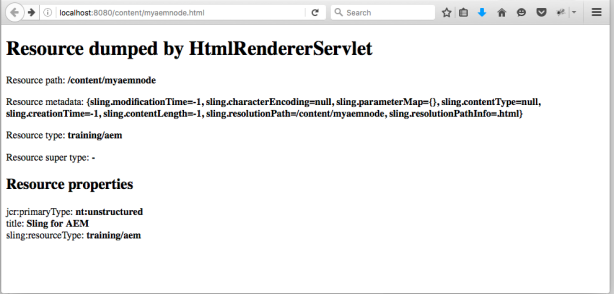
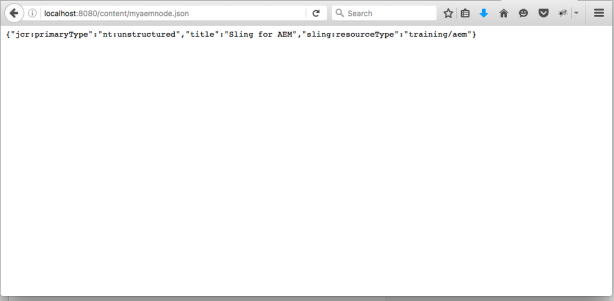
Now check the content by using the below URLs from a web browser.

Content node in HTML format: http://localhost:8080/content/myaemnode.html


The same node in JSON format: http://localhost:8080/content/myaemnode.json


By aem4beginner

April 27, 2020
Estimated Post Reading Time ~

How to protect the content from anonymous access through SAML based SSO

How to enable SAML based SSO in publisher to protect the content while accessing via the dispatcher

This post will explain the steps required to protect the published content from anonymous access through SAML based SSO while accessing via dispatcher/publisher - Adobe CQ5/AEM

Out of scope for this post - Configurations of IDP provider. Make sure the return URL configured in SAML provider is /saml_login

Enable Authentication for required content path: Go to http://localhost:4503/system/console/configMgr(publisher)
Search for Apache Sling Authentication Service
Add the path that required the authentication to Authentication requirements in the following format +<<Content Path>> e.g. +/content/test


Configure the IDP certificate in Adobe Experience Manager(AEM): Go to http://localhost:4503/system/console/configMgr(publisher)
Under /etc/key in the repository, create a node called "saml"(type nt:folder).
Inside this node, add a new binary property called "idp_cert" for the public certificate of the IdP.
Upload the certificate file by double clicking on idp_cert property
Save All


Go to: http://localhost:4503/libs/granite/security/content/useradmin.html(publisher)
Select any user because TrustStore is global to AEM
Create trust store by supplying the password & then manage trust store
Upload the IdP certificate & make note of the certificate Alias

Go to: http://localhost:4503/libs/granite/security/content/useradmin.html(publisher)
Select authentication-service
Create KeyStore by supplying the password
If encrypting SAML assertions then go to manage KeyStore for uploading the private & public key

Configure the user group for restricting the access to required content: Go to http://localhost:4503/useradmin(publisher)
Create a new group(content-access-group) with read access to content(provide the read assess only to the specific folder under content -/content/test and the required dam folders) and etc folder


Configure SAML 2.0 Authentication Handler: 
Go to http://localhost:4503/system/console/configMgr (publisher)
Search for Adobe Granite SAML 2.0 Authentication Handler
Provide the required details


IDP URL - URL of the IDP where the SAML Authentication Request should be sent to Provide all the required values
Service Provider Entity ID - ID which uniquely identifies this service provider with the identity provider
UserID Attribute - The name of the attribute containing the user ID from IDP
IDP Certificate Alias - Provide the certificate alais created in the above step
Select Auto create CRX Users
Select Add to Groups
Specify content-access-group in Default Groups(group created in previous step)
Password of Key Store - Specify the key store password specified in the above step.

Configure Referrer Filter: 
Go to http://localhost:4503/system/console/configMgr(publisher)
Serach for Apache Sling Referrer Filter
Configure IDP host at Allow Hosts


Access the content URL now - http://test.dispatcher.com/content/test/en.html
The user will be redirected to SAML provider and will be redirected to target page upon successful authentication.

All the user configured in SAML provider will be able to access the target page and the users will be auto created in AEM after successful authentication.
If we want to give them access only to predefined users in AEM then remove Auto create CRX Users and Add to Groups from Adobe Granite SAML 2.0 Authentication Handler configuration.

The authentication will not work if multiple publishers serve the request, as a solution we have to enable the sticky session to make sure the browser sessions are directed to same dispatcher/publisher


By aem4beginner

Approach to implement content preview environment in AEM

By default Adobe Experience Manager(AEM) not provides the preview instance to preview the content before publishing to live environment but most of the cases preview is required before publishing the content to live environment.

This post explain the approach to preview and approve the content before publishing to live environment.

The below diagram explains the preview flow


Author creates the content in production author and start the workflow
Workflow sends the content to Stage author and Publishers
Workflow assign the task to approver group and send the notification email
Approver reviews the content in stage environment and approve or reject the content (workflow)t - provides the detailed information for rejection
if the content is approved
Workflow sends the approved content to production publishers.
If the content is rejected
Workflow assign the task to author and sends the notification
Author review the details and completes the workflow
Start the process again by correcting the content

Define Replication process step with ECMA script:
Create ecma file replicate.ecma under /etc/workflow/scripts/<<application>> e.g. /etc/workflow/scripts/blog - This ecma script helps to replicate the content to stage environments

var workflowData = workItem.getWorkflowData();
var path = workflowData.getPayload().toString();
var session = workflowSession.getSession();

var replicator = sling.getService(Packages.com.day.cq.replication.Replicator);
var options = new Packages.com.day.cq.replication.ReplicationOptions();

for(var i=0;i<args.length;i++) {
var agent= args[i];
var filter = new Packages.com.day.cq.replication.AgentIdFilter(agent);
options.setFilter(filter);
options.setSuppressStatusUpdate(true);
try {
replicator.replicate(session, Packages.com.day.cq.replication.ReplicationActionType.ACTIVATE, path, options);
} catch(e) {
log.error("Cannot replicate page : " + path +"on publisher. (agentId: " + agent + "): " + e);
}
}


Define approver group:
Create a user group in production author- workflow-approver and add the required users to the group


Define Replication agents:
Define replication agents for Staging author and staging publishers in production author, Check only the checkbox associated with "ignore default"


Define workflow model:
Create new workflow model in production author- Content Review


Add a process step, select the ecma script defined in the previous step - /etc/workflow/scripts/blog/remlication.ecma as process
Select Handler Advance
Provide the staging replication agents as the argument - e.g. stage-author,stage-publisher1,stage-publisher2


Add a Participation Step and select the approver group defined
Select checkbox associated with Email


Add OR split with two branches
Add Activate Page/Asset step in the first branch


Add Dynamic Participant Step in the second branch and select Workflow Initiator Participant Chooser (Script)
Select checkbox associated with Email


Save the final workflow


Create the content and initiate the workflow for the content path in production author- Content Author


The content is published to stage author and publisher.
The workflow item is assigned to the workflow-approver group and email is send to the group.


Login to workflow inbox(production) with the user id who is part of workflow-approver group
Approve or Reject the content - Select the corresponding Next Step "Activate Page/Asset" or "Reject workflow step"


If the content is approved, the approved content is activated/published to production publisher(via default publisher agents)
If the content is rejected, the workflow item is assigned to the workflow initiator(author) and email is send.


Login to workflow inbox(production) with the author user id, complete the workflow. Correct the content based on the comment provided by approver and restart the process.


By aem4beginner

April 26, 2020
Estimated Post Reading Time ~

Content Finder - Query Builder

Use QueryBuilder HTTP API syntax to drive ContentFinder queries instead of more restrictive GQL.

How to Use
Install the ACS AEM Commons package
Create a new Content Finder Tab JS file
Update the contentfindertab config JS object to include:
url: “/bin/wcm/contentfinder/qb/view.json”
baseParams: { .. }
JS object representing the QueryBuilder API key/value pairs used to drive all of the ContentFinder Tab’s queries
If no baseParams are set then the suggestField will populate the query param
getParams: { .. }
JS object representing the dynamic QueryBuilder API key/value pairs used to drive all of the ContentFinder Tab’s queries (baseParams will be used in conjunction with these)

Page Hit
  • name: resource.getName()
  • path: hit.getPath()
  • title: page.getTitle() || page.getPageTitle() || page.getNavigationTitle() || page.getName()
  • excerpt: hit.getExcerpt() || page.getDescription()
  • ddGroups: page
  • type: Page
Asset Hit
  • name: resource.getName()
  • path: hit.getPath()
  • title: asset.getProperty("dc:title") || asset.getName()
  • excerpt: hit.getExcerpt() || asset.getMetadataValue("dc:description")
  • mimeType: asset.getMimeType()
  • size: < asset size >
  • type: Asset
Other Hit
  • name: resource.getName()
  • path: hit.getPath()
  • title: resource.getName()
  • excerpt: hit.getExcerpt()
  • type: Data
Notes
If no path keys are specified, the serlvet’s suffix will be used to scope the search Query parameter query is translated to QueryBuilder param: fulltext

Example ContentFinder Tab Implementation:

/* For more complete documentation, please see:
http://dev.day.com/docs/en/cq/current/widgets-api/index.html?class=CQ.wcm.ContentFinderTab
and http://chanchal.wordpress.com/2013/06/26/how-to-add-your-own-content-finder-tab-in-cq5/
*/
{
    /* Tab name */
    tabTip: CQ.I18n.getMessage("QueryBuilder"),

    /* Unique tab Id in form: cfTab-<unique-name> */
    id: "cfTab-QueryBuilder",

    /* Tab icon */
    iconCls: "cq-cft-tab-icon pages",

    /* Fixed value */
    xtype: "contentfindertab",

    /* Defines tab order */
    ranking: 1,

    /* Paths under which this Tab can appear in the content finder */
    allowedPaths: [
        "/content/*",
        "/etc/scaffolding/*"
    ],

    /* JS Function which returns a JS object representing the search criteria.
     Because this is a function it can produce dynamic JS objects based on other input items (ex. Tab search/filter inputs)
     See input item defintions in the "items" field */
    getParams: function () {
        /* Get suggestField widget as defined below */
        var suggestField = CQ.Ext.getCmp("cfTab-QueryBuilder-SearchField");

        return {
            /* get suggestField's value and send as QB's fulltext param */
            "fulltext": suggestField.getValue(),
            "10_property": "jcr:content/metadata/tiff:ImageWidth",
            "10_property.value": "800"
        };
    },

    items: [
        CQ.wcm.ContentFinderTab.getQueryBoxConfig({
            "id": "cfTab-QueryBuilder-QueryBox",
            "items": [
                CQ.wcm.ContentFinderTab.getSuggestFieldConfig({
                    "id": "cfTab-QueryBuilder-SearchField",
                    /* Update suggestion URL to search over proper content path via the suffix */
                    "url": "/bin/wcm/contentfinder/suggestions.json/content"
                })
            ]
        }),

        /* Result Box Config renders the infinite scrolling lists of results */
        CQ.wcm.ContentFinderTab.getResultsBoxConfig({

            /* Unique tab results Id in form: cfTab-<unique-name>-resultBox */
            id: "cfTab-QueryBuilder-resultBox",

            /* Enables/disables infinite scrolling; default behavior is true */
            disableContinuousLoading: false,

            /* Defines the component Drop Targets the result items can be dragged/dropped into */
            /* Values: [CQ.wcm.EditBase.DD_GROUP_ASSET, CQ.wcm.EditBase.DD_GROUP_COMPONENT, CQ.wcm.EditBase.DD_GROUP_DEFAULT, CQ.wcm.EditBase.DD_GROUP_PAGE, CQ.wcm.EditBase.DD_GROUP_PARAGRAPH] */
            itemsDDGroups: [CQ.wcm.EditBase.DD_GROUP_ASSET],

            /* Defines the type component type that is created when a result is dragged into a Parsys */
            /* Triggered via "alt-drag" from ContentFinder */
            itemsDDNewParagraph: {
                path: "foundation/components/image",
                propertyName: "./fileReference"
            },

            items: {
                tpl: '<tpl for=".">' +
                    '<div class="cq-cft-search-item" title="{pathEncoded}" ondblclick="CQ.wcm.ContentFinder.loadContentWindow(\'{[CQ.HTTP.encodePath(values.path)]}.html\');">' +
                    '<div class="cq-cft-search-thumb-top"' +
                    ' style="background-image:url(\'{[CQ.HTTP.externalize(CQ.HTTP.encodePath(values.path))]}.thumb.48.48.png\');"></div>' +
                    '<div class="cq-cft-search-text-wrapper">' + '<div class="cq-cft-search-title">{[CQ.shared.XSS.getXSSTablePropertyValue(values, \"title\")]}</div>' +
                    '</div>' +
                    '<div class="cq-cft-search-separator"></div>' +
                    '</div>' +
                    '</tpl>',
                itemSelector: CQ.wcm.ContentFinderTab.DETAILS_ITEMSELECTOR
            },

            tbar: [
                CQ.wcm.ContentFinderTab.REFRESH_BUTTON,
                "->"
                /* Add other xtypes here, common use-case is a button */
            ]
        }, {
            /* Path to ContentFinder QueryBuilder */
            url: "/bin/wcm/contentfinder/qb/view.json"
        }, {
            /* Base params to include in ALL searchs;
             These are the fixed search criteria for all searches initiated from this ContentFinderTab */
            baseParams: {
                "type": "dam:Asset",
                "path": "/content/dam",

                "1_property": "jcr:content/metadata/dam:MIMEtype",
                "1_property.value": "image/jpeg",

                "orderby": "@jcr:content/cq:lastModified",
                "orderby.sort" : "desc"

            }
        }, CQ.CF_REFRESH_INTERVAL)
    ]
}


By aem4beginner

April 22, 2020
Estimated Post Reading Time ~

CRX/DE console doesn't show node-tree in the AEM 6.2 for the run mode - Author, CRX3 and samplecontent

Issue: CRX/DE light console doesn't show nodetree
- Run mode for Author instance as follows:

sling.run.mode.install.options=author|crx3|samplecontent
- Post the installation of Author instance in crx/de console shows nothing in the tree-node, refer the below screenshot.
http://localhost:4502/crx/de/index.jsp


Solution:
- Go to the http://localhost:4502/system/console/configMgr
- Search for Apache Sling DavEx Servlet
- Root path shows only /Server as shown in the below screenshot.


- Change the root path from /server to /crx/server and save it.


- Go back to the /crx/de console, You will be able to see the node-tree as shown below.


By aem4beginner

April 17, 2020
Estimated Post Reading Time ~

Writing Effective Online Content – Made Easy

Lets begin with three important questions; the answers to these are key for a winner content.

Why doesn’t your content get a first page ranking even after creating it awesome?


Why is it that your video has fewer views compared to other videos?

Why aren’t you able to reach the target audience?


It’s no secret that SEO and content run parallel. SEO writing has always focused on optimizing the web page copy by targeting keyword phrases in certain frequencies and densities. But still, research shows that almost 85% of the factors that determine the ranking of the page is based on the activities that occur off-page.


Although keyword research is important, the way a search engine works has evolved with time.
Google considers the trust and authenticity of your page
How others perceive your content, and the words used to describe it in links
Modern SEO targets creating compelling and engaging content

Why Do We Have To Spoon Feed Search Engine?

They’re not as advanced as you think
They’re toddlers who need the information given to them in a way that works for them
You might write an article about “spoon feeding” using metaphors, entertaining analogies, and smart synonyms. But if you don’t use the words “spoon feeding” in certain locations and frequencies along with other SEO best practices, both you and the search engines are out of luck. The toddler goes hungry, and you’re irritated and likely dealing with a mess.
Keyword is the key !! 
Keyword research is cool as it lets you gaze into people’s mind
Being able to take a look at the words and phrases people use when looking for things online is invaluable
Once armed with keyword intelligence, you have the unique ability to create highly-relevant content that aids your site visitors and enhances your credibility
Saying that, it doesn’t mean that you will stuff the content with keywords. It would not be engaging and would be a bad strategy too
The objective is always to let people find you with the language they use when searching


Essentials to Cover for Keywords
1. Research Tools
People might tell you Google Keyword Planner is enough to search for a keyword. But more the options, merrier it is.

Few other options that could be used are, Aaron Wall’s SEO BOOK KEYWORD SUGGESTION TOOL, which uses Yahoo! Search data and other useful metrics; YOUTUBE KEYWORD TOOL, one of the best tools that work wonders when it comes to generating relevant tags for videos.

VIDOOLY and SEMRUSH.COM can also be used for online videos.

2. Get Specific
“Keyword” is the term that gets confused mostly, but what you’re looking for is keyword phrases.

For instance, a real estate lawyer in Delhi, India would gain very little actual benefit from ranking highly for the single word “attorney”. But specific tags based on geography and specialty would yield highly targeted traffic (“Delhi real estate lawyer”). And don’t forget synonyms.

3. Strength in Numbers
No tool is absolutely correct. Don’t consider the reported number of monthly searches by any particular tool as a gospel truth. But do pay attention to relativity among them.

Being realistic is the key. If you are trying to rank in a very competitive sector, aim for something attainable first. Keep in mind that a certain keyword combination can rank for an easier phrase if the most competitive term ends up out of reach.

4. Highly Relevant
Make sure that the keywords are in congruence with your objective.

If you are a service provider or if you sell specific products, the relevancy of the keyword may be easier to achieve—you ultimately want someone to purchase the product or service.

5. Develop a Resource
A keyword should be able to develop content that is useful to the readers.

The content generated from the keyword should be able to meet the client’s requests, aid marketing your brand or product and should be worth linking to.
How to make sure your video description or meta description is SEO enriched?


Write for your Audience


It is the utmost priority. It seems easy enough, yet many of us get it wrong most of the times.

Write content that appeals to the interests of your target market or answers their questions.

Make Headlines that Pack a Punch


You have a very minimal amount of text to make a very big impression. So never underestimate the power of a headline! Ensure your headlines are clear, interesting and make use of rich keywords.

Along with a great headline, make sure your descriptions are interesting and further explain the topic of your article. Your title and meta description are the keys, so ensure they serve the purpose!

Use Keyword-Rich Phrases

Use relevant, keyword-rich phrases in your headlines and throughout your content.

Use keywords thoughtfully and sparingly, sticking to a more natural feel.

Structure your Posts

Your content might be great but can easily serve no purpose if it is lost unorganized.

Smaller paragraphs with good headlines make for an easy read that will keep your readers engaged.

Propel content with Social Media


Social media is a powerful tool that helps increase the reach of your content and promote sharing.

Since the power of social media lies in sharing, it’s also important to include social sharing links as part of your descriptions.


Content and SEO are vital pieces of the puzzle, so it’s essential to use quality techniques to ensure higher visibility and traffic.

Source: https://www.tothenew.com/blog/writing-effective-content-made-easy/


By aem4beginner