Showing posts with label Granite UI/CoralUI. Show all posts

March 30, 2021
Estimated Post Reading Time ~

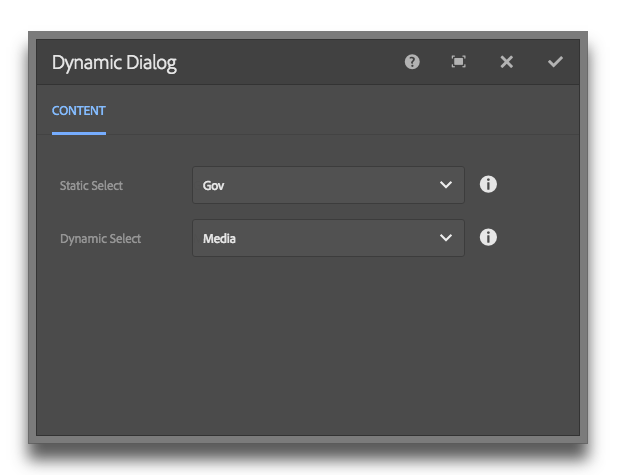
Display dynamic content in a Touch UI (Granite) Dialog Select Field

Update: I've added a proper GitHub project here.

In classic UI, it was easy to specify the options property on a selection xtype.

This made getting dynamic data into a dropdown very easy. Simply point the options property to /path/to/resource.infinity.json and you were done. In Granite, things don't work this easy.

There are two approaches that I found. 1) Use a listener. 2) Use ACS Commons GenericList / Datasource solution.

The ACS commons solution works great, but it's a bit rigid on the data structure. I used it as my starting point for the solution below.

My solution is a 3 step process, requires no JS and no external dependencies.

Step 1
Make a data source component. It only needs to have one JSP file in it...

<%@page session="false" import="
org.apache.sling.api.resource.Resource,
org.apache.sling.api.resource.ResourceUtil,
org.apache.sling.api.resource.ValueMap,
org.apache.sling.api.resource.ResourceResolver,
org.apache.sling.api.resource.ResourceMetadata,
org.apache.sling.api.wrappers.ValueMapDecorator,
java.util.List,
java.util.ArrayList,
java.util.HashMap,
java.util.Locale,
com.adobe.granite.ui.components.ds.DataSource,
com.adobe.granite.ui.components.ds.EmptyDataSource,
com.adobe.granite.ui.components.ds.SimpleDataSource,
com.adobe.granite.ui.components.ds.ValueMapResource,
com.day.cq.wcm.api.Page,
com.day.cq.wcm.api.PageManager"%><%
%><%@taglib prefix="cq" uri="http://www.day.com/taglibs/cq/1.0" %><%
%><cq:defineObjects/><%

request.setAttribute(DataSource.class.getName(), EmptyDataSource.instance());
Locale locale = request.getLocale();
Resource datasource = resource.getChild("datasource");
ResourceResolver resolver = resource.getResourceResolver();
ValueMap dsProperties = ResourceUtil.getValueMap(datasource);
String genericListPath = dsProperties.get("path", String.class);

// What fields and values do we want from the children resources? This should be inside the component dialog.
String value = dsProperties.get("value", String.class);
String text = dsProperties.get("text", String.class);

// If the path isn't null, get the resource and loop through the children.
if (genericListPath != null) {

Resource parentResource = resourceResolver.getResource(genericListPath);

// Create a list to stuff our values
List<Resource> fakeResourceList = new ArrayList<Resource>();

// Grab the children and get their properties.
for(Resource child : parentResource.getChildren()){

ValueMap vm = new ValueMapDecorator(new HashMap<String, Object>());

ValueMap childProperties = ResourceUtil.getValueMap(child);

vm.put("value", childProperties.get(value, String.class));
vm.put("text", childProperties.get(text, String.class));

fakeResourceList.add(new ValueMapResource(resolver, new ResourceMetadata(), "nt:unstructured", vm));
}

// Create a new data source from iterating through our fakedResourceList
DataSource ds = new SimpleDataSource(fakeResourceList.iterator());

// Add the datasource to our request to expose in the view
request.setAttribute(DataSource.class.getName(), ds);
}
%>


Step 2
Add a data source node to your dialog property. Read the gist for pertinent info.

<dropdown
jcr:primaryType="nt:unstructured"
sling:resourceType="granite/ui/components/foundation/form/select"
fieldLabel="Dropdown"
name="./dropdown"
rootPath="/content">
<!-- Params: value, text, path -->
<datasource
jcr:primaryType="nt:unstructured"
sling:resourceType="myapp/components/utilities/datasource"
value="value"
text="text"
path="/apps/myapp/components/content/snippets/statsbar/dialog/articleLabels/articleLabelsSelect/options" />
</dropdown>

Step 3
Profit.

By aem4beginner

January 3, 2021
Estimated Post Reading Time ~

AEM - Touch UI - Coral2 JSON store to Coral3 node store conversion

In Touch UI, Coral2 multifield with ACS common allow multifield data to stored as JSON but when you are going to migrate to Coral3/Granite type, new Granite type store multifield data in nodes not in JSON.

If the dialogs are already authored and if you convert them to Granite type then multifield dialogs fields would not be prepopulated without already authored data.

There are multiple solutions to pre-populate multifield fields with JSON data, the one is to create node structure from JSON.

In this article, I will show one of the approaches, to convert JSON data to node data.

Suppose if the dialog has a multifield item like below :
https://github.com/arunpatidar02/aem63app-repo/blob/master/packages/tmp/dialog-snippet1.xml

after dialog authored the values are stored in a JSON format.


To make the above dialog compatible with coral3, the data should be stored in a node under iItems. like below:


Note: The dialog fields should be changed separately from coral2 to coral3 resourcetype.

The below servlet runs SQL2 query and look for the touchmulti component and convert JSON data to nodes, so it will be compatible with coarl3 multifield and prepopulate the authored data.

Code:
https://github.com/arunpatidar02/aem63app-repo/blob/master/java/MultifieldConvertCoral2to3Servlet.java


By aem4beginner

January 2, 2021
Estimated Post Reading Time ~

Touch UI Concepts - Granite UI, Coral UI

Touch-enabled UI is the standard UI for AEM is based on Coral UI and Granite UI. (not an open-source project.)

Coral UI: We can classify this further as Javascript components offering functionality and CSS-only components
Granite UI: Components built with Coral UI to provide UI widgets.

Example of Coral UI as a Javascript component:
  • Components/functionalities like accordion/tabs which we usually/previously would have done using HTML markup with some jQuery plugins to bring out the final outcome as accordion/tabs.
  • In Coral UI, the same is exposed to us via tags named <coral-accordion>, <coral-accordion -item> and other related tags for a particular feature.
Example of Coral UI as a CSS-only component:
  • Dialog fields which are in the form of HTML input tag (say pathbrowser/pathfield), has classes named coral-InputGroup, coral-InputGroup-input(targeting input tag), coral-InputGroup-button(targeting the button with icon -> click of which lets us select a path) which has attributes contributing to the look and feel of the field.
Granite UI component example:
  • ResourceType/components that we use to form a touch UI dialog constitute a Granite UI component.
  • It is not limited to dialog fields, instead, there is more to it. (Ex: Granite UI admin components build on foundation components, say Global Navigation, Search Panel.)
  • By the term "Granite UI components built with coral UI", means that CSS class/selectors exposed to us via Coral UI are made use of in the Granite UI component.
    • In this case, for a pathfield/pathbrowser component, the classes mentioned above is used while framing the input tag.
Granite UI components available at
  • /libs/granite/ui/components/foundation are components based on coralui2.
    • Clientlibs are available in the category named "granite.ui.foundation", "granite.ui.foundation.admin"
  • /libs/granite/ui/components/coral/foundation are components based on coralui3
    • Clientlibs are available in the category named "granite.ui.coral.foundation"
Changes on CoralUI3 being API streamlining, removing deprecated feature with respect to previous version. Details on differences to be covered in next post.

Screenshots for reference:
<coral-columnview> component: Sites console in column view makes use of Coral.ColumnView component.


Granite UI pathbrowser component making use of css-only Coral UI: (in the form of selectors)

coral-InputGrop-input: selector targeting input
coral-InputGroup-button: selector targeting button
coral-Icon--folderSearch: responsible for displaying the folder icon along with the class -coral-Icon.


By aem4beginner

Difference b/w Granite UI Components based on Coral UI 2 and Coral UI 3

Given the fact that we have two sets of Granite UI components based on Coral UI2 and Coral UI3, below are the differences mentioned per Adobe documentation.

Coral UI2 Components Path         /libs/granite/ui/components/foundation/*
Coral UI3 Components Path         /libs/granite/ui/components/coral/foundation/*
Coral UI2 Clientlibs                     granite.ui.foundation, granite.ui.foundation.admin,                                                                 coralui2
Coral UI3 Clientlibs                     granite.ui.coral.foundation, coralui3

Coral UI 3 based components will not have layout concept. Replacement/alternative being direct standard component for simplicity.
  • While creating touch UI dialog, we create a node named "layout" with resourceType being the layouts from the path "granite/ui/components/foundation/layouts/*"
    • Eg: Coral UI 2: if layout resourceType used is granite/ui/components/foundation/layouts/tabs, equivalent Coral UI 3, granite/ui/components/coral/foundation/tabs.
    • section component(granite/ui/components/foundation/section)that we use to define for each of the tabs has been replaced with container component(granite/ui/components/coral/foundation/container)
$.validator which we were using for validation before is now been replaced with foundation-validation
Common attributes (like class, title, id) are strictly implemented.(this is more to the implementation perspective - retrieving logic of these common attributes. The same can be evident by comparing any particular component of both sets, say textfield available in /libs/granite/ui/components/foundation/textfield/render.jsp and /libs/granite/ui/components/coral/foundation/textfield/render.jsp

Few similar set of components has been removed. A list of components changed/removed has been mentioned here.


By aem4beginner

Hiding Granite UI Resource Dynamically

Granite UI offers two ways of hiding the resource dynamically.
  • FilteringResourceWrapper (granite:hide)
  • RenderCondition (granite:rendercondition)
UseCase: To hide/filter a resource from being rendered based on some custom conditions.

Understanding the differences in terms of usage:
granite:hide
granite:rendercondition
Decision making logic/condition is defined using Expression Language(EL).

Decision-making logic/condition is defined in a component ie. A separate rendercondition component will hold the logic.
Supported Variables/functions in EL (for Granite UI resource) are available hereOOB rendercondition components are available here
The custom variables can also be registered using ExpressionCustomizer. One such variable is cqDesign for fetching the design properties as we would do with currrentDesign global object.
(OOB core components uses this variable in EL- ${cqDesign.customproperty})
Custom rendercondition components can be created based on our requirements.
Usage: Property named "granite:hide" is to be created with the value being EL on the resource to be filteredNode named "granite:rendercondition" or "rendercondition" is to be created under the resource to be filtered.
Properties for this node being "sling:resourceType" with the value as rendercondition component or custom component's path
Ex: Widely used in OOB core components to control dialog fields based on design/policy configuration of that component.
The condition can be controlled at the property level itself making use of the cqDesign custom variable. Hence EL is preferred in this case.
Ex: In Page selection -> action bar -> Create -> Workflow option will be available/should be rendered for those who have access to /etc/workflow/models.
This condition has to be implemented by making use of AccessControlManager API on a specific path. Hence rendercondition is preferred for this use case.

A specific example on each of these is to be covered in a separate post for better clarity.


By aem4beginner

December 29, 2020
Estimated Post Reading Time ~

How to Convert Adobe’s Granite UI 1.0 Documentation to XML

As an AEM developer, we must prepare Touch UI dialogues within code, in the XML format. When it comes to reading the Granite UI 1.0 Documentation, it can be confusing; especially for new AEM developers. These new AEM developers are confused by how properties within the documentation are mapped and converted to XML entries.

This document will help you understand how properties within the Granite UI 1.0 documentation are mapped and converted to XML entries.
This article will focus on how to convert the Granite UI textfield component documentation to XML format.

Understanding Adobe’s Granite UI 1.0 Documentation, textfield component:
Before we jump straight to the code examples, let us understand how to convert Adobe’s Granite UI 1.0 Documentation to XML. When looking at a Granite UI 1.0 form component’s documentation, textfield component, we are presented with this page:

We can see a couple of sections of the page:
  • The component’s sling:resourceType reference.
  • The details & description of the current form component. From what we can see, the textfield form element extends from the Field, abstract component; extended Field component also makes more property configuration available to the form component.
  • The available configuration and properties for the form component.
a. Create a New textfield Component:
Once we understand the configurations and properties for the textfield form component, with XML, we can create a textfield component with the following. Note that the sling resource has a primary type of jcr:primaryType=”nt:unstructured”, as follows:

<labelTextfield
    jcr:primaryType="nt:unstructured"
    sling:resourceType="granite/ui/components/coral/foundation/form/textfield"/>

b. Plug in the Necessary Properties to our textfield Form Component:
Next, using the Granite UI 1.0 documentation, we can simply plug in the necessary properties to our form component, sling resource.


Based on our requirements, we can copy properties from the Granite UI 1.0 documentation into our newly created component, within the XML:

<labelTextfield
    jcr:primaryType="nt:unstructured"
    sling:resourceType="granite/ui/components/coral/foundation/form/textfield"
    fieldLabel="Label: labelTextfield"
    name="./labelTextfield"
    value="{String}Default Text"
    emptyText="Show placeholder text when input field is empty."
    disabled="{Boolean}false"
    required="{Boolean}true"
    autocomplete="off"
    autofocus="{Boolean}true"
    validation=""
    maxlength="{Long}100"/>


Question: Example Hierarchy Explained
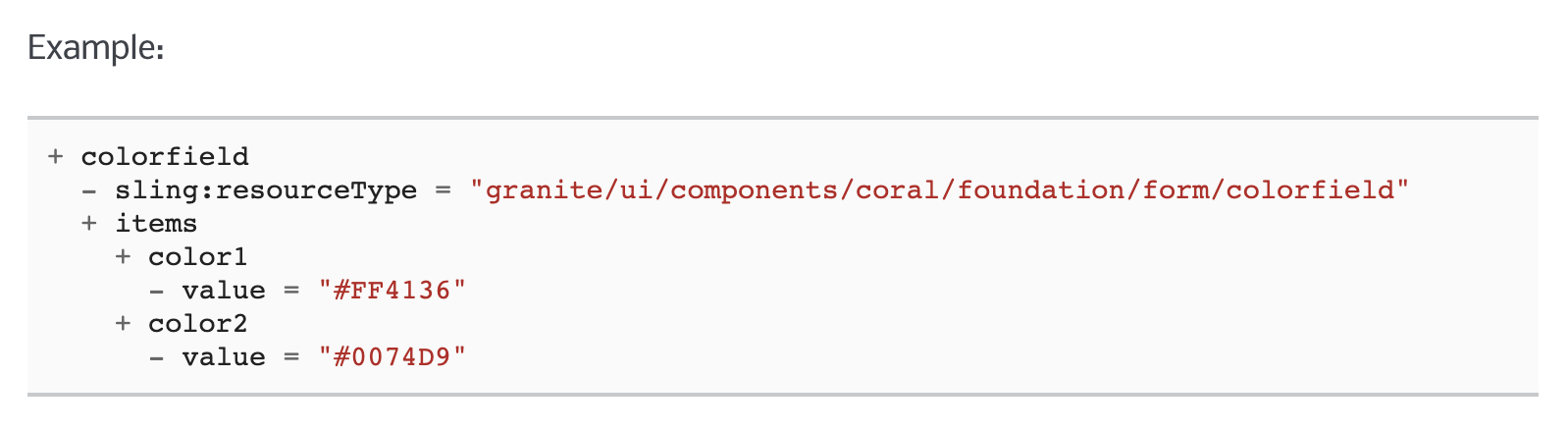
q: How can translate hierarchy examples diagrams within the Granite UI 1.0 Documentation?
Example in such diagrams:

Translated XML, looks like:
<color
    jcr:primaryType="nt:unstructured"
    sling:resourceType="granite/ui/components/coral/foundation/form/colorfield"
    name="./color">
    <items jcr:primaryType="nt:unstructured">
        <color1
            jcr:primaryType="nt:unstructured"
            value="#FF4136"/>
        <color2
            jcr:primaryType="nt:unstructured"
            value="#0077D9"/>
    </items>
</color>

Conclusion
I hope this article has been helpful. Other than the Granite UI 1.0 Text Field form component. There are many other form components you would be using based on your requirements. Have a play with all the form components available in the Granite UI 1.0 library. They are listed here:

Components:


By aem4beginner

AEM Granite UI 1.0 Form Component’s XML Reference Guide

This AEM Granite UI 1.0 Form Component’s XML Reference Guide provides code snippets to help developers speed up their AEM Touch UI development. This quick reference includes the most used Granite UI form components with plug and plays XML examples.

Note:
If you want to understand how to convert Granite UI 1.0 Form Components from Adobe’s documentation to XML format, have a look at the article. The article provides a step by step and easy to understand guide.

References:
1. CheckboxGranite UI 1.0, Touch UI XML Example:
<isChecked
jcr:primaryType="nt:unstructured"
    sling:resourceType="granite/ui/components/coral/foundation/form/checkbox"
    fieldLabel="isChecked?"
    name="./isChecked"
    text="isChecked flag"
    uncheckedValue="{Boolean}false"
    value="{Boolean}true"/>


sling:resourceType: granite/ui/components/coral/foundation/form/checkbox
Documetation: https://helpx.adobe.com/experience-manager/6-5/sites/developing/using/reference-materials/granite-ui/api/jcr_root/libs/granite/ui/components/coral/foundation/form/checkbox/index.html

2. Text FieldGranite UI 1.0, Touch UI XML Example:
<textfield-example
    jcr:primaryType="nt:unstructured"
    sling:resourceType="granite/ui/components/coral/foundation/form/textfield"
    fieldLabel="textfield-example"
    name="./example"
    value="{String}Default Text"
    emptyText="Show placeholder text when input field is empty."
    disabled="{Boolean}false"
    required="{Boolean}true"
    autocomplete="off"
    autofocus="{Boolean}true"
    validation=""
    maxlength="{Long}100"/>

<textfield-example-brandSlogan
    jcr:primaryType="nt:unstructured"
    sling:resourceType="granite/ui/components/coral/foundation/form/textfield"
    fieldLabel="Brand Slogan"
    required="{Boolean}true"
    name="./brandSlogan"/>


sling:resourceType: granite/ui/components/coral/foundation/form/textfield
Documentation: https://helpx.adobe.com/experience-manager/6-4/sites/developing/using/reference-materials/granite-ui/api/jcr_root/libs/granite/ui/components/coral/foundation/form/textfield/index.html

3. Text Area
Granite UI 1.0, Touch UI XML Example:
<textarea-example-description
    jcr:primaryType="nt:unstructured"
    sling:resourceType="granite/ui/components/coral/foundation/form/textarea"
    fieldLabel="Description"
    name="./description"
    value=""
    emptyText="A hint to the user of what can be entered in the field."
    disabled="{Boolean}false"
    required="{Boolean}true"
    autocomplete="off"
    autofocus="{Boolean}false"
    maxlength="{Long}160"
    rows="100"
    resize="both">


sling:resourceType: granite/ui/components/coral/foundation/form/textarea
Documentation: https://helpx.adobe.com/experience-manager/6-3/sites/developing/using/reference-materials/granite-ui/api/jcr_root/libs/granite/ui/components/coral/foundation/form/textarea/index.html

4. Path Field
Granite UI 1.0, Touch UI XML Example:
<pathfield-example-logoPath
    jcr:primaryType="nt:unstructured"
    sling:resourceType="granite/ui/components/coral/foundation/form/pathfield"
    fieldLabel="Logo Path"
    name="./logoPath"
    required="true"
    rootPath="/content/dam"/>


sling:resourceType: granite/ui/components/coral/foundation/form/pathfield
5. Multifield
Granite UI 1.0, Touch UI XML Example:
// Multifield Empty Body
<multifieldParent
    jcr:primaryType="nt:unstructured"
    sling:resourceType="granite/ui/components/coral/foundation/form/multifield"
    fieldLabel="Multifield Config">
    <multifield
        jcr:primaryType="nt:unstructured"
        sling:resourceType="granite/ui/components/coral/foundation/container"
        name="./multifield">
        <items jcr:primaryType="nt:unstructured">
            <fieldset
                jcr:primaryType="nt:unstructured"
                jcr:title="Items"
                sling:resourceType="granite/ui/components/coral/foundation/form/fieldset">
                <items jcr:primaryType="nt:unstructured">
                    ...
                </items>
            </fieldset>
        </items>
    </field>
</multifieldParent>

// Navigation Links
<navigationLinksMultifield
    jcr:primaryType="nt:unstructured"
    sling:resourceType="granite/ui/components/coral/foundation/form/multifield"
    fieldLabel="Navigation Links">
    <navLinks
        jcr:primaryType="nt:unstructured"
        sling:resourceType="granite/ui/components/coral/foundation/container"
        name="./navLinks">
        <items jcr:primaryType="nt:unstructured">
            <fieldset
                jcr:primaryType="nt:unstructured"
                jcr:title="Link Field Set Items"
                sling:resourceType="granite/ui/components/coral/foundation/form/fieldset">
                <items jcr:primaryType="nt:unstructured">
                    <linkLabel
                        jcr:primaryType="nt:unstructured"
                        sling:resourceType="granite/ui/components/coral/foundation/form/textfield"
                        fieldLabel="Link Label"
                        name="./linkLabel"
                        required="true"/>
                    <linkPath
                        jcr:primaryType="nt:unstructured"
                        sling:resourceType="granite/ui/components/coral/foundation/form/pathfield"
                        fieldLabel="Link Path"
                        name="./linkPath"
                        required="true"
                        rootPath="/content"/>
                    <linkTarget
                        jcr:primaryType="nt:unstructured"
                        sling:resourceType="granite/ui/components/coral/foundation/form/select"
                        fieldLabel="CTA Link Target"
                        name="./linkTarget">
                            <items jcr:primaryType="nt:unstructured">
                                <self
                                    jcr:primaryType="nt:unstructured"
                                    selected="{Boolean}true"
                                    text="Same Page"
                                    value="_self"/>
                                <blank
                                    jcr:primaryType="nt:unstructured"
                                    text="New Tab"
                                    value="_blank"/>
                            </items>
                    </linkTarget>
                </items>
            </fieldset>
        </items>
    </navLinks>
</navigationLinksParent>

sling:resourceType: granite/ui/components/coral/foundation/form/multifield
6. Select
Granite UI 1.0, Touch UI XML Example:
<linkTarget
    jcr:primaryType="nt:unstructured"
    sling:resourceType="granite/ui/components/coral/foundation/form/select"
    fieldLabel="CTA Link Target"
    name="./linkTarget">
    <items jcr:primaryType="nt:unstructured">
        <self
            jcr:primaryType="nt:unstructured"
            selected="{Boolean}true"
            text="Same Page"
            value="_self"/>
        <blank
            jcr:primaryType="nt:unstructured"
            text="New Tab"
            value="_blank"/>
    </items>
</linkTarget>

sling:resourceType: granite/ui/components/coral/foundation/form/select
Documentation: https://helpx.adobe.com/experience-manager/6-4/sites/developing/using/reference-materials/granite-ui/api/jcr_root/libs/granite/ui/components/coral/foundation/form/select/index.html

7. Radio
GroupGranite UI 1.0, Touch UI XML Example:
<radiogroup-example-columns
    jcr:primaryType="nt:unstructured"
    sling:resourceType="granite/ui/components/coral/foundation/form/radiogroup"
    deleteHint="{Boolean}true"
    fieldLabel="Type"
    name="./columns"
    vertical="{Boolean}false">
    <items jcr:primaryType="nt:unstructured">
        <columns1
            jcr:primaryType="nt:unstructured"
            checked="{Boolean}true"
            text="1 Column"
            value="1"/>
        <columns2
            jcr:primaryType="nt:unstructured"
            text="2 Columns"
            value="2"/>
        <columns3
            jcr:primaryType="nt:unstructured"
            text="3 Columns"
            value="3"/>
    </items>
</radiogroup-example-columns>

sling:resourceType: granite/ui/components/coral/foundation/form/radiogroup
Documentation: https://helpx.adobe.com/experience-manager/6-3/sites/developing/using/reference-materials/granite-ui/api/jcr_root/libs/granite/ui/components/coral/foundation/form/radiogroup/index.html

8. Number Field
Granite UI 1.0, Touch UI XML Example:
<numberfield-example-ageRestriction
    jcr:primaryType="nt:unstructured"
    sling:resourceType="granite/ui/components/coral/foundation/form/numberfield"
    fieldLabel="Age Restriction"
    min="{Long}1"
    max="{Double}200"
    name="./ageRestriction"
    disabled="{Boolean}false"
    step="1"
    value=""/>


sling:resourceType: granite/ui/components/coral/foundation/form/numberfield
Documentation: https://helpx.adobe.com/experience-manager/6-3/sites/developing/using/reference-materials/granite-ui/api/jcr_root/libs/granite/ui/components/coral/foundation/form/numberfield/index.html

9. File Upload
Granite UI 1.0, Touch UI XML Example:

Note: How to disable the file upload, browser button, granite UI component’s upload feature will be to set the allowUpload property to false, indicated in the examples below.

<fileupload-example-file
    jcr:primaryType="nt:unstructured"
    sling:resourceType="cq/gui/components/authoring/dialog/fileupload"
    autoStart="{Boolean}false"
    class="cq-droptarget"
    fieldLabel="Image asset"
    fileNameParameter="./fileName"
    fileReferenceParameter="./fileReference"
    mimeTypes="[image/gif,image/jpeg,image/png,image/tiff,image/svg+xml]"
    multiple="{Boolean}false"
    name="./file"
    title="Upload Image Asset"
    uploadUrl="${suffix.path}"
    useHTML5="{Boolean}true"/>

// disable allow upload
<fileupload-example-downloadAsset
    jcr:primaryType="nt:unstructured"
    sling:resourceType="cq/gui/components/authoring/dialog/fileupload"
    allowUpload="{Boolean}false"
    autoStart="{Boolean}false"
    class="cq-droptarget"
    fieldLabel="Download Asset"
    fileNameParameter="./fileName"
    fileReferenceParameter="./fileReference"
    mimeTypes="[image/*,video/*,audio/*,.pdf,.doc,.zip,.txt]"
    multiple="{Boolean}false"
    name="./downloadAsset"
    title="Upload Asset"
    uploadUrl="${suffix.path}"
    useHTML5="{Boolean}true"/>

sling:resourceType: cq/gui/components/authoring/dialog/fileupload
Documentation: https://helpx.adobe.com/experience-manager/6-3/sites/developing/using/reference-materials/granite-ui/api/jcr_root/libs/granite/ui/components/coral/foundation/form/fileupload/index.html

10. Color Picker
Granite UI 1.0, Touch UI XML Example:
Note: the variant properties can be set for two different outcomes; “default” allows the authors to insert custom hex values, while the set value of “swatch” does not allow custom hex selection.

//swatch example
<colorfield-swatch-example-brandColor
    jcr:primaryType="nt:unstructured"
    sling:resourceType="granite/ui/components/coral/foundation/form/colorfield"
    fieldLabel="Brand Color"
    name="./brandColor"
    emptyText="Please choose a color"
    disabled="{Boolean}false"
    required="{Boolean}true"
    variant="swatch"
    autogenerateColors="off"
    showDefaultColors="{Boolean}false"
    showProperties="{Boolean}false"
    showSwatches="{Boolean}true">
    <items jcr:primaryType="nt:unstructured">
        <color1
            jcr:primaryType="nt:unstructured"
            value="#FF4136"/>
        <color2
            jcr:primaryType="nt:unstructured"
            value="#0077D9"/>
    </items>
</colorfield-swatch-example-brandColor>

//properties example (choosing colors from a color wheel
<colorfield-properties-example-brandColor
    jcr:primaryType="nt:unstructured"
    sling:resourceType="granite/ui/components/coral/foundation/form/colorfield"
    fieldLabel="Brand Color"
    name="./brandColor"
    emptyText="Please choose a color"
    disabled="{Boolean}false"
    required="{Boolean}true"
    variant="default"
    autogenerateColors="off"
    showDefaultColors="{Boolean}false"
    showProperties="{Boolean}true"
    showSwatches="{Boolean}false"/>

sling:resourceType: granite/ui/components/coral/foundation/form/colorfield
Documentation: https://helpx.adobe.com/experience-manager/6-3/sites/developing/using/reference-materials/granite-ui/api/jcr_root/libs/granite/ui/components/coral/foundation/form/colorfield/index.html


By aem4beginner

December 10, 2020
Estimated Post Reading Time ~

Coral 3 – Granite UI components

There are few modifications to the way Granite UI components are configured for Coral 3 components. Example: radio, checkbox, multifield etc.

Sharing snippets for frequently used Granite UI components (verified on AEM 6.3):

Alert:
<readonlySelectedAlert
    granite:class="cmp-form-textfield-readonlyselected-alert"
    jcr:primaryType="nt:unstructured"
    sling:resourceType="granite/ui/components/coral/foundation/alert"
    size="S"
    text="Alert text"
    variant="warning"/>

Accordion:
<accordion
    granite:class="js-cq-IPEPlugin-container"
    jcr:primaryType="nt:unstructured"
    sling:resourceType="granite/ui/components/coral/foundation/accordion"
    variant="quiet">
    <items jcr:primaryType="nt:unstructured">
        <source
           jcr:primaryType="nt:unstructured"
           jcr:title="Source"
           sling:resourceType="granite/ui/components/coral/foundation/container"
           maximized="{Boolean}true">
            <items jcr:primaryType="nt:unstructured">
                <allowupload
                    granite:class="js-cq-ImageEditor-allowUpload"
                    jcr:primaryType="nt:unstructured"
                    sling:resourceType="granite/ui/components/coral/foundation/form/checkbox"
                    checked="{Boolean}true"
                    deleteHint="{Boolean}false"
                    name="./allowUpload"
                    text="Allow asset upload from file system"
                    uncheckedValue="{Boolean}false"
                    value="{Boolean}true"/>
            </items>
           <parentConfig
               jcr:primaryType="nt:unstructured"
               active="{Boolean}true"/>
       </source>
       <orientation
               granite:class="js-cq-IPEPlugin-group"
               jcr:primaryType="nt:unstructured"
               jcr:title="Orientation"
               sling:resourceType="granite/ui/components/coral/foundation/container"
               maximized="{Boolean}true">
           <items jcr:primaryType="nt:unstructured">
               <rotate
                   jcr:primaryType="nt:unstructured"
                   jcr:title="Rotate"
                   sling:resourceType="cq/gui/components/authoring/dialog/inplaceediting/configuration/plugin"
                   features="right"
                   name="rotate"/>
               <flip
                   jcr:primaryType="nt:unstructured"
                   jcr:title="Flip"
                   sling:resourceType="cq/gui/components/authoring/dialog/inplaceediting/configuration/plugin"
                   features="horizontal,vertical"
                   name="flip"/>
           </items>
       </orientation>
       <crop
           granite:class="js-cq-IPEPlugin-group"
           jcr:primaryType="nt:unstructured"
           jcr:title="Cropping"
           sling:resourceType="granite/ui/components/coral/foundation/container"
           maximized="{Boolean}true">
           <items jcr:primaryType="nt:unstructured">
               <crop
                   jcr:primaryType="nt:unstructured"
                   jcr:title="Allow crop"
                   sling:resourceType="cq/gui/components/authoring/dialog/inplaceediting/configuration/plugin"
                   features="*"
                   name="crop"/>
                   <configWrapper
                       jcr:primaryType="nt:unstructured"
                       sling:resourceType="cq/gui/components/authoring/dialog/inplaceediting/configuration/wrapper"
                       configPath="./plugins/crop/aspectRatios">
                       <aspectratios
                           granite:class="cq-AspectRatio"
                           jcr:primaryType="nt:unstructured"
                           sling:resourceType="granite/ui/components/coral/foundation/form/multifield"
                           composite="{Boolean}true"
                           fieldLabel="Aspect ratios">
                           <field
                               granite:class="cq-AspectRatio-field"
                               jcr:primaryType="nt:unstructured"
                               sling:resourceType="granite/ui/components/coral/foundation/container"
                               name="./plugins/crop/aspectRatios">
                               <items jcr:primaryType="nt:unstructured">
                                   <name
                                       granite:class="cq-AspectRatio-name"
                                       jcr:primaryType="nt:unstructured"
                                       sling:resourceType="granite/ui/components/coral/foundation/form/textfield"
                                       fieldLabel="Name"
                                       name="name"/>
                                   <ratio
                                       granite:class="cq-AspectRatio-ratio"
                                       jcr:primaryType="nt:unstructured"
                                       sling:resourceType="granite/ui/components/coral/foundation/form/numberfield"
                                       fieldLabel="Ratio"
                                       min="0"
                                       name="ratio"
                                       step="0.0001"/>
                               </items>
                           </field>
                       </aspectratios>
                </configWrapper>
            </items>
        </crop>
    </items>
</accordion>

Checkbox:
  • value: The submit value of the field when it is checked.
  • uncheckedValue: The submit value of the field when it is unchecked.
  • defaultChecked: Indicates if the checkbox is checked.
warning:: When setting “defaultChecked” = “true”, you have to set the value of “uncheckedValue” so that the form values will be always populated.

Otherwise Sling Post Servlet will remove the property from the form values, which makes the checkbox to be always checked.

<showDateFilter
    granite:class="cmp-form-option-item-active"
    jcr:primaryType="nt:unstructured"
    sling:resourceType="granite/ui/components/foundation/form/checkbox"
    name="./selected"
    text="Show Date Filter"
    uncheckedValue="{Boolean}false"
    defaultChecked="{Boolean}true"
    value="{Boolean}true"/>

Text:
<inputgroup
    jcr:primarytype="nt:unstructured"
    sling:resourcetype="granite/ui/components/coral/foundation/text"
    text="Some text"/>

Textfield:
<filterSectionText
    jcr:primaryType="nt:unstructured"
    sling:resourceType="granite/ui/components/coral/foundation/form/textfield"
    fieldLabel="Some Text"
    name="./someText"/>

TextArea:
<pathbrowser
    jcr:primarytype="nt:unstructured"
    sling:resourcetype="granite/ui/components/coral/foundation/form/pathbrowser"
    fieldlabel="Path Browser"
    name="./searchPath"
    rootpath="/etc/tags">

Fileupload:
<upload granite:class="cq-wcm-fileupload"
    jcr:primaryType="nt:unstructured"
    sling:resourceType="granite/ui/components/coral/foundation/form/fileupload"        async="{Boolean}true" autoStart="{Boolean}false" multiple="{Boolean}false"        name="./image/file.sftmp" sizeLimit="100000000" text="Upload Image"                uploadUrl="will_be_replaced">
    <granite:data
        jcr:primaryType="nt:unstructured"
        cq-msm-lockable="./image"/>
</upload>

Pathbrowser:
<pathBrowser
    jcr:primaryType="nt:unstructured"
    sling:resourceType="granite/ui/components/coral/foundation/form/pathbrowser"
    fieldLabel="Path Browser"
    name="./searchPath"
    rootPath="/etc/tags"/>

Pathfield:
<buttonLinkTo
    jcr:primaryType="nt:unstructured"
    sling:resourceType="granite/ui/components/coral/foundation/form/pathfield"
    fieldLabel="Link to"
    name="./buttonLinkTo"
    rootPath="/content"
    suffix=".html"/>

Datepicker:
<datepicker
    jcr:primaryType="nt:unstructured"
    sling:resourceType="granite/ui/components/coral/foundation/form/datepicker"
    displayedFormat="MM-DD-YYYY HH:mm"
    fieldLabel="datepicker"
    name="./datepicker"
    type="datetime"
    typeHint="Date"/>

Userpicker:
<userpicker
    jcr:primaryType="nt:unstructured"
    sling:resourceType="granite/ui/components/coral/foundation/form/userpicker"
    fieldLabel="User Picker"
    hideServiceUsers="{Boolean}true"
    impersonatesOnly="{Boolean}false"
    name="./user"/>

Select List:
<listFrom
granite:class="cmp-options--editor-type-v1"
jcr:primaryType="nt:unstructured"
sling:resourceType="granite/ui/components/coral/foundation/form/select"
fieldLabel="List Item"
name="./listItem">
<items jcr:primaryType="nt:unstructured">
    <children
        jcr:primaryType="nt:unstructured"
        text="Child pages"
        value="children"/>
    <static
        jcr:primaryType="nt:unstructured"
        text="Fixed list"
        value="static"/>
    <search
        jcr:primaryType="nt:unstructured"
        text="Search"
        value="search"/>
    <tags
        jcr:primaryType="nt:unstructured"
        text="Tags"
        value="tags"/>
    </items>
</listFrom>

Radio:
<radio
    jcr:primaryType="nt:unstructured"
    sling:resourceType="granite/ui/components/coral/foundation/form/radiogroup"
    name="./color"
    vertical="{Boolean}true"
    fieldLabel="Radio">
    <items jcr:primaryType="nt:unstructured">
        <op1
            jcr:primaryType="nt:unstructured"
            text="OP 1"
            value="op1"/>
        <op2
            jcr:primaryType="nt:unstructured"
            text="OP 2"
            value="op2"/>
    </items>
</radio>

Number field:
<radio jcr:primaryType="nt:unstructured"
    sling:resourceType="granite/ui/components/coral/foundation/form/radiogroup"
    name="./color"
    vertical="{Boolean}true"
    fieldLabel="Radio">
    <items jcr:primaryType="nt:unstructured">
        <op1 jcr:primaryType="nt:unstructured"
            text="OP 1"
            value="op1"/>
        <op2 jcr:primaryType="nt:unstructured"
            text="OP 2"
            value="op2"/>
    </items>
</radio>

Heading
<MainHeading
    jcr:primaryType="nt:unstructured"
    sling:resourceType="granite/ui/components/coral/foundation/heading"
    level="{Long}3"
    text="Main"/>

Multifield:
The attached snippet has been verified for:
  • Checkbox
  • Textfield
  • Pathbrowser
  • Pathfield
  • Datepicker
  • Select list
<pages
    jcr:primaryType="nt:unstructured"
    sling:resourceType="granite/ui/components/coral/foundation/form/multifield"
    composite="{Boolean}true"
    fieldDescription="Click '+' to add a new page"
    fieldLabel="URLs">
    <field
        granite:clas="cmp-options--editor-item-multifield-composite-item coral-Well"
        jcr:primaryType="nt:unstructured"
        sling:resourceType="granite/ui/components/coral/foundation/container"
        name="./items">
        <items jcr:primaryType="nt:unstructured">
            <column
                granite:clas="cmp-options--editor-item-multifield-composite-item coral-Well"
                jcr:primaryType="nt:unstructured"
                sling:resourceType="granite/ui/components/foundation/container">
                <items jcr:primaryType="nt:unstructured">
                    <showDateFilter
                       granite:class="cmp-form-option-item-active"
                       jcr:primaryType="nt:unstructured"
                       sling:resourceType="granite/ui/components/foundation/form/checkbox"
                       name="./selected"
                       text="Show Date Filter"
                       uncheckedValue="{Boolean}false"
                       value="{Boolean}true"/>
                    <filterSectionText
                       jcr:primaryType="nt:unstructured"
                       sling:resourceType="granite/ui/components/coral/foundation/form/textfield"
                       fieldLabel="Some Text"
                       name="./someText"/>
                    <pathBrowser
                       jcr:primaryType="nt:unstructured"
                       sling:resourceType="granite/ui/components/coral/foundation/form/pathbrowser"
                       fieldLabel="Path Browser"
                       name="./searchPath"
                       rootPath="/etc/tags"/>
                    <buttonLinkTo
                       jcr:primaryType="nt:unstructured"
                       sling:resourceType="granite/ui/components/coral/foundation/form/pathfield"
                       fieldLabel="Link to"
                       name="./buttonLinkTo"
                       rootPath="/content"
                       suffix=".html"/>
                    <datepicker
                       jcr:primaryType="nt:unstructured"
                       sling:resourceType="granite/ui/components/coral/foundation/form/datepicker"
                       displayedFormat="MM-DD-YYYY HH:mm"
                       fieldLabel="datepicker"
                       name="./datepicker"
                       type="datetime"
                       typeHint="Date"/>
                                           <listFrom
                           granite:class="cmp-options--editor-type-v1"
                           jcr:primaryType="nt:unstructured"
                           sling:resourceType="granite/ui/components/coral/foundation/form/select"
                           fieldLabel="List Item"
                           name="./listItem">
                         <items jcr:primaryType="nt:unstructured">
                             <children
                                 jcr:primaryType="nt:unstructured"
                                 text="Child pages"
                                 value="children"/>
                             <static
                                 jcr:primaryType="nt:unstructured"
                                 text="Fixed list"
                                 value="static"/>
                       </items>
                   </listFrom>
               </items>
            </column>
        </items>
    </field>
</pages>
More Granite UI components for Coral 3 are available at /libs/granite/ui/components/coral/foundation

Errors and resolution:
Error 1: Executing maven command, throws following error:
“The prefix “granite” for attribute “granite:class” associated with an element type “background-color-palette” is not bound.”

Resolution: Add following xml namespace to your content.xml
xmlns:granite=”http://www.adobe.com/jcr/granite/1.0&#8243;


By aem4beginner

May 27, 2020
Estimated Post Reading Time ~

AEM/CQ5 ExtJs Widgets Vs Matching Granite UI Components


ExtJS xtype
Granite UI resource type
button
granite/ui/components/foundation/form/button
checkbox
granite/ui/components/foundation/form/checkbox
componentstyles
cq/gui/components/authoring/dialog/componentstyles
cqinclude
granite/ui/components/foundation/include
datetime
granite/ui/components/foundation/form/datepicker
dialogfieldset
granite/ui/components/foundation/form/fieldset
hidden
granite/ui/components/foundation/form/hidden
html5smartfile, html5smartimage  
granite/ui/components/foundation/form/fileupload
multifield
granite/ui/components/foundation/form/multifield
numberfield
granite/ui/components/foundation/form/numberfield
pathfield, paragraphreference
granite/ui/components/foundation/form/pathbrowser
selection
granite/ui/components/foundation/form/select
sizefield
cq/gui/components/authoring/dialog/sizefield
tags
granite/ui/components/foundation/form/autocomplete

cq/gui/components/common/datasources/tags
textarea
granite/ui/components/foundation/form/textarea
textfield
granite/ui/components/foundation/form/textfield

Node type
Granite UI resource type
cq:WidgetCollection             
granite/ui/components/foundation/container
cq:TabPanel
granite/ui/components/foundation/container

granite/ui/components/foundation/layouts/tabs.        
cq:panel
granite/ui/components/foundation/container

Click here for Adobe Document


By aem4beginner