Showing posts with label JSON. Show all posts

December 21, 2022
Estimated Post Reading Time ~

If you want to know how to use/manipulate JSON in Javascript open this

If you want to know how to use/manipulate JSON in Javascript open this:


JSON (JavaScript Object Notation) is a lightweight data-interchange format that is easy for humans to read and write and easy for machines to parse and generate. It is based on a subset of the JavaScript Programming Language.

JSON is a text format that is completely language-independent but uses conventions that are familiar to programmers of the C-family of languages, including C++, C#, Java, JavaScript, Perl, Python, and many others. These properties make JSON an ideal data-interchange language.

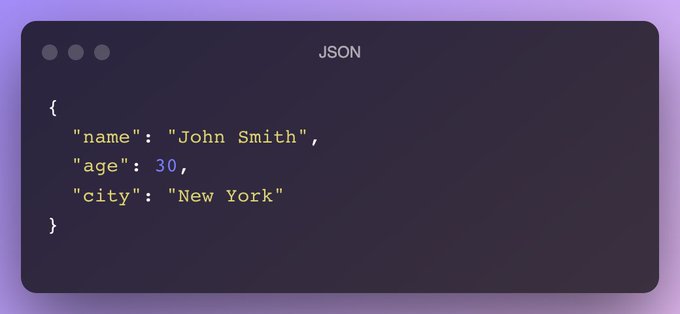
Here is an example of a JSON object:


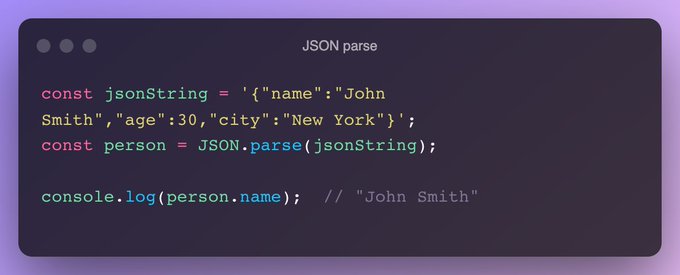
In JavaScript, you can use the JSON.parse() method to parse a JSON string and convert it into a JavaScript object. 

Here is an example:


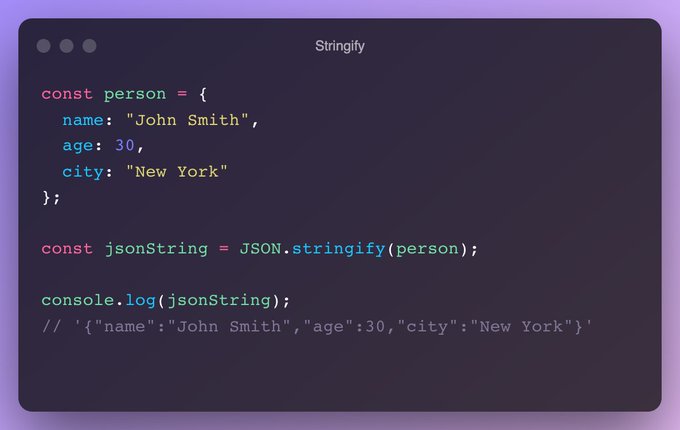
You can also use the JSON.stringify() method to convert a JavaScript object into a JSON string. 

Here is an example:


Where is JSON used? 
JSON is commonly used to transmit data between a server and a web application or between two web applications. 

It is also often used as a simple data storage format, either as a flat file or in a NoSQL database such as MongoDB or CouchDB.

Source:
@csaba_kissi


By aem4beginner

January 3, 2021
Estimated Post Reading Time ~

Get JSON response of an AEM Page

Creating a Default servlet with a selector to get Page JSON Response
For the demo, I created a 'hcms' Selector to get Page JSON Response, when the request is made using 'hcms' selector the node would be converted into JSON, and JSON response would be returned, it is like OOTB 'model' selector but with extension

Allow renaming properties
filter results(exclude properties based on config)
include reference response e.g. experience fragments

Uses
URL - http://host:port/resourcepath.hcms.json

Examples :
http://localhost:4504/content/we-retail/language-masters/en/men.hcms.json
http://localhost:4504/content/experience-fragments/demoxf/demoxf.hcms.json

with tidy selector
http://localhost:4504/content/experience-fragments/demoxf/demoxf.hcms.tidy.json

OSGi Config
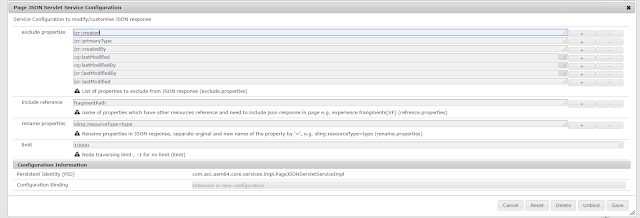
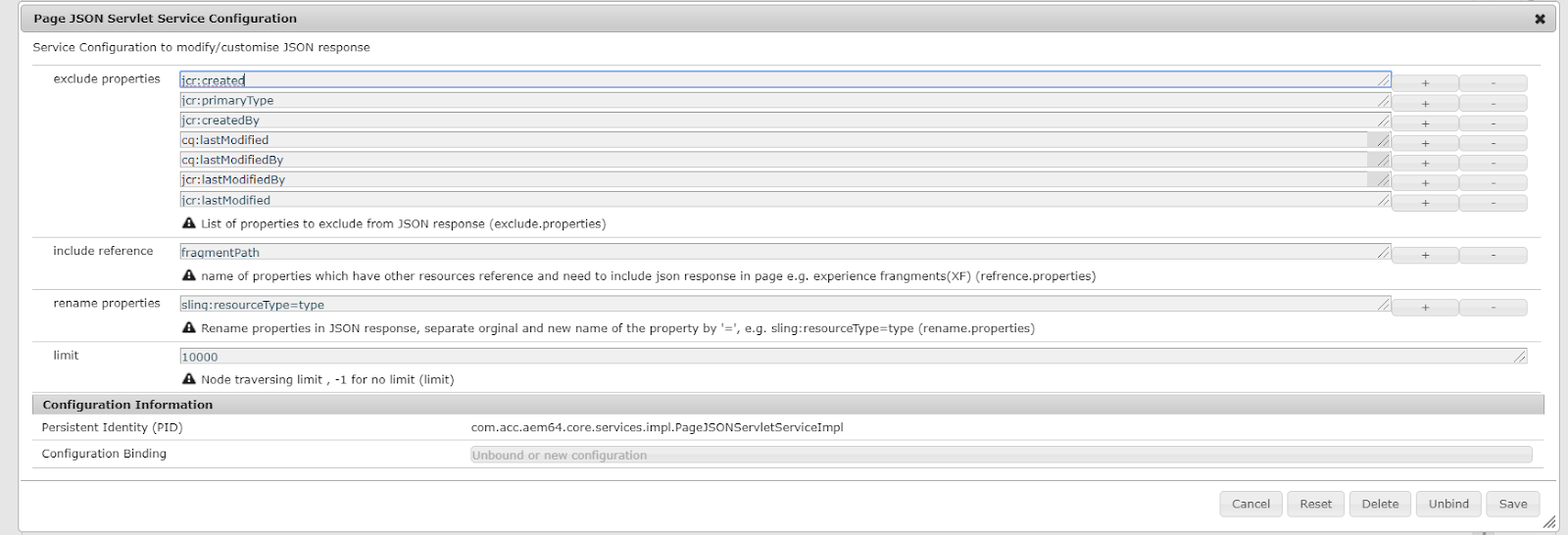
exclude properties: list of properties to be excluded from JSON response
include references: a list of properties that specify the reference of another resource.
rename properties: list of property to rename if response, e.g. originalname=newname
limit: to restrict look up if there is an infinite loop due to reference inclusion or the number of child nodes more than expected.

JSON Output
JSON output contains an array of node representations of JSON objects.
Each node object has the name, properties, and childnodes items(properties).

The JSON object would not have properties or childnodes items if they are empty, That's means if the node doesn't contain any property(filtered) then there will be no properties item in JSON response and if there is no child node of a node then childnodes items will be not there in the response)

JSON representation of experience fragment :
 "name": "jcr:content", 
 "properties": { 
 "cq:tags": [], 
 "jcr:title": "demoXF", 
 "cq:xfVariantType": "web", 
 "type": "weretail/components/structure/xfpage", 
 "cq:template": "/conf/we-retail/settings/wcm/templates/experience-fragment-web-variation", 
 "cq:xfMasterVariation": true 
 }, 
 "childnodes": [ 
 { 
 "name": "root", 
 "properties": { 
 "type": "wcm/foundation/components/responsivegrid" 
 }, 
 "childnodes": [ 
 { "name": "product_grid", "properties": { "tagsMatch": "any", "pages": [ 
 "/content/we-retail/language-masters/en/products/men/shirts/eton-short-sleeve-shirt", 
 "/content/we-retail/language-masters/en/products/men/pants/trail-model-pants", "/content/we-retail/language-masters/en/products/men/shorts/pipeline-board-shorts", 
 "/content/we-retail/language-masters/en/products/men/shirts/amsterdam-short-sleeve-travel-shirt", 
 "/content/we-retail/language-masters/en/products/men/shorts/buffalo-plaid-shorts", 
 "/content/we-retail/language-masters/en/products/men/coats/portland-hooded-jacket" ], 
 "feedEnabled": true, 
 "displayAs": "products", 
 "listFrom": "static", 
 "limit": "6", 
 "orderBy": "jcr:title", 
 "type": "weretail/components/content/productgrid", 
 "pageMax": "0" 
 }
 }, 
 { "name": "image", "
properties": { 
 "isDecorative": "false", 
 "altValueFromDAM": "true", 
 "titleValueFromDAM": "true", "
fileReference": "/content/dam/core-components-examples/library/sample-assets/mini.jpg", 
 "displayPopupTitle": "true", 
 "type": "weretail/components/content/image" 
 }
 }
 ] 
 }
 ] 
}

POM Gson dependency
<dependency>
<groupId>com.google.code.gson</groupId>
<artifactId>gson</artifactId>
<version>2.8.5</version>
</dependency>

Github code
https://github.com/arunpatidar02/aem63app-repo/tree/master/java/page/json


By aem4beginner

December 28, 2020
Estimated Post Reading Time ~

How to Get AEM i18n Dictionary in JSON Format

AEM i18n dictionary out of the box tools does not offer an elegant way to get the JSON representation of targeted the i18n dictionary. Without out of the box AEM i18n dictionary JSON formatting tools, we first solutionize to what we know the most.

As of AEM developers, we all know that we can trigger the JSON default rendering by appending a .json extension to a request, which triggers the default Sling GET servlet returning application/json. And of course, we all know about using the infinity selector in combination with the .json extension, which recursively returns the entire JCR structure in JSON format. Our first attempt is likely to attempt to get the formatted JSON from .infinity.json.

Illustrated below, on the left-hand side, you can see a structured AEM i18n dictionary from the out of the box commerce components library (these nodes should exist in a clean installation of AEM 6.4+). On the right-hand side, you can see the attempt to get a JSON format of this structure, using the selector, “infinity”, and the extension, “json”, 

http://localhost:4502/libs/commerce/components/search/i18n.infinity.json.
        

As you can see, the default Sling GET servlet’s JSON response returns a lot of extra unwanted properties. These unwanted properties will increase the file size of the outputted JSON file, which will impact load time, which will ultimately impact the overall performance of your website. Also, all the unwanted JSON properties will add complexity to consumers, whether it’s a front-end or to a third-party.

In this article, I will share with you a way that I go forward with getting a JSON representation of an AEM i18n dictionary, without the unwanted properties. The solution will make the JSON response from the above AEM i18n dictionary structure, return JSON in this format:

{
    sort: "Sort by:",
    firstPage: "First",
    timelessStatisticsText: "Results {0} - {1} of {2} for <b>{3}</b>.",
    lastPage: "Last",
}


Custom servlet to format all AEM i18N structured dictionaries
That’s right. In most of my AEM project implementations, I would introduce a servlet that can be used for all AEM i18N structured dictionaries. It’s very simple.

Requesting on http://localhost:4502/libs/commerce/components/search/i18n.jsonform.en or http://localhost:4502/libs/commerce/components/search/i18n.jsonform.de will return me a JSON formatted AEM i18n dictionary by language, and the JSON response will only include the dictionary keys.

Servlet Request: http://localhost:4502/libs/commerce/components/search/i18n.jsonform.en
Selector: jsonform
Extension: en|fr|de|kr
The extension is the target language that you want to receive. For example, if the extension was set for “de”, then the JCR searched would be /libs/commerce/components/search/i18n/de.

Here is the implementation:
package com.sourcedcode.core.servlets;

import org.apache.sling.api.SlingHttpServletRequest;
import org.apache.sling.api.SlingHttpServletResponse;
import org.apache.sling.api.servlets.SlingSafeMethodsServlet;
import org.apache.sling.commons.json.JSONException;
import org.apache.sling.commons.json.JSONObject;
import org.apache.sling.servlets.annotations.SlingServletResourceTypes;
import org.osgi.service.component.annotations.Activate;
import org.osgi.service.component.annotations.Component;
import org.osgi.service.component.annotations.ConfigurationPolicy;
import org.osgi.service.component.annotations.Deactivate;
import org.slf4j.Logger;
import org.slf4j.LoggerFactory;

import javax.jcr.Node;
import javax.jcr.NodeIterator;
import javax.jcr.RepositoryException;
import javax.servlet.Servlet;
import java.io.IOException;
import java.io.PrintWriter;
import java.util.Map;

import static org.apache.jackrabbit.JcrConstants.NT_FOLDER;
import static org.apache.sling.api.servlets.HttpConstants.METHOD_GET;
import static org.apache.sling.jcr.resource.api.JcrResourceConstants.NT_SLING_FOLDER;

@Component(service = Servlet.class, configurationPolicy = ConfigurationPolicy.OPTIONAL)
@SlingServletResourceTypes(
        resourceTypes = { NT_FOLDER, NT_SLING_FOLDER},
        selectors = "jsonform",
        methods = METHOD_GET)
public class JsonDictionaryFormatServlet extends SlingSafeMethodsServlet {

    private static final Logger LOGGER = LoggerFactory.getLogger(JsonDictionaryFormatServlet.class);
   
    @Activate
    protected void activate(Map<String, Object> properties) {
        LOGGER.info("Servlet activated");
    }

    @Deactivate
    protected void deactivate() {
        LOGGER.info("Servlet deactivated");
    }

    @Override
    protected void doGet(SlingHttpServletRequest req, SlingHttpServletResponse res) throws IOException {
        try {
            jsonFormatDictionary(req, res);
        } catch (Exception e) {
            LOGGER.error(e.getMessage(), e);
        }
    }

    private void jsonFormatDictionary(SlingHttpServletRequest req, SlingHttpServletResponse res) throws RepositoryException, IOException, JSONException {  
        String language = req.getRequestPathInfo().getExtension();
        PrintWriter writer = res.getWriter();
        if (language != null) {
            Node rootLanguageNode = req.getResource().adaptTo(Node.class);
            if (rootLanguageNode.hasNode("i18n")) {
                rootLanguageNode = rootLanguageNode.getNode("i18n");
            }
            Node languageNode = rootLanguageNode.getNode(language);
            if (languageNode != null) {
                res.setContentType("application/json; charset=UTF-8");
                res.setCharacterEncoding("UTF-8");
                JSONObject rootObject = new JSONObject();
                NodeIterator iterator = languageNode.getNodes();
                while (iterator.hasNext()) {
                    Node languageItem = (Node) iterator.next();
                    String key = languageItem.getName();
                    String value = languageItem.getProperty("sling:message").getString();
                    rootObject.put(key, value);
                }
                writer.write(rootObject.toString());
            } else {
                LOGGER.error("{} language is not exist", language);
            }
        } else {
            LOGGER.error("no language have been found in the extension");
        }
    }
}

HTTP Get Request:
http://localhost:4502/libs/commerce/components/search/i18n.jsonform.en

JSON output:
{
    sort: "Sort by:",
    firstPage: "First",
    timelessStatisticsText: "Results {0} - {1} of {2} for <b>{3}</b>.",
    lastPage: "Last",
}

  • An example of an i18n served to production-live would be a path that looks like this, /etc/commerce/components/search/i18n.jsonform.en
  • Only because, /apps and /libs are reserved areas, which means for security purposes, no one should have access to these areas. Using the /etc path to access dictionaries are fine.

By aem4beginner

October 13, 2020
Estimated Post Reading Time ~

Read/Write data in Json file of DAM in AEM + Making Rest API Call.


This is the frequently searched query on Google by AEM Developers.
So I will provide you the code in which we can use Asset and AssetManager API to read and write the data to any file in out DAM structure.
For this we need System User to be created which has read and write permission of DAM folder using which we will access the resource in our code.
So following is the code with required comments.

For better understanding copy the following code/paste in notepad++ or eclipse and format it:

package com.ab.internal.servlets;

//Java program to read JSON from a file
import java.io.BufferedReader;
import java.io.ByteArrayInputStream;
import java.io.IOException;
import java.io.InputStream;
import java.io.InputStreamReader;
import java.nio.charset.StandardCharsets;
import java.util.HashMap;

import javax.servlet.Servlet;
import javax.servlet.ServletException;

import org.apache.http.HttpResponse;
import org.apache.http.client.methods.HttpGet;
import org.apache.http.impl.client.CloseableHttpClient;
import org.apache.http.impl.client.HttpClients;
import org.apache.sling.api.SlingHttpServletRequest;
import org.apache.sling.api.SlingHttpServletResponse;
import org.apache.sling.api.resource.LoginException;
import org.apache.sling.api.resource.Resource;
import org.apache.sling.api.resource.ResourceResolver;
import org.apache.sling.api.resource.ResourceResolverFactory;
import org.apache.sling.api.servlets.SlingSafeMethodsServlet;
import org.json.JSONException;
import org.json.JSONObject;
import org.osgi.framework.Constants;
import org.osgi.service.component.annotations.Component;
import org.osgi.service.component.annotations.Reference;
import org.slf4j.Logger;
import org.slf4j.LoggerFactory;

import com.day.cq.dam.api.Asset;

@Component(service = Servlet.class, property = {
Constants.SERVICE_DESCRIPTION
+ “= Servlet to save data in AEM from Holiday Calendar API”,
“sling.servlet.paths=” + “/apps/ab/holidayCalendar” })
public class HolidayCalendar extends SlingSafeMethodsServlet {

private static final long serialVersionUID = 1L;

protected static final Logger LOGGER = LoggerFactory
.getLogger(HolidayCalendar.class);

@Reference
private ResourceResolverFactory resolverFactory;

@Override
protected void doGet(SlingHttpServletRequest request,
SlingHttpServletResponse response) throws ServletException,
IOException {

// Reading the JSON File from DAM.
Resource original;
String myJSON = “”;

LOGGER.info(“before factory..”);
ResourceResolver resolver = null;
HashMap<String, Object> param = new HashMap<>();
param.put(ResourceResolverFactory.SUBSERVICE, “readService”); //readService is my System User.
LOGGER.info(“After factory..”);
try {

resolver = resolverFactory.getServiceResourceResolver(param);
Resource resource = resolver
.getResource(“/content/dam/ab/holiday.json”);
Asset asset = resource.adaptTo(Asset.class);
original = asset.getOriginal();
InputStream content = original.adaptTo(InputStream.class);

StringBuilder sb = new StringBuilder();
String line;
BufferedReader br = new BufferedReader(new InputStreamReader(
content, StandardCharsets.UTF_8));

while ((line = br.readLine()) != null) {
sb.append(line);
}
JSONObject jsonObj = new JSONObject(sb.toString()); // In jsonObj I will get the data from the JSON file from DAM.

} catch (LoginException | JSONException e1) {
LOGGER.info(“EXCEPTION”);
}

// Getting the data from API Call by sending header parameters.

JSONObject json = null;
CloseableHttpClient httpClient = HttpClients.createDefault();
HttpGet getRequest = new HttpGet(
“/rest/api/end/point”);
getRequest.addHeader(“accept”, “application/json”);
getRequest.addHeader(“ClientId”, “123456”);
getRequest.addHeader(“Request-Tracking-Id”, “123456”);
HttpResponse httpResponse = httpClient.execute(getRequest);
LOGGER.info(“before if condition”);
if (httpResponse.getStatusLine().getStatusCode() != 200) {
LOGGER.info(“inside if condigiton”);
throw new RuntimeException(“Failed : HTTP error code : ”
+ httpResponse.getStatusLine().getStatusCode());
} else {
StringBuilder sb = new StringBuilder();
LOGGER.info(“before buffer reader”);
BufferedReader br = new BufferedReader(new InputStreamReader(
(httpResponse.getEntity().getContent())));

String output;
while ((output = br.readLine()) != null) {

myJSON = myJSON + output;
sb.append(output);
}

// Saving the data to DAM .json file which we got from API call.
InputStream is = new ByteArrayInputStream(myJSON.getBytes()); //we are sending the JSON data as a String.
com.day.cq.dam.api.AssetManager assetMgr = resolver
.adaptTo(com.day.cq.dam.api.AssetManager.class);
assetMgr.createAsset(“/content/dam/ab/holidayApi.json”, is,
“application/json”, true);
try {
json = new JSONObject(sb.toString());
} catch (JSONException e) {
LOGGER.info(“EXCEPTION”);
}

}

response.getWriter().println(json);

}
}


By aem4beginner

May 27, 2020
Estimated Post Reading Time ~

Disabling the XML and JSON render in AEM

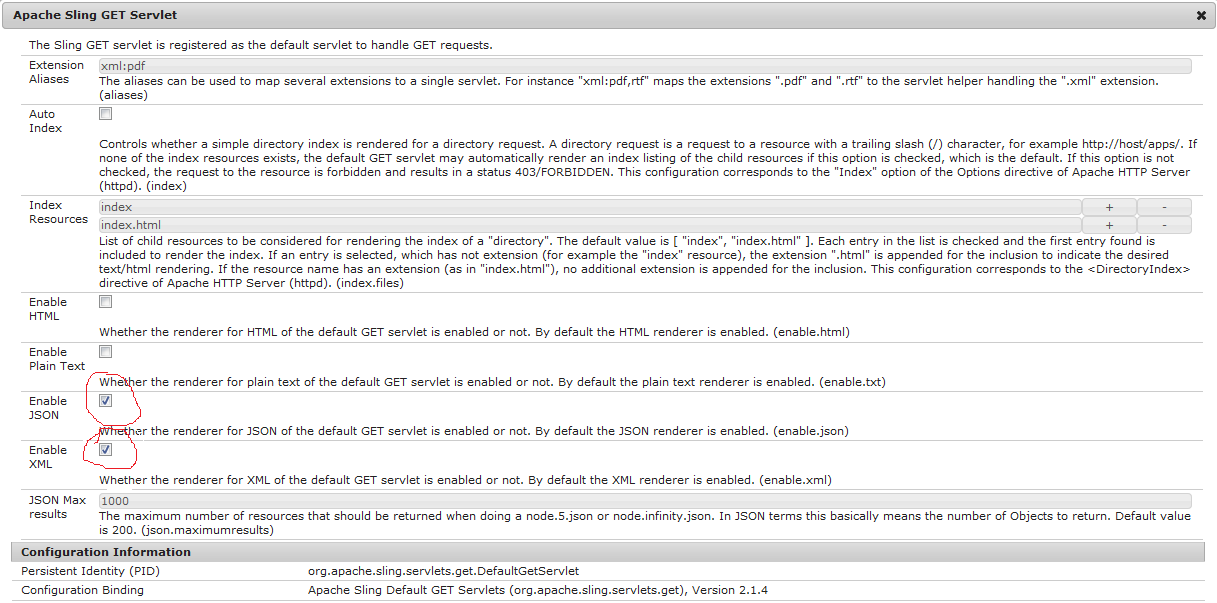
To disable the XML or JSON renderer, navigate to the OSGI configuration manager at the following URL:

http://localhost:4502/system/console/configMgr

Click on Apache Sling GET Servlet, uncheck “Enable XML” and Enable JSON, then click save.


By aem4beginner

How to Obtaining AEM Page Information in JSON Format

AEM/CQ Page Information in JSON Format
you can get page inform by hitting bellow service bypassing page path as parameter

http://server:port/libs/wcm/core/content/pageinfo.json?path=<page-path>

Ex : http://localhost:4502/libs/wcm/core/content/pageinfo.json?path=/content/geometrixx/en

Adobe documentation


By aem4beginner

How to create JSON file in AEM Repository

Sample Java code Snippet
Resource metadataOptionJson = ResourceUtil.getOrCreateResource(
        resolver,
        parentPath+ "/sample.json",
        Collections.singletonMap("jcr:primaryType",(Object) "nt:file"),
        null, false);
Resource metadataOptionJsonJcrContent = ResourceUtil.getOrCreateResource(
    resolver,
    metadataOptionJson.getPath() + "/jcr:content",
    Collections.singletonMap("jcr:primaryType",(Object) "nt:resource"),
    null, false);

final ModifiableValueMap metadataOptionJsonProprties = metadataOptionJsonJcrContent.adaptTo(ModifiableValueMap.class);
if (metadataOptionJsonProprties.get("jcr:data") != null) {
 // Remove the property first in case Types differ
 metadataOptionJsonProprties.remove("jcr:data");
}

metadataOptionJsonProprties.put("jcr:mimeType", "application/json");
metadataOptionJsonProprties.put("jcr:encoding", "utf-8");
final ByteArrayInputStream bais = new ByteArrayInputStream(yourjsonString.getBytes(StandardCharsets.UTF_8));
metadataOptionJsonProprties.put("jcr:data", bais);
LOG.debug(String.format("%s : %s", "Options Json ", metadataOptionJson.getPath()));
resolver.commit();


By aem4beginner

May 13, 2020
Estimated Post Reading Time ~

Using post.jar for posting JSON, CSV, XML data on Solr

In my last few post, I discussed “Dashboard introduction & how to post data on Apache Solr via its dashboard screen” & also provides many examples for the same. In that approach, I can post only one record at a time i.e. I am not able to post data using different files having differently formatted records like JSON, XML, CSV.

Agenda for this post
  • How to post XML data in the form of an XML file using a post.jar file?
  • How to post CSV data in the form of a CSV file using a post.jar file?
  • How to post JSON data in the form of a JSON file using a post.jar file?
How to post XML data in the form of an XML file using a post.jar file?
Apache java comes with an inbuilt jar file for document posting. This file is present at

<parent-directory>/solr-4.7.2/example/exampledocs
This exampledocs directory has many XML files for demo purposes.
How to post XML document files using this jar file.
just create an XML file with given records.

<add>
<doc>
<field name=”id”>Solr105</field>
<field name=”name”>Solr 105</field>
<field name=”address”>House No – 100, LR Apache, 40702</field>
<field name=”comments”>Apache Solr comment 1</field>
<field name=”popularity”>101</field>
<field name=”counts”>1</field>
</doc>
<doc>
<field name=”id”>Solr106</field>
<field name=”name”>Solr 106</field>
<field name=”address”>House No – 100, LR Apache, 40702</field>
<field name=”comments”>Apache Solr comment 2</field>
<field name=”popularity”>100</field>
<field name=”counts”>2</field>
<field name=”dynamicField_i”>It is dynamically genrated field.</field>
</doc>
<doc>
<field name=”id”>Solr107</field>
<field name=”name”>Solr 107</field>
<field name=”address”>House No – 100, LR Apache, 40702</field>
<field name=”comments”>Apache Solr It’s Cool.</field>
<field name=”popularity”>109</field>
<field name=”counts”>3</field>
<field name=”dynamicField_i”>It is dynamically genrated field.</field>
</doc>
</add>


Save this file as dummy.xml under <solr>/example/exampledocs directory.
Go to exampledocs directory using command prompt & execute –
java -jar post.jar dummy.xml

For multiple XML files use –
java -jar post.jar dummy.xml dummy1.xml

For all XML files present in working directory use-
java -jar post.jar *.xml

SimplePostTool version 1.5
Posting files to base url http://localhost:8983/solr/update using content-type application/xml.
POSTing file dummy.xml
1 file indexed.
COMMITting Solr index changes to http://localhost:8983/solr/update.
Time spent: 0:00:00.547

it means your data XML document has been indexed on Apache Solr. just go to your dashboard screen
select collection1 -> query-> Click on Execute Query Button
you will get a screen just like.


Syntax of XML file

<add></add> it behaves a the parent of all the records/entities i.e. Root Element.
<doc><doc> it denotes one record/entity to be added on Apache solr.
<field></field> it denotes the property of a record/entity.

“All required fields mentioned in schema.xml must present for all <doc> element in file”.

Let’s consider, If your second <doc></doc> element doesn’t fully fill this restriction then for the first record will be updated, and then it does nothing with all other records in that file. i.e. after exception it stop reading your document, so be care full with your required fields and document provided to Apache Solr for data updation.

How to post CSV data in the form of a CSV file using a post.jar file?
first create a CSV file at /example/exampledocs/ directory using these records-

id,name,address,comments,popularity,counts,dynamicField_i

“Solr110″,” Solr 110″,” House No – 100, LR Apache”,” Apache Solr comment 1″,110,110,” dynamic solr 110″

“Solr111″,” Solr 111″,” House No – 100, LR Apache”,” Apache Solr comment 1″,111,111,” dynamic solr 111″
“Solr112″,” Solr 112″,” House No – 100, LR Apache”,” Apache Solr comment 1″,112,112,” dynamic solr 112″
“Solr113″,” Solr 113″,” House No – 100, LR Apache”,” Apache Solr comment 1″,113,113,” dynamic solr 113″

save this file as dummy.csv –
Go to /example/exampledocs directory using command prompt & execute

java -Durl=http://localhost:8983/solr/update/csv -Dtype=text/csv -jar post.jar dummy.csv

For multiple CSV files use –
java -Durl=http://localhost:8983/solr/update/csv -Dtype=text/csv -jar post.jar dummy.csv dummy1.csv

For all CSV files present in working directory use-
java -Durl=http://localhost:8983/solr/update/csv -Dtype=text/csv -jar post.jar *.csv

you will get on the console a success message as –
SimplePostTool version 1.5
Posting files to base url http://localhost:8983/solr/update/csv using content-type text/csv.
POSTing file dummy.csv
1 file indexed.
COMMITting Solr index changes to http://localhost:8983/solr/update/csv.
Time spent: 0:00:00.577

it means your data CSV document has been indexed in Apache Solr. just go to your dashboard screen

select collection1 -> query-> Click on Execute Query Button
your screen looks like-

Congrats your CSV document has been posted successfully.

How to post JSON data in form of a JSON file using post.jar file?
first create a JSON file at /example/exampledocs/ directory using these records
[{
“id”:”Solr115″,
“name”:”Solr 115″,
“address”:”House No – 100, LR Apache, 40702″,
“comments”:”Apache Solr comment 1″,
“popularity”:115,
“counts”:115
},
{
“id”:”Solr116″,
“name”:”Solr 116″,
“address”:”House No – 100, LR Apache, 40702″,
“comments”:”Apache Solr comment 1″,
“popularity”:116,
“counts”:116
},
{
“id”:”Solr117″,
“name”:”Solr 117″,
“address”:”House No – 100, LR Apache, 40702″,
“comments”:”Apache Solr comment 1″,
“popularity”:117,
“counts”:117
}]


save this file as dummy.json –
Go to /example/exampledocs directory using command prompt & execute given command

java -Durl=http://localhost:8983/solr/update/json -Dtype=application/json -jar post.jar dummy.json

For multiple JSON files use –
java -Durl=http://localhost:8983/solr/update/json -Dtype=application/json -jar post.jar d1.json d2.json

For all JSON files present in working directory use-
java -Durl=http://localhost:8983/solr/update/json -Dtype=application/json -jar post.jar *.json

you will get on the console a success message as –
SimplePostTool version 1.5
Posting files to base url http://localhost:8983/solr/update/json using content-type application/json.
POSTing file dummy.json
1 file indexed.
COMMITting Solr index changes to http://localhost:8983/solr/update/json.
Time spent: 0:00:00.535

it means your data JSON document has been indexed in Apache Solr. just go to your dashboard screen select collection1 -> query-> Click on Execute Query Button your screen looks like this post.jar file provides you some more parameters with <add> tag in the XML file. I will discuss them in my later posts.


By aem4beginner

May 11, 2020
Estimated Post Reading Time ~

How to Get JSON response of AEM Page

Creating a Default servlet with a selector to get Page JSON Response
For the demo, I created a 'hcms' Selector to get Page JSON Response, when the request is made using 'hcms' selector the node would be converted into json and json response would be returned, it is like OOTB 'model' selector but with extension

Allow renaming properties
filter results(exclude properties based on config)
include reference response e.g. experience fragments

Uses
URL - http://host:port/resourcepath.hcms.json

Examples:
http://localhost:4504/content/we-retail/language-masters/en/men.hcms.json
http://localhost:4504/content/experience-fragments/demoxf/demoxf.hcms.json

with tidy selector
http://localhost:4504/content/experience-fragments/demoxf/demoxf.hcms.tidy.json

OSGi Config
exclude properties: list of properties to be excluded from json response
include references: list of properties which specify the reference of another resource.
rename properties: list of property to rename if response, e.g. originalname=newname
limit: to restrict lookup if there is infinite loop due to reference inclusion or the number of childnodes more then expected.


JSON Output
JSON output contains an array of node representation of json objects.
Each node object has the name, properties and childnodes items(properties).

The json object would not have properties or childnodes items if they are empty, That's means if the node doesn't contain any property(filtered) then there will be no properties item in json response and if there is no child node of a node then childnodes items will be not there in the response)

json representation of osgi configuration object :
{
  "name": "jcr:content",
  "properties": {
    "cq:tags": [],
    "jcr:title": "demoXF",
    "cq:xfVariantType": "web",
    "type": "weretail/components/structure/xfpage",
    "cq:template": "/conf/we-retail/settings/wcm/templates/experience-fragment-web-variation",
    "cq:xfMasterVariation": true
  },
  "childnodes": [
    {
      "name": "root",
      "properties": {
        "type": "wcm/foundation/components/responsivegrid"
      },
      "childnodes": [
        {
          "name": "product_grid",
          "properties": {
            "tagsMatch": "any",
            "pages": [
              "/content/we-retail/language-masters/en/products/men/shirts/eton-short-sleeve-shirt",
              "/content/we-retail/language-masters/en/products/men/pants/trail-model-pants",
              "/content/we-retail/language-masters/en/products/men/shorts/pipeline-board-shorts",
              "/content/we-retail/language-masters/en/products/men/shirts/amsterdam-short-sleeve-travel-shirt",
              "/content/we-retail/language-masters/en/products/men/shorts/buffalo-plaid-shorts",
              "/content/we-retail/language-masters/en/products/men/coats/portland-hooded-jacket"
            ],
            "feedEnabled": true,
            "displayAs": "products",
            "listFrom": "static",
            "limit": "6",
            "orderBy": "jcr:title",
            "type": "weretail/components/content/productgrid",
            "pageMax": "0"
          }
        },
        {
          "name": "image",
          "properties": {
            "isDecorative": "false",
            "altValueFromDAM": "true",
            "titleValueFromDAM": "true",
            "fileReference": "/content/dam/core-components-examples/library/sample-assets/mini.jpg",
            "displayPopupTitle": "true",
            "type": "weretail/components/content/image"
          }
        }
      ]
    }
  ]

POM Gson dependency
<dependency>
<groupId>com.google.code.gson</groupId>
<artifactId>gson</artifactId>
<version>2.8.5</version>
</dependency>


By aem4beginner

May 10, 2020
Estimated Post Reading Time ~

Storing JSON string in .content.xml

Given the JSON string of:
{ "firstname" : "Owen", "lastname" : "Bringino", "country" : "Philippines" }

If the above JSON string will be assigned as property value inside an XML document, then it will be encoded as:
"{&quot;firstname&quot;:&quot;Owen&quot;,&quot;lastname&quot;:&quot;Bringino&quot;,
&quot;country&quot;:&quot;Philippines&quot;}"

However, you may need to explicitly cast it to String when defined inside .content.xml as shown in the code snippet below:

<jcr:root ...>
    <jcr:content ...>
        <record jcr:primaryType="nt:unstructured"
            member= "{String}{&quot;firstname&quot;:&quot;Owen&quot;,
                     &quot;lastname&quot;:&quot;Bringino&quot;,
                     &quot;country&quot;:&quot;Philippines&quot;}" />   
    </jcr:content>
</jcr:root>

Without the {String} type hint, you may not be able to see the "member" property in JCR/CRXDE after deployment or upload.


By aem4beginner

TidyJSONWriter Tutorial

JSONWriter provides a quick and convenient way of producing JSON text. The texts produced strictly conform to JSON syntax rules. No whitespace is added, so the results are ready for transmission or storage. Each instance of JSONWriter can produce one JSON text.

TidyJSONWriter Sample code:

<%@page session="false"%>
<%@include file="/libs/foundation/global.jsp" %>
<%@page contentType="application/json" pageEncoding="utf-8" import="com.day.cq.commons.TidyJSONWriter;" %>
<%

    String elements[] = {"Java","AEM","JCR","Codermagnet"};  
    TidyJSONWriter w = new TidyJSONWriter(out);              
    
    w.setTidy(true); //If true, output will be pretty printed
    w.array();       // Start array

        for(int i=0;i<elements.length;i++)
        {
            w.object();   //Every time a new object is created
            w.key("index").value(""+(i+1));
            w.key("value").value(elements[i]);
            w.endObject();
        }
    w.endArray();
%>

Output:

[{
    "index": "1",
    "value": "Java"
  },{
    "index": "2",
    "value": "AEM"
  },{
    "index": "3",
    "value": "JCR"
  },{
    "index": "4",
    "value": "Codermagnet"
  }
]


By aem4beginner

How to convert a AEM Node into JSON using JsonItemWriter


How to convert an AEM Node into JSON representation
WE can easily convert an AEM node to its JSON representation by using the
org.apache.sling.commons.json.jcr.JsonItemWriter class.
This can be any type of Node like JCR node, AEM page, sling resource, cq:Page. etc.

The simple code for doing this is

 StringWriter stringWriter = new StringWriter();
 JsonItemWriter jsonWriter = new JsonItemWriter(null);
 jsonWriter.dump(node, stringWriter, -1, true);
 String json = stringWriter.toString();

EXAMPLE: 1. Let's suppose we have the following node "/apps/geometrixx-gov/components/logo" that we need to convert to JSON.


2. Now we want to convert it into it's JSON representation.
3. Let's write the main method to do so.

package codermag.net;
import java.io.StringWriter;
import javax.jcr.Node;
import javax.jcr.Repository;
import javax.jcr.Session;
import javax.jcr.SimpleCredentials;
import org.apache.jackrabbit.commons.JcrUtils;
import org.apache.jackrabbit.core.TransientRepository;
import org.apache.sling.commons.json.jcr.JsonItemWriter;

public class test {
 public static void main(String[] args) throws Exception {
  Repository repository = new TransientRepository();
  repository = JcrUtils.getRepository("http://localhost:4502/crx/server");
  Session session = repository.login(new SimpleCredentials("admin","admin".toCharArray()));

  // Getting a particular node
  Node root = session.getRootNode();
  Node subContent = root.getNode("apps/geometrixx-gov/components/logo");

  // Iterating over the nodes and printing their names
  StringWriter stringWriter = new StringWriter();
  JsonItemWriter jsonWriter = new JsonItemWriter(null);
  jsonWriter.dump(subContent, stringWriter, -1, true);
  String json = stringWriter.toString();

  System.out.println(json);
 }
}

NOTE: To run the program download the Jack Rabbit Jar File form
http://www.apache.org/dyn/closer.cgi/jackrabbit/2.8.1/jackrabbit-standalone-2.8.1.jar and place it in your project build path.

5. This code will connect to the AEM JCR and get the node. Then it will convert it to JSON.

OUTPUT:
{
  "jcr:title": "Logo",
  "jcr:created": "Wed Aug 05 2015 07:33:54 GMT+0530",
  "jcr:createdBy": "admin",
  "jcr:primaryType": "cq:Component",
  "sling:resourceSuperType": "foundation/components/logo",
  "componentGroup": ".hidden",
  "logo.jsp": {
    "jcr:created": "Wed Aug 05 2015 07:33:54 GMT+0530",
    "jcr:createdBy": "admin",
    "jcr:primaryType": "nt:file",
    "jcr:content": {
      "jcr:lastModifiedBy": "admin",
      ":jcr:data": 2185,
      "jcr:lastModified": "Wed Aug 05 2015 07:33:54 GMT+0530",
      "jcr:primaryType": "nt:resource",
      "jcr:mimeType": "text/plain",
      "jcr:uuid": "b8261ccb-ecd4-4c01-bbe1-fb1371a8c910"
    }
  }
}


Please go through the JSON data and the screenshot of the LOGO Node to understand better.


By aem4beginner

May 9, 2020
Estimated Post Reading Time ~

How to return JSON data from Servlet in AEM

By passing some data to the servlet(We can use Ajax call to pass the data -- Refer here for Ajax call ), we can generate a json as per our requirement and return to the front end page / Dialog.

package com.demo.train;

import java.io.IOException;
import java.net.HttpURLConnection;
import java.rmi.ServerException;

import org.apache.felix.scr.annotations.Reference;
import org.apache.felix.scr.annotations.sling.SlingServlet;
import org.apache.sling.api.SlingHttpServletRequest;
import org.apache.sling.api.SlingHttpServletResponse;
import org.apache.sling.api.servlets.SlingSafeMethodsServlet;
import org.apache.sling.jcr.api.SlingRepository;
import org.json.simple.JSONObject;
import java.util.UUID;

@SlingServlet(paths="/bin/convertPropsAsJson", methods = "POST", metatype=true)
public class HandleClaim extends org.apache.sling.api.servlets.SlingAllMethodsServlet {
     private static final long serialVersionUID = 23426532342349515L;
   
     @Reference
     private SlingRepository repository;
   
     public void bindRepository(SlingRepository repository) {
            this.repository = repository;
            }
         
     @Override
     protected void doPost(SlingHttpServletRequest request, SlingHttpServletResponse response) throws ServerException, IOException {
     
      try
      {
         //Get the submitted form data that is sent from the
              //CQ web page
          String id = UUID.randomUUID().toString();
          String value1 = request.getParameter("value1");
          String value2 = request.getParameter("value2");
          String value3 = request.getParameter("value3");
     
          //Encode the submitted form data to JSON
          JSONObject obj=new JSONObject();
          obj.put("id",id);
          obj.put("value1",value1);
          obj.put("value2",value2);
          obj.put("value3",value3);
         
             //Get the JSON formatted data  
          String jsonData = obj.toJSONString();
         
             //Return the JSON formatted data
         response.getWriter().write(jsonData);
      }
      catch(Exception e)
      {
          e.printStackTrace();
      }
    }
}

Now we can split and use our jsonData as per our requirement.


By aem4beginner

How to pass JSON data to a dialog in AEM

By following this process, we can pass the sample data in json format to a dropdown in the dialog.

Step 1: Create component  --> create a node for it
             in tab1 --> create "items" node of type cq:WidgetCollection
             in items --> create node called "counts" of type "cq:widget"
             add these properties to "counts" node as follows


Step 2: Now we need to define a servlet to expose json as return parameter.

For this create a java class called "JsonDataExtractor.java"
Here it follows,

package com.demo.serv;

/*
*Author SONYC
*
*/
import org.apache.felix.scr.annotations.*;
import org.apache.sling.api.servlets.*;
import org.apache.sling.api.SlingHttpServletRequest;
import org.apache.sling.api.SlingHttpServletResponse;
import javax.servlet.ServletException;
import org.slf4j.Logger;
import org.slf4j.LoggerFactory;

import java.io.*;
import java.util.ArrayList;

import org.json.*;
import javax.servlet.Servlet;

@SuppressWarnings({"deprecation", "serial"})
@Component
@Service(Servlet.class)
@Properties(value = {
    @Property(name = "sling.servlet.paths", value = "/bin/jsondataextractor.json")
})
public class JsonDataExtractor extends SlingAllMethodsServlet{    

    private static final Logger log = LoggerFactory.getLogger(JsonDataExtractor.class);

    @Override
    protected void doGet(SlingHttpServletRequest request, SlingHttpServletResponse response) throws ServletException,IOException {      
        init(request, response);
    }

    @Override
    protected void doPost(SlingHttpServletRequest request, SlingHttpServletResponse response) throws ServletException,IOException {      
        init(request, response);
    }

    @SuppressWarnings("static-access")
    private void init(SlingHttpServletRequest request, SlingHttpServletResponse response ){    

    try
      {
        log.info("-------------In Json Provider class--------------");  
        ArrayList jsonAr=new ArrayList();      
        JSONObject obj=new JSONObject();
        String jsonData=null;        
     for(int i=0;i<=4;i++)
  {
    obj.put("id",i);
    obj.put("value",i);
    jsonData = obj.toString();
    jsonAr.add(jsonData);
    obj=new JSONObject();        
     }
        //Return the JSON formatted data
        response.getWriter().write(jsonAr.toString());
      }
      catch(Exception e)
      {
  log.info("-------------exception-------------"+e.getMessage());
        e.printStackTrace();
      }
    }  
}

Step 3: Now you are able to get the values as json, and can check by hitting http://localhost:4502/bin/jsondataextractor.json

Step 4 :
Place this below code in your component jsp to get selected value.

<%@include file="/libs/foundation/global.jsp"%>
<%@page import="com.day.cq.wcm.api.WCMMode"%><%
%><%@page session="false" %>

<%
    pageContext.setAttribute("counVal", properties.get("count",""));
    if ( (WCMMode.fromRequest(request) == WCMMode.EDIT))
   {
       %>
           Please click here to add HTML
       <%
   }
%>
<c:if test="${not empty counVal}">
    <div class="container">
        ${counVal}
    </div>
</c:if>


By aem4beginner

May 3, 2020
Estimated Post Reading Time ~

AEM Node to JSON Converter Logic Ignoring Unnecessary Properties

            final Node node = resource.adaptTo(Node.class);
            /* Node properties to exclude from the JSON object. */
            @SuppressWarnings("serial")
            final Set<String> propertiesToIgnore = new HashSet<String>() {{
                add("jcr:created");
                add("jcr:createdBy");
                add("jcr:lastModified");
                add("jcr:lastModifiedBy");
                add("jcr:versionHistory");
                add("jcr:predecessors");
                add("jcr:baseVersion");
                add("jcr:uuid");
                add("sling:resourceType");
                add("jcr:primaryType");
            }};
           
            StringWriter stringWriter = new StringWriter();
            JsonItemWriter jsonWriter = new JsonItemWriter(propertiesToIgnore);
            JSONObject jsonObject = null;

            try {
                jsonWriter.dump(node, stringWriter, 0);
                jsonObject = new JSONObject(stringWriter.toString());
                return jsonObject;
            } catch (RepositoryException e) {
                LOG.info("Repository exception :: {} ", e);
            } catch (JSONException e) {
                LOG.info("JSON exception :: {} ", e);
                e.printStackTrace();
            } catch (Exception e) {
                LOG.info("Exception :: {} ", e);
            }


By aem4beginner

Converting AEM/Sling Resources to JSON

You can easily convert an AEM Page, Sling Resource, or JCR Node to JSON using the org.apache.sling.commons.json.jcr.JsonItemWriter class. This simple but useful utility allows you to dump a Node into a JSONObject. It also allows you to dump the Node into a JSON string into a PrintWriter for use in servlets for example.

The constructor accepts a Set of Strings representing JCR properties to exclude from the JSON output. You may want to ignore the standard cq:*, sling:*, and jcr:* properties while allowing only your custom properties to populate the JSON.

The overloaded dump methods allow you to pass in the recursion level similar to how you would use a selector when making AJAX calls to the Default Get Servlet. Just as you can cURL /content/geometrixx/en.json, /content/geometrixx/en.1.json and /content/geometrixx/en.-1.json, you can pass in a positive integer for the recursion level as well as -1 for infinite recursion.

Likewise, just as you can cURL /content/geometrixx/en.tidy.json, you can specify whether you want the JSON output nicely formatted or not.

The following examples demonstrate the JsonItemWriter utilizing a PrintWriter in a servlet and a JSONObject in a standard Java class.
ConvertResourceToJSON.java
package com.nateyolles.aem;

import org.apache.sling.api.resource.Resource;
import org.apache.sling.api.resource.ResourceResolver;
import org.apache.sling.commons.json.JSONException;
import org.apache.sling.commons.json.JSONObject;
import org.apache.sling.commons.json.jcr.JsonItemWriter;

import javax.jcr.Node;
import javax.jcr.RepositoryException;

import java.io.StringWriter;

import org.slf4j.Logger;
import org.slf4j.LoggerFactory;

/**
* Example of how to easily turn a Node into a JSONObject.
*/
public class ConvertResourceToJSON {

/** The logger */
private static final Logger LOGGER = LoggerFactory.getLogger(ConvertResourceToJSON.class);

/**
* Get the JSON representation of a Resource
*
* @param resolver Resolver to get resource
* @param resource Resource to turn into JSON
* @return JSON representation of the resource
*/
public JSONObject resourceToJSON(final ResourceResolver resolver, final Resource resource) {
final Node node = resource.adaptTo(Node.class);
final StringWriter stringWriter = new StringWriter();
final JsonItemWriter jsonWriter = new JsonItemWriter(null);

JSONObject jsonObject = null;

try {
/* Get JSON with no limit to recursion depth. */
jsonWriter.dump(node, stringWriter, -1);
jsonObject = new JSONObject(stringWriter.toString());
} catch (RepositoryException | JSONException e) {
LOGGER.error("Could not create JSON", e);
}

return jsonObject;
}
}

ResourceToJSONServlet.java
package com.nateyolles.aem;

import org.apache.felix.scr.annotations.sling.SlingServlet;
import org.apache.sling.api.SlingHttpServletRequest;
import org.apache.sling.api.SlingHttpServletResponse;
import org.apache.sling.api.resource.Resource;
import org.apache.sling.api.resource.ResourceResolver;
import org.apache.sling.api.servlets.SlingSafeMethodsServlet;
import org.apache.sling.commons.json.JSONException;
import org.apache.sling.commons.json.jcr.JsonItemWriter;
import org.slf4j.Logger;
import org.slf4j.LoggerFactory;

import javax.jcr.Node;
import javax.jcr.RepositoryException;
import javax.servlet.ServletException;

import java.io.IOException;
import java.io.PrintWriter;
import java.util.HashSet;
import java.util.Set;

import org.slf4j.Logger;
import org.slf4j.LoggerFactory;

/**
* Sample servlet which easily converts a Node as JSON to the PrintWriter.
*/
@SlingServlet(paths={"/bin/foo"})
public class ResourceToJSONServlet extends SlingSafeMethodsServlet {

/** The logger */
private static final Logger logger = LoggerFactory.getLogger(ResourceToJSONServlet.class);

@Override
protected void doGet(SlingHttpServletRequest request, SlingHttpServletResponse response)
throws ServletException, IOException {

response.setCharacterEncoding("UTF-8");
response.setContentType("application/json");

final PrintWriter out = response.getWriter();
final ResourceResolver resolver = request.getResourceResolver();
final Resource resource = resolver.getResource("/content/my-app/us/en/my-page/jcr:content");
final Node node = resource.adaptTo(Node.class);

/* Node properties to exclude from the JSON object. */
final Set<String> propertiesToIgnore = new HashSet<String>() {{
add("jcr:created");
add("jcr:createdBy");
add("jcr:versionHistory");
add("jcr:predecessors");
add("jcr:baseVersion");
add("jcr:uuid");
}};

JsonItemWriter jsonWriter = new JsonItemWriter(propertiesToIgnore);

try {
/* Write the JSON to the PrintWriter with max recursion of 1 level and tidy formatting. */
jsonWriter.dump(node, out, 1, true);
response.setStatus(SlingHttpServletResponse.SC_OK);
} catch (RepositoryException | JSONException e) {
logger.error("Could not get JSON", e);
response.setStatus(SlingHttpServletResponse.SC_INTERNAL_SERVER_ERROR);
}
}
}


By aem4beginner

Utility Sling Model to expose N level Coral UI AEM Multi-field as JSON without using deprecated JsonItemWriter

With the introduction of Coral UI and Sling models, implementing an N level multi-field in AEM is no longer a difficult job. That too without using ACS Commons!
What are we going to achieve ❓

In this article, I will share an approach to build a three level nested multi-field (which can be extended to N level) and steps on how we can parse the same in our AEM component. The major issue that I wanted to tackle is writing a generic code to parse the multi-field as JSON without using the deprecated JsonItemWriter class and its dump method.

The use case is to display a hierarchy of country, state and city.

This approach is an extension of the one here. Please feel free to suggest improvements in terms of making the code generic and reusable. The code has been tested on AEM 6.4 GA. For AEM 6.3 you might need service pack 2 or more.
Touch UI Dialog:
Touch UI Dialog
Output on UI:

Level 1: Country, Level 2: State, Level 3: City

For this, we will need four sling models to start with (For every extra nested multi-field addition, we will need a new sling model with this approach):
To parse the level 1 multi-field items (list of countries).
To read level 1 multi-field (country) properties and parse level 2 multi-field items (list of states).
To read level 2 multi-field (state) properties and parse level 3 multi-field items (list of cities).
To read level 3 multi-field (city) properties.

Important point about the dialog is to set the composite property to true for each multi-field that is a parent of another nested multi-field.

composite:true to support nesting of multifields

Now the code for sling models:

For this let’s first visualize the content hierarchy.

Resource and countries node below the resource
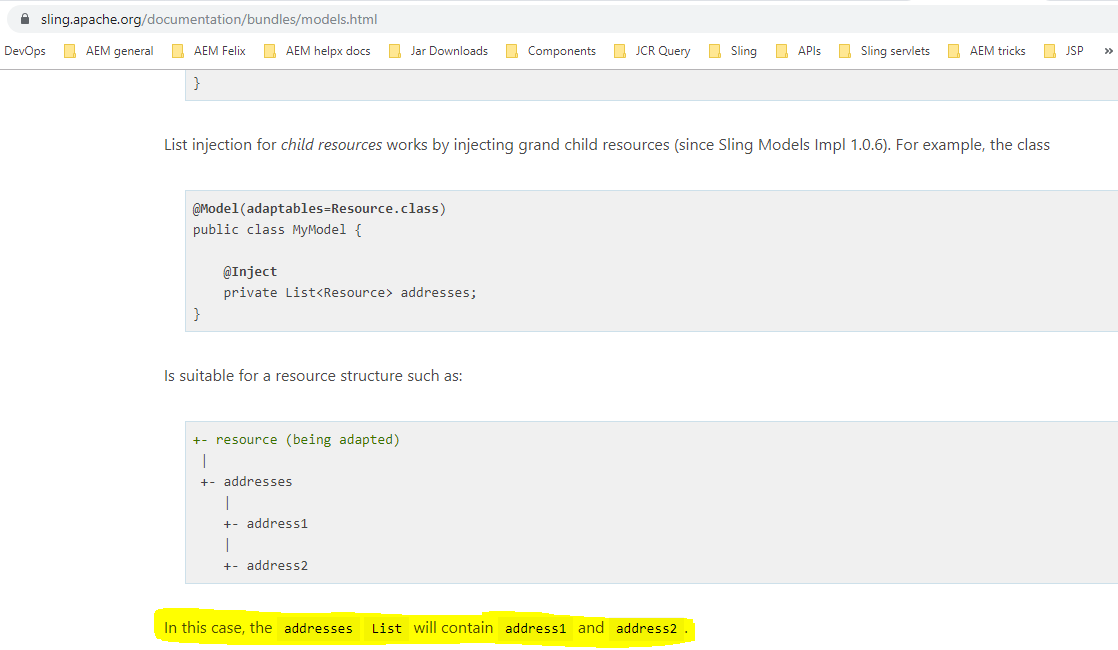
Thus, we need to Inject a List<Resource> and mark it as Optional as it may or may not be present based on the authoring.

The rest of the code simply converts the List of Resource to List of appropriate class i.e. Country in this case. 


    @Inject
    @Optional
    private List<Resource> countries;

    private List<Country> countriesList = new ArrayList<>();

    public List<Country> getCountriesList() {
        return countriesList;
    }

    public void setCountriesList(List<Country> countriesList) {
        this.countriesList = countriesList;
    }
    @PostConstruct
    protected void init() {
        logger.debug("In init of CountriesModel");
        if (countries != null && !countries.isEmpty()) {
            for (Resource resource : countries) {
                Country student = resource.adaptTo(Country.class);
                countriesList.add(student);
            }
        }
    }

This might be confusing as usually Sling models injects properties but countries is a child node. Referring to the official documentation of Sling, it becomes clear that grandchildren injection is allowed for Collections using Inject annotation.

Grandchildren injection for collections in Sling models

We extend the same logic to the country and state nodes which hold the list of states and cities respectively.


Each country has a name and a list of states under it.

    @Inject
    @Optional
    private String country;

    @Inject
    @Optional
    private List<Resource> states;

    @Optional
    private List<State> stateList = new ArrayList<>();


    public List<State> getStateList() {
        return stateList;
    }

    public void setStateList(List<State> stateList) {
        this.stateList = stateList;
    }


    @PostConstruct
    protected void init() {
        logger.debug("In init method of Country model.");
        if(!states.isEmpty()) {
            for (Resource resource : states) {
                State state = resource.adaptTo(State.class);
                stateList.add(state);
            }
        }
    }
And each state has a name with a list of cities under it.
Each state has a name and a list of cities under it.

    @Inject
    @Optional
    private List<Resource> cities;
    @Inject
    @Optional
    private String state;
    @Optional
    private List<City> cityList = new ArrayList<>();
    public List<City> getCityList() {
        return cityList;
    }

    public void setStateList(List<City> cityList) {
        this.cityList = cityList;
    }

    @PostConstruct
    protected void init() {
        logger.debug("In init method of Country model.");
        if(!cities.isEmpty()) {
            for (Resource resource : cities) {
                City city = resource.adaptTo(City.class);
                cityList.add(city);
            }
        }
    }

Thus using Coral UI, you no longer have to worry about writing custom js to populate dialog values in case of nested multi-field. Using sling models it is easy to visualize the code in terms of content hierarchy and write Java code pretty much in the same manner as data is stored in the JCR.

For the complete codebase and more such demos please refer to this project. This project also has the logic to expose the multi-field data as a json using sling models for SPA based implementations. The point to note here is I have tried to do this without using deprecated APIs.

For those interested in how to expose the multi-field data as JSON please refer MultifieldToJson.java file from the repo.

The code simply uses a recursive function to do the following:
Check for properties at each level and add to JsonObject.

2. Check if the node has children. Add a child object to a JsonArray and repeat until no children are left.

3. If the current node has children starting with the item (for multi-field), then add each JsonObject to “items” JsonArray to preserve uniformity.


private JsonObject checkForChildren(Resource resource) throws RepositoryException {
    Node resNode = resource.adaptTo(Node.class);
    JsonObject resourceJson = new JsonObject();
    if (null != resNode) {
        for (PropertyIterator resProp = resNode.getProperties(); resProp.hasNext(); ) {
            Property property = resProp.nextProperty();
            if (!propertiesToIgnore.contains(property.getName()))
                resourceJson.addProperty(property.getName(), property.getValue().getString());
        }
        if (resource.hasChildren()) {
            JsonArray multiJson = new JsonArray();
            for (Iterator<Resource> children = resource.listChildren(); children.hasNext(); ) {
                Resource childResource = children.next();
                JsonObject obj = checkForChildren(childResource);
                //if resource has children, list children as json objects.
                //but for multi use JsonArray
                if (childResource.getName().startsWith("item"))
                    multiJson.add(obj);
                else
                    resourceJson.add(childResource.getName(), obj);
            }
            if (multiJson.size() > 0)
                resourceJson.add("items", multiJson);
        }
    }
    return resourceJson;
}

The items array holds data for each level of multi-field. This code is generic and works for any number of nested multi-fields. Also, there is a utility function that takes the name of the multi-field root node so that this can be re-used for any multi-field as shown in the code below (note how I have passed countries as the name which can be replaced by any other multi-field root node name):

Java:

@Optional
@RequestAttribute
private String name;  //get the name using an optional request param
public String getJsonMulti() throws RepositoryException {
        Resource childResource = request.getResource().getChild(name); //get the root node using name
        if (childResource != null) {
            JsonObject resourceJson =   checkForChildren(childResource);
            return resourceJson.toString();
        }
        return StringUtils.EMPTY;
}

HTL:
<div data-sly-use.multi2Items=”${‘org.namaste.aem.core.models.MultifieldToJson’ @name=’countries’}”> Multi Json : ${multi2Items.getJsonMulti}</div>

For a quick glance at the HTL file refer this.

Below is how the json looks.

Json output for multi-field.
Note: The code in this project is only meant to serve as a reference and you must thoroughly test it before using it in your own project.

Hope this helped. Cheers!


By aem4beginner