Showing posts with label Annotations. Show all posts

January 3, 2021
Estimated Post Reading Time ~

Create OSGI Configuration Factory Service using R6 annotations

This article shows how to create OSGI Configuration Factory Service using OSGi R6 annotations.

OSGi Factory Service
Declaring the Service interface

public interface FileService {
public String getFileData();
}

Declaring the Service Configuration
@ObjectClassDefinition(name = "File Factory Service Configuration", description = "Factory Service Configurations")
public @interface FileServiceFactoryConfig {

@AttributeDefinition(name = "filetype", description = "File Type", type = AttributeType.STRING)
String file_type() default "xml";

@AttributeDefinition(name = "size", description = "Max Size of file(KB)", type = AttributeType.LONG)
long max_size() default 10240L;

}

Service implementation
@Component(service = FileService.class, immediate = true)
@Designate(ocd = FileServiceFactoryConfig.class, factory=true)

public class FileServiceImpl implements FileService {
private String data;

@Override
public String getFileData() {
return "File data from Service:" + this.data;
}

@Activate
@Modified
protected void activate(final FileServiceFactoryConfig Config) {
this.data = PropertiesUtil.toString(Config.file_type() + " - " + Config.max_size(), "No Config found");
}
}

In the above code, the @Designate annotation has "factory=true" which makes this config a factory.

Now Let’s create two service configurations from the factory which can be consumed by a test servlet that we are going to write next.

Configuration 1:

config 1

Configuration 2:

config 2


factory config

Sling Servlet
@Component(service = Servlet.class, property = { Constants.SERVICE_DESCRIPTION + "=Demo Servlet to access factory configs",
"sling.servlet.methods=" + HttpConstants.METHOD_GET, "sling.servlet.paths=" + "/bin/demo/facttest" })
public class FactConfigTestServlet extends SlingSafeMethodsServlet {

private static final long serialVersionUID = 2598426539166789516L;

@Reference(target="(file.type=xml)")
FileService fs1;

@Reference(target="(file.type=pdf)")
FileService fs2;

@Override
protected void doGet(final SlingHttpServletRequest req, final SlingHttpServletResponse resp)
throws ServerException, IOException {
try {
resp.setContentType("text/html");
resp.getWriter().write("<br>"+fs1.getFileData());
resp.getWriter().write("<br>"+fs2.getFileData());
resp.getWriter().close();
} catch (Exception e) {
e.printStackTrace();
}
}
}


This Reference with target parameter will directly points to the service which has the file.type as xml
@Reference(target="(file.type=xml)")
FileService fs1;

@Reference(target="(file.type=pdf)")
FileService fs2;


Call this servlet by using http://localhost:4502/bin/demo/facttest
which should return the configuration data based on target attribute of Reference annotations

Output

servlet output

Note: Without the target attribute i.e. only with a @Reference annotation the data binding will be random, more info at https://osgi.org/javadoc/r6/cmpn/org/osgi/service/component/annotations/Reference.html

Code
Code used in this article can be found at GitHub
https://github.com/arunpatidar02/aem63app-repo/tree/master/java/r6/factory


By aem4beginner

December 29, 2020
Estimated Post Reading Time ~

OSGI R6 Configuration @AttributeDefinition Essentials Reference Guide

When defining any OSGI component’s configuration its standard practice to use Declarative Services; these configurations can be edited in the OSGI Apache Felix Console. This can be done by creating a class interface with the annotated @ObjectClassDefinition, which includes a determined list of rules as @AttributeDefinition items.

The @AttributeDefinition defines the supporting configuration for a given OSGI component’s configuration. It allows you to set data types and default values for each given configuration. When an admin user interacts with the Felix console, how the @AttributeDefinition is defined will determine the look and feel of each of the input fields are presented.

Attribute Types – References
@AttributeDefinition Essential Parameters Explained
As we know, the most basic way to define a configuration will be to utilize the annotation @AttributeDefinition. Let’s explore the essential configurations.
  • The @AttributeDefinition annotation accepts parameters as such:
  • line 2: name: defines the human-readable label
  • line 3: description: description for the attribute configuration.
  • line 4: type: definition of the attribute’s data type.
  • line 6: <T>: definition of the attribute’s data type
  • line 6: name_of_conf_reference: configuration’s reference id : name.of.conf.reference
  • line 7: <T>[]: multifield (multi data set) is supported.
@AttributeDefinition(
name=""
description=""
type=""
}
name_of_conf_reference() default "";
// [] name_of_conf_reference_list() default "";


Explained:
Illustrating how the label, description, and configuration reference shows up on the OSGI Apache Felix console.


Attribute Types
With the understanding of how the @AttributeDefinition Essential Parameters are used, we can go ahead to utilize and to familiarize ourselves with the supported essential data attribute types; most of the basic attributes are covered below:

1. String Attribute Type
@AttributeDefinition(
name = "String Label",
description = "String Config Example Description",
type = AttributeType.STRING)
String config_string_example() default "Default String";

2. String[] Attribute Type
@AttributeDefinition(
name = "String[] Label",
description = "String[] Config Example Description",
type = AttributeType.STRING)
String[] config_string_array_example() default {"item1", "item2"};

Explained:
Illustrating how the multi-fields shows up on the OSGI Felix console.


Note:
Configuration can be set as multifield can be enabled without much effort, simply change the attribute type to a list type, shown in #2. String[] Attribute Type example.

3. Long Attribute Type
@AttributeDefinition(
name = "Long Label",
description = "Long Config Example Description",
type = AttributeType.LONG)
long config_long_example() default 0L;

4. int Attribute Type
@AttributeDefinition(
name = "int Label",
description = "innt Config Example Description",
type = AttributeType.INTEGER)
int config_number_example() default 0;

5. Short Attribute Type
@AttributeDefinition(
name = "Short Label",
description = "Short Config Example Description",
type = AttributeType.SHORT)
short config_short_example() default 0;

6. Char Attribute Type
@AttributeDefinition(
name = "Char Label",
description = "Char Config Example Description",
type = AttributeType.CHARACTER)
char config_char_example() default 0;

7. Byte Attribute Type
@AttributeDefinition(
name = "Byte Label",
description = "Byte Config Example Description",
type = AttributeType.BYTE)
byte config_byte_example() default 0;


8. Double Attribute Type
@AttributeDefinition(
name = "Double Label",
description = "Double Config Example Description",
type = AttributeType.DOUBLE)
double config_double_example() default 0;

9. Float Attribute Type
@AttributeDefinition(
name = "Float Label",
description = "Float Config Example Description",
type = AttributeType.FLOAT)
float config_float_example() default 0;

10. Boolean Attribute Type
@AttributeDefinition(
name = "Boolean Label",
description = "Boolean Config Example Description",
type = AttributeType.BOOLEAN)
boolean config_boolean_example() default true;

11. Password Attribute Type
@AttributeDefinition(
name = "Password Label",
description = "Password Config Example Description",
type = AttributeType.PASSWORD)
String config_password_config_example() default "";

12. Options Attribute Type
@AttributeDefinition(
name = "Dropdown Label",
description = "Dropdown Config Example Description",
options = {
@Option(label = "PRODUCTION", value = "PRODUCTION"),
@Option(label = "STAGING", value = "STAGING"),
@Option(label = "UAT", value = "UAT"),
@Option(label = "QA", value = "QA"),
@Option(label = "DEVELOP", value = "DEVELOP")
}
)
String config_dropdown_example() default "DEVELOP";


By aem4beginner

How to Enable Configuration for OSGi Components with R6

Adding configuration to OSGi Component(s) is as simple as annotating your class with @Designate(ocd=””) annotation with the “OCD” property, and to make the @Activate method accepts a config param; as indicated below:

// /com/sourcedcode/services/impl/MyserviceImpl.java
import org.osgi.service.component.annotations.Activate;
import org.osgi.service.component.annotations.Component;
import org.osgi.service.metatype.annotations.Designate;

@Component(service = MyService.class, immediate = true)
@Designate(ocd = SourcedCodeSiteSettingsConfig.class)
public class MyserviceImpl extends MyService {
@Activate
protected void activate(SourcedCodeSiteSettingsConfig config) {
// do something
// String name = config.name();
}
}


The “ocd” property must be set with a configuration interface class that is annotated with @ObjectClassDefinition; the annotated interface class can be an imported Java interface class or inner Java interface class.

Once the @Designate annotation on the OSGi Component’s class and the @ObjectClassDefinition configuration interface are configured, the OSGi Component(s) will have enabled the configuration successfully; you should be able to find the configuration in the OSGI Apache Felix Console, under http://localhost:4502/system/console/configMgr.

What is the @ObjectClassDefinition annotation?
The configuration interface is annotated with @ObjectClassDefinition where properties can be passed into the @ObjectClassDefinition annotation. The most common properties are @ObjectClassDefinition(name=””, description=””). The “name” property will be used as the title of the configuration popup within the OSGI Felix console, while the description property is used for the “description” of the popup.


// Example:
package com.sourcedcode.core.services;

import org.osgi.service.metatype.annotations.ObjectClassDefinition;

@ObjectClassDefinition(name = "SourcedCode - Site Settings Configuration",
description = "dialog description"
)
public @interface SourcedCodeSiteSettingsConfigExample {
// config1 @AttributeDefinition()
// config2 @AttributeDefinition()
// config3 @AttributeDefinition()
}

What is the @AttributeDefinition annotation?
Declaration of the @AttributeDefinition annotations defines each configuration by identifying the type, the configuration reference name, config name, and description.

package com.sourcedcode.core.services;

import org.osgi.service.metatype.annotations.AttributeDefinition;
import org.osgi.service.metatype.annotations.AttributeType;
import org.osgi.service.metatype.annotations.ObjectClassDefinition;

@ObjectClassDefinition(name = "SourcedCode - Site Settings Configuration",
description = "dialog description")
public @interface SourcedCodeSiteSettingsConfigExample {
@AttributeDefinition(
name = "String[] Label",
description = "String[] Config Example Description",
type = AttributeType.STRING)
String[] config_string_array_example() default {"item1", "item2"};
// config2 @AttributeDefinition()
// config3 @AttributeDefinition()
}


1. Imported Class – Defining OSGI Component’s Configuration with Configuration Interface
The title of this section speaks for itself. The examples below "Step A" example provides a sample code of a configuration interface class that is prepared to be imported OSGI Service Component, indicated in "Step B". This class has one responsibility, and its to provide the definition of the OSGI Component’s configuration interface.

Step A. Defining the annotated Configuration Interface
Isolated configuration interface class that prepared to be imported and referenced by the OSGI Service Component.

package com.sourcedcode.core.services;

import org.osgi.service.metatype.annotations.AttributeDefinition;
import org.osgi.service.metatype.annotations.AttributeType;
import org.osgi.service.metatype.annotations.ObjectClassDefinition;
import org.osgi.service.metatype.annotations.Option;

@ObjectClassDefinition(name = "SourcedCode - Site Settings Configuration",
description = "dialog description")
public @interface SourcedCodeSiteSettingsConfig {

@AttributeDefinition(
name = "String Label",
description = "String Config Example Description",
type = AttributeType.STRING)
String config_string_example() default "Default String";

@AttributeDefinition(
name = "String[] Label",
description = "String[] Config Example Description",
type = AttributeType.STRING)
String[] config_string_array_example() default {"item1", "item2"};

@AttributeDefinition(
name = "Long Label",
description = "Long Config Example Description",
type = AttributeType.LONG)
long config_long_example() default 0L;

@AttributeDefinition(
name = "int Label",
description = "innt Config Example Description",
type = AttributeType.INTEGER)
int config_number_example() default 0;

@AttributeDefinition(
name = "Short Label",
description = "Short Config Example Description",
type = AttributeType.SHORT)
short config_short_example() default 0;

@AttributeDefinition(
name = "Char Label",
description = "Char Config Example Description",
type = AttributeType.CHARACTER)
char config_char_example() default 0;

@AttributeDefinition(
name = "Byte Label",
description = "Byte Config Example Description",
type = AttributeType.BYTE)
byte config_byte_example() default 0;

@AttributeDefinition(
name = "Double Label",
description = "Double Config Example Description",
type = AttributeType.DOUBLE)
double config_double_example() default 0;

@AttributeDefinition(
name = "Float Label",
description = "Float Config Example Description",
type = AttributeType.FLOAT)
float config_float_example() default 0;

@AttributeDefinition(
name = "Boolean Label",
description = "Boolean Config Example Description",
type = AttributeType.BOOLEAN)
boolean config_boolean_example() default true;

@AttributeDefinition(
name = "Password Label",
description = "Password Config Example Description",
type = AttributeType.PASSWORD)
String config_password_config_example() default "";

@AttributeDefinition(
name = "Dropdown Label",
description = "Dropdown Config Example Description",
options = {
@Option(label = "PRODUCTION", value = "PRODUCTION"),
@Option(label = "STAGING", value = "STAGING"),
@Option(label = "UAT", value = "UAT"),
@Option(label = "QA", value = "QA"),
@Option(label = "DEVELOP", value = "DEVELOP")
}
)
String config_dropdown_example() default "DEVELOP";
}


Step B. Consuming the Configuration Interface by Imported Class
To use the configuration interface within our OSGI service component, we would need to annotation our service class with @Designate, with the OCD param pointing to the imported configuration interface class. Next, it would be as simple as setting up the initial @Activate method.

package com.sourcedcode.core.services;

import org.osgi.service.component.annotations.Activate;
import org.osgi.service.component.annotations.Component;
import org.osgi.service.metatype.annotations.Designate;
import com.sourcedcode.core.services.SourcedCodeSiteSettingsConfig;

@Component(service = SourcedCodeSiteSettingsService.class, immediate = true)
@Designate(ocd = SourcedCodeSiteSettingsConfig.class)
public class SourcedCodeSiteSettingsService {
private String config_string_example;
private String[] config_string_array_example;
private long config_long_example;
private int config_number_example;
private short config_short_example;
private char config_char_example;
private byte config_byte_example;
private double config_double_example;
private float config_float_example;
private Boolean config_boolean_example;
private String config_password_getConfig_example;
private String config_dropdown_example;

@Activate
protected void activate(SourcedCodeSiteSettingsConfig config) {
this.config_string_example = config.config_string_example();
this.config_string_array_example = config.config_string_array_example();
this.config_long_example = config.config_long_example();
this.config_number_example = config.config_number_example();
this.config_short_example = config.config_short_example();
this.config_char_example = config.config_char_example();
this.config_byte_example = config.config_byte_example();
this.config_double_example = config.config_double_example();
this.config_float_example = config.config_float_example();
this.config_boolean_example = config.config_boolean_example();
this.config_password_getConfig_example = config.config_password_config_example();
this.config_dropdown_example = config.config_dropdown_example();
}
}


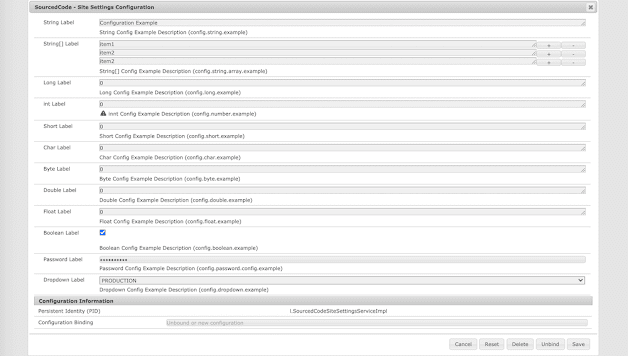
Outcome Explained:
The outcome of the OSGI Service and Configuration will result in an editable configuration within the OSGI Apache Felix Console.

2. Inner Class – Defining OSGI Component’s Configuration with Configuration Interface

You can also define the annotated @ObjectClassDefinition interface as an inner class as shown below. To use the inner class configuration interface within our OSGI service, we would need to annotation our service class with @Designate, with the OCD param pointing to the inner interface class. Next, it would be as simple as setting up the initial @Activate method.

package com.sourcedcode.core.services.impl;

import org.osgi.service.component.annotations.Activate;
import org.osgi.service.component.annotations.Component;
import org.osgi.service.metatype.annotations.*;

@Component(service = SourcedCodeSiteSettingsServiceInlineExample.class, immediate = true)
@Designate(ocd = SourcedCodeSiteSettingsServiceInlineExample.SourcedCodeSiteSettingsConfig.class)
public class SourcedCodeSiteSettingsServiceInlineExample {

@ObjectClassDefinition(name = "SourcedCode - Site Settings Configuration",
description = "dialog description")
protected @interface SourcedCodeSiteSettingsConfig {

@AttributeDefinition(
name = "String Label",
description = "String Config Example Description",
type = AttributeType.STRING)
String config_string_example() default "Default String";

@AttributeDefinition(
name = "String[] Label",
description = "String[] Config Example Description",
type = AttributeType.STRING)
String[] config_string_array_example() default {"item1", "item2"};

@AttributeDefinition(
name = "Long Label",
description = "Long Config Example Description",
type = AttributeType.LONG)
long config_long_example() default 0L;
}

@Activate
protected void activate(SourcedCodeSiteSettingsConfig config) {

}
}


NOTES:
@AttributeDefinitions are the underlying formatting of how each OSGI configuration interface are put together.


By aem4beginner

December 28, 2020
Estimated Post Reading Time ~

Registering @SlingServletPaths Component Property Type

You are probably looking for the @SlingServletPaths, OSGi DS 1.4 (R7) component property type annotations for Sling Servlets, code/unit test examples and was not successful.

Apache recommends not use the @SlingServletPaths annotation, Sling Servlet register by a path. Rather use the @SlingServletResourceTypes component type. Given the drawbacks in the caveats below, it is strongly recommended to bind servlets to resource types rather than paths.

Caveats when using @SlingServletPaths:
  • Path-bound servlets cannot be access-controlled using the default JCR repository ACLs.
  • Path-bound servlets can only be registered to a path and not a resource type (i.e. no suffix handling).
  • If a path-bound servlet is not active, e.g. if the bundle is missing or not started, a POST might result in unexpected results. usually creating a node at /bin/xyz which subsequently overlays the servlets path binding.
  • The mapping is not transparent to a developer looking just at the repository.
Apache’s Documentation
Also, have a look at the Apache Sling Servlet Documentation for the SlingServletPaths component property type, which what is mentioned above is clearly stated.

Example of @SlingServletResourceTypes:
The proper way to bind Sling Servlets is by binding the servlet to resource types. This is an example of a servlet binding to a resource type.

package com.sourcedcode.core.servlets.impl;
import org.apache.sling.api.SlingHttpServletRequest;
import org.apache.sling.api.SlingHttpServletResponse;
import org.apache.sling.api.servlets.SlingSafeMethodsServlet;
import org.apache.sling.servlets.annotations.SlingServletResourceTypes;
import org.osgi.service.component.annotations.Component;

import javax.servlet.Servlet;
import java.io.IOException;

import static org.apache.sling.api.servlets.HttpConstants.METHOD_GET;

/**
* Enables all resources to return formatted response data from the doGet() method.
* Appending ".example.json" on any resource will activate the doGet() method below.
*/
@Component(service = Servlet.class)
@SlingServletResourceTypes(
resourceTypes = "sling/servlet/default",
methods = "get",
extensions = "json",
selectors = "example")
public class SlingServletResourceTypesExampleServlet extends SlingSafeMethodsServlet {

@Override
protected void doGet(SlingHttpServletRequest req, SlingHttpServletResponse res) throws IOException {
res.setContentType("text/plain");
res.setCharacterEncoding("UTF-8");
res.setStatus(200);
res.getWriter().write("Done");
}
}


By aem4beginner

AEM Sling Models Injectors Service Ranking

When working on an AEM project, Sling Models provides several custom Sling Models injectors to aid injection of Sling objects, Sling object values, OSGI services, etc…

While using the injectors within in Sling Models, how do injectors invoke in order? Injectors are invoked in order, of their service ranking, from lowest to highest. If you are writing a custom injector, it is good practice to include service ranking.

Examples of the common injectors and their service ranking from the Apache Sling Models available injectors, injector-specific annotations, list (since version 1.1.0):
  • @ScriptVariable, 1000
  • @ValueMapValue, 2000
  • @ChildResource, 3000
  • @RequestAttribute, 4000
  • @ResourcePath, 2500
  • @OSGiService, 5000
  • @Self, 2147483647 (Integer.MAX_VALUE)
  • @SlingObject, 2147483647 (Integer.MAX_VALUE)
Example of the @OSGIService, injector:
An example below illustrates the @OSGIService, injector specific annotation, which here we understand that the Service Ranking is set to 5000.

/*
* Licensed to the Apache Software Foundation (ASF) under one or more
* contributor license agreements. See the NOTICE file distributed with
* this work for additional information...
*/
package org.apache.sling.models.impl.injectors;

import java.lang.reflect.AnnotatedElement;
import java.lang.reflect.Array;
import java.lang.reflect.ParameterizedType;
import java.lang.reflect.Type;
import java.util.ArrayList;
import java.util.Arrays;
import java.util.Collection;
import java.util.Collections;
import java.util.List;

import org.apache.commons.lang3.StringUtils;
import org.apache.sling.models.annotations.Filter;
import org.apache.sling.models.annotations.injectorspecific.InjectionStrategy;
import org.apache.sling.models.annotations.injectorspecific.OSGiService;
import org.apache.sling.models.spi.AcceptsNullName;
import org.apache.sling.models.spi.DisposalCallback;
import org.apache.sling.models.spi.DisposalCallbackRegistry;
import org.apache.sling.models.spi.Injector;
import org.apache.sling.models.spi.injectorspecific.AbstractInjectAnnotationProcessor2;
import org.apache.sling.models.spi.injectorspecific.InjectAnnotationProcessor2;
import org.apache.sling.models.spi.injectorspecific.StaticInjectAnnotationProcessorFactory;
import org.jetbrains.annotations.NotNull;
import org.jetbrains.annotations.Nullable;
import org.osgi.framework.BundleContext;
import org.osgi.framework.Constants;
import org.osgi.framework.InvalidSyntaxException;
import org.osgi.framework.ServiceReference;
import org.osgi.service.component.annotations.Activate;
import org.osgi.service.component.annotations.Component;
import org.slf4j.Logger;
import org.slf4j.LoggerFactory;

@Component(property=Constants.SERVICE_RANKING+":Integer=5000", service={Injector.class, StaticInjectAnnotationProcessorFactory.class, AcceptsNullName.class})
public class OSGiServiceInjector implements Injector, StaticInjectAnnotationProcessorFactory, AcceptsNullName {

private static final Logger log = LoggerFactory.getLogger(OSGiServiceInjector.class);

private BundleContext bundleContext;

@Override
public @NotNull String getName() {
return "osgi-services";
}

@Activate
public void activate(BundleContext ctx) {
this.bundleContext = ctx;
}

@Override
public Object getValue(@NotNull Object adaptable, String name, @NotNull Type type, @NotNull AnnotatedElement element,
@NotNull DisposalCallbackRegistry callbackRegistry) {
return getValue(adaptable, name, type, element, callbackRegistry, bundleContext);
}

/**
*
* @param adaptable
* @param name
* @param type
* @param element
* @param callbackRegistry
* @param modelContext
* @return
*/
public Object getValue(@NotNull Object adaptable, String name, @NotNull Type type, @NotNull AnnotatedElement element,
@NotNull DisposalCallbackRegistry callbackRegistry, @Nullable BundleContext modelContext) {
OSGiService annotation = element.getAnnotation(OSGiService.class);
String filterString = null;
if (annotation != null) {
if (StringUtils.isNotBlank(annotation.filter())) {
filterString = annotation.filter();
}
} else {
Filter filter = element.getAnnotation(Filter.class);
if (filter != null) {
filterString = filter.value();
}
}
return getValue(adaptable, type, filterString, callbackRegistry, modelContext == null ? bundleContext : modelContext);
}

private <T> Object getService(Object adaptable, Class<T> type, String filter,
DisposalCallbackRegistry callbackRegistry, BundleContext modelContext) {
// cannot use SlingScriptHelper since it does not support ordering by service ranking due to https://issues.apache.org/jira/browse/SLING-5665
try {
ServiceReference<?>[] refs = modelContext.getServiceReferences(type.getName(), filter);
if (refs == null || refs.length == 0) {
return null;
} else {
// sort by service ranking (lowest first) (see ServiceReference.compareTo)
List<ServiceReference<?>> references = Arrays.asList(refs);
Collections.sort(references);
callbackRegistry.addDisposalCallback(new Callback(refs, modelContext));
return modelContext.getService(references.get(references.size() - 1));
}
} catch (InvalidSyntaxException e) {
log.error("invalid filter expression", e);
return null;
}
}

private <T> Object[] getServices(Object adaptable, Class<T> type, String filter,
DisposalCallbackRegistry callbackRegistry, BundleContext modelContext) {
// cannot use SlingScriptHelper since it does not support ordering by service ranking due to https://issues.apache.org/jira/browse/SLING-5665
try {
ServiceReference<?>[] refs = modelContext.getServiceReferences(type.getName(), filter);
if (refs == null || refs.length == 0) {
return null;
} else {
// sort by service ranking (lowest first) (see ServiceReference.compareTo)
List<ServiceReference<?>> references = Arrays.asList(refs);
Collections.sort(references);
// make highest service ranking being returned first
Collections.reverse(references);
callbackRegistry.addDisposalCallback(new Callback(refs, modelContext));
List<Object> services = new ArrayList<>();
for (ServiceReference<?> ref : references) {
Object service = modelContext.getService(ref);
if (service != null) {
services.add(service);
}
}
return services.toArray();
}
} catch (InvalidSyntaxException e) {
log.error("invalid filter expression", e);
return null;
}
}

private Object getValue(Object adaptable, Type type, String filterString, DisposalCallbackRegistry callbackRegistry,
BundleContext modelContext) {
if (type instanceof Class) {
Class<?> injectedClass = (Class<?>) type;
if (injectedClass.isArray()) {
Object[] services = getServices(adaptable, injectedClass.getComponentType(), filterString,
callbackRegistry, modelContext);
if (services == null) {
return null;
}
Object arr = Array.newInstance(injectedClass.getComponentType(), services.length);
for (int i = 0; i < services.length; i++) {
Array.set(arr, i, services[i]);
}
return arr;
} else {
return getService(adaptable, injectedClass, filterString, callbackRegistry, modelContext);
}
} else if (type instanceof ParameterizedType) {
ParameterizedType ptype = (ParameterizedType) type;
if (ptype.getActualTypeArguments().length != 1) {
return null;
}
Class<?> collectionType = (Class<?>) ptype.getRawType();
if (!(collectionType.equals(Collection.class) || collectionType.equals(List.class))) {
return null;
}

Class<?> serviceType = (Class<?>) ptype.getActualTypeArguments()[0];
Object[] services = getServices(adaptable, serviceType, filterString, callbackRegistry, modelContext);
if (services == null) {
return null;
}
return Arrays.asList(services);
} else {
log.warn("Cannot handle type {}", type);
return null;
}
}

private static class Callback implements DisposalCallback {
private final ServiceReference<?>[] refs;
private final BundleContext context;

public Callback(ServiceReference<?>[] refs, BundleContext context) {
this.refs = refs;
this.context = context;
}

@Override
public void onDisposed() {
if (refs != null) {
for (ServiceReference<?> ref : refs) {
context.ungetService(ref);
}
}
}
}

@Override
public InjectAnnotationProcessor2 createAnnotationProcessor(AnnotatedElement element) {
// check if the element has the expected annotation
OSGiService annotation = element.getAnnotation(OSGiService.class);
if (annotation != null) {
return new OSGiServiceAnnotationProcessor(annotation);
}
return null;
}

private static class OSGiServiceAnnotationProcessor extends AbstractInjectAnnotationProcessor2 {

private final OSGiService annotation;

public OSGiServiceAnnotationProcessor(OSGiService annotation) {
this.annotation = annotation;
}

@Override
public InjectionStrategy getInjectionStrategy() {
return annotation.injectionStrategy();
}

@Override
@SuppressWarnings("deprecation")
public Boolean isOptional() {
return annotation.optional();
}
}
}


NOTE:
  • The source code can be found from the Github repository, Apache Sling Models Implementation, here.
  • The official documentation for the Sling Models available injector’s service ranking status can be found here.


By aem4beginner

AEM Sling Model Injectors Annotations Reference Guide

The Apache Sling Model enables injector specific annotations which aggregate the standard annotations for each of the available injectors, which are: Script Bindings, Value Map, Resource Path, Child Resources, Request Attributes, OSGI Services, Self, and the Sling Object.

Sure we can invoke injectors by the @inject, followed by the @source annotation (with an injector name) as so, @Inject @Source(“script-bindings”), but invoking such injectors introduces many more lines of code which is tedious and repetitive. Using the @inject annotation freely may cause injector collisions.

Thankfully Apache’s Sling Model library delivered the injector specific annotations!
The injector specific annotations enable us, developers, to write less code, enables stability with injectors to demise injector collisions, and enables better IDE support.

This article will provide examples (used in practice) that will include both ways to invoke injectors in Sling Models, using the @Inject & @Source annotations, and also the Apache Sling Model injector specific annotations approach.

Available Injectors
1. Script Bindings (name=”script-bindings”) Injector
Service Ranking: 1000
Annotation: @ScriptVariable
Description: Injects objects via script variable defined from Sling Bindings; Lookup objects in the script bindings object by name.

As you can see, the example below indicated that there are many ways to inject within the POJO:

Without the injector specific annotations:

1. @Inject @Source(“script-bindings”) @Named(“component”)
2. @Inject @Source(“script-bindings”)

With the injector specific annotations:
3. @ScriptVariable(name = “component”)
4. @ScriptVariable

Note: If the name is not set (using the @Named annotation or name property), then the name is derived from the method/property/variable/field name.

@Model(adaptables = Resource.class,
defaultInjectionStrategy = DefaultInjectionStrategy.OPTIONAL)
public class ExampleComponent {

// @Inject @Source("script-bindings") @Named("component")
// @Inject @Source("script-bindings")
// @ScriptVariable(name = "component")
@ScriptVariable
private Component component;

// @Inject @Source("script-bindings") @Named("componentContext")
// @Inject @Source("script-bindings")
@ScriptVariable
private ComponentContext componentContext;

// @Inject @Source("script-bindings") @Named("currentDesign")
// @Inject @Source("script-bindings")
@ScriptVariable
private Design currentDesign;

// @Inject @Source("script-bindings") @Named("currentNode")
// @Inject @Source("script-bindings")
@ScriptVariable
private Node currentNode;

// @Inject @Source("script-bindings") @Named("currentPage")
// @Inject @Source("script-bindings")
@ScriptVariable
private Page currentPage;

// @Inject @Source("script-bindings") @Named("currentSession")
// @Inject @Source("script-bindings")
@ScriptVariable
private HttpSession currentSession;

// @Inject @Source("script-bindings") @Named("currentStyle")
// @Inject @Source("script-bindings")
@ScriptVariable
private Style currentStyle;

// @Inject @Source("script-bindings") @Named("designer")
// @Inject @Source("script-bindings")
@ScriptVariable
private Designer designer;

// @Inject @Source("script-bindings") @Named("editContext")
// @Inject @Source("script-bindings")
@ScriptVariable
private EditContext editContext;

// @Inject @Source("script-bindings") @Named("log")
// @Inject @Source("script-bindings")
@ScriptVariable
private Logger log;

// @Inject @Source("script-bindings") @Named("out")
// @Inject @Source("script-bindings")
@ScriptVariable
private PrintWriter out;

// @Inject @Source("script-bindings") @Named("pageManager")
// @Inject @Source("script-bindings")
@ScriptVariable
private PageManager pageManager;

// @Inject @Source("script-bindings") @Named("pageProperties")
// @Inject @Source("script-bindings")
@ScriptVariable
private ValueMap pageProperties;

// @Inject @Source("script-bindings") @Named("reader")
// @Inject @Source("script-bindings")
@ScriptVariable
private BufferedReader reader;

// @Inject @Source("script-bindings") @Named("request")
// @Inject @Source("script-bindings")
@ScriptVariable
private SlingHttpServletRequest request;

// @Inject @Source("script-bindings") @Named("resolver")
// @Inject @Source("script-bindings")
@ScriptVariable
private ResourceResolver resolver;

// @Inject @Source("script-bindings") @Named("resource")
// @Inject @Source("script-bindings")
@ScriptVariable
private Resource resource;

// @Inject @Source("script-bindings") @Named("resourceDesign")
// @Inject @Source("script-bindings")
@ScriptVariable
private Design resourceDesign;

// @Inject @Source("script-bindings") @Named("resourcePage")
// @Inject @Source("script-bindings")
@ScriptVariable
private Page resourcePage;

// @Inject @Source("script-bindings") @Named("response")
// @Inject @Source("script-bindings")
@ScriptVariable
private SlingHttpServletResponse response;

// @Inject @Source("script-bindings") @Named("sling")
// @Inject @Source("script-bindings")
@ScriptVariable
private SlingScriptHelper sling;

// @Inject @Source("script-bindings") @Named("slyWcmHelper")
// @Inject @Source("script-bindings")
@ScriptVariable
private WCMScriptHelper slyWcmHelper;

// @Inject @Source("script-bindings") @Named("wcmmode")
// @Inject @Source("script-bindings")
@ScriptVariable
private SightlyWCMMode wcmmode;

// @Inject @Source("script-bindings") @Named("xssAPI")
// @Inject @Source("script-bindings")
@ScriptVariable
private XSSAPI xssAPI;
}


2. Value Map (name=”valuemap”) Injector
Service Ranking: 2000
Annotation: @ValueMapValue
Description: Gets a property from a ValueMap by name; If @Via is not set, it will automatically take resource if the adaptable is the SlingHttpServletRequest. If the name is not set the name is derived from the method/field name.

@Model(adaptables = SlingHttpServletRequest.class,
defaultInjectionStrategy = DefaultInjectionStrategy.OPTIONAL)
public class ExampleComponent {

// @Inject @Source("valuemap") @Named("jcr:title")
@ValueMapValue(name = "jcr:title")
private String titleText;

// @Inject @Source("valuemap")
@ValueMapValue
private String titleDescription;
}


3. Resource Path (name=”resource-path”) Injector

Service Ranking: 2500
Annotation: @ResourcePath
Description: Injects one or multiple resources. The resource paths are either given by @Path annotations, the element path or paths of the annotation @ResourcePath, or by paths given through a resource property being referenced by either @Named or element name of the annotation @ResourcePath.

@Model(adaptables = Resource.class,
defaultInjectionStrategy = DefaultInjectionStrategy.OPTIONAL)
public class ExampleComponent {

// @Inject @Source("resource-path") @Path("/content/sourcedcode/en/home")
@ResourcePath(path = "/content/sourcedcode/en/home")
Resource sourcedCodePageResource;

// @Inject @Source("resource-path") @Path("/content/we-retail/language-masters/en")
@ResourcePath(name = "/content/we-retail/language-masters/en")
Resource weRetailPageResource;

// @Inject @Source("resource-path") @Path(paths = {"/content/sourcedcode/en/home","/content/we-retail/language-masters/en"})
@ResourcePath(paths = {"/content/sourcedcode/en/home","/content/we-retail/language-masters/en"})
Resource[] resources;
}

4. Child Resources (name=”child-resources”) Injector
Service Ranking: 3000
Annotation: @ChildResource
Description: Gets a child resource by name.

@Model(adaptables = Resource.class,
defaultInjectionStrategy = DefaultInjectionStrategy.OPTIONAL)
public class ExampleComponent {

// @Inject @Source("child-resources") @Named("links")
// @ChildResource(name="links")
@ChildResource
private Resource links;

// @Inject @Source("child-resources") @Named("links")
// @ChildResource(name="links")
@ChildResource
private List<Resource> links;

// @Inject @Source("child-resources") @Named("social")
// @ChildResource(name="social")
@ChildResource
private Resource social;
}


5. Request Attributes (name=”request-attributes”) Injector
Service Ranking: 4000
Annotation: @RequestAttribute
Description: Injects a request attribute by name. If the name is not set the name is derived from the method/field name.

@Model(adaptables = Resource.class,
defaultInjectionStrategy = DefaultInjectionStrategy.OPTIONAL)
public class ExampleComponent {

// @Inject @Source("request-attributes") @Named("social")
@RequestAttribute(name = "social")
private String socialParam;

public String getSocialParam() {
return socialParam;
}
}


The example below calls the Sling Model using the input parameter:

<div data-sly-use.exampleComponent="${'com.sourcedcode.core.models.ExampleComponent' @ social='facebook'}">
${exampleComponent.socialParam}
</div>


6. OSGi Services (name=”osgi-services”) Injector

Service Ranking:
5000
Annotation: @OSGiService
Description: Injects an OSGi service by type; Lookup services based on the class name. Since Sling Models Impl 1.2.8 (SLING-5664) the service with the highest service ranking is returned. In case multiple services are returned, they are ordered descending by their service ranking (i.e. the one with the highest-ranking first).

@Model(adaptables = Resource.class,
defaultInjectionStrategy = DefaultInjectionStrategy.OPTIONAL)
public class ExampleComponent {

// @Inject @Source("osgi-services")
@OSGIService
private SlingSettingsService slingSettingsService;

// @Inject @Source("osgi-services")
@OSGiService
private MyCustomOSGIService myCustomOSGIService;

// @Inject @Source("osgi-services")
@OSGiService
private MyCustomOSGISConfigurationervice myCustomOSGISConfigurationervice;
}

7. Self (name=”self”) Injector
Service Ranking: Integer.MAX_VALUE
Annotation: @Self
Description: Injects the adaptable object itself (if the class of the field matches or is a supertype). If the @Self annotation is present it is tried to adapt the adaptable to the field type.

@Model(adaptables = Resource.class,
defaultInjectionStrategy = DefaultInjectionStrategy.OPTIONAL)
public class ExampleComponent {

// @Inject @Source("self")
@Self
private Node node;

// @Inject @Source("self")
@Self
private MyCustomSlingModel myCustomSlingModel;
}

///////
///////
/////// Example below highlights that the @self annotation can minimize the lines of code that needs to be written.
///////
///////
@Model(adaptables = Resource.class,
defaultInjectionStrategy = DefaultInjectionStrategy.OPTIONAL)
public class ExampleComponent {

@SlingObject
private Resource currentResource;

Node node;

@PostConstruct
public void init() {
// adapts the current resource to a node class
node = currentResource.adaptTo(Node.class);
}
}


8. Sling Object (name=”sling-object”) Injector

Service Ranking: Integer.MAX_VALUE
Annotation: @SlingObject
Description: Injects commonly used sling objects if the field matches with the class: request, response, resource resolver, current resource, SlingScriptHelper. This works only if the adaptable can get the according to information, i.e. all objects are available via SlingHttpServletRequest while ResourceResolver can only resolve the ResourceResolver object and nothing else. A discussion around this limitation can be found at SLING-4083. Also, Resources can only be injected if the according to injector specific annotation is used (@SlingObject).

@Model(adaptables = Resource.class,
defaultInjectionStrategy = DefaultInjectionStrategy.OPTIONAL)
public class ExampleComponent {

// @Inject @Source("sling-object")
@SlingObject
private SlingHttpServletRequest slingHttpServletRequest;

// @Inject @Source("sling-object")
@SlingObject
private SlingHttpServletResponse slingHttpServletResponse;

// @Inject @Source("sling-object")
@SlingObject
private Resource currentResource;

// @Inject @Source("sling-object")
@SlingObject
private ResourceResolver resourceResolver;

}

Note:
If the name is not set (using the @Named annotation or name property), then the name is derived from the method/property/variable/field name. An example for setting the @Named annotation would time you as a developer encounter a clash between the method/property/variable/field name or when the developer not wanting to use the scripting variable names as the variables in the POJO.

As you can see, using the Apache Sling Model’s injector specific annotations during implementation will help you stay organized, write less code, and speed up the development process.


By aem4beginner

May 27, 2020
Estimated Post Reading Time ~

OSGi R7 annotations Examples in AEM

OSGi component / service Configs
String Config

 @AttributeDefinition(
          name = "String Property",
          description = "String example",
          type = AttributeType.STRING
      )
    String stringExample() default "String value";

String Array Config

@AttributeDefinition(
    name = "String Array Example",
    description = "String Array Example",
    type = AttributeType.STRING
   )
 String[] stringArrayExample() default {"String1", "String2"};

Dropdown Config

 @AttributeDefinition(
         name = "Dropdown example",
         description = "Dropdown example",
         options = {
             @Option(label = "Option1", value = "Option1"),
             @Option(label = "Option2", value = "Option2"),
             @Option(label = "Option3", value = "Option3")
         }
     )
 String dropdownExample() default StringUtils.EMPTY;

Boolean Config
To declare your  OSGi configuration as boolean you must use the attribute type BOOLEAN
@AttributeDefinition(
         name = "Boolean Property",
         description = "Boolean example",
         type = AttributeType.BOOLEAN
 )

Long Config

 @AttributeDefinition(
       name = "Long Property",
       description = "Sample long property",
       type = AttributeType.LONG
 )
  long longExample() default 0L;


By aem4beginner

May 26, 2020
Estimated Post Reading Time ~

How to Migrate from SCR Annotations to DS Annotations

Change is a rule of life, and if you are not updating yourself on current trends then you are constantly falling behind on new updates that can be essential to your system. With Adobe, they release a new version of AEM  every year. Last year, they introduced SCR annotations, and now they are supporting DS annotations. From AEM 6.2 DS Annotations are supported, and it is highly recommended that you use these in the newer version of AEM. This is why you need to learn how to migrate from SCR Annotations to DS Annotations.

Let’s look at brief introductions of SCR Annotations and DS Annotations.

What are SCR Annotations?
SCR stands for Service Component Runtime. The ”maven-scr-plugin” uses scr annotations from the corresponding subproject at Apache Felix. All annotations are in “org.apache.felix.scr.annotations” package. The Apache Felix SCR described by the OSGi Declarative Services Specification is implemented by the “org.apache.felix.scr” bundle.

SCR annotations do not support new features from R6 and above. It is highly recommended to use OSGi annotations for Declarative Services instead.

What are DS Annotations?
DS annotation is an official implementation from OSGi R6 (release 6) specification. It is also known as OSGi Declarative Services Annotations.
Remember that declarative services are a compiled time process. For DS annotations to be effective, they must be handled during the build process.
The migration from SCR annotations to DS annotations is fairly easy and both annotation styles will work side-by-side while you complete the switch-over.
So here will we discuss how to migrate from SCR annotations to DS annotations?

Plugin:
For DS annotations we have to use “maven-bundle-plugin” instead of “maven-scr-plugin”. Version 3.2.0 or greater.

<plugin>
<groupId>org.apache.felix</groupId>
<artifactId>maven-bundle-plugin</artifactId>
<version>3.5.1</version>
<inherited>true</inherited>
</plugin>

Dependencies:
For DS annotations we need artifacts  “org.osgi.service.metatype.annotations” and “org.osgi.service.component.annotations” instead “org.osgi.core” and “org.osgi.compendium”.

<dependency>
<groupId>org.osgi</groupId>
<artifactId>org.osgi.service.component.annotations</artifactId>
<version>1.3.0</version>
<scope>provided</scope>
</dependency>

<dependency>
<groupId>org.osgi</groupId>
<artifactId>org.osgi.service.metatype.annotations</artifactId>
<version>1.3.0</version>
</dependency>

Java Package:
In DS Annotation, package “org.apache.felix.scr.annotations.*” will be replaced with “org.osgi.service.component.annotations.*”  and “org,osgi.service.metatype.annotations.*”.

Migration of Component and Services:
We used to use @Component, @Service annotations in SCR Annotations while in DS annotation just have @Component annotation with the collaboration of all these annotations.

SCR annotation Implementation:
@Component(label = "Demo Service", immediate = true)
@Service(DemoService.class)

public class DemoService {
    public String getMyClassName() {
              return "DemoService";
    }
}

DS annotation Implementation:
@Component(name = "Demo Service", immediate = true, service = DemoService.class)

public class DemoService {
    public String getMyClassName() {
       return "DemoService";
    }
}

Migration of Sling Servlet:
We used to use @Component, @Service @SlingServlet @Properties in SCR Annotations while DS annotation just has @Component with the collaboration of all these annotations.

SCR annotation Implementation
@SlingServlet(  resourceTypes = "sling/servlet/default",
                                methods = {"POST", "GET"},
                                selectors = "demoServlet",
                                extensions = "fetch")

public class Demo extends SlingSafeMethodsServlet {
    @Override
    protected void doGet(SlingHttpServletRequest request, SlingHttpServletResponse response) throws IOException {  
        response.getWriter().print("doGet Method");  }

    @Override
    protected void doPost(SlingHttpServletRequest request, SlingHttpServletResponse response) throws IOException {  
        response.getWriter().print("doPost Method");
    }
}

DS annotation Implementation:
@Component(service = Servlet.class,
                               property = {
                "sling.servlet.methods=" + HttpConstants.METHOD_GET,
                "sling.servlet.methods=" + HttpConstants.METHOD_POST,
                "sling.servlet.resourceTypes=" + "sling/servlet/default",
                "sling.servlet.selectors=" + "demoServlet",
                "sling.servlet.extensions=" + "fetch"})

public class Demo extends SlingSafeMethodsServlet {
    @Override
    protected void doGet(SlingHttpServletRequest request, SlingHttpServletResponse response) throws IOException {
        response.getWriter().print("doGet Method");
    }

    @Override
    protected void doPost(SlingHttpServletRequest request, SlingHttpServletResponse response) throws IOException {
        response.getWriter().print("doPost Method");
    }
}

Migration of Custom Workflow process:
SCR annotations Implementation:
@Component(immediate = true, enabled = true, metatype = true)
@Service(value = WorkflowProcess.class)
@Property(name = "process.label", value = "Demo Process", propertyPrivate = true)

public class DemoProcess implements WorkflowProcess {
    public void execute(WorkItem workitem, WorkflowSession wfsession, MetaDataMap metaDataMap)  {
        System.out.println("I am in execute method");
    }
}

DS annotation Implementation:  
@Component(service = WorkflowProcess.class,  
                                immediate = true, enabled = true,
                                 property = {"process.label= Demo Process"})

public class DemoProcess implements WorkflowProcess {
    public void execute(WorkItem workitem, WorkflowSession wfsession, MetaDataMap metaDataMap) {
        System.out.println(“ I am in execute method”);
    }
}

Migration of Custom OSGi Configuration:
Major changes came in custom OSGi configuration. OSGi annotations provided flexibility to create a configuration in a separate interface and we can use it in any place.

SCR annotations Implementation:
@Component(immediate = true, metatype = true, label = "Customer Configuration")
@Service(value = CustomerDemo.class)

public class CustomerDemo {
    @Property(label = "Custmer Name", value = "default value")
    private static final String CUST_NAME = "custmer.name";
   
    @Property(label = "Custmer address", value = "default value")
    private static final String CUST_ADDR = "custmer.address";
    private String custmerName;    
    private String custmerAddr;

    @Activate
    protected void activate(Map context) {
   custmerName = PropertiesUtil.toString(context.get(CUST_NAME), EMPTY);
   custmerAddr = PropertiesUtil.toString(context.get(CUST_ADDR), EMPTY);
 }  

    @Modified
    protected void modified(ComponentContext context) {
   custmerName = PropertiesUtil.toString(context.getProperties().get(CUST_NAME), EMPTY);
   custmerAddr = PropertiesUtil.toString(context.getProperties().get(CUST_ADDR), EMPTY);

 }

DS annotation Implementation:
Interface:
import org.osgi.service.metatype.annotations.ObjectClassDefinition;
@ObjectClassDefinition(name = "Customer Configuration")

public @interface CustomerConfig {
    @AttributeDefinition(name = "Custmer Name")
    String CUST_NAME() default "default value";
    @AttributeDefinition(name = "Custmer address")
    String CUST_ADDR() default "default value";
}

Actual Class:
import org.osgi.service.component.annotations.Activate;
        import org.osgi.service.component.annotations.Component;
        import org.osgi.service.component.annotations.Modified;
        import org.osgi.service.metatype.annotations.Designate;

@Component(service = CustomerDemo.class, immediate = true)
@Designate(ocd = CustomerConfig.class)

public class CustomerDemo {  
    private String custmerName;

    private String custmerAddress;
    @Activate
    @Modified
    protected void Activate(final CustomerConfig custmerconfig) {
   custmerName = custmerconfig.CUST_NAME();
   custmerAddress = custmerconfig.CUST_ADDR();
 }
}

Fig- OSGi Configuration in Felix Console


Migration of OSGi Config:
The migration of OSGi config is quite tricky. There are two scenarios for OSGi config.

You have created a new configuration according to DS annotations and you want a config of it for a default value.
You are migrating old custom config to a new one (DS annotations) and you already have a config file.
Scenario 1:
If you have created your own custom config. For e.g.
Interface:
import org.osgi.service.metatype.annotations.ObjectClassDefinition;
@ObjectClassDefinition(name = "Demo Configuration")

public @interface Demo {
    @AttributeDefinition(name = "My Name")
    String myName() default "Abc";
    @AttributeDefinition(name = "Address")
    String myAddress() default "default address";
}
So, your default configuration will be:
<? xml version = "1.0" encoding="UTF-8"?>
<jcr:root xmlns:sling="http://sling.apache.org/jcr/sling/1.0"xmlns:jcr="http://www.jcp.org/jcr/1.0"
        jcr:primaryType="sling:OsgiConfig"
        myName="XYZ"
        myAddress="default address"/>

Scenario 2:
If you have already default configuration and you are migrating to DS annotation. For e.g.
Config file:
<?xml version="1.0" encoding="UTF-8"?> 
<jcr:root xmlns:sling="http://sling.apache.org/jcr/sling/1.0" xmlns:jcr="http://www.jcp.org/jcr/1.0" 
    jcr:primaryType="sling:OsgiConfig" 
    smtp.host="smtp.office365.com" 
    smtp.passsword="{474c6b96ab4d}" 
    smtp.port="587" 
    smtp.user="noreply.onmicrosoft.com"/> 


So, your interface will be:
import org.osgi.service.metatype.annotations.ObjectClassDefinition;
import org.osgi.service.metatype.annotations.AttributeDefinition;

@ObjectClassDefinition(name = "Email Configuration")
public @interface EmailConfig {
    @AttributeDefinition(name = "SMTP server host name")
    String smtp_host();

    @AttributeDefinition(name = "SMTP server port")
    String smtp_port();

    @AttributeDefinition(name = "SMTP user")
    String smtp_user();

    @AttributeDefinition(name = "SMTP password")
    String smtp_passsword();
}


By aem4beginner

How to Change Data Type in AEM | Typecast Using @TypeHint

Problem Statement:
How to convert a variable from one data type to another data type in AEM. This process is also known as typecast in AEM.

For a use case where a number field is used in dialog and further data will be utilized in Sightly (HTL) for numeric comparison operations. Problem can come up as data will be stored in String format and comparison can only be made on same data type elements.

Solution:

Using @TypeHint, which is used to forcefully define the data type of a property. The following are the steps and scenarios for the application of the same to change data type in AEM.

Scenario:
I have a number field in my dialog with name ‘sponsoredPosition’. By default its value is stored in String format and I wanted it to be stored in Long format instead of String format.

Steps to Change Data Type in AEM using @TypeHint
In the component, add a node parallel to the ‘sponsoredPosition’ node (for which data type needs to be changed) of the type nt:unstructured.

In the new node add the following properties:
ignoreData{Boolean} = true
value{String} = Long
Name{String} =sponsoredPosition@TypeHint
sling:resourceType{String} = granite/ui/components/foundation/form/hidden.
Here,

(a) ignoreData, as the name suggests, it tells the value of this field should not be stored.

(b) In value field you must define the data type in which you want your data to be stored.

(c) In Name, field add ‘@TypeHint’ suffix to the property name of the original node whose value was stored in string format (by default).

(d) Resource type hidden is used for hiding it in dialog.

<sponsoredPosition
jcr:primaryType="nt:unstructured"
sling:resourceType="granite/ui/components/foundation/form/numberfield"
fieldLabel="Sponsored Content Position"
max="{Long}3"
min="{Long}2"
value="3"
name="./sponsoredPosition"/>
<sponsoredPositionTypeHint
jcr:primaryType="nt:unstructured"
sling:resourceType="granite/ui/components/foundation/form/hidden"
ignoreData="{Boolean}true"
name="./sponsoredPosition@TypeHint"
value="Long"/>


This article is intended to provide technical AEM users a solution and tactical training on the topic: How to change the data type in AEM or how to typecast in AEM.

Conclusion

Adding @TypeHint solved the issue, now the value is being stored in Long format instead of String.


By aem4beginner

How to Migrate from SCR Annotations to DS Annotations

Change is a rule of life, and if you are not updating yourself on current trends then you are constantly falling behind on new updates that can be essential to your system. With Adobe, they release a new version of AEM  every year. Last year, they introduced SCR annotations, and now they are supporting DS annotations. From AEM 6.2 DS Annotations are supported, and it is highly recommended that you use these in the newer version of AEM. This is why you need to learn how to migrate from SCR Annotations to DS Annotations.

Let’s look at brief introductions of SCR Annotations and DS Annotations.

What are SCR Annotations?
SCR stands for Service Component Runtime. The ”maven-scr-plugin” uses scr annotations from the corresponding subproject at Apache Felix. All annotations are in “org.apache.felix.scr.annotations” package. The Apache Felix SCR described by the OSGi Declarative Services Specification is implemented by the “org.apache.felix.scr” bundle.

SCR annotations do not support new features from R6 and above. It is highly recommended to use OSGi annotations for Declarative Services instead.

What are DS Annotations?
DS annotation is an official implementation from OSGi R6 (release 6) specification. It is also known as OSGi Declarative Services Annotations.
Remember that declarative services are a compiled time process. For DS annotations to be effective, they must be handled during the build process.
The migration from SCR annotations to DS annotations is fairly easy and both annotation styles will work side-by-side while you complete the switch-over.
So here will we discuss how to migrate from SCR annotations to DS annotations?

Plugin:
For DS annotations we have to use “maven-bundle-plugin” instead of “maven-scr-plugin”. Version 3.2.0 or greater.

<plugin>
<groupId>org.apache.felix</groupId>
<artifactId>maven-bundle-plugin</artifactId>
<version>3.5.1</version>
<inherited>true</inherited>
</plugin>

Dependencies:
For DS annotations we need artifacts  “org.osgi.service.metatype.annotations” and “org.osgi.service.component.annotations” instead “org.osgi.core” and “org.osgi.compendium”.

<dependency>
<groupId>org.osgi</groupId>
<artifactId>org.osgi.service.component.annotations</artifactId>
<version>1.3.0</version>
<scope>provided</scope>
</dependency>

<dependency>
<groupId>org.osgi</groupId>
<artifactId>org.osgi.service.metatype.annotations</artifactId>
<version>1.3.0</version>
</dependency>

Java Package:
In DS Annotation, package “org.apache.felix.scr.annotations.*” will be replaced with “org.osgi.service.component.annotations.*”  and “org,osgi.service.metatype.annotations.*”.

Migration of Component and Services:
We used to use @Component, @Service annotations in SCR Annotations while in DS annotation just have @Component annotation with the collaboration of all these annotations.

SCR annotation Implementation:
@Component(label = "Demo Service", immediate = true)
@Service(DemoService.class)

public class DemoService {
    public String getMyClassName() {
              return "DemoService";
    }
}

DS annotation Implementation:
@Component(name = "Demo Service", immediate = true, service = DemoService.class)

public class DemoService {
    public String getMyClassName() {
       return "DemoService";
    }
}

Migration of Sling Servlet:
We used to use @Component, @Service @SlingServlet @Properties in SCR Annotations while DS annotation just has @Component with the collaboration of all these annotations.

SCR annotation Implementation
@SlingServlet(  resourceTypes = "sling/servlet/default",
                                methods = {"POST", "GET"},
                                selectors = "demoServlet",
                                extensions = "fetch")

public class Demo extends SlingSafeMethodsServlet {
    @Override
    protected void doGet(SlingHttpServletRequest request, SlingHttpServletResponse response) throws IOException {  
        response.getWriter().print("doGet Method");  }

    @Override
    protected void doPost(SlingHttpServletRequest request, SlingHttpServletResponse response) throws IOException {  
        response.getWriter().print("doPost Method");
    }
}

DS annotation Implementation:
@Component(service = Servlet.class,
                               property = {
                "sling.servlet.methods=" + HttpConstants.METHOD_GET,
                "sling.servlet.methods=" + HttpConstants.METHOD_POST,
                "sling.servlet.resourceTypes=" + "sling/servlet/default",
                "sling.servlet.selectors=" + "demoServlet",
                "sling.servlet.extensions=" + "fetch"})

public class Demo extends SlingSafeMethodsServlet {
    @Override
    protected void doGet(SlingHttpServletRequest request, SlingHttpServletResponse response) throws IOException {
        response.getWriter().print("doGet Method");
    }

    @Override
    protected void doPost(SlingHttpServletRequest request, SlingHttpServletResponse response) throws IOException {
        response.getWriter().print("doPost Method");
    }
}

Migration of Custom Workflow process:
SCR annotations Implementation:
@Component(immediate = true, enabled = true, metatype = true)
@Service(value = WorkflowProcess.class)
@Property(name = "process.label", value = "Demo Process", propertyPrivate = true)

public class DemoProcess implements WorkflowProcess {
    public void execute(WorkItem workitem, WorkflowSession wfsession, MetaDataMap metaDataMap)  {
        System.out.println("I am in execute method");
    }
}

DS annotation Implementation:
@Component(service = WorkflowProcess.class,  
                                immediate = true, enabled = true,
                                 property = {"process.label= Demo Process"})

public class DemoProcess implements WorkflowProcess {
    public void execute(WorkItem workitem, WorkflowSession wfsession, MetaDataMap metaDataMap) {
        System.out.println(“ I am in execute method”);
    }
}

Migration of Custom OSGi Configuration:
Major changes came in custom OSGi configuration. OSGi annotations provided flexibility to create a configuration in a separate interface and we can use it in any place.

SCR annotations Implementation:
@Component(immediate = true, metatype = true, label = "Customer Configuration")
@Service(value = CustomerDemo.class)

public class CustomerDemo {
    @Property(label = "Custmer Name", value = "default value")
    private static final String CUST_NAME = "custmer.name";
   
    @Property(label = "Custmer address", value = "default value")
    private static final String CUST_ADDR = "custmer.address";
    private String custmerName;    
    private String custmerAddr;

    @Activate
    protected void activate(Map context) {
   custmerName = PropertiesUtil.toString(context.get(CUST_NAME), EMPTY);
   custmerAddr = PropertiesUtil.toString(context.get(CUST_ADDR), EMPTY);
 }  

    @Modified
    protected void modified(ComponentContext context) {
   custmerName = PropertiesUtil.toString(context.getProperties().get(CUST_NAME), EMPTY);
   custmerAddr = PropertiesUtil.toString(context.getProperties().get(CUST_ADDR), EMPTY);

 }

DS annotation Implementation:
Interface:
import org.osgi.service.metatype.annotations.ObjectClassDefinition;
@ObjectClassDefinition(name = "Customer Configuration")

public @interface CustomerConfig {
    @AttributeDefinition(name = "Custmer Name")
    String CUST_NAME() default "default value";
    @AttributeDefinition(name = "Custmer address")
    String CUST_ADDR() default "default value";
}

Actual Class:
import org.osgi.service.component.annotations.Activate;
        import org.osgi.service.component.annotations.Component;
        import org.osgi.service.component.annotations.Modified;
        import org.osgi.service.metatype.annotations.Designate;

@Component(service = CustomerDemo.class, immediate = true)
@Designate(ocd = CustomerConfig.class)

public class CustomerDemo {  
    private String custmerName;

    private String custmerAddress;
    @Activate
    @Modified
    protected void Activate(final CustomerConfig custmerconfig) {
   custmerName = custmerconfig.CUST_NAME();
   custmerAddress = custmerconfig.CUST_ADDR();
 }
}

Fig- OSGi Configuration in Felix Console

Migration of OSGi Config:
The migration of OSGi config is quite tricky. There are two scenarios for OSGi config.

You have created a new configuration according to DS annotations and you want a config of it for a default value.
You are migrating old custom config to a new one (DS annotations) and you already have a config file.
Scenario 1:
If you have created your own custom config. For e.g.
Interface:
import org.osgi.service.metatype.annotations.ObjectClassDefinition;
@ObjectClassDefinition(name = "Demo Configuration")

public @interface Demo {
    @AttributeDefinition(name = "My Name")
    String myName() default "Abc";
    @AttributeDefinition(name = "Address")
    String myAddress() default "default address";
}
So, your default configuration will be:
<? xml version = "1.0" encoding="UTF-8"?>
<jcr:root xmlns:sling="http://sling.apache.org/jcr/sling/1.0"xmlns:jcr="http://www.jcp.org/jcr/1.0"
        jcr:primaryType="sling:OsgiConfig"
        myName="XYZ"
        myAddress="default address"/>

Scenario 2:
If you have already default configuration and you are migrating to DS annotation. For e.g.
Config file:
<?xml version="1.0" encoding="UTF-8"?> 
<jcr:root xmlns:sling="http://sling.apache.org/jcr/sling/1.0" xmlns:jcr="http://www.jcp.org/jcr/1.0" 
    jcr:primaryType="sling:OsgiConfig" 
    smtp.host="smtp.office365.com" 
    smtp.passsword="{474c6b96ab4d}" 
    smtp.port="587" 
    smtp.user="noreply.onmicrosoft.com"/> 


So, your interface will be:
import org.osgi.service.metatype.annotations.ObjectClassDefinition;
import org.osgi.service.metatype.annotations.AttributeDefinition;

@ObjectClassDefinition(name = "Email Configuration")
public @interface EmailConfig {
    @AttributeDefinition(name = "SMTP server host name")
    String smtp_host();

    @AttributeDefinition(name = "SMTP server port")
    String smtp_port();

    @AttributeDefinition(name = "SMTP user")
    String smtp_user();

    @AttributeDefinition(name = "SMTP password")
    String smtp_passsword();
}


By aem4beginner