Showing posts with label JMX. Show all posts

April 27, 2020
Estimated Post Reading Time ~

How to monitor the Replication Queues through Java

This post will explain the approach to monitor the Replication Queues of Adobe Experience Manager(AEM) through java

Enable the Remote JMX in the AEM server:
Add the following configurations as part of CQ_JVM_OPTS in AEM startup file (start.sh or start.bat)

-Dcom.sun.management.jmxremote -Dcom.sun.management.jmxremote.authenticate=false -Dcom.sun.management.jmxremote.ssl=false -Dcom.sun.management.jmxremote.port=50055

e.g.

CQ_JVM_OPTS='-server -Xmx6144m -XX:MaxPermSize=512M -Djava.awt.headless=true -Dcom.sun.management.jmxremote -Dcom.sun.management.jmxremote.authenticate=false -Dcom.sun.management.jmxremote.ssl=false -Dcom.sun.management.jmxremote.port=50055'

Restart the server.

Configuration.txt:
ServerHost=xxxxxxxxxxx
ServerPort=50055
QueueNames=publish,publish_Dev
Environment=Development
EmailHost=xxxxxx
Email_To=xxxxxx
Email_From=xxxxxxx
QueueThreshold=15

GetReplicationQueueStatus.java
import java.io.*;
import java.util.*;
import javax.management.*;
import javax.management.remote.*;
import javax.mail.*;
import javax.mail.internet.*;

public class GetReplicationQueueStatus {
static JMXConnector m_connector=null;
public static void main(String[] args) {
FileInputStream in=null;
try
{
Properties configuration = new Properties();
in= new FileInputStream("Configuration.txt");
configuration.load(in);
String serverHost=configuration.getProperty("ServerHost");

String serverUrl = "service:jmx:rmi:///jndi/rmi://"+serverHost+":"+configuration.getProperty("ServerPort")+"/jmxrmi";

JMXServiceURL serviceURL = new JMXServiceURL(serverUrl);
m_connector =JMXConnectorFactory.newJMXConnector(serviceURL,null);
m_connector.connect();
MBeanServerConnection m_connection = m_connector.getMBeanServerConnection();
Set<ObjectName> queryResult =m_connection.queryNames(new ObjectName("com.adobe.granite.replication:type=agent,*"),null);
String queueNames=configuration.getProperty("QueueNames");
List<String> queueNameList = Arrays.asList(queueNames.split(","));
for(ObjectName objectName : queryResult) {
if(queueNameList.contains(objectName.getKeyProperty("id").replaceAll("\"", "")))
{
String attrNames[] =
{ "Enabled",
"QueueNumEntries",
"QueueBlocked",
"QueuePaused"
};

AttributeList attrList = m_connection.getAttributes(objectName, attrNames);
String isEnabled= ((Object) attrList.get(0)).toString().split("=")[1];
String queueNumEntries= ((Object) attrList.get(1)).toString().split("=")[1];
String isQueueBlocked= ((Object) attrList.get(2)).toString().split("=")[1];
String isQueuePaused= ((Object) attrList.get(3)).toString().split("=")[1];
System.out.println( "Values: " +isEnabled+" "+ queueNumEntries+" "+isQueueBlocked+" "+ isQueuePaused);
String to=configuration.getProperty("Email_To");
String from=configuration.getProperty("Email_From");
String emailHost=configuration.getProperty("EmailHost");
String queueThreshold=configuration.getProperty("QueueThreshold");
String environment=configuration.getProperty("Environment");
if(!isEnabled.trim().equals("true"))
{
String subject=environment+": Replication Queue "+"\""+objectName.getKeyProperty("id").replaceAll("\"", "")+"\""+" is Disabled";
sendEmail(to,from, subject,subject+"\n"+"Server: "+serverHost, emailHost);
}else if(isQueueBlocked.trim().equals("true"))
{
String subject=environment+": Replication Queue "+"\""+objectName.getKeyProperty("id").replaceAll("\"", "")+"\""+" is Blocked";
sendEmail(to,from, subject,subject+"\n"+"Server: "+serverHost, emailHost);
}else if(isQueuePaused.trim().equals("true"))
{
String subject=environment+": Replication Queue "+"\""+objectName.getKeyProperty("id").replaceAll("\"", "")+"\""+" is Paused";
sendEmail(to,from, subject,subject+"\n"+"Server: "+serverHost, emailHost);
}else if(Integer.parseInt(queueNumEntries.trim())>Integer.parseInt(queueThreshold.trim()))
{
String subject=environment+": Replication Queue "+"\""+objectName.getKeyProperty("id").replaceAll("\"", "")+"\""+" is Queued with "+queueNumEntries+" Requests";
sendEmail(to,from, subject,subject+"\n"+"Server: "+serverHost, emailHost);
}

}

}
}catch(Exception e)
{
e.printStackTrace();
}finally {
try {
if(m_connector!=null)
{
m_connector.close();
}
if(in!=null)
{
in.close();
}
}catch(Exception e)
{

}
}

}

static void sendEmail(String to,String from,String subject,String body,String host)
{
Properties properties = System.getProperties();
properties.setProperty("mail.smtp.host", host);
Session session = Session.getDefaultInstance(properties);

try {
MimeMessage message = new MimeMessage(session);
message.setFrom(new InternetAddress(from));
message.addRecipient(Message.RecipientType.TO, new InternetAddress(to));
message.setSubject(subject);
message.setText("Hi Team\n\n"+body+"\n\n"+"Regards\nAdmin");
Transport.send(message);
System.out.println("Email send successfully...");

}catch (MessagingException mex) {
mex.printStackTrace();
}
}

}

Configure the data in Configuration.txt file accordingly.
An email will be triggered whenever the configured Queue is disabled, blocked, paused or the pending request is more than the configured threshold.

The executable jar file can be generated for the java class and scheduled for continuous monitoring.


By aem4beginner

April 22, 2020
Estimated Post Reading Time ~

How to run online and offline Consistency Check in AEM through JMX console

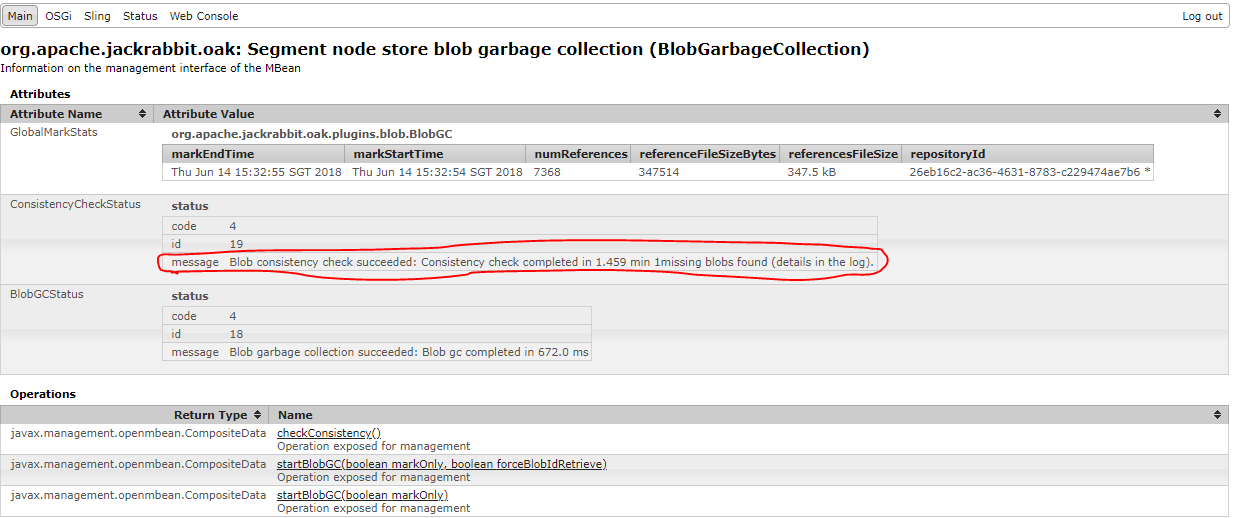
Statement: Online consistency check for BLOB GC
Solution:
Online Consistency Check:

Go to the JMX console: http://localhost:4502/system/comsole/jmx
Search for BLOBGarbagecollection and open it.
Click on checkConsistency() and click on invoke
Observe the log files for the GC observation


Post consistency check you might see Blob id's missing


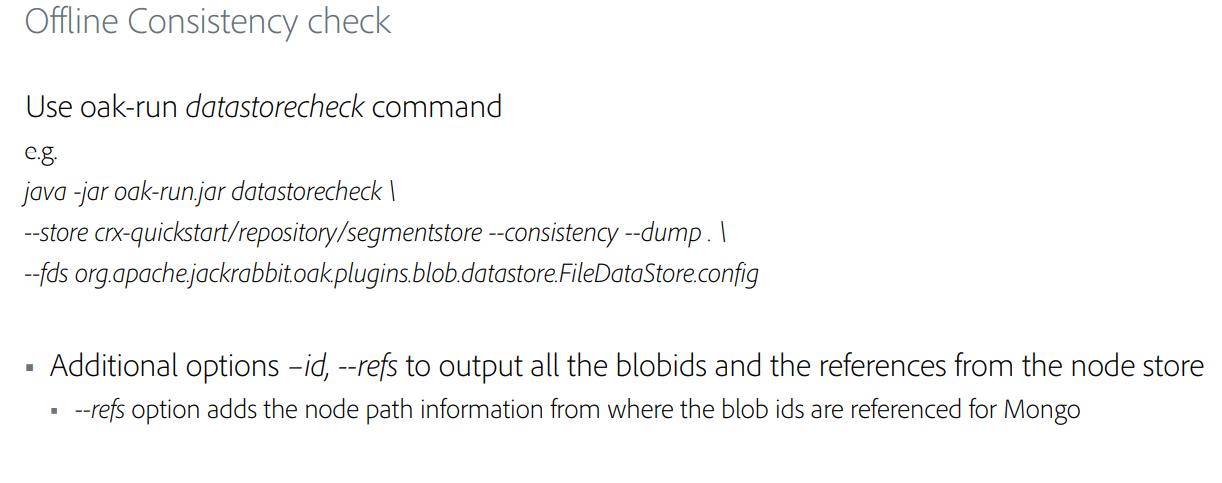
Check the log file for the missing Blob id and run the offline datastore check command to find the missing blob id

Offline Consistency Check:


By aem4beginner

RevisionGC through JMX console in AEM

Statement: StartRevsionGC
Solution:
Go to this URL: http://localhost:4502/system/console/jmx/org.apache.jackrabbit.oak%3Aname%3Drepository+manager%2Ctype%3DRepositoryManagement
Click on startRevision(), a window will open again click on invoke
As shown in the below screenshot


Status of all repository Managment


Different Types of Repository management operation

That's it!.


By aem4beginner

How to clear blocked queue or forced-to retry blocked queue in AEM through JMX console

Statement - How to clear and force retry blocked queue
Environment - AEM 6.3 GA

Solution:
Go to the Felix console URL: http://localhost:4502/system/console/jmx
Search for publish agent as shown in below screenshot

Open the Publish agent and you can validate whether the queue is blocked or not, If the queue is blocked, you can see the no of items blocked in the queue as per the screenshot.

you can see there are 4 items blocked in the queue, Click on the queueCLear() method --> Click on Invoke to clear the blocked queue and refresh the console post click on invoke as shown in below screenshot.


That's it!


By aem4beginner

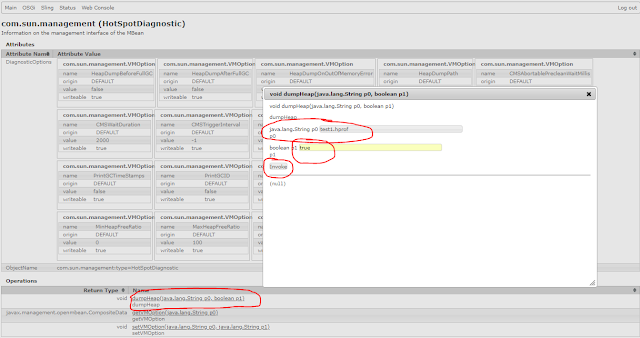
Heap Dump Generation in AEM through JMX console

Statement - Heap Dump generation
Environment - AEM 6.3 GA

Solution:
Go to the Felix console URL: http://localhost:4502/system/console/jmx/com.sun.management%3Atype%3DHotSpotDiagnostic

Search for the Operations -->click on the dumpHeap()


Check the test1.prof parallel to the crx-quickstart folder.

That's it!


By aem4beginner

How to find Popular and Slow Queries in AEM through JMX console

Statement - Popular and Slow Queries in AEM through JMX console
Environment - AEM 6.3 GA

Solution:
Go to the Felix console URL: http://localhost:4502/system/console/jmx/org.apache.jackrabbit.oak%3Aname%3DOak+Query+Statistics%2Ctype%3DQueryStat
You can observe the top 15 popular queries as shown in below screenshot.


Top 15 Slow Queries tweak slow queries/rewrite slow queries for better performance or create indexes for those slow queries.

Below is the screenshot to clear popular and slow queries, Click on each of the below Operation and click on invoke.


By aem4beginner

How to Check status of All Queues in AEM through JMX console

Statement - All Queues Status

Solution:

Status of All Queues:
Attributes
 
Attribute NameAttribute Value
NameAll Queues
StartDate2018-06-07T13:56:03+0800
LastActivatedJobDate2018-06-19T09:47:06+0800
LastFinishedJobDate2018-06-19T09:47:07+0800
StartTime1.5E+12
NumberOfJobs2
LastActivatedJobTime1.5E+12
NumberOfActiveJobs2
NumberOfCancelledJobs8
NumberOfFinishedJobs53
AverageWaitingTime1E+08
LastFinishedJobTime1.5E+12
NumberOfFailedJobs871
NumberOfProcessedJobs932
AverageProcessingTime3075922
NumberOfQueuedJobs0

Operations
 
Return TypeName
voidreset()
Operation exposed for management

Screenshot for Queue status:


By aem4beginner

April 10, 2020
Estimated Post Reading Time ~

Creating JMX MBeans in AEM

Java Management Extensions (JMX) is a Java technology that provides an architecture to manage resources dynamically at runtime. JMX is used mostly in enterprise applications to make the system configurable or to get the state of the application at any point in time. Those resources are represented by objects called MBeans (for Managed Bean).

In AEM also, sometimes we need to use this architecture to manage resources dynamically. Although AEM provides a rich set of out of the box MBeans, we also create our own MBeans as and when required.

In this post, we will be creating an MBean that will take a set of input parameters and return the status of all the bundles/services/components in the AEM instance in a JSON format.

Let us look at the steps of creating such an MBean.

Create an MBean

  • The first step is to create the layout of our MBean. By layout, I mean the input parameters that the MBean requires to function.
  • All the parameters are specified by the specified parameters. In our case, we need the server's hostname, port number and the entity which we want to examine (bundles/services/components).
  • Create an interface named SystemInfo and paste the following code in it
package org.redquark.demo.core.jmx;

import com.adobe.granite.jmx.annotation.Description;

/**
 * @author Anirudh Sharma
 * 
 * This interface exposes the input parameter for the MBean
 */
@Description("Input parameters for getting the System information")
public interface SystemInfo {

 @Description("Enter the protocol, hostname, and port of the server")
 String getBundles(String protocol, String hostName, String port);

 @Description("Enter the protocol, hostname, and port of the server")
 String getComponents(String protocol, String hostName, String port);

 @Description("Enter the protocol, hostname, and port of the server")
 String getServices(String protocol, String hostName, String port);
}
  • Here we have three methods that take host, port, and protocol and gives us the JSON response of the bundles, services, and components
  • Now let us create the implementation class of the SystemInfo interface and paste the following code in it
package org.redquark.demo.core.jmx;

import java.io.BufferedReader;
import java.io.IOException;
import java.io.InputStreamReader;
import java.net.URL;
import java.net.URLConnection;

import javax.management.DynamicMBean;
import javax.management.NotCompliantMBeanException;

import org.apache.commons.codec.binary.Base64;
import org.osgi.service.component.annotations.Component;
import org.redquark.demo.core.utils.Network;
import org.slf4j.Logger;
import org.slf4j.LoggerFactory;

import com.adobe.granite.jmx.annotation.AnnotatedStandardMBean;

/**
 * @author Anirudh Sharma
 * 
 * Implementation class for the MBean
 */
@Component(immediate = true, service = DynamicMBean.class, property = {
 "jmx.objectname = org.redquark.demo.core.jmx:type=System Info MBean"
})
public class SystemInfoImpl extends AnnotatedStandardMBean implements SystemInfo {

 /**
  * Logger
  */
 private static final Logger log = LoggerFactory.getLogger(SystemInfoImpl.class);

 /**
  * Parameters to read user input
  */

 public SystemInfoImpl() throws NotCompliantMBeanException {
  super(SystemInfo.class);
 }

 @Override
 public String getBundles(String protocol, String hostname, String port) {

  log.info("Logging the bundles in JSON");

  String url = protocol + "://" + hostname + ":" + port + "/system/console/bundles/.json";

  String result;

  if (protocol.equalsIgnoreCase("http")) {
   result = makeHttpCall(url);
  } else {
   result = Network.readJson(url);
  }
  return result;
 }

 @Override
 public String getComponents(String protocol, String hostname, String port) {

  log.info("Logging the components in JSON");

  String url = protocol + "://" + hostname + ":" + port + "/system/console/components/.json";

  String result;

  if (protocol.equalsIgnoreCase("http")) {
   result = makeHttpCall(url);
  } else {
   result = Network.readJson(url);
  }
  return result;
 }

 @Override
 public String getServices(String protocol, String hostname, String port) {

  log.info("Logging the services in JSON");

  String url = protocol + "://" + hostname + ":" + port + "/system/console/services/.json";

  String result;

  if (protocol.equalsIgnoreCase("http")) {
   result = makeHttpCall(url);
  } else {
   result = Network.readJson(url);
  }
  return result;
 }

 private String makeHttpCall(String requestURL) {

  URL url;
  try {
   url = new URL(requestURL);
   URLConnection uc;
   uc = url.openConnection();

   uc.setRequestProperty("X-Requested-With", "Curl");

   String userpass = "admin" + ":" + "admin";
   String basicAuth = "Basic " + new String(new Base64().encode(userpass.getBytes()));
   uc.setRequestProperty("Authorization", basicAuth);

   BufferedReader reader = new BufferedReader(new InputStreamReader(uc.getInputStream()));
   StringBuilder builder = new StringBuilder();
   String line = null;
   while ((line = reader.readLine()) != null) {
    builder.append(line);
    builder.append(System.getProperty("line.separator"));

   }
   String result = builder.toString();

   return result;

  } catch (IOException e) {
   e.printStackTrace();
  }

  return "";
 }
}
  • Here we are registering this class of service DynamicMBean which exposes a dynamic management interface. We are using property jmx.objectname which defines the name of our MBean. We are reading the passed parameters and creating an appropriate URL to get the JSON response.
  • Now deploy the code and navigate to http://<host>:<port>/system/console/jmx. There you will see all the registered MBean. Search for your MBean.
System Info MBean
  • Open the MBean, you will see three methods each for bundles, components, and services.
  • Open the getBundles() methods, and configure it. After clicking on invoke, you will see the JSON response returned.
JSON Response returned


By aem4beginner