Showing posts with label API. Show all posts

December 22, 2022
Estimated Post Reading Time ~

Learn For Free

Learn For Free

HTML → w3schools
CSS → FreeCodeCamp
Git / GitHub→ LearnGitBranching.js .org
Tailwind → Tailwindcss .com
Javascript → Javascript .info
React → React-tutorial .app
SQL → Sqlbolt
API → RapidAPI
React → Scrimba
Node → Youtube
UI/UX → Hackdesign


By aem4beginner

December 21, 2022
Estimated Post Reading Time ~

100+ FREE Public APIs for Developers

100+ FREE Public APIs for Developers

Categories are,

➊ Fake Data 
➋ Images 
➌ Sports 
➍ Weather 
➎ Foods & Recipes 
➏ Currency Exchange 
➐ Finance 
➑ Cryptocurrency 
➒ IP Geolocation 
➓ TimeZone 
➊➊ Dictionary 
➊➋ Jokes/Memes 
➊➌ Quotes 
➊➍ Audio/Movies/Comics 
➊➎ Google Services 
➊➏ Others

➊ Fake Data 
➀ Dummy API 
https://dummyapi.io 

➁ ReqRes 
https://reqres.in 

➂ RandomData API 
https://random-data-api.com 

➃ JSON Placeholder 
https://jsonplaceholder.typicode.com 

➄ Fake Store API 
https://fakestoreapi.com 

➅ Mocki 
https://mocki.io

➋ Images 
➀ Unsplash 
https://unsplash.com/developers 

➁ imgur 
https://apidocs.imgur.com 

➂ Pexels 
https://www.pexels.com/api/ 

➃ Figma 
https://www.figma.com/developers/api

➄ Flickr 
https://www.flickr.com/services/api/ 

➅ Getty Images 
API https://developers.gettyimages.com 

➆ Giphy 
https://developers.giphy.com/docs/sdk/

➌ Sports 
➀ API-Sports 
https://api-sports.io 

➁ Cricbuzz Cricket API 
https://rapidapi.com/cricketapilive/api/cricbuzz-cricket/ 

➂ LiveScore 
https://rapidapi. com/apidojo/api/livescore6/ 

➃ Cricket Live Data 
https://rapidapi.com/sportcontentapi/api/cricket-live-data/

➍ Weather 
➀ AccuWeather APIs 
https://developer.accuweather.com/apis 

➁ OpenWeather API 
https://openweathermap.org/api 

➂ Q Weather 
https://dev.qweather.com 

➃ Weather API 
https://www.weatherapi.com/ 

➄ IQ Air 
https://www.iqair.com/air-pollution-data-api

➎ Foods & Recipes 
➀ Edamam Food Database API 
https://developer.edamam.com/food-database-api 

➁ Edamam Recipe Search API 
https://developer.edamam.com/edamam-recipe-api 

➂ Edamam Nutrition Analysis API 
https://developer.edamam.com/edamam-nutrition-api

➃ TheMealDB 
https://www.themealdb.com/api.php 

➄ TheCocktailDB 
https://www.thecocktaildb.com/api.php 

➅ Tasty API 
https://rapidapi.com/apidojo/api/tasty/ 

➆ Yummly API 
https://rapidapi.com/apidojo/api/yummly2/

➇ Kroger Public APIs 
https://developer.kroger.com/ 

➈ Fruityvice 
https://www.fruityvice.com/ 

➉ Zestful Ingredient Parser API 
https://zestfuldata.com/

➏ Currency Exchange 
➀ ExchangeRate-API 
https://www.exchangerate-api.com/ 

➁ 1Forge Forex Quote API 
https://1forge.com/api 

➂ ExchangeRates 
https://exchangeratesapi.io/ 

➃ Forex Rates API 
https://exchangerate.host/ 

➄ Free Forex API 
https://freeforexapi.com/

➐ Finance 
➀ Polygon Stock API 
https://polygon.io/ 

➁ Finage 
https://finage.co.uk 

➂ Alphavantage
https://www.alphavantage.co 

➃ Finnhub 
https://finnhub.io/docs/api/ 

➄ Stock Data 
https://www.stockdata.org/

➅ YH Finance 
https://www.yahoofinanceapi. com/

➑ Cryptocurrency
➀ Coin MarketCap 
https://coinmarketcap.com/api/ 

➁ CoinGecko 
https://www.coingecko.com/en/api 

➂ Coin API 
https://www.coinapi. io 

➃ Nomics 
https://nomics. com/docs/

➒ IP Geolocation 
➀ IP Info 
https://ipinfo.io/ 

➁ IP Fast 
https://ip-fast.com/ 

➂ IPfind 
https://ipfind.io/ 

➃ IPify 
https://www.ipify.org/ 

➄ IP Base 
https://ipbase.com/ 

➅ IP2Location 
https://www.ip2location.com/

➓ TimeZone 
➀ Google TimeZone API 
https://developers.google.com/maps/documentation/timezone/get-started 

➁ TimeZone DB 
https://timezonedb.com/api 

➂ Time API 
https://timeapi.io

➊➊ Dictionary 
➀ Oxford Dictionaries API 
https://developer.oxforddictionaries.com/ 

➁ Merriam-Webster Dictionary API 
https://dictionaryapi.com/ 

➂ Synonyms API 
https://www.synonyms. com/synonyms_api.php 

➃ Wiktionary Media Wiki API 
https://en.wiktionary. org/w/api.php

➄ Words API 
https://www.wordsapi.com/ 

➅ Wordnik API 
https://developer.wordnik.com/ 

➆ Free Dictionary API 
https://dictionaryapi.dev/

➊➋ Jokes/Memes 
➀ Imgflip API 
https://imgflip.com/api 

➁ Chuck Norris Jokes 
https://api.chucknorris.io/ 

➂ Random Useless Fact 
https://uselessfacts.jsph.pl/ 

➃ Tech Savvy Phrases 
https://techy-api.vercel.app/

➊➌ Quotes 
➀ Quotes API 
https://www.quotes.net/quotes_api.php 

➁ Theysaidso Quotes API 
https://theysaidso.com/api/ 

➂ Quote Garden 
https://pprathameshmore.github.io/QuoteGarden/ 

➃ Programming Quotes 
https://github.com/skolakoda/programming-quotes-api

➄ Random Quotes 
https://github. com/lukePeavey/quotable 

➅ Stoicism Quotes 
https://github.com/tlcheah2/stoic-quote-lambda-public-api 

➆ Quotes on Design 
https://quotesondesign. com/api/

➊➍ Audio/Movies/Comics 
➀ The AudioDB 
https://www.theaudiodb.com/api_guide.php 

➁ The Movie DB 
https://www.themoviedb. org/documentation/api 

➂ Disney API 
https://disneyapi.dev/ 

➃ IGDB 
https://api-docs.igdb.com/

➊➎ Google Services 
➀ Search 
➁ Translate 
➂ Analytics 
➃ Books 
➄ Calendar 
➅ Docs 
➆ Sheets 
➇ Slides 
➈ Keep ➉ Fonts 
➀➀ Maps ➀➁ Photos

➊➏ Others 
➀ Twitter 
➁ GitHub 
➂ GitLab 
➃ StackExchange 
➄ ClickUp 
➅ Notion 
➆ Eventbrite 
➇ Tiktok 
➈ Tomtom 
➉ NASA

Final Words 
⬘ APIs help us save a lot of time. The good thing is many APIs provide a FREE tier. 
⬗ Integrate with these APIs to learn and build innovative applications. 
⬙ Previously I shared a list of 75+ APIs. This is an extension of that.


By aem4beginner

March 30, 2021
Estimated Post Reading Time ~

Create a group and user using the Jackrabbit API

I was looking for a concise way to work with users and groups in Sling. Because "everything is content," it's easy to use Sling's REST API to create a user like any other node, but things get a little dicey when you want a bit more flexibility. Enter the Jackrabbit API...

private void createAuthorGroupAndUser(ResourceResolver resolver) {

  try {

    Session session = resolver.adaptTo(Session.class);

    if (session != null && session instanceof JackrabbitSession) {

      // Get our User Manager

      UserManager userManager = ((JackrabbitSession) session).getUserManager();

      ValueFactory valueFactory = session.getValueFactory();

      // Create the Authors group if it doesn't exist already.

      Authorizable authors = userManager.getAuthorizable("authors");

      if (authors == null) {

        authors = userManager.createGroup("authors");

        authors.setProperty("displayName", valueFactory.createValue("Authors"));

      }

      // Create the default author if it doesn't already exist.

      Authorizable author = userManager.getAuthorizable("author");

      if(author == null) {

        author = userManager.createUser("author", "letMeIn");

        author.setProperty("displayName", valueFactory.createValue("Default Author"));

      }

      // Add author member to authors group

      ((Group) authors).addMember(author);

      // Save our session

      session.save();

    }

  } catch (RepositoryException e) {

      LOGGER.error("Could not get the session", e);

  }

}

More Reading

Jackrabbit Wiki - User Management
Jackrabbit API - org.apache.jackrabbit.api.security.user


By aem4beginner

December 10, 2020
Estimated Post Reading Time ~

AEM – Fetch product info via API

Here is a code snippet that can be used to fetch AEM’s product information via APIs.

import org.apache.felix.scr.annotations.Activate;
import org.apache.felix.scr.annotations.Component;
import org.apache.felix.scr.annotations.Modified;
import org.apache.felix.scr.annotations.Reference;
import org.apache.felix.scr.annotations.Service;
import org.osgi.service.component.ComponentContext;
import org.slf4j.Logger;
import org.slf4j.LoggerFactory;

import com.adobe.granite.license.ProductInfo;
import com.adobe.granite.license.ProductInfoProvider;

@Component(immediate = true)
@Service(ProductInfoImpl.class)
public class ProductInfoImpl {
private static final Logger LOG = LoggerFactory.getLogger(ProductInfoImpl.class);

@Reference
private ProductInfoProvider piProvider;

@Activate
@Modified
protected void activate(ComponentContext cc) {
if (piProvider != null) {
ProductInfo pi = piProvider.getProductInfo();

//Logging product information
LOG.info("Product name: " + pi.getName());
LOG.info("Product short name: " + pi.getShortName());
LOG.info("Product version: " + pi.getVersion());
LOG.info("Product short version: " + pi.getShortVersion());
}
}
}

Information printed in logs:
Product name: Adobe Experience Manager
Product short name: AEM
Product version: 6.3.0
Product short version: 6.3


By aem4beginner

October 13, 2020
Estimated Post Reading Time ~

COVID-19 Tracker using API calls in India - AEM 6.5.5

In this article, we will see how we can implement a COVID-19 Tracker in AEM Server. I have used the open-source Postman API’s to get the latest State and District wise data.

I have used the below APIs to get the data related to COVID-19 in India
1. State & District wise API to get the data based on State and District.
2. Raw data of Infected people to get details of each and every person got infected due to COVID-19
3. Total State wise Data to get the increase in the cases every day and tested people report in India.

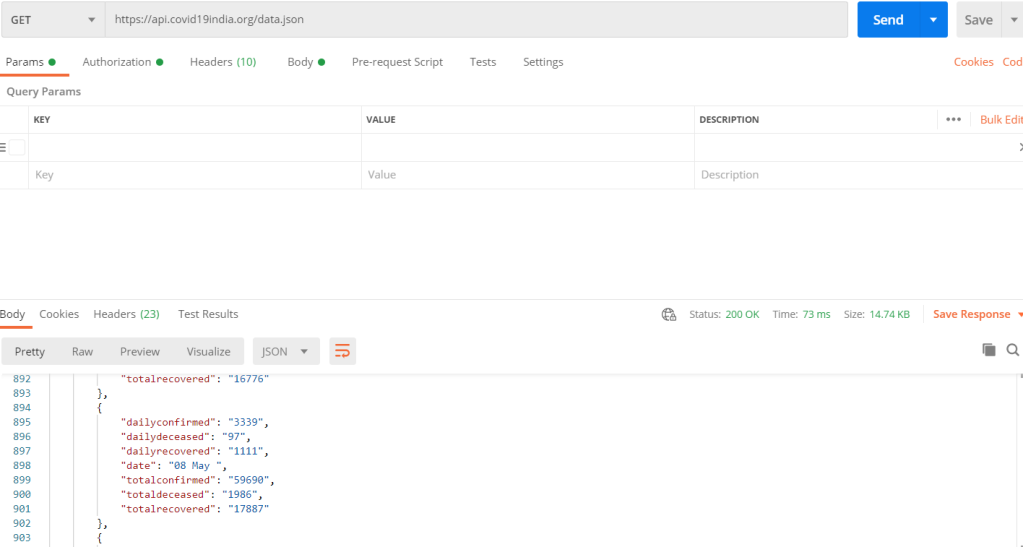
To get the response of one of the API is have used Postman to study and analyze the data and filter out what is required.

API response for Chandigarh using API 1

Data of infected people in India using API 2


Daily cases count response using API 3
This API can be handled in AEM servlet or Java class to get the response in AEM and filter out the data which is required for the implementation to create a dashboard in AEM pages.

I have used the below code snippet to get the response in form of JSON and later fetched the data which was required to be displayed on the dashboard.

HashMap < String, Object > serviceParam = new HashMap < > ();
serviceParam.put(ResourceResolverFactory.SUBSERVICE, "writeSystemUser");

try (CloseableHttpClient httpClient = HttpClients.createDefault(); ResourceResolver resolver = resolverFactory.getServiceResourceResolver(serviceParam)) {

HttpGet getRequest = new HttpGet("https://api.covid19india.org/state_district_wise.json");

/* Headers can be added if accessing other available APIs */

HttpResponse httpResponse = httpClient.execute(getRequest);
} catch {}
We can also implement rapid-api to get more filtered data based on different query parameters. In this API we need to pass some Header parameters like x-rapidapi-host and x-rapidapi-key.

Source: https://aemsimplifiedbynikhil.wordpress.com/2020/08/16/covid-19-tracker-using-api-calls-in-india-aem-6-5-5/


By aem4beginner

May 27, 2020
Estimated Post Reading Time ~

ExtJS /CQ Widget API Tips

How to get the component node path dialog listeners like beforeshow, afterrender ....etc
 beforeshow : function(compDialog){
  console.log(compDialog.path);//currentNode.getPath();
 }

How to do get an AJAX call for no-cache
 var curNodeRes =  CQ.Util.eval( CQ.HTTP.noCaching(compDialog.path+".json") );  // gives json of component node/currentNode

How to get the dialog fields in listeners
  1) by using the name
   selectionchanged : function(el,val,check){
           var dialog = el.findParentByType('dialog');//gives dialog
           var field = dialog.getField('./fieldNameGivenInDialog')
          }
  2) by using id -- if the item has an id
   selectionchanged : function(el,val,check){
           var field = CQ.Ext.getCmp('id-given-for-field');
          }


By aem4beginner

May 20, 2020
Estimated Post Reading Time ~

Expose API on a CQ Author Node

In CQ, let's say we want to expose some sort of REST API for our internal clients, but don't want these API's accessible by the public. For example, say we'd like the said JSP to be available internally (inside the firewall), and to be invoked via the web. The API's responsibility is to clear Dispatcher cache via curl command behind the scene.

Approach
Make the service API available on the Author node (not the Publish node). If your Author node resides inside a firewall, then only internal clients have access to. Instead of coding SlingServlet (see references) in CQ, we can choose to code JSP and have it been accessed through the standard sling URL decomposition. Sling then looks for a special property on that node named "sling:resourceType", then Sling will look under /apps (then /lib) to find a script according to the value of "sling:resouorceType".

Without writing a SlingServlet, we can simply code a JSP file using CRXDE Lite, and have the java code on the JSP page to be invoked. The example is to have a JSP to be invoked from the web. Its responsibility is to clear Dispatcher cache via curl command behind the scene. To invoke the JSP deployed on the Author node: 

http://localhost:4502/apps/company/tools/dispatcher/invalidate?url=http://dictionary.company.com/definition/master-validity.html

However, for accessibility on Author node, you must remember to poke a hole on the Author node so accessing the above said API (JSP) won't require username and password credential. Also, for security concern, remember not to replicate such .jsp node to your Publish node unless it's necessary.

To poke a hole, you need:
to give read access to 'everyone' group for accessing the node that you have the jsp code, and

to give read access to 'everyone' group for accessing any other node(s) that you referenced by the jsp code, and
config 'Apache Sling Authentication Service' so that access to the jsp node won't trigger authentication.
Give read access to 'everyone' group for the JSP node and other nodes:
http://localhost:4502/useradmin

search for 'everyone'
double-click on 'everyone' group
click on 'permissions' tab of 'everyone' group
navigate to the folder(s) and check 'read'

save
Config 'Apache Sling Authentication Service' so that access to the node won't trigger authentication:
http://localhost:4502/system/console/configMgr

Find and click on 'Apache Sling Authentication Service'

In 'Authentication Requirements' field, add '-' followed by the relative path you'd like authentication be disabled for. e.g. '-/apps/tools/dispatcher/invalidate'

Save

References
Configuring Anonymous access for Sling Servlet
CQ Tips and Tricks #1 – How to define a SlingServlet [CQ5.5-5.6]
How to write a custom SlingServlet


By aem4beginner

May 13, 2020
Estimated Post Reading Time ~

Low-Level APIs Considered Harmful in AEM

For my latest project, we’ve instituted a process where-by every single commit gets code reviewed by at least one other person, and usually by 2 or more people. It’s a process I really enjoy and think has led to exponential gains in code quality. At some point, I’ll probably post more info on the tools we use to facilitate this process and how it works. It’s nothing groundbreaking or revolutionary, but it’s interesting nonetheless. That’s a post for another day.
However, in the course of doing said code reviews, I’ve found myself frequently commenting on my preference for higher-level APIs over their lower-level equivalents. This has drawn some confusion at times, so I thought I would explain that stance, and why I believe it is, in general, the right approach.
When developing for CQ, there is almost always more than one way to solve a given problem, and oftentimes 3 or 4 ways. Partly, this is due to the fact that the platform is built on top of a cascading series of frameworks, each with their own API operating at a given level of abstraction.
Just as a quick example, If I need to manipulate a page’s content I could:
  • use the Page Manager to retrieve the Page, then get the content Resource from there
  • use the Sling Resource Resolver, to grab the content Resource I need directly
  • use a JCR Session to retrieve the Node I need to manipulate
Quite obviously, these layers of abstraction leak to some extent. Even in the simple example above, the first case using the CQ Page Manager API directly involves the Sling Resource API to make any actual updates. Given these leaks, you need to understand those abstractions, and what is happening at each layer of abstraction to effectively work within the platform, so why prefer the higher level approach?
To answer that question, let’s compare 2 code snippets, which accomplish the relatively simple task described above. The first one, using the low lever JCR API and the second one using the higher level CQ and Sling APIs.

private void updatePageLastModified(String pagePath, Session jcrSession) {
    Node pageNode = jcrSession.getNode(pagePath);
    Node contentNode = pageNode.getNode("jcr:content"); 

    if(!contentNode.hasProperty("customUpdateDate")) {
        contentNode.setProperty("customUpdateDate", java.util.Calendar.getInstance());
        jcrSession.save();
    } else {
        Property dateProp = contentNode.getProperty("customUpdateDate");
        java.util.Calendar curDate = dateProp.getDate();
        log.debug("update date already set to {}", curDate);
    }

}

private void updatePageLastModified(String pagePath, ResourceResolver resourceResolver) {
    PageManager pm = resourceResolver.adaptTo(PageManager.class);

    Page myPage = pm.getPage(pagePath);
    Resource cntRes = myPage.getContentResource();

    ModifiableValueMap mvm = cntRes.adaptTo(ModifiableValueMap.class);
    java.util.Calendar curDate = mvm.get("customUpdateDate", java.util.Calendar.class);
    if(curDate!=null) {
        mvm.put("customUpdateDate", java.util.Calendar.getInstance()); 
        resourceResolver.commit();
    } else {
        log.debug("update date already set to {}", curDate);
    } 

}

Both sets of codes are about the same length (in fact, in this instance the low-level approach is slightly fewer lines of code, but that’s due to having to initialize the PageManager from the ResourceResolver). But take a close look at how you check for the existence of the custom date property. Using the Sling ValueMap API, just get the property and if it’s not there, deal with the null case. Using the JCR API, you need an explicit check for the property’s existence before you can get its value and use it. If you call getProperty and the property wasn’t there, an exception would be raised. By using the higher-level API, there is no need to worry about handling this exception case. Basically, the abstraction makes it easier to accomplish the task at hand, which is the whole purpose of abstraction in general. You can focus on structuring the code in a way to make it easy to test, on making sure the algorithm does what it needs to do in a consistent way and handles any edge-cases. Put another way, you can focus your time and effort on your job without worrying about the lowest level semantics of the repository persistence layer.
Additionally, compare lines 3 and 5, where you get the content node/resource from the page. The difference here is small, but in my mind important. By hard coding the “jcr:content” node name, the code is locked into a given representation format for that data. In this simple case, you could work around that by using a constant and move on with life. But especially in more complex situations, having code tied to given storage representation makes the code less flexible. It means that if the format ever changes, there will be a huge and expensive effort to refactor and make things with the new format.
Having just said all of that, there are obviously cases where using the low-level JCR API is appropriate. It’s important to have all the tools in your toolbox, and know when and how to use each of them. In general though, given the choice of 2 tools to accomplish the same task, I’m going to use the one that’s easiest to use and creates the least amount of mess.


By aem4beginner

April 22, 2020
Estimated Post Reading Time ~

How to check which all API's will be Unavailable during the AEM upgrade

Statement: Detects all the package imports that will be unsatisfied when upgrading to a specified AEM version.

Solution:
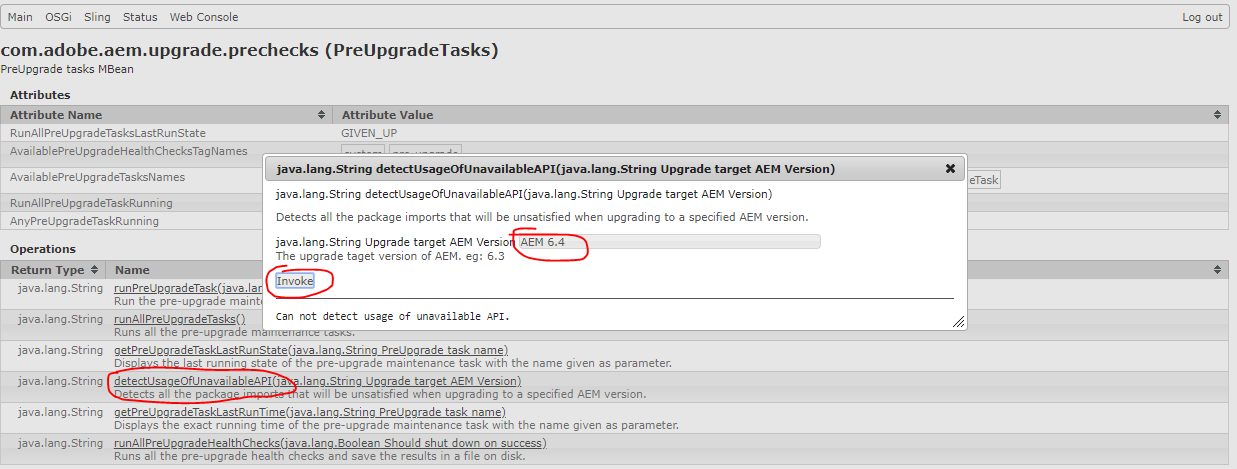
Go to this URL: 
http://localhost:4502/system/console/jmx/com.adobe.aem.upgrade.prechecks%3Atype%3DPreUpgradeTasks
Click on detectUsageOfUnavailableAPI() method
Key in the Version of AEM planning to upgrade ex. AEM 6.4
Click on Invoke as shown in below screenshot.

It will show the list of API will be unavailable for higher version upgrade


By aem4beginner

April 14, 2020
Estimated Post Reading Time ~

Creating Adobe Experience Manager Packages using a Java API

You can dynamically create an Adobe Experience Manager package by using a Java API. That is, you can create an OSGi bundle that contains code that builds an AEM package. Building a package using code lets build a package without having an AEM administrator build a package manually, For example, some use cases are to build packages every week automatically. Using the Java API, you can perform this use case, as shown in the following illustration.


This AEM client invokes a sling servlet that dynamically builds an AEM package. 


By aem4beginner

April 13, 2020
Estimated Post Reading Time ~

Querying Adobe Experience Manager Data using the JCR API

You can create an Adobe Experience Manager (AEM) application that queries data located in the AEM Java Content Repository (JCR). To query data, you use a javax.jcr.query.Query instance that belongs to the JCR Query API. This API supports both searching and querying operations. For example, assume that your AEM application tracks your organization’s customers. You can query the JCR to obtain a customer result set in which a digital marketer is interested.

The following illustration shows customer data displayed within an AEM application.


This data is retrieved from the AEM JCR and displayed within a data grid control located on a client web page. The JCR Query API is used within an OSGi bundle that returns a result set to the client. This development article guides you through creating an AEM application that queries data from the JCR and displays the data on client web page. To view this development article, click here:
http://helpx.adobe.com/experience-manager/using/querying-experience-manager-data-using1.html.

NOTE: Be sure to read this article for more information about querying data using the JCR API: http://docs.jboss.org/exojcr/1.12.13-GA/developer/en-US/html/ch-jcr-query-usecases.html#d0e3517


By aem4beginner

Retrieving Adobe Experience Manager ContextHub information using the ContextHub API

Adobe Experience Manager exposes a Java API named the ContextHub API that lets you programmatically obtain information about the Experience Manager ContextHub. The Experience Manager ContextHub contains data that displays information about users, known as context data. For more information about the Experience Manager ContextHub, including ContextHub stores, see Adding ContextHub to Pages and Accessing Stores.

For example, you can create a custom Experience Manager service that logs information about the ContextHub, as shown below.

9.01.2017 12:43:38.886 *INFO* [OsgiInstallerImpl] com.community.aem.core.ContextHubServiceImpl Size of stores list :14
19.01.2017 12:43:38.886 *INFO* [OsgiInstallerImpl] com.community.aem.core.ContextHubServiceImpl ---------Store----------
19.01.2017 12:43:38.886 *INFO* [OsgiInstallerImpl] com.community.aem.core.ContextHubServiceImpl contexthub.geolocation
19.01.2017 12:43:38.886 *INFO* [OsgiInstallerImpl] com.community.aem.core.ContextHubServiceImpl contexthub.surferinfo
19.01.2017 12:43:38.886 *INFO* [OsgiInstallerImpl] com.community.aem.core.ContextHubServiceImpl granite.profile
19.01.2017 12:43:38.887 *INFO* [OsgiInstallerImpl] com.community.aem.core.ContextHubServiceImpl granite.emulators
19.01.2017 12:43:38.887 *INFO* [OsgiInstallerImpl] com.community.aem.core.ContextHubServiceImpl aem.analyticsdata
19.01.2017 12:43:38.887 *INFO* [OsgiInstallerImpl] com.community.aem.core.ContextHubServiceImpl aem.pagedata
19.01.2017 12:43:38.887 *INFO* [OsgiInstallerImpl] com.community.aem.core.ContextHubServiceImpl aem.segmentation

To read this development article, click Retrieving Adobe Experience Manager ContextHub information using the ContextHub API.


By aem4beginner

April 10, 2020
Estimated Post Reading Time ~

Replication API in action

Replication is an important concept in AEM as it enables an enterprise to author the content in the Author AEM instance and after it is final replicate to the Publish instance which is visible to the end-users of the website.

AEM provides a rich Replication API which replicates the content from AEM Author to the AEM Publish instance. Though AEM provides out of the box Replication agents which are super easy to configure and provides much abstraction for the replication process, sometimes we are required to achieve this functionality programmatically such as when asset metadata is changed, or a page is versioned any many other cases.

In this post, we will see how can we replicate content programmatically. For this, we will be creating a Sling Servlet (how? see here) and passing the content path which we want to replicate as a query parameter. So without wasting much time, let's get our hands dirty with some code.

Replication by code

For using the Replication API, we will be using an API com.day.cq.replication.Replicator to replicate the content. 
  • Create a class named ReplicationServlet and paste the following code in it.
package org.redquark.demo.core.servlets;

import java.util.LinkedHashSet;
import java.util.Map;
import java.util.Set;

import javax.jcr.Node;
import javax.jcr.Session;
import javax.servlet.Servlet;

import org.apache.sling.api.SlingHttpServletRequest;
import org.apache.sling.api.SlingHttpServletResponse;
import org.apache.sling.api.resource.Resource;
import org.apache.sling.api.resource.ResourceResolver;
import org.apache.sling.api.servlets.HttpConstants;
import org.apache.sling.api.servlets.SlingSafeMethodsServlet;
import org.osgi.framework.Constants;
import org.osgi.service.component.annotations.Component;
import org.osgi.service.component.annotations.Reference;
import org.slf4j.Logger;
import org.slf4j.LoggerFactory;

import com.day.cq.dam.api.Asset;
import com.day.cq.dam.api.DamConstants;
import com.day.cq.dam.commons.util.AssetReferenceSearch;
import com.day.cq.replication.ReplicationActionType;
import com.day.cq.replication.ReplicationException;
import com.day.cq.replication.Replicator;
import com.day.cq.wcm.api.Page;
import com.day.cq.wcm.api.PageManager;

/**
 * @author Anirudh Sharma
 *
 */
@Component(service = Servlet.class, property = {
 Constants.SERVICE_DESCRIPTION + "= Servlet to replicate the passed contents",
 "sling.servlet.methods=" + HttpConstants.METHOD_GET,
 "sling.servlet.paths=" + "/bin/demo/replication"
})
public class ReplicationServlet extends SlingSafeMethodsServlet {

 /**
  * Generated serialVersionUID
  */
 private static final long serialVersionUID = 1860103923125331408 L;

 /**
  * Logger
  */
 private static final Logger log = LoggerFactory.getLogger(ReplicationServlet.class);

 @Reference
 private Replicator replicator;

 @Override
 protected void doGet(SlingHttpServletRequest request, SlingHttpServletResponse response) {

  log.info("----------< Processing starts >----------");

  try {

   String path = request.getParameter("contentPath");

   ResourceResolver resolver = request.getResourceResolver();

   Session session = resolver.adaptTo(Session.class);

   replicateContent(session, path);

   activatePageAssets(resolver, path);

   log.info("----------< Processing ends >----------");

   response.getWriter().println("Replicated content");

  } catch (Exception e) {

   log.error(e.getMessage(), e);
  }
 }

 private void activatePageAssets(ResourceResolver resolver, String path) {

  Set < String > pageAssetPaths = getPageAssetsPaths(resolver, path);

  if (pageAssetPaths == null) {

   return;
  }

  Session session = resolver.adaptTo(Session.class);

  for (String assetPath: pageAssetPaths) {
   replicateContent(session, assetPath);
  }
 }

 private Set < String > getPageAssetsPaths(ResourceResolver resolver, String pagePath) {

  PageManager pageManager = resolver.adaptTo(PageManager.class);

  Page page = pageManager.getPage(pagePath);

  if (page == null) {
   return new LinkedHashSet < > ();
  }

  Resource resource = page.getContentResource();
  AssetReferenceSearch assetReferenceSearch = new AssetReferenceSearch(resource.adaptTo(Node.class),
   DamConstants.MOUNTPOINT_ASSETS, resolver);
  Map < String, Asset > assetMap = assetReferenceSearch.search();

  return assetMap.keySet();
 }

 private void replicateContent(Session session, String path) {

  try {
   replicator.replicate(session, ReplicationActionType.ACTIVATE, path);
   log.info("Replicated: {}", path);
  } catch (ReplicationException e) {
   log.error(e.getMessage(), e);
   e.printStackTrace();
  }
 }

}
  • First, we are getting the path of the path to be replicated as a request parameter.
  • All we need to do is to define a field of the type com.day.cq.replication.Replicator, let OSGi injects the reference to the Replicator service.
  • The code is pretty simple as we are calling the replicate(Session session, ReplicationActionType type, String path) to replicate the content to the publish instance.
  • But wait a minute? What about the assets that are referenced on the page? How do we replicate them? We have an awesome class com.day.cq.dam.commons.util.AssetReferenceSearch will get the reference of the Assets and replicate them as well. Pretty cool stuff, eh?.
  • We pass page paths and assets paths and they are replicated one by one.
  • After deploying the code, go to the browser and hit http://<host>:<port>/bin/demo/replication?contentPath=/content/we-retail/language-masters/en/user and see the content on the publish.
  • The logs will look like this - 
2018-10-19 22:34:10 - INFO - publish : Creating content for path /content/we-retail/language-masters/en/user
2018-10-19 22:34:11 - INFO - publish : Creating content for path /content/dam/we-retail/en/experiences/arctic-surfing-in-lofoten/northern-lights.jpg
2018-10-19 22:34:11 - INFO - publish : Sending POST request to http://localhost:4503/bin/receive?sling:authRequestLogin=1
2018-10-19 22:34:11 - INFO - publish : sent. Response: 200 OK
2018-10-19 22:34:11 - INFO - publish : ------------------------------------------------
2018-10-19 22:34:11 - INFO - publish : Sending message to localhost:4503
2018-10-19 22:34:11 - INFO - publish : >> POST /bin/receive HTTP/1.0
2018-10-19 22:34:11 - INFO - publish : >> Action: Activate
2018-10-19 22:34:11 - INFO - publish : >> Path: /content/we-retail/language-masters/en/user
2018-10-19 22:34:11 - INFO - publish : >> Handle: /content/we-retail/language-masters/en/user
2018-10-19 22:34:11 - INFO - publish : >> Referer: about:blank
2018-10-19 22:34:11 - INFO - publish : >> ...spooling 2606 bytes...
2018-10-19 22:34:11 - INFO - publish : --
2018-10-19 22:34:11 - INFO - publish : << HTTP/1.1 200 OK
2018-10-19 22:34:11 - INFO - publish : << Date: Fri, 19 Oct 2018 17:04:11 GMT
2018-10-19 22:34:11 - INFO - publish : << X-Content-Type-Options: nosniff
2018-10-19 22:34:11 - INFO - publish : << Content-Type: text/plain;charset=utf-8
2018-10-19 22:34:11 - INFO - publish : << Content-Length: 30
2018-10-19 22:34:11 - INFO - publish : << 
2018-10-19 22:34:11 - INFO - publish : << ReplicationAction ACTIVATE ok.
2018-10-19 22:34:11 - INFO - publish : Message sent.
2018-10-19 22:34:11 - INFO - publish : ------------------------------------------------
2018-10-19 22:34:11 - INFO - publish : Replication (ACTIVATE) of /content/we-retail/language-masters/en/user successful.
2018-10-19 22:34:11 - INFO - publish : Sending POST request to http://localhost:4503/bin/receive?sling:authRequestLogin=1
2018-10-19 22:34:11 - INFO - publish : sent. Response: 200 OK
2018-10-19 22:34:11 - INFO - publish : ------------------------------------------------
2018-10-19 22:34:11 - INFO - publish : Sending message to localhost:4503
2018-10-19 22:34:11 - INFO - publish : >> POST /bin/receive HTTP/1.0
2018-10-19 22:34:11 - INFO - publish : >> Action: Activate
2018-10-19 22:34:11 - INFO - publish : >> Path: /content/dam/we-retail/en/experiences/arctic-surfing-in-lofoten/northern-lights.jpg
2018-10-19 22:34:11 - INFO - publish : >> Handle: /content/dam/we-retail/en/experiences/arctic-surfing-in-lofoten/northern-lights.jpg
2018-10-19 22:34:11 - INFO - publish : >> Referer: about:blank
2018-10-19 22:34:11 - INFO - publish : >> ...spooling 568041 bytes...
2018-10-19 22:34:11 - INFO - publish : --
2018-10-19 22:34:11 - INFO - publish : << HTTP/1.1 200 OK
2018-10-19 22:34:11 - INFO - publish : << Date: Fri, 19 Oct 2018 17:04:11 GMT
2018-10-19 22:34:11 - INFO - publish : << X-Content-Type-Options: nosniff
2018-10-19 22:34:11 - INFO - publish : << Content-Type: text/plain;charset=utf-8
2018-10-19 22:34:11 - INFO - publish : << Content-Length: 30
2018-10-19 22:34:11 - INFO - publish : << 
2018-10-19 22:34:11 - INFO - publish : << ReplicationAction ACTIVATE ok.
2018-10-19 22:34:11 - INFO - publish : Message sent.
2018-10-19 22:34:11 - INFO - publish : ------------------------------------------------
2018-10-19 22:34:11 - INFO - publish : Replication (ACTIVATE) of /content/dam/we-retail/en/experiences/arctic-surfing-in-lofoten/northern-lights.jpg successful.


By aem4beginner

Working with Query Builder API

Search functionality is the backbone of almost all the enterprise web applications and AEM is no exception. AEM provides the QueryBuilder API to perform search operations in the JCR. Query Builder works in the following way 
  • Queries are converted into XPath by the Query Engine. There they are again converted into JCR SQL2.
  • JCR SQL2 query is executed by the Oak Engine.
  • Appropriate Oak Index will be picked up by the query. A query for which the index is not found becomes the traversal queries (traverses the whole repository) which should be avoided by creating an appropriate index.
  • Query Builder does not have its own index. It uses the Oak index.

Query Builder

A query builder accepts a query description (in the form of predicates), creates the query and searches the JCR based on the predicates passed. Without further ado, let's see the code. 
Here we are creating the Sling Servlet that will use the Query Builder to search all the assets under /content/dam matching to the search term passed.
  • Create a class named QueryBuilderServlet and paste the following code in it.
package org.redquark.demo.core.servlets;

import java.util.HashMap;
import java.util.Map;

import javax.jcr.Session;
import javax.servlet.Servlet;

import org.apache.sling.api.SlingHttpServletRequest;
import org.apache.sling.api.SlingHttpServletResponse;
import org.apache.sling.api.resource.ResourceResolver;
import org.apache.sling.api.servlets.HttpConstants;
import org.apache.sling.api.servlets.SlingSafeMethodsServlet;
import org.osgi.framework.Constants;
import org.osgi.service.component.annotations.Component;
import org.osgi.service.component.annotations.Reference;
import org.slf4j.Logger;
import org.slf4j.LoggerFactory;

import com.day.cq.search.PredicateGroup;
import com.day.cq.search.Query;
import com.day.cq.search.QueryBuilder;
import com.day.cq.search.result.Hit;
import com.day.cq.search.result.SearchResult;

/**
 * @author Anirudh Sharma
 * 
 * This servlet uses the QueryBuilder API to fetch the results from the JCR
 */
@Component(service = Servlet.class, property = {
 Constants.SERVICE_DESCRIPTION + "=Query Builder servlet",
 "sling.servlet.methods=" + HttpConstants.METHOD_GET,
 "sling.servlet.paths=" + "/bin/demo/querybuilder"
})
public class QueryBuilderServlet extends SlingSafeMethodsServlet {

 /**
  * Generated serialVersionUID
  */
 private static final long serialVersionUID = 2610051404257637265 L;

 /**
  * Logger
  */
 private static final Logger log = LoggerFactory.getLogger(QueryBuilderServlet.class);

 /**
  * Injecting the QueryBuilder dependency
  */
 @Reference
 private QueryBuilder builder;

 /**
  * Session object
  */
 private Session session;

 /**
  * Overridden doGet() method which executes on HTTP GET request
  */
 @Override
 protected void doGet(SlingHttpServletRequest request, SlingHttpServletResponse response) {

  try {

   log.info("----------< Executing Query Builder Servlet >----------");

   /**
    * This parameter is passed in the HTTP call
    */
   String param = request.getParameter("param");

   log.info("Search term is: {}", param);

   /**
    * Get resource resolver instance
    */
   ResourceResolver resourceResolver = request.getResourceResolver();

   /**
    * Adapting the resource resolver to the session object
    */
   session = resourceResolver.adaptTo(Session.class);

   /**
    * Map for the predicates
    */
   Map < String, String > predicate = new HashMap < > ();

   /**
    * Configuring the Map for the predicate
    */
   predicate.put("path", "/content/dam");
   predicate.put("type", "dam:Asset");
   predicate.put("group.p.or", "true");
   predicate.put("group.1_fulltext", param);
   predicate.put("group.1_fulltext.relPath", "jcr:content");

   /**
    * Creating the Query instance
    */
   Query query = builder.createQuery(PredicateGroup.create(predicate), session);

   query.setStart(0);
   query.setHitsPerPage(20);

   /**
    * Getting the search results
    */
   SearchResult searchResult = query.getResult();

   for (Hit hit: searchResult.getHits()) {

    String path = hit.getPath();

    response.getWriter().println(path);
   }
  } catch (Exception e) {

   log.error(e.getMessage(), e);
  } finally {

   if (session != null) {

    session.logout();
   }
  }
 }

}
  • Here, we are reading the query parameter param and based on this query parameter we will search the JCR in the path /content/dam
  • We are searching only the assets, which is defined by the property type=dam:Asset 
  • Now we are creating the Query object using the predicate map and the session object.
  • At last, we are getting the SearchResult from the query builder and then using the Hit object, we are getting the path of each result.
  • Deploy the code and executing the servlet by hitting the request - http://<host>:<port>/bin/demo/querybuilder?param=we.retail
  • You will get the following the result set on the browser window
1. /content/dam/we-retail-screens/we-retail-instore-logo.png
2. /content/dam/projects/we-retail/cover
3. /content/dam/we-retail-screens/italy.png
4. /content/dam/we-retail-screens/usa.png
5. /content/dam/we-retail/en/activities/running/marathon-shoes.jpg
6. /content/dam/we-retail/en/activities/running/running-woods-woman.jpg
7. /content/dam/we-retail/en/activities/running/running_4.jpg
8. /content/dam/we-retail/en/activities/running/fitness-woman.jpg
9. /content/dam/we-retail/en/activities/running/running_1.jpg
10. /content/dam/we-retail/en/activities/running/running_3.jpg
11. /content/dam/we-retail/en/activities/running/running_5.jpg
12. /content/dam/we-retail/en/activities/running/running_2.jpg
13. /content/dam/we-retail/en/activities/running/running-desert-woman.jpg
14. /content/dam/we-retail/en/activities/running/running-couple-mountain.jpg
15. /content/dam/we-retail/en/activities/snowboarding/man-snowboarder.jpg
16. /content/dam/we-retail/en/activities/snowboarding/extreme-championship-girls.jpg
17. /content/dam/we-retail/en/activities/snowboarding/freeride-downhill.jpg
18. /content/dam/we-retail/en/activities/hiking-camping/alpinists-rochefort-ridge.jpg
19. /content/dam/we-retail/en/activities/hiking-camping/hiker-anapurna.jpg
20. /content/dam/we-retail/en/activities/hiking-camping/trekker-ama-dablam.jpg


By aem4beginner

April 9, 2020
Estimated Post Reading Time ~

Integration of Google Map APIs

Software engineers and organizations lookout for effective ways to create new applications that save time and money. We can easily do this by using third-party APIs and SDKs.

This blog talks about a useful Google Map API. I am working on a project based on Routing and live tracking of a driver’s vehicle.
Consider a scenario where a driver can pick up multiple passengers from different locations, where we need to put markers on every pickup. A route needs to be created between two locations. Google Maps API allows you to display maps, draw routes, and create Markers on your website.

Following are the steps to use Google Map APIs:
Step1: Add script to your HTML page. 
<script src="https://maps.googleapis.com/maps/api/js?key=[YOUR_API_KEY]&libraries=places"></script>

Step2: Get your API key. Click the Get A Key button from here. It will tell you how to register projects in the Google API Console. It can also activate the Directions API automatically to generate a generic and unrestricted API key.

Step3: Now we can use multiple Google API’s in our controller to fulfill our requirements:

Draw a route between two locations either by location name or location lat-long:
var directionsDisplay;
var directionsService = new google.maps.DirectionsService();
var map;
var mapCenter = new google.maps.LatLng(28.535891, 77.345700);
var myOptions =
{
zoom: 12,
mapTypeId: google.maps.MapTypeId.ROADMAP,
center: mapCenter
};
map = new google.maps.Map(document.getElementById("map_canvas"), myOptions);
//There should be a div with id 'map_canvas' in your html.
//It can be done in angular directive if you are using angular

var request = {.
origin: 'Sector 127, Noida',
destination: 'Sector 18, Noida',
travelMode: 'DRIVING'
}

OR

var request = {
origin: new google.maps.LatLng(28.535891, 77.345700),
destination: new google.maps.LatLng(28.570317, 77.321820),
travelMode: 'DRIVING'
}

directionsService.route(request, function(response, status) {
if (status === 'OK') {
directionsDisplay = new google.maps.DirectionsRenderer();
directionsDisplay.setMap(map);
directionsDisplay.setDirections(response);
// For each route, display summary information.
} else {
console.log('Directions request failed due to ' + status, response);
}
});


In the above image, the polyline is the default polyline of directionsDisplay to draw the route. We can also change polyline configurations like color and line style by specifying polylineOptions while creating the directions display object. See the code below:

// we can specify even small dot-dot and any other kind of polyline according to requirement
var lineSymbol = {
path: 'M 0,-1 0,1',
strokeOpacity: 1,
scale: 4
};

var polylineOptionsActual = {
strokeColor: '#FB802E',
strokeOpacity:0,
strokeWeight: 0,
icons: [{
icon: lineSymbol,
offset: '0',
repeat: '20px'
}]
};
//specify polylineOption in DirectionRenderer constructor
directionsDisplay = new google.maps.DirectionsRenderer({polylineOptions: polylineOptionsActual});


In this image, Google detects the smallest route between locations A and B by default. However, if we want to find a route covering some specific locations like that in the “Travelling Salesman Problem” then, we can define a waypoints array for those places while drawing the route.

Creating Waypoints while Drawing Route:
function drawRouteByWaypoints() {
//covering Location Array

var otherLocations = [
{latitude: 28.535618, longitude: 77.348914},
{latitude: 28.555861, longitude: 77.329794},
{latitude: 28.561299, longitude: 77.336473}
];
var wayPoints = [];
angular.forEach(otherLocations, function (waypoint) {
wayPoints.push({
location: new google.maps.LatLng(waypoint.latitude, waypoint.longitude),
stopover: true
});
});
var request = {
origin: 'Sector 127, Noida',
destination: 'Sector 18, Noida',
waypoints: wayPoints,
optimizeWaypoints: true,
travelMode: 'DRIVING'
};
directionsService.route(request, function(response, status) {
if (status === 'OK') {
directionsDisplay = new google.maps.DirectionsRenderer();
directionsDisplay.setMap(map);
directionsDisplay.setDirections(response);
// For each route, display summary information.
} else {
console.log('Directions request failed due to ' + status, response);
}
});
}


In the image above, B, C, and D are the locations that we need to cover between Location A (Sector 127, Noida) and Location B (Sector 18, Noida).

We can also avoid displaying B, C, and D markers for waypoints bypassing {suppressMarkers: true} in the DirectionRenderer constructor while creating a directionsDisplay object as given below:

directionsDisplay = new google.maps.DirectionsRenderer({suppressMarkers: true});

Creating Markers on the map: Here we will discuss different types of markers that we can create by using Google APIs:

a. Default, Google Marker
var marker = new google.maps.Marker({
map: map,
position: {lat: 28.533938, lng: 77.348235}
});

b. Marker with Label
var marker = new google.maps.Marker({
map: map,
label: '1',
position: {lat: 28.543792, lng: 77.331007}
});

c. Marker with Custom color
var marker = new google.maps.Marker({
map: map,
position: {lat: 28.570317, lng: 77.321820},
icon: pinSymbol("#FFF")
});

function pinSymbol(color) {
return {
path: 'M 0,0 C -2,-20 -10,-22 -10,-30 A 10,10 0 1,1 10,-30 C 10,-22 2,-20 0,0 z',
fillColor: color,
fillOpacity: 1,
strokeColor: '#000',
strokeWeight: 2,
scale: 1,
};
}

d. Marker with Custom Image
var marker = new google.maps.Marker({
map: map,
position: {lat: 28.573405, lng: 77.371203},
icon:'https://developers.google.com/maps/documentation/javascript/examples/full/images/beachflag.png'
});


As we can see, all the markers are those which we created by using Google API. Nevertheless, we can create markers with a different look and feel by using some external JS. 

1. markerwithlabel.js: We can create a marker of any color with any label.

var marker = new MarkerWithLabel({
position: {lat: 28.529377, lng: 77.391295},
map: map,
labelContent: 1,
labelAnchor: new google.maps.Point(7, 35),
labelClass: "labels", // the CSS class for the label
labelInBackground: false,
icon: pinSymbol('red')//it is function that is given in above code
});

//the CSS class for label
.labels {
color: white;
background-color: transparent;
font-size: 12px;
text-align: center;
width: 15px;
white-space: nowrap;
font-weight: 600;
top: 121px;
}


Click here to explore more about it.

2. map-icons.js: By using Map Icons, we can change Google Maps Marker according to our requirements and we can have control over the shape, color, and size of the Marker. We can also extend Google Map Marker object by placing an icon on top of the Marker as a label.
Include the following things from here to create markers with icons:
a. fonts given in dist/font
b. dist/css/map-icons.css
c. dist/js/map-icons.js
Icon Classes: icon Class names are to be used with the map-icon class prefix.

<span class="map-icon map-icon-point-of-interest"></span>

You should be creating an instance of Marker rather than google.maps.Marker.

var marker = new Marker({
position: {lat: 28.533938, lng: 77.348235},
map: map,
icon: {
path: 'M 0,0 C -2,-20 -10,-22 -10,-30 A 10,10 0 1,1 10,-30 C 10,-22 2,-20 0,0 z',
fillColor: '#0000FF',
fillOpacity: 1,
strokeColor: '',
strokeWeight: 0
},
map_icon_label: "<span class='map-icon map-icon-bus-station'></span>"
});

Explicit styles to icons used on a Google marker should be applied with .map-icon-label .map-icon CSS selector.

.map-icon-label .map-icon {
display: block;
font-size: 12px;
color: white;
width: 49px;
line-height: 39px;
text-align: center;
white-space: nowrap;
}


To explore Google Map API, please visit here.
You can also visit code on GitHub repo
In this way, you can easily create routes and markers on Map with just a few steps. 


By aem4beginner

April 7, 2020
Estimated Post Reading Time ~

News Component using Guardian News API in AEM


A simple news component that used Guardian News API and reduces Servlet data calls using the browser's local storage features.

Here’s the overview of component:-
The component displays 4 news for each of the keyword authored. As an input to the component author has to give four keywords for which he wants the news to be displayed. These keywords can be any like Apple, Adobe, Facebook, Google, etc.

Once inputs are given Servlet will fetch the news and returned to client-side JavaScript. It’s the responsibility of JavaScript to make sure it caches this news data in browser local storage. There is very little chance of changing news data every hour which is why this data is cached for 1 hour in local storage. Once the time expires, again call to Guardian API will be made by the servlet and cached into local storage.

Developers can modify this cached time depending on their preference.

Following things are included in our news component:

  1. A Servlet: Fetches the news using Guardian API based on the keywords authored in the component
  2. Client-side JavaScript script: It places the response received from Servlet into the page and also manages the cache of news to reduce frequent Servlet calls.
  3. Bootstrap CSS and JS
Let's get started.

1. Authoring the component
The user has to enter 4 keywords for which he wants to display news.

2. JavaScript calls to Servlet asking for news for above-authored keywords


$(document).ready(function() {
 var tags = document.getElementById('news-tags').innerHTML;
 $('[data-toggle="tooltip"]').tooltip();

 if (typeof(Storage) !== "undefined") {
  // Store
  var news = localStorage.getItem("news");
  var time = localStorage.getItem("time");
  var lastTags = localStorage.getItem("tags");
  time = new Date(time);
  var currentDate = new Date();

  if (news != null && news.length > 0 && time != null && currentDate - time < 3600000 && lastTags == tags) {
   // Retrieve data from localstorage
   document.getElementById("news-data").innerHTML = localStorage.getItem("news");
  } else if (tags.length > 5) {

   $.ajax({
    url: "/bin/getMorningNews?tags=" + tags,
    success: function(result) {

     if (result.length == 0) {
      $("#news-data").html("<div class=\"alert alert-danger\"><strong>Oops!..</strong> Something went wrong, looks like no news today so please have ice-cream<span class=\"glyphicon glyphicon-ice-lolly-tasted\"></span></div>");
     } else {
      $("#news-data").html(result);
      localStorage.setItem("news", result);
      localStorage.setItem("time", new Date());
      localStorage.setItem("tags", tags);
     }
    },
    error: function(xhr, status, error) {
     $("#news-data").html("<div class=\"alert alert-danger\"><strong>Oops!..</strong> Something went wrong, looks like no news today so please have ice-cream<span class=\"glyphicon glyphicon-ice-lolly-tasted\"></span></div>");
    }

   });
  }

 } else {
  $.ajax({
   url: "/bin/getMorningNews?tags=" + tags,
   success: function(result) {

    if (result.length == 0) {
     $("#news-data").html("<div class=\"alert alert-danger\"><strong>Oops!..</strong> Something went wrong, looks like no news today so please have ice-cream<span class=\"glyphicon glyphicon-ice-lolly-tasted\"></span></div>");
    } else {
     $("#news-data").html(result);
    }
   },
   error: function(xhr, status, error) {
    $("#news-data").html("<div class=\"alert alert-danger\"><strong>Oops!..</strong> Something went wrong, looks like no news today so please have ice-cream<span class=\"glyphicon glyphicon-ice-lolly-tasted\"></span></div>");
   }

  });
 }
});

This code will take care of all local storage and its time out, below Servlet will be called by it.

3. Servlet which fetches news from Guardian API


package com.aemclub.newscomponent.core.servlets;

import org.apache.felix.scr.annotations.sling.SlingServlet;
import org.apache.sling.api.SlingHttpServletRequest;
import org.apache.sling.api.SlingHttpServletResponse;
import org.apache.sling.api.resource.Resource;
import org.apache.sling.api.servlets.SlingAllMethodsServlet;
import org.apache.sling.api.servlets.SlingSafeMethodsServlet;
import org.json.JSONArray;
import org.json.JSONException;
import org.json.JSONObject;

import javax.servlet.*;

import java.io.BufferedReader;
import java.io.IOException;
import java.io.InputStream;
import java.io.InputStreamReader;
import java.io.Reader;
import java.net.URL;
import java.nio.charset.Charset;

import org.slf4j.Logger;
import org.slf4j.LoggerFactory;

/**
 * @author praveen
 * Servlet that writes some sample content into the response. It is mounted for
 * all resources of a specific Sling resource type. The
 * {@link SlingSafeMethodsServlet} shall be used for HTTP methods that are
 * idempotent. For write operations use the {@link SlingAllMethodsServlet}.
 */
@SuppressWarnings("serial")
@SlingServlet(paths = "/bin/getMorningNews", methods = "GET")
public class SimpleServlet extends SlingSafeMethodsServlet {
private static final Logger LOGGER = LoggerFactory
.getLogger(SimpleServlet.class);

@Override
protected void doGet(final SlingHttpServletRequest req,
final SlingHttpServletResponse resp) throws ServletException,
IOException {

try {
final String guardianNewsAPI = "http://content.guardianapis.com/search?api-key=test&page-size=4&q=";
JSONArray completeJson = new JSONArray();
String paramValue = req.getParameter("tags");
LOGGER.info("paramValue:" + paramValue);
String[] allTags = paramValue.split("\\|");

JSONObject appleJson = readJsonFromUrl(guardianNewsAPI + allTags[0]);
JSONObject globeJson = readJsonFromUrl(guardianNewsAPI + allTags[1]);
JSONObject googleJson = readJsonFromUrl(guardianNewsAPI
+ allTags[2]);
JSONObject moneyJson = readJsonFromUrl(guardianNewsAPI + allTags[3]);

completeJson.put(appleJson);
completeJson.put(globeJson);
completeJson.put(googleJson);
completeJson.put(moneyJson);

String[] topics = { allTags[0], allTags[1], allTags[2], allTags[3] };

String html = "", active = "";
String[] dataHtml = new String[4];

for (int i = 0; i < 4; i++) {

// Adding 'active' class to the html of first tab
if (i == 0)
active = "active";
else
active = "";

JSONObject x = completeJson.getJSONObject(i);
JSONObject response = x.getJSONObject("response"); // Getting
// response
// object
JSONArray res = new JSONArray();
res = response.getJSONArray("results"); // Reading results

// Generating HTML to be returned to client side
dataHtml[i] = "<div role=\"tabpanel\" class=\"tab-pane "
+ active + "\" id=\"" + topics[i] + "\">"
+ "<ul class=\"list-group\">";
for (int k = 0; k < res.length(); k++) {
JSONObject p = res.getJSONObject(k);
String data = "<li class=\"list-group-item\"><span class=\"glyphicon glyphicon-pushpin\">"
+ "</span> <span class=\"label label-info\">"
+ p.get("sectionId")
+ "</span> "
+ "<a target=\"_blank\" href = \""
+ p.get("webUrl")
+ "\"> "
+ p.get("webTitle")
+ "</a> </li>";

dataHtml[i] = dataHtml[i] + data;
}

dataHtml[i] = dataHtml[i] + "</ul></div>";
html = html + dataHtml[i];
}
resp.setContentType("text/html");
resp.getWriter().write(html);
} catch (Exception e) {

LOGGER.info("Something went wrong:" + e.getMessage());
}
}

private static String readAll(Reader rd) throws IOException {
StringBuilder sb = new StringBuilder();
int cp;
while ((cp = rd.read()) != -1) {
sb.append((char) cp);
}
return sb.toString();
}

public static JSONObject readJsonFromUrl(String url) throws IOException,
JSONException {
InputStream is = new URL(url).openStream();
try {
BufferedReader rd = new BufferedReader(new InputStreamReader(is,
Charset.forName("UTF-8")));
String jsonText = readAll(rd);
JSONObject json = new JSONObject(jsonText);
return json;
} finally {
is.close();
}
}
}

4. Once data is returned from client-side, it can be seen on component


A simple error will appear if there is something broken due to Internet connection

Feel free to enhance and optimize this component. The complete project is available on our Github repository.


By aem4beginner