AEM Tutorials for Beginners

AEM4BEGINNER blog is for Beginners who are interested in learning Adobe Experience Manager (AEM) aka Adobe CQ5 from basics. The Information provided in this blog is for learning and testing purposes only. Here, I have posted the information which I know or gathered from different sources.

Showing posts with label Architecture. Show all posts

October 13, 2020
Estimated Post Reading Time ~

Extending responsiveGrid using React in AEM SPA Architecture

As the topic itself elaborate on what we will be handling in this article now.
During my AEM SPA implementation I encountered one issue where I needed something like column control in SPA architecture. But as you know earlier we used to have HTL rendered component, so it was easy to handle the division and crating a parsys inside parsys.
But as we are using SPA architecture we should have all rendering at React end.

Let’s understand how we can achieve the same thing in current SPA architecture.

Create a basic AEM component under your project structure let’s say /apps/mycompany/content/components/mygrid with resourceSupertype as wcm/foundation/components/responsivegrid. (overlaying)
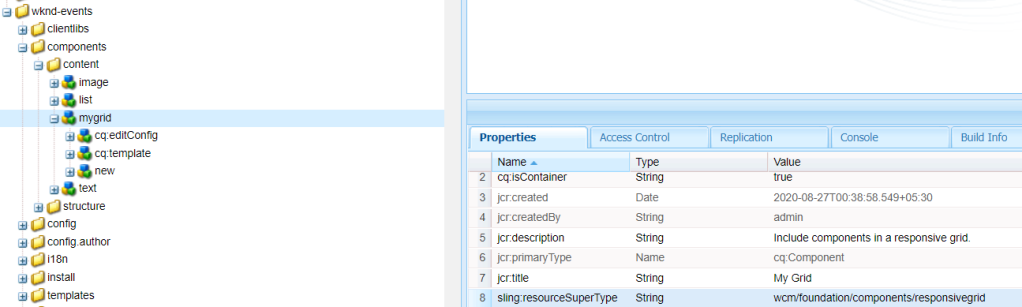
AEM responsiveGrid overlayed component.

Now we start with creating our corresponding React component inside ../react-app/src/components/MyGrid/Mygrid.js

I have used the following JS and CSS to extend the ResponsiveGrid class from @adobe/cq-react-editable-components.

MyGrid.js
import React, { Component } from "react";
import {ResponsiveGrid, MapTo, withComponentMappingContext} from "@adobe/cq-react-editable-components";

require('./MyGrid.scss');

export class MyGrid extends ResponsiveGrid {
/**
* The attributes that will be injected in the root element of the container
*
* @returns {Object} - the attributes of the container
*/
get containerProps() {
let containerProps = super.containerProps;
containerProps.className = (containerProps.className || '') + ' MyGrid ' + this.props.gridClassNames;
return containerProps;
}

render() {
return (
<div {...this.containerProps}>
{ super.childComponents }
{ super.placeholderComponent }
</div>
)
}

}

MapTo('wknd-events/components/content/mygrid')(withComponentMappingContext(MyGrid));

MyGrid.scss

@import '../../styles/shared';

.MyGrid{
padding: $gutter-padding;
width: 50%;
p {
color: $color-white;
}

&-message {
color: $color-primary;
}

}


Also place the following SCSS files at ../react-app/src/styles

shared.scss
@import './variables';

//Mixins

@mixin media($types...) {
@each $type in $types {

@if $type == tablet {
@media only screen and (min-width: $small-screen + 1) and (max-width: $medium-screen) {
@content;
}
}

@if $type == desktop {
@media only screen and (min-width: $medium-screen + 1) {
@content;
}
}

@if $type == mobile {
@media only screen and (min-width: $mobile-screen + 1) and (max-width: $small-screen) {
@content;
}
}
}
}

@mixin content-area () {
max-width: $max-width;
margin: 0 auto;
padding: $gutter-padding;
}

@mixin component-padding() {
padding: 0 $gutter-padding !important;
}

@mixin drop-shadow () {
box-shadow: 0 4px 8px 0 rgba(0, 0, 0, 0.2), 0 6px 20px 0 rgba(0, 0, 0, 0.19);
}


variables.scss
//Typography
$em-base: 20px;
$base-font-size: 1rem;
$small-font-size: 1.4rem;
$lead-font-size: 2rem;
$title-font-size: 5.2rem;
$h1-font-size: 3rem;
$h2-font-size: 2.5rem;
$h3-font-size: 2rem;
$h4-font-size: 1.5rem;
$h5-font-size: 1.3rem;
$h6-font-size: 1rem;
$base-line-height: 1.5;
$heading-line-height: 1.3;
$lead-line-height: 1.7;

$font-serif: ‘Asar’, serif;
$font-sans: ‘Source Sans Pro’, sans-serif;

$font-weight-light: 300;
$font-weight-normal: 400;
$font-weight-semi-bold: 600;
$font-weight-bold: 700;

//Colors
$color-white: #ffffff;
$color-black: #080808;

$color-yellow: #FFEA08;
$color-gray: #808080;
$color-dark-gray: #707070;

//Functional Colors

$color-primary: $color-yellow;
$color-secondary: $color-gray;
$color-text: $color-gray;

//Layout
$max-width: 1200px;
$header-height: 80px;
$header-height-big: 100px;

// Spacing
$gutter-padding: 12px;

// Mobile Breakpoints
$mobile-screen: 160px;
$small-screen: 767px;
$medium-screen: 992px;


Once you are done with above changes deploy the code in AEM and drag and drop the component on SPA page. Below is the final snap of the component that’s created. We can customize the react code to add more responsiveGrid as well and arrange them in Horizontal order.
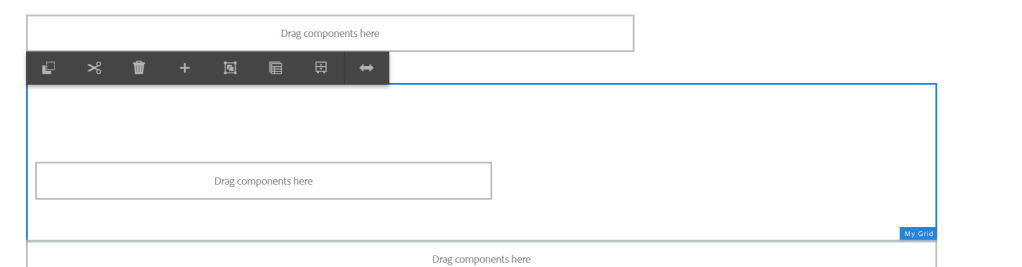
Responsive Grid SPA component


By aem4beginner
Posted by aem4beginner at October 13, 2020 No comments:
Email ThisBlogThis!Share to XShare to FacebookShare to Pinterest
Labels: Architecture, Components, SPA

May 19, 2020
Estimated Post Reading Time ~

AEM Forms: Technology and Architecture Overview

AEM Forms OSGi and AEM Forms JEE
There are two implementations of AEM Forms: AEM Forms OSGi and AEM Forms JEE. AEM Forms OSGi is essentially a version of the Adobe LiveCycle platform re-architected into OSGi. AEM forms JEE is a re-branded legacy version of LiveCycle.
Beginning with AEM 6.1, the AEM Forms module has most of the functionality available in AEM Forms JEE, with the exception of forms workflow and document security.
If you are trying to migrate forms and workflows from a LiveCycle instance into AEM, depending on your current site architecture and how many forms you have, you’ll want to start by migrating to AEM Forms JEE. Otherwise, you’ll have to re-author your forms to be adaptive forms within AEM Forms OSGi.

Features on OSGi Stack
A number of new services and utilities have been introduced to run within the OSGi stack of AEM Forms.
As of AEM 6.1, the AEM Forms module brings in several enhancements in adaptive forms to simplify the authoring of forms and enhance the form filling experience. You now have the ability to:
  • Create reusable form components (form fragments) that will be available in the Content Finder. Form fragments help save significant authoring time and effort by bringing re-usability and consistency among adaptive forms.
  • Create responsive and dynamic tables to present complex data with configurable layouts for mobile devices.
  • Define the styling of individual adaptive form components using inline CSS properties. Or create custom client libraries for specific styles within your forms.
  • Utilize Adobe Test and Target to perform A/B tests on adaptive forms for better conversion.
  • Configure auto-generation of document of record (DoR) for non-XFA adaptive forms.
  • Export forms and assets via a package or as a zip file.
  • Import forms and assets via a package, zip file, or as individual files (such as a PDF).
Submitting Forms
Adaptive forms are a key part of the AEM Forms module. An important piece of form is exactly where that data goes and what you do with it. With AEM Forms you can configure what action to take upon submit and what parameters to pass. For example, you can submit to a REST endpoint, perform an email action, or submit to a workflow. In addition, you can write a custom submit actions, making it extremely flexible and tailored towards what you are trying to accomplish.

Moving Ahead
AEM forms OSGi is the future for AEM Forms and Adobe seems to be slowly trying to move people away from LiveCycle into it. Slowly the AEM Forms module is integrating into AEM and it’s expected that Adobe will only continue to build the project. Check back soon for future posts on AEM Forms and what it has to offer. Or better yet, join our mailing list below!


By aem4beginner
Posted by aem4beginner at May 19, 2020 No comments:
Email ThisBlogThis!Share to XShare to FacebookShare to Pinterest
Labels: AEM Forms, Architecture

May 13, 2020
Estimated Post Reading Time ~

Architecture Decisions

There are a few things you should think about before you start building your app.
  1. How will it work
  2. What infrastructure will it be on
  3. What is the security model
  4. How is caching handled

How will it work

This is a big subject and every application is different so there is no silver bullet answer to how it should be built, this is dependant on doing an analysis of the requirements.
The following list is a few of what I think you should think about:
  • Is it an end-user only system with fixed content pages
    • A fixed page system is the simplest implementation in AEM as all of the content is static
    • This should allow heavy caching at the dispatcher of both the static content (css/js) and the html
  • Is there an authoring process
    • Authoring means someone can change the page content on the author and replicate it to the publishers for display,
    • Content pages can still be cached at the dispatcher to save calls to the publishers
  • Is the content dynamic and personalized
    • Personalized data shouldn't be cached at the dispatcher
    • Pages should be built as static placeholder's and use ajax to load the data otherwise no pages can be cached
  • Can the end-user send data to the system and what happens to it
    • If the data is just stored then you will need to consider setting up publisher tunneling
    • If the data is to be approved/mediated by an author then reverse replication should be setup
    • Data stored in the jcr:repository should be done via a service user
  • Is there dynamic data for the users and where will it be stored
    • Storing a lot of data in the jcr:repository is a bad idea as it will slow down standard queries
    • Support of an external database or api server would be recommended
    • Api calls and database calls can be made via AEM to hide any other infrastructure but add overhead

What infrastructure will it be on

As mentioned in the how will it work section, there are lots of different application types that can be built on AEM so the infrastructure needs to be put in place to support it.
AEM Server layout
As mentioned previously there are multiple ways of configuring the AEM stack and the needs of the application dictate what the stack will be.
If you are a pure front end application with a bit of storage, while you will only ever use the aem publisher and dispatcher, an author should still be added to the stack to allow administration and tunneling if needed. This is the worst-case application for AEM as it doesn't utilize any of the main AEM facilities and could have been built on any web server.
The main considerations in a multi-server stack are where is the data stored. If it is in the jcr:repository you will need to enable either replication between the publishers and the author, or tunneling between the publishers.
While sticky sessions can be enabled on most load balancers, you can't rely on the user always arriving at the same publisher so data storage has to be your biggest consideration. 
It is possible to add a database into the stack for data storage, however, you should consider concurrency of the data and how the data is used on the publishers over the author.
If your application is running across multiple regions you may well have your publishers in disparate areas so replication of data from the authors or other publishers may be slow and will need to be considered, this will also affect databases, you will need to consider whether to shard your database or have multiple instances for different regions.

What is the security model

It may be that your application doesn't use any security in which this section will be negated, however, if your users do have to log in what is the method?
If the users will be presented with specific data based on their user then you will need to pass the user credentials to the service layer. 
AEM comes with a few built-in models for user access via AEM itself. By default you can use the built-in user manager and authentication method, this allows you to create users and add them to groups that will control what content is available to the user.
AEM also has an authentication handler structure which by default has handlers for a client certificate, oauth (v1/v2), and saml.
Each of the authentication handlers can be configured to support a path including the hostname so that you can have multiple ways of logging into your application.
Once logged in the user details are passed with every request to the application services.

Application structure

In the following pages, you will get a better understanding of the types of components both java and html based. The following diagram shows a basic representation of how components and services interact in an AEM component 
Page Generation
As you can see there are a lot of parts that make up the display of a page within AEM.
While a page is a piece of HTML, in AEM you generally make the page a template with a parsys (an AEM component that allows the addition of other components)
Each of the components is a piece of HTML in their own right, however, they only render the html piece to display the component. A component can have one or many java models or wcm use classes that can also access one or more OSGI services or components.
While it is possible to have a page that is just pure html, this doesn't really utilize the power of AEM.

What is the user experience

For this, I am not thinking of just the end-user, which is an important decision, and will decide how you build the application, but also how the editorial user's experience is. Do your editors understand AEM? do they know all the quirks (and there are many) of the editorial process? Do you want to change how the standard process works, for instance, do you want a workflow for approval of changes to editorial pages or do you want anyone to be able to publish pages? Do you want to add extra buttons to the menu's that are specific to the application? You should always think about the administrative functions of the platform as well as the end-user.


By aem4beginner
Posted by aem4beginner at May 13, 2020 No comments:
Email ThisBlogThis!Share to XShare to FacebookShare to Pinterest
Labels: Architecture

AEM Architecture

This page will be a very brief discussion on the architecture of how AEM is made up.


AEM Architecture
As you saw in the section Structure of AEM physical hardware wise AEM is a distributed system, this page will go into a bit more detail about the actual AEM instance itself.

OSGI
OSGI is the framework that underpin's AEM and holds most of the other components together. Much of the code that is written for AEM is done as OSGI services

In AEM the OSGI layer is handled by Apache Felix

Custom Applications
This is where your applications site. Anything that is not supplied out of the box with AEM will be a custom application. Even the geometrixx apps that come as standard with a default AEM instance are custom applications to show how applications should be built. However saying that the geometrixx apps are very out of date and are still written in jsp

AEM Modules
There are a number of modules that AEM provides that allow AEM to work properly, Most of these you won't interact with and they will just work for you, however there are many that you will, most of the user interfaces within AEM are built using granite components, so they are in fact AEM applications in their own right.

Sling Content
This is the core of the content processing within the platform. In AEM Apache Sling underpin's most content and application structure.

CRX Content Repository
CRX is AEM's own enhancement of Apache Sling, along with the granite libraries this controls most of the lower level functionality such as user management, data persistence and event management

The core jcr:repository that makes up CRX is an apache jackrabbit oak repository. The repository uses either TarMK or MongoDB for it's persistence layer. TarMK is the most common because of performance issues with MongoDB, however the only way to scale AEM authors is to use MongoDB but you will need to have a lot of users on the server before this really becomes a requirement and there are other ways of handling scalability of authors.

Servlet Engine
In AEM the servlet engine is the open source jetty servlet container

Java
Of course, all of the technologies that AEM runs on are java based, and most of them are open source. AEM provides the wrappers that make it all work, as well as the utilities for load balancing, clustering, and editorial content management


By aem4beginner
Posted by aem4beginner at May 13, 2020 No comments:
Email ThisBlogThis!Share to XShare to FacebookShare to Pinterest
Labels: Architecture

Overview and Structure of Adobe Experience Manager

Adobe Experience Manager (AEM):
Adobe Experience Manager (AEM) is a content management platform which is the main part of the Adobe Marketing Cloud.

The following pages will describe the architecture of AEM and how it is used for projects i have worked on including how an AEM based web application can be built.

While the latest version of AEM is 6.3, This article is currently for version 6.2. Functionally there are not a lot of changes in the versions that will affect most developers.

"Adobe Marketing Cloud gives you the most complete set of integrated digital marketing solutions available. It provides everything you need to organise, access, and personalise your marketing content. It gives you deep insights into what’s working with your customers and the ability to consistently deliver the best experiences to every customer across every channel."

While AEM (Experience Manager) is only a small part of the adobe marketing cloud, it is the only part that these pages will discuss.

One thing to note about the following pages is that they are an introduction to AEM and how to build applications, and far from being an intensive instruction on how to build AEM applications

This article does not go into AEM maintenance or the low-level structure of supporting an AEM instance

AEM Structure:
When we talk about AEM we talk about the entire eco system that goes to make up a working system.

AEM is a highly scalable system and can be configured in a number of ways.

AEM Server Layout

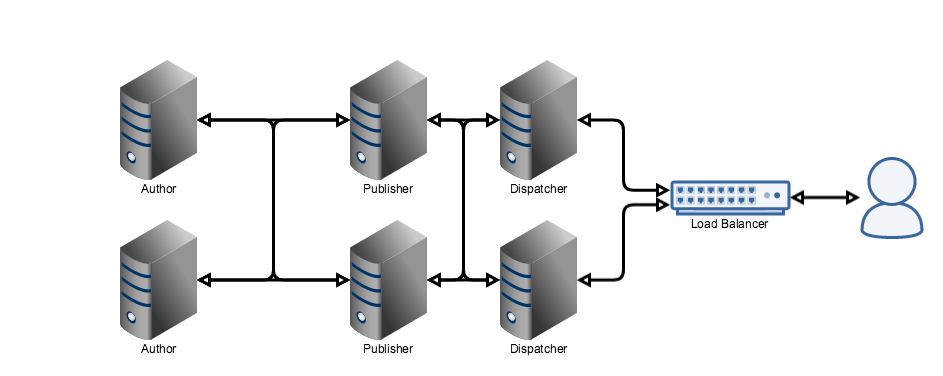
As you can see in the above diagram, there are multiple layers available as part of an AEM system. The diagram above shows a highly scalable option, while possible is generally not used and is not good practice.

Author
The author is where the editorial staff create and manage page content. It is also the central hub of AEM, while in the above configuration it is shown as a cluster, and this is possible using the MongoMK file system, it is not recommended unless your system has a high number of editorial users, this is due to the overheads that MongoMK has on AEM. For more information about the deployment options and their recommendations go to Recommended Deployments.

In all of the following pages I will assume a single author instance which is the norm for most AEM instances.

Publisher
The publisher can be thought of as the main server that the end user will see, while it is hidden behind the dispatcher it holds the latest versions of the content that the editorial staff have decided to activate and any content loaded by the end user will have come from a publisher.

As can be seen in the diagram above the publishers can be clustered, each running independently of the others.

Dispatcher
The dispatcher is the caching layer of AEM. While it has been shown as clustered to multiple publishers, and this is possible it is generally setup in a one to one relationship with a publisher and the load balancing is handled by an external load balancer (not part of the AEM stack)

The dispatcher controls what content can and can't be seen from the dispatcher as well as caching static content.

While it has been shown running on it's own server, in smaller installations the dispatcher will be installed on the same server as the publisher.

while the above image shows a possible combination there are many ways AEM can be configured, from a single author, publisher, dispatcher setup to a highly scalable, multi region setups as shown in the next image.

AEM Server Layout - Complex


By aem4beginner
Posted by aem4beginner at May 13, 2020 No comments:
Email ThisBlogThis!Share to XShare to FacebookShare to Pinterest
Labels: AEM Project, Architecture

May 10, 2020
Estimated Post Reading Time ~

AEM Architecture


AEM technology stack can be divide into the following,
  1. Java Runtime Environment (commonly known as JRE)
  2. Granite Platform
  3. AEM modules(Adobe Experience Manager)
  4. Custom Application Module (your website)
Java Runtime Environment [JRE]:
AEM is more or less a combination of or collection of jars, jsps [Java Server Pages], servlets, Java classes along with static resources such as HTML, pictures, assets, etc. To drive this architecture, it needs JRE.
This makes AEM compatible with any OS that supports required JRE.

Granite Platform:
Granite platform is a key role player in the AEM stack. Granite is Adobe’s open web stack.

As you can observe from the image above, the Granite platform consists of the below-listed modules:
  1. CQSE Servlet Engine
  2. CRX Content Repository
  3. Sling Content Delivery
  4. OSGi Framework
CQSE Servlet Engine: AEM requires an application server that supports Java Servlets API 2.4 or later. The AEM software package is available in two forms:
  1. cq-quickstart.jar: it includes everything needed to get up and running (also called a “standalone executable jar”). The Quickstart Standalone jar file contains a built-in servlet engine. As the name “Standalone” suggests user can simply double-click the jar file to install an AEM instance with a built-in servlet-engine. You do not require any dedicated external application server for servlet handling. In this case, you only need a JRE and a standalone quickstart JAR file.
  2. cq-quickstart.war: for deployment in a third-party application server. WAR files do not contain built-in servlet engines. In this case, you need a JRE, a WAR file, and a third-party application server for servlet handling.
CRX Content Repository: Everything in AEM is stored in nodes and properties in the built-in CRX content repository. CRX is a content repository of JCR type. JCR specifications combine features of the relational database and file systems, allowing fine-grained access to the content repository in File-system Fashion and also in Database fashion.
Let’s understand some terms here itself:
  1. CRX (Content repository Xtreme): CRX is a repository built into AEM.
  2. JSR (Java Specification Request): JSR’s are the formal documents that describe proposed specifications and technologies for adding to the Java platform. There are hundreds of JSR. CRX is Adobe’s implementation of the JSR-283.
  3. JCR (Content Repository API for Java): It can be defined as the specifications for accessing content repository using JAVA API in a uniform manner. So, JCR is a “type of repository”. CRX is an implementation of JCR. Similarly, Apache Jackrabbit is an example of JCR.
To summarize, CRX is content repositories of type JCR and CRX is an implementation of JSR (JSR-283).

The Java Content Repository (JCR) standard, JSR 283, specifies a vendor-independent and implementation-independent way to access content bi-directionally on a granular level within a content repository.

Sling Content Delivery: Sling is a Web application framework based on REST principles. The sling allows easy development of content-oriented applications. AEM is based on the sling. Sling uses a repository of type JCR, such as CRX and Apache Jackrabbit.

“Using Sling, the type of content to be rendered is not the first processing consideration. Instead, the main consideration is whether the URL resolves to a content object for which a script can then be found to perform the rendering. This provides excellent support for web content authors to build pages that are easily customized to their requirements.”

The advantages of the content first approach are significant when we have a wide range of different content elements, or when you need easily customizable pages.

OSGi Framework (Open Service Gateway Initiative): OSGi (Open Service Gateway Initiative) is a Java framework for developing and deploying modular software programs and libraries. OSGI is a modular system that implements dynamic components/applications in form of bundles. AEM is based on OSGi. AEM can be thought of as a conglomeration of bundles(components). All the bundles in AEM can be operated from a web console. 

A bundle is a jar file holding Java classes and a special metadata file (META-INF subfolder). Applications or components coming in form of bundles installed, started, stopped, updated, and uninstalled without requiring a reboot. Each bundle(component/application) is a tightly coupled, dynamically loadable collection of classes, jars, and configuration files that explicitly declare their external dependencies.

OSGi framework, elements of AEM as well as any additional custom applications on top AEM platform are implemented in OSGI bundles.

AEM Modules:
AEM runs on the Granite platform. AEM is a complete package of the below-mentioned modules built on the Granite platform in the OSGI framework.
  • Websites
  • Mobile Applications
  • Digital Publications
  • Forms
  • Digital Assets
  • Communities
  • Online Commerce
Customers can leverage these application-level building blocks to create customized solutions by building applications of their own.

Custom Application Module (your website):
Customers can build their own customized application module o top of AEM. The underlying technology stack empowers the customer to take advantage of AEM features such as flexibility, simplicity in the management and delivery of websites, content, and assets, and reduced complexity of delivering online experiences to the right customers.


By aem4beginner
Posted by aem4beginner at May 10, 2020 No comments:
Email ThisBlogThis!Share to XShare to FacebookShare to Pinterest
Labels: AEM Project, Architecture

May 4, 2020
Estimated Post Reading Time ~

Microservices Architecture for AEM

Modularization is not a new concept in software development. Modular programs were created in times when most of us were not even in this world yet. Although this kind of software design is a quite old technique, its implementations have been evolving throughout decades resulting in number of great inventions. In the AEM world we also have the ability to create modular applications as AEM is built on top of OSGi – a framework which is designed to support modular systems. And it works well. Pieces of functionality are gathered into logical units called bundles, they communicate with other bundles through clearly defined interface (OSGi services). Developers working with AEM on daily basis know that perfectly.

However, AEM-based applications are often very complex systems providing not only pure CMS capabilities, but also consisting of multiple integrations with other systems like room booking, real-time stock market data, identity management, federated search, etc. Thanks to OSGi modularization, you can implement all of the integrations as separate modules and run them all on an AEM instance. Such an approach seems quite natural for AEM-based systems - everything is deployed into single AEM instance and if your system expects more traffic you can scale it horizontally by adding another instance. Simple and it works. At least in theory.

In practice, we can often observe that some parts of a complex system are used much more extensively than others and require far more resources. Scaling of such a system may be challenging since the only option we have is to add another AEM instance. Unfortunately, this is not an easy operation, especially if you don’t use MongoDB setup. Additionally, it may generate significant costs on infrastructure and licencing. As a result, even if a system is designed to be modular, from scalability point of view it’s still a monolith - particular parts of the system can’t be scaled independently. So how can we deal with such issue?

If we think of highly-scalable enterprise systems it’s worth considering moving from AEM-based design to microservices architecture. In this approach, some bigger logical parts are deployed separately, outside of AEM – all of these parts are called services. Of course, AEM is still there (it’s another service) and plays one of the most important roles - it delivers the user experience, i.e. websites, pages, their layout and static content. Most of the dynamic content though, is provided by other services deployed e.g. as a stand-alone applications on Tomcat or Node.js servers. The assembly of pages served by AEM and the dynamic content from other services is done with use of… another service. Sounds complicated? Although from deployment point of view it’s more complex than simple AEM-based approach, it brings a couple of significant advantages:
  • Improved scalability – each service can be scaled separately. If you expect a lot of traffic and the majority of processing is related e.g. to search, then you can add another instance of search service only. You don’t need to replicate the whole system.
  • Easier deployment – since the services are independent you can upgrade each of them easily whereas other services remain untouched.
  • Faster development – you are not limited to OSGi technology, so you can develop each service with solutions which best suit the service needs.
  • Reduced cost and time-to-market – thanks to above, the overall cost of change implementation and time needed to deploy it to production is reduced significantly
An example microservice architecture is depicted on a diagram below. If you want to know more on how microservices in AEM world work in practice, please join my session at the AEMHub conference, starting 8th of September in London. I will show you how this approach can be implemented and what benefits it brings.


Source: https://www.cognifide.com/our-blogs/adobe/microservices-architecture-for-aem


By aem4beginner
Posted by aem4beginner at May 04, 2020 No comments:
Email ThisBlogThis!Share to XShare to FacebookShare to Pinterest
Labels: Architecture, Micro Services

May 3, 2020
Estimated Post Reading Time ~

Web Architecture 101

The basic architecture concepts I wish I knew when I was getting started as a web developer

Modern web application architecture overview
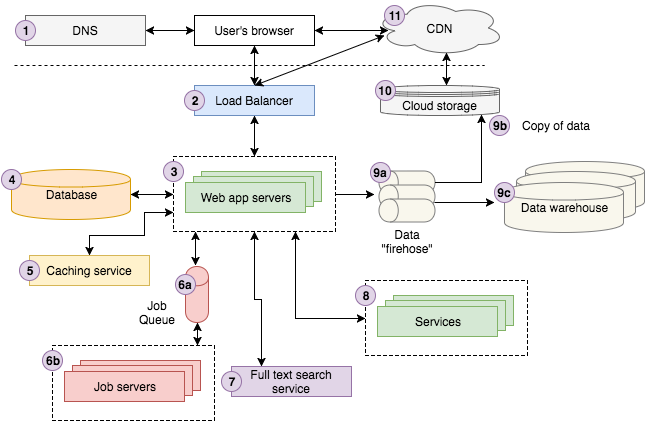
The above diagram is a fairly good representation of our architecture at Storyblocks. If you’re not an experienced web developer, you’ll likely find it complicated. The walkthrough below should make it more approachable before we dive into the details of each component.

A user searches on Google for “Strong Beautiful Fog And Sunbeams In The Forest”. The first result happens to be from Storyblocks, our leading stock photo, and vectors site. The user clicks the result which redirects their browser to the image details page. Underneath the hood, the user’s browser sends a request to a DNS server to look up how to contact Storyblocks, and then sends the request.

The request hits our load balancer, which randomly chooses one of the 10 or so web servers we have running the site at the time to process the request. The web server looks up some information about the image from our caching service and fetches the remaining data about it from the database. We notice that the color profile for the image has not been computed yet, so we send a “color profile” job to our job queue, which our job servers will process asynchronously, updating the database appropriately with the results.

Next, we attempt to find similar photos by sending a request to our full-text search service using the title of the photo as input. The user happens to be logged in to Storyblocks as a member so we look up his account information from our account service. Finally, we fire off a page view event to our data firehose to be recorded on our cloud storage system and eventually loaded into our data warehouse, which analysts use to help answer questions about the business.

The server now renders the view as HTML and sends it back to the user’s browser, passing first through the load balancer. The page contains Javascript and CSS assets that we load into our cloud storage system, which is connected to our CDN, so the user’s browser contacts the CDN to retrieve the content. Lastly, the browser visibly renders the page for the user to see.

Next I’ll walk you through each component, providing a “101” introduction to each that should give you a good mental model for thinking through web architecture going forward. I’ll follow up with another series of articles providing specific implementation recommendations based on what I’ve learned in my time at Storyblocks.

1. DNS
DNS stands for “Domain Name System” and it’s a backbone technology that makes the world wide web possible. At the most basic level DNS provides a key/value lookup from a domain name (e.g., google.com) to an IP address (e.g., 85.129.83.120), which is required in order for your computer to route a request to the appropriate server. Analogizing to phone numbers, the difference between a domain name and IP address is the difference between “call John Doe” and “call 201-867–5309.” Just like you needed a phone book to look up John’s number in the old days, you need DNS to look up the IP address for a domain. So you can think of DNS as the phone book for the internet.

There’s a lot more detail we could go into here but we’ll skip over it because it’s not critical for our 101-level intro.

2. Load Balancer
Before diving into details on load balancing, we need to take a step back to discuss horizontal vs. vertical application scaling. What are they and what’s the difference? Very simply put in this StackOverflow post, horizontal scaling means that you scale by adding more machines into your pool of resources whereas “vertical” scaling means that you scale by adding more power (e.g., CPU, RAM) to an existing machine.

In web development, you (almost) always want to scale horizontally because, to keep it simple, stuff breaks. Servers crash randomly. Networks degrade. Entire data centers occasionally go offline. Having more than one server allows you to plan for outages so that your application continues running. In other words, your app is “fault tolerant.” Secondly, horizontal scaling allows you to minimally couple different parts of your application backend (web server, database, service X, etc.) by having each of them run on different servers. Lastly, you may reach a scale where it’s not possible to vertically scale any more. There is no computer in the world big enough to do all your app’s computations. Think Google’s search platform as a quintessential example though this applies to companies at much smaller scales. Storyblocks, for example, runs 150 to 400 AWS EC2 instances at any given point in time. It would be challenging to provide that entire compute power via vertical scaling.

Ok, back to load balancers. They’re the magic sauce that makes scaling horizontally possible. They route incoming requests to one of many application servers that are typically clones / mirror images of each other and send the response from the app server back to the client. Anyone of them should process the request the same way so it’s just a matter of distributing the requests across the set of servers so none of them are overloaded.

That’s it. Conceptually load balancers are fairly straight forward. Under the hood there are certainly complications but no need to dive in for our 101 version.

3. Web Application Servers
At a high level web application servers are relatively simple to describe. They execute the core business logic that handles a user’s request and sends back HTML to the user’s browser. To do their job, they typically communicate with a variety of backend infrastructure such as databases, caching layers, job queues, search services, other microservices, data/logging queues, and more. As mentioned above, you typically have at least two and often times many more, plugged into a load balancer in order to process user requests.

You should know that app server implementations require choosing a specific language (Node.js, Ruby, PHP, Scala, Java, C# .NET, etc.) and a web MVC framework for that language (Express for Node.js, Ruby on Rails, Play for Scala, Laravel for PHP, etc.). However, diving into the details of these languages and frameworks is beyond the scope of this article.

4. Database Servers
Every modern web application leverages one or more databases to store information. Databases provide ways of defining your data structures, inserting new data, finding existing data, updating or deleting existing data, performing computations across the data, and more. In most cases the web app servers talk directly to one, as will the job servers. Additionally, each backend service may have it’s own database that’s isolated from the rest of the application.

While I’m avoiding a deep dive on particular technologies for each architecture component, I’d be doing you a disservice not to mention the next level of detail for databases: SQL and NoSQL.

SQL stands for “Structured Query Language” and was invented in the 1970s to provide a standard way of querying relational data sets that was accessible to a wide audience. SQL databases store data in tables that are linked together via common IDs, typically integers. Let’s walk through a simple example of storing historical address information for users. You might have two tables, users and user_addresses, linked together by the user’s id. See the image below for a simplistic version. The tables are linked because the user_id column in user_addresses is a “foreign key” to the id column in the users table.


If you don’t know much about SQL, I highly recommend walking through a tutorial like you can find on Khan Academy here. It’s ubiquitous in web development so you’ll at least want to know the basics in order to properly architect an application.

NoSQL, which stands for “Non-SQL”, is a newer set of database technologies that has emerged to handle the massive amounts of data that can be produced by large scale web applications (most variants of SQL don’t scale horizontally very well and can only scale vertically to a certain point). If you don’t know anything about NoSQL, I recommend starting with some high level introductions like these:

https://www.w3resource.com/mongodb/nosql.php
http://www.kdnuggets.com/2016/07/seven-steps-understanding-nosql-databases.html
https://resources.mongodb.com/getting-started-with-mongodb/back-to-basics-1-introduction-to-nosql

I would also keep in mind that, by and large, the industry is aligning on SQL as an interface even for NoSQL databases so you really should learn SQL if you don’t know it. There’s almost no way to avoid it these days.

5. Caching Service
A caching service provides a simple key/value data store that makes it possible to save and look up information in close to O(1) time. Applications typically leverage caching services to save the results of expensive computations so that it’s possible to retrieve the results from the cache instead of recomputing them the next time they’re needed. An application might cache results from a database query, calls to external services, HTML for a given URL, and many more. Here are some examples from real world applications:

Google caches search results for common search queries like “dog” or “Taylor Swift” rather than re-computing them each time
Facebook caches much of the data you see when you log in, such as post data, friends, etc. Read a detailed article on Facebook’s caching tech here.
Storyblocks caches the HTML output from server-side React rendering, search results, typeahead results, and more.

The two most widespread caching server technologies are Redis and Memcache. I’ll go into more detail here in another post.

6. Job Queue & Servers
Most web applications need to do some work asynchronously behind the scenes that’s not directly associated with responding to a user’s request. For instance, Google needs to crawl and index the entire internet in order to return search results. It does not do this every time you search. Instead, it crawls the web asynchronously, updating the search indexes along the way.

While there are different architectures that enable asynchronous work to be done, the most ubiquitous is what I’ll call the “job queue” architecture. It consists of two components: a queue of “jobs” that need to be run and one or more job servers (often called “workers”) that run the jobs in the queue.

Job queues store a list of jobs that need to be run asynchronously. The simplest are first-in-first-out (FIFO) queues though most applications end up needing some sort of priority queuing system. Whenever the app needs a job to be run, either on some sort of regular schedule or as determined by user actions, it simply adds the appropriate job to the queue.

Storyblocks, for instance, leverages a job queue to power a lot of the behind-the-scenes work required to support our marketplaces. We run jobs to encode videos and photos, process CSVs for metadata tagging, aggregate user statistics, send password reset emails, and more. We started with a simple FIFO queue though we upgraded to a priority queue to ensure that time-sensitive operations like sending password reset emails were completed ASAP.

Job servers process jobs. They poll the job queue to determine if there’s work to do and if there is, they pop a job off the queue and execute it. The underlying languages and frameworks choices are as numerous as for web servers so I won’t dive into detail in this article.

7. Full-text Search Service
Many if not most web apps support some sort of search feature where a user provides a text input (often called a “query”) and the app returns the most “relevant” results. The technology powering this functionality is typically referred to as “full-text search”, which leverages an inverted index to quickly lookup documents that contain the query keywords.


Example showing how three document titles are converted into an inverted index to facilitate fast lookup from a specific keyword to the documents with that keyword in the title. Note, common words such as “in”, “the”, “with”, etc. (called stop words), are typically not included in an inverted index.

While it’s possible to do full-text search directly from some databases (e.g., MySQL supports full-text search), it’s typical to run a separate “search service” that computes and stores the inverted index and provides a query interface. The most popular full-text search platform today is Elasticsearch though there are other options such as Sphinx or Apache Solr.

8. Services
Once an app reaches a certain scale, there will likely be certain “services” that are carved out to run as separate applications. They’re not exposed to the external world but the app and other services interact with them. Storyblocks, for example, has several operational and planned services:

Account service stores user data across all our sites, which allows us to easily offer cross-sell opportunities and create a more unified user experience
Content service stores metadata for all of our video, audio, and image content. It also provides interfaces for downloading the content and viewing download history.
Payment service provides an interface for billing customer credit cards.
HTML → PDF service provides a simple interface that accepts HTML and returns a corresponding PDF document.

9. Data
Today, companies live and die based on how well they harness data. Almost every app these days, once it reaches a certain scale, leverages a data pipeline to ensure that data can be collected, stored, and analyzed. A typical pipeline has three main stages:

The app sends data, typically events about user interactions, to the data “firehose” which provides a streaming interface to ingest and process the data. Often times the raw data is transformed or augmented and passed to another firehose. AWS Kinesis and Kafka are the two most common technologies for this purpose.
The raw data as well as the final transformed/augmented data are saved to cloud storage. AWS Kinesis provides a setting called “firehose” that makes saving the raw data to it’s cloud storage (S3) extremely easy to configure.

The transformed/augmented data is often loaded into a data warehouse for analysis. We use AWS Redshift, as does a large and growing portion of the startup world, though larger companies will often use Oracle or other proprietary warehouse technologies. If the data sets are large enough, a Hadoop-like NoSQL MapReduce technology may be required for analysis.

Another step that’s not pictured in the architecture diagram: loading data from the app and services’ operational databases into the data warehouse. For example at Storyblocks we load our VideoBlocks, AudioBlocks, Storyblocks, account service, and contributor portal databases into Redshift every night. This provides our analysts a holistic dataset by co-locating the core business data alongside our user interaction event data.

10. Cloud storage
“Cloud storage is a simple and scalable way to store, access, and share data over the Internet” according to AWS. You can use it to store and access more or less anything you’d store on a local file system with the benefits of being able to interact with it via a RESTful API over HTTP. Amazon’s S3 offering is by far the most popular cloud storage available today and the one we rely on extensively here at Storyblocks to store our video, photo, and audio assets, our CSS and Javascript, our user event data and much more.

11. CDN
CDN stands for “Content Delivery Network” and the technology provides a way of serving assets such as static HTML, CSS, Javascript, and images over the web much faster than serving them from a single origin server. It works by distributing the content across many “edge” servers around the world so that users end up downloading assets from the “edge” servers instead of the origin server. For instance in the image below, a user in Spain requests a web page from a site with origin servers in NYC, but the static assets for the page are loaded from a CDN “edge” server in England, preventing many slow cross-Atlantic HTTP requests.


Source
Check out this article for a more thorough introduction. In general a web app should always use a CDN to serve CSS, Javascript, images, videos and any other assets. Some apps might also be able to leverage a CDN to serve static HTML pages.
Parting thoughts

And that’s a wrap on Web Architecture 101. I hope you found this useful. I’ll hopefully post a series of 201 articles that provide deep dives into some of these components over the course of the next year or two.


By aem4beginner
Posted by aem4beginner at May 03, 2020 No comments:
Email ThisBlogThis!Share to XShare to FacebookShare to Pinterest
Labels: Architecture, Web Developer

April 25, 2020
Estimated Post Reading Time ~

AEM 6.4 Sample Architecture for Hybrid AEM and Shaded Deployment in Rackspace cloud

Hybrid AEM deployment with Rackspace Private Cloud, separate Bare Metal authors for content and asset management

AEM architecture diagram: sharded author with cloud publishers
The above diagram represents site with heavy authoring requirements so that it makes sense to shard out individual sites onto their own physical authoring environments. A Solr Cloud cluster plugs into the authors for indexing DAM assets and assisting with the custom authoring UI. The publish tier is served by Rackspace public cloud servers (OpenStack) which can easily be cloned and scaled up and down to meet load demands. connectivity between your author instance and Adobe Marketing Cloud

Reference: https://blog.rackspace.com/sample-architecture-diagrams-for-adobe-experience-manager


By aem4beginner
Posted by aem4beginner at April 25, 2020 No comments:
Email ThisBlogThis!Share to XShare to FacebookShare to Pinterest
Labels: AEM 6.4, Architecture, Hybrid CMS

April 21, 2020
Estimated Post Reading Time ~

AEM/CQ Architectural Overview

CQ Deployment Model
  • Scalability (Sharding)
  • Availability (Replication)
  • Disaster Recovery (DR, Replication)
  • Monitoring (JMX)
  • Build (Maven, Gradel)
  • Deployment (Any deployment Tool)
  • Templating (Slightly)
  • Portal Management (OOTB)
  • More ...
What is covered ?
Adobe AEM/CQ
  • Enterprise product for Web Content Management
  • Build on top of CRX / Granite Platform
  • Provide following features apart from CRX
  • Authoring UI (Template and component management)
  • Digital Asset Management
  • Personalization
  • Mobile Module
  • Ecommerce module
  • Plugin feature with Adobe Cloud services for all web related task (AB testing, Analytics etc)
  • SOCO (Social Collaboration Module)
  • TaggingReport and Monitoring
  • AEM stands for Adobe Experience Manager and CQ Stands for CommuniQue
  • AEM provide you platform to create, manage, and optimize digital customer experiences across every channel, including web, mobile apps, digital forms, and communities. With the ability to deliver next-generation experiences across both online and in-person interactions, you can increase demand and build lasting brand loyalty.
  • Originally created by Day Software. First version of CQ was released in 2002
Adobe Granite / CRX
AEM/CQ Overview

  • Background
  • AEM 6
  • Building Blocks of AEM
  • Small Demo (If Have Time ...)
What Is AEM/CQ ?
  • Enterprise version of Content Repository
  • Based on Apache Sling / Felix / JCR
  • Provide following additional features
  • Package Manager
  • Additional persistence Plug in (Tar, Oracle, MySQL, DB2)
  • UI for all JCR operations including version management, node type management, user management
  • CRXDE light code code management
  • Repository Backup and Clustering Support
  • Replication
  • LDAP Support
  • Operation support (Tar optimization)
Building Blocks Of AEM
Persistence: Apache Jackrabbit Oak
Request Processing: Apache Sling
Dynamic Library Management: Apache Felix
Adobe Granite (Enterprise version of Oak, Sling, Felix, some more feature) used to be called CRX. It is infact OSGI wrapper of CRX
Authoring Experience: ExtJS, CoralUI, JQuery, Handle Bar
Publishing Experience: Any Framework

AEM 6 Architecture
Apache Sling
Apache Jackrabbit
  • REST Based Web Framework for HTTP request processing
  • It uses JCR for content repository to store content
  • Uses Apache felix for dynamic module management
  • Support for Scripting (JSP, ECMA, Scala)
  • Building Block for resource resolution within AEM
  • Provide API for Servlet Support, Scheduler, Event Handling (Both Synchronous and non synchronous), Discovery (For Load distribution), Resource CRUD operations (READ, DELETE, CREATE, UPDATE), Sling Models, Thread pools, JMX, Sling Mock, Sling Adapt, XSS
Apache Felix
  • Implementation of JCR Spec JSR-283
  • Stateless, sessionless, JSON model
  • Provide feature like Node Type Management, Query, versioning, Observation, Security (ACL, Authentication, Authorization), Locking
  • MVCC (MultiVersion Concurrency Control) model
Jackrabbit Architecture
  • One of the implementation of OSGI framework
  • Provides web based console for managing Dependency and configuration.
  • Provide services like (All based on OSGI Specification)
  • Dependency Manager
  • HTTP service (For servlet,filter, resource registration, This run within Jetty for AEM6)
  • Maven Bundle and SCR Plugin
  • Event Admin (Bundle based Event)
  • Config Admin
  • OSGI Bundle repository
  • Logger
  • File Install
  • Microkernel API org.apache.jackrabbit.mk
  • Oak API org.apache.jackrabbit.oak
  • JCR API javax.jcr and all existing API
Source: https://prezi.com/i97-ptdowxfi/aemcq-architecture/


By aem4beginner
Posted by aem4beginner at April 21, 2020 No comments:
Email ThisBlogThis!Share to XShare to FacebookShare to Pinterest
Labels: Architecture

Basics of AEM Architecture and Micro Services

Solution: AEM Architecture and Micro Service


By aem4beginner
Posted by aem4beginner at April 21, 2020 No comments:
Email ThisBlogThis!Share to XShare to FacebookShare to Pinterest
Labels: Architecture, Micro Services

DTM Architecture

Solution:
The following illustration shows how the DTM architecture components work together to effectively deploy and manage tools, tags, and scripts on your site.


Architecture
The primary components of the DTM technical architecture include the web management application, the staging and production JavaScript libraries, and the embed code.

The web management application is the online interface that you log in to and use to manage your DTM implementation.

A web-property in DTM is a collection of tools, rules, and data element configurations.

Each web property is associated with one staging JavaScript library and one production JavaScript library. These libraries are generated by the web application and contain the unique set of configurations in that web property.

Reference:
https://marketing.adobe.com/resources/help/en_US/dtm/get_started.html


By aem4beginner
Posted by aem4beginner at April 21, 2020 No comments:
Email ThisBlogThis!Share to XShare to FacebookShare to Pinterest
Labels: Architecture, DTM

April 14, 2020
Estimated Post Reading Time ~

Getting Started with Adobe Experience Manager and OSGi bundles

Adobe Experience Manager (AEM) is developed using frameworks such as OSGi and Apache Sling. OSGi defines a dynamic component that is written in Java. These specifications enable a development model where dynamic applications comprise of reusable components. The OSGi specifications enable components to hide their implementations from other components while communicating through services, which are objects that are specifically shared between components. For more information, see OSGi Architecture.

The following illustration shows how the OSGi framework within AEM.


This development article explains basic AEM/OSGi concepts that every AEM developer should understand. It also steps you through an AEM project setup using the AEM Eclipse plug-in.

To read this article, click https://helpx.adobe.com/experience-manager/using/osgi_getting_started.html.


By aem4beginner
Posted by aem4beginner at April 14, 2020 No comments:
Email ThisBlogThis!Share to XShare to FacebookShare to Pinterest
Labels: Architecture, OSGi

April 10, 2020
Estimated Post Reading Time ~

AEM Architecture

In the previous post, we discussed the basics of AEM and the reason behind its hype in the Digital Marketing space. In this post, we will go a bit more technical and will try to understand the architecture or the basic building blocks of AEM.

Hence, without wasting more time, let's dive into the AEM architecture.

image source: https://prezi.com/i97-ptdowxfi/aemcq-architecture/

Java Runtime Environment (JRE) 
AEM is a Java-based web application hence it requires server-side Java Runtime Environment (JRE).

Granite Platform
It is Adobe's open web stack and it forms the technical base on which AEM is built. It also provides the foundation UI framework and its major goals are to -
  • provide granular UI widgets
  • implement best UI practices
  • provide an extensible UI

image source: aemstack

OSGi Framework

image source: OSGi org

It is a set of specifications. Its core specification defines a component and service model for Java. A practical advantage of OSGi is that every software component can define its API via a set of exported Java packages and that every component can specify its required dependencies.

The components and services can be dynamically installed, activated, de-activated, updated, and uninstalled.

The OSGi specification has several implementations, for example, Eclipse Equinox, Knopflerfish OSGi, or Apache Felix. AEM uses Apache Felix in its tech stack.

Java Content Repository (JCR)
This combines the attributes of file systems and RDBMS and tries to provide the best of both worlds. According to JSR 283, "the Java Content Repository API defines an abstract model and a Java API for data storage and related services commonly used by content-oriented applications."

The JCR storage model is a tree of nodes and properties: nodes are used to organize the content and named properties store the actual data, either as simple types (string, boolean, number, etc.) or as binary streams for storing files of arbitrary size.

AEM 6.x uses Apache Oak as the JCR implementation.

Apache Sling
AEM is built using Sling, a Web application framework based on REST principles that provide easy development of content-oriented applications.
Sling uses a JCR repository, such as Apache Jackrabbit, or in the case of AEM, the CRX Content Repository, as its data store.

From Apache Sling's official documentation, Sling maps HTTP request URLs to content resources based on the request's path, extension, and selectors. Using convention over configuration, requests are processed by scripts and servlets, dynamically selected based on the current resource. This fosters meaningful URLs and resource-driven request processing, while the modular nature of Sling allows for specialized server instances that include only what is needed.

Thus, anything present in the JCR can be accessed in a RESTful way using HTTP requests.

AEM Modules
On top of the above technology stack, there are AEM specific modules that run. These modules are AEM Sites, AEM Assets, Workflows, etc.

Custom Modules/Code
On top of everything, the organization-specific code runs which is according to their specific needs. In the upcoming posts, we will be learning to do this only - creating custom code on top of AEM.


By aem4beginner
Posted by aem4beginner at April 10, 2020 No comments:
Email ThisBlogThis!Share to XShare to FacebookShare to Pinterest
Labels: AEM/ Adobe CQ5, Architecture

March 22, 2020
Estimated Post Reading Time ~

Microservices & Serverless Architecture

Microservices
Microservices came into picture because of the Monolithic applications wherein all the logical code is put into the same codebase. The parts in here are tightly coupled with each other, so deploying this means that either a part or the whole application is deployed. In this scenario we should be careful for the errors because a small error can also break our deployment and put our whole server down.
So because of this tightly coupled code base in monolithic application and the high chances of breakdown because of the errors which could be interdependent the concept of Micro services came into picture.
instead we could have different parts of our application which could connect with HTTP API interface the requirement. So if a change is made into our codebase, we are only changing a part of it and not the whole application.  

So Micro services has some PROS and CONS as well which we can have a look-   

ADVANTAGES
1. Using Micro services, different teams can work on the services separately and each part of the application can be build separately as the microservices component are decoupled.
2. With Microservices we can scale horizontally and can scale only those services which are bottlenecks as they are decoupled.


DISADVANTAGES
1. One of the disadvantages of the microservices is its complexity. As the whole application is spitted into different microservices so it entitles more things to manage. It requires planning, a lot of effort. Resources and skills.
2. Consistency of the data becomes harder as every services has a separate database
3. As in microservices each service communicates externally with an API so it raises a security concern.
4. As we can use different programming languages on different separate services, but it make a overhead to deploy different languages and also its very harder for devs to switch between the development of each service.
Serverless Architecture
Serverless architecture is based out of the cloud computing approach to build apps and services without the need of infrastructure.
Here the code execution is done by server, so a developer can deploy code and feel free about scaling and the stuffs like server maintenance its provision, database management etc.
So, a serverless architecture has 2 concepts –
1. Faas (Function as a Service) : Here we can upload our developed functionality and let them run independently. One of the examples of this is AWS Lamda, which runs on event and this event can be triggered by any device on whatsoever programming language we can use.
2. Baas (Backend as a Service) : So Here the backend related stuffs like Database Management, Cloud storage, user Authentication, push notification, hosting etc can be outsourced and the developers only have to work on front end part.
Advantage
1. As we don’t have to worry about the infrastructure and the provisioning required, application can be deployed easily.
2. As the serverless architecture have accessible points on a global scale so its easier to manage users from any corner of the globe.
3. We can give more time to the UX of the application as don’t have to care about the infrastructure.
Disadvantage
Integration testing of the Architecture that are serverless is tough. In Faas unit for testing are way smaller than with the other architectures. We may have to deploy a Faas artifact separately for each function in our application.

Conclusion
Out of the two architectures, it all depends on the requirements. If the application is simple and clean, then we can go for monolithic architecture.
So, if suppose there is a requirement of launching the product as soon as possible then we can opt for monolithic because there is no complexity which is there in distributed systems and the deployment time is least. But suppose if you add features to your product every now and then, then monolith is not a good choice. We may have to transfer our system to microservices to avoid hold up situations in performance. So, adding new features and deployment is not going to affect the entire application, and the application will still work.
However, the serverless architecture is more of deployment rather than development and it overcomes the overhead of scaling, maintenances and are managed by their own so it reduces the resource overhead cost too.


By aem4beginner
Posted by aem4beginner at March 22, 2020 No comments:
Email ThisBlogThis!Share to XShare to FacebookShare to Pinterest
Labels: Architecture, Micro Services

March 20, 2020
Estimated Post Reading Time ~

Visualize OSGi Service Graphs with Composum

What is Composum?
Composum is an Open-Source project based on Apache Sling, which is a set of useful tools and a
a framework to work with Apache Sling framework easily

Modules of Composum: Nodes, Pages, Assets, Platform
Composum Platform: This is the central services to set up an Apache Sling based application platform
Composum Pages: Pages provide the content management feature of the Composum platform
Composum Assets: This is the image asset management feature of the Composum
Composum Nodes: Resource/JCR development tool with core API for all Composum modules.
Use case with AEM: Composum helps to create a diagram representation of the OSGI service dependencies

Here’s a neat trick for AEM developers and architects: you can create a diagram representation of the service dependencies using Composum. For those not familiar, Composum is an Open-Source project based on Apache Sling.
To create a service dependency diagram, you will need to install two additional dependencies:
Composum Sling Core Console
Composum Sling Core Commons

Once you install the dependencies, you can access the Composum Service Graph web console at /system/console/servicegraph.


Using the Service Graph Web Console
The Service Graph Web Console has a couple fields, the most important being the Classnames Regex. You can put any regular expression to filter what classes should be including:
^com.composum
^com.day.cq.wcm.foundation.forms

Every OSGi Service matching the regular expression will be included in the graph. Note that having too broad of a regular expression, such as ^com.adobe or ^org will cause the graph to fail to render, so make sure to narrow down as much as possible.
Downloading as an Image
Currently, the Service Graph is only available as an SVG, not a downloadable image, but using the following JavaScript snippet you can download the Service Graph:

function svg2img(){
var svg = document.querySelector('svg');
var xml = new XMLSerializer().serializeToString(svg);
var svg64 = btoa(xml);
var b64start = 'data:image/svg+xml;base64,';
var image64 = b64start + svg64;
return image64;
};

var img = document.createElement('img');
img.src = svg2img();
document.body.appendChild(img);

Reference: https://blogs.perficient.com/2019/10/09/visualize-osgi-service-graphs-with-composum/


By aem4beginner
Posted by aem4beginner at March 20, 2020 No comments:
Email ThisBlogThis!Share to XShare to FacebookShare to Pinterest
Labels: Architecture, OSGi

March 18, 2020
Estimated Post Reading Time ~

Architecture of AEM instance (AEM/Adobe CQ5 Technology Stack)


From Image above, AEM technology stack can be divide into following,
1. Java Runtime Environment (commonly known as JRE)
2. Granite Platform
3. AEM modules(Adobe Experience Manager)
4. Custom Application Module (your website)

Java Runtime Environment [JRE]:
AEM is more or less a combination of or collection of jars, jsps [Java Server Pages], servlets, Java classes along with static resources such as HTMLS, pictures, assets etc. To drive this architecture, it needs JRE.
This makes AEM compatible with any OS that supports required JRE.

Granite Platform:
Granite platform is key role player in AEM stack. Granite is Adobe’s open web stack.
As you can observe from image above, Granite platform consists of below listed modules:
1. CQSE Servlet Engine
2. CRX Content Repository
3. Sling Content Delivery
4. OSGi Framework

CQSE Servlet Engine: AEM requires an application server that supports Java Servlets API 2.4 or later. The AEM software package is available in two forms:
1. cq-quickstart.jar: it includes everything needed to get up and running (also called as a “standalone executable jar”). Quickstart Standalone jar file contains a built in servlet engine. As the name “Standalone” suggests user can simply double-click the jar file to install an AEM instance with built in servlet-engine. You do not require any dedicated external application server for servlet handling. In this case you only need a JRE and a standalone quickstart JAR file.
2. cq-quickstart.war: for deployment in a third-party application server. WAR file do not contain built in servlet engine. In this case, you need a JRE, a WAR file and third party application server for servlet handling.

CRX Content Repository: Everything in AEM is stored in nodes and properties in built-in CRX content repository. CRX is content repository of JCR type. JCR specifications combine features of relational database and file systems, allowing fine-grained access to content repository in File-system Fashion and also in Database fashion.

Let’s understand some terms here itself:
· CRX (Content repository Xtreme): CRX is repository built into AEM.
· JSR (Java Specification Request): JSR’s are the formal documents that describe proposed specifications and technologies for adding to the Java platform. There are hundreds of JSR. CRX is Adobe’s implementation of the JSR-283.
· JCR (Content Repository API for Java): It can be defined as the specifications for accessing content repository using JAVA API in uniform manner. So, JCR is “type of repository”. CRX is an implementation of JCR. Similarly, Apache Jackrabbit is an example of JCR.

To summarize, CRX is content repositories of type JCR and CRX is an implementation of JSR (JSR-283).
The Java Content Repository (JCR) standard, JSR 283, specifies a vendor-independent and implementation-independent way to access content bi-directionally on a granular level within a content repository.

Sling Content Delivery: Sling is a Web application framework based on REST principles. Sling allows easy development of content oriented applications. AEM is based on sling. Sling uses repository of type JCR, such as, CRX and Apache jackrabbit.

“Using Sling, the type of content to be rendered is not the first processing consideration. Instead the main consideration is whether the URL resolves to a content object for which a script can then be found to perform the rendering. This provides excellent support for web content authors to build pages which are easily customized to their requirements.”

You can read more on Sling Resource Resolution [Sling Request Processing] here.
The advantages of content first approach are significant when we have a wide range of different content elements, or when you need easily customizable pages.
OSGi Framework (Open Service Gateway Initiative): OSGi (Open Service Gateway Initiative) is a Java framework for developing and deploying modular software programs and libraries. OSGI is modular system which implements a dynamic components / applications in form of bundles. AEM is based on OSGi. AEM can be thought of as a conglomeration of bundles(components). All the bundles in AEM can be operated from web console.

A bundle is a jar file holding Java classes and a special metadata file (META-INF subfolder). Applications or components coming in form of bundles installed, started, stopped, updated, and uninstalled without requiring a reboot. Each bundle(component/application) is a tightly coupled, dynamically loadable collection of classes, jars, and configuration files that explicitly declare their external dependencies.

OSGi framework, elements of AEM as well as any additional custom applications on top AEM platform are implemented in OSGI bundles.
AEM Modules: AEM runs on Granite platform. AEM is a complete package of below mentioned modules built on Granite platform in OSGI framework.
· Websites
· Mobile Applications
· Digital Publications
· Forms
· Digital Assets
· Communities
· Online Commerce

Customers can leverage these application-level building blocks to create customized solutions by building applications of their own.

Custom Application Module (your website):
Customer’s can build their own customized application module o top of AEM. The underlying technology stack empower customer to take advantage of AEM features such as flexibility, simplicity in the management and delivery of website’s, content and assets, and reduced complexity of delivering online experiences to the right customers.

Reference: https://docs.adobe.com/docs/en/cq/5-6-1/exploring/architecture-overview.html


By aem4beginner
Posted by Author at March 18, 2020 No comments:
Email ThisBlogThis!Share to XShare to FacebookShare to Pinterest
Labels: AEM/ Adobe CQ5, Architecture
Older Posts Home

Pages

  • About Us
  • Site Map
  • Home Page
  • AEM Assets
  • AEM/CQ5
  • AEM Integration
  • AEM Migration
  • AEM Projects
  • AEM Templates
  • AEM Tools
  • Apache Sling
  • Bookmarks
  • Components
  • Contact Us
  • Development
  • Dispatcher
  • FAQs
  • i18N & MSM
  • OSGi
  • References
  • Users & Groups
  • Troubleshooting
  • Workflows
  • Web Services
  • Web Development Resources
  • Forum
  • Disclaimer
  • COVID Stats

Search This Blog

Total Pageviews

Labels

  • ACS Commons (22)
  • Admin Password (12)
  • Adobe Analytics (19)
  • Adobe Campaign (8)
  • Adobe Summit (3)
  • Adobe Target (20)
  • AEM 6.1 (21)
  • AEM 6.2 (29)
  • AEM 6.3 (56)
  • AEM 6.4 (78)
  • AEM 6.5 (45)
  • AEM Author (18)
  • AEM Certification (11)
  • AEM Deployment (27)
  • AEM Development (36)
  • AEM Forms (18)
  • AEM Integration (166)
  • AEM Java API (18)
  • AEM Migration (21)
  • AEM Project (169)
  • AEM Repository (23)
  • AEM Upgrade (56)
  • AEM/ Adobe CQ5 (456)
  • Ajax (14)
  • Akamai (12)
  • AngularJS (22)
  • Annotations (30)
  • Apache (22)
  • Apache Sling (86)
  • Apache Solr (26)
  • API (21)
  • Architecture (18)
  • Assets/DAM (86)
  • Authentication (18)
  • Best Practices (25)
  • Blog (1)
  • Bookmark (288)
  • Bundles (52)
  • Cache (32)
  • Cheat Sheet (35)
  • CICD (46)
  • Classic UI (23)
  • Clientlibs (58)
  • Cloud Services (17)
  • Components (301)
  • Content (21)
  • Context Hub (14)
  • Cookies (7)
  • CPU Usage (6)
  • CQ Dialog (179)
  • crx-quickstart (18)
  • CRXDE (52)
  • CSS (93)
  • CURL Commands (28)
  • Customizing (103)
  • Data Science (1)
  • Data Store (10)
  • DataSource (7)
  • Debugging (48)
  • Dispatcher (107)
  • DTM (12)
  • eBook (2)
  • Eclipse (45)
  • Editable Templates (23)
  • Email Notification (24)
  • Encrypting - Decrypting (8)
  • Error Handling (17)
  • FAQs (40)
  • Fragments (48)
  • Garbage Collection (15)
  • GitHub (10)
  • Google Analytics (6)
  • Granite UI/CoralUI (29)
  • Groovy Scripts (14)
  • Headless CMS (6)
  • HTML (68)
  • Hybrid CMS (3)
  • Image Rendition (10)
  • Indexing (29)
  • Internalization or i18N (35)
  • Interview Questions (35)
  • Java (110)
  • JavaScript (180)
  • JCR (33)
  • JMX (8)
  • jQuery (16)
  • JSON (39)
  • JSP (20)
  • JVM (12)
  • LDAP and SSO (29)
  • link checker (14)
  • Link Rewriter (4)
  • Linux (58)
  • LiveCopy (9)
  • Locale (4)
  • Logs (59)
  • Machine Learning (3)
  • Maven (112)
  • Meta Information (6)
  • Micro Services (9)
  • Mobile App (15)
  • Mongo DB (6)
  • MongoMK (5)
  • MSM (26)
  • Multifield Component (31)
  • Nested Multifield (9)
  • Node (28)
  • Node JS (7)
  • Oak (16)
  • OAuth (6)
  • OSGi (315)
  • Overlay (12)
  • Override (8)
  • Packages (73)
  • Page (78)
  • PDF (9)
  • Performance (100)
  • Personalization (21)
  • POST (9)
  • Postman (16)
  • Purge Version (5)
  • Python (2)
  • Query Builder (44)
  • Querying (13)
  • ReactJs (16)
  • reCaptcha (3)
  • Redirection (11)
  • Regex (3)
  • Relational Database (3)
  • Remote Assets (5)
  • Replication (59)
  • Resource Resolver (14)
  • RTE (39)
  • Runmode (29)
  • Salesforce (15)
  • Script (24)
  • Search (13)
  • Search & Promote (13)
  • Security (24)
  • SEO (22)
  • Service (22)
  • Session (10)
  • Shortcuts (63)
  • Sidekick (15)
  • Sightly HTL (117)
  • Sitemap (16)
  • Sling Models (59)
  • Sling Servlet (77)
  • SonarQube (8)
  • SPA (19)
  • SQL2 (13)
  • SSL (12)
  • Start/Stop (25)
  • System User (10)
  • Tags (21)
  • Tar Compaction (15)
  • TarMK (22)
  • Templates (47)
  • Tool (220)
  • Touch UI (115)
  • Troubleshooting (162)
  • Tutorial (6)
  • UNIT Testing (48)
  • URLs Mapping (12)
  • Use-API (14)
  • Users and groups (83)
  • Vanity URLs (14)
  • Vault Tool (20)
  • WCMUse (12)
  • Web Developer (14)
  • Web Services (35)
  • WebDAV client (5)
  • WebDev (266)
  • Website (43)
  • Workflow (107)
  • XLIFF (3)
  • XML (12)
  • YouTube Component (11)

Get Posts In Your Inbox