Showing posts with label Redirection. Show all posts

April 28, 2020
Estimated Post Reading Time ~

Approach to 301 redirect the internal URL's to dynamic SEO friendly URL

This post will explain the approach to 301 redirect the internal URLs to the dynamic SEO friendly URL.

We had a scenario to display the SEO friendly URL to the user instead of displaying the internal URL for the PDP pages in eCommerce website - The SEO friendly URL is formed dynamically based on the product title and format from Hybris.

The internal product URL is - /en/test/pdp/book.html?id=123(Internal Publisher page that handles the request based on the product id)
New SEO friendly URL - /en/test/Sample_Book/book/pdp.html?id=123(Dynamic URL and should be rewritten to internal URL to process by publisher )

Whenever users access the SEO specific URL(/en/test/Sample_Book/book/pdp.html?id=123) in the browser the user should be redirected to the internal URL(/en/test/pdp/book.html?id=123) without changing the browser URL.

Also, the user should be 301 redirected to SEO friendly URL while accessing the internal URL directly from the browser.

Redirect the internal URL to the new Dynamic URL:
As the new URL is dynamic based on the product title and product format` from Hybris, the dispatcher rules cant be defined to handle the redirect from internal URL to new SEO friendly dynamic URL.

The alternative solution is to define a Request filter that will form the dynamic URL by fetching the product tile from Hybris and 301 redirect to the new URL.

import java.io.IOException;
import javax.servlet.Filter;
import javax.servlet.FilterChain;
import javax.servlet.FilterConfig;
import javax.servlet.ServletException;
import javax.servlet.ServletRequest;
import javax.servlet.ServletResponse;
import javax.servlet.http.HttpServletResponse;

import org.apache.felix.scr.annotations.sling.SlingFilter;
import org.apache.felix.scr.annotations.sling.SlingFilterScope;
import org.apache.sling.api.SlingHttpServletRequest;
import org.apache.sling.api.SlingHttpServletResponse;

@SlingFilter(label = "301 URL redirector", description = "301 URL redirector", metatype = true, generateComponent = true, // True if you want to leverage activate/deactivate
generateService = true, order = 0, scope = SlingFilterScope.REQUEST)
public class Redirect301HandlerFilter implements Filter {
@Override
public void init(FilterConfig filterConfig) throws ServletException {
}

@Override
public void doFilter(ServletRequest request, ServletResponse response, FilterChain chain)
throws IOException, ServletException {

final SlingHttpServletRequest slingRequest = (SlingHttpServletRequest) request;

final SlingHttpServletResponse slingResponse = (SlingHttpServletResponse) response;
String requestPath= slingRequest.getRequestURI();
String pid = slingRequest.getParameter("pid");
if (!requestPath.contains("/pdp/") || slingRequest.getParameter("isInternalRedirect")!=null) {
chain.doFilter(request, response);
return;
}

String title = "";// Get the product title and product format from Hybris based on the pid
String format = "";//// Get the product title and product format from Hybris based on the pid

String newURL = slingRequest.getScheme() + "://" + slingRequest.getServerName() + ":"+ slingRequest.getServerPort() + "/en/test/" + title + "/" + format + "/pdp.html?pid=" + pid;

slingResponse.setStatus(HttpServletResponse.SC_MOVED_PERMANENTLY);
slingResponse.setHeader("Location", newURL);
}

@Override
public void destroy() {
// TODO Auto-generated method stub
}
}

Rewrite the SEO friendly URL to internal URL:
The SEO friendly URL is not recognized by the publisher so rewrite the SEO friendly URL to internal URL in dispatcher without changing browser URL.

Add an additional parameter isInternalRedirect while rewriting the SEO URL to internal URL from Dispatcher to avoid the redirect loop

RewriteCond %{QUERY_STRING} ^id=(.*) [NC]
RewriteRule ^/en/test/(.*)/(.*)/pdp.html$ /en/test/pdp/$2.html?isInternalRedirect=true&id=%1 [PT,L]


By aem4beginner

April 27, 2020
Estimated Post Reading Time ~

Different approaches to perform Vanity/Redirect URL management in AEM

In Adobe Experience Manager there is no centralized management UI to manage the Vanity/Redirect URL's also the vanity/Redirects are added into multiple places like Apache and AEM.

This post will explain the different approaches to manage the Vanity/Redirect URL through centralized management UI.
Option1: Manage the Vanity URL's through VanityPath page property


The same approach can be followed to manage the redirect path enabled in AEM

Vanity URL's are handled in AEM so all the request reaches AEM publisher

Option2 - Manage the Vanity/redirects through AEM UI on XML and redirect through Java Filter


Store the vanity and redirects mapping in an XML file within AEM repository

<rules>
 <rule>
 <siteName></siteName>
 <code></code>
 <sourcePath></sourcePath>
 <target></target>

 </rule>
<rules>

  • Build a UI application to manage the redirects in the file - modify/remove and add new rules
  • Replicate the mapping XML to the publisher on every modification through replication API
  • Build a Java filter that will redirect to the target URL if the vanity path is defined in the XML file(the filter should be restricted only required path)
  • Whitelist the vanitypaths in Apache – Expose the vanitypaths through custom URL(Servlet expose the list of vanity URLs by parsing the XML) and configure the URL in Apache for whitelisting(Refer https://helpx.adobe.com/experience-manager/dispatcher/using/dispatcher-configuration.html#EnablingAccesstoVanityURLsvanityurls for apache configuration, the vanity list URL should be custom)

Vanity/Redirects are handled in AEM so all the request reaches AEM publisher

Sample Rule file:
<rules>
    <rule>
        <sitename>test</sitename>
        <type>302</type>
        <target>http://localhost:8080/content/geometrixx-outdoors/en.html</target>
        <source>/testVanity</source>
    </rule>
    <rule>
        <sitename>test</sitename>
        <type>302</type>
        <target>http://localhost:8080/content/geometrixx-outdoors/en/men.html</target>
        <source>/testVanity1</source>
    </rule>
</rules>

Add the vanity_urls configuration to the farm:

/vanity_urls {
 /url "/services/getRedirects.html"
 /file "/tmp/vanity_urls"
 /delay 30
}

Add a filter rule in the dispatcher to allow the vanity URL to be called on Publish instance:
/0100 { /type "allow" /url "/services/getRedirects.html" }

Add a caching rule to prevent caching of this URL:
/0001 { /type "deny" /glob "/services/getRedirects.html" }

Sample GetRedirects Servlet:

import java.io.IOException;
import java.io.PrintWriter;

import javax.jcr.Node;
import javax.jcr.Property;
import javax.jcr.Session;
import javax.servlet.ServletException;
import javax.xml.parsers.DocumentBuilder;
import javax.xml.parsers.DocumentBuilderFactory;

import org.apache.felix.scr.annotations.Reference;
import org.apache.felix.scr.annotations.sling.SlingServlet;
import org.apache.sling.api.SlingHttpServletRequest;
import org.apache.sling.api.SlingHttpServletResponse;
import org.apache.sling.api.resource.ResourceResolver;
import org.apache.sling.api.resource.ResourceResolverFactory;
import org.apache.sling.api.servlets.SlingAllMethodsServlet;
import org.apache.sling.api.servlets.SlingSafeMethodsServlet;
import org.w3c.dom.Document;
import org.w3c.dom.Element;
import org.w3c.dom.NodeList;
import org.xml.sax.InputSource;

@SuppressWarnings("serial")
@SlingServlet(paths= "/services/getRedirects")
public class GetRedirects extends SlingSafeMethodsServlet {

 @Reference
 private ResourceResolverFactory resolverFactory;

 @Override
 protected void doGet(final SlingHttpServletRequest req, final SlingHttpServletResponse resp)
 throws ServletException, IOException {

 String redirectMapPath="/content/geometrixx-outdoors/en/redirectmap.xml/jcr:content";
 Session session = null;

  resp.setContentType("text/html");
  PrintWriter pw = resp.getWriter();

 // this is for demo purpose
     //the redirect should be parsed and stored in HashMap and updated on every modification

      //Servlet should list the redirects from HashMap

 try {

  ResourceResolver resourceResolver = resolverFactory.getAdministrativeResourceResolver(null);
       session=resourceResolver.adaptTo(Session.class);
      // create a new DocumentBuilderFactory
          DocumentBuilderFactory factory = DocumentBuilderFactory.newInstance();
                  
          if(session.nodeExists(redirectMapPath)) {
              Node node = session.getNode(redirectMapPath);
              if(node.hasProperty("jcr:data")) {
                  Property jcrData = node.getProperty("jcr:data");
                  DocumentBuilder builder = factory.newDocumentBuilder();           
                  InputSource is = new InputSource(jcrData.getBinary().getStream());
                  Document doc = builder.parse(is);
                  NodeList rules=doc.getElementsByTagName("rule");
                  for (int i = 0; i < rules.getLength(); i++) {
                   Element rule = (Element) rules.item(i);                 
                   NodeList sourceElements = rule.getElementsByTagName("source");
                      Element source = (Element) sourceElements.item(0);
                      NodeList sourceChildren = source.getChildNodes();
                      String sourceValue = sourceChildren.item(0).getNodeValue(); 
                      pw.println(sourceValue);
   
                  }
              }
          }

 } catch (Exception e) {
 // TODO Auto-generated catch block

 e.printStackTrace();
 }finally {
 if(session!=null)
 {
 session.logout();
 }
 }
 }

}

Sample RedirectFilter.java:

import java.io.IOException;

import javax.jcr.Node;
import javax.jcr.Property;
import javax.jcr.Session;
import javax.servlet.Filter;
import javax.servlet.FilterChain;
import javax.servlet.FilterConfig;
import javax.servlet.ServletException;
import javax.servlet.ServletRequest;
import javax.servlet.ServletResponse;
import javax.servlet.http.HttpServletResponse;
import javax.xml.parsers.DocumentBuilder;
import javax.xml.parsers.DocumentBuilderFactory;

import org.apache.felix.scr.annotations.Reference;
import org.apache.felix.scr.annotations.sling.SlingFilter;
import org.apache.felix.scr.annotations.sling.SlingFilterScope;
import org.apache.sling.api.SlingHttpServletRequest;
import org.apache.sling.api.SlingHttpServletResponse;
import org.apache.sling.api.resource.ResourceResolver;
import org.apache.sling.api.resource.ResourceResolverFactory;
import org.slf4j.Logger;
import org.slf4j.LoggerFactory;
import org.w3c.dom.Document;
import org.w3c.dom.Element;
import org.w3c.dom.NodeList;
import org.xml.sax.InputSource;

/**
 * Simple servlet filter component that logs incoming requests.
 */
@SlingFilter(order = -700, scope = SlingFilterScope.REQUEST)
public class RedirectFilter implements Filter {

    private final Logger logger = LoggerFactory.getLogger(getClass());

    @Reference
    ResourceResolverFactory resourceResolverFactory;

    @Override
    public void doFilter(final ServletRequest request, final ServletResponse response,

            final FilterChain filterChain) throws IOException, ServletException {
     
     
     String redirectMapPath="/content/geometrixx-outdoors/en/redirectmap.xml/jcr:content";
        final SlingHttpServletRequest slingRequest = (SlingHttpServletRequest) request;
        final SlingHttpServletResponse  slingResponse = (SlingHttpServletResponse ) response;     
        Session session=null;
    
        // this is for demo purpose
        //the redirect should be parsed and stored in HashMap and updated on every modification
        //Filter should verify the the redirects in HashMap and redirect accordingly
       try {
        
        ResourceResolver resourceResolver = resourceResolverFactory.getAdministrativeResourceResolver(null);
        session=resourceResolver.adaptTo(Session.class);
     // create a new DocumentBuilderFactory
           DocumentBuilderFactory factory = DocumentBuilderFactory.newInstance();
           String requestPath=slingRequest.getPathInfo();
           logger.error("requestPath:"+requestPath);

        if(session.nodeExists(redirectMapPath)) {
            Node node = session.getNode(redirectMapPath);
            if(node.hasProperty("jcr:data")) {
                Property jcrData = node.getProperty("jcr:data");
                DocumentBuilder builder = factory.newDocumentBuilder();           
                InputSource is = new InputSource(jcrData.getBinary().getStream());
                Document doc = builder.parse(is);
                NodeList rules=doc.getElementsByTagName("rule");
                for (int i = 0; i < rules.getLength(); i++) {
                 Element rule = (Element) rules.item(i);                 
                 NodeList sourceElements = rule.getElementsByTagName("source");
                    Element source = (Element) sourceElements.item(0);
                    NodeList sourceChildren = source.getChildNodes();
                    String sourceValue = sourceChildren.item(0).getNodeValue();
                    logger.error("sourceValue:"+sourceValue);                 
                 
                    if(sourceValue.equals(requestPath))
                    {                  
                 
                    NodeList targetElements = rule.getElementsByTagName("target");
                 Element target = (Element) targetElements.item(0);
                 NodeList targetChildren = target.getChildNodes();
                 String targetValue = targetChildren.item(0).getNodeValue();                     
                 logger.error("targetValue:"+targetValue);
              
                 NodeList typeElements = rule.getElementsByTagName("type");
               Element type = (Element) typeElements.item(0);
               NodeList typeChildren = type.getChildNodes();
               String typeValue = typeChildren.item(0).getNodeValue();
               logger.error("typeValue:"+typeValue);
            

               if(typeValue.equals("301"))
               {
                 slingResponse.setStatus(HttpServletResponse.SC_MOVED_PERMANENTLY); 
               }else
               {
                slingResponse.setStatus(HttpServletResponse.SC_MOVED_TEMPORARILY); 
               }                  
            
               slingResponse.setHeader("Location", targetValue);
            
               return;
                    }

 }
             
                logger.error("Vanity Path not defined, continuing the filter chan in");
             filterChain.doFilter(request, response); 
             return;

             
            }
        }
       
       } catch (Exception ex) {
          ex.printStackTrace();
       }finally {
 if(session!=null)
 {
 session.logout();
 }
 }
   
   }   

    @Override
    public void init(FilterConfig filterConfig) {}

    @Override
    public void destroy() {}

}

Option3 - Apache RedirectMap with Vanity/redirects Management UI in AEM

Define a redirect mapping XML file in AEM
<rules>
 <rule>
 <siteName></siteName>
 <code></code>
 <sourcePath></sourcePath>
 <target></target>

 </rule>
<rules>

  • Build a UI application to manage the redirects in the XML file
  • Validate the rules before adding to XML for accepted characters.
  • Replicate the mapping XML to a publisher on every modification through replication API
  • Configure the RedirectMap in apache - Separate map for 301 and 302 redirect
  • Build a Servlet in AEM that provides the txt file with redirect details based on the redirect type(301 or 302) from XML rule file

         #Source Target
         test test1
         test2  test3
         test4        test5 

  • Create a Cron job(script) in dispatcher that will get the redirect file(txt) file from AEM through servlet – separate request for 301 and 302 types of redirects every one hour and format it to Apache RedirectMap dbm format. The redirect map is reloaded with new redirects

Apache server handles the redirect so the load on AEM publisher will be reduced.

Sample Rule file:
<rules>
    <rule>
        <sitename>test</sitename>
        <type>302</type>
        <target>http://localhost:8080/content/geometrixx-outdoors/en.html</target>
        <source>/testVanity</source>
    </rule>
    <rule>
        <sitename>test</sitename>
        <type>302</type>
        <target>http://localhost:8080/content/geometrixx-outdoors/en/men.html</target>
        <source>/testVanity1</source>
    </rule>
</rules>

Cron Job to fetch the redirects: Add the following script into /etc/cron.hourly:

#!/bin/bash
 wget http://localhost:4503/services/getRedirectMapping.html -O /tmp/redirectmap.txt >> /var/log/update-redirect-map.log 2>&1
 httxt2dbm -i /tmp/redirectmap.txt -o /etc/httpd/conf/redirectmap.map >> /var/log/update-redirect-map.log 2>&1

Redirect Map configuration in Virtualhost:
RewriteMap redirects "dbm=db:C:\Albin\SW\redirectmap.txt"
RewriteCond ${redirects:$1} !=""
RewriteRule ^(.*)$ ${redirects:$1} [redirect=permanent,last]

Sample GetRedirectMapping Servlet:
import java.io.IOException;
import java.io.PrintWriter;

import javax.jcr.Node;
import javax.jcr.Property;
import javax.jcr.Session;
import javax.servlet.ServletException;
import javax.xml.parsers.DocumentBuilder;
import javax.xml.parsers.DocumentBuilderFactory;

import org.apache.felix.scr.annotations.Reference;
import org.apache.felix.scr.annotations.sling.SlingServlet;
import org.apache.sling.api.SlingHttpServletRequest;
import org.apache.sling.api.SlingHttpServletResponse;
import org.apache.sling.api.resource.ResourceResolver;
import org.apache.sling.api.resource.ResourceResolverFactory;
import org.apache.sling.api.servlets.SlingAllMethodsServlet;
import org.apache.sling.api.servlets.SlingSafeMethodsServlet;
import org.w3c.dom.Document;
import org.w3c.dom.Element;
import org.w3c.dom.NodeList;
import org.xml.sax.InputSource;

@SuppressWarnings("serial")
@SlingServlet(paths= "/services/getRedirectMapping")
public class GetRedirectMapping extends SlingSafeMethodsServlet {

 @Reference
 private ResourceResolverFactory resolverFactory;

 @Override
 protected void doGet(final SlingHttpServletRequest req, final SlingHttpServletResponse resp)
 throws ServletException, IOException {

 String redirectMapPath="/content/geometrixx-outdoors/en/redirectmap.xml/jcr:content";
 Session session = null;

  resp.setContentType("text/html");
  PrintWriter pw = resp.getWriter();

 // this is for demo purpose
     //the redirect should be parsed and stored in HashMap and updated on every modification
      //Servlet should list the redirects from HashMap

 try {

  ResourceResolver resourceResolver = resolverFactory.getAdministrativeResourceResolver(null);
       session=resourceResolver.adaptTo(Session.class);
      // create a new DocumentBuilderFactory
          DocumentBuilderFactory factory = DocumentBuilderFactory.newInstance();
                  
          if(session.nodeExists(redirectMapPath)) {
              Node node = session.getNode(redirectMapPath);
              if(node.hasProperty("jcr:data")) {
                  Property jcrData = node.getProperty("jcr:data");
                  DocumentBuilder builder = factory.newDocumentBuilder();           
                  InputSource is = new InputSource(jcrData.getBinary().getStream());
                  Document doc = builder.parse(is);
                  NodeList rules=doc.getElementsByTagName("rule");
                  for (int i = 0; i < rules.getLength(); i++) {
                   Element rule = (Element) rules.item(i);                 
                   NodeList sourceElements = rule.getElementsByTagName("source");
                      Element source = (Element) sourceElements.item(0);
                      NodeList sourceChildren = source.getChildNodes();
                      String sourceValue = sourceChildren.item(0).getNodeValue(); 
                   
                      NodeList targetElements = rule.getElementsByTagName("target");
                      Element target = (Element) targetElements.item(0);
                      NodeList targetChildren = target.getChildNodes();
                      String targetValue = targetChildren.item(0).getNodeValue();                 
                                     
                      pw.println(sourceValue+" "+targetValue );
   
                  }
              }
          }

 } catch (Exception e) {
 // TODO Auto-generated catch block

 e.printStackTrace();
 }finally {
 if(session!=null)
 {
 session.logout();
 }
 }
 }

}

Option4: ACS Redirect Map Manager
Refer the following URL for more details https://adobe-consulting-services.github.io/acs-aem-commons/features/redirect-map-manager/index.html

Apache server handles the redirect so the load on AEM publisher will be reduced.


By aem4beginner

How to display custom site specific error(404,403 and 500) pages in multi site AEM setup?

This post explains the approach to handle custom site specific error handling for Adobe Experience Manager(AEM) sites in a multi site environment

Sling Model to identify the error page:
Create a Sling model ErrorHandlerRequestModel.java in core module withe the below code - This will help to identify the site-specific error page path specific to the error code.

package com.errorhandler.core.models;

import com.day.cq.wcm.api.Page;
import com.day.cq.wcm.api.PageManager;
import org.apache.sling.api.SlingHttpServletRequest;
import org.apache.sling.models.annotations.Default;
import org.apache.sling.models.annotations.Model;
import org.apache.sling.models.annotations.injectorspecific.Self;

import javax.annotation.PostConstruct;
import javax.inject.Inject;

@Model(adaptables = SlingHttpServletRequest.class)
public class ErrorHandlerRequestModel {

private static final String DEFAULT_ERROR_PAGE = "/content/geometrixx-outdoors";
private static final String ERROR_CODE_404 = "404";
private static final int MAX_DEPTH = 2;
private static final String PATH_SEPERATOR = "/";

@Self
private SlingHttpServletRequest slingRequest;

@Inject
@Default(values = ERROR_CODE_404)
private String errorCode;

private String pagePath;

@PostConstruct
protected void init() {
pagePath = DEFAULT_ERROR_PAGE + errorCode;
final String requestURI = slingRequest.getRequestPathInfo().getResourcePath();
if (requestURI!=null && !requestURI.equals("")) {
pagePath = getErrorPageFromRequestedUrl(errorCode, requestURI);
}
}

private String getErrorPageFromRequestedUrl(final String errorCode, final String requestURI) {
final Page resolvedPage = getPageFromPath(requestURI);
if (resolvedPage != null) {
return getErrorPathFromPage(errorCode, resolvedPage);
}
return null;
}

private Page getPageFromPath(String requestURI) {
final PageManager pageManager = slingRequest.getResourceResolver().adaptTo(PageManager.class);
while (requestURI.contains(PATH_SEPERATOR)) {
Page page = pageManager.getContainingPage(requestURI);
if (page != null) {
return page;
} else {
requestURI = requestURI.substring(0, requestURI.lastIndexOf(PATH_SEPERATOR));
}
}
return null;
}

private String getErrorPathFromPage(final String errorCode, final Page resolvedPage) {
if (resolvedPage.hasChild(errorCode)) {
return resolvedPage.getPath() + PATH_SEPERATOR + errorCode;
}
if (resolvedPage.getParent() != null && resolvedPage.getDepth() >= MAX_DEPTH) {
return getErrorPathFromPage(errorCode, resolvedPage.getParent());
}
return null;
}

public String getPagePath() {
return pagePath;
}
} 

Configure the DEFAULT_ERROR_PAGE(the content folder in which the default 404, 403, and 500 error pages are available) in the above code - the error pages that will be displayed if the site-specific 404, 403 and 500 pages are missing.

Add the below instruction into core module pom.xml - to notify the package in which the sling models are available for registration

<Sling-Model-Packages>com.errorhandler.core.models</Sling-Model-Packages>

<plugin>
<groupId>org.apache.felix</groupId>
<artifactId>maven-bundle-plugin</artifactId>
<extensions>true</extensions>
<configuration>
<instructions>
<Import-Package>javax.inject;version=0.0.0,*</Import-Package>
<Sling-Model-Packages>com.errorhandler.core.models</Sling-Model-Packages>
</instructions>
</configuration>
</plugin>


Configure Error Handlers:
Create 403.html, 404.html and Exception.html(error handler to handle all the Internal Server Exceptions) under /apps/sling/servlet/errorhandler


Add the below contents to 403.html, 404.html and Exception.html respectively

403.html
<sly data-sly-use.errorPage="${'com.errorhandler.core.models.ErrorHandlerRequestModel'@ errorCode='403'}"/>
<sly data-sly-resource="${errorPage.pagePath}.html"/>
404.html
<sly data-sly-use.responseStatus="apps.sling.servlet.errorhandler.ResponseStatus">
<sly data-sly-use.errorPage="${'com.errorhandler.core.models.ErrorHandlerRequestModel'@ errorCode='404'}"/>
<sly data-sly-resource="${errorPage.pagePath}.html"/>
</sly>

Exception.html
<sly data-sly-use.errorPage="${'com.errorhandler.core.models.ErrorHandlerRequestModel'@ errorCode='500'}"/>
<sly data-sly-resource="${errorPage.pagePath}.html"/>

Create ResponseStatus.java under /apps/sling/servlet/errorhandler and add the below content

package apps.sling.servlet.errorhandler;

import com.adobe.cq.sightly.WCMUse;

public class ResponseStatus extends WCMUse {

@Override
public void activate() throws Exception {
getResponse().setStatus(404);
}
}

Configure Error Pages:
Create site-specific error files 403, 404, and 500(the files can be created at any level - the minimum depth should be 2 i.e under /content/sitename), the files will be taken based on the level where the exception occurred.


Exception directly under /content/geometrixx-outdoors consider the error pages under /content/geometrixx-outdoors
Exception under /content/geometrixx-outdoors/en consider the error pages under /content/geometrixx-outdoors/en

Configure the local error pages - 404, 403, and 500 for all the required sites.

Now the user will be displayed the corresponding error file content based on the error code.

This implementation has been tested in AEM 6.2 version.


By aem4beginner

April 26, 2020
Estimated Post Reading Time ~

External redirect for an AEM page

In order to redirect an AEM page to external url follow the below steps

Create a page with sling:resourceType=foundation/components/redirect.
Goto page properties, assign the redirect url

Open the page in either publisher or in author instance append ?wcmmode=disabled. Now page redirects to external url.


By aem4beginner

April 16, 2020
Estimated Post Reading Time ~

Implementing 301 and 302 Redirect in AEM

The focus of this tutorial is to create a custom component that allows end-users to select 301 or 302 redirects for individual pages in AEM.
Adobe Experience Manager(AEM) SEO best practices suggest the use of 301 or 302 redirect in AEM.

I have tried to cover below topics in details in this tutorial:
  • What is the difference between 301 and 302 redirect in AEM?
  • When to use 301 and 302 redirect.
  • How to avoid 400 pages not found an error in AEM.
  • Implement a custom component to allow users to configure a redirect for individual pages.
Difference Between 301 and 302 Redirect
Status code 301 means that this webpage no longer exists, the engine search for location header in response pick the new URL and replace the indexed URL with the new one and also transfer page rank.

Note: In the case of 301 redirect browser cache the mapping of new url with old url.

Status code 302 tells the crawlers or browser to redirect this webpage temporarily to the new location and crawl both of the pages. The old webpage URL still exists in the search engine database and when we make hit to a new URL, it always attempts to request both the old location and new location and crawl it.

Note: In the case of a 302 redirect browser does not maintain any mapping or cache. So, the server receives a hit for both the URLs.
When to use 301 and 302 redirect

AEM 301 Redirect Feature is a good alternative to deleting, moving and deactivating a page. As it transfers the page rank of the webpage to a new page hence improving SEO and search engine result.

AEM 302 Redirect Feature is Preferred: If in your application, you need to change any page url frequently(generally in case of promotional sale pages) then using 302 redirects is a good alternative.

Note: Do not use AEM redirect feature very frequently as it messes up your entire project hierarchy.

Avoid 400 pages not found an error in AEM
Use 301 redirects for pages that no longer exist, so that search engine map this new url and cache it. Now search engine will redirect all your old bookmarks to this new url instead of giving 400 errors.

Let's implement a custom component to allow users to select 301 or 302 redirects in AEM.
Implement a custom component to redirect individual pages in AEM:
Let's create a custom component to allow content authors or end-users to select which redirect they want to apply on an individual page.
Create a Project Structure:

Your Project Structure should look like below image:


Creating a Redirect Template:
A template is a blueprint for creating any page. Follow the below steps to create 301 or 302 redirect Templates in AEM.
Select the Template Folder. Right, Click and select create a template.
Enter the below details in create template dialog.

Enter Allowed Path: /content(/.*)?
Click Next. Click Finish and Save Changes.

Creating a Custom Component for Redirect in AEM:
Follow the below steps to create the redirect component:
Select Components Folder. Right, Click and select create the component.
Enter the below details in create component dialog.

Click Next. Click Finish and Save Changes.

Create a dialog to take User input
Select the components folder. Right-click and select Create Dialog.
Enter Title: Redirect Configuration Dialog.
Click Save All.


Go to the tab1 panel node and rename the title to any suitable name like locale in the current example.
Right-click tab1. Create a Node.
Title: items.
Type: cq:widgetCollection .
Right-click on Items. Create a node.
Title: locale
Type: cq:widget

Right click locale. Create a Node.
Title: items.
Type: cq:WidgetCollection .
Right, click on Items.

Create Two nodes. For the first Node:
Title: redirect
Type: cq:widget
Add below Node properties.

Create another Node:
Title: type.
Type: cq:widget.
Add below Node properties.

Right click type. Create a Node.
Title: options.
Type: cq:WidgetCollection.

Create two nodes of type nt:unstructured to take user input.
Right-click on options node. Create a Node.
Title: Permanent.
Type: nt:unstructured
Add below node properties to Permanent Node.

Right-click on options node. Create a Node.
Title: Temporary.
Type: nt:unstructured.
Add below node properties to Temporary Node.


Open our default rendering script by name redirect.jsp and replace it with the below code.

<%@include file="/libs/wcm/global.jsp"%>
<cq:include script="/libs/wcm/core/components/init/init.jsp"/>
<cq:include path="firstComponent" resourceType="foundation/components/parsys"/><%
%><%@ page import="com.day.cq.wcm.foundation.ELEvaluator,
org.apache.sling.settings.SlingSettingsService"%><%

// try to resolve the redirect target in order to the the title
String path = properties.get("redirectTarget", "/");
String type = properties.get("type", Integer.toString(HttpServletResponse.SC_MOVED_PERMANENTLY));
// resolve variables in path
path = ELEvaluator.evaluate(path, slingRequest, pageContext);

// check for recursion
if (!path.equals("") && !path.equals(currentPage.getPath()) && !path.isEmpty()) {
SlingSettingsService slingSettings = sling.getService(SlingSettingsService.class);
if (slingSettings.getRunModes().contains("publish")) {
response.setStatus(Integer.valueOf(Integer.parseInt(type)));
System.out.println("This is my path "+path);
response.setHeader("Location",path);
return;
} else {
Page target = pageManager.getPage(path);
String title = target == null ? path : target.getTitle();
%><p class="cq-redirect-notice">** This page redirects to <a href="<%= path %>"><%= xssAPI.filterHTML(title) %></a> **</p><%

}
}
%>


Creating Pages in site admin:
Webpages on which components are placed are created under site admin. Follow the below steps to create a page in AEM:
Go to Site Admin.
Create a New Folder to maintain the readability of the Project.
From Top Bar Select New –> New Page.
Enter Page Name
Select Template(Redirect Template)
Double click on Page and add Redirect component to our Page.

Activate the page and test the redirect component on publishing Environment.


By aem4beginner

April 3, 2020
Estimated Post Reading Time ~

How to change the root publish page from /content/geometrixx-outdoors/en.html to what you require

The Problem
When you type in http://www.yourwebsite.com you get redirected to
http://www.yourwebsite.com/content/geometrixx-outdoors/en.html

The Solution
It is best to fix the core of the problem, which is the target redirect on the /content folder.

A bit of mechanical sympathy first, however.

When you type in the default / url, cq5 will look at the Target Path setting in the Day CQ Root Mapping component.

This setting by default is set to /content.html

You can change the url at this point, however, it is not advisable to do so, as if the url ever changes, you will need to make a configuration change, rather than a content change.

So when you first hit the / directory, the Day CQ Root Mapping servlet changes the request to be /content

Within the /content folder, which can be viewed by using CRXDE Lite/Explorer, you will see that the sling:target setting, is to /geohome.

/geohome is set as the vanityPath for the geometrixx-outdoors site, which in turn has a redirectTarget set to /content/geomtetrixx/en

So if we change the /content folder to have the next correct address, such as /mysite or the equivalent starting point coded into the author instance, this will then replicate seamlessly to the publisher, and means that you don't have to rely upon apache rewrite rules to serve up the correct website.


By aem4beginner

Redirection to login page in CQ5 publish environment

If you have faced this problem with your AEM/CQ5 environment that each time you hit via a web server or you hit your application via IP address directly you are always being redirected to login page

To solve the issue, check the following things

1. Any Repository Policy nodes that have security settings specified at the root level (/) which can restrict anonymous access.
2. If anonymous user has appropriate ACL’s assigned on the node being accessed and redirected to in case applicable.
3. Check and see in your publish environment (http://localhost:4503/system/console/configMgr) if you have enabled anonymous access to the user in Apache Sling Authentication Service. There is a checkbox, just check that.

These are some of the possible causes of the user being redirected to the login page. I would like to hear from the community in case anybody else also solved their problem with other solutions.


By aem4beginner

Workflow to remove renditions other than the original one

In my previous post here, I explained the process to remove the renditions from any given path. But don’t you think this is cumbersome because every time at particular location, if multiple dam assets are submitted, developer/support guy has to check and run the servlet to remove the renditions.

Wouldn’t it nice to create a generic process like a workflow which automatically triggers and remove the rendition as soon as any dam asset is submitted. Today we are going to look as to how we can achieve renditions removal using workflow. I will post some sample code and will detail out the process for people who might not be familiar in writing a workflow process in CQ5.

1) First of all, you will have to create a new workflow model.

2) Use the source code below to create a workflow process step. The label in the code below will help you identify the process step explained below with help of screenshot.

3) If you look closely in the image attached, i dragged a process step component on the demo workflow and the process step label in the code can be seen in the dropdown on the right. If this label is not appearing then there is something wrong with your code.

4) Once you have configured these steps, click on save.

5) You now will have to create a launcher which will bind these workflows with specific file types and on specific path. If you need the functionality on a whole dam then the path that would be given would be /content/dam. You can look at the samples provided in workflow launcher console for rendtions, a similar launcher would be created for this code as well.


 @Component
 @Service
 @Properties({
  @Property(name = Constants.SERVICE_DESCRIPTION, value = "The logic can be used to remove rendition from all the subnodes below a certain path"),
  @Property(name = Constants.SERVICE_VENDOR, value = "Sahil Thadhani Test"),
  @Property(name = "process.label", value = "Rendition Remover")
 })
 public class RenditionRemoverWorkflow implements WorkflowProcess {
  @Reference
  private ResourceResolverFactory resourceResolverFactory;
  private ResourceResolver resourceResolver;
  @Reference
  private QueryBuilder builder;
  private Session session;
  @Override
  public void execute(WorkItem item, WorkflowSession wfsession, MetaDataMap args)
  throws WorkflowException {
   try {
    resourceResolver = resourceResolverFactory.getAdministrativeResourceResolver(null);
    WorkflowData workflowData = item.getWorkflowData();
    String path = workflowData.getPayload().toString();
    path = path.replace("/jcr:content/renditions", "");
    session = resourceResolver.adaptTo(Session.class);
    Map < String, String > map = new HashMap < String, String > ();
    map.put("path", path);
    map.put("property", "jcr:primaryType");
    map.put("property.1_value", "nt:folder");
    Query query = builder.createQuery(PredicateGroup.create(map), session);
    SearchResult result = query.getResult();
    List < Hit > hits = result.getHits();
    Resource renditionResource = resourceResolver.resolve(hits.get(0).getPath());
    LoggerUtil.debugLog(this.getClass(), "renditionRersour path is{}", renditionResource.getPath());
    Iterator < Resource > reneditionIterator = renditionResource.listChildren();
    while (reneditionIterator.hasNext()) {
     Resource specificResource = reneditionIterator.next();
     Node renditionNode = specificResource.adaptTo(Node.class);
     if (!renditionNode.getName().equals("original")) {
      renditionNode.remove();
     }
    }
    session.save();
    session.logout();
   } catch (Exception e) {
    // TODO Auto-generated catch block  
    e.printStackTrace();
   }
  }


By aem4beginner

How to configure Internal and External Redirects in CQ5

There are multiple ways in CQ to redirect you to any page internally or externally. One of the most common of them is using Vanity URLs. They are easily editable and the authors can also tweak them on the fly. However, they are not manageable due to the fact that they can be configured on the page individually.

So, if you consider managing these URLs a herculean task, don’t panic, there are other shorter and simpler ways by which you can redirect the user to internal as well as external sites.

I wanted to attach a package with redirect contents but my free WordPress account does not allow me to add a zip file. So, I have illustrated the approach in layman language hope this will clarify the redirection process.

create node http(jcr:primaryType="sling:OrderedFolder") //below map on http node
create node internal_redirect
jcr:primaryType="sling:Mapping"
sling:internalRedirect=/content/geometrixx/en/community.html ->Type String //internal redirect
sling:match=\[^/]+/content/geometrixx/en/events.html -> Type String

create node external_redirect
jcr:primaryType="sling:Mapping" sling:redirect=http://www.google.com - >Type String // external redirect
sling:match=\[^/]+/content/geometrixx/en/toolbar.html -> Type String


By aem4beginner

March 29, 2020
Estimated Post Reading Time ~

How to Implement 301 and 302 Redirect in AEM

A website redirect will take one website URL and point it to another. When anyone types in or click on that original URL they’ll be taken to the new page or website.

There are a few different types of redirects.

301 Redirect: A 301 redirect is a permanent redirect from one URL to another. 301 redirects send site visitors and search engines to a different URL than the one they originally typed into their browser or selected from a search engine results page.

The big reasons marketers might set up a 301 redirect are:

To rebrand or rename a website with a different URL.
To direct traffic to a website from other URLs owned by the same organization.

Note: In the case of 301 redirect browser cache the mapping of new URL with the old URL.

302 Redirect:A 302 status code means Found, or more commonly referred to as “temporarily moved.” This redirect doesn’t carry or pass the link value to the new location. What it does do is get the user to an appropriate location for you so that you aren’t showing them a broken link, a 404 page not found, or an error page.

Note: In the case of 302 redirect browser does not maintain any mapping or cache. So, the server receives hit for both the URLs.

In AEM, OOTB redirect URLs do 302 Redirect. Redirect URL will only work in disabled and publish mode but not in edit mode.


Fig-1 Redirect Widget in Page Properties Dialog

So How to do 301/302 Redirect in AEM? 
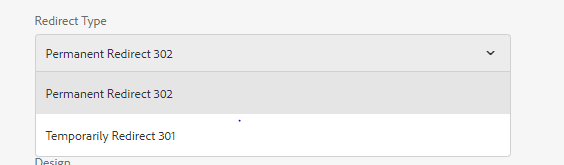
Add a custom widget as drop down to select 301 and 301 redirect and value must be 301 and 302 only.


Fig-2 Redirect Type Option in Page Properties

Let’s start with AEM 6.2/AEM 6.3 with 301/302 Redirect

The logic of redirection is written in /libs/foundation/components/page/page.jsp file so need to seperate the redirection logic in one another jsp file may be “redirect.jsp” but logic in this jsp only do 302 redirect so let’s add logic for 301 redirect.and include that jsp in header.html. 

The implementation of 301 and 302 Redirection is exactly same in AEM 6.2 and AEM 6.3

redirect.jsp having the logic for 301 and 302 redirection:

<%@page session="false"
import="com.day.cq.wcm.api.WCMMode,
com.day.cq.wcm.foundation.ELEvaluator" %><%
%><%@taglib prefix="cq" uri="http://www.day.com/taglibs/cq/1.0" %><%
%><cq:defineObjects/><%
String location = properties.get("redirectTarget", "");
String type = properties.get("redirectType", "");
// resolve variables in path
location = ELEvaluator.evaluate(location, slingRequest, pageContext);
boolean wcmModeIsDisabled = WCMMode.fromRequest(request) == WCMMode.DISABLED;
boolean wcmModeIsPreview = WCMMode.fromRequest(request) == WCMMode.PREVIEW;
if ( (location.length() > 0) && ((wcmModeIsDisabled)) ) {
// check for recursion
if (currentPage != null && !location.equals(currentPage.getPath()) && location.length() > 0) {
// check for absolute path
final int protocolIndex = location.indexOf(":/");
final int queryIndex = location.indexOf('?');
String redirectPath;

if ( protocolIndex > -1 && (queryIndex == -1 || queryIndex > protocolIndex) ) {
redirectPath = location;
} else {
redirectPath = slingRequest.getResourceResolver().map(request, location) + ".html";
}

// include wcmmode=disabled to redirected url if original request also had that parameter
if (wcmModeIsDisabled) {
redirectPath += ((redirectPath.indexOf('?') == -1) ? '?' : '&') + "wcmmode=disabled";
}
if (type.equals("301")) {
response.setStatus(301);
response.setHeader("Location",redirectPath);
} else {
response.sendRedirect(redirectPath);
}

} else {
response.sendError(HttpServletResponse.SC_NOT_FOUND);
}
return;
}
%>


AEM 6.4 with 301/302 Redirect:
In AEM 6.4, AEM has provided a feature of redirecting a page by default.It means no need to write any redirect.jsp for 302 Redirection.

So how 302 Redirect is working in AEM 6.4?
My observation: I created a page component without any inheritance and created a
page configured a redirect path in it.

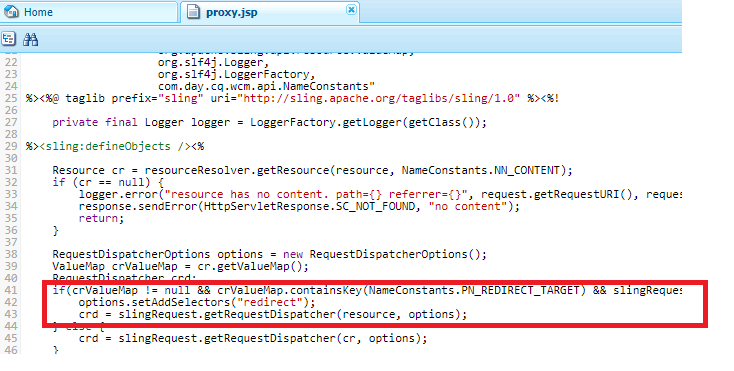
While rendering a page this jsp "/libs/cq/Page/Page.jsp" gets called. This jsp
includes proxy.jsp and that proxy.jsp is calling a servlet com.day.cq.wcm.foundation.impl.PageRedirectServlet.java with selector "redirect".


Fig-3 : Call PageRedirectServlet from proxy.jsp

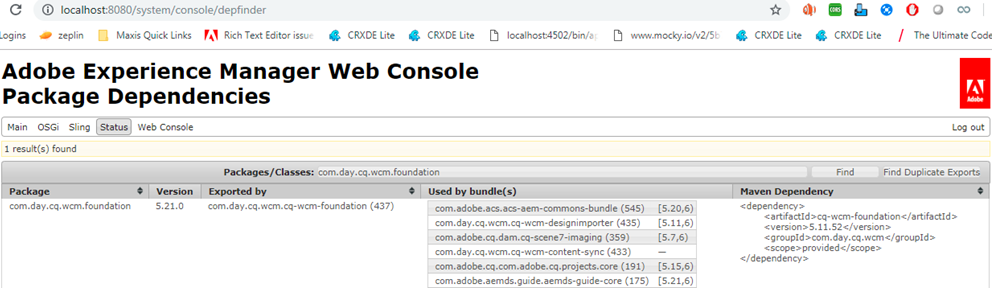
com.day.cq.wcm.foundation.impl.PageRedirectServlet.java class exists in the bundle shown below.


Fig-4: Bundle that has the class PageRedirectServlet.java

Now the question come how to configure 301 in AEM 6.4??
To achieve 301 redirect,

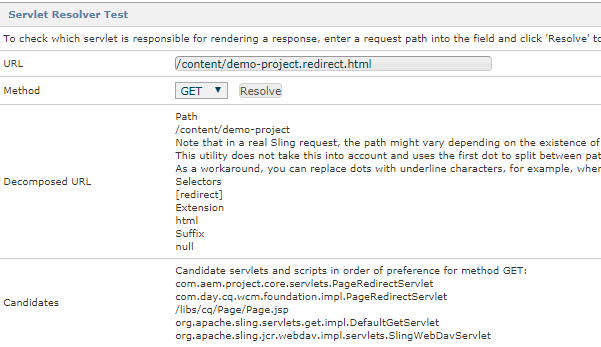
Overlay /libs/cq/Page hierarchy and make a servlet with a different selector and make an entry of that selector in proxy.jsp.So that always your servlet will get called (in which the logic for 301 and 302 redirection is written ) in place of OOTB servlet.
Make your own servlet class with the same selector(redirect) with 301 redirect logic in it and make the service ranking of this servlet higher.OOTB Servlet is not using any service ranking, so you can create servlet using service ranking and then always your servlet will get called.


Fig-5: Servlet Resolver Console that shows the scripts running for redirection as per preference
Custom PageRedirectServlet

package com.aem.project.core.servlets;

import com.day.cq.wcm.api.WCMMode;
import java.io.IOException;
import java.net.MalformedURLException;
import java.net.URL;
import java.util.Collections;
import java.util.HashSet;
import java.util.Map;
import java.util.Set;
import javax.servlet.RequestDispatcher;
import javax.servlet.Servlet;
import javax.servlet.ServletException;
import org.apache.commons.lang3.ArrayUtils;
import org.apache.commons.lang3.StringUtils;
import org.apache.sling.api.SlingHttpServletRequest;
import org.apache.sling.api.SlingHttpServletResponse;
import org.apache.sling.api.request.RequestDispatcherOptions;
import org.apache.sling.api.resource.Resource;
import org.apache.sling.api.resource.ValueMap;
import org.apache.sling.api.servlets.SlingSafeMethodsServlet;
import org.apache.sling.commons.osgi.PropertiesUtil;
import org.osgi.framework.Constants;
import org.osgi.service.component.annotations.Activate;
import org.osgi.service.component.annotations.Component;
import org.slf4j.Logger;
import org.slf4j.LoggerFactory;

@Component(service = Servlet.class,
property = {
Constants.SERVICE_DESCRIPTION + "= Redirection Servlet",
"sling.servlet.extensions=" + "html",
"sling.servlet.selectors=" + "redirect",
"sling.servlet.resourceTypes=" + "cq/Page",
Constants.SERVICE_RANKING + "=700"
})
public class PageRedirectServlet
extends SlingSafeMethodsServlet {

private Set<String> excludedResourceTypes;
private static Logger LOG = LoggerFactory.getLogger(PageRedirectServlet.class);
private static final String WCM_MODE_PARAM = "wcmmode";

@Activate
protected void activate(Map<String, Object> properties) {
String[] excludedResourceTypesArray = PropertiesUtil.toStringArray(properties.get("excluded.resource.types"));
this.excludedResourceTypes = new HashSet();
if (!ArrayUtils.isEmpty(excludedResourceTypesArray)) {
Collections.addAll(this.excludedResourceTypes, excludedResourceTypesArray);
}
}

protected void doGet(SlingHttpServletRequest request, SlingHttpServletResponse response)
throws ServletException, IOException {
Resource resource = request.getResource();
Resource contentResource = resource.getChild("jcr:content");
if (contentResource != null) {
String redirectTarget = getRedirectTarget(contentResource);
String redirectType = getRedirectType(contentResource);
if ((isRedirectRequest(request, redirectTarget)) && (!isExcludedResourceType(contentResource))) {
if (!isExternalRedirect(redirectTarget)) {
redirectTarget = resource.getResourceResolver().map(request, redirectTarget) + ".html";
}
redirectTarget = appendWcmModeQueryParameter(request, redirectTarget);
LOG.debug("Redirecting page {} to target {}", resource.getPath(), redirectTarget);
if (redirectType.equals("301")) {
response.setStatus(301);
response.setHeader("Location", redirectTarget);
} else
response.sendRedirect(redirectTarget);
return;
}
}
RequestDispatcherOptions requestDispatcherOptions = new RequestDispatcherOptions();
String selectorString = request.getRequestPathInfo().getSelectorString();
selectorString = StringUtils.replace(selectorString, "redirect", "");
requestDispatcherOptions.setReplaceSelectors(selectorString);

RequestDispatcher requestDispatcher = request.getRequestDispatcher(contentResource, requestDispatcherOptions);
if (requestDispatcher != null) {
requestDispatcher.include(request, response);
}
}

private boolean isExcludedResourceType(Resource contentResource) {
for (String excludedResourceType : this.excludedResourceTypes) {
if (contentResource.isResourceType(excludedResourceType)) {
return true;
}
}
return false;
}

private String appendWcmModeQueryParameter(SlingHttpServletRequest request, String redirectTarget) {
if (isModeDisabledChangeRequest(request)) {
redirectTarget = redirectTarget + (redirectTarget.contains("?") ? "&" : "?") + "wcmmode" + "=disabled";
}
return redirectTarget;
}

private boolean isModeDisabledChangeRequest(SlingHttpServletRequest request) {
boolean isModeChangeRequest = false;
String modeChange = request.getParameter("wcmmode");
if (StringUtils.equalsIgnoreCase(modeChange, WCMMode.DISABLED.name())) {
isModeChangeRequest = true;
}
return isModeChangeRequest;
}

private boolean isExternalRedirect(String redirectTarget) {
boolean externalRedirect = false;
try {
URL url = new URL(redirectTarget);
String protocol = url.getProtocol();
if (StringUtils.isNotBlank(protocol)) {
externalRedirect = true;
}
} catch (MalformedURLException e) {
return false;
}
return externalRedirect;
}

private String getRedirectTarget(Resource resource) {
ValueMap valueMap = resource.adaptTo(ValueMap.class);
String redirectTarget = "";
if (valueMap != null) {
redirectTarget = (String) valueMap.get("cq:redirectTarget", "");
}
return redirectTarget;
}

private String getRedirectType(Resource resource) {
ValueMap valueMap = resource.adaptTo(ValueMap.class);
String redirectTarget = "";
if (valueMap != null) {
redirectTarget = valueMap.get("redirectType", "");
}
return redirectTarget;
}

private boolean isRedirectRequest(SlingHttpServletRequest request, String redirectTarget) {
WCMMode wcmMode = WCMMode.fromRequest(request);
return (StringUtils.isNotEmpty(redirectTarget)) && (wcmMode.equals(WCMMode.DISABLED));
}
}


By aem4beginner

Handing 301 Redirection in AEM using Redirect Map Manager

Ideally when we need 301 redirections?
1. When you are completely changing the website with a new hierarchy of Pages and Assets, 301 redirections are needed. The idea is the old users who were using the website will never get 404 and still can be redirected to the correct place.
2. If you want 301 redirections of internal URL’s to External Sites.

Does the approach of 301 Redirection via page properties really solve the issue if not then why?
1. Let's suppose we have a old website /content/we-retail/en/home.html and now the new home page is /content/we-retail/home.html, we won't manage the old hierarchy in our AEM, then having 301 redirection in page properties won’t really help.

2. The page properties 301 can only work if you have a page just to create the hierarchy but you always want the user to redirect to some other place.For instance: you have a page /content/we-retail/en and you want to 301 redirect to this page to home page.

Conclusion: Having 301 redirection in page properties can not solve all the use cases of 301 redirections.

If we are managing single/multiple websites in AEM, we really want a full-fledged solution to handle 301 redirection.
ACS Commons Redirect Map Manager is really able to solve all the above mentioned
issues And we can manage all the 301 redirection at the Apache level itself.

How to configure Redirect Map Manager for your project in AEM.
1. Go to miscadmin console. Go to Tools->acs commons->Redirect Maps.
2. Create a new Page.


Fig1: Create a page for Redirect Maps

3. Enter the Title/Name of your redirect map and click Create.
4. Upload a Redirect Map base file (optional). This can be useful for specifying miscellaneous or external redirects that aren’t found for pages in the AEM repository. For example, redirecting a particular URL to an external application.
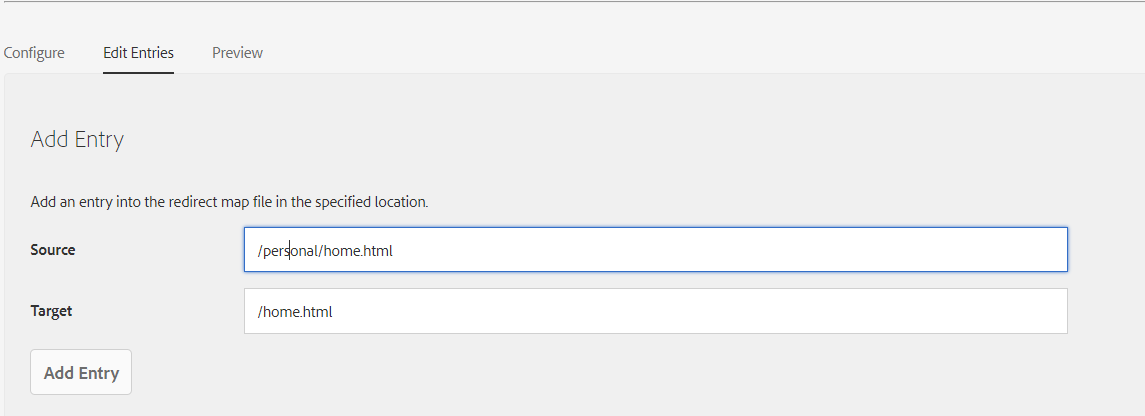
5. If you don't want to upload a file, Go to "Edit entries" Tab and “Add Entry” by entering Source and Target. Use source as a relative path and target you can configure the relative path if you want 301 redirections at the same domain or can configure the full external domain to redirect.


Fig2: Add entries for 301 Redirection

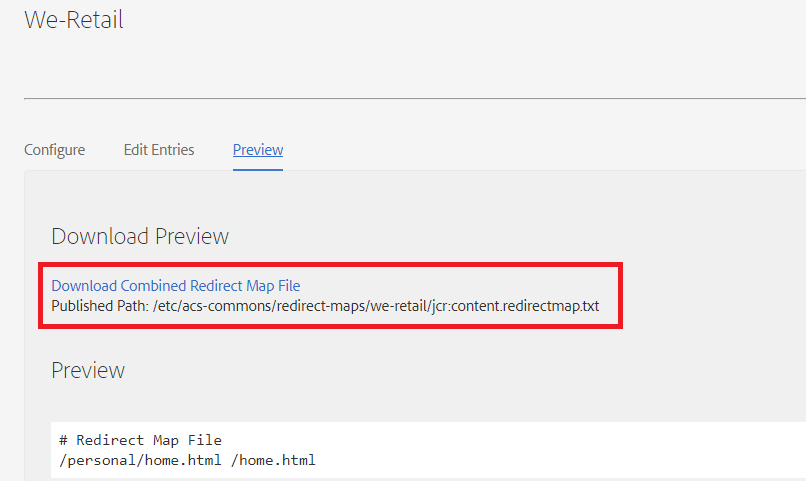
6. You can preview the list of all 301 redirections. In the “Download Preview”, you got the URL through which Apache server can access this file from AEM.


Fig3: Preview will show the link to access redirect map.

7. Publish the Redirect Map Pages.
Handling Configuration in Apache1. Add a bash script (redirect-map.txt) to pull the redirect Map file from publisher. You can put it anywhere but I placed it in “/etc/httpd/conf.d/redirects/redirect-map.txt”. [The extension of the script can be .sh or .txt]

#!/bin/bash

# Configuration values
PUBLISHER_IP=A.B.C.D
LOG_DIR=/var/log/httpd
MAPS=(
"we-retail"
"geometrixxx"
)

# Update the redirect maps
for MAP_FILE in "${MAPS[@]}"
do
:
rm /tmp/${MAP_FILE}.txt
wget http://${PUBLISHER_IP}:4503/etc/acs-commons/redirect-maps/${MAP_FILE}/jcr:content.redirectmap.txt -O /tmp/${MAP_FILE}.txt >> ${LOG_DIR}/update-redirect-map.log 2>&1
httxt2dbm -i /tmp/${MAP_FILE}.txt -o /etc/httpd/conf/tmp-${MAP_FILE}.map >> ${LOG_DIR}/update-redirect-map.log 2>&1
mv /etc/httpd/conf/tmp-${MAP_FILE}.map.dir /etc/httpd/conf/${MAP_FILE}.map.dir
mv /etc/httpd/conf/tmp-${MAP_FILE}.map.pag /etc/httpd/conf/${MAP_FILE}.map.pag
done

Below is the explanation of the bash script line by line.
line No 4: need to change with the publish private IP to which apache should able to connect. (Can be tested via telnet)
line No 5:Need to define the log directory of the apache server
line No 7:This is the name of the redirect map you created in your AEM. If there are multiple redirect map to handle multiple sites, you can add all the redirect Map pages name here.
line No 12: This line will start the loop for all the map files one by one. Let’s see the execution of the we-retail map file.
line No 15: Will remove the file from /tmp/we-retail.txt
line no 16:It will fetch the file from the publisher and put it in “/tmp/we-retail” and log this activity in a log file named “update-redirect-map.log”.
line No 17: convert the /tmp/we-retail file to a DBM file and place the newly DB files(.pag file and dir file) in the conf directory. So the files gets created are /conf/httpd/conf/tmp-we-retail.pag and /etc/httpd/conf/tmp-we-retail.dir and log this activity in log file.
line No 18,Move the file from /etc/httpd/conf/tmp-we-retail.dir to /etc/httpd/conf/we-retail.dir
line No 19,Move the file from /etc/httpd/conf/tmp-we-retail.pag to /etc/httpd/conf/we-retail.pag
From Line 12 to Line 19 will execute for geometrixx also and for all the websites you will define in the above script.

2.Add a rewrite rule in the /etc/conf.d/rewrites/we_retail_base_rewrites.rules

# Rewrite rules
RewriteMap map.legacy dbm:/etc/httpd/conf/we-retail.map
RewriteCond ${map.legacy:$1} !=""
RewriteRule ^(.*)$ ${map.legacy:$1|/} [L,R=301]
If you are managing multiple sites, in every domain redirect.rules file you need to change the /etc/httpd/conf/we-retail.map file to the corresponding domain map file.

3. How to set cron expression to execute the above script on an hourly basis.
To open the cron file run the command:

sudo crontab -e
Or
sudo /bin/crontab -e
A file gets opened and you can add your cron expression like shown below. I have set the cron expression on hourly basis.

0 * * * * sh /etc/httpd/conf.d/redirects/redirect-map.txt 2>&1 /var/log/httpd/map-update-cron.log


Fig: Screenshot for the cron expression in apache

When you do all the configuration, you need to manually run the bash script one time by running the command “sh redirect-map.txt”

Because the rewrite rule tries to fetch map file which doesn’t get created by then, maybe your cron job will create it in an hour. So run one time manually to restart the Apache server and later cron job can take care of this activity on an interval.

Vanity URL Issue: As you know that vanity URL’s can not be duplicated within the whole AEM. AEM can only have one unique vanity and in the case of multiple sites, we may have requirements of having the same vanity for two domains. In this case also in place of vanity, you can manage this in 301 redirect map file for both domains and as every website map file is different so there won't be any conflict.

Limitations of 301 Redirects in Redirect Map Manager:
301 Redirect Map is really a cool feature but it has some limitations.
1. This is one to one mapping and we can not manage a regex here. So if we have 1000 URL’s need to redirect in a particular pattern you can not manage in Redirect Map. For this, you have to manage it at the Apache level. So create a file and add all the regex redirect URLs as shown below.
RewriteRule ^/en/index(.*)html$ /en/home.html [R=301,L]
Include the file in the rewrite file of a particular website.

Note: All the directories I mentioned above are as per the AMS Servers directory structure.
If you have different folder structure you can manage as per your need.

Note: Redirect Map Manager is not an AEM Feature but an ACS Commons feature.
So you need to install ACS Commons package in your AEM Server.

Note: When you made any change in Apache configuration, don’t directly restart.
Run a command “httpd-t” to check all the syntax first. If “Syntax Ok” then
only restart otherwise the Apache will go down if the syntax is not OK.

aem4beginner@dispatcher2apsoutheast1:~ httpd -t
Syntax OK

Conclusion and Benefits of Using Redirect Map Manager:
1. If you are managing 301 redirects like this, you don't need to manage 301 redirects at the page properties level. If there is any page in AEM, which you want to redirect just configure the page in the redirect Map Manager.

2. Through this approach, you can give an author the privilege that if they miss out on any 301 redirections, they can do it anytime they want.
3. If there are many vanity URL’s and because so many vanity URL’s impacts the performance of the server, you can use 301 redirections in place of vanities.
4. You can use the same vanities for different domains sharing the same AEM Server.


By aem4beginner