Showing posts with label Sling Servlet. Show all posts

January 3, 2021
Estimated Post Reading Time ~

Granite Custom Render Conditions using Servlet

Granite Render ConditionThe granite renders condition allows you to show(render)/hide(not render) granite resources based on some condition.

Custom Granite Render ConditionThe OOTB render Render Condition resources/components are JSP based and the above blogs also explained how to create and use custom render conditions using JSP but if you want to do it the same using servlet then follow this post. This post is only about how to create servlet based custom render condition resources.

Steps are as follows:
Create a servlet and registered with sling resourceType
Set Render Condition.class.getName() attribute with new SimpleRenderCondition(flag), where flag is true for render field and false to not render field.
request.setAttribute(RenderCondition.class.getName(), new SimpleRenderCondition(flag));
ExampleThis example same as ACS Commons's JSP based Path Render Condition . For demo I modified it little bit. Following are the changes :

Accept multiple paths.
It does not render the field for specified path instead of render for ACS path render.
It can be used for the component's dialog field to render a field based on-site and/or apps. This use case may come when there are common dialog fields and included in the component dialog using granite includes like OOTB page property dialog fields in AEM 6.4 and for example if some of the fields should not be rendered for other apps.
How : Created a granite:rendercondition node as a child node of the field which wanted to render/not render based on condition and set the following properties.

sling:resourceType - The resource type to which servlet is registered i.e. utils/granite/rendercondition/simple/sites-apps
hiddenSitePaths - Multifield property contains paths regex for which field will be hidden based on the current path, example values /contet/we-retail/.*
This is an optional property if hiddenAppPaths property specified.
hiddenAppPaths - Multifield property contains paths regex for which field will be hidden based on the component path, example values /apps/AEM63Apps/.*
This is an optional property if hiddenSitePaths property specified
and - true to not rendered field based on both App and Content path regex, false otherwise, default is false. This is an optional property.

Either hiddenSitePaths or hiddenAppPaths properties should be used based on scenarios. Both can be used as well.

granite:rendercondition node's properties

Example Servlet code
https://github.com/arunpatidar02/aem63app-repo/blob/master/java/CustomRenderConditionsServlet.java

Conclusion
  • The granite render condition is a powerful feature of the granite framework and can be used to render conditional fields.
  • The condition can be simple or complex. In this post, the example custom render is a complex type that can be reduced to 2 renders (App and site/content path(ACS Path Render)) and can be used with Or/And rendercondition.


By aem4beginner

December 31, 2020
Estimated Post Reading Time ~

Unit Testing Hands on - For Sling Servlet

This post is about creating a Unit Test class for Sling Servlet, another commonly used Java class as part of an AEM application.
In Sling servlets, we have

SlingSafeMethodsServlet - read only servlet supporting GET (doGet)
SlingAllMethodsServlet - Supports POST, PUT and DELETE (doPost/doPut/doDelete)


In either case, we have request and response objects using which desired code logic is written in Servlet.
For Unit testing, we have Mock sling request and sling response from Sling Mocks (org.apache.sling.testing.mock.sling.servlet.MockSlingHttpServletRequest and org.apache.sling.testing.mock.sling.servlet.MockSlingHttpServletResponse respectively)

Writing unit test for Servlet involves the following
  • Instantiate Servlet to be tested.
  • Get mock request and response from AemContext
  • Prepare the mock request object (per the code logic before calling doGet/doPost)
  • Call doGet/doPost method of Servlet to be tested
  • Assert the Servlet response (per the code logic)
Instantiate Servlet to be tested.
Considering the Servlet to be tested is UnitTestServlet.java,
    UnitTestServlet unitTestServletObj = new UnitTestServlet();

Get request and response from AemContext:
From the AemContext object, we can create a request and response which is MockSlingHttpServletRequest and MockSlingHttpServletResponse respectively as explained above.
    MockSlingHttpServletRequest mockSlingRequest = aemContext.request();
    MockSlingHttpServletResponse mockSlingResponse = aemContext.response();


Prepare a mock request object:
  • Consider a scenario where we have a Servlet to retrieve values from the request and perform logic based on that.
  • Lets say, parameter named "siteName" is retrieved from request via request.getParameter("siteName") where siteName is being passed from HTML form or ajax request/any related.
  • Now for unit testing, we need to explicitly set the parameter to the mock request. So when the Servlet method is tested and when the above line executes, we will have a value for the "siteName".
Prepare Map object and set it to mock sling request as below

private Map<String, Object> parameterMap = new HashMap<String, Object>();
parameterMap.put("siteName", "aemlearnings");
mockSlingRequest.setParameterMap(parameterMap);


Similarly, we can gain access to other methods available in MockSlingRequest to prepare mock sling request (mockSlingRequest) per the code logic for testing. (mockSlingRequest.setResource(), mockSlingRequest.addHeader and so on)

Call doGet/doPost method of Servlet to be tested:

Once when the mock sling request object is prepared, we can call the respective method using the servlet object that we instantiated per the first step.
    unitTestServletObj.doGet(mockSlingRequest, mockSlingResponse);

When this line gets executed, code logic in the actual doGet method will be executed. If there is anything that is missed to set up in the Test class file, then this line might throw "NullPointerException"

Example:
Let say code logic in doGet makes use of an OSGI service + if that OSGI service is not registered in Test class file/ in a mock sense, if we don't define any dummy implementation for any of the lines of code, then the respective object will be null and hence exception in the above line of execution (or if an exception is handled, it will ultimately result in an error related to Assertion)

Assert the Servlet response:
Based on the code logic related to the response object, we can assert accordingly.
Example to assert the status code/check the content type set/anything written to the response object.

/* Checking content Type */
assertEquals("application/json", mockSlingResponse.getContentType());
/* Checking response status code */
assertEquals(200, mockSlingResponse.getStatus());
/* Checking output of servlet */
assertTrue(mockSlingResponse.getOutputAsString().contains("Response String from Servlet")); [where the actual line of code for this is something like - resp.getWriter().write("Response String from Servlet=" + responseStr);]


Code on GitHub:
Full Sample Servlet and Unit Test class for the same is available in GitHub
As such it doesn't refine to a specific functionality but to illustrate the below
  • Reference an OSGi Service
  • Call a dummy REST API (available from POSTMAN) and writes the API response to the Servlet response object.
Reference an OSGI service:
We have an option to register/inject OSGi service with the help of AemContext.
Considering an OSGI service (with config) is referenced in a Servlet, then in Test class file, we need to register that service using AemContext - We have few related methods from AemContext for the same. Based on the nature of the OSGi service referenced, we can use the respective method accordingly.

A full list of methods related to this is available under the "Methods from OSGIContextImpl" section in API Doc

Prepare the config properties using a Map object
Use registerInjectActivateService method from AemContext

    private SampleOSGIService mockSampleOSGIService; // OSGI service
    private Map<String, String> configProps = new HashMap<String, String>();
    configProps.put("apiEndpoint", "https://postman-echo.com");
    configProps.put("apiKey", "XYZ");
    configProps.put("siteName", "aemlearnings");
    mockSampleOSGIService = aemContext.registerInjectActivateService(new      
    SampleOSGIServiceImpl(), configProps);

Other use cases part of a Servlet:
  • Logic related to accessing a resource from request/performing any iteration/related actions on AEM APIs like Page or Asset or Tag or any related/Query Builder based logic to get the result based on some condition via predicates Map and so on.
  • We can mock the respective API if it is not directly available from AemContext -> provide dummy implementation and hence assert accordingly.


By aem4beginner

December 28, 2020
Estimated Post Reading Time ~

What is a Servlet in AEM?

What is a Servlet? 
A Servlet is a class used to extend the capabilities of servers that host applications accessed by means of a request-response programming model; we know most of the HTTP protocol.

In AEM, Servlets are typically registered as an OSGI service. The reference of the “sling.servlet.paths” or “sling.servlet.resourceTypes” must be set, or the Servlet service will be ignored.


By aem4beginner

Sugar Coat Registered AEM Servlet Scripts and Paths Endpoint

In AEM we tend to write Sling Servlet OSGI Services to expose JSON data using the various service reference properties such as “sling.servlet.paths”, “sling.servlet.resourceTypes”, “sling.servlet.selectors”, and “sling.servlet.extensions”.

Example 1: DirectoriesServlet.Java doGet Servlet Implementation (html extension):
This is an example of how a servlet in AEM retrieves the directories JSON data.
// example for /content/mysite.directories.html
@SlingServlet(
    resourceTypes = "/apps/mysite/components/page/basepage",
    selectors = "directory",
    extensions = "html",
    methods = "GET")
public class MyServlet extends SlingSafeMethodsServlet {
    @Override
    protected void doGet(SlingHttpServletRequest request, SlingHttpServletResponse response) throws ServletException, IOException {
        response.setStatus(HttpStatus.OK_200);
        response.setContentType(APPLICATION_JSON_UTF8);
        response.setHeader(HttpHeaders.EXPIRES, EXPIRE_IN_SECONDS);
        response.setHeader(HttpHeaders.CACHE_CONTROL, "max-age=" + EXPIRE_IN_SECONDS);
        String json = new ObjectMapper().writeValueAsString(getDirectories());
        response.getWriter().write(json);
    }
}

Example 2: StoresServlet.Java doGet Servlet Implementation (json extension):
This is an example of how a servlet in AEM retrieves the stores JSON data.

// example for /content/mysite.stores.json
@SlingServlet(
    resourceTypes = "/apps/mysite/components/page/basepage",
    selectors = "stores",
    extensions = "json",
    methods = "GET")
public class MyServlet extends SlingSafeMethodsServlet {
    @Override
    protected void doGet(SlingHttpServletRequest request, SlingHttpServletResponse response) throws ServletException, IOException {
        response.setStatus(HttpStatus.OK_200);
        response.setContentType(APPLICATION_JSON_UTF8);
        response.setHeader(HttpHeaders.EXPIRES, EXPIRE_IN_SECONDS);
        response.setHeader(HttpHeaders.CACHE_CONTROL, "max-age=" + EXPIRE_IN_SECONDS);
        String json = new ObjectMapper().writeValueAsString(getStores());
        response.getWriter().write(json);
    }
}

JSON Request:
Typically, multi-channel implementations such as mobile, smartwatches, kiosks, 3rd party websites, etc… will be requesting JSON data with the path of:

/content/mysite.directories.html
/content/mysite.stores.json

As you can tell, the path stated above looks unfinished. As such, Sling Servlet Resolver scripts/paths may not be acceptable to present to the end-users. Revealing custom selectors or custom extensions are not suitable for security reasons and detailed information exposure; this can be easily resolved. We can add a layer of security, and also sugar-coat the revealed scripts/paths by utilizing the Apache Web Server’s Rewrite Flag, PT, as one of the many good practices to follow.

What is the Apache Web Server’s Rewrite Flag, PT
The [PT] flag causes the result of the RewriteRule to be passed back through URL mapping as an Alias. Simply the end-users will only see an alias of the JSON file while the request is internally mapped to the correct path to the AEM publisher.

Examples of PT:
RewriteRule ^/api/directories.json$ /content/mysite.directories.html [PT,L]
RewriteRule ^/api/stores.json$ /content/mysite.stores.json [PT,L]

Finally, after the Rewrite rule has been set up, multi-channel implementations can request for the JSON with this path:

/api/directories.json
/api/stores.json

In summary, this is a standard way to secure your Servlets in AEM, and also to sugar-coat an AEM site’s Sling Servlet Resolver scripts/paths.

Also, do remember to add caching strategies to optimize the load against your AEM production publish instances.


By aem4beginner

Registering @SlingServletPaths Component Property Type

You are probably looking for the @SlingServletPaths, OSGi DS 1.4 (R7) component property type annotations for Sling Servlets, code/unit test examples and was not successful.

Apache recommends not use the @SlingServletPaths annotation, Sling Servlet register by a path. Rather use the @SlingServletResourceTypes component type. Given the drawbacks in the caveats below, it is strongly recommended to bind servlets to resource types rather than paths.

Caveats when using @SlingServletPaths:
  • Path-bound servlets cannot be access-controlled using the default JCR repository ACLs.
  • Path-bound servlets can only be registered to a path and not a resource type (i.e. no suffix handling).
  • If a path-bound servlet is not active, e.g. if the bundle is missing or not started, a POST might result in unexpected results. usually creating a node at /bin/xyz which subsequently overlays the servlets path binding.
  • The mapping is not transparent to a developer looking just at the repository.
Apache’s Documentation
Also, have a look at the Apache Sling Servlet Documentation for the SlingServletPaths component property type, which what is mentioned above is clearly stated.

Example of @SlingServletResourceTypes:
The proper way to bind Sling Servlets is by binding the servlet to resource types. This is an example of a servlet binding to a resource type.

package com.sourcedcode.core.servlets.impl;
import org.apache.sling.api.SlingHttpServletRequest;
import org.apache.sling.api.SlingHttpServletResponse;
import org.apache.sling.api.servlets.SlingSafeMethodsServlet;
import org.apache.sling.servlets.annotations.SlingServletResourceTypes;
import org.osgi.service.component.annotations.Component;

import javax.servlet.Servlet;
import java.io.IOException;

import static org.apache.sling.api.servlets.HttpConstants.METHOD_GET;

/**
* Enables all resources to return formatted response data from the doGet() method.
* Appending ".example.json" on any resource will activate the doGet() method below.
*/
@Component(service = Servlet.class)
@SlingServletResourceTypes(
resourceTypes = "sling/servlet/default",
methods = "get",
extensions = "json",
selectors = "example")
public class SlingServletResourceTypesExampleServlet extends SlingSafeMethodsServlet {

@Override
protected void doGet(SlingHttpServletRequest req, SlingHttpServletResponse res) throws IOException {
res.setContentType("text/plain");
res.setCharacterEncoding("UTF-8");
res.setStatus(200);
res.getWriter().write("Done");
}
}


By aem4beginner

AEM Sling Servlet Unit Test Example Using wcm.io AEM Mocks, Servlet by Resource Type

This article will demonstrate how to write AEM Unit tests for @SlingServletResourceTypes (OSGi DS 1.4 (R7) component property type annotations) using the Junit4 testing framework. With developers being more visual, the source code is posted below.

Environment:
AEM project archetype 19 (link)
Mockito 2.27.0 (link)
AEM Mocks JUnit 4 2.7.2 (link)

This example uses the AEM project archetype 19 to generate a new AEM project, Junit 4 will be used as the testing framework, Mockito 2.27.0 will be used as the mocking framework, and AEM Mocks will be used to mock AEM objects and AEM API.

What’s really great about the latest versions of AEM mocks, is that the setup is very minimal. After spinning up a new AEM project from the AEM project archetype 19, you simply need to include the AEM Mocks dependency, and you are ready to go!

Using OSGI R7 annotations for your AEM project requires some additional dependencies. 

Test Framework Dependencies
// pom.xml
<!-- Maven Surefire Plugin -->
<plugin>
    <groupId>org.apache.maven.plugins</groupId>
    <artifactId>maven-surefire-plugin</artifactId>
    <version>2.20</version>
    <configuration>
        <junitArtifactName>junit:junit:4</junitArtifactName>
    </configuration>
</plugin>
...
<dependencies>
    ...
    <dependency>
        <groupId>io.wcm</groupId>
        <artifactId>io.wcm.testing.aem-mock</artifactId>
        <version>2.7.2</version>
        <scope>test</scope>
    </dependency>
    ...
</dependencies>

// core/pom.xml
<dependencies>
    ...
    <dependency>
        <groupId>io.wcm</groupId>
        <artifactId>io.wcm.testing.aem-mock</artifactId>
    </dependency>
    ...
</dependencies>

Sling Servlet Resource Types Class : SlingServletResourceTypes.class

package com.sourcedcode.core.servlets;

import com.day.cq.wcm.api.Page;
import com.fasterxml.jackson.databind.ObjectMapper;
import org.apache.sling.api.SlingHttpServletRequest;
import org.apache.sling.api.SlingHttpServletResponse;
import org.apache.sling.api.resource.Resource;
import org.apache.sling.api.resource.ResourceResolver;
import org.apache.sling.api.servlets.SlingSafeMethodsServlet;
import org.apache.sling.servlets.annotations.SlingServletResourceTypes;
import org.osgi.service.component.annotations.Component;

import javax.servlet.Servlet;
import java.io.IOException;
import java.util.ArrayList;
import java.util.Iterator;
import java.util.List;

import static com.day.crx.packaging.JSONResponse.APPLICATION_JSON_UTF8;
import static org.apache.sling.api.servlets.HttpConstants.METHOD_GET;

/**
 * A demonstration sling servlet resource type class to demonstrate unit testing.
 * Appending ".example.json" on any resource will activate the doGet() method below, and return Json data.
 * Json Data returned is data from the immediate children of the "/content/we-retail', parent resource node.
 */
@Component(service = Servlet.class)
@SlingServletResourceTypes(
        resourceTypes = "sling/servlet/default",
        methods = METHOD_GET,
        extensions = "json",
        selectors = "example")
public class SlingServletResourceTypesExampleDS14Servlet extends SlingSafeMethodsServlet {

    @Override
    protected void doGet(SlingHttpServletRequest req, SlingHttpServletResponse res) throws IOException {
        res.setContentType(APPLICATION_JSON_UTF8);
        res.setStatus(SlingHttpServletResponse.SC_OK);
        List<PageItem> pageItems = getPageItems(req);
        String json = new ObjectMapper().writeValueAsString(pageItems);
        res.getWriter().write(json);
    }

    private List<PageItem> getPageItems(SlingHttpServletRequest req) {
        List<PageItem> pageItems = new ArrayList<>();
        ResourceResolver resolver = req.getResourceResolver();
        Resource weRetail = resolver.getResource("/content/we-retail");
        if (weRetail != null) {
            Iterator<Resource> it = weRetail.listChildren();
            while (it.hasNext()) {
                Resource resource = it.next();
                if (resource.getResourceType().equalsIgnoreCase(com.day.cq.wcm.api.NameConstants.NT_PAGE)) {
                    Page page = resource.adaptTo(Page.class);
                    if (page != null) {
                        pageItems.add((new PageItem(page.getTitle(), resource.getPath())));
                    }
                }
            }
        }
        return pageItems;
    }

    /**
     * Inner class PageItem, for creating PageItem objects.
     */
    public class PageItem {

        private String pageTitle;

        private String pagePath;

        PageItem(String pageTitle, String pagePath) {
            this.pageTitle = pageTitle;
            this.pagePath = pagePath;
        }

        public String getPageTitle() {
            return pageTitle;
        }

        public String getPagePath() {
            return pagePath;
        }
    }
}

Results of the output from the working as expected SlingServletResourceTypesTest.class.


Sling Servlet Resource Types Test Class : SlingServletResourceTypesTest.class


package com.sourcedcode.core.servlets;

import com.fasterxml.jackson.databind.JsonNode;
import com.fasterxml.jackson.databind.ObjectMapper;
import io.wcm.testing.mock.aem.junit.AemContext;
import org.apache.sling.testing.mock.sling.ResourceResolverType;
import org.apache.sling.testing.mock.sling.servlet.MockSlingHttpServletRequest;
import org.apache.sling.testing.mock.sling.servlet.MockSlingHttpServletResponse;
import org.junit.Before;
import org.junit.Rule;
import org.junit.Test;
import org.junit.runner.RunWith;
import org.mockito.InjectMocks;
import org.mockito.Mock;
import org.mockito.junit.MockitoJUnitRunner;

import java.io.IOException;

import static com.day.crx.packaging.JSONResponse.APPLICATION_JSON_UTF8;
import static junitx.framework.Assert.assertEquals;
import static org.junit.Assert.assertTrue;

@RunWith(MockitoJUnitRunner.class)
public class SlingServletResourceTypesExampleDS14ServletTest {

    @Rule
    public final AemContext context = new AemContext(ResourceResolverType.JCR_MOCK);

    @Mock
    private MockSlingHttpServletRequest req;

    @Mock
    private MockSlingHttpServletResponse res;

    @InjectMocks
    private SlingServletResourceTypesExampleDS14Servlet underTest;

    @Before
    public void setup() {
        underTest = new SlingServletResourceTypesExampleDS14Servlet();
        req = context.request();
        res = context.response();
    }

    @Test
    public void doGet_shouldReturnHeaderAsExpected() throws IOException {
        underTest.doGet(req, res);
        assertEquals(res.getContentType(), APPLICATION_JSON_UTF8);
    }

    @Test
    public void doGet_shouldReturnPageItemListJsonAsExpected_0() throws IOException {
        underTest.doGet(req, res);
        String jsonString = res.getOutputAsString();
        ObjectMapper mapper = new ObjectMapper();
        JsonNode actualObj = mapper.readTree(jsonString);
        assertEquals(0, actualObj.size());
    }

    @Test
    public void doGet_shouldReturnPageItemJsonAsExpected_properties_values() throws IOException {
        createPagesInJcrMock();
        underTest.doGet(req, res);
        String jsonString = res.getOutputAsString();
        ObjectMapper mapper = new ObjectMapper();
        JsonNode actualObj = mapper.readTree(jsonString);
        JsonNode firstItem = actualObj.get(0);
        assertTrue(firstItem.has("pageTitle"));
        assertTrue(firstItem.has("pagePath"));
        assertEquals( "United states", firstItem.get("pageTitle").textValue());
        assertEquals("/content/we-retail/us", firstItem.get("pagePath").textValue());
    }

    /**
     * Test helper method to create 3 pages in the on-memory JCR Mock instance.
     */
    private void createPagesInJcrMock() {
        context.create().page("/content/we-retail", "/", "We Retail");
        context.create().page("/content/we-retail/us", "/", "United states");
        context.create().page("/content/we-retail/ca", "/", "Canada");
    }
}

NOTES:


By aem4beginner

October 13, 2020
Estimated Post Reading Time ~

Call any servlet in touchUI dialog - AEM 6.3

Firstly we will write a dialog listener, in that listener we will send the request to a servlet and also we can send the values to the servlet using the data attribute.

Step 1: jquery code snippet:

(function(document, $, ns) {
"use strict";

$(document).on("click", ".cq-dialog-submit", function(e) {

$.ajax({
type: 'GET',
url: '/bin/sling/idvalidate',
data: {
text: "TEXT",
heading: "HEADING"
},

success: function(msg) {

alert('success');
}
});
});

})(document, Granite.$, Granite.author);


Step 2: Now in our Java servlet we will get the values of which were sent from jquery and perform any kind of operations and send back the response:

package com.ftd.platform.core.servlets;

import java.io.IOException;
import java.net.URL;
import java.util.Map;
import javax.servlet.Servlet;
import javax.servlet.ServletException;

import org.apache.sling.api.SlingHttpServletRequest;
import org.apache.sling.api.SlingHttpServletResponse;
import org.apache.sling.api.servlets.SlingAllMethodsServlet;
import org.apache.sling.commons.osgi.PropertiesUtil;
import org.osgi.service.component.annotations.Activate;
import org.osgi.service.component.annotations.Component;
import org.slf4j.Logger;
import org.slf4j.LoggerFactory;

import com.fasterxml.jackson.databind.JsonNode;
import com.fasterxml.jackson.databind.ObjectMapper;

@Component(
service = { Servlet.class }, property = { " service.description=Servlet", " service.vendor=Adobe",
" process.label=Id Validator Service", "sling.servlet.paths=/bin/sling/idvalidate",
"sling.servlet.methods=GET" })

public class IdValidator extends SlingAllMethodsServlet {
private static final long serialVersionUID = -293773910749832945L;

String text;
String heading;
private static final Logger LOG = LoggerFactory.getLogger(IdValidator.class);

@Override
protected void doGet(SlingHttpServletRequest request, SlingHttpServletResponse response) throws ServletException, IOException {

response.setContentType("application/json");
text = request.getParameter("text");
heading = request.getParameter("heading").toString();
response.getWriter().write(heading.toString());

}
}


By aem4beginner

October 1, 2020
Estimated Post Reading Time ~

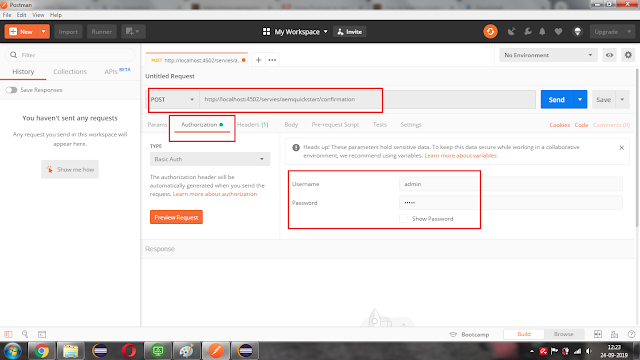
Access AEM servlet in postman

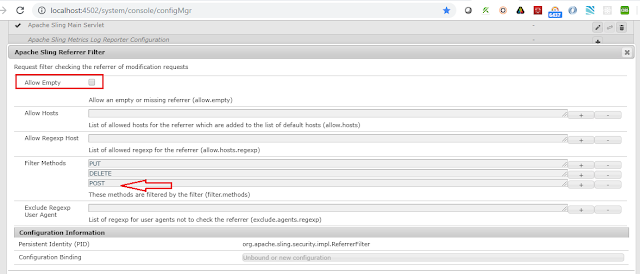
When you make a POST request to your local AEM author instance, the request will be filtered and restricted by "Apache Sling Referrer Filter" and "Adobe Granite CSRF Filter". Incoming POST requests without the CSRF-Token in the header will be blocked by "Apache Sling Referrer Filter" and "Adobe Granite CSRF Filter".

Steps to configure:
  1. Navigate to ConfigMgr
  2. Search for 'Apache Sling Referrer Filter'
  3. Remove the POST method from the filter.
  4. Check the "Allow Empty" checkbox and click on Save.


Search for "Adobe Granite CSRF Filter"
Remove the POST method from the filter.
Click on Save.


Click here to download the postman and install it.

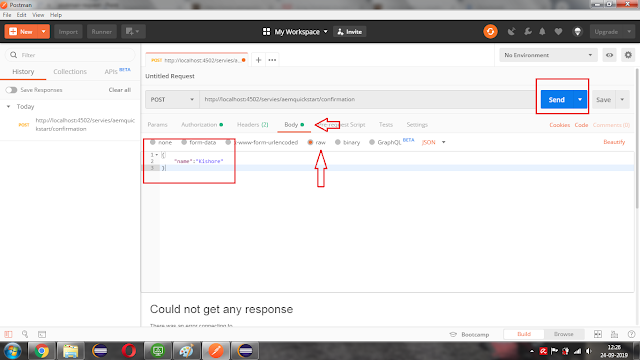
Open the Postman app and do the following steps.
  • A select method as POST
  • Enter AEM servlet URL.
  • Navigate to the "Authorization" tab and enter username and password.
  • Enter required "Headers"

Enter request in the body tab and hit the Send button.


By aem4beginner

May 22, 2020
Estimated Post Reading Time ~

Get JSP output within Servlet in AEM

In CQ, we need to process jsp within servlet then combine the result with other results we get from the server before writing back to the browser.

The following code is almost what we need, except that it writes the result back to the browser after processing jsp.

RequestDispatcher dispatcher = request.getRequestDispatcher(resource);
dispatcher.forward(request, response);
We tried using mock response as follows:

RequestData requestData = new RequestData(slingRequestProcessor, request, mockResponse);
SlingHttpServletRequest slingRequest = requestData.getSlingRequest();
SlingHttpServletResponse slingResponse = requestData.getSlingResponse();
RequestDispatcher dispatcher = request.getRequestDispatcher(resource);
dispatcher.forward(slingRequest, slingResponse);
but we get issues.

Best How To:
First off - based on your description it sounds like you want to use requestDispatcher.include and not requestDispatcher.forward.

Concerning the inclusion of the response content, the response which you pass into a requestDispatcher.include call could be an object of your own creation which would write its output to a string instead of returning it to the browser. Something along the lines of the following might be appropriate:

final ServletOutputStream outputStream = new ServletOutputStream() {
    public void write(int b) throws IOException {
        outputBuffer.append((char) b);
    }
};

SlingHttpServletResponseWrapper responseWrapper = new SlingHttpServletResponseWrapper(response) {
    public ServletOutputStream getOutputStream() {
        return outputStream;
    }

    public PrintWriter getWriter() throws IOException {
        return new PrintWriter(outputBuffer);
    }

    public SlingHttpServletResponse getSlingResponse() {
        return super.getSlingResponse();
    }
};

After the inclusion outputStream.toString() should provide the result of the resource request's execution.


By aem4beginner

May 15, 2020
Estimated Post Reading Time ~

No Servlets Required: Exporting Data with Sling Models

In version 1.3.0 of Sling Models the Apache Sling team introduced Sling Model Exporter, a new capability to directly export models as a Java Servlet. This version of Sling Models is available in AEM 6.3+. I finally have a chance to use the new Sling Model Exporter and I found it reduced the amount of boilerplate code I had to write by at least half.

Previously, to expose data in a Sling Model to JSON you had to use a tool like Gson to serialize the object to JSON and write a Servlet to expose this as an endpoint.

With the new version of Sling Models, you can directly expose a model as a Servlet by specifying a resource type and the selector to use in your model annotations. When the Model is loaded into Apache Sling, it automatically registers a Servlet corresponding to the model, allowing you to with nearly zero additional code, create a Servlet to access a JSON representation of the model. That’s super cool!

Using Sling Model Exporter
To leverage this new feature, simply add the @Exporter annotation and the resourceType attribute to your existing @Model annotation.

@Model(adaptables = { SlingHttpServletRequest.class }, resourceType = { "myapp/components/general/mycomponent" }) @Exporter(name = "jackson", extensions = "json") public class MyComponentData { @ValueMapValue private String[] paths; public String[] getPaths(){ return paths; } }

Once your Sling Model is installed the Servlet will be created. You can pull up the Sling Models status window (http://localhost:4502/system/console/status-slingmodels) in the Apache Felix OSGi Console to double check that the Servlet has been registered correctly. Then simply request a resource with the configured resource type and selector (if set, the default is “model”) and you will retrieve a JSON representation of the model:

$.getJSON(resourcePath+'.model.json',function(data){ console.log(data); }); >>> { paths: [ "/content/site/page", "/content/site/page2" ] }

One of the great things, is the Sling Models Exporter uses the Jackson serialization library for serializing data, so you can add annotations to configure how your Model is serialize to JSON. Using the Mapping Feature, you can configure how the data is mapped from the Model object or using the Serialization Feature, you can configure how the values are serialized to the JSON.

@Exporter(name = "jackson", extensions = "json", options = { @ExporterOption(name = "MapperFeature.SORT_PROPERTIES_ALPHABETICALLY", value = "true"), @ExporterOption(name = "SerializationFeature.WRITE_DATES_AS_TIMESTAMPS", value="false") })

Using the Right Tool
Sling Models Exporter is a great option for exposing data from the AEM repository in GET requests. However, we’re not quite free of the need to create Java Servlets in AEM. To support POST requests or GET requests which are not returning data extracted from the AEM repository, a standard Java Servlet is a better choice.

I hope you also see the value in the Sling Models Exporter. I certainly hope I never have to write another Servlet to dump a Sling Model to JSON in AEM.


By aem4beginner

Custom ComboBox with Dynamically Generated option value by the Servlet

In this post, I will explain how to create ComboBox with Dynamically generated option value in the AEM6 dialog?

Let’s see with the example:-
I created a dialog with a tab named as tab1. Under this node, I created a node named as items with the property jcr:primaryType = cq:widgetCollection.Under this node, I created a node named as comboBox with the property jcr:primaryType = cq:widget as shown in figure-


Now set the properties of this node as shown in figure-

For creating a comboBox, I used these properties-

type=select
xtype=selection
All other properties are explained below-
allowBlank = It restricts you from submitting the dialog without selecting an option from the comboBox.
fieldLabel = Text that will be shown before comboBox.
options = This property is used to define the servlet path that returns the JSON. 

This JSON will act as the option value for the comboBox. In my case, it values are/bin/page.html that returns a JSON as shown below-
{“1”:[{“path”:”/content/geometrixx/en/toolbar/contacts”,”title”:”Contact”},{“path”:”/content/geometrixx/en/toolbar/feedback”,”title”:”Feedback”},{“path”:”/content/geometrixx/en/toolbar/newsletter”,”title”:”Newsletter”}]}
optionsRoot = This property defines what property of the given JSON act as the source of options for this comboBox. As my JSON object contains an Array corresponding to a key “1“, So my optionsRoot property value will be “1”.
optionsTextField = This field represents which key from the JSON object will be treated as an options text values i.e. The text that will be displayed in the comboBox.
optionsValueField – This field represents which key from the JSON object will be treated as the value of that option i.e. On selecting a value from comboBox that will be returned to the server.

Now, In my case, the array has multiple JSON objects having two keys with corresponding values. These values are “path” & “title”.
I want to show “title” as an optional text value, i.e. It will be visible to the author & “path” is for returning the value to the server when the user selects the title value from the comboBox.

So I set these properties like this-
optionsTextField = title
optionsValueField = path

For example-
If user selects the “Contact” then “/content/geometrixx/en/toolbar/contacts” will be returned to the server for further processing.

After using all the above properties the dialog will look like this-


NOTE:
If your servlet returns only a single JSONArray and at the place of “path” and “title” are “key” and “value” like-
[{“key”:”/content/geometrixx/en/toolbar/contacts”,”value”:”Contact”},{“key”:”/content/geometrixx/en/toolbar/feedback”,”value”:”Feedback”},{“key”:”/content/geometrixx/en/toolbar/newsletter”,”value”:”Newsletter”}]

Then the last three properties (optionsRoot, optionsTextField, optionsValueField) are not required because by default the value of optionsTextField is “key” & the value of optinosValueField is “value”.

But if your JSON is in the form of like this-
{“1”:[{“key”:”/content/geometrixx/en/toolbar/contacts”,”value”:”Contact”},{“key”:”/content/geometrixx/en/toolbar/feedback”,”value”:”Feedback”},{“key”:”/content/geometrixx/en/toolbar/newsletter”,”value”:”Newsletter”}]}

Then only optionsRoot value is mandatory.
But if you want to give another name at the place of “key” and “value” then, all of these three properties are mandatory.
If your JSONArray is like as-
[{“path”:”/content/geometrixx/en/toolbar/contacts”,”title”:”Contact”},{“path“:”/content/geometrixx/en/toolbar/feedback”,”title“:”Feedback”},{“path“:”/content/geometrixx/en/toolbar/newsletter”,”title“:”Newsletter”}]

Then, You have to convert your JSON in this form-

{“1”:[{“path“:”/content/geometrixx/en/toolbar/contacts”,”title“:”Contact”},{“path“:”/content/geometrixx/en/toolbar/feedback”,”title“:”Feedback”},{“path“:”/content/geometrixx/en/toolbar/newsletter”,”title“:”Newsletter”}]}
Then, You can use the last three properties properly.


By aem4beginner

Named Transform Image Servlet (Image Renditions on the Fly)

Purpose:
Many web site designs demands consistency of images based on their use within components. For example, a panoramic spotlight may demand the image be 960 x 400, and bio picture must be 100 x 100 and greyscale.

Some times we have some images on which we can not use image renditions generated by out of the box because of their cropped size. In that case we have to use our different types of dimensions for different types of component.

The ACS AEM Commons Named Transform Image Servlet allows specific image transforms to be defined centrally via OSGI configurations. These image transforms can be easily invoked via parameterized HTTP GET requests to image resources in AEM.

So let see about ACS AEM Commons provided Image Transformers and how to use these transformers and what will the effect of these on images.

Supported “image-y” resources
Almost any “image-like” resource can be requested using the named transform URI parameterization, and the underlying image will be derived and rendered using the transformation parameters.
Pages (cq:Page):
HTTP GET /content/acme/article.transform/feature/image.png
Image component resources:
HTTP GET /content/acme/article/_jcr_content/image.transform/feature/image.png
DAM Assets (dam:Asset):
HTTP GET /content/dam/images/dog.jpg.transform/feature/image.jpg
DAM Asset Renditions”
HTTP GET /content/dam/images/dog.jpg/jcr:content/renditions/thumbnail.jpg.transform/feature/image.jpg
“Raw” Binary Images (nt:file or nt:resource):
HTTP GET /etc/designs/acme/images/cat.png.transform/feature/image.jpg

1. Resize:
Resizes the image to the specified width and/or height.
Name
  • Resize
Params
  • width=[width in px]
  • height=[height in px]Example
Example
  • resize:width=200
  • resize:height=300
  • resize:width=400&height=400
How to use:
Define any number of sling:OsgiConfig’s, each representing a differently named transform

/apps/mysite/config/com.adobe.acs.commons.images.impl.NamedImageTransformerImpl-myTransformName.xml

<?xml version="1.0" encoding="UTF-8"?> <jcr:root xmlns:sling="http://sling.apache.org/jcr/sling/1.0" xmlns:cq="http://www.day.com/jcr/cq/1.0" xmlns:jcr="http://www.jcp.org/jcr/1.0" xmlns:nt="http://www.jcp.org/jcr/nt/1.0" jcr:primaryType="sling:OsgiConfig" name="my-transform" transforms="[resize:width=400&height=400]"/>


Get the URI to a supported resource (see above) to transform
add the .transform extension (append this even if the resource is named with an extension; like a DAM asset)
Add an initial suffix segment that matches your transform name (Ex. /my-transform)
Add a final suffix segment of /image.<image-format-extension> OR /img.<image-format-extension>

Resulting in
<img src=”/content/mysite/article/_jcr_content/image.transform/my-transform/image.png”/>
or
<img src=”/content/dam/images/dog.jpg.transform/my-transform/img.png”/>

The below DAM Asset image has been resizes as defined by the custom defined my-transform transform rule set.

bc http://localhost:4502/content/dam/we-retail/en/activities/hiking/hiking_5.jpg.transform/my-transform/image.jpg

Resized Image


Original Image

2. Bounded Resize (v1.8.0+)
Resizes the image but will not resize past maximum dimension constraints. Accepts two Integer params: height and width. Either width or height will scale to the parameterized limit. The other dimension scale automatically to maintain the original aspect ratio. If the original image is smaller than the configured dimensions the image won’t be resized. Upscale param can be set to true to allow upscaling smaller images.

Name
  • bounded-resize
Params
  • width=[width in px]
  • height=[height in px]
  • upscale=true/false
Example
  • bounded-resize:width=200
  • bounded-resize:height=300
  • bounded-resize:width=400&height=400&upscale=true
How to use:

The below DAM Asset image has been resizing as defined by the custom-defined my-transform-bounded transform rule set.

bc. http://localhost:4502/content/dam/we-retail/en/activities/hiking/hiking_5.jpg.transform/my-transform-bounded/image.jpg


Bounded-resize

3. Crop
Crops the image to the specified bounds.
Name
  • crop
Params
  • bounds=[x,y,width,height]
  • smart=[boolean] Defaults to true. Smart bounding will attempt to shift the specified crop-zone to fit within the image dimensions if the crop-zone falls outside the images dimensions.
Example
  • crop:bounds=0,10,300,350
  • crop:bounds=0,10,300,350&smart=false
  • crop:bounds=25%,0,50%,100%
  • Relative cropping available since v2.8.0/3.4.0
How to use:
The below DAM Asset image has been cropped as defined by the custom defined my-transform-crop transform rule set.

http://localhost:4502/content/dam/we-retail/en/activities/hiking/hiking_5.jpg.transform/my-transform-crop/image.jpg
4. Greyscale
Converts the image to greyscale.

Name
.greyscale

Params
.None

Example
.greyscale
If we want to use all configs in single transform rule than we can use it. config will be like this:


The below DAM Asset image has been resizes, cropped and greyscaled as defined by the custom defined my-transform-all transform rule set.


Note: Order matters when defining your image transformation rules. For example, a resize then crop can yield significantly different results than a crop then resize.


By aem4beginner

May 13, 2020
Estimated Post Reading Time ~

Sling Servlets

Servlets in AEM is very similar to standard java servlets, however, they can be configured to be used either by everyone on AEM or for a specific component
The default implementation of a servlet is
@SlingServlet(paths = "/bin/sample/getdata", methods = { "GET"})
public class GetDataServlet extendsSlingAllMethodsServlet {
as you can see in the above example the basic implementation will generate a servlet available to be called on /bin/sample/getdata and provides a GET option only. From there the servlet is just like any other piece of code.
You can see that this servlet has extended the SlingAllMethodsServlet, while this is not mandatory and you could just extend Servlet if you wanted, the SlingAllMethods servlet has a lot of helper methods that make it much easier to use.
The SlingServlet annotation allows for multiple ways to be configured
  • generateComponent
    • Whether to generate a default SCR component tag
    • Defaults to true
  • generateService
    • Whether to generate a default SCR service tag
    • Defaults to true
  • paths
    • A list of paths this servlet is accessible on
  • resourceTypes
    • A list of resource types the servlet is available for
  • selectors
    • A list of selectors the servlet is available for
  • extensions
    • A list of extensions the servlet is available for
  • methods
    • A list of the http methods the servlet is available for
  • name
    • The name of the servlet
    • Used for component/service generation
  • metatype
    • If the metatype service data is generated
    • Defaults to false
  • label
    • The label for the servlet
    • Used for component/service generation
  • description
    • The description of the servlet
As you can see there are a few different ways of defining how access to the servlet is done, and you can combine 1 or more of them

path

The simplest definition is the path, while it needs to be a path that is available to the users, or if the servlet is used internally within the AEM application then it can be any url that is not already used by another service within AEM

resourceTypes

Usually, this is the resource type of a specific component, but it doesn't need to be, for internal references for data it can be a predefined label that another component can access. If it is being used to access data for a specific component then the path will be based on the path of the component on the page.
i.e. If you have the page /content/site/lang/home/page1 and on that page, you have a component in a parsys called comp1 then the path to the servlet would be /content/site/lang/home/page1/_jcr_content/par/comp1 there are helpers in sightly to get the current components path

selectors

Selectors are anything between the first and last . in the name of the page you are calling.
i.e. for the above page, if I call /content/site/lang/home/page1.sel1.sel2.sel3.html you are calling the page1 with extension html and with 3 selectors sel1, sel2, sel3

extensions

As in the above selector's example the extension is the piece of code after the last ., but before any other protected characters (/, ?, # e.t.c)
While it is possible to combine both path and resourceTypes these 2 parameters are generally mutually exclusive as they both define the path of the servlet
as an example, you could define a path, selector and extensions
@SlingServlet(paths = "/bin/sample/getdata", selectors="sel1", extensions = "json", methods = { "GET"})
Which would mean to get data you would have to call /bin/sample/getdata.sel1.json while this could all be in the path, it allows for you to have more than one selector or extension
@SlingServlet(paths = "/bin/sample/getdata", selectors={"sel1","sel2"}, extensions = {"json","xml"}, methods = { "GET"})
The slingServlet annotation writes the mapping into the build and at deployment, AEM will read the deployment and register all of the paths that it needs to listen on for the servlet.

SlingAllMethodsServlet

While as I mentioned you don't have to write a servlet as a SlingAllMethodsServlet, it is the easiest and gives you an easier way of implementing your servlet
the SlingAllMethodsServlet provides a nicer way of determining what type of call is being done.
By extending this class all you have to do is override one of the type methods
doGet, doPost, doPut, doDelete, doHead, doOptions, doTrace
As the default servlet is a component, you have access to other services and components via the reference annotation, and it is recommended to have the servlet itself very clean while using a service for processing the of the request
Like all servlets, it is your responsibility to handle getting parameters from the request, and writing the to the response.


By aem4beginner

Securely Serving AEM Vanity URLs

CQ’s (really Sling’s) out of the box vanity url features provide a powerful mechanism for authors to set and modify vanity urls for a page at run time, without the need for IT or sys admin involvement. One conflict I ran into for a long time with this was resolving the need to let authors create vanity urls, with the need to follow adobe security best practices of using a whitelist filter at dispatcher to not allow arbitrary request to be passed along to CQ publish instances.

As you can see, these 2 things conflict. If we want to follow security best practices, we can’t allow authors to specify arbitrary vanity urls. Or can we?

By utilizing CQ’s query builder json servlet and mod_rewrite RewriteMaps, we can create an always up-to-date mapping from the authored vanity urls to the canonical content path they represent, and still maintain a whitelist filter in accordance with security best practices.

Full disclosure, the idea for this is not originally mine (although all the code and config included is my own). I ran into it on 2 separate occasions with 2 different AEM sys-admins who had implemented a similar system. But when trying to implement it myself, finding publicly available examples to guide me was difficult; hence this post.

There are basically just 2 pieces to the solution:
a python script which uses CQ’s QueryBuilder json servlet to retrieve a list of pages with a vanity path set, and writes the results to a text file, along with setting up a cron job to run this on a regular basis.
mod_rewrite conf, which uses that text file to perform the mapping

See the github repo for the full details and code.


By aem4beginner

May 12, 2020
Estimated Post Reading Time ~

AEM Servlet + Interview Question

Servlet is a Java programming language class that is used to extend the capabilities of servers that host applications accessed by means of a request-response programming model. Although servlets can respond to any type of request, they are commonly used to extend the applications hosted by web servers.

Servlets can be registered as OSGi services. For a Servlet registered as an OSGi service to be used by the Sling Servlet Resolver, the following restrictions apply:
Either the sling.servlet.paths or the sling.servlet.resourceTypes service reference property must be set. If neither is set, the Servlet service is ignored.
If the sling.servlet.paths property is set, all other sling.servlet.* properties are ignored.
Otherwise a Resource provider is registered for the Servlet for each permutation resource types, selectors, extensions and methods.
Read more

Interview Questions
Note: For more on creating the servlet watch this video

1. How to register Servlet using Java annotations?
There are two ways of doing this
1. The @SlingServlet annotation
@SlingServlet(
resourceTypes = "sling/servlet/default",
selectors = "hello",
extensions = "html",
methods = "GET")
public class MyServlet extends SlingSafeMethodsServlet {
@Override
protected void doGet(SlingHttpServletRequest request, SlingHttpServletResponse response) throws ServletException, IOException {
...
}
}
2. The @Properties and @Property annotations
@Component(metatype = true)
@Service(Servlet.class)
@Properties({
@Property(name = "sling.servlet.resourceTypes", value = "sling/servlet/default"),
@Property(name = "sling.servlet.selectors", value = "hello"),
@Property(name = "sling.servlet.extensions", value = "html"),
@Property(name = "sling.servlet.methods", value = "GET")
})
public class MyServlet extends SlingSafeMethodsServlet {
@Override
protected void doGet(SlingHttpServletRequest request, SlingHttpServletResponse response) throws ServletException, IOException {
...
}
}

We should prefer @SlingServlet annotation.

2. How are different ways to register servlet in AEM?
You can register a Servlet using the two Standard approaches:
1. Registering the servlet by path
@SlingServlet(
paths={"/bin/customservlet/path"} )
@Properties({
@Property(name="service.pid", value="com.day.servlets.SampleServlet",propertyPrivate=false),
@Property(name="service.description",value="SampleDescription", propertyPrivate=false),
@Property(name="service.vendor",value="SampleVendor", propertyPrivate=false)
})
public class SampleServletname extends SlingAllMethodsServlet
{
@Override
protected void doGet(SlingHttpServletRequest request, SlingHttpServletResponse response) throws ServletException, IOException
{
}
}
2. Register servlet by ResourceType
@SlingServlet(
resourceTypes = "sling/servlet/path",
selectors = "json",
extensions = "html",
methods = "GET")
public class MyServlet extends SlingSafeMethodsServlet {
@Override
protected void doGet(SlingHttpServletRequest request, SlingHttpServletResponse response) throws ServletException, IOException {
...
}
}

The resource type(s) supported by the servlet. The property value must either be a single String, an array of Strings or a Vector of Strings. This property is ignored if the sling.servlet.paths property is set. More on Register servlet by Resource Type watch this video

3. Difference between SlingSafeMethodsServlet and SlingAllMethodsServlet.
  • SlingSafeMethodsServlet - Helper base class for read-only Servlets used in Sling. This base class is actually just a better implementation of the Servlet API HttpServlet class which accounts for extensibility. So extensions of this class have great control over what methods to overwrite. It supports GET, HEAD, OPTIONS etc methods. Read more
  • SlingAllMethodsServlet - Helper base class for data modifying Servlets used in Sling. This class extends the SlingSafeMethodsServlet by support for the POST, PUT and DELETE methods. Read more
4. Suppose I have added sling.servlet.paths and sling.servlet.resourceTypes both in servlet. What will happen?
Suppose I have added sling.servlet.paths and sling.servlet.resourceTypes both in servlet. sling.servlet.resourceTypes property is ignored if the sling.servlet.paths property is set.

5. How to get session in servlet?
1. We can get session from SlingHttpServletRequest.
Session session = slingHttpServletRequest.getResourceResolver().adaptTo(Session.class)
2. From ResourceResolverFactory,
@SlingServlet(
resourceTypes = "sling/servlet/path",
selectors = "json",
extensions = "html",
methods = "GET")
public class MyServlet extends SlingSafeMethodsServlet {
  @Refrence
  ResourceResolverFactory resourceResolverFactory
@Override
  protected void doGet(SlingHttpServletRequest request, SlingHttpServletResponse response) throws ServletException, IOException {
      Map param = new HashMap();
     param.put(ResourceResolverFactory.SUBSERVICE, "readservice");
      ResourceResolver resolver = null;
      try {
      //Invoke the getServiceResourceResolver method to create a Session instance
     resolver = resourceResolverFactory.getServiceResourceResolver(param);
     Session session = resolver.adaptTo(Session.class);
}
}

6. What is a resource resolver?
The ResourceResolver defines the service API which may be used to resolve Resource objects. The resource resolver is available to the request processing servlet through the SlingHttpServletRequest.getResourceResolver() method. A resource resolver can also be created through the ResourceResolverFactory. The ResourceResolver is also an Adaptable to get adapters to other types. Read more

7. Registering the servlet by path vs ResourceType?
Registering the servlet by resourceType is more preferential than path , because
  • use of resourceType is that the Sling Engine will take care of permissions for you. Users who cannot access a particular resource will not be able to invoke the servlet. Hence register by resourcetype is more secure.
  • While defining a path , you must be specific what all paths are allowed to be used in the ServletResource OSGi service. If you define something randomly, your servlet might not be fucntional. Only a limited paths are allowed and the rest are blocked unless you open them up. This is resolved using resourceType.
8. what is serialVersionUID in servlet?
The serialization runtime associates with each serializable class a version number, called a serialVersionUID, which is used during deserialization to verify that the sender and receiver of a serialized object have loaded classes for that object that are compatible with respect to serialization. If the receiver has loaded a class for the object that has a different serialVersionUID than that of the corresponding sender's class, then deserialization will result in an InvalidClassException. A serializable class can declare its own serialVersionUID explicitly by declaring a field named "serialVersionUID" that must be static, final, and of type long:

ANY-ACCESS-MODIFIER static final long serialVersionUID = 1L;

If a serializable class does not explicitly declare a serialVersionUID, then the serialization runtime will calculate a default serialVersionUID value for that class based on various aspects of the class, as described in the Java(TM) Object Serialization Specification. However, it is strongly recommended that all serializable classes explicitly declare serialVersionUID values, since the default serialVersionUID computation is highly sensitive to class details that may vary depending on compiler implementations, and can thus result in unexpected InvalidClassExceptions during deserialization


By aem4beginner

May 11, 2020
Estimated Post Reading Time ~

Granite Custom Render Conditions using Servlet

Granite Render ConditionThe granite render condition allows you to show(render)/hide(not render) granite resources based on some condition.
To understand and know more about Granite Render Condition please check below articles:
Custom Granite Render Condition
The OOTB render Render Condition resources/components are JSP based and above blogs also explained how to create and use custom render condition using JSP but if you want to do it same using servlet then follow this post. This post is only about how to create servlet based custom render condition resources.

Steps are as follows:
  • Create a servlet and registered with sling resourceType
  • Set Render Condition.class.getName() attribute with new SimpleRenderCondition(flag), where flag is true for render field and false to not render field. 
request.setAttribute(RenderCondition.class.getName(), new SimpleRenderCondition(flag));
Example:
This example same as ACS Commons's JSP based Path Render Condition . For demo I modified it little bit. Following are the changes :
  • Accept multiple paths.
  • It does not render the field for specified path instead of render for ACS path render.
  • It can be used for the component's dialog field to render field based on site and/or apps. This use case may come when there are common dialog fields and included in the component dialog using granite includes like OOTB page property dialog fields in AEM 6.4 and for example if some of the fields should not be rendered for other apps.
How: Created a granite:rendercondition node as a child node of the field which wanted to render/not render based on condition and set the following properties.

sling:resourceType - The resource type to which servlet is registered i.e. utils/granite/rendercondition/simple/sites-apps
hiddenSitePaths - Multifield property contains paths regex for which field will be hidden based on the current path, example values /contet/we-retail/.*
This is an optional property if hiddenAppPaths property specified.
hiddenAppPaths - Multifield property contains paths regex for which field will be hidden based on the component path, example values /apps/AEM63Apps/.*
This is an optional property if hiddenSitePaths property specified
and - true to not rendered field based on both App and Content path regex, false otherwise, default is false. This is an optional property.

Either hiddenSitePaths or hiddenAppPaths properties should be used based on scenarios. Both can be used as well.


granite:rendercondition node's properties

Example Servlet code
https://github.com/arunpatidar02/aem63app-repo/blob/master/java/CustomRenderConditionsServlet.java

Conclusion:
The granite render condition is a powerful feature of granite framework and can be used to render conditional fields.
The condition can be simple or complex. In this post, the example custom render is a complex type which can be reduced to 2 renders (App and site/content path(ACS Path Render)) and can be used with Or/And rendercondition.

By aem4beginner