Showing posts with label System User. Show all posts

October 1, 2020
Estimated Post Reading Time ~

Create a system user in AEM using runmode config

Add/create a system user through run mode in AEM using ACS commons. Create a run mode config file in your project.
/apps/aemquickstart/config/com.adobe.acs.commons.users.impl.EnsureServiceUser-customServiceUser.config

Add the below snippet in the config file

principalName="custom-service-user"
type="add"
ensure-immediately="{Boolean}true"
aces="[type=allow;privileges=jcr:read\,jcr:modifyproperties;path=/content/we-retail;rep:glob=/jcr:content/*,type=allow;privileges=jcr:read;path=/content/aemquickstart;rep:glob=/jcr:content/*]

The above snippet will add read and modify properties privilege to /content/we-retail path and read permission to /content/aemquickstart.

Click here to check how to create a system user using system explorer


By aem4beginner

May 27, 2020
Estimated Post Reading Time ~

Apache sling Service User Mapper Service

Problem Statement:
I am using 6.1. I have created a service user and given required permissions in useradmin. When am trying to map the service user in Apache sling Service User Mapper Service Amendment, I have given pwcm.core.schedulers: EventArchiveService=testSystemUser and clicked save but the issue is when I refresh I don't see any value in service mappings its becoming empty and I get the login error in error logs. I don't understand why the value is clearing off from Felix console.

Solution:
Step 1: Create a new system user. to do this
Open http://localhost:4502/crx/explorer/index.jsp

Login as admin > Open 'User Administration > Select 'Create System User' > Enter "user id" > Hit the Green button (you will not se a save button 🙂

I have created "abcwriteservice" user

Step 2: Go to Permissions, and for the user, 'abcwriteservice' give Permissions to access the folder where you'd like to write. (In this example: /etc/userdata )

Step 3: Open OSGI console and go to "Apache Sling Service User Mapper Service" to define the service-user mapping. For example: 'group.commons-service:writeService=abcwriteservice'

Step 4: In code, I added an extra parameter, as:

Map<String, Object> param = new HashMap<String, Object>(); param.put(ResourceResolverFactory.SUBSERVICE, "writeService"); try { resourceResolverWriter = factory.getServiceResourceResolver(param); if (resourceResolverWriter == null) throw new Exception("Could not obtain a CRX User for the Service:'writeService'"); Node usersRootNode = adminSession.getNode("/etc/userdata/users");

Note:
You should be using: "Apache Sling Service User Mapper service" - not "Apache Sling Service User Mapper Service Amendment".


By aem4beginner

May 9, 2020
Estimated Post Reading Time ~

Creating system users session in AEM – Getting system user session in AEM

Create system users from console http://localhost:4502/crx/explorer/index.jsp

User 1: shasservice – user with no access permissions
User 2: serviceuser – user with all the access permissions

Configure this in APCHE SLING SERVICE USER MAPPER SERVICE @System/console

Service mappings: com.demo.sehns.sehns:shasservice=serviceuser

Method #1 – TRYING FOR Session

private Session getSession(String srvServiceName) throws Exception{
Session session =null;

try{
log.info(“—-Getting session for—-“+srvServiceName);
ResourceResolver resourceResolver =  resolverFactory.getServiceResourceResolver(CommonUtils.getServiceMap(strServiceName));
session = resourceResolver.adaptTo(Session.class);
}catch(Exception e){
e.printStackTrace();
log.error(“—-Exception while getting session—-“+e.getMessage());
throw e;
}
return session;
}

METHOD #2 – returning service map data

public static Map getServiceMap(final String getServiceName) throws Exception{

try {
Map params = new HashMap();
param.put(ResourceResolverFactory.SUBSERVICE, getServiceName);
return params;
}catch(Exception e){
log.error(“————Error —-“+e);
throw exception;
}
}

Here we can get the session object by following the above method.


By aem4beginner

April 27, 2020
Estimated Post Reading Time ~

Sling scheduler to auto create the packages through JcrPackageManager API - AEM

This post will explains the approach to define Sling scheduler to auto create the packages through JcrPackageManager API in Adobe Experience Manager(AEM).

Define a Service user:
Define a Service User with required access to create a package.

Login to CRX explorer - http://localhost:4502/crx/explorer/index.jsp
Click on User Administration


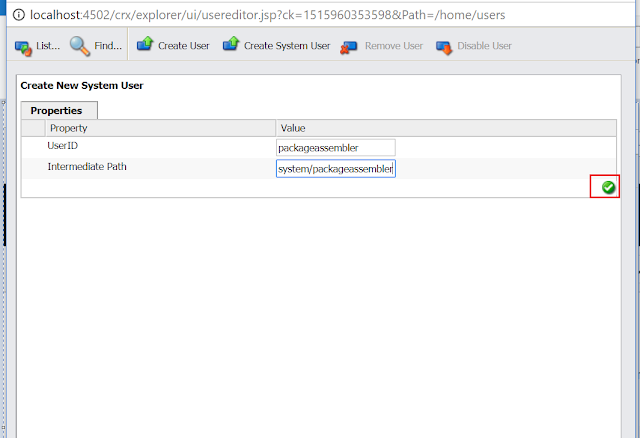
Click on Create System User


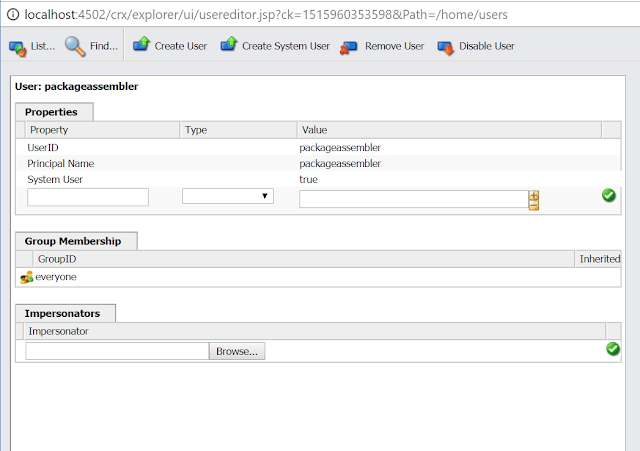
Enter the User Id - "packageassembler and the path - "system/packageassembler"


Login to config manager - http://localhost:4502/system/console/configMgr

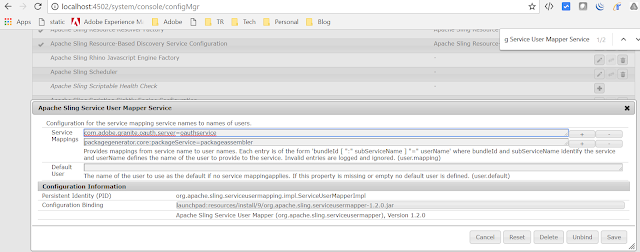
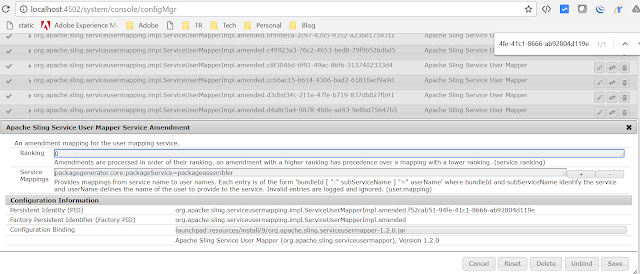
Search for "Apache Sling Service User Mapper Service" and add new service mapping


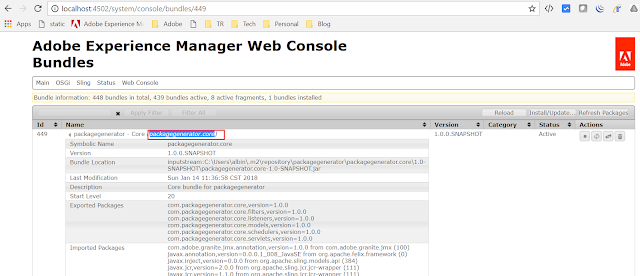
The bundle id can be copied from OSGI console


Search for "Apache Sling Service User Mapper Service Amendment" add service mapping


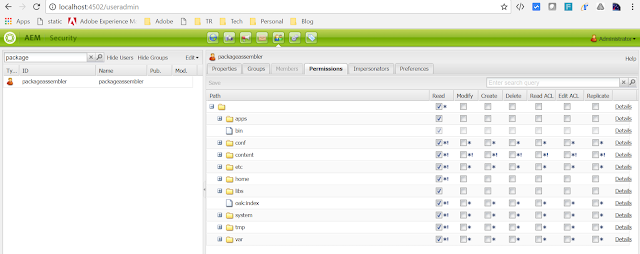
Login to - http://localhost:4502/useradmin
Search for the user "packageassembler"
Provide the read-only access to the repository


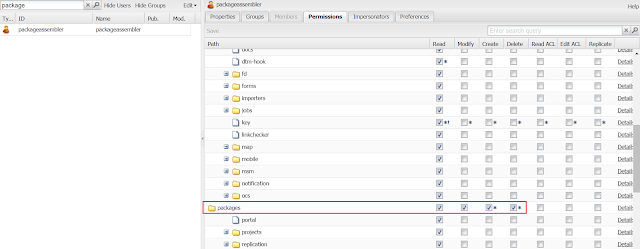
Provide create/modify/delete access to /etc/packages


GeneratePackageSchedulerRequest.java:
Factory class to define the Job configuration

@Component(configurationFactory = true, policy = ConfigurationPolicy.OPTIONAL, metatype = true, immediate = true, label = "Scheduled Package Generator")
@Service(value = GeneratePackageSchedulerRequest.class)
public class GeneratePackageSchedulerRequest {

final Logger logger = LoggerFactory.getLogger(this.getClass());

@Property(unbounded=PropertyUnbounded.DEFAULT, label="Scheduler Expression", description="Scheduler Expression", value="")
private static final String SCHEDULER_EXPRESSION = "sheduleExpression";
private String sheduleExpression;

@Property(unbounded = PropertyUnbounded.ARRAY, label = "Packages Filter String", cardinality = 50, description = "Packages Filter String")
public static final String PACKAGE_FILTERS = "packageFilters";
private String[] packageFilters;

@Property(unbounded=PropertyUnbounded.DEFAULT, label="Package Name", description="Package Name")
private static final String PACKAGE_NAME = "packgeName";
private String packageName;

@Property(unbounded=PropertyUnbounded.DEFAULT, label="Root Path to store the package", description="Root Path")
private static final String ROOT_PATH = "rootpath";
private String rootPath;

@Activate
protected void activate(final ComponentContext ctx) {

Dictionary<?, ?> props = ctx.getProperties();
sheduleExpression = PropertiesUtil.toString(props.get(SCHEDULER_EXPRESSION), "");

packageFilters = PropertiesUtil.toStringArray(props.get(PACKAGE_FILTERS), null);
packageName = PropertiesUtil.toString(props.get(PACKAGE_NAME), null);
rootPath=PropertiesUtil.toString(props.get(ROOT_PATH), null);
}

public String[] getPackageFilters() {
return packageFilters;
}

public String getJobname() {
return packageName;
}

public String getSheduleExpression() {
return sheduleExpression;
}

public String getRootPath() {
return rootPath;
}

}

GeneratePackageScheduledTask.java
Job class to create the package based on the Job parameter.

@Component(immediate = true, metatype = true)
@Service(GeneratePackageScheduledTask.class)

public class GeneratePackageScheduledTask {

@Reference
private SlingRepository repository;

@Reference
private ResourceResolverFactory resolverFactory;

@Reference
private SlingSettingsService settingsService;

@Reference
private Scheduler scheduler;

@Reference
private Packaging packaging;

protected final Logger logger = LoggerFactory.getLogger(this.getClass());

@Reference(cardinality = ReferenceCardinality.OPTIONAL_MULTIPLE, referenceInterface = GeneratePackageSchedulerRequest.class, policy = ReferencePolicy.DYNAMIC)
private final List<GeneratePackageSchedulerRequest> providers = new LinkedList<GeneratePackageSchedulerRequest>();

protected void bindProviders(final GeneratePackageSchedulerRequest config) throws Exception {

providers.add(config);

final String schedulingExpression=config.getSheduleExpression();
final String jobname= config.getJobname();
final String[] packageFilters = config.getPackageFilters();

final Runnable job = new Runnable() {
public void run() {

Session session=null;
if (isRunMode("author")&& isMasterRepository()) {

try {

Map<String, Object> param = new HashMap<String, Object>();
param.put(ResourceResolverFactory.SUBSERVICE, "packageService");

ResourceResolver resolver = resolverFactory.getServiceResourceResolver(param);

//ResourceResolver resolver = resolverFactory.getAdministrativeResourceResolver(null);
session= resolver.adaptTo(Session.class);

logger.debug("{} is now running, Parameter='{}'",jobname, packageFilters);

List<PathFilterSet> pathFilterSets = new ArrayList<PathFilterSet>();
for (String packageFilter : packageFilters) {
pathFilterSets.add(new PathFilterSet(packageFilter));
}

SimpleDateFormat sdf = new SimpleDateFormat("yyyy-MM-dd-HH-mm-ss-SSS");

JcrPackageManager jcrPackageManager = packaging.getPackageManager(session);

JcrPackage jcrPackage = jcrPackageManager.create("ScheduledPackages", jobname+sdf.format(new Date()).toString(), "1.0");
JcrPackageDefinition jcrPackageDefinition = jcrPackage.getDefinition();
DefaultWorkspaceFilter workspaceFilter = new DefaultWorkspaceFilter();

for (PathFilterSet pathFilterSet : pathFilterSets) {
workspaceFilter.add(pathFilterSet);
}

jcrPackageDefinition.setFilter(workspaceFilter, true);
jcrPackageDefinition.set(JcrPackageDefinition.PN_DESCRIPTION, "Scheduled Package"+jobname+sdf.format(new Date()).toString(), false);
String filePath=config.getRootPath()+File.separator+ config.getJobname()+sdf.format(new Date()).toString()+".zip";
logger.debug("Package Export File Path:"+filePath);

ProgressTrackerListener listener = new DefaultProgressListener();
jcrPackageManager.assemble(jcrPackageDefinition,listener, new FileOutputStream(filePath));

jcrPackageManager.remove(jcrPackage);

} catch (Exception rex) {
rex.printStackTrace();
logger.error("Error occurred in pckage creation..", rex.getMessage());
}finally {

if (session != null) {
session.logout();
}
}
}

logger.debug("run() END"+jobname);
}

};

ScheduleOptions so = scheduler.EXPR(schedulingExpression);
so.name(jobname);
this.scheduler.schedule(job, so);
logger.debug("Scheduled Job: " + config.getJobname()+" "+schedulingExpression);
}

protected void unbindProviders(final GeneratePackageSchedulerRequest config) {
logger.debug("Removed Job: " + config.getJobname());
this.scheduler.unschedule(config.getJobname());
providers.remove(config);
}

private Boolean isRunMode(String mode) {
Set<String> runModes = settingsService.getRunModes();
for (String runMode : runModes) {
if (runMode.equalsIgnoreCase(mode)) {
logger.debug("Current Runmode is : " + runMode);
return true;
}
}
return false;
}

public boolean isMasterRepository(){
final String isMaster = repository.getDescriptor("crx.cluster.master");
logger.debug("isMaster.."+isMaster);
return isMaster!=null && !isMaster.equals("") && Boolean.parseBoolean(isMaster);
}

}

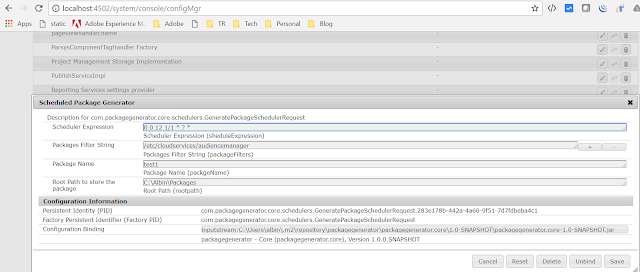
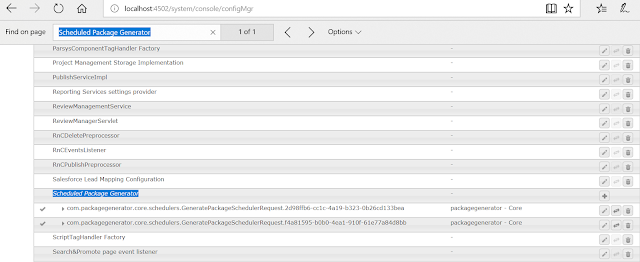
After deployment, Login to config manager - http://localhost:4502/system/console/configMgr
Search for "Scheduled Package Generator" and configure the Jobs(multiple jobs can be configured)

Scheduler Expression - Specify the scheduler expression to run the Job(use Cron maker to generate the expression)
Package Filter - Specify the repository path to include in the package(multiple paths can be specified)
Package Name - Specify the package name
Root Path to store the package - Specify the parent path in the server to store the package


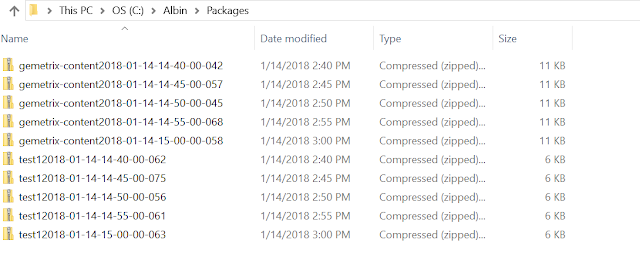
After enabling the configurations the packages will be created in specified location based on the scheduled time.


Download the sample code - https://gitlab.com/albinsblog-data/PackageGenerator(Refer com.packagegenerator.core.schedulers in core module)


By aem4beginner

April 26, 2020
Estimated Post Reading Time ~

Creating a System User in AEM

AEM System User:
Till AEM 6 we have the liberty to use any user as service user, for invoking and executing any service. But from AEM 6.1 there was a slight change on how to define the ServiceUserMapping and how the service user or system user has to be created.

If we try to assign any arbitrary user as service user in AEM 6.1 we would face below error : org.apache.sling.api.resource.LoginException: Cannot derive user name for bundle ch.inside.cqblog-bundle [452] and sub service readService Note:- From AEM 6.1 service users can only be mapped to system users (jcr:primaryType = rep:SystemUser).

In AEM 6.1, you must create an AEM System User to successfully get a session using code such as:

Why System User?
Use of admin session and admin resource resolver through ResourceresolverFactory is now deprecated, that’s why from AEM 6.1 Adobe forces developers to create system users and map them to Service User Mapper in Felix Console.

Prevent excessive use of administrative JCR Sessions and ResourceResolvers.
Allow services access to ResourceResolvers and JCR Sessions without requiring to hard-code or configure passwords.
Allow services to use service users and/or system users which are specially configured for service level access.

import javax.jcr.Session;
import org.apache.sling.api.resource.ResourceResolver;
import org.apache.sling.api.resource.ResourceResolverFactory;
....
@Reference
private ResourceResolverFactory factory;
private ResourceResolver resourceResolver;
private static Session adminSession;
...
...
Map<String, Object> param = new HashMap<String, Object>();        
    param.put(ResourceResolverFactory.SUBSERVICE, "writeService");
try {
  resourceResolver = factory.getServiceResourceResolver(param);            
  adminSession = resourceResolver.adaptTo(Session.class);  

  ResourceResolver resourceResolver=null;
  resourceResolver = resolverFactory.getServiceResourceResolver(param);
  Resource pageResource = resourceResolver.getResource("/etc/cloudservices/salesforce/kishore/jcr:content");
  Node configNode = pageResource.adaptTo(Node.class);
  configNode.setProperty("accesstoken", client.getAccessToken());
  adminSession.save();
...
} catch (LoginException e) {
...
}

This code will not work in AEM 6.1 using a standard user.
If we try to assign any arbitrary user as service user in AEM 6.1 we would face below error : org.apache.sling.api.resource.LoginException: Cannot derive user name for bundle com.kishore.aem-bundle [452] and sub service readService Note:- From AEM 6.1 service users can only be mapped to system users (jcr:primaryType = rep:SystemUser).


To create a system user, perform these tasks:
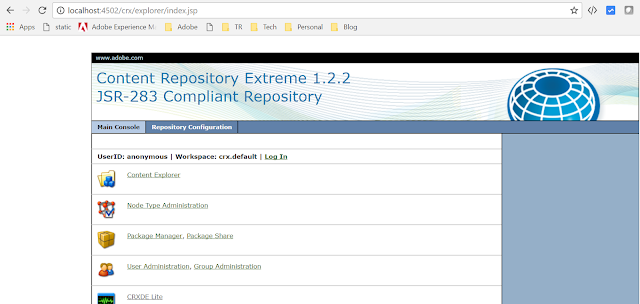
Open http://localhost:4502/crx/explorer/index.jsp
Login as admin
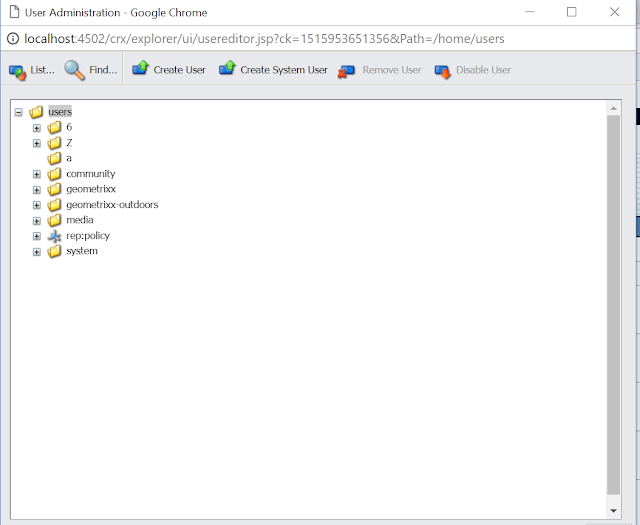
Click User Administration
Click Create System User
Set the UserId
Click Save


Once created, you can extend permissions like a normal user using the AEM ACL functionality.

Sometimes we face below error, so I tried the other option to use the system user.
Error:Missing permission to create intermediate authorizable folders.

Other option for using system user to set properties to node.
Use in-built system user in OSGI configuration. In OSGI select Apache Sling Service User Mapper Service
Add new entry com.kishore.aem:writeService=oauthservice

com.kishore.aem is bundle name
writeService is sling subservice name
oauthservice is systemuser available in AEM


Note: If we try to set properties under /etc, read&write permission to be set for oauthservice system user else resourceResolver.getResource will return null pointer exception.


By aem4beginner

Create a system user in AEM using runmode config

Add/create a system user through runmode in AEM using ACS commons.

Create a runmode config file in your project.
/apps/aemquickstart/config/com.adobe.acs.commons.users.impl.EnsureServiceUser-customServiceUser.config

Add below snippet in the config file

principalName="custom-service-user"
type="add"
ensure-immediately="{Boolean}true"
aces="[type=allow;privileges=jcr:read\,jcr:modifyproperties;path=/content/we-retail;rep:glob=/jcr:content/*,type=allow;privileges=jcr:read;path=/content/aemqui
ckstart;rep:glob=/jcr:content/*]

The above snippet will add read and modify properties privilege to /content/we-retail path and read permission to /content/aemquickstart.

Refer ACS Commons documentation


By aem4beginner

Create a system user in AEM using runmode config

Add/create a system user through runmode in AEM using ACS commons.

Create a runmode config file in your project.
/apps/aemquickstart/config/com.adobe.acs.commons.users.impl.EnsureServiceUser-customServiceUser.config

Add below snippet in the config file

principalName="custom-service-user" 
type="add" 
ensure-immediately="{Boolean}true"
aces="[type=allow;privileges=jcr:read\,jcr:modifyproperties;path=/content/we-retail;rep:glob=/jcr:content/*,type=allow;privileges=jcr:read;path=/content/aemquickstart;rep:glob=/jcr:content/*]

The above snippet will add read and modify properties privilege to /content/we-retail path and read permission to /content/aemquickstart.

Click here to check how to create a system user using system explorer
Refer ACS Commons documentation


By aem4beginner

April 16, 2020
Estimated Post Reading Time ~

How to create System User in AEM

AEM 6.1 comes with lot of features, one of those is allowing developer or content authors to create system user from CRX explorer. I have updated this post for creating system user in AEM 6.3 and how to package system user and its permissions, so that it can be easily deployed on any instance like dev,qa or prod.

The focus of this tutorial is to have a clear understanding about:
What is System User.
Why System Users are introduced in AEM 6.1.
How to create a System User.
How to define Service User mapper in Felix Console.
How to package System user.

System User In AEM:
Till AEM 6 we have the liberty to use any user as service user, for invoking and executing any service. But from AEM 6.1 there was a slight change on how to define the ServiceUserMapping and how the service user or system user has to be created.

If we try to assign any arbitrary user as service user in AEM 6.1 we would face below error :

org.apache.sling.api.resource.LoginException: Cannot derive user name for bundle ch.inside.cqblog-bundle [452] and sub service readService

Note: From AEM 6.1 service users can only be mapped to system users (jcr:primaryType = rep:SystemUser).

Why System User is Introduced:
Use of admin session and admin resource resolver through ResourceresolverFactory is now deprecated, that’s why from AEM 6.1 Adobe forces developers to create system users and map them to Service User Mapper in Felix Console.
Prevent excessive use of administrative JCR Sessions and ResourceResolvers.
Allow services access to ResourceResolvers and JCR Sessions without requiring to hard-code or configure passwords.
Allow services to use service users and/or system user which are specially configured for service level access.
Create System User in AEM:
A system user can either be created by definition in your application content package or manual creation in the CRX Explorer through “User Administration”. As this is a system user, no need to set a password.
Go to CRX Explorer.

Click on User Administration.
Click on Create system User from Top Bar.
UserId- testSystemUser (User Id of system user you want to assign)
Intermediate Path – /home/users/systemNote:- Path where you want to store system user. If no path is provided it will store user at some arbitrary node. This field is optional, but it is always advisable to provide path so that it will be easy to track user.


Click on Green checkbox.
Your system user is successfully created.

You can also view system user details from CRX DE at this path /home/user/system.


Define Service User Mapper in AEM :
For defining a service user mapper, a new configuration can be created using Apache sling Service User Mapper Service Amendment.

Go to Felix Console configurations.
Search for “service user mapper” configuration.
Click on Plus sign against Apache sling Service User Mapper Service Amendment to create new factory configuration.
Enter Service Mapping Details
Enter entry in form of BundleId:subserviceName=userName.


For example in below screenshot:
bundleId = com.adobe.cq.cq-dms-tagmanager
subServiceName =tagmanagement
systemUser Name =tagmanagerservice


For example in our case, we want to add testSystemUser system user mapping in Apache sling Service User Mapper Service Amendment. Follow below steps to add entry into service user mapper service in AEM

Lets Assume below details:-
bundleId = com.aemlearning (You can find your bundle symbolic name under your core pom.xml )
subServiceName = testSystemUser (Used in your java for getting resource resolver based on subService Name)
systemUser Name = testSystemUser (Your system user Name, that you have given at time of creation of system user)


How to package system user using acs commons acl packager:
In AEM, if we have to export users or groups from one environment to another we use packages. To transfer permissions along with user we use acs commons acl packager.

As a pre-requisite lets first add permission to our testSystemUser. Lets consider we want this system user for content editing usage.
Navigate to User Admin Console.
Search for your user (testSystemUser).
Select your user and go to Permissions Tab.
Provide full access to /content folder. By selecting all checkboxes against content row. You can ignore replicate checkbox as we don’t want this user for replication.
Click on save.


Follow below steps to create ACS Commons ACL Packager:
Log in to AEM Author.
Navigate to the Classic UI Tools Console (In case of Touch UI, You can navigate to Tools–>Operations –> Configuration )
Under the acs-commons folder, create a folder named packages. (name should be packagers, Title you can keep according to your choice, If you keep any other folder name apart from packagers then no template will be displayed).

NOTE: As of acs commons version 1.6.0, this folder is created automatically


Under the packagers folder, create a new Page of Template type “ACL Packager”


Double click on newly created page.
Click Edit.
Enter values in dialog to configure the package rules and configuration.
Add Principal Names:- Add names of user that you want to export.
Include Patterns:- Add path from which you want to add rep:Policy or permissions

Click OK , It will display a brief overview of your ACL Package.

Click On Preview button output a list of the access control entries which will be packaged.

Click on Create Package. That’s it you are done. You have successfully created acl packager package for system user at /etc/packages/AEMCQ5Tutorials/Package System User-1.0.0.zip . Navigate to crx package manager build and download your package. You can now import it on any environment where ever you want.
Note: Once you have create a package you cannot change, package configuration. For changing package configuration you need to create a new acl package.


By aem4beginner

April 14, 2020
Estimated Post Reading Time ~

Creating an AEM System User for AEM 6.1

In AEM 6.1, you must create an AEM System User to successfully get a session using code such as:

Map<String, Object> param = new HashMap<String, Object>();
param.put(ResourceResolverFactory.SUBSERVICE, "datawrite");
ResourceResolver resolver = null;

try {
//Invoke the adaptTo method to create a Session used to create a QueryManager
resolver = resolverFactory.getServiceResourceResolver(param);
session = resolver.adaptTo(Session.class);


Note - see this article:
Querying Adobe Experience Manager 6 data using the Sling getServiceResourceResolver method

This code will not work in AEM 6.1 using a standard user,

Note: All AEM 6.x HelpX Articles will be updated soon to use a System user to obtain a Session object from within an OSGi bundle.

To create a system user, perform these tasks:
Open http://localhost:4502/crx/explorer/index.jsp
Login as admin
Click User Administration
Click Create System User
Set the UserId
Click Save
Once created, you can extend permissions like a normal user using the AEM ACL functionality.


By aem4beginner

April 12, 2020
Estimated Post Reading Time ~

If I were a CQ systems administrator

Write a script to monitor the repository folder. 
How big is it? 
How many tar files are in today? 
What is the difference between yesterday's tar files total & today? 

The motivation for this is that sometimes you get a server increasing in disk space and its because the TAR optimizer isn't running for long enough.

grep the logs for the "last stage" of the online backup.

similarly for the TAR optimizer completion step.


By aem4beginner