Showing posts with label Cloud Services. Show all posts

January 4, 2021
Estimated Post Reading Time ~

Anaconda Distribution on Google Cloud


Assuming that you have access to any cloud provider or any cloud instance like AWS, GCP, Rackspace, DigitalOcean, Linode, etc. The instance used has the following specification. This is the Guide to install and configure Anaconda Distribution for Data Science Projects. This guide is a part of DevOps for Data Science.

System Requirements
  • CPU: 64-bit 2.8 GHz
  • RAM: 4 GB (min)
  • Storage: 30 GB.
  • License: Free use & redistribution under the terms of Anaconda End User License.
  • OS: Windows 7,8,10, macOS 10.10+, or, Ubuntu, RedHat, CentOS 6+, and others.
  • System architecture: 64-bit x86, 32-bit x86 with Windows or Linux
GUIDE
  • Part-01: Creating an Instance on the Google Cloud Platform
  • Part-02: Installing and configuring Anaconda Distribution – Traditional
  • Part-03: Updating and Upgrading Anaconda Distribution
Part-01: CREATING INSTANCE ON GOOGLE CLOUD
Step-01: Name the Instance and select the Region and Zone


Step-02: Select the Machine Type


Step-03: Select the Boot Disk and Storage Options


Step-04: Select OS


Step-05: Verify the Instance


Step-06: Add the DNS configuration


Step-07: Login to the Server


Step-08: Install pre-requisites and update cache


Step-09: Verify the OS release


Step-10: Done – Setting up the instance is completed

Part-02: Installing & configuring Anaconda - Traditional
Step-01: Download the Anaconda Python distribution


Step-02: Python 2.7.x will be used in this guide


Step-03: Create the directory structure for installation


Step-04: Install Anaconda Distribution


Step-05: Accept the License


Step-06: Select the Installation Path


Step-07: Add to the PATH variable


Step-08: Do not install VS Code


Step-09: Verify Anaconda installation


Part-03: Updating and Upgrading Anaconda Distribution
Step-01: Updating Conda


Step-02: Update Anaconda


Step-03: Update All Packages


Step-04: Testing Jupyter Notebooks


By aem4beginner

October 1, 2020
Estimated Post Reading Time ~

AEM as a Cloud Service


For the last few years, Adobe Experience Manager (AEM) has been available as On-prem and Adobe Managed Services (AMS)

There are intrinsic differences between these previous approaches and AEM as a Cloud Service:
  1. Architecture
  2. Upgrades
  3. Cloud Manager
  4. Onboarding
  5. Developing
  6. Operations and Performance
  7. Identity Management
  8. Authoring User Interface
  9. AEM Sites
  10. AEM Assets
AEM as a Cloud Service Benefits
Version Less AEM:

No need to worry about upgrading to the latest AEM version. When a new version is available, we can upgrade from the Cloud Manager CI/CD pipeline which is fully automated.

Quick Time to Market:
AEM as a Cloud Service assists you in quickly delivering the products, services, and experiences faster without developing customized content management systems.
Auto-scalable:
It can scale automatically based on traffic and operations. It requires less support and maintenance efforts.

Separation of code and content:
Custom code and configurations are clubbed into the AEM base image which is then used to create multiple Author and Publish nodes. The changes to the code and configurations are made only through CI/CD pipelines in Cloud Manager.
Security: Industry standard security measures will be taken care of.


By aem4beginner

AEM as a Cloud Service: Dispatcher Setup

Local Dispatcher Setup


The AEM as a Cloud Service SDK includes a validator tool and docker image for simulating it locally.
Dispatcher Tools is comprised of:
  • a baseline set of Apache HTTP Web server and Dispatcher configuration files, located in .../dispatcher-sdk-x.x.x/src
  • a configuration validator CLI tool, located at .../dispatcher-sdk-x.x.x/bin/validator
  • a configuration deployment CLI tool, located at .../dispatcher-sdk-x.x.x/bin/docker_run
  • a Docker image that runs Apache HTTP Web server with the Dispatcher module
Before we start, make sure the AEM SDK setup is completed locally. It's ideal to set up AEM publish environment for your dispatcher to map. Install and start the latest version of Docker (Docker Desktop 2.2.0.5+ / Docker Engine v19.03.9+) on the local development machine.

Download AEM SDK, navigate to your AEM folder (where dispatcher tools are available).

Unpack the Dispatcher Tools into ~/aem-sdk/dispatcher
kishore@kishores-mbp dispatcher % chmod a+x aem-sdk-dispatcher-tools-2.0.22-unix.sh 
kishore@kishores-mbp dispatcher % ./aem-sdk-dispatcher-tools-2.0.22-unix.sh Creating directory dispatcher-sdk-2.0.22 
Verifying archive integrity... 100% All good. 
Uncompressing dispatcher-sdk-2.0.22 100% 
kishore@kishores-mbp dispatcher % ls 
aem-sdk-dispatcher-tools-2.0.22-unix.sh dispatcher-sdk-2.0.22  
aem-sdk-dispatcher-tools-2.0.22-windows.zip

The above command creates a new folder and unpacks dispatcher tools to it. A complete description of the configuration files is available in the unpacked Dispatcher Tools as dispatcher-sdk-x.x.x/docs/Config.html.

Validate Dispatcher Configs:

Before we run the Dispatcher locally, it's advised to validate the configs using Dispatcher Tools's validator CLI tool. Also, it transpires the configurations into a file-set compatible with the Docker container's Apache HTTP Web Server.

./bin/validator full -d ./out ./src

This creates a new "out" folder. Run below command.
./bin/docker_run.sh <deployment-folder> <aem-publish-host>:<aem-publish-port> <dispatcher-port>

The aem-publish-host can be set to host.docker.internal, a special DNS name Docker provides in the container that resolves to the host machine's IP. If he host.docker.internal does not resolve, please see the troubleshooting section below.
./bin/docker_run.sh ./out host.docker.internal:4503 8080

The AEM as a Cloud Service SDK's Publish Service, running locally on port 4503 will be available through Dispatcher at http://localhost:8080.

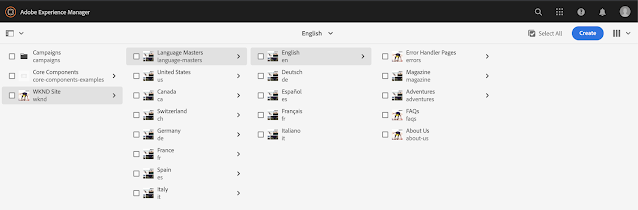
Access the WNKD site with the dispatcher URL.


By aem4beginner

AEM as a Cloud Service: Local Setup

Adobe is providing AEM SDK to install it locally.
Follow the below steps to install the SDK locally and install the WKND site.

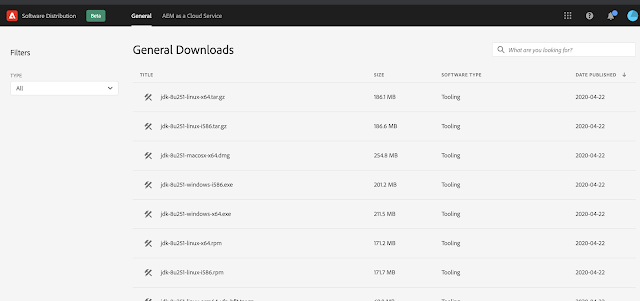
Navigate to Experience Cloud Software Distribution
Go to the General tab, download the latest Java version.


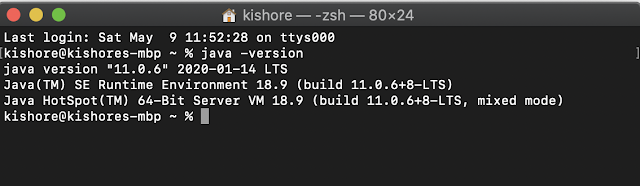
Install the java and setup the environment variables


If you have different java versions installed, you can switch java version by modifying either bash_profile for bash or zprofile for zsh.
Add below lines in zprofile by using command open-e ~/.zprofile.

export JAVA_8_HOME=$(/usr/libexec/java_home -v1.8) export JAVA_11_HOME=$(/usr/libexec/java_home -v11) alias java8='export JAVA_HOME=$JAVA_8_HOME' alias java11='export JAVA_HOME=$JAVA_11_HOME' # default to Java 11 java11

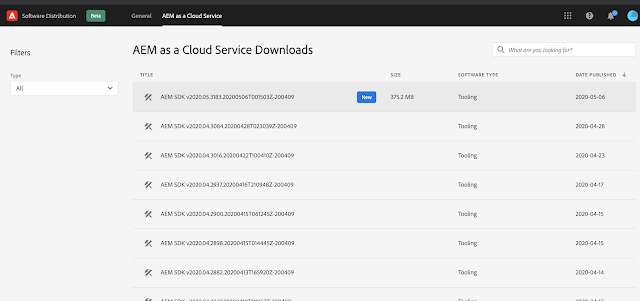
Go to AEM as a Cloud Service tab, and download the latest version

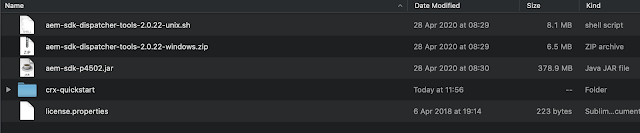
Extract the ZIP and we can see AEM SDK jar, dispatcher tools for Windows and Mac.


Run the command java -jar <jar file name>


Install the WKND Site by downloading the aem-guides-wknd-all-*.*.*.zip


Good to see:
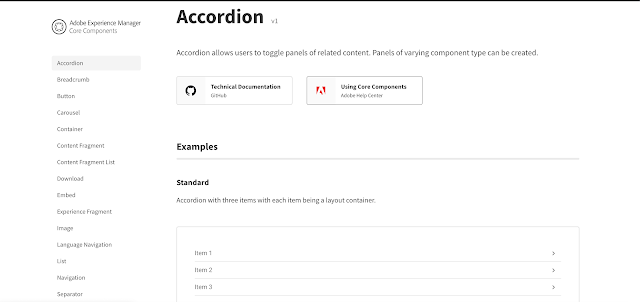
SDK is packed with 30 Core components, core component examples are added under /content/core-component-examples. Using the examples we can play around the core components.


By aem4beginner

Ugrading from older versions of AEM to AEM as a cloud Service - Tools

There are some readily available tools that fasten the process of upgrading older AEM to AEM as a Cloud Service.

Cloud Readiness Analyzer-CRA
  • Cloud Readiness Analyzer report is built using the output of the Adobe Experience Manager (AEM) Pattern Detector)
  • This gives a high-level understanding of general upgrade readiness.
  • Helps accelerate the processes of assessing readiness to move from an existing Adobe Experience Manager (AEM) deployment to AEM as a Cloud Service.
  • This tool generates a report that identifies areas of potential refactoring, which is the first step in the transition journey to AEM as a Cloud Service.
  • CRA is supported on AEM instances with version 6.1 and above (CRA is supported on AEM instances with version 6.1 and above)
  • CRA can run on any environment, but it is preferred to have it run on a Stage (Author) environment or clone of the production Author environment
  • CRA can be downloaded as zip and uploaded to AEM instance via Package Manager
Notes: CRA utilizes a system service user account named repository-reader-service(default available in AEM 6.2 and later, For AEM 6.1 we will have to manually create it) to execute the Pattern Detector. Version 6.3 and later we can access CRA via tools -> Operations -> Cloud Readiness Analyzer.
AEM 6.2 provides a link that generates and downloads the CSV report.
and 6.1 the tool is not functional and only the HTTP interface may be used

Analyzer report - includes the following categories:
  • Application functionality that must be refactored
  • Repository items that must be moved to a supported location
  • Legacy user interface dialogs and components that must be modernized
  • Deployment and configuration issues
  • AEM 6.x features that have been replaced by new functionality or that are currently not supported on AEM as a Cloud Service
  • The report generation time required is highly dependent on the size and nature of the AEM repository content, the AEM version, and other factors
Content Transfer Tool CTT
This tool helps to move existing content over from a source AEM instance (on-premise or AMS) to the target AEM Cloud Service instance.
We can use this tool to transfer principals (users or groups) automatically

2 Steps involved
Extraction- extract the source content from AEM and keeping a temporary place called 'migration set'(cloud storage area provided by Adobe - inactive for more than 30 days it gets deleted )

Ingestion - ingesting content from the migration set into the target Cloud Service instance

**Content Transfer Tool creates a local copy of the repository that is later uploaded to the migration set. To ensure enough space is available in local/source AEM
  • The minimum req for CTT is AEM 6.3 + and JAVA 8. On lower env upgrade your content repository to AEM 6.5 first
  • author AEM will be unavailable during the whole ingestion process.
  • The recommended upper limit for the repository size is 20 Gb
  • CTT can be downloaded as zip and uploaded to AEM instance via Package Manager
  • Access it from navigate to tools -> Operations -> Content Transfer


By aem4beginner

FAQ on AEM as a cloud service

1) Which are all the environments available as part of AEM as a cloud service?
Four types of environments available with AEM as a Cloud Service:
  1. Production environment - for the business practitioners
  2. Stage environment: performance and quality tests before changes to the application are pushed to the production
  3. Development environment - developers to implement AEM applications
  4. Demonstration environment: Training, demos, pocs, etc - is simplified to a single author node, all others having min 2 author nodes2) 
Which are all the types of programs available as part of AEM as a cloud service?
Two types of programs are initially available for AEM as a Cloud Service:
  1. AEM Cloud Sites Service
  2. AEM Cloud Assets Service
3) What we get as part of AEM as a cloud license?
When we get the license we will have
  • Code repository (Git) 1
  • Baseline image (Sites or Assets) 1
  • Stage and production environment set (1:1) 0 or 1
  • Non-production environments (development or demonstration) 0 to N
  • Pipeline for each environment 0 or 1
Note: The author tier will contain all Sites and Assets functionality for all programs, but the Assets programs will not have a publish tier by default

4) What are all the changes in Author, Publish & Replication in AEM as a Cloud Service
Author and publish features:
Both authors and publish tiers always accessed via a load balancer. But publish tier, a Continuous Delivery Network (CDN) is always available.

The method of the author to publish replication has upgraded now. AEM as a Cloud Service Sling Content Distribution which allows one to distribute Sling resources between different Sling instances.{The API works at path level and the distribution agents basically enable the distribution of specific paths between instances.}This uses a pipeline service run on Adobe I/O, which is external to AEM.

Replication changes - The replication agents used in previous versions of AEM are no longer used or provided, which might impact the following areas of existing AEM projects:
  • Custom workflows that push content to replication agents of preview servers for example.
  • Customization to replication agents to transform content
  • Using Reverse Replication to bring content from publish back to the author
5) Do we have all types of runmodes as in the previous version of AEM?
The answer is NO.

Run modes that are defined typically include the service (author and publish) and the environment (dev, stage, prod).

Pattern
<service>.<environment_type>

Fr eg: author.dev or publish.prod
The supported runmode configurations in AEM as a cloud service are:

config ( The default, applies to all AEM Services )
config.author ( Applies to all AEM Author service )
config.author.dev ( Applies to AEM Dev Author service )
config.author.stage ( Applies to AEM Staging Author service )
config.author.prod ( Applies to AEM Production Author service )
config.publish ( Applies to AEM Publish service )
config.publish.dev ( Applies to AEM Dev Publish service )
config.publish.stage ( Applies to AEM Staging Publish service )
config.publish.prod ( Applies to AEM Production Publish service )
config.dev (*Applies to AEM Dev services)
config.stage (*Applies to AEM Staging services)
config.prod (*Applies to AEM Production services)
** OSGI configuration that has the most matching runmodes is used.

6) How do we do local development when AEM is in the cloud?
For local development:
The following artifacts are made available to the developers:
The AEM as a Cloud Service QuickStart: a .jar based, standalone installer of the latest AEM code base, with the same functional and API surface.
The AEM as a Cloud Service Dispatcher SDK: an image-based process for testing and validating Dispatcher configurations locally

[* The quickstart is a simple author environment where the majority of the extensions can be developed and tested - does not allow for all AEM Sites and AEM Assets functionalities]

7. What are all some of the important terminologies which we should be aware of?
New important terminologies w.r.t. cloud

AEM as a Cloud Service - The cloud-native way of leveraging the AEM applications
AEM Image - A deployable artifact that contains the AEM product code together with the customer code.
Golden Master - The AEM publish tier.
Orchestration Engine - AEM as a Cloud Service uses an orchestration engine to ensure that all author and publish services are scaling as and when needed.
Asset microservices - Cloud-based digital asset processing services that cater to various asset processing use cases, such as rendition generation, PDF processions, sub-asset handling, text extraction, etc.

8) What are all the types of users and roles available in AEM as a cloud?
Users & Roles
Cloud Manager currently defines four roles for users which govern the availability of specific features:

Business Owner - defining KPIs, approving production deployments
Program Manager - team setup, review status
Deployment Manager - execute stage/production deployments
Developer - Develops and tests custom application code, do git operations
* There is a role 'Content Author' who does not interact with Cloud Manager. May use Cloud Manager Program Switcher (having navigated from Experience Cloud) to access AEM

9) How do we upgrade from the existing AEM version to Cloud Service
> Planning
Access cloud service readiness - determine areas that will require refactoring to be compatible with AEM as a Cloud Service.(Source code Vs deprecated features, New path structure w.r.t AEM as cloud). Then estimate the plan.
Review resource planning - identify resources, create a team, and map out roles and responsibilities
Establish KPIs - Define KPIs to help your team focus on what matters the most.

> Execution
- onboard -familiarize & deploy the code to cloud service
- Integrate - the Git and deploy the code, content transfer, code refactor( Use tools where ever possible For eg: Asset Workflow Migration Tool, Dispatcher Converter, Modernization Tools. )
- Configure - user roles and other things on the Admin console of the cloud manager

> Post-Go-Love
clean-up of temporary files,
review best practices for continuous development
manage logs

10) What are all the options available to troubleshoot anything in AEM as a cloud service?
The following tools are available to troubleshoot AEM as a Cloud Service environments:
  • Developer Console
  • CRX/DE Lite
  • Managing Logs
11) What does the SDK For Local Development contain in AEM as a Cloud Service?
SDK is comprised of the following artifacts
Quickstart Jar - The AEM runtime
Java API Jar - all allowed Java APIs that can be used to develop against AEM as Cloud Service(Previously known as Uber Jar)
Javadoc Jar - The javadocs for the above JAR
Dispatcher Tools - set of tools used to develop against Dispatcher locally

12) How do the Maintenance tasks became more users friendly now?
With AEM as a Cloud Service, the need for customers to configure the operational properties of maintenance tasks is minimal. Customers can focus their resources on application-level concerns, leaving the infrastructure operations to Adobe.

Below given customer owned the configuration
Ad-hoc Task Purge
Workflow Purge
Project Purge

13) Can you explain mutable vs immutable in AEM as a Cloud Service?

Mutable Vs immutable
/apps and /libs are considered immutable areas of AEM as they cannot be changed (create, update, delete) after AEM starts (i.e. at runtime). Any attempt to change an immutable area at runtime will fail.
Everything else in the repository, /content , /conf , /var , /home , /etc , /oak:index , /system , /tmp , etc. are all mutable areas, meaning they can be changed at runtime.
Oak indexes are mutable at run time
* /oak:index configurations are part of the Code Package and not part of the Content Package


By aem4beginner

Architectural changes or improvements in AEM as a Cloud Service

Below given the noted architectural changes in AEM as a cloud service
  • Scaling - A dynamic architecture with a variable number of AEM images.
  • Has an author cluster as default;
  • Has individual instances that only run when needed.
  • Dynamically scales each of the service instances as per the actual needs; both scaling up or down as appropriate.
  • Many tasks have been automated. - like indexing , backup etc, binary-less replication is the default.
  • Micro-services sharing the processes which were done by core AEM itself: For eg: Heavy-load tasks, such as queues, jobs and bulk-processing tasks etc
  • Authoring UI is purely touch-enabled; the classic UI is no longer available
  • AEM as a Cloud Service currently supports Azure. AWS support is a roadmap item.
  • The default workflow DAM Asset Update in previous versions of AEM is no longer available.
  • No Custom replication agents & No Reverse Replication Agents are allowed in AEM as cloud


By aem4beginner

All you need to know about AEM Assets as a Cloud Service

The new 'AEM Assets as a cloud service' which is part of AEM as a cloud (platform as a service solution) provides Digital Asset Management capabilities(storage, managing metadata online, versioning, upload, and download) with below-extended features.
  • Based on asset microservices(asset ingestion and processing).
  • Smart capabilities, such as AI/ML
  • Highly scalable
  • Always current
  • Always available
  • Autoscaled deployed and monitored
In older AEM all the asset operations happened at AEM Author instance - which consumes considerable CPU, memory, and I/O resource. Asset processing and storage requirements demand resources which in turn create performance issues impact the authoring and browsing experience of end-users.

A High-level Architecture of Assets as a Cloud Service can be seen below


The generic steps followed in the sequence are,
  • Clients send an upload request - then start uploading binary directly to the cloud
  • Once the direct upload is completed, the client notifies AEM
  • Now the AEM sends a processing request to Assets Microservice
  • The asset microservice now start processing the asset (based on the rendition request from AEM) - asset microservice runs relevant microservices for this. They access the binary from the cloud and processed assets are also placed in the binary cloud.
  • Now assets microservice notifies AEM that renditions are available.
Assets as a Cloud Service Vs AEM Asset upload on-premise
Assets as a Cloud Service uses direct binary access principle for upload and download - Previously Assets were uploaded directly to AEM author instance for processing.

Assets as a Cloud Service uses 'asset microservices' for asset processing, which is external to AEM - But in older AEM versions, all processes happened within AEM.

In Assets as a Cloud Service, DAM Asset Update Not available [ asset microservices provide a scalable, readily available service that covers most of the default asset processing (renditions, metadata extraction, text extraction for indexing)]. But in older AEM we had DAM Asset Update workflow as default.

Assets as a Cloud Service comes with post-processing workflows which can be used or customizations(where additional processing of assets is required that cannot be achieved using the processing profiles) -In older AEM we had default + customized workflow steps (Even though it looks like an advantage it had used AEM for all processing).

In Assets as a Cloud Service the standard Asset upload interface is the Touch-enabled UI - In the older version, Classic UI was available.

In Assets as a Cloud Service, only the new upload APIs are supported -The older AEM Assets HTTP API(AEM 6.5), AssetManager Java API, is deprecated now

Advantages of new cloud
The uploaded binaries do not go through AEM, which is now simply coordinating the upload process with the binary cloud storage configured for the deployment. finally, clients get direct access to them to carry out their work. This minimizes the load on networks and duplication of binaries stored.

Binary cloud storage is fronted by a Content Delivery Network (CDN, Edge Network), which brings the upload endpoint closer to the client, helping to improve upload performance and user experience, especially for distributed teams uploading assets

More scalable and performant handling of asset uploads.

Ways of uploading Assets to Assets as a Cloud Service
Upload using the web interface, Adobe Asset Link, AEM desktop app, or custom applications that use the new HTTP API.

Post-processing workflows
There are cases where we need additional processing to be done, which are not done by asset microservices(For eg. Generating a rendition which requires integration with other applications), additional post-processing workflows can be added to the configuration.

Post-processing workflows, once configured, are automatically executed by AEM after the microservices processing finishes. There is no need to add workflow launchers manually to trigger them.

Some examples for Post Processing workflow use cases are:

Custom workflow steps to process assets.
Additional processing done by external services.
Integrations to add metadata or properties to assets from external systems

How to create Post - Processing Workflows: Steps involved
  1. Create one or more workflow models. - they are of regular AEM workflow models
  2. Add specific workflow steps to these models.
  3. Add 'DAM Update Asset Workflow Completed' Process step at the end(To inform AEM once the processing is done)
  4. Create a configuration for the Custom Workflow Runner Service(configuration of an OSGi service) - This ensures the execution of a post-processing workflow model either by a path (folder location) or by a regular expression.
Supported File Formats
Adobe formats - AI, COLLAGE, DN, IDEAS, INDD, INDT, PDF, PROTO, PSB, PSD, XD
Imaging file formats - BMP, EPS, GIF, JPEG, PNG, SVG, TIFF
Image formats in Dynamic Media - PNG, GIF, TIFF, JPEG, BMP, PSD , EPS, PICT
3D formats - DN, gLB, gLTF, OBJ, STL, USDz
Camera Raw file formats - 3FR, ARW, CR2, CR3, CRW, DCR, DNG, ERF, FFF, GPR, IIQ, KDC, MEF, MFW, MOS, MRW, NEF, NRW, ORF, PEF, RAF, RAW, RW2, RWL, SRF, SRW, X3F
Document formats - PDF,DOCX,DOC,PPTX,PPT, XLSX,XLS,ODF,OFG,ODM,ODP,ODS,ODT,EPUB,HTML,PS,RTF,TXT,XML
Document formats in Dynamic Media - AI, PDF, INDD
Video formats - 3G2,3GP,AVI,DIVX,F4V,FLV,M2T,M2TS,M2V,M4V,MKV,MOV,MP4,MPEG,MPG,MTS,OGV,QT,R3D,SWF,WEBM,WMV
Video formats in Dynamic Media for transcoding - MP4,MOV, QT,FLV, F4V,WMV,MPG, VOB, M2V, MP2,M4V,AVI,WebM,OGV, OGG,MXF,MTS,MKV,R3D, RM,RAM, RM,FLAC,MJ2,
Audio formats - AIF, ASF, M4A, MP3, WAV, and WMA


By aem4beginner

September 22, 2020
Estimated Post Reading Time ~

AEM Cloud Service deployment issue | Packages shouldn't mix mutable and immutable content

While deploying our old Adobe Experience Manager(AEM) code to AEM cloud service, we find some code smell issues,

ImmutableMutableMixedPackage in project build issue report. We will understand this issue here and also look how to fix this code issue from project.

Lets first understand what part of our AEM project is mutable and immutable.

Mutable

/content , /conf , /var , /etc , /oak:index , /system , /tmp , etc. are all mutable areas of AEM project, it means they can be changed at runtime.

Immutable

/apps and /libs are considered immutable areas of AEM as they cannot be changed and we are not allowed to perform CUD(create, update, delete) operation at runtime. Any attempt to change an immutable area at runtime will fail. On immutable areas we can only perform the read operation.

Issue Description


In order to make our project compatible with Cloud Service deployment model, individual content packages must contain either content for the immutable areas of the repository (that is, /apps and /libs, although /libs should not and never be modified by custom code and will cause a separate violation) or the mutable area (that is, everything else), but not both. For example, a package which includes both /apps/myproject/components/text and /etc/clientlibs/myproject is not compatible with Cloud Service and will cause an issue to be reported.


By aem4beginner

AEM as cloud service, /apps and /libs directories are in read-only mode

AEM cloud service makes the out of the box and custom codes immutable. Once we deployed the code in the AEM server, we will not be able to modify or create any content or node under the /apps and /libs directories using CRXDE Lite. When we try to do so, then it will throw an error "Could not save changes. Received 500 () for saving changes in workspace crx.default. Unknown error (Error Code: 500)". Below is the screenshot, when we tried creating a folder "myProject" under /apps folder.


The only way to change the code is to go for a fresh build and deploy the code. 

Hope this helps you!

References:


By aem4beginner

Setup local dispatcher server | AEM as cloud service

In this article, we are going to learn how to set up AEM cloud service dispatcher server on a local machine.

Prerequisite:

1. Download the docker from Docker's official site for our operating system. >> https://www.docker.com/products/docker-desktop and install the docker. Note: We need the administrator privileged to run this installer since this docker installer will change some BIOS settings in the operating system.

2. Download the latest AEM-SDK from Adobe software distribution libraryhttps://experience.adobe.com/#/downloads/content/software-distribution/en/aemcloud.html

Let's start the local dispatcher setup now:

Step 1: Start docker, make sure our docker is active and running.

Active docker

Step 2: Create a  folder "C:\Users\<user>\aem-sdk\dispatcher". Then extract the file "aem-sdk-dispatcher-tools-<version>-windows.zip" here. This will extract three folders: 

  1. bin
  2. src
  3. docs

Note: These all folders should direct the child of the dispatcher folder.

Step 3: Open the CLI (cmd) at open directory "C:\Users\<user>\aem-sdk\dispatcher"

Now run the command bin\validator full -d out src
If everything will be good with our setup then the following message will get printed on your CLI.
C:\Users\<user_name>\aem-sdk\dispatcher>bin\validator full -d out src
Cloud manager validator 2.0.21
2020/08/07 18:31:20 No issues found
Step 4: Now run the docker to link our AEM publisher instance and tune the dispatcher server on a port. The default port for the dispatcher is 8080, but we may tune on the different port based on availability. To start and link the dispatcher executes the below command.
bin\docker_run out host.docker.internal:4503 8080
Here in the above command we just need to change the port numbers as per our configurations, rest all command will remain the same. This command will download the required image from the docker server. Below are the entries of successful download on the command-line interface.

 1
 2
 3
 4
 5
 6
 7
 8
 9
10
11
12
13
14
15
16
17
18
19
20
21
22
23
24
25
26
27
28
29
30
31
32
33
34
35
36
37
C:\Users\rashidjorvee\aem-sdk\dispatcher>bin\docker_run out host.docker.internal:4503 8080
Required image not found, trying to load from archive...
d9ff549177a9: Loading layer [==================================================>] 4.671MB/4.671MB 
14c93ed9ebdc: Loading layer [==================================================>] 7.123MB/7.123MB 
cf0d60dcd2e9: Loading layer [==================================================>]  1.848MB/1.848MB 
214f54e148db: Loading layer [==================================================>] 109.1kB/109.1kB 
5931f9345e57: Loading layer [==================================================>]  3.584kB/3.584kB 
5ad19feebed3: Loading layer [==================================================>] 5.12kB/5.12kB 
21a29c76732d: Loading layer [==================================================>]  4.096kB/4.096kB 
860d3c46b038: Loading layer [==================================================>] 3.584kB/3.584kB 
Loaded image: adobe/aem-ethos/dispatcher-publish:2.0.23

Running script /docker_entrypoint.d/10-check-environment.sh
Running script /docker_entrypoint.d/20-create-docroots.sh
Running script /docker_entrypoint.d/30-wait-for-backend.sh
Waiting until host.docker.internal is available
host.docker.internal resolves to 192.168.65.2
Running script /docker_entrypoint.d/40-generate-allowed-clients.sh
Running script /docker_entrypoint.d/50-check-expiration.sh
Running script /docker_entrypoint.d/60-check-loglevel.sh
Running script /docker_entrypoint.d/70-check-forwarded-host-secret.sh
Starting httpd server
[Fri Aug 07 13:12:16.706522 2020] [:notice] [pid 1:tid 140172533533576] ModSecurity for Apache/2.9.2 (http://www.modsecurity.org/) configured.
[Fri Aug 07 13:12:16.706805 2020] [:notice] [pid 1:tid 140172533533576] ModSecurity: APR compiled version="1.6.3"; loaded version="1.6.3"
[Fri Aug 07 13:12:16.706827 2020] [:notice] [pid 1:tid 140172533533576] ModSecurity: PCRE compiled version="8.42 "; loaded version="8.42 2018-03-20"
[Fri Aug 07 13:12:16.706837 2020] [:notice] [pid 1:tid 140172533533576] ModSecurity: LIBXML compiled version="2.9.8"
[Fri Aug 07 13:12:16.706844 2020] [:notice] [pid 1:tid 140172533533576] ModSecurity: Status engine is currently disabled, enable it by set SecStatusEngine to On.
[Fri Aug 07 13:12:16.875893 2020] [mpm_worker:notice] [pid 1:tid 140172533533576] AH00292: Apache/2.4.43 (Unix) Communique/4.3.4-20200624 mod_qos/11.63 configured -- resuming normal operations
[Fri Aug 07 13:12:16.876090 2020] [core:notice] [pid 1:tid 140172533533576] AH00094: Command line: 'httpd -d /etc/httpd -f /etc/httpd/conf/httpd.conf -D FOREGROUND -D ENVIRONMENT_DEV'
172.17.0.1 "localhost:8585" - [07/Aug/2020:13:12:42 +0000] "GET / HTTP/1.1" 302 - "-" "Mozilla/5.0 (Windows NT 10.0; Win64; x64) AppleWebKit/537.36 (KHTML, like Gecko) Chrome/84.0.4147.105 Safari/537.36"
[07/Aug/2020:13:12:42 +0000] "GET /index.html HTTP/1.1" 302 none [publishfarm/0] 24ms "localhost:8585"
172.17.0.1 "localhost:8585" - [07/Aug/2020:13:12:42 +0000] "GET /content.html HTTP/1.1" 404 196 "-" "Mozilla/5.0 (Windows NT 10.0; Win64; x64) AppleWebKit/537.36 (KHTML, like Gecko) Chrome/84.0.4147.105 Safari/537.36"
[07/Aug/2020:13:12:42 +0000] "GET /content.html HTTP/1.1" - blocked [publishfarm/-] 1ms "localhost:8585"
[07/Aug/2020:13:12:43 +0000] "GET /favicon.ico HTTP/1.1" 404 none [publishfarm/0] 39ms "localhost:8585"
172.17.0.1 "localhost:8585" - [07/Aug/2020:13:12:43 +0000] "GET /favicon.ico HTTP/1.1" 404 235 "http://localhost:8585/content.html" "Mozilla/5.0 (Windows NT 10.0; Win64; x64) AppleWebKit/537.36 (KHTML, like Gecko) Chrome/84.0.4147.105 Safari/537.36"
[Fri Aug 07 13:13:28.608851 2020] [mpm_worker:notice] [pid 1:tid 140172533533576] AH00296: caught SIGWINCH, shutting down gracefully
172.17.0.1 "-" - [07/Aug/2020:13:13:34 +0000] "-" 408 - "-" "-"

Step 5: Our dispatcher is now active. We can now browse http://localhost:8080.
Step 6: Now we need to install our customized dispatcher configuration files in our local dispatcher server. To install the dispatcher files run the below-mentioned command at the same dispatcher directory. 
del -/Q out && bin\validator full -d out <path of the dispatcher source files in your project>

e.g. del -/Q out && bin\validator full -d out E:\aem\aemcloudmanager\aem-cloud-manager-set-up\dispatcher\src
Hope this helps you to understand the setup of a dispatcher in local machine. Feel free to share your inputs and issues with us, we will happy to help you. Thank You!

References:


By aem4beginner

August 19, 2020
Estimated Post Reading Time ~

Adobe Experience Manager as a Cloud Services

We all know that Adobe always has something big to announce for its partners and customers, and we were expecting the same from Adobe at the NRF 2020 Retail’s Big Show held in New York City. On January 13, 2020, Adobe unveiled the availability of its newest offering Adobe Experience Manager (AEM) as a cloud application, where AEM runs natively in Adobe’s Experience Cloud.

Prior to this, Adobe Experience Manager was available either as a managed service or on-premises, but now, it is available as a pure cloud-native service.

Combining out-of-the-box components with advanced content customization options, the AEM as a Cloud Service allows marketers and developers to support the business models in a more simplified way and go live with new site experiences faster than ever before. It comes with a great opportunity for all those enterprises that are continuously striving to embrace the new technologies for the betterment of their business but need more simplicity and flexibility to fulfill their needs.

Managing tons of data across the various departments and personalizing it to honor user’s interests has always become a difficult challenge for B2B and B2C companies nowadays. Implementing AEM as a Cloud Service allows organizations to integrate the digital assets and customer conversations on a globally accessible platform and tailor the content as per the insights.

What’s more? You can interact with customers at any time of the day, no matter where they are! Having a real-time exposure to client experiences means you can follow a strategic approach that performs beyond their expectations and make sense to your existing clients.

Why One Should Migrate AEM as a Cloud-Native SaaS Application?
While the early results show that the companies have seen vast growth in administrative efficiency, author productivity, and content velocity, there is a reduction in downtime and maintenance efforts as well. Some salient benefits of migrating to AEM as a Cloud-Native SaaS application are:

• Quick Time to Market: With Adobe Experience Manager as a Cloud-Native application, you need not worry about developing customized content management systems (CMS) and DAM environments for achieving a boost in sales and lead generation. AEM as a Cloud Service assists you in quickly delivering the products, services, and experiences in just a few minutes, thus helping you save both time and money.

• Cross-Channel Experience Management: It’s time to deliver the right experiences to the right audience at the right time across various channels, devices, and applications. Organizations can focus on creating useful, informative, and precise content that addresses the pain-points of the potential prospects and leverage the power of built-in Adobe Sensei to automate the relevant content. This way, both the marketing and sales team can streamline the activities and drive real-time decisions.

• Version Less AEM: You can focus more on innovation rather than worrying about up-gradation to the latest and greatest AEM experience. The production environment is constantly maintained with its up-to-date software and other products that you need to build new websites and apps. All this is done through Cloud Manager CI/CD Pipeline. These upgrade operations are fully automated, so users don’t face service interruption.

• Auto-scalable: Being auto-scalable, customers don’t need to worry about infrastructure aspect, AEM as a Cloud Service can scale automatically based on traffic and operations. It requires less support and maintenance efforts.

• Separation of code and content: The cloud architecture separates application content from code and configuration. Custom code and configurations are clubbed into the AEM base image which is then used to create multiple Author and Publish nodes. The changes to the code and configurations are made only through CI/CD pipelines in Cloud Manager.

What’s available with Cloud Service at the moment:
1. AEM Sites
2. AEM Assets
3. Forms, Screens, and Communities are not supported currently.

Notable changes:
1. Classic UI is no longer available in AEM as a Cloud Service.
2. Replication agents have been removed. Content gets published using Sling Content Distribution.
3. No changes to Publish repository are allowed. For example, User Generated Content (UGC) such as profile or form submissions – customers would need to use Unified Profile Service from Experience Cloud Platform.
4. Dynamic Media integration: Previous integrations with Dynamic Media Classic (Scene7) and Dynamic Media Hybrid mode are not available in AEM as a Cloud Service. Customers would need to use Dynamic Media provided with AEM as a Cloud Service.
5. AEM Assets sharing with Marketing Cloud and Creative Cloud is not available. Customers would need to use Adobe Asset Link for integration with Creative Cloud.
6. Asset uploads, processing, and downloads have been optimized in AEM as a Cloud Service to be more efficient; thus, enabling faster uploads and downloads.
7. Enabled asynchronous operations for AEM Sites features such as Page Move and Page Rollout.
8. Customized code can only deploy through Cloud Manager (Adobe CI/CD pipeline) using Adobe Git repository.
9. Only Adobe IMS (Adobe SSO) Identity Management is supported for authentication.
10. No access to OSGi console/Apache Felix to check or add your OSGi custom configs.


By aem4beginner

May 5, 2020
Estimated Post Reading Time ~

AEM as a Cloud Service


AEM is a content management solution that helps professionals keeping track of their content. It is the most flexible and open system for building and managing web solutions to drive customer experience. It can be also referred to as a fast and easy way to provide access to the correct content to your customers, by using user-friendly interfaces and built-in features. Due to its usability, it has gained huge popularity.

With Cloud Service, you can worry less, innovate more, and grow faster.

So far, AEM needed a complex infrastructure with several servers that needed multiple licenses and maintenance. That meant the expense of resources, time, and investment for companies that were forced to manage this aspect of the CMS. AEM as a Cloud Service further abstracts its hardware layer, taking care of scaling the infrastructure vertically and horizontally when needed, and presenting to the client only with the AEM endpoints needed to author & publish the content, and interacting exclusively with the AEM user interface.
The main benefits of AEM as a Cloud Service are:

It is always on:
The entire service architecture has been revisited so that you do not experience any downtime (99,95% uptime guaranteed); for neither the content management nor the content delivery capabilities.

It is always at scale:
All AEM instances in the Cloud Service are created homogeneously; so the service architecture will automatically scale, up and down, depending on the client's needs.

It is always updated:
AEM as a Cloud Service implements a new, continuous delivery pipeline for the AEM codebase, with automated updates up to several times a month. This solves one of the main challenges of AEM applications, by keeping the system on the most recent version.

It is always evolving:
AEM as a Cloud Service evolves on a daily basis, based on the projects implemented by our customers. Content, code, and configurations are constantly reviewed and vetted against best practices, allowing to guide the client on how to achieve the business goals.

In conclusion, AEM is a powerful tool in continuous growth and Adobe is simplifying its use, allowing its adaptation for maximizing the client outcomes. With this kind of configuration, the focus points directly to the important aspects of the client projects.


By aem4beginner

April 26, 2020
Estimated Post Reading Time ~

AEM as a Cloud Service


For the last few years, Adobe Experience Manager (AEM) has been available as On-prem and Adobe Managed Services (AMS)

There are intrinsic differences between these previous approaches and AEM as a Cloud Service:
AEM as a Cloud Service Benefits
Version Less AEM:
No need to worry about upgrading to the latest AEM version. When a new version is available, we can upgrade from the Cloud Manager CI/CD pipeline which is fully automated.

Quick Time to Market:
AEM as a Cloud Service assists you in quickly delivering the products, services, and experiences faster without developing customized content management systems.

Auto-scalable:
It can scale automatically based on traffic and operations. It requires less support and maintenance efforts.

Separation of code and content:
Custom code and configurations are clubbed into the AEM base image which is then used to create multiple Author and Publish nodes. The changes to the code and configurations are made only through CI/CD pipelines in Cloud Manager.
Security: Industry standard security measures will be taken care of.


By aem4beginner

April 25, 2020
Estimated Post Reading Time ~

AEM as a Cloud Service, a challenging shift or a rising opportunity?


Introduction
Did you hear that Adobe Experience Manager will be released as a Cloud Service? Probably you did.

Since Adobe’s announcement, there has been a lot of noise all around. Actually, there are already several technical posts talking about the impact and challenges this change might bring.

Instead of following this trend, we decided we’ll write about how these changes can bring new opportunities to business and technology; and how companies like Conexio can get interesting benefits of this AEM shift.

Quick recap
AEM as a Cloud Service will provide a dynamic architecture, it means that now AEM will be scaled based on its actual traffic and site activity. Therefore, AEM pricing will change, instead of paying a license per instance the client will pay according to their Page Views/API Calls (at least, those are the rumors for now).

In this context, having a new accessible price in AEM, the most recognized CMS in the world will entail new opportunities, markets, and clients. In fact, this change raises a huge benefit for mid-size companies.

As Loni Stark said: “It creates a compelling offer for mid-size companies and enterprises that are increasingly transforming to adopt advanced digital tools but need more simplicity and flexibility to support their changing business models”.

Another improvement that brings great benefits, is that AEM will have an author cluster as default. Before, the basic/standard AEM production installation had only one author instance, having downtime because of maintenance tasks. This brings a major benefit for Authors from now on because they will have an environment 24/7, with no downtime that causes pains during campaign releases.

Mid Market
Until now, enterprises or mid-size companies have been requiring a solution to reduce their gap with digital transformation and their changing business. They needed to face a challenging and demanding market without having the resources to afford the right technological solutions. They were craving for developing digital customer experience management with an agile, safe, and globally scalable platform.

That is why it is interesting to think and understand how this AEM shift can turnaround the mid-market companies‘ situation.

Despite the pricing flexibility, the fact that now AEM will be a Cloud Service will create the right context for mid-size companies and enterprises. Adobe presents a new simple and flexible offering, that supports their need for digital transformation and can adapt to their changing business models. AEM as a Cloud Service offers Saas, not only it can be extensible and customizable, but also, it will help mid-markets on improving their time to market.

This brings new opportunities for smaller clients than the ones we are used to working for. As an example, Latin American companies, which are looking to transform digitally and access to CMS systems as Adobe Experience Manager.

Why Conexio?
Conexio is an Adobe Specialized Partner on Adobe Experience Manager and we intend to be constantly informed on Adobe’s changes. Being close to Adobe helped us on being more responsive in their changes and new releases. In addition, thanks to our size, we can quickly and easily adapt to changes compared to big global companies, that may have the resources but are slow to respond. It is key to train your teams and align them regarding these new approaches and technological operatives.

Nowadays, there are a bunch of LATAM companies that are eager to use a first-class CMS and it seems this change can be an Adobe strategic movement, that would be the perfect move.

As Adobe already informed, their primary Go-To-Market offering for this year will be AEM as Cloud Service and AEM Sites and Assets will be available in NA, EMEA, and ANZ. Unfortunately, this release is not available for LATAM yet, but hopefully, during March’s Adobe Summit, we will get close to the LATAM timeline release date.

Keep in mind that now Cloud Manager to create environments is available only in three geographical regions: US (East), EMEA (Netherlands), and APAC (Australia). Probably, Adobe will increase this offering soon.

If you want to learn more about these changes, we recommend reading the following links. These posts share information with a higher technical level and will provide you a better understanding of how this will work and how to face it correctly.

http://www.jetteroheller.com/introducing-aem-as-a-cloud-service/
https://blogs.perficientdigital.com/2020/01/13/thoughts-on-aem-as-a-cloud-service/
https://docs.adobe.com/content/help/en/experience-manager-cloud-service/overview/what-is-new-and-different.html


By aem4beginner

April 8, 2020
Estimated Post Reading Time ~

Typekit Cloud Service

Purpose
Leverage Adobe Typekit’s web-fonts to make your AEM web sites stand out on the Web.

General Requirements
In order to use these Cloud Services, ensure that the Cloud Service configuration components are included in both the head and body of the page. This typically is done by including 
<cq:include script="/libs/cq/cloudserviceconfigs/components/servicelibs/servicelibs.jsp"/> in headlibs.jsp and <cq:include path="cloudservices" resourceType="cq/cloudserviceconfigs/components/servicecomponents"/> 

in body.jsp. If you run into trouble with these Cloud Services, compare your page component scripts to the Foundation page component.

Special Requirement when using AEM 6.1+
On AEM 6.1, the use of these components generally requires the enabling of the CQ Configuration Manager component, which is disabled by default. This is required for cross-compatibility with AEM 6.0 and AEM 6.1.


This must be done in both authors and publish.


How to Use
  1. Navigate to AEM Author > Tools > Cloud Services Configurations
  2. Select Typekit
  3. Select New > New Page
  4. Select Typekit Configuration and open the newly created page
  5. Enter your Kit ID
  6. Apply this Typekit Configuration to any AEM Page in the usual manner Page Properties > Cloud Services Tab > Add Service > TypeKit > Select the configuration


By aem4beginner

AEM Cloud Services

General Requirements
In order to use these Cloud Services, ensure that the Cloud Service configuration components are included in both the head and body of the page. This typically is done by including 
<cq:include script="/libs/cq/cloudserviceconfigs/components/servicelibs/servicelibs.jsp"/> 
in headlibs.jsp and <cq:include path="cloudservices" resourceType="cq/cloudserviceconfigs/components/servicecomponents"/> 

in body.jsp. If you run into trouble with these Cloud Services, compare your page component scripts to the Foundation page component.

Special Requirement when using AEM 6.1+
On AEM 6.1, the use of these components generally requires the enabling of the CQ Configuration Manager component, which is disabled by default. This is required for cross-compatibility with AEM 6.0 and AEM 6.1.


By aem4beginner