Showing posts with label Apache Sling. Show all posts

March 23, 2021
Estimated Post Reading Time ~

Sling Jobs

One of the most underused and powerful features of the sling is Sling Jobs. We use OSGI events for the handling of events but in the general event, the mechanism has no knowledge about the content of events. Therefore, it can't decide if an event is important and should be processed by someone. As the event mechanism is a "fire event and forgets about it" algorithm, there is no way for an event admin to tell if someone has really processed the event. Processing of an event could fail, the server or bundle could be stopped, etc.

On the other hand, there are use cases where the guarantee of processing is a must and usually, this comes with the requirement of processing exactly once. Typical examples are sending notification emails (or SMS), post-processing of content (like thumbnail generation of images or documents), workflow steps, etc.

Sling Event takes care of the above use cases. Sling Event has a concept of Job. A Job is also an event that is guaranteed to be executed at least once with the exception being the instance processing the job crashed after the job processing is finished but before the state is persisted. This results in job consumers processing the job twice.

Job Fundamentals:

1) A job has two parts - the topic which describes the nature of the job and payload, the data in the form of key-value pairs.

2) A job consumer is a service consuming and processing a job. It registers itself as an OSGi service together with a property defining which topics this consumer can process.

3) A job executor is a service processing a job. It registers itself as an OSGi service together with a property defining which topics this consumer can process.

Now, let's start by creating an event handler for publishing content:

ActivationEventHandler

package aem.project.core.jobs.handlers;

import org.osgi.service.component.annotations.Component;
import org.osgi.service.event.Event;
import org.osgi.service.event.EventHandler;
import org.osgi.framework.Constants;
import org.osgi.service.event.EventConstants;
import com.day.cq.replication.ReplicationAction;
import com.day.cq.replication.ReplicationActionType;

import java.util.HashMap;
import java.util.Map;

import org.apache.sling.event.jobs.JobManager;
import org.osgi.service.component.annotations.Reference;
import org.slf4j.Logger;
import org.slf4j.LoggerFactory;

@Component(service = EventHandler.class,
immediate = true,
property = {
Constants.SERVICE_DESCRIPTION + "=Demo to listen on changes in the replication",
EventConstants.EVENT_TOPIC + "=" + ReplicationAction.EVENT_TOPIC
})
public class ActivationEventHandler implements EventHandler{

private final Logger logger = LoggerFactory.getLogger(getClass());

@Reference
JobManager jobManager;

@Override
public void handleEvent(Event event) {

try {
logger.debug("Resource event: {} at: {}", event.getTopic());
logger.debug("Replication Event is {}", ReplicationAction.fromEvent(event).getType());
if (ReplicationAction.fromEvent(event).getType().equals(ReplicationActionType.ACTIVATE)) {
logger.debug("Triggered activate on {}", ReplicationAction.fromEvent(event).getPath());

//Create a property map to pass it to the JobConsumer service
Map<String, Object> jobProperties = new HashMap<String, Object>();
jobProperties.put("path", ReplicationAction.fromEvent(event).getPath());

//For some reason if the job fails, but you want to keep retrying ; then in JobConsumer//Set the result as failed . Check the JobConsumer

jobManager.addJob("aem/replication/job", jobProperties); // This can point to you registered Job Consumer Property Topics

logger.debug("the job has been started for: {}", jobProperties);
}

} catch (Exception e) {
logger.error("Exception is " , e);
}

}

}

ActivationEventConsumer
package aem.project.core.jobs.handlers;

import org.apache.sling.event.jobs.Job;
import org.apache.sling.event.jobs.consumer.JobConsumer;
import org.osgi.service.component.annotations.Component;
import org.osgi.framework.Constants;
import org.slf4j.Logger;
import org.slf4j.LoggerFactory;

@Component(service = JobConsumer.class,
immediate = true,
property = {
Constants.SERVICE_DESCRIPTION + "=Demo to listen on changes in the resource tree",
JobConsumer.PROPERTY_TOPICS + "=aem/replication/job" //topic names like sample.replication.job will NOT WORK
})
public class ActivationEventConsumer implements JobConsumer{

private final Logger logger = LoggerFactory.getLogger(getClass());

@Override
public JobResult process(Job job) {

try {
logger.debug("Processing the JOB *******");

//A Property map will be passed on so we can fetch the values we need here to//Process the request

String path = (String) job.getProperty("path");
logger.debug("The path in which the replication is triggered and passed to the Job is " +
"{}", path);
return JobConsumer.JobResult.OK;
} catch (Exception e) {
logger.error("Exception is ", e);
return JobResult.FAILED;
}
}

}


Deploy the code to your AEM instance and navigate to OSGI Configuration Apache Sling Job Queue Configuration. Define the topic for the job alongside the other configurations such as retry delays, maximum retries, etc


The jobs will be added to var/eventing/slings


Reference:
https://sling.apache.org/documentation/bundles/apache-sling-eventing-and-job-handling.html


By aem4beginner

March 22, 2021
Estimated Post Reading Time ~

Sling Context Aware Configuration AEM 6.5 Examples

We all know every OSGI service/ component configurations meta data in OSGI Console, Configuration section or we can deploy the as part of the code base. We can maintain these configurations based on the run modes by deploy as part of the code base and we can configure in Felix console.We need admin permissions to configure through Felix console. To change in Felix configurations in not best practice.

We can deploy configurations with runmodes, which is environment specific what if we want to configurations based on the content hierarchy?
To achieve this we can make use of Sling Context Aware Configuration
Sling Context Aware Configuration

What can we do with the sling context aware configuration? We can store the configurations based on the repository hierarchy

How to implement this?
You just need to create a Java POJO class with “@Configuration” with required properties as variables. If add collection = true Attribute, it will treat as collection.

You can configure these under the /conf with the content hierarchy and you need to add “sling:congRef“ property to page by pointing the configuration


How to read in Java class (Services)
To get the configuration


To get the collections (you should declare your configuration as collection as true)


How to read in HTL
In HTL component you access the configurations by using “caconfig”

${caconfig['subbu.blogspot.caconfig.core.slingcaconfig.SiteConfiguration'].stringArrayParam}

How it works?


How Inheritance will work
By adding the sling:configPropertyInherit as true to the configuration resource it will look into parent configurations for the not adding properties

By adding sling:configCollectionInherit as true to the configuration resource it will look for the parent configurations


The result of this example is: C, A, B. It would by just C if the sling:configCollectionInherit is not set.

How to manage the configuration
A project form a wcm.io providing the editors and extensions to edit the configurations
Editor: Configuration Editor Template for AEM.
· By using this you can edit the CA configs under the /content tree as page
· Before creating the CA configs you need to define the sling:configRef. This can be done by proving the configuration in page properties
· The configuration editor supports only editing configuration for which configuration metadata is present.
What to Install
· Editor bundle – these are already provided in 6.5
· Editor package (io.wcm:io.wcm.caconfig.editor.package) – you can deploy this along with your application as sub package

<subPackage>
    <groupId>io.wcm</groupId>
    <artifactId>io.wcm.caconfig.editor.package</artifactId>
    <filter>true</filter>
</subPackage>


Extensions AEM applications: AEM-specific extensions for Sling Context-Aware Configuration.
What to install

· Deploy the bundle io.wcm.caconfig.extensions along with your application to the AEM instance. As bundle
<embedded>
    <groupId>io.wcm</groupId>
    <artifactId>
        io.wcm.caconfig.extensions
    </artifactId>
    <target>/apps/ca-config-examples/install</target>
</embedded>


References
Sample Project: https://github.com/subbuwcm/ca-config-examples
Refer my post How to Debug/ Troubleshoot Sling Context-Aware Configuration

Sling Doc:
https://sling.apache.org/documentation/bundles/context-aware-configuration/context-aware-configuration.html

WCM IO Doc:https://wcm.io/caconfig/index.html


By aem4beginner

January 5, 2021
Estimated Post Reading Time ~

Getting Started With Apache Sling Repo Init

At times, setting up the initial state of the AEM repository may appear cumbersome, especially when we have to set up multiple things beforehand such as:

1. Creating service users
2. Creating user groups
3. Setting up ACLs/permissions for these users
4. Base content structure inside /conf or /content

That said, it’s just not about the content, it could be configurations as well. Creating and setting up these configurations manually may lead to mistakes. Also, this doesn’t just apply to remote environments; it is much needed for a developer’s local instance as well. To overcome all these issues, Apache Sling Repository Initialization (otherwise known as Repo Init) comes in very handy.

How Repo Init works?
Repo Init is a set of instructions/scripts which help us in creating JCR structures, service users, and groups. There are no explicit permissions needed in order to run these scripts. These scripts are executed early in the deployment process so that all required configuration/content exists in the system before the code is executed.

This article is based and tested on AEM 6.5.5.0 with the below bundle versions:

org.apache.sling.jcr.repoinit – 1.1.8
org.apache.sling.repoinit.parser – 1.2.2


Benefits of Repo Init:
  • Keep all environments in-sync in terms of initial/basic configuration.
  • Speeds up local environment setup for developers.
  • No lag between the code deployment and basic setup of the AEM repository. By the time code is deployed, Repo Init instructions are already executed.
Configuring Repo Init:
These scripts are stored as a factory OSGi configuration of type “org.apache.sling.jcr.repoinit.RepositoryInitializer”. Being an OSGi configuration, it is easy to have different set of scripts for author and publish run-modes along with different environments such as Stage and Production. For e.g. config.author, config.publish, config.author.prod, config.publish.stage etc.

Below is a sample Repo Init OSGi configuration with jcr:primaryType “sling:OsgiConfig”:

/apps/myproject/config/org.apache.sling.jcr.repoinit.RepositoryInitializer-demo.xml

scripts = “[
    create service user demo-service-user,
    create path /conf/demo(nt:folder)/token(sling:Folder),
    set ACL for demo-service-user&#010;
        allow jcr:read,rep:write on /conf/demo/token&#010;
    end
]”


Tip: In order to save this OSGi configuration as repository configuration, we had to use ASCII encoded value “&#010;” for the new-line character.

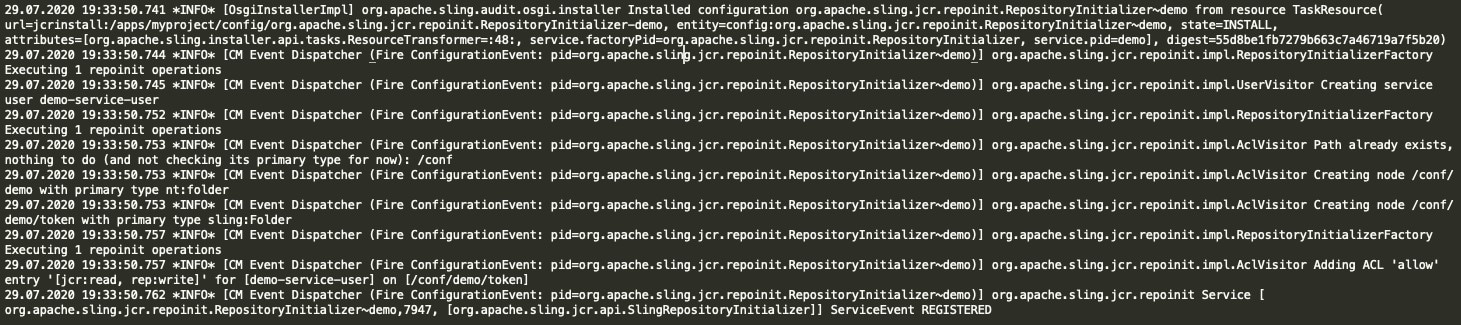
During deployment, we see log statements like below in error.log file where we see each and every command is executed line-by-line.


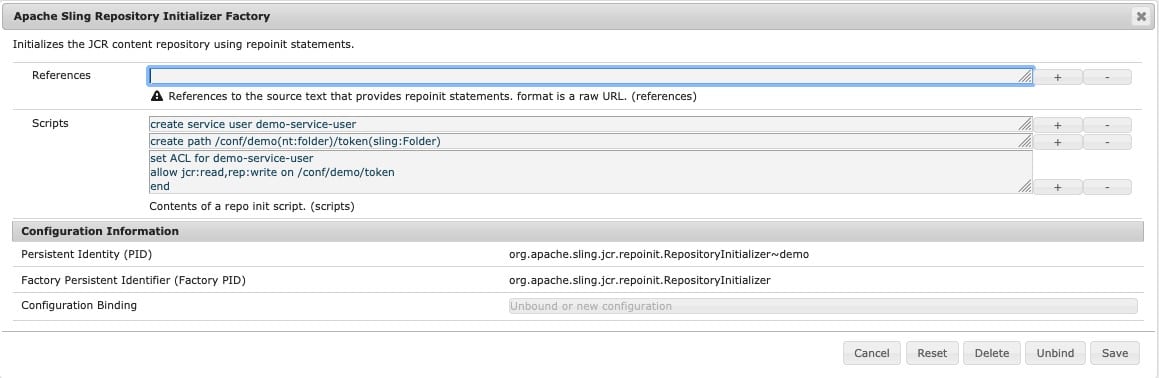
Post-deployment, you can also see the Repo Init configurations in the OSGi console:

There are other ways as well for initializing a repository but Repo Init consolidates them all in one tool making the configurations easy to implement and manage. Also, Apache Sling Repo Init is compatible with AEM as a Cloud Service.


By aem4beginner

January 3, 2021
Estimated Post Reading Time ~

Sling – Feature Flags in AEM

Sometimes we need to implement site toggle or feature toggle in the website to enable or disable certain functionality like maintenance banner, chat, etc.
For this kind of functionality, AEM developers generally go for OSGi config, where they can create properties and use those properties to toggle.

But AEM already has such a feature which is called Feature Flags.

Feature Flags
Feature Flags are used to select whether a particular feature is enabled or not. This allows to continuously deploy new features of an application without making them globally available yet.

Features may be enabled based on various contextual data:
  • Time of Day
  • Segmentation Data (gender, age, etc.), if available
  • Request Parameter
  • Request Header
  • Cookie Value
  • Static Configuration
  • Other Configurations
Feature flags can be provided by registering org.apache.sling.featureflags.Feature services. Alternatively, feature flags can be provided by factory configuration with factory PID org.apache.sling.featureflags.Feature

More info at https://sling.apache.org/documentation/the-sling-engine/featureflags.html

Creating Features by registering org.apache.sling.featureflags.Feature services
Java API Docs–

https://helpx.adobe.com/experience-manager/6-3/sites/developing/using/reference-materials/javadoc/org/apache/sling/featureflags/package-summary.html

@Component(service = Feature.class, immediate = true)
public class AuthorFeature implements Feature {

@Override
public String getDescription() {
return "mysite-author description2";
}

@Override
public String getName() {
return "mysite-author2";
}

@Override
public boolean isEnabled(ExecutionContext ec) {
boolean isValid = false;

// Evaluate value of flag and return true or false
return isValid;
}


where isEnabled methods check whether the feature is enabled for the given execution context.

Creating a static feature flag by factory configuration
Static feature flag can be created from OSGi Configuration
http://localhost:4502/system/console/configMgr

Configuration Name - Apache Sling Configured Feature
(There are 2 configurations with the same name use 2nd one to create a new feature flag)


for example, AEM Content Services Feature Flag is a kind of sling feature flag.

Access feature flags in the code
Both Custom and Static feature flags can be accessed inside Servlet, HTL, or inside other components by creating a reference of Feature service(org.apache.sling.featureflags.Features).

@Reference
private Features features;


Feature service has the below method, which returns true or false based on feature flag value in the given execution context.

features.isEnabled("mysite-author2")

Code Example - 1
Below Servlet get all the feature flag and shows their enable states
https://github.com/arunpatidar02/aem63app-repo/blob/master/java/GetFeaturesServlet.java


Code Example - 2
Creating custom flags that would be enabled if either user is the admin or belongs to some Author groups.
https://github.com/arunpatidar02/aem63app-repo/blob/master/java/AuthorFeature.java

Above service check the user against Author groups, these author groups can be hard-coded or can be stored in config or in JCR. For this example I've saved Author groups in CRXDE in below node /apps/AEM63App/tools/features/my-author2, group multi-valued property have all the groups for which this feature flag should return true.


Where can feature flag be used in AEM?
Can be used to toggle application features.
e.g.
if(features.isEnabled("mysite-author2")) {
// do something
}

Can be used to show hide granite fields e.g. components dialog field or action button in AEM application header e.g. Create Page, Share Assets, delete a page, etc...

Granite provides various options to render or not item based on render types. More info
https://helpx.adobe.com/experience-manager/6-3/sites/developing/using/reference-materials/granite-ui/api/jcr_root/libs/granite/ui/components/coral/foundation/renderconditions/index.html

Except for features options, others are not that dynamics static for example
https://helpx.adobe.com/experience-manager/6-3/sites/developing/using/reference-materials/granite-ui/api/jcr_root/libs/granite/ui/components/coral/foundation/renderconditions/feature/index.html

Not
/libs/granite/ui/components/foundation/renderconditions/not
The condition that renders the component when all of the sub-conditions are false.

Or

/libs/granite/ui/components/coral/foundation/renderconditions/or
The condition that renders the component when any of the sub-conditions is deciding the component should be rendered.

Privilege
/libs/granite/ui/components/coral/foundation/renderconditions/privilege
A condition that decides based on AccessControlManager#hasPrivileges(String, Privilege[]).

Simple
/libs/granite/ui/components/coral/foundation/renderconditions/simple
A condition that takes a simple boolean for the decision.

Feature
/libs/granite/ui/components/coral/foundation/renderconditions/feature
A condition that decides based on Sling’s Feature Flag.

Privilege uses AccessControlManager, which enables the following
Privilege discovery: Determining the privileges that a user has in relation to a node.
Assigning access control policies: Setting the privileges that a user has in relation to a node using access control policies specific to the implementation.
more info https://docs.adobe.com/docs/en/spec/jcr/2.0/16_Access_Control_Management.html
Privilege type rendition check user against JCR privileges e.g. jcr:write,jcr:modifyProperties,jcr:addChildNodes, jcr:readAccessControl,jcr:modifyAccessControl etc. If the user doesn't have those privilege for that node it won't be rendered.

But In AEM the user set and their roles are not very limited if you restrict the user for a feature he/she may be blocked for another, so there might be consequences using Privilege rendition just for hiding items or action buttons.

So alternative if this using Features renditions which can be more dynamic and can be adapt by the developer based on the requirement, for example in Code Example - 2, I've created a flag to hide a dialog item if the user is not an admin or not belongs to some groups and used in renditions


a product-type dropdown will be visible if mysite-author2 feature evaluate true in the current context(which is if a user is admin or part of my-reviewer or administrator groups)


Dialog for admin looks like below :


For user who is not an admin or part of those 2 groups


Similarly, all the other granite items can also be rendered based on the above. e.g. Lock item is hidden for some users for which the feature flag is not enabled.


Can be used with Workflow Launcher...

Features
A list of features to be enabled. Select the required feature(s) using the dropdown selector.
Disabled Features
A list of features to be disabled. Select the required feature(s) using the dropdown selector.

References:

https://sling.apache.org/documentation/the-sling-engine/featureflags.html
https://helpx.adobe.com/experience-manager/6-3/sites/developing/using/reference-materials/granite-ui/api/jcr_root/libs/granite/ui/components/coral/foundation/renderconditions/index.html


By aem4beginner

January 2, 2021
Estimated Post Reading Time ~

Updating AEM content with Sling Pipes

You are still updating content manually? Try out Sling pipes.

Several weeks ago I saw some tweet about how Adobe guys are using Sling pipes for updating their AEM content, so I was curious and I try it out.

Let's see what I have found out...

Sling pipes are a simple tool for executing CRUD operations over resources in the AEM repository. But is it powerful enough to replace your groovy scripts? Let's discover it in the following examples.

Introduction
Just to get your attention, let's say in past you have made some bad decisions during the development of some of your components and now you need to update all content with that component. With Sling Pipes that is very easy.

Example
plumber.newPipe(resourceResolver) 
 .echo("/content/yoursite") .$("nt:unstructured[sling:resourceType=projectName/components/content/imageSlider]") 
 .write("autoplay", true) 
 .run()

5 lines? Yes, you can set autoplay property to true in all your content with imageSlider component in 5 lines, and I'm pretty much sure you can't do that so simply with your groovy code, or you can do it manually in crx/de for the whole day...

So what the hell is happening in this code, what are these methods?!

I will explain it later in more details but in tl;dr;
  • plumber is OSGi service and to start of all this magic you need to pass resourceResolver object to newPipe method. After that, you need to call pipes (methods) to achieve what you want.
  • echo("path") is used to receive root resource on specific path.
  • $(expression) is a wrapper of Sling query expressions and I'm using it here to filter out specific resources with imageSlider component
  • write(conf) is a pipe to write/update resources/properties, in this case, I'm creating or updating autoplay property with value true
  • run() is used to execute code
Still interested? Let me explain to you Sling pipes in more detail.

About Sling Pipes
Sling pipes is a toolset for doing extract - transform - load operations by chaining proven code blocks. A sling pipe is essentially a sling resource stream, encapsulating well-known sling operations.

There are 3 types of pipes:
  • reader pipes - used to get resources
  • writer pipes - for writing/updating resources in repository, depending on configuration and input
  • logical pipes - they refer to other pipes, chaining them or using their results in a general way
Reader pipes
Used to get resources.

Base pipe: echo(path)
Used to receive resource on given path

Let's say you want to get "/content/we-retail" resource. plumber.newPipe(resourceResolver) 
 .echo("/content/we-retail") 
 .run()

XPathPipe: xpath(expr)

Used to receive resource with given xpath query

Let's say you want to get all nt:unstructured resources with heroimage component under "/content/we-retail". 
plumber.newPipe(resourceResolver)
 .xpath("/jcr:root/content/we-retail//element(*, nt:unstructured)[(@sling:resourceType = 'weretail/components/content/heroimage')]") 
 .run()

Sling Query Pipes
Wrapper for executing Sling Query methods in sling pipe way.
  • Find Pipe: $(expr)
  • Children Pipe: children(expr)
  • Siblings Pipe: siblings(expr)
  • Parent Pipe: parent()
  • Closest Pipe: closest(expr)
Here is more details about Sling Query

Same example as previous one, let's say you want to get all resources with heroimage component under "/content/we-retail". plumber.newPipe(resourceResolver) 
 .echo("/content/we-retail") .$("nt:unstructured[sling:resourceType=weretail/components/content/heroimage]") .run()

Writer pipes
Used to modify resources.

Write Pipe: write(conf)
Used to write given nodes and properties to current input resource

Let's say you want to create/update property "foo" with value "bar" and property "foo2" with value "bar2".

Please let me know is it possible to write different values except strings, like long, date, boolean?
plumber.newPipe(resourceResolver) 
 .echo("/content/we-retail") .write('foo','bar','foo2','bar2') 
 .run()

PathPipe: mkdir(expr)
Used to create resources on a given location.

Let's you want to create resource "master" on "/content/we-retail/master" location. This will create "sling:Folder" node.

Please let me know if is it possible to specify a different jcr:primaryType?plumber.newPipe(resourceResolver) 
 .mkdir("/content/we-retail/master") 
 .run()

MovePipe: mv(expr)
Moves resource or property to the target path

Following example will move master resource from "/content/we-retail/master" to "/content/we-retail/language-master".
plumber.newPipe(resourceResolver) 
 .echo("/content/we-retail/master") 
 .mv("/content/we-retail/language-master") 
 .run()

RemovePipe: rm()
Removes resource or property on a specific location.

The following example will remove master resource on the given path "/content/we-retail/master".1 2 3 4 plumber.newPipe(resourceResolver) .echo("/content/we-retail/master") .rm() .run()

PackagePipe: pkg(expr)
Creates a package and add current resource as a filter.

The following example will package all we retail content1 2 3 4 plumber.newPipe(resourceResolver) .echo("/content/we-retail") .pkg("/etc/packages/we-retail-content.zip") .run()


How to use it in your AEM project
Okay, how to run all this in your AEM project? You can configure and execute pipes with java, groovy console, HTTP, or JMX

Dependencies
You need to add "org.apache.sling.query" & "org.apache.sling.pipes" as dependencies and you need to embedded them as part of your bundle or install it as separate bundles (my recommended way). 

<dependency> 
 <groupId>org.apache.sling</groupId> <artifactId>org.apache.sling.query</artifactId> 
 <version>4.0.2</version> 
 <scope>provided</scope> 
</dependency> 
<dependency> 
 <groupId>org.apache.sling</groupId> <artifactId>org.apache.sling.pipes</artifactId> 
 <version>3.1.0</version> 
 <scope>provided</scope> 
</dependency>

<plugin> 
 <groupId>org.apache.jackrabbit</groupId> 
 <artifactId>filevault-package-maven-plugin</artifactId> <extensions>true</extensions> 
 <configuration> 
 <allowIndexDefinitions>true</allowIndexDefinitions> <packageType>mixed</packageType> 
 <group>pipes</group> 
 <embeddeds> 
 <!--sling pipes related--> 
 <embedded> <groupId>org.apache.sling</groupId> <artifactId>org.apache.sling.query</artifactId> 
 <target>/apps/pipes-vendor-packages/application/install</target> 
 </embedded> 
 <embedded> 
 <groupId>org.apache.sling</groupId> <artifactId>org.apache.sling.pipes</artifactId> 
 <target>/apps/pipes-vendor-packages/application/install</target> 
 </embedded> </embeddeds> 
 </configuration> 
</plugin>

Code execution

You can write in the groovy console. 
def plumber = getService("org.apache.sling.pipes.Plumber") 

plumber.newPipe(resourceResolver) 
 .echo("/content/yoursite") .$("nt:unstructured[sling:resourceType=projectName/components/content/imageSlider]") 
 .write("autoplay", true) 
 .run()

You can write in your Java class. 
@Component(service = SlingPipesExamples.class, immediate = true) 
public class SlingPipesExamples { 
 private static final Logger logger = LoggerFactory.getLogger(SlingPipesExamples.class); 

 private static final String SERVICE_USER = "sling-pipes-service-user"; 

 @Reference 
 private ResourceResolverFactory resourceResolverFactory; 

 @Reference 
 private Plumber plumber; 

 public void example() { 
 try (final ResourceResolver resourceResolver = this.resourceResolverFactory.getServiceResourceResolver(this.getAuthenticationInfo())) { 
 PipeBuilder pipeBuilder = this.plumber.newPipe(resourceResolver); 
 // your logic with pipes 
 } catch (final LoginException e) { 
 logger.error("Exception during creating service resource resolver ", e); 
 } 
 }
 private Map<String, Object> getAuthenticationInfo() {
 return Collections.singletonMap(ResourceResolverFactory.SUBSERVICE, SERVICE_USER); 
 } 
}

You can create a resource on a specific location e.g "/etc/sling-pipes/example" and execute it with an HTTP request
<?xml version="1.0" encoding="UTF-8"?> 
<jcr:root xmlns:sling="http://sling.apache.org/jcr/sling/1.0"     xmlns:jcr="http://www.jcp.org/jcr/1.0" 
 jcr:description="Create directory pipe" 
 jcr:primaryType="sling:OrderedFolder" 
 sling:resourceType="slingPipes/mkdir" 
 expr="/content/sling-pipes/foo"/>

Sum up
Basicly that's it what I discover so far. In general I like Sling Pipes, specialy how with few lines of code you can do a lot of stuff. Didn't try with some more complex examples but I guess it would be almost the same.
For more details take a look into offical documentation.


By aem4beginner

One Tool to Configure Them All: Sling RepoInit

The core paradigm for the Java Content Repository (JCR), the repository for Adobe Experience Manager (AEM) is Everything is Content. This principal drives the flexibility which made AEM a market-leading solution. It does, however, come with a downside, managing the initial repository state is challenging since the repository state is a combination of the content, code and configuration for an AEM application.

Managing this initial state is important for developers and administrators to be able to stand up local instances, standing up new environments and keeping environments in sync.

Multiple teams have build parts of a solution to this problem, including:
Netcentric Access Control Tool
ACS AEM Commons Ensure Service User
ACS AEM Commons Authorizable Packager
Apache Sling Service User Web Console
AEM Content Packages

Recently though, another solution has come to the fore for configuring the initial repository state.

Apache Sling RepoInit
Apache Sling RepoInit has been a feature of Apache Sling since 2016 but historically has been used for base repository initialization as a part of slingstart / launchpad starter, not for project-level repository initialization.Version 1.1.6+ of Sling JCR RepoInit includes the ability for registering configurations with RepoInit scripts or references. This brings Apache Sling Repoint out from just being a base repository initializer to enable use by project teams.

With Sling Repoint, we have a consolidated grammar to:
  • Create groups
  • Assign permissions
  • Create paths
  • Set properties
  • Assign group membership
  • Create OSGi configurations
  • Create service users
Enabling RepoInit in AEM
Note: this is based on AEM 6.5.5, newer service packs and AEM Cloud Service may have different dependency versions.

AEM includes a fairly old version of Sling RepoInit, in order to leverage the full power of Sling RepoInit, you need to upgrade to the following dependencies for AEM 6.5.5:
org.apache.sling.jcr.repoinit – 1.1.24
org.apache.sling.repoinit.parser – 1.6.2

Configuring RepositoryInitializer
We can configure RepoInit scripts to be executed by registering a configuration of the org.apache.sling.jcr.repoinit.impl.RepositoryInitializer Service Factory, however there is a challenge with how this service resolves the references. Each reference is expected to be in the form of a URL and OSGi supports exposing bundles as URLs, however when Apache Felix resolves the URL of a bundle in the URLHandlersBundleStreamHandler, it expects the URL host to be the UUID of the bundle, not a stable ID such as the Bundle’s Symbolic Name.

Note: as per Oliver Lietz’s comment I would recommend following the PAX URL Classpath method rather than the approach below.

I have opened a ticket to get this resolved, but until that’s complete and Generally Available, the best option is to create an OSGi Component to resolve the Bundle URL and initialize the configurations when the bundle starts.

Below is a sample implementation showing how this could be done, showing how to support multiple RepoInit files in a single bundle:

package com.company;

import java.io.IOException;
import java.net.URL;
import java.util.ArrayList;
import java.util.Dictionary;
import java.util.Enumeration;
import java.util.Hashtable;
import java.util.List;

import org.osgi.framework.BundleContext;
import org.osgi.service.cm.Configuration;
import org.osgi.service.cm.ConfigurationAdmin;
import org.osgi.service.component.ComponentContext;
import org.osgi.service.component.annotations.Activate;
import org.osgi.service.component.annotations.Component;
import org.osgi.service.component.annotations.Deactivate;
import org.osgi.service.component.annotations.Modified;
import org.osgi.service.component.annotations.Reference;
import org.slf4j.Logger;
import org.slf4j.LoggerFactory;

/**
* Register the repoint scripts in the bundle's /repoinits context path.
*/
@Component(immediate = true)
public class RegisterRepoInits {

public static final String PID = "org.apache.sling.jcr.repoinit.RepositoryInitializer";
private static final Logger log = LoggerFactory.getLogger(RegisterRepoinits.class);

@Reference
private ConfigurationAdmin configAdmin;

private Configuration config;

/**
* Install the Sling RepoInit configuration based on the RepoInit scripts
* embedded in this bundle
*
* @param ctx the OSGi ComponentContext
* @throws IOException an exception occurs resolving the RepoInit scripts
*/
@Activate
@Modified
protected void activate(ComponentContext ctx) throws IOException {
log.info("activate");
BundleContext bundleContext = ctx.getBundleContext();

// Get or create the configuration if it does not already exist
config = configAdmin.getConfiguration(PID + "-company");

List<String> urls = new ArrayList<>();
// Find all of the RepoInit text files in ./src/main/resources/repoinits by
// enumerating the Bundle's entries
Enumeration<?> repoinits = bundleContext.getBundle().getEntryPaths("/repoinits");
while (repoinits.hasMoreElements()) {
Object repoinit = repoinits.nextElement();
log.info("Adding RepoInit: {}", repoinit);
// Resolve the Bundle URL for the Bundle Resource
URL repointUrl = bundleContext.getBundle().getResource(repoinit.toString());
urls.add(repointUrl.toString());
}

// Create and register an OSGi configuration with an Array of Bundle Resource
// URLs
@SuppressWarnings("java:S1149")
Dictionary<String,Object> properties = new Hashtable<>();
properties.put(ConfigurationAdmin.SERVICE_FACTORYPID, PID);
properties.put("references", urls.toArray(new String[urls.size()]));
properties.put("scripts", new String[] {});
config.update(properties);

log.info("RepoInit Registered");
}

/*
* Remove the config when the component is deactivated
*/
@Deactivate
protected void deactivate() throws IOException {
log.info("deactivate");
if (config != null) {
config.delete();
log.info("Repoinit De-registered");
}
}
}


Now that you have Sling RepoInit setup and working, you can create any number of RepoInit scripts in the ./src/main/resources/repoinits folder and on bundle installation they’ll be live reloaded.

With the RepoInit scripts, you can set up your repository completely with commands like:# Create paths create path /content/my-site(cq:Page) # Create a group create group my-site-admin set ACL for my-site-admin allow crx:replicate, jcr:lockManagement, jcr:versionManagement, rep:write on /content/my-site end # Add group members add my-site-admin to group administrators # And More!

Apache Sling RepoInit is the consolidated way to initialize a repository for any Apache Sling-based system including AEM 6.5, AEM as a Cloud Service and Apache Sling CMS. With RepoInit, you can be assured that your solution will work on both the current version of AEM as well as AEM as a Cloud Service.

Source:
https://blogs.perficient.com/2020/06/17/one-tool-to-configure-them-all-sling-repoinit/


By aem4beginner

December 28, 2020
Estimated Post Reading Time ~

What is the AEM Apache Sling Referrer Filter OSGI configuration?

AEM “referrer not allowed”

Out of the box, AEM denies all server names or hosts to make HTTP requests to the respective running AEM publish/author instance. During an HTTP request made to the AEM publish/author, AEM checks the Referrer header configuration. If the referrer configured to allow the host(s), then AEM will fulfill the request, and if not, the AEM “referrer not allowed” error message will be shown.

Take an example of an AEM application that exposes a servlet that exposes the endpoint of “/bin/stores.js”. This endpoint will return an array of store detail JSON objects. This feature will be reusable, so throughout the AEM application, on many occasions, the endpoint is being used to render HTML elements to the page using javascript. Now take an example of a microsite within the same organization of m.site.com (mobile site) where it would like to consume “/bin/stores.js”. 

When the micro-site makes an HTTP GET request on “/bin/stores.js”, you will get the AEM “referrer not allowed” error because the host (or m.site.com) referrer is not allowed; we must allow m.site.com in the Apache Sling Referrer Filter settings.

What is an “HTTP Referrer header”? 
The HTTP Referrer header identifies the address of the webpage that’s making a request. We can use this information to allow specific hosts to fulfill the HTTP request.

Read More: https://en.wikipedia.org/wiki/HTTP_referer

In OSGI Configurations in AEM (http://localhost:4502/system/console/configMgr) use the browser finder (CTRL + F) and find “Apache Sling Referrer Filter”. Click on the configuration, and let’s break it down to see what fields control what.

Breaking things down


  • Allow Empty (Boolean): only enable this if you are testing (using a REST Client). Enabling this will allow any hosts to make requests to your AEM application (remember to turn this off in your production environment).
  • Allow Hosts (String[]): allows specific hosts to make requests to your AEM instance; use string characters only.
  • Allow Regexp Host (String[]): allows specific hosts to make requests to your AEM instance; use regex only.
  • Filter Methods (String[]): defines which HTTP method(s) will be checked with the values in the allowed hosts before accepting incoming HTTP requests.


By aem4beginner

October 1, 2020
Estimated Post Reading Time ~

Apache Sling's Request Processing Analyser

AEM provides a console to check recent requests, by default only 20 requests can be seen which is troublesome in the production environment as we get millions of requests. We can update the default value, but it will be difficult when we get some millions of requests in production.

Recent requests in AEM:

Apache Sling provides a tool to analyse all the recent requests using "Request Processing Analyser". To install this tool download the code from GitHub and run mvn clean install. Once the build is successful, we can see jar files in the target folder. Install org.apache.sling.reqanalyzer-0.0.1-SNAPSHOT.jar to AEM instance.


A log file requesttracker.txt is created in ${sling.home}/logs folder. To analyse this log file we need to run the below command, which opens a graphical window
java -jar org.apache.sling.reqanalyzer-0.0.1-SNAPSHOT.jar D:\CQ5\CQ5\AEM6.4\crx-quickstart\logs\requesttracker.txt


We can see the below info in the window
  • Start time stamp in milliseconds
  • Request processing time in milliseconds
  • Request method
  • Request URL
  • Response content type
  • Response status
To analyse a specific request, click on it then we can see a new window with more info.


We can see the below info
  • Timestamp - shows the timestamp of each step that the request
  • Delta - time between each step
  • Message - shows info about which step is processed


By aem4beginner

September 22, 2020
Estimated Post Reading Time ~

Failure authenticating with BASIC 'Sling (Development)'

Issue: When we try to replicate anything from author to publisher I am getting below error. and not even on any replication, it keeps printing the log in error.log file automatically after an interval. What could be the cause of this? 

24.10.2019 11:31:05.942 *INFO* [oak-repository-executor-1] com.adobe.granite.repository Service [34344, [org.apache.jackrabbit.oak.api.jmx.SessionMBean]] ServiceEvent REGISTERED
24.10.2019 11:31:20.180 *INFO* [sling-default-2812-com.day.cq.replication.impl.ReverseReplicator.22529] org.apache.commons.httpclient.auth.AuthChallengeProcessor basic authentication scheme selected
24.10.2019 11:31:20.180 *INFO* [sling-default-2812-com.day.cq.replication.impl.ReverseReplicator.22529] org.apache.commons.httpclient.HttpMethodDirector Failure authenticating with BASIC 'Sling (Development)'@localhost:4503
24.10.2019 11:31:24.323 *INFO* [oak-repository-executor-1] com.adobe.granite.repository Service [34345, [org.apache.jackrabbit.oak.api.jmx.SessionMBean]] ServiceEvent REGISTERED
Resolution: This error message you are getting because, AEM author replication agent is unable to communicate with publisher instance due to bad credential (username and password). You might change the password of admin user in publisher and forget to update the password on default author agent. Once you will update the valid authentication credential in default author replication agent this error will be no more logged in the error.log file.
By default AEM system keep generating events and try to transport the same to publisher instance, every time it send the replication request to replication agent the authentication get failed thats why this log is get printed after a certain interval. 

Reference:

  1. https://helpx.adobe.com/in/experience-manager/6-3/sites/deploying/using/replication.html


By aem4beginner

September 19, 2020
Estimated Post Reading Time ~

What is Sling and why have multiple scripts/renderers for a Component?

Apache Sling is one of the technology stack of AEM/CQ5 CMS on which AEM is built on. Sling is a Web application framework based on REST principles that provide easy development of content-oriented applications. In general terms, we can say Sling is used to resolve the resources or URI in our application. Sling uses a JCR repository, such as Apache Jackrabbit or Day's CRX, as its data store. Sling maps HTTP request URLs to content resources based on the request's path, extension, and selectors.

The resource is one of the central parts of Sling. Extending from JCR, Everything is Content, and Sling assumes that Everything is a Resource.

Apache Sling is included in the installation of CQ5. Sling has since been contributed to the Apache Software Foundation - further information can be found at Apache Sling.
Using Apache Sling, the type of content to be rendered is not the first processing consideration. Instead, the main consideration is whether the URL resolves to a content object for which a script can then be found to perform the rendering. This provides excellent support for Web content authors to build pages that are easily customized to their requirements.

The advantages of this flexibility are apparent in applications with a wide range of different content elements, or when you need Pages that can be easily customized/viewed differently.

How sling used to resolve a URL (Resource) in AEM? and How sling works internally?
The following diagram explains the Sling script resolution. It shows how to get from the HTTP request to content node, from content node to resource type, from resource type to script and what scripting variables are available.

Sling Resource resolver

The following diagram explains all the hidden, but powerful request parameters you can use when dealing with the SlingPostServlet, the default handler for all POST requests that give you endless options for creating, modifying, deleting, copying, and moving nodes in the repository.

We will now see how sling resolves a URL by using the above resolution diagram.

1. Actual URL get divided into the following chunks. e.g. we have a URL " www.rashidjorvee.blogspot.com/blog/post/aboutrashid.print.html/printable?height=400,width=200" and now we will see how sling will resolve my URL.
  • Request Method: This information comes in the request header.
  • Content Path: [/blog/post/aboutrashid]
  • Seletor: [print]
  • Extension: [html]
  • Suffix:
  • Query parameter : [height=400,width=200]
2. Sling will go to the requested content path.

3. Then it will check whether that content path or component has a property sling:resourceSuperType of sling:resourceType. If the request found any of these properties in that node then the sling request moves to that path which is present in the sling:resourceType or sling:resourceSuperType.

sling:resourceType is used to render to script files.
sling:resourceSuperType is used to overload or inherit an existing component.


4. Then render to the path given in resourceType and resourceSuperType property to load the script or inherit the functionality. To resolve this first sling will find the path under the apps directory, in case that content path is not available in apps then the request will move under the libs directory.

5. In this step sling will look for the script name and try to match with the exact request URL with the requested selector and extension. There is a set of rules which sling follow to match the selector and extension. Following are the rules:

Folders (i.e. nodes of type nt:folder) take precedence over jsp file names when resolving using selectors, at least for the first selector.
Only one selector in a file name has any effect - any files with names containing two selectors don't ever get selected, but names of folders can be used to match the selectors in the request.

Scripts with HTTP method names (e.g.,GET.jsp) is selected as a last resort, (after the default script: jobs.jsp, in this case).
Scripts with names that include HTTP methods in addition to another selector or extension in a .jsp file name are never selected.


By aem4beginner

Failure authenticating with BASIC 'Sling (Development)'

Issue: When we try to replicate anything from author to publisher I am getting below error. and not even on any replication it keep printing the log in error.log file automatically after an interval. What could be the cause of this? 

24.10.2019 11:31:05.942 *INFO* [oak-repository-executor-1] com.adobe.granite.repository Service [34344, [org.apache.jackrabbit.oak.api.jmx.SessionMBean]] ServiceEvent REGISTERED

24.10.2019 11:31:20.180 *INFO* [sling-default-2812-com.day.cq.replication.impl.ReverseReplicator.22529] org.apache.commons.httpclient.auth.AuthChallengeProcessor basic authentication scheme selected

24.10.2019 11:31:20.180 *INFO* [sling-default-2812-com.day.cq.replication.impl.ReverseReplicator.22529] org.apache.commons.httpclient.HttpMethodDirector Failure authenticating with BASIC 'Sling (Development)'@localhost:4503

24.10.2019 11:31:24.323 *INFO* [oak-repository-executor-1] com.adobe.granite.repository Service [34345, [org.apache.jackrabbit.oak.api.jmx.SessionMBean]] ServiceEvent REGISTERED

Resolution: This error message you are getting because, AEM author replication agent is unable to communicate with publisher instance due to bad credential (username and password). You might change the password of admin user in publisher and forget to update the password on default author agent. Once you will update the valid authentication credential in default author replication agent this error will be no more logged in the error.log file.

By default AEM system keep generating events and try to transport the same to publisher instance, every time it send the replication request to replication agent the authentication get failed thats why this log is get printed after a certain interval. 

Reference: 

https://helpx.adobe.com/in/experience-manager/6-3/sites/deploying/using/replication.html


By aem4beginner

May 29, 2020
Estimated Post Reading Time ~

AEM 6.3 migration OSGi bundle whitelist error-osgi-service is NOT whitelisted to use SlingRepository.loginAdministrative

Are you facing such errors while migrating to AEM 6.3:
osgi bundle whitelist error-osgi-service is NOT whitelisted to use SlingRepository.loginAdministrative

Here is a quick hack but please ensure not to use it in production
I believe most of the AEM developers are aware that ResourceResolverFactory.getAdministrativeResourceResolver and SlingRepository.loginAdministrative methods have been defined to provide access to the resource tree and JCR Repository.

Consequently, the following methods are being deprecated
ResourceResolverFactory.getAdministrativeResourceResolver
ResourceProviderFactory.getAdministrativeResourceProvider
SlingRepository.loginAdministrative 

and alternatively, we started using the service authentication method getServiceResourceResolver to get the resourceResolver and then making a system user and mapping service with the user in Felix configurations.

like this <service-name>[:<subservice-name>]=<authorizable id of a JCR system user>]

IMAGINE YOU ARE A DEVELOPER AND YOU RESUME YOUR WORK AFTER LUNCH AND U HAVE BEEN ASKED TO RUN A GENERIC OSGI SERVICE ON AEM 6.3 AND YOU TRYING TO RUN THAT SERVICE BUT ITS GIVING THE ABOVE ERROR osgi-service is NOT whitelisted to use SlingRepository.loginAdministrative

Relax, You might be aware of the fix(service authentication) but you still don't want to add it coz you need to make code changes and build again and deploy. Hold on that's gonna take another 1 hour. Ridiculous ! and then your question why they keep on changing methods to get resourceResolver.

Let's SAVE ONE HOUR IF YOU ARE USING THIS SERVICE OR BUNDLE ON LOCAL ENVIRONMENT.


How:
1) go to osgi configurations
2) search for keyword whitelist
3) click on add and give a name to config and bundle symbolic name

YOU ARE DONE!

Refer to the following link :

https://sling.apache.org/documentation/the-sling-engine/service-authentication.html

Copied from the above link:
Whitelisting bundles for administrative loginhttps://sling.apache.org/documentation/the-sling-engine/service-authentication.html#whitelisting-bun...
In order to be able to manage a few (hopefully legit) uses of the above-deprecated methods, a whitelisting mechanism was introduced with SLING-5153 (JCR Base 2.4.2).

The recommended way to whitelist a bundle for administrative login is via a whitelist fragment configuration. It can be created as an OSGi factory configuration with the factoryPID org.apache.sling.jcr.base.internal.LoginAdminWhitelist.fragment. E.g. a typical configuration file might be calledorg.apache.sling.jcr.base.internal.LoginAdminWhitelist.fragment-myapp.config and could look as follows: 

whitelist.name="myapp" whitelist.bundles=[ "com.myapp.core", "com.myapp.commons" ] 

All configured whitelist fragments are taken into account. This makes it easy to separate whitelists for different application layers and purposes.
For example, some Sling bundles need to be whitelisted, which could be done in a whitelist fragment named sling. In addition, myapp adds a whitelist fragment called myapp. For integration tests and additional whitelist fragments, myapp-integration-testing may be added. 

Furthermore, there is a global configuration with PID org.apache.sling.jcr.base.internal.LoginAdminWhitelist, which should only be used in exceptional cases. It has a switch to turn administrative login on globally (whitelist.bypass) and it allows supplying a regular expression to whitelist matching bundle symbolic names (whitelist.bundles.regexp). 

The regular expression is most useful for running PaxExam based tests, where bundle symbolic names follow a set pattern but have randomly generated parts.
Example: to whitelist all bundles generated by PaxExam a configuration file named org.apache.sling.jcr.base.internal.LoginAdminWhitelist.config might look as follows: 

whitelist.bypass=B"false" whitelist.bundles.regexp="^PAXEXAM.*$"

The configuration PID is org.apache.sling.jcr.base.internal.LoginAdminWhitelist. It supports the following configuration properties.


By aem4beginner

May 27, 2020
Estimated Post Reading Time ~

Sling Context Aware Configuration in AEM

OSGI configuration
We all know every OSGI service/ component configurations metadata in OSGI Console, Configuration section or we can deploy the as part of the codebase. We can maintain these configurations based on the run modes by deploy as part of the code base and we can configure in Felix console. We need admin permissions to configure through Felix console. To change in Felix configurations in not best practice.

We can deploy configurations with runmodes, which is environment-specific what if we want to configurations based on the content hierarchy?
To achieve this we can make use of Sling Context-Aware Configuration
Sling Context-Aware Configuration

What can we do with the sling context-aware configuration? We can store the configurations based on the repository hierarchy

How to implement this?
You just need to create a Java POJO class with “@Configuration” with the required properties as variables. If add collection = true Attribute, it will treat as a collection.

You can configure these under the /conf with the content hierarchy and you need to add “sling:congRef“ property to page by pointing the configuration


How to read in Java class (Services)
To get the configuration


To get the collections (you should declare your configuration as a collection as true)

How to read in HTL

In HTL component you access the configurations by using “caconfig”

${caconfig['subbu.blogspot.caconfig.core.slingcaconfig.SiteConfiguration'].stringArrayParam}

How it works?


How Inheritance will work
By adding the sling:configPropertyInherit as true to the configuration resource it will look into parent configurations for the not adding properties

By adding sling:configCollectionInherit as true to the configuration resource it will look for the parent configurations


The result of this example is: C, A, B. It would by just C if the sling:configCollectionInherit is not set.

How to manage the configuration
A project form a wcm.io providing the editors and extensions to edit the configurations
Editor: Configuration Editor Template for AEM.
· By using this you can edit the CA configs under the /content tree as page
· Before creating the CA configs you need to define the sling:configRef. This can be done by proving the configuration in page properties
· The configuration editor supports only editing configuration for which configuration metadata is present.
What to Install
· Editor bundle – these are already provided in 6.5
· Editor package (io.wcm:io.wcm.caconfig.editor.package) – you can deploy this along with your application as sub package
<subPackage>
<groupId>io.wcm</groupId>
<artifactId>io.wcm.caconfig.editor.package</artifactId>
<filter>true</filter>
</subPackage>

Extensions AEM applications: AEM-specific extensions for Sling Context-Aware Configuration.
What to install
· Deploy the bundle io.wcm.caconfig.extensions along with your application to the AEM instance. As bundle
<embedded>
<groupId>io.wcm</groupId>
<artifactId>
io.wcm.caconfig.extensions
</artifactId>
<target>/apps/ca-config-examples/install</target>
</embedded>

References
Sample Project: https://github.com/subbuwcm/ca-config-examples

Sling Doc:
https://sling.apache.org/documentation/bundles/context-aware-configuration/context-aware-configuration.html

WCM IO Doc:
https://wcm.io/caconfig/index.html


By aem4beginner

Apache sling Service User Mapper Service

Problem Statement:
I am using 6.1. I have created a service user and given required permissions in useradmin. When am trying to map the service user in Apache sling Service User Mapper Service Amendment, I have given pwcm.core.schedulers: EventArchiveService=testSystemUser and clicked save but the issue is when I refresh I don't see any value in service mappings its becoming empty and I get the login error in error logs. I don't understand why the value is clearing off from Felix console.

Solution:
Step 1: Create a new system user. to do this
Open http://localhost:4502/crx/explorer/index.jsp

Login as admin > Open 'User Administration > Select 'Create System User' > Enter "user id" > Hit the Green button (you will not se a save button 🙂

I have created "abcwriteservice" user

Step 2: Go to Permissions, and for the user, 'abcwriteservice' give Permissions to access the folder where you'd like to write. (In this example: /etc/userdata )

Step 3: Open OSGI console and go to "Apache Sling Service User Mapper Service" to define the service-user mapping. For example: 'group.commons-service:writeService=abcwriteservice'

Step 4: In code, I added an extra parameter, as:

Map<String, Object> param = new HashMap<String, Object>(); param.put(ResourceResolverFactory.SUBSERVICE, "writeService"); try { resourceResolverWriter = factory.getServiceResourceResolver(param); if (resourceResolverWriter == null) throw new Exception("Could not obtain a CRX User for the Service:'writeService'"); Node usersRootNode = adminSession.getNode("/etc/userdata/users");

Note:
You should be using: "Apache Sling Service User Mapper service" - not "Apache Sling Service User Mapper Service Amendment".


By aem4beginner

May 26, 2020
Estimated Post Reading Time ~

Sling Dynamic Include (SDI): Dynamically Include Page Components

In CQ or AEM, most of the pages remain static. Hence, caching of the pages is very useful with dispatchers or any other available AEM plugins/connectors. Imagine a scenario where the homepage of a news agency must show the hot news which is different for different regions, however, because of caching it is displaying the same news in all the regions. Strange! To rescue from these, live scenarios, the application may require certain elements/components of the page to be dynamically included. In AEM, Sling Dynamic Include (SDI) provides this functionality.

Let’s elaborate on SDI integration with AEM 6.4, Dynamic Include 3.0.0, and Dispatcher 2.4.

Please note that Step 1 and Step 2 need to be performed on publish instance.
 
Step 1:
Install Sling Dynamic Include Bundle using the following steps:
Download the Dynamic Include bundle.
Open the bundles using http://<host>:<port>/system/console/bundles
Click on install/update button in the right corner of the screen
4. Check the Start Bundle checkbox and browse the location where the bundle is downloaded and click on install/update button
Once the installation of the bundle is completed, verify it by searching Dynamic Include. It should be in an active state.
Step 2:
After installation of the SDI bundle, the next step is to configure the component to be dynamically included.

<?xml version="1.0" encoding="UTF-8"?>
<jcr:root xmlns:sling="http://sling.apache.org/jcr/sling/1.0"xmlns:cq="http://www.day.com/jcr/cq/1.0"
    xmlns:jcr="http://www.jcp.org/jcr/1.0"xmlns:nt="http://www.jcp.org/jcr/nt/1.0"
    jcr:primaryType="sling:OsgiConfig"
    include-filter.config.enabled="{Boolean}true"
    include-filter.config.path="/content"
    include-filter.config.resource-types="[my-app/components/content/dynamic_included_component]"
    include-filter.config.include-type="SSI"
    include-filter.config.add_comment="{Boolean}false"
    include-filter.config.selector="nocache"
    include-filter.config.ttl=""
    include-filter.config.required_header="Server-Agent=Communique-Dispatcher"
    include-filter.config.ignoreUrlParams="[]"
    include-filter.config.rewrite="{Boolean}true"
/>
Please find below the brief description of each OSGI config used above:

enabled – set it to true to enable SDI.
path – SDI configuration will be enabled only for this path.
resource-types – which components should be replaced with tags
include-type – type of include tag (Apache SSI, ESI or Javascript)
Apache SSI – Apache Server Side Includes
Apache HTTP Server is set up as a caching proxy in front of the AEM. This means that the include will be done by the http server and not by the sling engine.

ESI – Edge Site Includes
Edge Site Includes can be used as an alternative to SSI, it is evaluated by CDN. ESI has to have some proxy that is able to process its tags and often made available as part of CDN.

JavaScript – Ajax
Using JSI will replace dynamic components with ajax tags, so they are loaded by the browser. If included component has some JS code, it may not work properly, as it won’t be initialized immediately after a page is loaded.

Add comment – adds debug comment: <!– SDI include (path: %s, resourceType: %s) –> to every replaced component.
Filter selector – selector added to HTTP request for particular component and is used to get actual content.
TTL – time to live in seconds, set for rendered component. This property is supported for dispatcher version 4.1.11+
Required header – SDI will be enabled only if the configured header is present in the request. By default it’s Server-Agent=Communique-Dispatcher header, added by the AEM dispatcher. You may enter just the header name only or the name and the value split with =.
Ignore URL params – SDI normally skips requests containing any GET parameters. This option allows to set a list of parameters that should be ignored.
Include path rewriting — enable rewriting link (according to sling mappings) that is used for dynamic content including.

Step 3:
After completion of Step 1 and Step 2 on publishing instance, Dispatcher configurations need to be updated as explained below:

1. Include(If already present, make sure uncommented) the mod_include module in Apache Web server’s httpd.conf file:

LoadModule include_module modules/mod_include.so
2. Update virtual host configuration file

a. Find the following lines in the dispatcher.conf file

<IfModule dispatcher_module>
SetHandler dispatcher-handler
</IfModule>
modify as below

<IfModule dispatcher_module>
SetHandler dispatcher-handler
</IfModule>
SetOutputFilter INCLUDES
b. Add Includes to Options directive:

<VirtualHost *:80>
...
<Directory />
...
Options FollowSymLinks Includes  
AllowOverride None
...
<Directory>
...
</VirtualHost>
3.  Update the httpd.conf to enable SDI.

a. Add “Includes” to Options directive to enable SSI includes used by Sling Dynamic Include

b. Specify what file types are to be processed by Includes filter.

   <Directory /mnt/var/www/html>
      ...
      Options Indexes FollowSymLinks Includes  
... 
      AddOutputFilter INCLUDES .html 
AddOutputFilterByType INCLUDES text/plain text/html
      ...
   </Directory>
4. Update rules.any or dispatcher.any depending where the cache rules are defined for the publish instance.

/0008 {
    /glob "*.nocache.html*"
    /type "deny"
  }
Make sure the selector ‘nocache’ used here is same as defined in OSGI config (include-filter.config.selector = ‘nocache’) explained in Step 2.

5. Restart the server using any of the below commands:

sudo apachectl restart OR sudo service httpd restart

Verification
After setting up the SDI, it’s time to verify the changes. Follow the below steps:

Right-click and open the page source on the webpage where the component is dynamically included.
In the page source, search for SDI includes a tag.
A component configured for SDI will be replaced with SDI tags as shown below:


By aem4beginner