This is a guide to help you integrate Active Directory into AEM 6.0 using Windows Server 2008 R2, AD FS 2.0, and the SAML 2.0 spec. It's gnarly, so hold on to your butts.
Intro and Notes
I've written this guide from a developer's perspective who wants to get a working lab together before handing it off to an AD admin. If you have direct access to tweak your AD environment, you can skip most of the Windows stuff.
There's a lot of incantations that have a lot of research behind them. Try not to blindly copy them as there's bound to be typos. This process worked for me. It may not for you. Almost everything you see is done on bare VMs.
Things you will need:
- A Windows 2008 R2 Server Installation
- OpenSSL
- A copy of AEM
Assumptions:
- You have the internet
- You can run VMs
- You're using CentOS, or RHEL to host AEM
- You know how to modify hosts files
- You can use a command-line
- You know a bit about certs
- You like good beer
Table of Contents
- Installing Active Directory / Domain services
- Installing IIS
- Generating Windows friendly certs
- Installing AD FS 2.0 (and hotfix)
- Generating Linux / Apache friendly certs
- Configuring Apache for HTTPS
- Moving certs into a Java Keystore / Truststore
- Modifying Java to support 2048-bit encryption
- Configuring AEM to support HTTPS
- Installing Service Pack 1 for AEM
- Configuring AEM for SAML
- Drinking heavily
Installing Active Directory (and DNS)
Go download, install, and update Windows Server 2008 R2 if you have not already done so.
Install as "Windows Server 2008 R2 Standard (Full Installation)"
Make sure your IP isn't going to change anytime soon
Add the Active Directory Services role.
Initial Configurations Tasks -> Add Role, or Server Manager -> Add Roles
Go through the Wizard and select "Active Directory Services" 
Configure Active Directory Services
Run > dcpromo.exe
Create a new forest
Add your fully qualified domain name (FQDN). We're using yourmom.com 
Setup your functional level. I just set this at Windows Server 2008 R2. 
Active Directory requires that you setup a DNS server... 
DNS will bark about having a DHCP assigned IP. This is fine as long as it doesn't change during testing. You can configure a static one if you know how.
DNS will bark about some integration crap. Let's be honest, you want to continue... just hit 'yes'.
I left these default...
Add your domain admin's password. Your next login will be using this account. 
Let's get this domain party started... 
Hey, look! Windows needs to reboot for the 627th time. Never seen that before... 
Login as your new domain admin... 
Once you're logged in, create a new user. (Server Manager -> Roles -> Active Directory Domain Services -> AD Users and Computers -> yourmom.com -> Users
Right click in the Users pane, New -> User
Make a simple user: First Name, Last Name, and FirstInitialLastName (cmillar) for the user logon name.
Add a password. Don't require a change.
When you're finished, you should see something like this:
After you setup the user, open them up (double click)
Add an email address to the user and save. We will be syncing this email back to AEM.
Installing Certificate Services
Certificate services will help you generate Windows friendly certs on your AD server.
Add Role -> Active Directory Certificate Services
Only add "Certificate Authority" 
Select Enterprise
Select Root CA
Create a new private key
Configure the new private key (RSA, 2048, SHA1)... very similar to our OpenSSL certs we will be creating.
Enter your CA name. This should match your domain. (yourmom.com). If this wasn't self signed, you would be using someone like VeriSign as your CA (Cert Authority)
Make it last for 5 years.
Stuff things in places you don't really care about.
Next...
Next...
Great. Now we will be using this CA / Private key to create a public cert for adfs.yourmom.com
Installing AD FS 2.0 (and hotfix)
It's important that you do not add the AD FS role. That will only install AD FS 1.0 which does not have SAML 2.0 support.
Download AD FS 2.0 from here. Make sure you get the one for R2 and AMD64.
Download the AD FS hotfix rollup from here. At present, it's on Rollup 3.
Open AdfsSetup.exe
Agree to the terms.
Setup as Federation Server
The install will tell you that it needs IIS. That's totally cool with us because we need it.
Wait a while for everything to install...
Do not start the snap in.
Install the hotfix. (Installs an exe, run the exe, hit next a bunch of times, done.)
Configure IIS for HTTPS
Create a self-signed Cert
Open IIS Manager (Start -> Search -> IIS)
Select your computer (WIN-HLKJHAOSIHA or whatevs)
Filter by SSL and open 'Server Certificates'
In the actions pane (Right hand side) click "Create Domain Certificate"
Spec out your domain properties. Remember, this cert is for our website that will host our SAML login, so use something like adfs.yourmom.com
Select your self-signed CA and give your new public cert a friendly name. Click finish.
Add HTTPS support to your default website
Right click on "Default Website" in the connections pane (Left-hand side), select "Edit Bindings"

Click Add
Configure the following settings
Type: HTTPS
IP Address: All Unassigned
Port: 443
SSL Cert: adfs.yourmom.com (this is a selector) 
Note: Please keep in mind that we just configured a sub-domain cert for all sites on IIS. I'm doing this for the sake of simplicity. Normally each subdomain would have its own cert.
Restart IIS (Actions Pane -> Restart)
Configure AD FS 2.0
Initial Setup
Open Start and AD FS 2.0 Management should be listed in the app list. If not, just search for AD FS. Open it.
Start the Wizard. Yay, another Wizard!
Create a new Federation Service 
Select new server farm, hit next. 
Your cert will auto populate... because we are awesome. 
Specify a service account to run AD FS on. I use my own user. You could / should create a user called adfs_user or something like that. 
AD FS will tell you what it's going to do. 
AD FS will then do what it said it was going to do. 
Add Relying Party Trust (Our AEM instance)
Select "Required: Add a trusted relying party"
Select enter information manually 
Add a name. This can be anything. I chose "AEM" 
Select AD FS 2.0 Profile 
Do not add a certificate (yet). We want to learn about the SAML flow and how claims come over. 
Select SAML 2.0... 
Specify a name for your Relying Party Trust. This can be semi-friendly. A lot of applications will use the URL of the app because it's unique. 
Permit all users, or whoever you'd like. 
Next... 
The edit claims rule checkbox will be selected. This is fine since we need to add claims anyway. 
For our uses, we only need one rule that will pass all of our claims (user attributes). 
Send LDAP attributes as claims... 
Name your claim rule, select AD as your attribute store, and add some claims. Try to stick with what I have listed for now. Click Finish, and hit apply once you're done. 
You have now finished the majority of the Windows portion.
Test AD FS 2.0
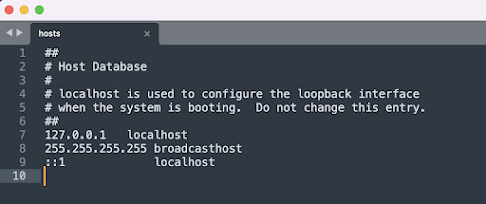
Update your hosts file on your local machine.
Get your Windows Server's IP address.
Add '{your-windows-ip} adfs.yourmom.com' to your hosts file.
Browse to https://adfs.yourmom.com/adfs/ls/IdpInitiatedSignon.aspx
You will get a cert warning. You can either save the cert locally to trust, or you can keep clicking through. 
Attempt to login with the AD user you created. Don't do any special domain backslashes and don't use your email address. Example:
user: cmillar
pass: {whateveryoupasswordis} 
Make sure you do not try to do this on the local Windows Server. There is some weird forward/reverse-DNS it has problems with.
You should have successfully logged in. Don't bother trying to go to AEM, yet. 
Generating Linux / Apache friendly certs
Now it's time to move over to our linux instance. You can do this on a Mac, but I prefer to run my environments as similarly to production as possible.
We will be self signing all of our certs for our dev AEM domain. We are performing these actions on our dev server that is running AEM. If you have a legit cert, use it. Otherwise...
Generate a new private keyopenssl genrsa -out aem-dev-author.key 2048
Generate a new signing request
Note: You'll be asked a bunch of questions when making the request. The main one to pay attention to is the domain name. This really should be the domain you plan on using AEM from. For our dev site we will use: aem-dev-author.yourmom.com. A password is optional for this. I'm leaving it off for the sake of simplicity.

openssl req -new -key aem-dev-author.key -out aem-dev-author.csr
Generate a public certificateopenssl x509 -req -days 1825 -in aem-dev-author.csr -signkey aem-dev-author.key -out aem-dev-author.crt
Convert the private and public certificates into something Java can use (PKCS12)
Note: This is not what we will use for our SAML encryption. We could do that, but it's better to use one universal cert (aem.yourmom.com) for that purpose. This is only so AEM can run HTTPS (4533/443). We'll make our SAML certs later.openssl pkcs12 -export -in aem-dev-author.crt -inkey aem-dev-author.key -out aem-dev-author.p12.key -name aem
When you're done you will have 4 files:
Private Key - aem-dev-author.key
Signing Reqest - aem-dev-author.csr
Public Certificate - aem-dev-author.csr
Java compatible PKCS12 private/public key pair - aem-dev-author.p12
Configure Apache for HTTPS
Use your favorite package manager to install mod_sslyum install mod_ssl openssl
Copy your certs to Apache friendly locations:cp aem-dev-author.crt /etc/pki/tls/certs/aem-dev-author.crt
cp aem-dev-author.key /etc/pki/tls/private/aem-dev-author.key
cp aem-dev-author.csr /etc/pki/tls/private/aem-dev-author.csr
Modify http.conf to support https
Add the following to /etc/httpd/conf/http.confNameVirtualHost *:443
Add an entry to your AEM apache config (/etc/httpd/conf.d/aem.conf)<VirtualHost *:443>
ProxyPreserveHost On
SSLProxyEngine On
ProxyPass / https://localhost:4533/ connectiontimeout=5 timeout=300
ProxyPassReverse / https://localhost:4533/
ServerName aem-dev-author.yourmom.com
SSLEngine on
SSLCertificateFile /etc/pki/tls/certs/aem-dev-author.crt
SSLCertificateKeyFile /etc/pki/tls/private/aem-dev-author.key
ErrorLog /var/www/aem/logs/ssl-error.log
CustomLog /var/www/aem/logs/ssl-access.log combined
</VirtualHost>
Restart apache
Test your apache instance and restart it:apachectl -t
service httpd restart
Move certs into a Java Keystore / Truststore/usr/java/jre1.7.0_67/bin/keytool -importkeystore -deststorepass changeit -destkeypass changeit -destkeystore /data/aem/ssl/aemkeystore.keystore -srckeystore /data/aem-dev-author.p12 -srcstoretype PKCS12 -srcstorepass changeit -alias aem
*Note: Make sure your paths are correct. IE: Know where your certs are and know where your AEM instance is. Also, make sure your java path is correct.
Modifying Java to support 2048-bit encryption
If you don't update Java to support 2048, you will have issues. If you make 1024 certs, AD FS will not like you.
You can download the files here. You will need to install both files in your java folder and restart AEM...mv local_policy.jar <java-home>/lib/security/local_policy.jar
mv US_export_policy.jar <java-home>/lib/security/US_export_policy.jar
Restart AEM.../data/aem/crx-quickstart/bin/stop
/data/aem/crx-quickstart/bin/start
Installing Service Pack 1 for AEM
I'm not going to go into too much detail on this one. Browse to Welcome -> Package share, find SP1, download it, install it.
Configuring AEM to support HTTPS
I lifted this portion from here. There are a few missing pieces on that page. Namely, the truststore info. I found these to be required. See below for additional details.
Whatever you do, do NOT modify HTTPS in the OSGI configs. You must add these entries using CRXDE Lite. You will crash AEM. If you end up doing this, it will create a file inside crx-quickstart that will crash jetty. Just remove that file and start over.
In CRXDE Lite, select the /apps/system/config.author node (folder). Create it if you need to.
Create a node inside that folder Name: org.apache.felix.http Type: sling:OsgiConfig
Add these properties (property name | type | value ) org.apache.felix.https.enable | Boolean | true org.osgi.service.http.port.secure | Long | 5433 org.apache.felix.https.nio | Boolean | true org.apache.felix.https.keystore | String | crx-quickstart/ssl/aemkeystore.keystore org.apache.felix.https.keystore.password | String | changeit org.apache.felix.https.keystore.key | String | alias e.g. aem org.apache.felix.https.keystore.key.password | String | changeit org.apache.felix.https.truststore | String | crx-quickstart/ssl/aemkeystore.keystore org.apache.felix.https.truststore.key.password | String | changeit In case I miseed anything, here is my working config:

Pay close attention to the Syncronized Attributes section above. Here you can see how to map SAML attributes to AEM user attributes.
In this example, we are adding all users to the Administrators group. Do not try this at home.
You will also need to configure Apache Sling Referrer Filter... 
Add more certs
You will need to add at least one cert to AEM (AD FS signing cert) and if you want to encrypt the assertions (you do) you will want to add your private and public key to AEM and then add your public key to AD FS. We will not be encrypting for the sake of readability.
AEM Certs
Grab the signing cert from AD FS.
AD FS 2.0 -> Service -> Certificates -> Token Signing (Double Click )
Click on the details tab and save the cert to a file. 
Export the file as Base-64 (x509). Extension doesn't matter. 
Once you have saved the file, you will need to create a new SAML key entry in AEM using CRXDE Lite. It's also (sort of) documented here.
Create a new sling:Folder in etc->key called saml
Add a new property to the folder called idp_cert. It's type will be binary. Save All.
Add the signing cert from AD FS as the value of idp_cert. 
Pay attention to the attribute statements. In each attribute, there is a property value called "Name". This is the value that matches to your "Syncronized Attributes" in your SAML OSGI Config.
Last verification
If all went to plan, you were able to login. In addition, your attributes are synced from AD FS to AEM in perfect harmony. You can view users at http://aem.yourmom.com/useradmin: 
Drinking heavily
This is about the time you start to open a beer and reflect on a job well done.
You have setup a Windows Server, AD, IIS, AD FS.
You have created / converted certs for three very different platforms (Windows, OpenSSL, and Java).
You've also configured apache and https.