Showing posts with label Link Rewriter. Show all posts

May 5, 2020
Estimated Post Reading Time ~

Blueprint, Live Copy, Links Rewriting

In the past 2 years, I had occasion to work on Live Copy, Language Copy, and BluePrint on some projects on AEM 6.1 and AEM 6.2. Well, I cannot say I was delighted by a touch UI that was missing a lot of interesting features that were working fine in previous CQ 5.x implementations: live copies and MSM (Multi-Site Manager) are areas where these problems are more evident and only with AEM 6.3 I started to see a more complete solution.

But in this article, I would like to focus my attention on a problem (or maybe is a feature???) that I have found out after long analysis: Adobe documentation doesn’t describe this behaviour in detail and it’s very difficult for a newbie in Live Copies to understand it.

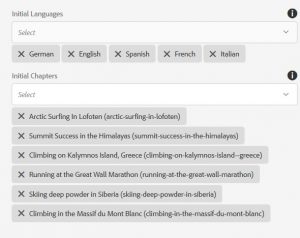
I’m referring to the way links are rewritten by AEM when you create a new site with the “Create Site” option, starting from a BluePrint. When you create a new site starting from a BluePrint AEM asks you to choose for languages and chapters. I have to say I really don’t understand why Adobe engineers have decided to add the concept of “chapter”. Every first level folder under the languages is defined as “chapter”: in this way when you create a new site you can decide to add only some specific subsections of the website leaving out others.

In figure 1 you can see the create site from blueprint property page, with chapters selection.


If you flag the livecopy checkbox (almost natural in a multi-country website) all the pages will be kept in sync with the blueprint, with a nice-to-have rollout option and (from AEM 6.3) a centralized MSM interface to inspect the synchronization status of each blueprint page (unfortunately I still believe that CQ 5.5 MSM interface was more intuitive, but this is only my opinion as of AEM 6.3).

After site creation I was noticing some problems on internal links: some of them were pointing to the blueprint site and were not rewritten.

The following example clarifies the situation. Let’s take this simple website:

/exmaple-site/
/language-masters (blueprint)/
/en
/products
/product1
/product2
/about-us
/company With this structure, “it” is a language, “products” and “about-us” are chapters of the blueprint.
Now place 2 links inside product1 page:

first link points to product2
second link points to company Create a new site starting from the blueprint (/content/example-site/en). The two links in “product1” page will be rewritten in this way:

link1: /content/example-site/en/products/product2
link2: /content/example-site/language-masters/en/about-us/company I was very surprised by this behaviour and started surfing online to find a solution or an explanation. I was able to find issues / problems similar to the one I was experiencing, with Adobe answers that were leaving me a litte surprised.

The explanation is contained here (from Adobe page: https://helpx.adobe.com/experience-manager/6-3/sites/administering/using/msm-best-practices.html)

“Once a new site has been created as a live copy (using Create, then Site), the first two levels of this live copy are shallow. Children of the page do not belong to the live-relationship, but a roll-out will still descend if a live-relationship that matches the trigger is found.
It helps avoid:

manually adding languages in the blueprint (below the first level)
manually adding content directly below the language root,
does not result in automatically carrying this new content over to the live copy on rollout.” So, the first two folder levels are Shallow live copies (root + language). Chapters are independent live copies. This is the point. Links are rewritten by AEM only inside the livecopy. If the links point outside of the livecopy, the link is not going to be rewritten.

So, in conclusion, simply to avoid some “manual” operations, we are going to make a blueprint completely useless in a lot of potential scenarios (quite common to have internal links pointing between chapters). One of the answers I found in the forum was: “Don’t use blueprint and simply make a livecopy”. Very bad, because blueprints gives you access to full MSM functionalities, above all a centralized tool to monitor the synchronization status for all the pages. Not using the MSM central tool makes extremely difficult to manage something that is difficult by itself.

If you take a look at nodes structure with CRXDE you can better understand what it’s happening here:

/content/example-site/en/jcr:content/cq:LiveSyncConfig
. cq:master: points to the blueprint
. cq.isDeep: false It’s Shallow

/content/example-site/en/en_gb/jcr:content/cq:LiveSyncConfig
. cq:master: points to the blueprint language folder
. cq:isDeep: false It’s shallow

/content/example-site/en/en_gb/about/jcr:content/cq:liveSyncConfig
. cq:master: points to the blueprint chapter folder
. cq:isDeep: true Ok, finally a real livecopy

Once I realized the problem I was not able to find a clean solution. The only way seems not to use the MSM functionalities. So I decided to manually create the country folder and then to setup a livecopy for each language node. Since I wanted to keep the MSM functionalities, I manually added the cq:LiveSyncConfig the root country node (with cq:isDeep false). In this way I was able to keep also central MSM functionalities, combining the good behaviour of link rewriting. Nothing Adobe-approved… so please, if you want to follow this solution, do it at your own risk.

I write this article with the hope to receive an answer telling me there is a better solution. Or at least to see a nice alert on AEM documentation.

Source: https://aemcorner.com/blueprint-live-copies-links-rewriting-why-chapter-links-are-not-correctly-rewritten/


By aem4beginner

April 23, 2020
Estimated Post Reading Time ~

Prevent rapid repository growth caused by Link Checker

Issue: Repository growth
Recommendation
Starting from CQ 5.6.1, the referencedBy property has been introduced in order to keep track of the pages that reference the same link.

However, in case a link such as external links in the page footers is referenced from too many pages, Linkchecker performs a lot of JCR writes/update causing CPU peaks as well as performance decreases, mainly caused by the JCR locks.

To verify if the repository growth is related to the linkchecker, enable TRACE log level for org.apache.jackrabbit.oak.jcr.operations.writes during a few minutes, and check if the majority of the writes are below /var/linkchecker. Then do not forgot to disable the TRACE log level.

In such cases where performance is compromised by this linkchecker behavior, it is recommended to disable this feature by following the steps below:

Solution
1. Delete /var/linkchecker (it will be recreated automatically)

2. In the OSGI configuration console, open Day CQ Link Checker Info Storage Service and deselect "Save external link references” option and save.

Please note that disabling this option will not cause automatic removal of the existing referenced property values. To achieve this, first, remove /var/linkchecker.


By aem4beginner

April 22, 2020
Estimated Post Reading Time ~

How to find Current Apache Sling Rewriter Configuration in AEM through Felix console

Statement - Apache Sling rewrite configuration
Environment - AEM 6.3 GA

Solution:
Go to the Felix console URL: http://localhost:4502/system/console/status-slingrewriter
login with username and password if not logged into the AEM server.
see the below rewrite config details which are configured OOTB as well customized config info. 

Current Apache Sling Rewriter Configuration
=================================================
Active Configurations
-----------------------------------------------------------------
Configuration hybrid-app

Name : hybrid-app
Content Types : [text/html]
Paths : [/content/phonegap, /content/mobileapps, /content/campaigns]
Order : 1001
Active : true
Valid : true
Process Error Response : true
Pipeline : 
    Generator : 
        htmlparser : {includeTags=[Ljava.lang.String;@67735c8d}
    Transformers : 
        linkchecker
        contentsync : {component-optional=true}
        hybridapp : {component-optional=true}
        mobileappscampaign : {component-optional=true}
    Serializer : 
        htmlwriter
Resource path: /libs/mobileapps/config/rewriter/hybrid-app

Configuration campaign-link-rewrite

Name : campaign-link-rewrite
Content Types : [text/html]
Resource Types : [mcm/campaign/components/newsletter, 
mcm/neolane/components/newsletter, mcm/campaign/components/campaign_newsletterpage]
Order : 1000
Active : true
Valid : true
Process Error Response : true
Pipeline : 
    Generator : 
        htmlparser : {includeTags=[Ljava.lang.String;@14f0e58b}
    Transformers : 
        campaign-link-rewrite : {component-optional=true}
    Serializer : 
        htmlwriter
Resource path: /libs/mcm/config/rewriter/campaign-link-rewrite

Configuration cfm

Name : cfm
Content Types : [text/html]
Resource Types : [dam/cfm/components/contentfragment]
Selectors : [rawcontent]
Order : 1000
Active : true
Valid : true
Process Error Response : true
Pipeline : 
    Generator : 
        html-generator
    Transformers : 
        cfm-payload
        cfm-parfilter : {component-optional=false}
        cfm-assetprocessor : {component-optional=false}
    Serializer : 
        htmlwriter
Resource path: /libs/dam/config/rewriter/cfm

Configuration pdf

Name : pdf
Extensions : [pdf]
Order : 0
Active : true
Valid : true
Process Error Response : false
Pipeline : 
    Generator : 
        empty-generator
    Transformers : 
        htmlparser
        xslt : {source=sling://libs/wcm/core/content/pdf/page2fo.xsl}
    Serializer : 
        fop : {mime-type=application/pdf}
Resource path: /libs/cq/config/rewriter/pdf

Configuration default

Name : default
Content Types : [text/html]
Order : -1
Active : true
Valid : true
Process Error Response : true
Pipeline : 
    Generator : 
        htmlparser
    Transformers : 
        linkchecker
        mobile : {component-optional=true}
        mobiledebug : {component-optional=true}
        contentsync : {component-optional=true}
    Serializer : 
        htmlwriter
Resource path: /libs/cq/config/rewriter/default


By aem4beginner

April 13, 2020
Estimated Post Reading Time ~

Creating a Link Rewriter for Adobe Experience Manager

In today’s competitive business environment, a great looking website is just not enough. Focus has shifted towards page loading speeds, cross-device compatibility with responsive and adaptive design patterns and also accessibility. When it comes to speed, there are many ways to improve your website’s performance. One of them is to keep resources that change infrequently cached. Using Adobe Experience Manager (AEM), you can cache most content, including images, scripts, and HTML/JSP pages.

Not only can you cache these files on the dispatcher server but you can also make use of the visitor’s browser cache. If you allow files to be cached directly in the browser, the amount of load placed on the dispatcher server decreases drastically. You can inform the browser that it is actually is okay for it to cache JavaScript and CSS files for a few days or maybe even weeks depending on your release cycle. But what happens when you make a change in these files before they have expired in the visitor’s browser cache? Well, then you have a problem, the user does not receive any changes unless they actually clear their browser cache, which is something that one cannot demand of their visitors.

This article explains a workaround for this issue when using AEM. The basic idea is by using Sling selectors; you can append a version number to the CSS/JavaScript files so that they will change with each release. This affects the actual name of the file so it does not matter if the browser has cached the scripts because it will look for the new file in the browser cache. Because this file does not already exist, it will fetch this new file from the server and the user will receive the latest changes.

You can create a custom Adobe Experience Manager (AEM) Link Rewriter that is based on the Apache Sling Rewriter module. This module is used for rewriting the output generated by the Sling rendering process.

Note: For more information about a Sling Rewriter, see Apache Sling Rewriter.

An Adobe CQ Link Rewriter is implemented as an OSGi bundle that contains a Java class that extends the org.apache.sling.rewriter.Transformer class. For information, see Interface Transformer.

To read this development article, click http://helpx.adobe.com/experience-manager/using/creating-link-rewrite.html.


By aem4beginner